

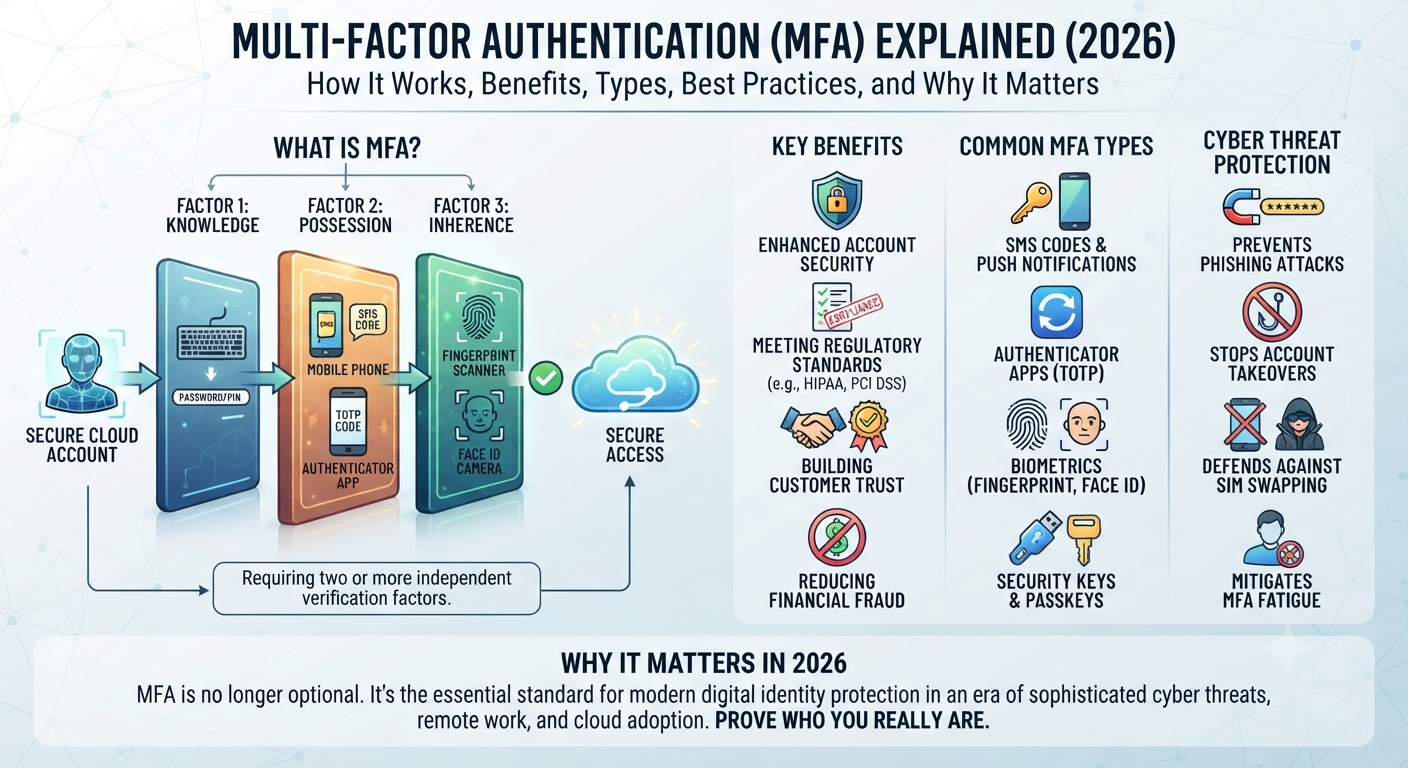
Modern cyber attacks happen every day. Hackers no longer rely on guessing passwords alone. They use phishing emails, stolen credentials, malware, and automated tools to break into personal and business accounts. If a password becomes exposed, your email, bank account, cloud storage, or work applications could be at risk within minutes.
That is why Multi-Factor Authentication has become one of the most important parts of modern Cybersecurity. Instead of trusting only one password, MFA asks you to verify your identity using multiple security checks. This extra layer makes unauthorized access much harder, even if criminals know your password. Whether you are protecting personal accounts or managing company systems, Multi-Factor Authentication helps improve Account Security, Identity Verification, Online Security, and Secure Access without making everyday logins difficult.
What Is Multi-Factor Authentication (MFA)?
Simple Definition of Multi-Factor Authentication (MFA)
Simply put, Multi-Factor Authentication is a security method that requires users to prove their identity using two or more different verification factors before gaining access to an account or device. Instead of depending only on a password, MFA combines multiple security checks that work together to verify the person attempting to sign in. This additional protection greatly reduces the chances of hackers accessing sensitive information after stealing login credentials.
Think of your home. A strong front door lock offers good protection. However, adding a security alarm and a fingerprint lock creates several barriers that criminals must overcome. Online accounts work the same way. What is Multi-Factor Authentication becomes easy to understand when you compare it to multiple locks protecting one valuable asset. This modern Authentication Process strengthens Identity Security, protects your Digital Identity, supports User Authentication, and improves overall Account Protection.
Authentication Without MFA vs Authentication With MFA
| Login Method | Security Level | Risk of Account Theft |
| Password Only | Low | High |
| Password + SMS Code | Medium | Moderate |
| Password + Authenticator App | High | Low |
| Password + Security Key | Very High | Very Low |
| Password + Biometrics + Security Key | Excellent | Extremely Low |
As cyber threats continue to evolve, businesses and individuals can no longer depend on passwords alone. Even strong passwords can be stolen through phishing websites, data breaches, or malware. By requiring another verification step, MFA Security creates a stronger defense against modern attacks and helps organizations maintain better Access Control, Enterprise Security, Information Security, and Threat Prevention.
Why Multi-Factor Authentication (MFA) Matters More Than Ever in 2026
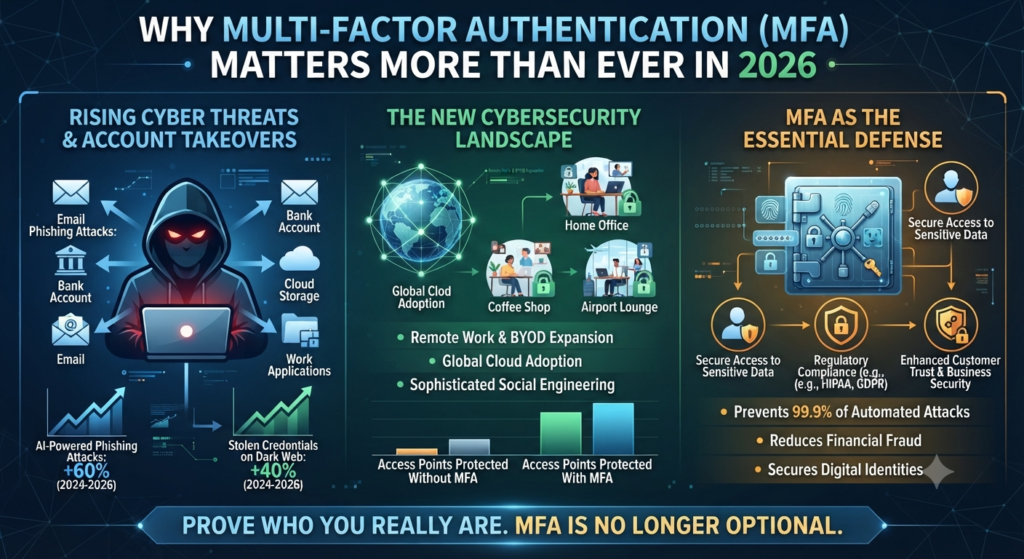
Rising Cyber Threats and Account Takeovers
Cybercriminals have become smarter than ever. They now use artificial intelligence to create convincing phishing emails, fake login pages, and automated password attacks. Millions of stolen usernames and passwords are available on the dark web, making account takeovers much easier than they were only a few years ago. Because of these growing risks, companies across the United States have made Multi-Factor Authentication a standard security requirement for employees, customers, and administrators.
Remote work has also changed the cybersecurity landscape. Employees often sign in from home networks, coffee shops, airports, and mobile devices. Every new location creates another opportunity for attackers to intercept login credentials. By adding a second verification step, organizations reduce the risk of unauthorized access even when passwords become exposed. This approach strengthens Business Security, Cloud Security, Remote Access Security, Secure Login, and Cyber Risk Management while protecting valuable company information.
Personal users also benefit from MFA. Email accounts, banking apps, shopping websites, cloud storage, and social media profiles all contain valuable personal information. If someone steals your password, they may attempt identity theft, financial fraud, or account recovery attacks. Enabling Identity and Access Management (IAM) together with Multi-Factor Authentication significantly improves Identity Protection, Digital Security, Data Protection, and Security Controls for everyday online activities.
“A password tells the system who you claim to be. Multi-Factor Authentication helps prove who you really are.”
Modern cybersecurity experts no longer ask whether organizations should enable MFA. Instead, they ask where it should be implemented first. From healthcare providers and banks to schools and government agencies, MFA has become one of the simplest yet most effective ways to reduce cyber risk while improving trust and protecting sensitive digital assets.
Common Types of Multi-Factor Authentication (MFA)
SMS Codes, Authenticator Apps, Biometrics, Security Keys, and Passkeys
Not every MFA method offers the same level of protection. Some are simple and convenient, while others provide stronger security for business environments. Choosing the right method depends on the type of account, the sensitivity of your data, and the level of protection you need. Understanding these Authentication Methods helps individuals and organizations build stronger MFA Security, improve Account Security, strengthen Secure Authentication, and support better Cybersecurity practices.
One of the oldest methods is the SMS Verification Code. After entering your password, the website sends a temporary code to your mobile phone. You must enter this code before accessing your account. Although this method is much safer than using only a password, it can still be vulnerable to SIM Swapping attacks. Many security experts now recommend moving to more secure alternatives whenever possible.
Authenticator applications have become the preferred option for many users. Apps such as Microsoft Authenticator, Google Authenticator, Authy, Duo Security, and Okta Verify generate a Time-Based One-Time Password (TOTP) that changes every 30 seconds. Since these codes are created directly on your trusted device instead of being sent through a mobile network, they offer much stronger protection against attackers. They also improve Identity Protection, Authentication System, Secure Login, and Threat Prevention without making the login process difficult.
Biometric verification continues to grow in popularity because it combines convenience with strong security. Modern smartphones, laptops, and tablets support Biometric Authentication using Fingerprint Authentication or Face Recognition Login. Instead of remembering another password, users simply verify their identity with a fingerprint or facial scan. This approach improves User Identity, strengthens Digital Security, supports Identity Verification, and makes everyday authentication faster.
Hardware-based authentication provides one of the highest levels of protection available today. A Security Key or Hardware Token must be physically connected or tapped before access is granted. Devices such as YubiKey use FIDO2 Authentication standards to verify identity securely. Because the authentication process depends on a physical device, phishing websites cannot easily steal login credentials. Many government agencies, financial institutions, and large enterprises rely on hardware security keys for their most sensitive systems.
Another modern innovation is Passkeys. Instead of relying on traditional passwords, passkeys use secure cryptographic technology stored on trusted devices. They support Passwordless Authentication, making logins both safer and easier. Many technology companies are adopting passkeys because they reduce phishing risks, eliminate password reuse, and simplify account recovery while improving overall Online Security.
Comparison of Popular MFA Methods
| MFA Method | Security Level | Ease of Use | Best For |
| SMS Verification Code | Medium | Easy | Personal accounts |
| Authenticator App | High | Easy | Most users and businesses |
| Push Notification Authentication | High | Very Easy | Mobile users |
| Fingerprint Authentication | Very High | Very Easy | Smartphones and laptops |
| Face Recognition Login | Very High | Very Easy | Personal devices |
| Security Key (YubiKey) | Excellent | Moderate | Enterprise environments |
| Passkeys | Excellent | Very Easy | Modern passwordless accounts |
As authentication technology continues to evolve, organizations increasingly combine multiple verification methods instead of relying on only one. This flexible approach improves Cloud Security, supports Enterprise Security, strengthens Access Control, and creates a better user experience without sacrificing protection.
Benefits of Multi-Factor Authentication (MFA) for Individuals and Businesses
Better Security, Compliance, and User Trust
One of the biggest advantages of Multi-Factor Authentication (MFA) is that it protects accounts even after a password has been compromised. Every year, millions of usernames and passwords are exposed through data breaches. Without MFA, criminals can immediately use those credentials to access personal and business accounts. By requiring another verification step, organizations dramatically reduce the risk of unauthorized access. This extra layer strengthens Account Protection, improves Identity Security, enhances Secure Access, and supports stronger Cyber Defense across every industry.
Businesses also benefit because MFA helps reduce costly cyber incidents. A successful account takeover can interrupt operations, expose confidential information, damage customer trust, and lead to financial losses. Implementing MFA helps protect employee accounts, cloud applications, customer databases, and remote work environments. It also strengthens Enterprise Identity, improves Business Security, supports Cloud Identity Security, and reinforces modern Security Controls throughout the organization.
Regulatory compliance has become another important reason for adopting MFA. Many industries must follow strict Compliance Requirements to protect customer information. Regulations such as HIPAA Compliance, PCI DSS Compliance, and GDPR Compliance encourage or require organizations to implement stronger authentication controls. MFA helps companies meet these standards while improving Information Security, strengthening Data Protection, supporting effective Access Management, and reducing legal risks associated with data breaches.
Customers also feel more confident when businesses protect their accounts with strong authentication. Whether logging into online banking, healthcare portals, shopping websites, or business applications, users appreciate knowing that another security layer protects their personal information. This trust improves customer satisfaction while reducing fraud and unauthorized account access.
Organizations that combine MFA with Least Privilege Access, Zero Trust Security, and modern Identity and Access Management (IAM) strategies build a much stronger cybersecurity foundation. Instead of trusting every login automatically, they continuously verify users and devices before granting access to sensitive resources. This proactive approach helps businesses stay ahead of evolving cyber threats while protecting valuable digital assets.
“Strong passwords are important, but strong authentication is what truly protects modern digital identities.”
Multi-Factor Authentication (MFA) vs Two-Factor Authentication (2FA)
Key Differences Between MFA and 2FA
Many people believe Multi-Factor Authentication (MFA) and Two-Factor Authentication (2FA) are exactly the same. They are closely related, but they are not identical. Two-Factor Authentication (2FA) always requires exactly two authentication factors before granting access. In contrast, Multi-Factor Authentication uses two or more factors depending on the organization’s security needs. This flexibility allows businesses to create stronger MFA Authentication, improve Access Control, strengthen User Authentication, and support modern Enterprise Security strategies.
For example, imagine you log into your online banking account using a password and a verification code from your phone. That is Two-Factor Authentication (2FA) because it uses two different authentication factors. Now imagine an enterprise system that requires your password, a fingerprint scan, and a hardware security key before granting access. That is Multi-Factor Authentication (MFA) because it uses three authentication factors. Large organizations often choose MFA because it provides better protection for sensitive systems and supports advanced Identity and Access Management (IAM) policies.
Businesses that handle confidential customer information, financial records, or healthcare data usually prefer MFA because it offers greater flexibility. Administrators can apply different authentication requirements based on user roles, device health, or login location. This intelligent approach improves Risk-Based Authentication, strengthens Cloud Security, enhances Authentication Technology, and provides stronger Security Infrastructure against evolving cyber threats.
MFA vs 2FA Comparison Table
| Feature | Multi-Factor Authentication (MFA) | Two-Factor Authentication (2FA) |
| Number of Factors | Two or more | Exactly two |
| Security Level | Higher | High |
| Flexibility | Very Flexible | Limited |
| Enterprise Support | Excellent | Good |
| Best For | Businesses and enterprises | Personal and small business accounts |
| Authentication Options | Password, biometrics, security key, authenticator app, passkeys | Password plus one additional factor |
| Protection Against Modern Attacks | Excellent | Very Good |
| Scalability | High | Moderate |
Although MFA provides stronger protection, 2FA is still far better than relying on a password alone. For personal email, social media, and shopping accounts, enabling 2FA is an excellent first step. Organizations with valuable digital assets should consider implementing Enterprise Authentication, Behavioral Authentication, and Continuous Authentication alongside MFA for maximum protection.
Where Multi-Factor Authentication (MFA) Is Used Today
Banking, Healthcare, Education, Government, Cloud Services, and Remote Work
Today, Multi-Factor Authentication (MFA) protects millions of users across nearly every industry. Financial institutions were among the first to adopt MFA because online banking accounts are frequent targets for cybercriminals. When customers transfer money or update account settings, banks often require a password together with an authenticator app, biometric verification, or a one-time code. This additional verification reduces fraud, improves Account Security, strengthens Identity Verification, and supports secure digital banking.
Healthcare organizations also rely heavily on MFA. Doctors, nurses, and administrative staff access confidential patient records every day. A stolen password could expose highly sensitive medical information. By combining MFA with Identity Governance, healthcare providers strengthen Information Security, improve Data Protection, meet HIPAA Compliance, and reduce the risk of unauthorized access to electronic health records.
Educational institutions have also expanded MFA usage. Universities protect student accounts, online learning systems, research databases, and faculty portals with multiple authentication layers. As remote education continues to grow, stronger User Identity verification helps prevent unauthorized access while keeping academic resources secure.
Government agencies manage some of the most sensitive information in the world. They use MFA to protect employee accounts, internal applications, citizen portals, and classified systems. Many agencies combine MFA with Least Privilege Access, Zero Trust Security, and advanced Access Management policies to strengthen national cybersecurity and reduce insider threats.
Cloud computing has made MFA even more important. Organizations using Microsoft 365, Google Workspace, Amazon Web Services (AWS), and Microsoft Azure depend on cloud platforms for daily operations. Because employees can log in from almost anywhere, businesses use MFA to secure cloud applications and remote connections. This approach strengthens Cloud Identity Security, improves Remote Workforce Security, enhances Secure Access, and supports modern Business Security without affecting employee productivity.
Remote work has permanently changed how companies protect digital resources. Employees now access company systems from home offices, airports, hotels, and public Wi-Fi networks. MFA ensures that even if a password is stolen, attackers cannot easily enter business systems without completing another verification step. Combined with Endpoint Security and strong Cybersecurity Best Practices, MFA creates a safer environment for today’s distributed workforce.
Real-World Examples of MFA Usage
| Industry | How MFA Is Used | Main Benefit |
| Banking | Login verification and transaction approval | Prevents financial fraud |
| Healthcare | Patient record access | Protects sensitive medical data |
| Education | Student and faculty portals | Secures learning platforms |
| Government | Employee and citizen services | Protects confidential information |
| Cloud Services | Microsoft 365, Google Workspace, AWS, Azure | Secures cloud accounts |
| Remote Work | VPNs and business applications | Reduces unauthorized access |
| E-commerce | Customer accounts and payments | Prevents account takeovers |
As digital transformation continues, MFA is no longer optional. It has become a core security requirement for organizations that want to protect users, sensitive information, and critical business systems from modern cyber threats.
Common MFA Security Threats and Limitations
MFA Fatigue, SIM Swapping, Phishing, and Social Engineering
Although Multi-Factor Authentication (MFA) provides excellent protection, no security solution is perfect. Cybercriminals continue to develop new techniques that target users instead of technology. Instead of breaking strong encryption, they often trick people into approving login requests or revealing sensitive information. Understanding these risks helps you build stronger MFA Security, improve Threat Prevention, strengthen Identity Security, and protect your Digital Identity from modern attacks.
One growing attack is MFA Fatigue. In this attack, hackers repeatedly send login approval requests until the user becomes frustrated and accidentally approves one. Some people think the notifications are system errors and tap “Approve” without checking. Once approved, attackers gain access to the account. Organizations reduce this risk by using Push Notification Authentication with number matching, limiting repeated login requests, and applying Behavioral Authentication to detect unusual activity.
Another common threat is SIM Swapping. Attackers convince a mobile carrier to transfer a victim’s phone number to a new SIM card. After taking control of the phone number, they receive every SMS Verification Code sent to the victim. Because of this weakness, many security professionals recommend using an Authenticator App or a Security Key instead of SMS whenever possible. This simple change strengthens Account Protection, improves Secure Authentication, and reduces the chances of unauthorized account access.
Phishing attacks remain one of the biggest cybersecurity challenges. Criminals create fake login pages that look almost identical to trusted websites. Victims unknowingly enter their usernames, passwords, and verification codes. Some advanced phishing kits can even capture temporary authentication codes before they expire. Using Passkeys, FIDO2 Authentication, or hardware security keys offers stronger Phishing Protection because these technologies verify the real website before completing the login process.
Social Engineering Attacks continue to target employees in every industry. Instead of attacking computers directly, criminals manipulate people through phone calls, emails, text messages, or fake technical support requests. They may pretend to be an IT administrator, bank employee, or company executive to convince users to share authentication codes. Regular security awareness training helps employees recognize suspicious requests while strengthening Cyber Defense, improving User Authentication, supporting Security Compliance, and reducing human error.
Common MFA Threats and How to Prevent Them
| Threat | Description | Best Protection |
| MFA Fatigue | Repeated login approval requests | Number matching and user awareness |
| SIM Swapping | Mobile number is hijacked | Authenticator apps or security keys |
| Phishing | Fake login pages steal credentials | Passkeys and FIDO2 Authentication |
| Social Engineering | Users are tricked into sharing codes | Employee security training |
| Credential Theft | Stolen usernames and passwords | Multi-Factor Authentication and password managers |
| Credential Stuffing | Automated login attempts using leaked passwords | Strong passwords and MFA |
Even with these risks, Multi-Factor Authentication remains one of the most effective ways to prevent unauthorized access. The goal is not to replace MFA but to combine it with stronger authentication methods, user education, and continuous monitoring. Businesses that integrate MFA with Zero Trust Security, Cloud Security, and modern Identity and Access Management (IAM) create a far stronger defense against today’s evolving cyber threats.
MFA Best Practices for Maximum Account Security
Strong Passwords, Authenticator Apps, Passkeys, and Backup Methods
Using MFA correctly is just as important as enabling it. Start by creating a strong and unique password for every important account. Never reuse the same password across multiple websites because one data breach could expose all your accounts. A trusted password manager can generate and store complex passwords securely. When combined with Multi-Factor Authentication (MFA), strong passwords improve Password Protection, strengthen Secure Login, enhance Account Security, and support better Identity Protection.
Whenever possible, choose an Authenticator App instead of SMS verification. Applications such as Microsoft Authenticator, Google Authenticator, Authy, Okta Verify, and Duo Security generate secure Time-Based One-Time Password (TOTP) codes directly on your trusted device. These apps provide stronger protection against SIM swapping and reduce the risk of intercepted verification codes. They also improve Authentication System reliability while supporting stronger Authentication Best Practices.
For highly sensitive accounts, security experts recommend using Passkeys or a physical Security Key like YubiKey. These technologies support Passwordless Authentication and FIDO2 Authentication, making phishing attacks much more difficult. Because authentication happens directly between your device and the legitimate website, fake login pages cannot easily steal your credentials. This approach strengthens Enterprise Security, improves Secure Access, and enhances Cloud Identity Security for both personal and business users.
Backup planning is another important part of account security. Save recovery codes in a secure location before enabling MFA. Keep your recovery email address and phone number updated so you can regain access if your device is lost or replaced. Businesses should also maintain documented recovery procedures for employees. These simple steps strengthen Access Management, improve Identity Verification Process, support Business Security, and reduce downtime during account recovery.
Organizations should regularly review login activity and remove access for inactive users. Applying Least Privilege Access ensures employees only have permission to access the systems they need for their jobs. Combined with Continuous Authentication, regular software updates, and employee awareness training, these practices create a strong security foundation that protects both personal accounts and enterprise environments.
“The strongest security doesn’t rely on one defense. It combines multiple layers that work together to stop attackers before they reach valuable data.”
Best Multi-Factor Authentication (MFA) Solutions in 2026
Microsoft Authenticator, Google Authenticator, Duo Security, Okta Verify, Authy, and YubiKey
Choosing the right MFA solution depends on your security needs, the size of your organization, and the devices you use every day. Some tools are designed for personal accounts, while others provide advanced features for large businesses. The best solutions offer strong protection, an easy setup process, and seamless integration with cloud services. They strengthen Multi-Factor Authentication (MFA), improve MFA Security, enhance Enterprise Authentication, support Identity Verification, and protect your Digital Identity from modern cyber threats.
For individual users, Microsoft Authenticator, Google Authenticator, and Authy remain popular choices because they are free, simple to configure, and compatible with thousands of online services. They generate secure Time-Based One-Time Password (TOTP) codes without relying on mobile networks. Business environments often choose Duo Security and Okta Verify because these platforms offer centralized management, policy enforcement, detailed reporting, and support for Adaptive Authentication and Risk-Based Authentication. Organizations requiring the highest level of protection frequently deploy YubiKey, a physical Security Key that supports FIDO2 Authentication and Passwordless Authentication.
Large enterprises usually combine several authentication technologies instead of depending on a single method. For example, employees may use an authenticator app for daily logins while administrators use hardware security keys for privileged accounts. This layered approach improves Access Control, strengthens Cloud Identity Security, supports Identity and Access Management (IAM), and creates a more resilient Security Infrastructure.
Best MFA Solutions Comparison
| MFA Solution | Best For | Authentication Type | Platform Support |
| Microsoft Authenticator | Microsoft users and businesses | TOTP, Push Notifications | Android, iOS |
| Google Authenticator | Personal and business accounts | TOTP | Android, iOS |
| Authy | Multi-device users | TOTP, Cloud Backup | Android, iOS, Windows, macOS |
| Duo Security | Enterprise organizations | Push, Biometrics, Security Keys | Windows, macOS, Linux, Mobile |
| Okta Verify | Cloud-based enterprises | Push Notifications, Biometrics | Android, iOS |
| YubiKey | High-security environments | Hardware Security Key, FIDO2 | Windows, macOS, Linux, Mobile |
No single solution is perfect for everyone. Individuals should choose an option that is easy to use every day, while businesses should evaluate scalability, compliance, centralized management, and integration with existing systems. Selecting the right MFA platform improves Secure Authentication, enhances Online Security, supports Cybersecurity Best Practices, and reduces the risk of unauthorized access.
Common Multi-Factor Authentication (MFA) Mistakes to Avoid
Weak Backup Methods, Ignoring Updates, and Using SMS Alone
Many users enable Multi-Factor Authentication (MFA) but unknowingly reduce its effectiveness through poor security habits. One of the most common mistakes is relying only on SMS Verification Code authentication. Although SMS provides an extra security layer, it remains vulnerable to SIM Swapping attacks. Whenever possible, replace SMS with an Authenticator App, Passkeys, or a physical Security Key. This simple upgrade improves Account Protection, strengthens Strong Authentication, enhances Secure Access, and supports better Cyber Defense.
Another frequent mistake is using weak or reused passwords. MFA should strengthen password security, not replace it. If the same password appears across multiple websites, one data breach can expose many accounts. Every important account should have a unique password stored in a trusted password manager. Combined with MFA, this practice improves Password Protection, supports Authentication Best Practices, strengthens Identity Protection, and reduces Credential Theft.
Some users forget to save backup recovery codes after enabling MFA. Losing your phone without backup options can temporarily lock you out of important accounts. Store recovery codes securely and keep your recovery email address and phone number current. Organizations should also create secure recovery procedures for employees to minimize business disruption.
Ignoring software updates creates another unnecessary security risk. Outdated operating systems, browsers, and authentication applications may contain vulnerabilities that attackers can exploit. Keeping devices updated improves Threat Prevention, strengthens Information Security, enhances Security Controls, and supports modern Business Security practices.
Employee awareness also plays a critical role. Many successful attacks occur because users approve suspicious login requests or share authentication codes during Social Engineering Attacks. Regular cybersecurity training helps employees recognize phishing attempts, fraudulent support calls, and fake login pages. When organizations combine user education with Zero Trust Security, Least Privilege Access, and continuous monitoring, they significantly reduce the likelihood of account compromise.
Common MFA Mistakes
| Mistake | Potential Risk | Better Approach |
| Using SMS only | SIM Swapping | Use an Authenticator App or Security Key |
| Reusing passwords | Credential Theft | Create unique passwords for every account |
| Skipping software updates | Security vulnerabilities | Keep all devices and apps updated |
| Not saving backup codes | Account lockout | Store recovery codes securely |
| Approving unknown login requests | Unauthorized access | Verify every login notification carefully |
| No employee training | Human error | Provide regular cybersecurity awareness training |
Modern cybersecurity is built on multiple layers of protection. MFA becomes far more effective when it works alongside strong passwords, secure devices, continuous monitoring, and informed users. Organizations that avoid these common mistakes create a safer digital environment while improving trust, resilience, and long-term security.
The Future of Multi-Factor Authentication (MFA)
Passwordless Authentication, AI-Powered Identity Verification, and Zero Trust Security
The future of Multi-Factor Authentication (MFA) is moving beyond passwords. Many organizations are replacing traditional passwords with Passwordless Authentication to improve both security and user experience. Instead of remembering complex passwords, users can sign in using Passkeys, biometrics, or a trusted Security Key. This modern approach reduces password-related attacks while making logins faster and more convenient. It also strengthens Identity Security, improves Secure Authentication, enhances Authentication Technology, and supports stronger Online Security.
Artificial intelligence is also changing how organizations verify user identities. Modern security platforms use AI to study login behavior, device information, and user activity in real time. This process is known as Behavioral Authentication. If the system detects unusual behavior, such as a login from a new country or an unfamiliar device, it can request extra verification before granting access. Combined with Continuous Authentication, businesses can identify suspicious activity much earlier and reduce the risk of account compromise.
Another major trend is the growing adoption of Risk-Based Authentication. Instead of applying the same security rules to every login, the system evaluates each situation individually. Low-risk logins may require fewer verification steps, while high-risk attempts trigger additional authentication. This intelligent approach improves the user experience without sacrificing protection. It also strengthens Cloud Identity Security, supports Enterprise Authentication, improves Remote Workforce Security, and helps organizations manage modern cyber risks more effectively.
The future of cybersecurity is also closely connected with Zero Trust Security. Under the Zero Trust model, no user or device is trusted automatically, even after a successful login. Every request is verified continuously before access is granted. Organizations combine MFA with Identity and Access Management (IAM), Endpoint Security, Least Privilege Access, and advanced Access Management to create multiple layers of defense. This strategy protects sensitive business data while reducing the impact of stolen credentials and insider threats.
As cyber threats continue to evolve, MFA will remain a core part of every modern security strategy. Businesses that adopt passwordless technologies, AI-driven identity verification, and Zero Trust principles will be better prepared to defend their systems, employees, and customers against the next generation of cyber attacks.
Frequently Asked Questions About Multi-Factor Authentication (MFA)
What is Multi-Factor Authentication (MFA)?
Multi-Factor Authentication (MFA) is a security method that requires two or more verification factors before granting access to an account, application, or device. It provides much stronger protection than using a password alone.
Is Multi-Factor Authentication better than Two-Factor Authentication (2FA)?
Yes. Multi-Factor Authentication (MFA) is more flexible because it can use two or more authentication factors, while Two-Factor Authentication (2FA) always uses exactly two. Both improve security, but MFA is often preferred by businesses.
Can MFA stop phishing attacks?
MFA significantly reduces the risk of phishing attacks, but it cannot stop every attack. Using Passkeys, FIDO2 Authentication, and hardware security keys provides stronger Phishing Protection than SMS verification alone.
What is the safest MFA method?
Security experts generally recommend Passkeys, YubiKey, or another Security Key that supports FIDO2 Authentication. These methods provide excellent protection against phishing and credential theft.
Is SMS authentication still safe?
An SMS Verification Code is better than using only a password, but it is less secure than an Authenticator App or hardware security key because it may be vulnerable to SIM Swapping attacks.
Conclusion
Modern cyber threats are becoming more sophisticated every year. Stolen passwords, phishing campaigns, ransomware, and identity theft continue to target both individuals and businesses. Relying on passwords alone is no longer enough to protect valuable accounts and sensitive information.
Multi-Factor Authentication (MFA) adds an extra layer of security by requiring additional verification before granting access. Whether you choose an authenticator app, biometric verification, passkeys, or a hardware security key, MFA makes it much harder for attackers to compromise your accounts. It also improves Account Security, strengthens Identity Verification, supports Enterprise Security, and helps organizations meet important compliance requirements.
As businesses continue adopting cloud services, remote work, and Zero Trust Security, MFA will remain one of the most valuable cybersecurity investments. Implementing it today helps protect your digital identity, reduces the risk of data breaches, and builds a safer online environment for the future.
If you want to strengthen your cybersecurity knowledge further, continue reading our guides on Identity and Access Management (IAM), Endpoint Security, Zero Trust Security, Cloud Security, and Cybersecurity for Beginners. Together, these technologies create a strong security foundation for individuals and organizations in 2026 and beyond.
Meta Description
Multi-Factor Authentication (MFA) Explained: Learn how MFA works, its benefits, authentication types, best practices, and how it protects your accounts from cyber threats.
10 Comments