

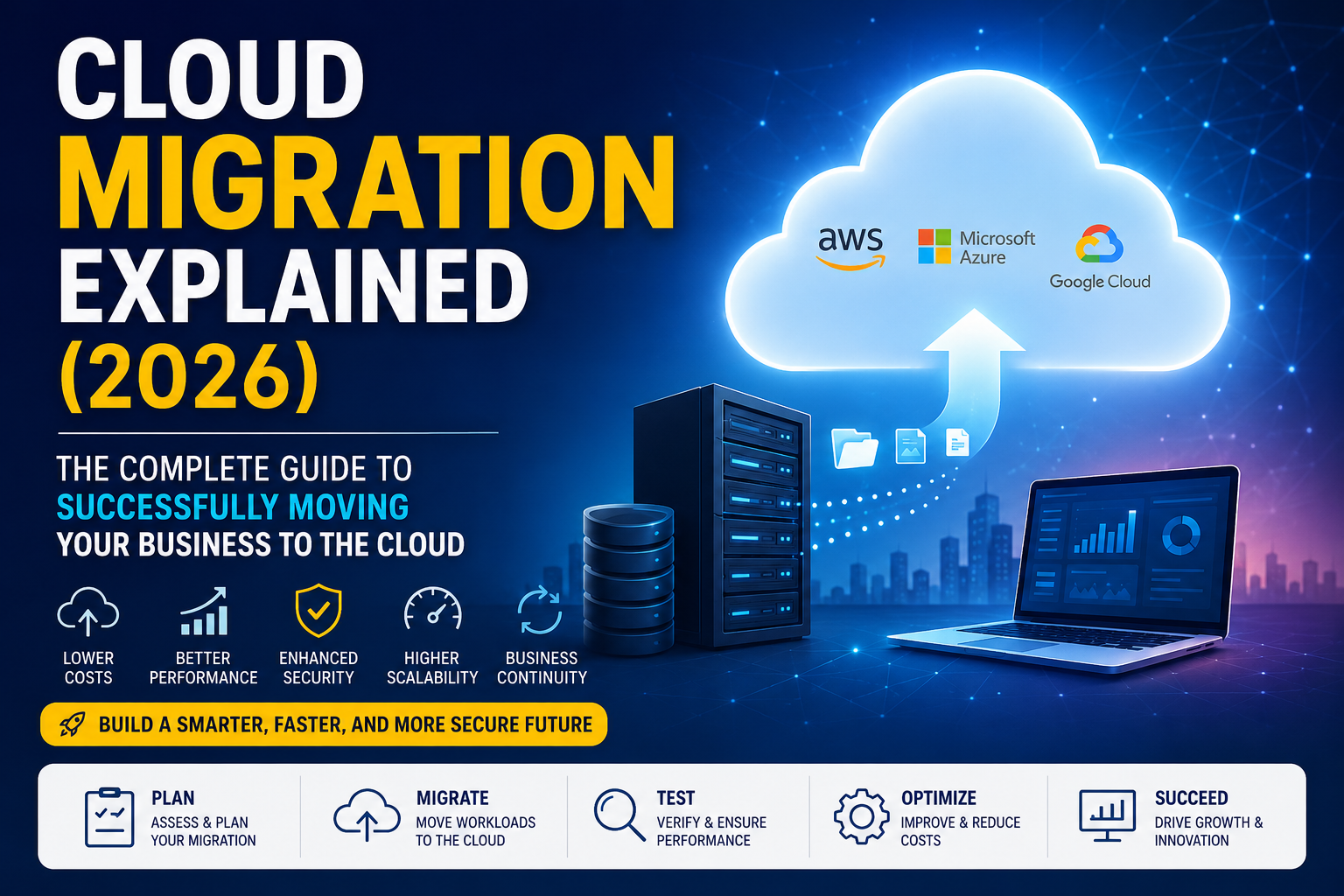
Updated for 2026 | Beginner-Friendly Guide
Introduction
Businesses are changing faster than ever. Companies now need systems that are flexible, secure, and easy to manage. That is why Cloud Migration Explained has become one of the most searched technology topics in recent years. Instead of relying on expensive physical servers, organizations are moving applications, databases, and files to modern Cloud Computing platforms. This shift improves Scalability, supports Business Agility, and helps companies respond quickly to changing customer needs.
Whether you own a small business or manage a large enterprise, understanding Cloud Migration can help you make smarter technology decisions. In this guide, you’ll learn how the migration process works, why businesses are moving to the cloud, common mistakes to avoid, and the best strategies for a successful transition. You’ll also discover practical tips that make cloud adoption easier while improving Data Security, Cost Optimization, and long-term business growth.
Expert Insight: “Cloud migration isn’t simply moving data. It’s creating a stronger foundation for innovation, security, and future growth.”
What Is Cloud Migration?
Moving to the cloud has become a major step in digital transformation. Businesses no longer want to depend only on traditional servers because they often cost more to maintain and scale. Cloud Migration Explained refers to the complete process of moving digital assets, applications, databases, and workloads from on-premises infrastructure or another cloud platform into a modern cloud environment.
A successful migration is more than copying files from one place to another. It requires planning, testing, security checks, and continuous improvement. Organizations that follow a structured migration strategy usually experience better performance, lower operational costs, and stronger Business Continuity.
Definition of Cloud Migration
Cloud Migration is the process of transferring applications, websites, databases, servers, and business workloads from local infrastructure to a Public Cloud, Private Cloud, or Hybrid Cloud environment. Some organizations also move data between different cloud providers to improve performance or reduce costs.
The goal is to modernize IT infrastructure while increasing flexibility. Businesses often combine Application Migration, Data Migration, and Cloud Infrastructure Migration into one carefully planned project that supports future growth.
Why Cloud Migration Matters in 2026
Technology continues to evolve rapidly. Customers expect faster applications, reliable online services, and secure digital experiences. Companies that delay cloud adoption often struggle with outdated systems, rising maintenance costs, and limited scalability.
In 2026, businesses use cloud platforms to improve Digital Transformation, simplify Cloud Operations, and support remote teams. Modern cloud environments also provide better disaster recovery options, stronger security controls, and access to advanced technologies powered by Artificial Intelligence (AI).
How Does Cloud Migration Work?
Every successful migration follows a structured path instead of rushing directly into deployment. Organizations first evaluate their existing infrastructure, identify business goals, and choose the right migration strategy before moving any workloads. Careful preparation reduces risk while improving project success.
After planning is complete, applications and data move gradually into the new cloud environment. Engineers verify performance, fix compatibility issues, and optimize workloads after migration. This phased approach helps businesses avoid unnecessary downtime while maintaining reliable operations.
Migration Planning
Every migration starts with Cloud Migration Planning. Teams analyze existing applications, databases, security requirements, and business priorities before creating a detailed Cloud Migration Roadmap. Proper planning reduces unexpected problems later in the project.
A thorough Migration Assessment also identifies which applications should be migrated immediately, which require modernization, and which should remain on existing infrastructure until a later phase.
Moving Applications and Data
Once planning is complete, businesses begin transferring applications, databases, and digital assets into the chosen cloud platform. This stage may include Server Migration, Database Migration, and complete Workload Migration depending on business needs.
After migration, engineers perform Migration Testing to confirm that applications work correctly, data remains accurate, and users experience little or no disruption during the transition.
| Migration Stage | Primary Goal |
| Assessment | Understand current infrastructure |
| Planning | Build a migration roadmap |
| Migration | Move workloads securely |
| Testing | Verify functionality |
| Optimization | Improve cloud performance |
Why Businesses Are Moving to the Cloud
Organizations are investing heavily in cloud technology because it provides flexibility that traditional infrastructure cannot easily match. Cloud platforms allow businesses to launch new services faster, expand globally, and reduce the time spent managing physical hardware. These advantages make Cloud Migration Benefits valuable for companies of every size.
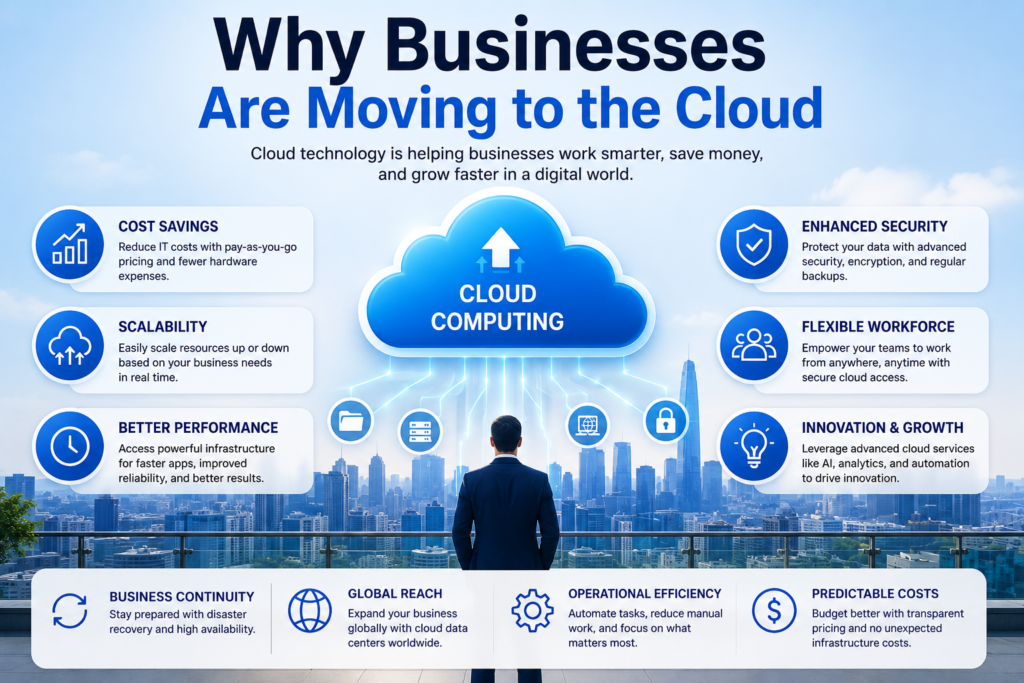
Cloud platforms also simplify software updates, improve collaboration, and support modern business operations. Whether employees work in the office or remotely, cloud services provide secure access to applications while improving overall productivity and operational efficiency.
Cost Savings
Maintaining physical servers requires significant investment in hardware, electricity, maintenance, and IT staff. Cloud platforms reduce many of these expenses by allowing businesses to pay only for the resources they actually use.
This flexible pricing model improves Cost Optimization while allowing organizations to invest more in innovation instead of infrastructure maintenance.
Better Scalability
Business growth often creates unpredictable demand. Cloud environments automatically adjust computing resources when traffic increases or decreases. This flexibility improves customer experience without requiring companies to purchase additional hardware.
Modern cloud providers deliver exceptional Scalability using technologies such as Virtual Machines, Containers, and Kubernetes, allowing applications to grow with business demands.
Improved Security
Security remains one of the biggest reasons organizations adopt cloud platforms. Leading providers invest heavily in advanced Cybersecurity, encryption technologies, and continuous monitoring to protect customer information.
Businesses also benefit from features like Identity and Access Management (IAM), Multi-Factor Authentication (MFA), Data Encryption, and Zero Trust Security, making sensitive information much harder for attackers to access.
| Business Need | Cloud Advantage |
| Reduce Costs | Pay-as-you-go pricing |
| Business Growth | Automatic scalability |
| Better Security | Advanced protection features |
| Remote Work | Secure access from anywhere |
| Faster Innovation | Rapid application deployment |
Types of Cloud Migration
Not every business follows the same migration path. Some organizations move applications without making changes, while others redesign software to fully benefit from cloud technology. Choosing the right migration method depends on business goals, budget, existing infrastructure, and long-term strategy.
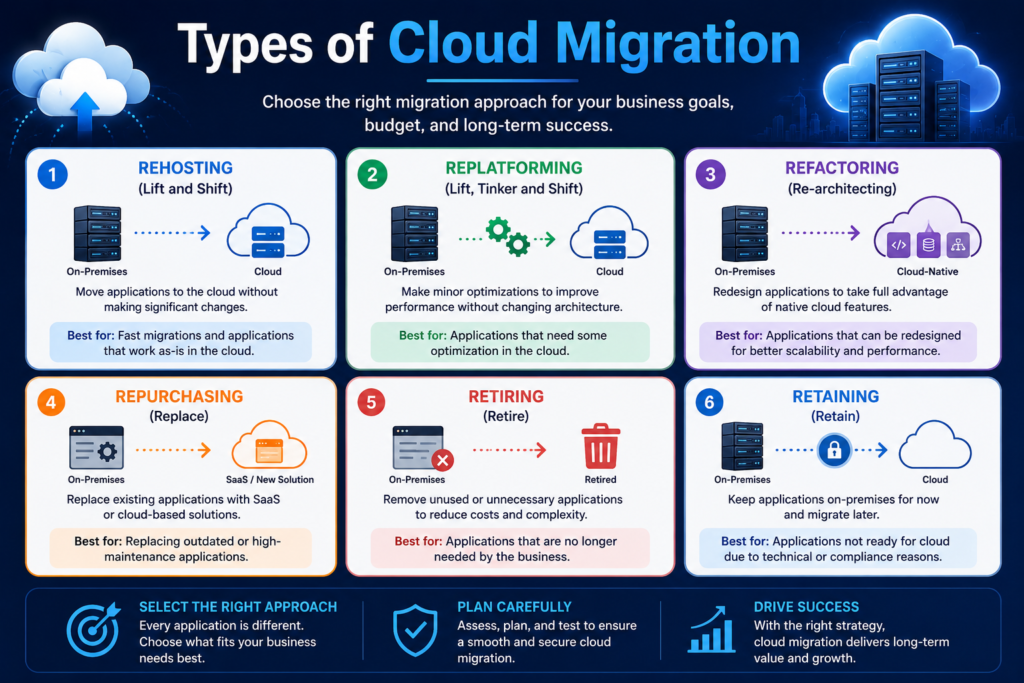
Understanding each migration type helps businesses avoid unnecessary expenses while improving performance after deployment. Selecting the correct approach is one of the most important decisions during any Cloud Migration Process.
Rehosting (Lift and Shift)
Lift and Shift Migration moves applications from local servers directly into the cloud with minimal modifications. This method is faster than other strategies and works well for organizations that need quick migration without redesigning applications.
Replatforming
Replatforming makes small improvements before moving applications to the cloud. Businesses keep the application’s core structure while optimizing databases, operating systems, or runtime environments to improve cloud performance.
Refactoring
Refactoring completely redesigns applications to take full advantage of cloud-native technologies. Although this approach requires more time and investment, it often delivers better scalability, reliability, and long-term performance.
Repurchasing
Instead of migrating existing software, organizations replace legacy applications with modern Software as a Service (SaaS) solutions. This approach reduces maintenance responsibilities while providing regular updates from the software provider.
Retiring
During migration planning, companies often discover outdated applications that are no longer needed. Retiring unnecessary systems reduces costs, simplifies infrastructure, and lowers security risks.
Retaining
Some applications remain on existing infrastructure because they are not yet suitable for cloud deployment. Businesses continue operating these systems while planning future modernization or replacement projects.
| Migration Type | Best Used For |
| Rehosting | Fast migrations |
| Replatforming | Moderate optimization |
| Refactoring | Cloud-native transformation |
| Repurchasing | SaaS adoption |
| Retiring | Removing unused applications |
| Retaining | Systems staying on-premises |
Cloud Migration Strategies Explained
Every migration project needs a clear direction before any workload moves to the cloud. Without a strategy, businesses may face delays, higher costs, or application failures. A well-planned Cloud Migration Strategy helps organizations choose the safest and most efficient path while reducing unnecessary risks. It also supports better Cloud Modernization and long-term business success.
The right strategy depends on your budget, business goals, application complexity, and future plans. Some companies prefer quick migration, while others redesign applications for maximum cloud performance. Careful planning creates a smoother Cloud Migration Process and improves overall project outcomes.
The 6Rs Migration Strategy
The 6Rs framework is one of the most widely used methods for planning Cloud Migration projects. It includes Rehosting, Replatforming, Refactoring, Repurchasing, Retiring, and Retaining. Each option solves a different business problem and helps organizations migrate workloads based on technical and financial requirements.
Choosing the Right Strategy
Choosing the best migration strategy requires a detailed review of applications, business priorities, security requirements, and available resources. Organizations that complete proper Cloud Migration Planning usually experience fewer disruptions while improving long-term Cloud Optimization and operational efficiency.
| Strategy | Best For | Time Required | Business Impact |
| Rehosting | Fast migration | Short | Quick cloud adoption |
| Replatforming | Small improvements | Medium | Better performance |
| Refactoring | Cloud-native apps | Long | Maximum scalability |
| Repurchasing | SaaS migration | Medium | Lower maintenance |
| Retiring | Unused software | Short | Reduced costs |
| Retaining | Legacy systems | Ongoing | Future planning |
Step-by-Step Cloud Migration Process
Successful cloud projects rarely happen by accident. They follow a structured roadmap that reduces risk while improving performance. Every stage builds on the previous one, ensuring applications remain stable throughout the migration journey. A carefully planned Cloud Migration Process also helps organizations maintain business operations during major infrastructure changes.
Although every company has different requirements, most migration projects include assessment, planning, migration, testing, and optimization. Following these steps creates a repeatable process that improves reliability and supports future Cloud Deployment initiatives.
Assessment
The first step is understanding your current IT environment. Engineers review applications, databases, servers, storage systems, and business requirements before deciding what should move to the cloud. A complete Migration Assessment identifies technical challenges before migration begins.
Planning
Planning transforms business goals into a practical migration roadmap. Teams define timelines, assign responsibilities, estimate costs, and select appropriate cloud services. Good planning also includes security reviews, compliance checks, and Cloud Backup preparation.
Migration
Once preparations are complete, organizations begin moving applications, databases, and workloads. Depending on the project, this stage may involve Application Migration, Server Migration, or complete Database Migration into the target cloud platform.
Testing
After migration, every application should be tested carefully. Teams verify system performance, data accuracy, user access, and application functionality. Proper Migration Testing helps detect issues before users experience problems.
Optimization
Migration does not end after deployment. Businesses continue improving workloads by adjusting resources, monitoring performance, and reducing unnecessary costs. Continuous Cloud Optimization helps maximize performance while improving long-term efficiency.
Migration Process Table
| Step | Purpose |
| Assessment | Evaluate current systems |
| Planning | Create migration roadmap |
| Migration | Move workloads securely |
| Testing | Verify applications and data |
| Optimization | Improve performance and reduce costs |
Expert Insight: “The best migration projects spend more time planning than fixing mistakes afterward.”
Benefits of Cloud Migration
Businesses continue investing in cloud technology because the advantages extend far beyond lower infrastructure costs. Cloud platforms improve flexibility, simplify management, and support continuous innovation. The long-term Cloud Migration Benefits often outweigh the initial migration effort when projects are properly planned.
Modern cloud environments also help businesses respond faster to changing market conditions. Companies can launch new applications, support remote employees, and expand globally without purchasing expensive hardware. This flexibility improves productivity while supporting sustainable business growth.
Lower Costs
Owning physical infrastructure requires large investments in hardware, cooling systems, maintenance, and upgrades. Cloud providers eliminate many of these expenses by offering flexible pay-as-you-use pricing models.
Organizations also reduce operational costs through Automation, efficient resource management, and improved Cost Optimization, allowing IT teams to focus on innovation instead of infrastructure maintenance.
Higher Performance
Cloud providers operate powerful global data centers designed for speed and reliability. Businesses benefit from modern hardware, optimized networking, and intelligent resource allocation that improve application responsiveness.
Features such as Load Balancing, Performance Monitoring, and High Availability help applications remain fast even during periods of heavy user traffic.
Business Continuity
Unexpected hardware failures, natural disasters, or cyberattacks can interrupt business operations. Cloud environments improve Business Continuity by storing data across multiple secure locations and supporting rapid Disaster Recovery when unexpected events occur.
Reliable backup systems reduce downtime while protecting critical business information against accidental loss.
Global Accessibility
Employees, partners, and customers often work from different locations. Cloud platforms allow secure access to business applications from almost anywhere with an internet connection.
Whether using Amazon Web Services (AWS), Microsoft Azure, or Google Cloud Platform (GCP), organizations can deliver faster services to users around the world.
| Benefit | Business Value |
| Lower Costs | Reduced IT expenses |
| Better Performance | Faster applications |
| Business Continuity | Improved reliability |
| Global Accessibility | Secure remote access |
| Scalability | Easy business growth |
| Automation | Higher productivity |
Common Cloud Migration Challenges
Although cloud migration offers many advantages, every project also presents challenges. Organizations that ignore these risks often experience delays, unexpected costs, or application failures. Understanding Cloud Migration Challenges before starting helps businesses prepare effective solutions.
Most migration problems can be avoided through proper planning, skilled technical teams, and continuous monitoring. Organizations that combine careful preparation with proven Cloud Migration Best Practices usually complete projects more successfully.
Downtime
Application downtime is one of the biggest concerns during migration. If systems become unavailable for extended periods, customers may lose access to important services while businesses experience financial losses.
Careful scheduling, phased deployments, and thorough testing reduce downtime while maintaining service availability throughout the migration process.
Data Security Risks
Moving sensitive information between environments creates additional security responsibilities. Organizations must protect customer data, financial records, and confidential business information during every migration stage.
Strong Data Security, Data Encryption, secure network connections, and continuous Cybersecurity monitoring reduce the risk of unauthorized access.
Legacy Applications
Older applications were often designed for traditional infrastructure instead of cloud environments. These systems may require updates before migration to improve compatibility and long-term performance.
Some organizations choose Legacy Application Migration, while others modernize software as part of a broader Application Modernization strategy.
Compliance Issues
Many industries must follow strict regulatory requirements for storing and processing sensitive information. Businesses should verify that cloud providers support relevant Compliance standards before moving critical workloads.
Proper governance, documentation, and security controls help organizations maintain compliance while benefiting from cloud technology.
| Challenge | Recommended Solution |
| Downtime | Phased migration strategy |
| Data Security Risks | Encryption and monitoring |
| Legacy Applications | Modernization before migration |
| Compliance Issues | Regulatory planning |
| Unexpected Costs | Detailed migration assessment |
| Skill Gaps | Employee training |
Best Practices for Successful Cloud Migration
A successful migration begins long before the first application moves to the cloud. Businesses that invest time in preparation usually complete projects faster and experience fewer technical problems. Following proven Cloud Migration Best Practices reduces risk while improving long-term performance. It also creates a smoother transition for employees, customers, and IT teams.
Every migration project should focus on planning, security, testing, and continuous improvement. Organizations that review each phase carefully often achieve better results and avoid costly mistakes. A structured approach also supports better Cloud Operations and long-term Cloud Transformation.
Create a Migration Roadmap
Every successful project starts with a clear roadmap. A detailed Cloud Migration Roadmap outlines business goals, timelines, responsibilities, application priorities, and potential risks. This document keeps every team aligned throughout the migration journey.
A strong roadmap also includes security planning, budget estimates, testing schedules, and rollback procedures. These preparations help organizations respond quickly if unexpected issues appear during migration.
Backup Everything
Before moving workloads, businesses should create secure Cloud Backup copies of critical applications, databases, and business files. Reliable backups protect valuable information if unexpected failures occur during migration.
Good backup planning also improves Disaster Recovery by allowing businesses to restore systems quickly without losing important data or interrupting customer services.
Train Employees
Technology alone does not guarantee success. Employees should understand new cloud tools, security policies, and operational procedures before migration begins. Proper training increases confidence while reducing user errors after deployment.
Organizations that invest in employee education often experience faster cloud adoption and smoother day-to-day operations. Training also supports stronger Business Agility as teams adapt to modern cloud environments.
| Best Practice | Business Benefit |
| Migration Roadmap | Better planning |
| Cloud Backup | Reduced data loss |
| Employee Training | Faster adoption |
| Security Review | Stronger protection |
| Continuous Testing | Fewer production issues |
Cloud Migration Tools
Modern migration projects rely on specialized software that simplifies planning, workload transfer, and system testing. The right Cloud Migration Tools reduce manual work while improving speed and accuracy. They also help businesses monitor migration progress and identify issues before they affect production systems.
Each tool offers different strengths depending on your cloud provider and infrastructure. Selecting the right solution depends on business goals, application complexity, and the cloud platform you choose.
AWS Application Migration Service
Amazon Web Services (AWS) provides a migration service that moves physical servers, virtual machines, and applications into AWS with minimal downtime. It supports continuous replication and simplifies large-scale migration projects.
Azure Migrate
Microsoft Azure offers Azure Migrate to assess workloads, estimate costs, and migrate applications into Azure. The platform provides detailed recommendations that help organizations plan efficient cloud deployments.
Google Cloud Migrate
Google Cloud Platform (GCP) includes migration solutions that support application transfers, virtual machines, and database workloads. Businesses can migrate gradually while maintaining operational stability.
VMware HCX
VMware HCX simplifies hybrid cloud migrations by allowing organizations to move workloads between on-premises infrastructure and cloud environments with minimal disruption.
Carbonite Migrate
Carbonite Migrate helps organizations transfer physical, virtual, and cloud-based workloads while reducing downtime. It supports flexible migration scenarios for businesses of different sizes.
| Migration Tool | Best Use |
| AWS Application Migration Service | AWS migrations |
| Azure Migrate | Microsoft environments |
| Google Cloud Migrate | Google Cloud workloads |
| VMware HCX | Hybrid infrastructure |
| Carbonite Migrate | Cross-platform migration |
Cloud Migration Security Best Practices
Security should remain a priority during every migration stage. Moving applications and sensitive information without proper protection increases the risk of data exposure and cyberattacks. Strong security controls protect customer information while maintaining business trust. Good planning also strengthens Cloud Migration Services and supports long-term Cloud Deployment success.
Organizations should combine technical safeguards with employee awareness to build multiple layers of protection. This approach improves resilience while reducing the likelihood of security incidents during and after migration.
Data Encryption
Sensitive information should always be protected using strong Data Encryption while data is stored and transferred. Encryption prevents unauthorized users from reading confidential information even if data is intercepted.
Identity and Access Management (IAM)
Identity and Access Management (IAM) controls who can access cloud resources. Businesses should give employees only the permissions required for their specific roles to reduce unnecessary security risks.
Multi-Factor Authentication (MFA)
Multi-Factor Authentication (MFA) adds another verification step beyond passwords. This simple security measure greatly reduces the chance of unauthorized account access.
Continuous Monitoring
Continuous monitoring allows IT teams to detect unusual activity before it becomes a serious security problem. Combining Performance Monitoring with Network Security tools helps businesses respond quickly to emerging threats.
| Security Measure | Purpose |
| Data Encryption | Protect sensitive data |
| IAM | Control user access |
| MFA | Secure user accounts |
| Continuous Monitoring | Detect suspicious activity |
| Security Audits | Improve compliance |
Security Quote: “Protecting your cloud starts before migration begins and continues every day afterward.”
Cloud Migration Cost Factors
Cloud migration costs vary from one project to another. Some businesses move only a few applications, while others migrate thousands of workloads across multiple data centers. Understanding these expenses helps organizations build realistic budgets and avoid unexpected financial surprises.
The total investment includes more than cloud subscriptions. Businesses should also consider software licensing, migration tools, employee training, consulting services, and post-migration optimization. Careful budgeting improves project success while supporting better Cloud Optimization over time.
Infrastructure Costs
Cloud providers charge for computing power, storage, networking, and additional cloud services. These expenses depend on workload size, application performance requirements, and resource usage.
Data Transfer Costs
Large migrations often involve transferring massive amounts of information between environments. Data transfer fees may vary depending on cloud provider policies and network usage.
Licensing Costs
Organizations may need to purchase new software licenses or update existing subscriptions when moving applications into the cloud. Reviewing licensing requirements early helps prevent unexpected expenses.
Training Costs
Employees often require technical training to manage cloud environments effectively. Investing in education improves productivity while reducing operational mistakes after migration.
| Cost Factor | Description |
| Infrastructure | Compute, storage, networking |
| Data Transfer | Moving large datasets |
| Licensing | Software subscriptions |
| Training | Employee education |
| Migration Services | Technical implementation |
Cloud Migration Mistakes to Avoid
Many migration projects fail because businesses underestimate planning and preparation. Avoiding common mistakes saves time, protects valuable information, and improves project outcomes. Organizations that learn from previous migration experiences usually complete projects with fewer disruptions.
Successful migration depends on careful decision-making from beginning to end. Reviewing risks early helps businesses build stronger strategies while improving long-term cloud performance.
No Planning
Starting migration without a clear strategy often leads to delays, unexpected costs, and technical problems. Every project should begin with detailed Cloud Migration Planning and realistic business objectives.
Ignoring Security
Security should never become an afterthought. Businesses that overlook Cybersecurity measures expose sensitive information to unnecessary risks during migration.
Poor Testing
Applications should always be tested before they become available to users. Thorough Migration Testing confirms that systems perform correctly after deployment.
Lack of Backup
Skipping backups creates unnecessary risk. Reliable Cloud Backup copies ensure businesses can recover important information quickly if migration problems occur.
| Common Mistake | Better Approach |
| No Planning | Create a migration roadmap |
| Ignoring Security | Apply security controls early |
| Poor Testing | Test every workload |
| No Backup | Create verified backup copies |
| Rushed Deployment | Migrate in phases |
Cloud Migration for Small Businesses
Small businesses often think cloud migration is only for large corporations. That isn’t true. Modern cloud platforms offer affordable services that allow startups and growing companies to improve efficiency without investing in expensive hardware. A well-planned Cloud Migration project helps small businesses reduce maintenance costs while improving Business Agility and overall productivity.
Cloud technology also gives small businesses access to enterprise-level tools that were once available only to large organizations. By following a simple Cloud Migration Roadmap, companies can modernize operations, improve customer service, and prepare for future growth without placing unnecessary pressure on their budget.
Affordable Migration Tips
Small businesses should begin with non-critical applications before migrating important systems. This gradual approach reduces risk while allowing employees to become familiar with the new cloud environment. Starting small also makes Cloud Migration Planning easier and supports better long-term Cloud Optimization.
Choosing the Right Cloud Provider
Choosing a provider depends on business goals, security needs, pricing, and technical support. Many organizations compare Amazon Web Services (AWS), Microsoft Azure, and Google Cloud Platform (GCP) before selecting the platform that best matches their requirements.
| Small Business Need | Recommended Solution |
| Lower IT Costs | Cloud subscription model |
| Better Collaboration | Cloud-based applications |
| Secure Storage | Managed cloud services |
| Future Growth | Flexible cloud resources |
| Business Continuity | Automated backups |
Cloud Migration for Large Enterprises
Large enterprises manage thousands of applications, databases, and users across multiple locations. Their migration projects are more complex because every workload must remain available throughout the transition. A structured Cloud Migration Strategy helps reduce downtime while improving operational efficiency and supporting long-term Cloud Transformation.
Enterprise organizations also focus on governance, compliance, and performance optimization. Modern cloud platforms allow global businesses to improve collaboration while supporting advanced technologies such as Artificial Intelligence (AI), Automation, and real-time analytics.
Multi-Cloud Migration
Many enterprises use Multi-Cloud environments to avoid depending on one provider. This strategy improves flexibility while allowing organizations to select the best services from different cloud vendors.
Hybrid Cloud Migration
Some businesses cannot move every application to the cloud immediately. Hybrid Cloud Migration combines on-premises infrastructure with cloud services, allowing organizations to migrate gradually while maintaining business stability.
| Enterprise Strategy | Primary Benefit |
| Public Cloud | Faster deployment |
| Hybrid Cloud | Greater flexibility |
| Multi-Cloud | Vendor independence |
| Cloud Modernization | Better performance |
| Application Modernization | Improved scalability |
Cloud Migration Case Study
Real-world examples show why careful planning is essential for successful migration. Imagine a retail company using aging servers that frequently experienced downtime during busy shopping seasons. Rising maintenance costs and slow application performance made daily operations increasingly difficult. After completing a detailed Migration Assessment, the company developed a phased Cloud Migration Process that minimized disruption.
Following migration, applications loaded faster, online sales increased, and IT maintenance costs dropped significantly. The company also improved Business Continuity, strengthened Data Security, and gained better system visibility through Performance Monitoring. Continuous optimization allowed the business to scale resources automatically during seasonal demand without purchasing additional hardware.
Before Migration
Before migration, the company relied on outdated infrastructure that required frequent maintenance. Limited scalability reduced customer satisfaction during periods of high traffic.
After Migration
After moving to the cloud, the company experienced improved reliability, stronger security, lower operational costs, and faster application performance. Employees also collaborated more effectively using cloud-based services.
| Before Migration | After Migration |
| Aging servers | Modern cloud infrastructure |
| Frequent downtime | High availability |
| High maintenance costs | Lower operating expenses |
| Limited scalability | Automatic resource scaling |
| Manual management | Automated cloud operations |
Future of Cloud Migration (2026 and Beyond)
Cloud technology continues to evolve as businesses demand greater speed, security, and flexibility. Future migration projects will become more automated, allowing organizations to move applications with less manual effort. Advanced Cloud Migration Services will also improve decision-making through intelligent recommendations powered by Machine Learning.
Businesses are expected to invest more in cloud-native applications, stronger security frameworks, and sustainable infrastructure. These innovations will help organizations modernize operations while improving reliability and supporting continuous digital growth.
AI-Powered Migration
Future migration platforms will use Artificial Intelligence (AI) to analyze workloads, recommend migration strategies, predict potential issues, and automate repetitive tasks. This technology will reduce project complexity while improving migration accuracy.
Automated Cloud Management
Automation will continue reducing manual administration by handling resource allocation, updates, security monitoring, and performance optimization. This allows IT teams to focus on innovation rather than routine maintenance.
Multi-Cloud Growth
Organizations will increasingly adopt Multi-Cloud strategies to improve flexibility, reduce vendor dependency, and optimize workload placement across multiple providers.
Edge Computing Integration
As edge computing expands, businesses will process data closer to users while connecting seamlessly with cloud platforms. This approach reduces latency and improves performance for real-time applications such as IoT devices and smart manufacturing.
| Future Trend | Business Impact |
| AI-Powered Migration | Faster planning and execution |
| Automation | Lower operational effort |
| Multi-Cloud | Greater flexibility |
| Edge Computing | Faster data processing |
| Cloud Modernization | Continuous innovation |
Expert Insight: “The future of cloud migration isn’t just about moving systems. It’s about building intelligent, secure, and scalable digital businesses.”
Frequently Asked Questions (FAQs)
What is cloud migration?
Cloud Migration is the process of moving applications, databases, files, and IT infrastructure from on-premises servers or another cloud platform to a modern Cloud Computing environment. Businesses migrate to improve performance, reduce costs, increase flexibility, and strengthen Data Security.
Why is cloud migration important?
Cloud migration helps businesses modernize outdated systems while improving Business Continuity, Scalability, and operational efficiency. It also provides access to advanced cloud technologies that support innovation and long-term growth.
How long does cloud migration take?
Migration timelines depend on project size. Small businesses may complete migration within weeks, while enterprise projects involving hundreds of applications can take several months.
Is cloud migration secure?
Yes. When organizations follow Cloud Migration Best Practices, use Data Encryption, Identity and Access Management (IAM), and Multi-Factor Authentication (MFA), cloud migration can provide excellent security.
What is Lift and Shift migration?
Lift and Shift Migration moves applications to the cloud without major code changes. It is one of the fastest migration methods for organizations that want quick cloud adoption.
Which cloud provider is best for migration?
The right provider depends on business goals. Amazon Web Services (AWS), Microsoft Azure, and Google Cloud Platform (GCP) all offer reliable migration tools, strong security, and scalable cloud services.
Expert Tips for Successful Cloud Migration
Even the best migration strategy requires continuous improvement. Successful organizations treat cloud migration as an ongoing process instead of a one-time project. Regular monitoring, optimization, and security updates keep cloud environments efficient and reliable. Following these expert recommendations helps businesses maximize the value of their Cloud Migration investment.
Start Small
Begin with less critical applications before migrating essential business systems. This approach allows your team to gain experience while reducing project risks. Early success also builds confidence for larger migration phases.
Test Before Going Live
Every migrated application should undergo thorough Migration Testing before production deployment. Testing confirms that systems perform correctly, protects business data, and minimizes unexpected downtime.
Monitor Performance
After migration, continuously monitor workloads, application speed, and resource usage. Regular Performance Monitoring helps identify optimization opportunities while maintaining excellent user experiences.
Optimize Regularly
Cloud environments should evolve with business needs. Review infrastructure, remove unused resources, and improve application performance to support continuous Cloud Optimization and lower operational costs.
| Expert Recommendation | Business Benefit |
| Start Small | Lower migration risk |
| Test Thoroughly | Better reliability |
| Monitor Performance | Improved user experience |
| Optimize Regularly | Lower cloud costs |
| Review Security | Stronger protection |
Conclusion – Build a Successful Cloud Migration Strategy
Cloud technology has transformed how businesses build, manage, and grow their digital operations. As explained throughout this Cloud Migration Explained guide, moving to the cloud is more than transferring files or applications. It is an opportunity to modernize infrastructure, improve Business Agility, strengthen Cybersecurity, and prepare for future innovation. Organizations that invest in careful planning, structured execution, and continuous optimization are more likely to achieve long-term success.
Whether you are a startup planning your first migration or a large enterprise modernizing legacy systems, following a clear Cloud Migration Strategy will reduce risk and improve results. Focus on assessment, planning, testing, security, and optimization at every stage. By adopting proven Cloud Migration Best Practices, your business can reduce costs, improve scalability, increase reliability, and build a cloud environment ready for future growth.
Final Thought: Cloud migration is not the finish line. It is the foundation for continuous innovation, stronger security, and smarter business decisions.
Continue Reading on DailyTecho
If you found this Cloud Migration Explained (2026) guide helpful, continue exploring our Cloud Computing series to build a stronger understanding of cloud technology.
| Related Guide | Why Read It? |
| What Is Cloud Computing? The Ultimate Beginner’s Guide (2026) | Learn the fundamentals of Cloud Computing and how it works. |
| Public Cloud vs Private Cloud vs Hybrid Cloud: Key Differences, Pros, Cons & Best Use Cases (2026) | Compare cloud deployment models and choose the right one for your needs. |
| Cloud Service Models Explained: Everything You Need to Know About IaaS, PaaS & SaaS (2026) | Understand Infrastructure as a Service (IaaS), Platform as a Service (PaaS), and Software as a Service (SaaS). |
| Cloud Deployment Models Explained: Public, Private, Hybrid & Multi-Cloud (2026) | Explore every cloud deployment model and discover when each one works best. |
| Cloud Storage Explained (2026): Types, Benefits, How It Works & Best Cloud Storage Providers | Learn how cloud storage works, its benefits, and how to choose the best provider. |
| Cloud Security Explained (2026): Complete Guide to Threats, Challenges, Best Practices & Data Protection | Discover how to protect cloud data using modern security strategies and best practices. |
→ Explore More Technology Guides
Meta Description
Learn Cloud Migration Explained (2026) with this complete beginner-friendly guide. Discover migration types, benefits, process, challenges, tools, security best practices, and expert tips for successful cloud adoption.
2 Comments