

Technology has changed the way people work, shop, study, and communicate. Every day, millions of users sign in to websites, cloud platforms, banking apps, and business systems. Behind every secure login is a system that decides who you are and what you can access. This process is called Identity and Access Management, often shortened to IAM Explained in cybersecurity discussions. It helps organizations verify users, protect sensitive information, and prevent unauthorized access without making security difficult for employees or customers.
As cyberattacks become more advanced, businesses across the United States need stronger security than a simple username and password. Modern Identity Management combines Authentication, Authorization, and Access Control to protect every Digital Identity inside an organization. Whether you manage a small business or a global enterprise, understanding Identity and Access Management is no longer optional. It is one of the most important parts of modern Cybersecurity and enterprise security.
This guide explains how IAM works in simple English. You will learn the difference between authentication and authorization, discover common access control models, understand cloud identity security, and explore the latest IAM trends shaping 2026. By the end, you will know why businesses invest heavily in IAM to strengthen data protection, improve compliance, and reduce security risks.
What Is Identity and Access Management (IAM)?
Identity and Access Management is a cybersecurity framework that helps organizations identify users, verify their identity, and control what they can access. Instead of allowing everyone to view every file or application, IAM gives each person only the permissions needed for their job. This approach protects company resources while making everyday work easier and more secure. Modern Access Management also supports remote employees, cloud applications, and mobile devices without sacrificing safety.
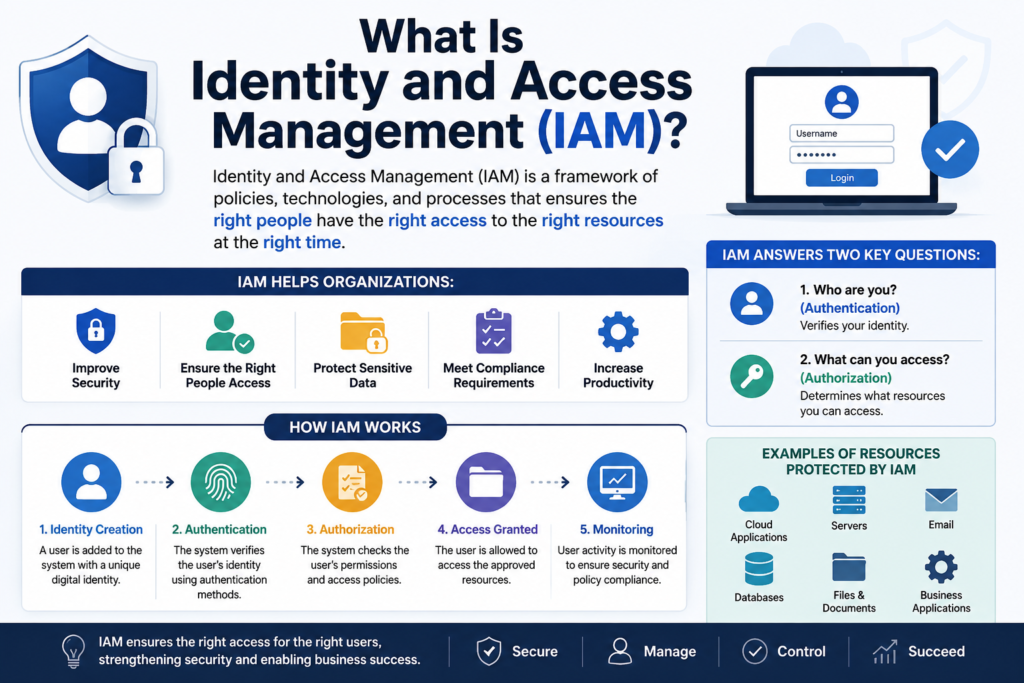
An effective IAM system combines Identity Verification, User Authentication, and Access Control into one secure process. It stores every user’s digital identity, manages the complete identity lifecycle, and protects important business resources through identity security, identity repository, identity governance, and access policies. Every login request passes through these security layers before access is granted.
What Does Identity Mean in IAM?
In IAM, an identity represents a unique person, device, or application. Each identity contains information such as a username, employee role, department, email address, and security permissions. This information forms a trusted user identity that helps the organization recognize legitimate users while blocking unauthorized ones. Strong identity protection begins with creating accurate digital identities that remain updated throughout employment.
What Does Access Management Mean?
Access management determines which resources a verified user can use after logging in successfully. It controls applications, files, cloud services, databases, and internal systems according to business rules. Using proper resource permissions, authorization rules, and permission management, organizations reduce unnecessary access while improving account security and overall identity security.
How IAM Protects Digital Identities
Every employee creates a digital footprint while using business applications. IAM protects that footprint by monitoring login activity, updating permissions, and removing unnecessary access when roles change. Features such as identity synchronization, identity provisioning, user provisioning, and user deprovisioning ensure that user accounts remain accurate from hiring to departure. This continuous management reduces mistakes and limits security gaps.
| IAM Function | Purpose | Benefit |
| Identity Creation | Creates a trusted user profile | Accurate user records |
| Authentication | Verifies user identity | Secure access |
| Authorization | Grants correct permissions | Better protection |
| Access Management | Controls available resources | Reduced security risks |
| Identity Governance | Reviews user access | Strong compliance |
Why Identity and Access Management Is Important
Cybercriminals don’t always attack computer systems directly. Many attacks begin by stealing passwords or abusing weak permissions. Once attackers gain access, they often move quietly through business systems searching for valuable information. Identity and Access Management reduces these risks by ensuring that only verified users can reach sensitive resources. Strong Identity Management also helps organizations protect customer information, financial records, and confidential business data.
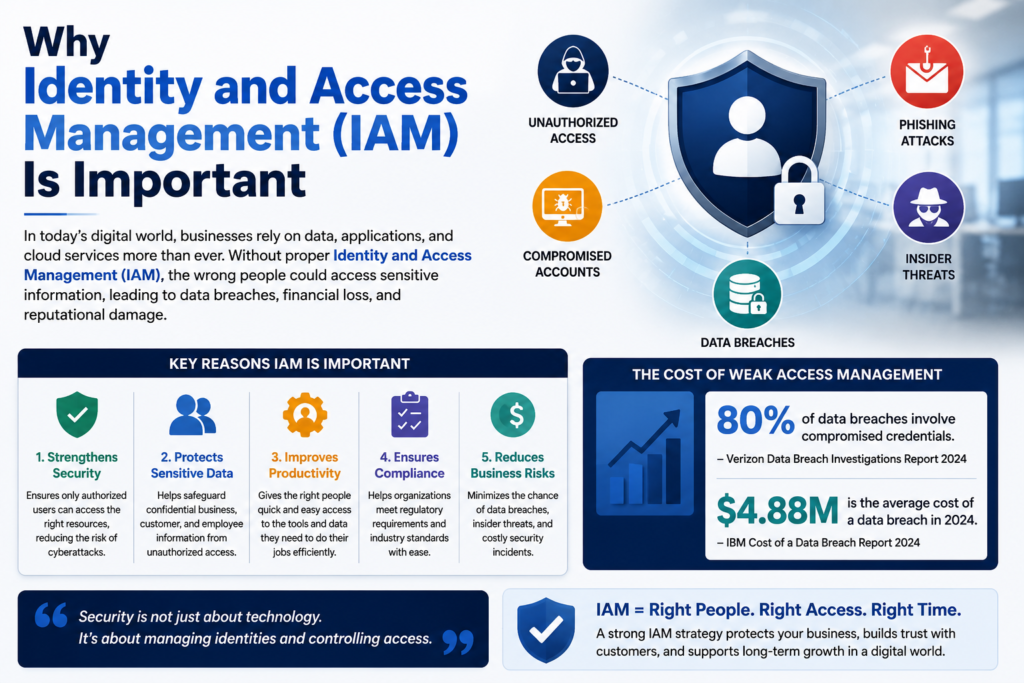
Modern businesses use cloud platforms, remote work environments, and hundreds of digital applications every day. Without centralized Access Management, employees may receive unnecessary permissions that increase security risks. IAM strengthens cloud security, improves compliance management, supports regulatory compliance, and protects organizations against insider threats through better security monitoring and carefully designed security policies.
Why Modern Organizations Depend on IAM
Organizations need a reliable way to verify every login request without slowing daily operations. IAM automates identity management while reducing manual work for IT teams. Businesses also gain better visibility into user activity through user access monitoring, allowing security teams to identify suspicious behavior before it becomes a serious threat.
Benefits of Identity and Access Management
| Business Benefit | Why It Matters |
| Stronger security | Blocks unauthorized access |
| Better compliance | Meets legal requirements |
| Faster user access | Improves productivity |
| Lower IT workload | Automates account management |
| Reduced cyber risk | Protects business assets |
“Strong security starts with knowing exactly who is accessing your systems and why.”
How Identity and Access Management Works
Every secure login follows a structured process. First, the user enters login details. Next, the IAM platform verifies the identity. Finally, the system decides which resources that person can access. Although these steps happen within seconds, they involve several security checks working together behind the scenes. This structured authentication process protects applications while giving authorized users quick access.
Modern IAM platforms rely on trusted technologies such as Identity Provider, Directory Services, LDAP, OAuth 2.0, OpenID Connect (OIDC), and SAML to manage user identities across multiple applications. These technologies allow employees to move between systems securely while reducing password fatigue and strengthening overall Cybersecurity.
The IAM Authentication Process
The first step verifies that the user is genuine. During this stage, the platform checks login credentials, performs user verification, and evaluates the chosen authentication methods. Depending on the organization’s security requirements, the system may require password authentication, biometric authentication, passwordless authentication, adaptive authentication, or risk-based authentication before allowing a secure login.
The IAM Authorization Process
After successful verification, the platform begins the authorization process. It compares the user’s role against access rights, user permissions, and predefined authorization rules. Only approved applications and resources become available, reducing unnecessary exposure while supporting the least privilege principle.
Identity Lifecycle Management
Identity management continues long after the first login. Employees join the company, change departments, receive promotions, and eventually leave the organization. Throughout this journey, IAM manages the complete identity lifecycle using role assignment, identity governance and administration, identity synchronization, identity provisioning, and user deprovisioning to keep user accounts accurate and secure.
Authentication vs Authorization: What’s the Difference?
Many beginners confuse authentication with authorization because both happen during the login process. However, they solve different security problems. Authentication answers the question, “Who are you?” while Authorization answers, “What are you allowed to do?” Understanding this difference makes IAM much easier to understand.
Think about entering a secure office building. Showing your employee badge proves your identity. That is authentication. After entering the building, your department determines which rooms you can access. That is authorization. Together, these two processes create strong Access Control while protecting sensitive business information.
Authentication Explained
Authentication confirms that the person requesting access is genuine. It uses passwords, biometrics, hardware security keys, or Multi-Factor Authentication to verify identity before allowing access to business systems.
Authorization Explained
Authorization determines which files, applications, or databases the verified user may access. It uses business rules, resource permissions, and access policies to protect critical information while supporting everyday work.
| Authentication | Authorization |
| Verifies identity | Grants permissions |
| Happens first | Happens after authentication |
| Uses passwords, biometrics, MFA | Uses roles and permissions |
| Confirms who you are | Confirms what you can access |
Core Components of an IAM System
Every modern IAM solution contains several core components that work together to protect business systems. Each component performs a specific job, yet they share information continuously to create a secure environment. Identity and Access Management becomes more effective when every identity is stored, verified, monitored, and updated through one centralized platform. This approach reduces security gaps while improving daily operations.
A complete IAM platform combines Identity Provider, Identity Management, Access Management, identity repository, and identity governance into one ecosystem. It also supports identity governance and administration, identity synchronization, identity provisioning, and user provisioning so employees receive the correct permissions from their first working day. When someone leaves the company, user deprovisioning automatically removes unnecessary access and protects business resources.
Identity Repository
An identity repository acts as the central database for user information. It stores employee details, usernames, roles, departments, and security settings. Every login request begins by checking this trusted database. Well-maintained repositories improve identity security, reduce duplicate accounts, and simplify user management across multiple applications.
Identity Provider (IdP)
An Identity Provider verifies user identities before granting access to business applications. Popular solutions include Microsoft Entra ID, Okta, and Ping Identity. These platforms simplify User Authentication, improve secure login, and allow organizations to manage thousands of employee accounts from one location.
Access Policies
Access policies define who can access business resources and under which conditions. They rely on authorization rules, user permissions, and access rights to ensure employees only receive the access needed to perform their jobs. This structured approach strengthens security while reducing unnecessary privileges.
Directory Services
Most organizations rely on Directory Services to organize user accounts and system resources. Technologies such as Active Directory and LDAP make it easier to manage users, groups, and permissions across business networks. Centralized directories also simplify identity management as companies grow.
Identity Governance and Administration (IGA)
Identity governance and administration helps organizations review, approve, and monitor user access throughout the complete identity lifecycle. Regular access reviews reduce unnecessary permissions while supporting regulatory compliance, improving audit readiness, and strengthening overall security.
User Provisioning and Deprovisioning
Creating and removing user accounts manually can lead to costly mistakes. Automated identity provisioning, user provisioning, and user deprovisioning ensure employees receive the correct access immediately while former employees lose access without delay. Automation improves efficiency and reduces security risks.
| IAM Component | Primary Purpose | Business Benefit |
| Identity Repository | Stores user identities | Accurate account management |
| Identity Provider | Verifies users | Secure authentication |
| Directory Services | Organizes identities | Simplified administration |
| Access Policies | Controls permissions | Stronger security |
| Identity Governance | Reviews access | Better compliance |
| Provisioning | Automates accounts | Faster onboarding |
Types of Authentication Methods
Passwords alone no longer provide enough protection against modern cyber threats. Attackers use phishing, malware, and credential theft to steal login information every day. Because of this, businesses now combine several authentication methods to verify users before granting access. Strong authentication reduces unauthorized access without creating unnecessary frustration for employees.
Modern Identity and Access Management platforms support multiple verification techniques that match different business needs. Organizations often combine password authentication, biometric authentication, passwordless authentication, adaptive authentication, and risk-based authentication to create stronger protection while improving the overall user experience.
Password Authentication
Password authentication remains the most common login method worldwide. Although it is simple to use, weak passwords continue to cause many security breaches. Organizations should encourage long, unique passwords and combine them with additional security measures to improve account security.
Biometric Authentication
Biometric authentication verifies users through fingerprints, facial recognition, or iris scans. Since biometric data is unique to each person, this method provides stronger Identity Verification than passwords alone. Many smartphones and laptops now include biometric security as a standard feature.
Passwordless Authentication
Passwordless authentication removes traditional passwords entirely. Users authenticate through hardware security keys, trusted devices, or biometric verification. This approach reduces password fatigue while preventing many phishing attacks that target stolen credentials.
Adaptive Authentication
Adaptive authentication evaluates user behavior before granting access. The system analyzes device type, login location, and recent activity. If something appears unusual, it requests additional verification. This intelligent approach improves security without interrupting normal business operations.
Risk-Based Authentication
Risk-based authentication calculates the risk level of every login attempt. Low-risk users enjoy a faster secure login, while high-risk attempts trigger extra verification steps. This flexible security model improves both protection and usability.
| Authentication Method | Security Level | Best Use Case |
| Password Authentication | Moderate | Everyday logins |
| Biometric Authentication | Very High | Mobile devices |
| Passwordless Authentication | Very High | Enterprise security |
| Adaptive Authentication | High | Remote workforce |
| Risk-Based Authentication | High | Cloud applications |
Understanding Access Control Models
After verifying a user’s identity, the system must decide which resources that person can access. This responsibility belongs to Access Control. Different organizations use different access control models depending on their security needs, compliance requirements, and business structure. Choosing the correct model improves both security and productivity.
Modern IAM solutions support several access control frameworks, including role-based access control, attribute-based access control, discretionary access control, and mandatory access control. Each model provides a different way to manage permissions while protecting sensitive information.
Discretionary Access Control (DAC)
Discretionary access control allows resource owners to decide who can access their files or folders. Although this model provides flexibility, it depends heavily on individual users making correct security decisions.
Mandatory Access Control (MAC)
Mandatory access control follows strict security rules established by administrators. Individual users cannot change permissions themselves. Government agencies, defense organizations, and highly regulated industries often rely on this model because it offers strong protection for classified information.
Role-Based Access Control (RBAC)
Role-based access control assigns permissions according to a user’s job role rather than individual preferences. Employees with similar responsibilities receive the same permissions, making administration easier while supporting the least privilege principle.
Attribute-Based Access Control (ABAC)
Attribute-based access control makes decisions using multiple factors such as user role, device type, location, department, and time of access. This flexible model works well in cloud environments where security conditions constantly change.
| Access Control Model | Decision Based On | Common Usage |
| DAC | Resource owner | Small organizations |
| MAC | Security policy | Government agencies |
| RBAC | User role | Businesses |
| ABAC | User attributes | Cloud platforms |
Role-Based Access Control (RBAC) Explained
Among all access control models, Role-Based Access Control remains one of the most widely adopted solutions. Instead of assigning permissions individually, administrators group employees according to their responsibilities. Every role receives predefined permissions, making account management faster and more consistent.
RBAC improves Identity and Access Management by reducing manual administration and strengthening permission management. Employees receive only the resource permissions required for their work, supporting the least privilege principle while protecting sensitive systems from unnecessary exposure.
How RBAC Works
RBAC begins by creating job roles such as Human Resources, Finance, Sales, or IT Support. Each role includes predefined access rights, role assignment, and authorization rules. New employees automatically inherit permissions when assigned to the appropriate department.
Advantages of RBAC
Organizations using RBAC spend less time managing permissions because administrators update roles instead of individual users. This approach improves consistency, reduces mistakes, strengthens identity security, and supports long-term business growth.
RBAC Example for Businesses
Imagine a hospital where doctors, nurses, pharmacists, and reception staff all require different system access. RBAC ensures every employee receives only the permissions necessary for their responsibilities while protecting confidential patient information.
What Is Single Sign-On (SSO)?
Managing dozens of passwords creates frustration for users and additional work for IT teams. Single Sign-On solves this problem by allowing users to authenticate once and securely access multiple business applications without repeated logins. This improves productivity while maintaining strong security standards.
Modern IAM platforms integrate Single Sign-On, Identity Provider, OpenID Connect (OIDC), OAuth 2.0, and SAML to provide seamless access across cloud and on-premises applications. SSO also reduces password reuse, decreases help desk requests, and improves the overall user experience.
How Single Sign-On Works
After users complete Authentication through a trusted identity provider, the platform creates a secure session that allows access to approved applications without additional logins. The system continues enforcing Authorization and Access Control behind the scenes.
Benefits of SSO
SSO improves employee productivity, reduces password fatigue, strengthens cloud identity management, and lowers IT support costs. It also works well alongside Multi-Factor Authentication, creating an extra layer of protection for modern organizations.
SSO vs Traditional Login Systems
| Feature | Single Sign-On | Traditional Login |
| Number of Passwords | One | Multiple |
| User Experience | Excellent | Moderate |
| Productivity | High | Lower |
| Password Fatigue | Very Low | High |
| Security Management | Centralized | Separate |
Multi-Factor Authentication (MFA) in IAM
Passwords still play an important role in online security. However, they can be stolen through phishing emails, malware, or weak password habits. That is why modern Identity and Access Management solutions encourage businesses to use Multi-Factor Authentication as an additional security layer. Instead of trusting one password, MFA asks users to provide two or more forms of Identity Verification before access is granted. This simple step makes unauthorized access much harder.
Many organizations combine User Authentication, mobile verification apps, security keys, fingerprints, or one-time codes to protect important accounts. Even if hackers discover login credentials, they usually cannot complete the second verification step. This approach strengthens identity protection, improves account security, and supports stronger Cybersecurity across cloud and business environments.
Why MFA Is Essential
Modern cyberattacks often begin with stolen passwords. MFA reduces this risk because attackers must pass multiple security checks before reaching company resources. Businesses that protect financial records, customer data, and cloud services benefit greatly from this extra layer of security.
Common MFA Verification Methods
Organizations choose different verification methods depending on their security requirements. Common options include mobile authenticator apps, hardware security keys, fingerprint scanners, facial recognition, email verification, and temporary security codes sent to trusted devices.
| MFA Method | Security Level | Common Use |
| Authenticator App | Very High | Business accounts |
| Fingerprint | Very High | Mobile devices |
| Security Key | Excellent | Enterprise security |
| SMS Code | Moderate | Personal accounts |
| Email Code | Moderate | General verification |
Identity Federation Explained
Modern businesses rarely rely on one application. Employees often access cloud storage, email, project management software, customer databases, and communication tools throughout the day. Logging into every platform separately wastes time and increases security risks. Identity federation solves this problem by allowing trusted systems to recognize one verified identity across multiple services.
Instead of creating separate accounts everywhere, organizations use trusted standards such as SAML, OAuth 2.0, and OpenID Connect (OIDC) to share authentication securely between applications. This process improves Access Management, simplifies cloud identity management, and strengthens overall identity security without forcing users to remember dozens of passwords.
Federation vs Single Sign-On
Although people often confuse them, identity federation and Single Sign-On are not identical. Single Sign-On allows one login across connected applications within a trusted environment. Identity federation extends that trust between different organizations or platforms, allowing secure access across independent systems.
Benefits of Federated Identity
Identity federation reduces password fatigue, improves collaboration, simplifies cloud access, and strengthens Digital Identity protection. It also reduces administration work because trusted organizations can securely share identity information without duplicating user accounts.
| Identity Federation | Business Benefit |
| One trusted identity | Better user experience |
| Cross-platform access | Higher productivity |
| Secure authentication sharing | Stronger protection |
| Less password management | Lower IT workload |
| Simplified cloud access | Better scalability |
Privileged Access Management (PAM)
Not every employee should receive administrator-level access. Some accounts control servers, databases, cloud infrastructure, and security settings. If attackers compromise these accounts, they can cause serious damage. Privileged Access Management helps organizations secure these high-risk accounts through strict monitoring and advanced access controls.
A modern PAM solution protects privileged accounts by limiting administrator access, recording important activities, and approving sensitive actions only when necessary. Combined with Identity and Access Management, PAM reduces insider risks while improving security monitoring, permission management, and overall business resilience.
What Is Privileged Access?
Privileged access refers to elevated permissions that allow users to install software, manage servers, change configurations, or access confidential business information. Only trusted administrators should receive these permissions because they carry significant responsibility.
How PAM Protects Critical Systems
PAM verifies every privileged login, monitors administrator activity, limits unnecessary permissions, and supports the least privilege principle. Many organizations also record privileged sessions to improve investigations and strengthen regulatory compliance.
Best Practices for Privileged Accounts
Businesses should review privileged accounts regularly, remove unused administrator rights, require MFA, rotate passwords, and monitor every sensitive action. These practices reduce the chances of privilege abuse while improving long-term enterprise security.
| PAM Feature | Security Benefit |
| Session Monitoring | Tracks administrator activity |
| Temporary Access | Reduces unnecessary privileges |
| Password Rotation | Improves account protection |
| Approval Workflow | Prevents unauthorized changes |
| Activity Logging | Supports compliance audits |
IAM in Cloud Computing
Cloud services have transformed the way organizations store data and run applications. Businesses now rely on platforms such as Microsoft Azure, Amazon Web Services (AWS), and Google Cloud to support employees across different locations. As cloud environments continue to grow, Identity and Access Management becomes the foundation of secure cloud operations.
Cloud IAM verifies every user, device, and application before allowing access to online resources. It strengthens cloud security, protects sensitive data, supports Zero Trust, and enforces consistent security policies across multiple cloud platforms. This centralized approach reduces security gaps while making cloud management much easier.
Cloud Identity and Access Management
Cloud IAM controls user identities, permissions, and application access through one centralized platform. Administrators can quickly assign permissions, monitor user activity, and remove access when employees change roles or leave the organization.
IAM for Multi-Cloud Environments
Many companies use more than one cloud provider to improve flexibility. IAM creates consistent security rules across Microsoft Azure, AWS, and Google Cloud, reducing management complexity while improving data protection and business continuity.
Securing Cloud Applications with IAM
Organizations secure cloud applications by combining Authentication, Authorization, Access Control, MFA, and continuous monitoring. Together, these technologies protect customer information while supporting safe remote work.
IAM Best Practices
Installing an IAM platform is only the beginning. Organizations must also create strong security habits that continue protecting users over time. Following proven best practices improves security while making identity management easier for administrators and employees.
Successful businesses regularly review permissions, monitor suspicious activity, update security rules, and educate employees about cyber risks. Combined with identity governance, security monitoring, and strong Access Management, these habits create a more secure digital workplace.
Recommended IAM Practices
| Best Practice | Why It Matters |
| Follow the least privilege principle | Limits unnecessary access |
| Enable Multi-Factor Authentication | Protects user accounts |
| Review user permissions regularly | Removes outdated access |
| Monitor access requests | Detects unusual behavior |
| Automate identity provisioning | Improves efficiency |
| Strengthen security policies | Reduces cyber risks |
| Audit user access monitoring | Supports compliance |
| Protect Identity Provider systems | Secures authentication |
“The strongest security strategy isn’t built on one technology. It is built on consistent identity management and smart access decisions.”
Common IAM Challenges
Although IAM improves security, organizations still face several implementation challenges. Growing businesses often manage thousands of employees, contractors, cloud services, and connected devices. Without careful planning, identity management can become difficult to maintain.
Remote work, cloud adoption, and constantly changing cyber threats require businesses to update IAM strategies regularly. Organizations must balance strong protection with a smooth user experience while meeting compliance management requirements and defending against insider threats.
Managing Remote Workforces
Employees now work from homes, offices, and public locations. IAM helps organizations secure remote access without reducing productivity by using strong authentication and continuous identity verification.
Preventing Insider Threats
Not every security risk comes from outside attackers. Employees with excessive permissions can accidentally expose sensitive information. Regular permission reviews and activity monitoring reduce these risks while improving identity governance.
Reducing Credential Theft
Credential theft remains one of the most common attack methods. Organizations reduce this threat by combining MFA, passwordless authentication, user education, and continuous monitoring.
Meeting Compliance Requirements
Many industries must follow strict privacy and security regulations. IAM supports audits by recording login activity, controlling permissions, and documenting identity changes throughout the complete identity lifecycle.
Real-World Examples of IAM
Every industry depends on secure digital access. Hospitals protect patient records, banks secure financial transactions, and online retailers manage customer accounts. In each case, Identity and Access Management ensures that only the right people can view or change sensitive information. Without proper IAM, businesses face a much higher risk of data breaches and operational disruption.
Large organizations also rely on IAM to simplify daily operations. Employees can safely access applications without requesting manual approval every time they log in. Combined with Role-Based Access Control, Identity Provider, Access Control, identity governance, and security monitoring, IAM improves efficiency while reducing unnecessary security risks.
IAM in Healthcare
Healthcare organizations use IAM to protect electronic health records, medical devices, and patient information. Doctors, nurses, pharmacists, and administrative staff receive different access levels based on their responsibilities. This approach strengthens data protection, improves regulatory compliance, and protects confidential medical information.
IAM in Banking
Banks process millions of secure transactions every day. IAM helps verify customer identities, prevent fraud, and protect online banking platforms. Combining Multi-Factor Authentication, Authorization, and identity protection creates a safer banking experience for both customers and employees.
IAM in Retail
Retail businesses manage customer accounts, payment systems, and inventory platforms. IAM protects online shopping accounts while reducing unauthorized access to internal business systems.
IAM in Education
Schools and universities use IAM to manage student portals, online learning platforms, and faculty resources. Students, teachers, and administrators receive different permissions based on their academic roles.
IAM in Government
Government agencies protect classified information and citizen services through strict identity verification and controlled access. Strong IAM policies help secure public data while maintaining trust.
| Industry | How IAM Helps |
| Healthcare | Protects patient records |
| Banking | Secures financial transactions |
| Retail | Protects customer accounts |
| Education | Controls learning platforms |
| Government | Secures public services |
Why Businesses Need IAM
Every business stores valuable information. Customer records, financial reports, employee data, and intellectual property all require strong protection. Identity and Access Management gives organizations complete control over who can access these resources while reducing the chances of unauthorized activity. As businesses grow, centralized identity management becomes even more important.
Modern organizations also benefit from faster onboarding, easier account management, and improved compliance. Features such as Access Management, User Authentication, permission management, cloud security, and Cybersecurity work together to create a secure environment that supports productivity instead of slowing it down.
Business Advantages of IAM
| Business Goal | IAM Benefit |
| Improve security | Blocks unauthorized users |
| Increase productivity | Faster access to applications |
| Reduce IT workload | Automates account management |
| Support compliance | Creates audit records |
| Protect sensitive data | Controls user permissions |
| Secure remote work | Verifies every login |
“The right user should have the right access at the right time—and nothing more.”
Future of Identity and Access Management in 2026
Identity security continues to evolve as businesses adopt artificial intelligence, cloud services, and remote work. Traditional passwords are slowly giving way to smarter authentication technologies that improve both convenience and security. Organizations are investing in identity-first security because cybercriminals increasingly target user accounts rather than networks.
Future IAM platforms will use artificial intelligence to detect unusual behavior in real time. Passwordless Authentication, Zero Trust, adaptive authentication, risk-based authentication, and continuous identity verification will become standard security features. Businesses will also improve cloud identity management, protect machine identities, and automate routine identity tasks to reduce human error.
Emerging IAM Trends
| Trend | Expected Impact |
| AI-powered identity security | Faster threat detection |
| Passwordless authentication | Better user experience |
| Zero Trust adoption | Stronger access control |
| Identity automation | Reduced manual work |
| Continuous verification | Improved account security |
| Cloud-first IAM | Better scalability |
Frequently Asked Questions
What is Identity and Access Management?
Identity and Access Management is a security framework that verifies user identities and controls access to applications, systems, and business data. It helps organizations protect sensitive information while giving employees secure access to the resources they need.
What is the difference between Authentication and Authorization?
Authentication confirms who you are, while Authorization decides what you are allowed to access after your identity has been verified.
Why is IAM important for businesses?
IAM protects customer information, reduces cyber risks, supports regulatory compliance, improves productivity, and helps organizations manage employee access more efficiently.
What is Multi-Factor Authentication?
Multi-Factor Authentication requires users to provide two or more verification methods before accessing an account. This significantly improves security compared to using only a password.
What is Role-Based Access Control?
Role-Based Access Control assigns permissions based on job responsibilities instead of individual users. This simplifies administration while reducing unnecessary access.
Can small businesses benefit from IAM?
Yes. Small businesses are common targets for cyberattacks. IAM helps protect business data, cloud applications, and employee accounts regardless of company size.
Which industries use IAM?
Healthcare, banking, retail, education, government, manufacturing, technology companies, and many other industries rely on IAM to secure digital resources.
Final Thoughts
Digital security is no longer just about protecting computers. Today, organizations must protect identities because every login creates a potential entry point for attackers. Identity and Access Management provides a structured way to verify users, control permissions, and secure valuable information across modern business environments. Whether a company uses on-premises systems or cloud platforms, IAM creates a strong security foundation.
Understanding Authentication, Authorization, Access Control, Identity Management, and Privileged Access Management helps businesses build safer systems without making daily work difficult. As cyber threats continue to evolve, organizations that invest in modern IAM solutions will be better prepared to protect employees, customers, and sensitive business data in the years ahead.
Meta Description
Learn Identity and Access Management (IAM) in simple English. Discover how authentication, authorization, access control, MFA, SSO, RBAC, and cloud IAM protect users, businesses, and sensitive data in this complete 2026 beginner’s guide.
12 Comments