

Introduction
Every day, millions of people and businesses rely on cloud computing to store files, run applications, and collaborate from anywhere. While the cloud offers speed and flexibility, it also creates new security challenges. That is why Cloud Security Explained has become an essential topic in 2026. Whether you use cloud services for personal tasks or business operations, understanding what is cloud security helps you protect valuable information from cyber threats. This guide explains how cloud security works, the latest cloud security best practices, common risks, and practical solutions. By the end, you will know how to secure your cloud environment and protect your data with confidence.
Strong cloud security protects your personal and business information from hackers, malware, and unauthorized access. It also helps organizations follow privacy laws and keep customer trust. In this guide, you will learn what is cloud security, how cloud security works, the biggest threats, modern protection methods, and the best practices to secure your cloud environment in 2026.
What Is Cloud Security?
Cloud services make life easier. However, they also require strong protection. Cloud Security Explained means using technologies, policies, and security processes to protect cloud computing, cloud infrastructure, cloud applications, and valuable information stored online. The goal is simple. Keep data safe while allowing authorized users to access it whenever they need it.
Every modern organization depends on secure cloud systems. Good security protects data protection, data privacy, sensitive data, and important digital assets from cybercriminals. Whether a company uses public cloud, private cloud, or hybrid cloud services, cloud security reduces risk and keeps business operations running smoothly.
Why Cloud Security Is Important in 2026
Cyberattacks continue to grow every year. Criminals now target cloud platforms because businesses store more information online than ever before. A single attack can expose customer records, financial data, or confidential business documents. Understanding cloud security in 2026 helps organizations prepare for modern threats before they become expensive problems.
Cloud security is no longer optional. Businesses need strong cloud security strategy, reliable security monitoring, regular risk management, and continuous updates to protect valuable systems. Healthcare providers, schools, banks, retailers, and government agencies all rely on secure cloud services because losing customer trust can damage both reputation and revenue.
How Cloud Security Works
Many people wonder how cloud security works. The answer is surprisingly simple. Cloud security combines technology, people, and security rules to protect online systems. It verifies users before allowing access, encrypts important information, watches for suspicious activity, and blocks attacks before they spread across the network.
Modern cloud platforms also follow the shared responsibility model. The cloud provider protects the physical infrastructure, while customers protect their accounts, applications, and stored information. Strong authentication, authorization, access control, cloud identity management, and multi-factor authentication work together to prevent unauthorized access.
Types of Cloud Security
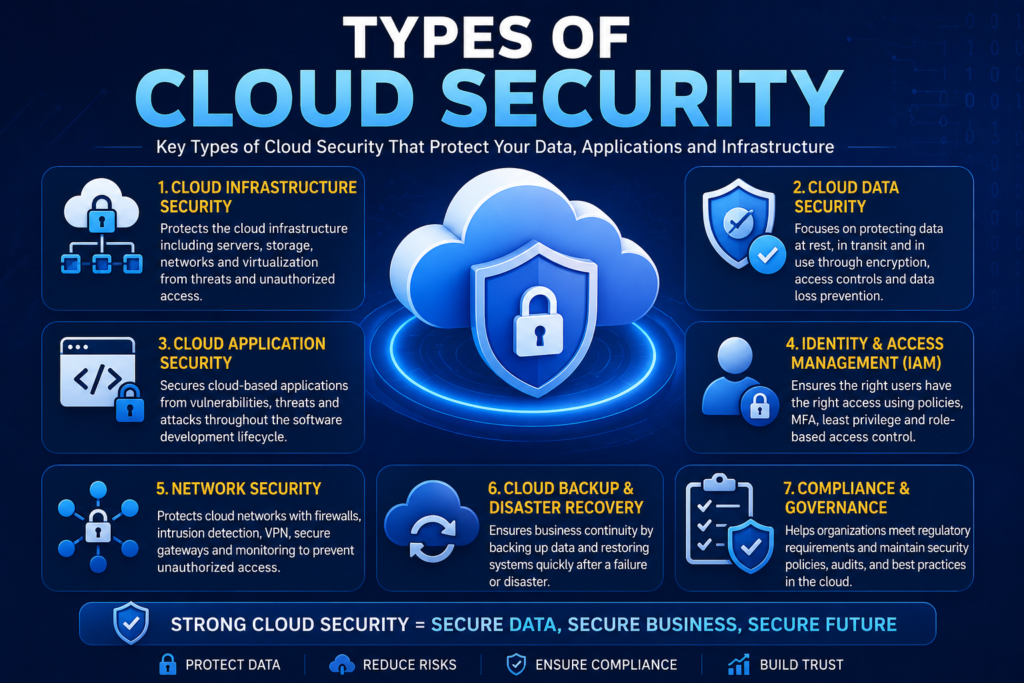
Cloud security includes several layers that work together. Each layer protects a different part of the cloud environment. Using only one security method is never enough because attackers constantly look for new ways to exploit weaknesses. Organizations need multiple security controls to build a strong defense.
A complete security program combines cloud security framework, cloud security architecture, cloud security controls, and continuous cloud security management. Together, these layers improve visibility, reduce risk, and strengthen overall protection.
Network Security
Every cloud network transfers large amounts of information every second. Strong network security, modern firewall systems, intrusion detection, and intrusion prevention help stop attackers before they reach important systems. Secure network design also limits the spread of malware if an attack occurs.
Identity and Access Management (IAM)
Identity protection is one of the most important parts of cloud security. Identity management, least privilege, privileged access, user permissions, and secure authentication ensure that users only access the resources they truly need. This greatly reduces the chances of account misuse or insider attacks.
Data Encryption
Encryption keeps information unreadable to unauthorized users. Modern cloud encryption uses encryption at rest, encryption in transit, and secure encryption keys to protect files whether they are stored or moving across the internet. Even if attackers steal encrypted data, reading it becomes extremely difficult.
Endpoint Security
Employees often access cloud systems using laptops, smartphones, and tablets. Strong endpoint protection, secure device management, and regular software updates reduce security risks. Protecting every connected device is essential because one infected computer can expose an entire organization.
Application Security
Cloud applications process valuable business information every day. Strong application security, secure API security, regular vulnerability management, and timely patch management reduce software weaknesses before attackers can exploit them. Secure applications create a safer experience for both employees and customers.
Common Cloud Security Threats
Cybercriminals never stop looking for weak systems. As more businesses move to the cloud, attackers continue creating smarter methods to steal information. Understanding cloud security threats helps you recognize risks before they become serious problems. Every organization should perform a regular cloud risk assessment to identify weaknesses and improve its overall security posture.
A data breach is one of the most common cloud security incidents. Attackers may also use phishing attacks, account takeover, malware protection bypass techniques, or exploit insider threats. Weak passwords, poor security settings, and outdated software increase these risks. Strong threat detection, continuous security analytics, and a modern security operations center help organizations respond quickly before damage spreads.
| Cloud Security Threat | Possible Impact | Recommended Protection |
| Data Breach | Loss of sensitive information | Encryption, multi-factor authentication, access reviews |
| Phishing Attacks | Stolen login credentials | Employee awareness and email protection |
| Ransomware | Locked files and downtime | Backup and recovery, endpoint security |
| Insider Threats | Unauthorized data access | Least privilege, activity monitoring |
| Account Takeover | Full account compromise | Strong passwords and secure authentication |
| Misconfigured Cloud Storage | Public data exposure | Regular cloud security audit |
| API Attacks | Application compromise | Strong API security and monitoring |
Cloud Security Best Practices
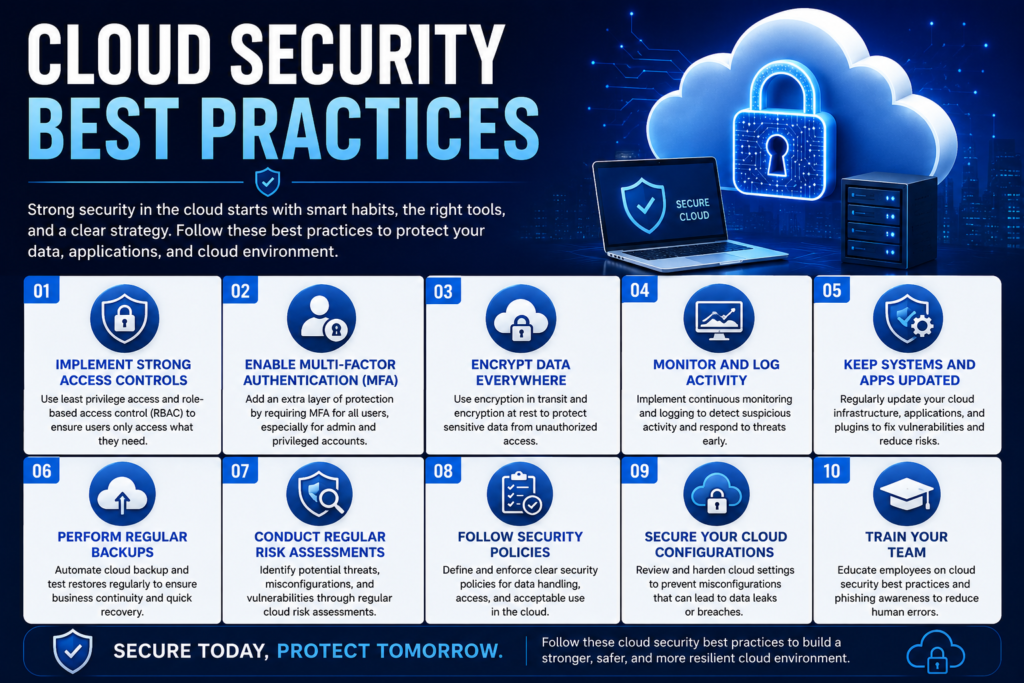
Building strong cloud security starts with simple habits. Every business should create a clear cloud security checklist that covers user accounts, device security, software updates, backups, and employee training. Small improvements made consistently often prevent large security incidents later.
Organizations should follow proven cloud security best practices by enabling multi-factor authentication, applying zero trust security, performing regular cloud security assessment, improving continuous monitoring, and reviewing security policies frequently. These steps strengthen cloud compliance, improve cyber resilience, and help protect valuable customer information.
Benefits of Cloud Security
Strong cloud security offers much more than protection against hackers. It helps organizations build customer confidence while improving daily business operations. Companies that invest in security often experience fewer interruptions and recover more quickly from unexpected incidents.
Reliable security improves cloud data protection, supports business continuity, simplifies cloud governance, and protects valuable cloud services. Organizations also benefit from stronger compliance, better operational efficiency, and greater trust from customers who expect their information to remain safe.
| Benefit | Business Value |
| Better Data Protection | Protects customer information |
| Faster Threat Detection | Responds to attacks quickly |
| Business Continuity | Reduces downtime |
| Regulatory Compliance | Supports legal requirements |
| Customer Trust | Builds long-term relationships |
| Secure Collaboration | Enables safe remote work |
“Cloud security isn’t only about stopping attacks. It’s about building confidence every time someone trusts you with their data.”
Challenges of Cloud Security
Although cloud technology offers many advantages, it also introduces new responsibilities. Many organizations struggle because they assume the cloud provider handles every security task. In reality, protecting customer accounts, applications, and stored information remains the customer’s responsibility.
Growing cloud security challenges include poor configurations, limited security expertise, expanding multi-cloud environments, and complex cloud migration projects. Organizations should strengthen cloud security compliance standards, perform regular reviews, and improve employee awareness to reduce these risks before they become costly problems.
Cloud Security vs Traditional Security
Choosing between cloud security and traditional security depends on business goals, budget, and technical requirements. Cloud environments provide flexibility and automatic updates, while traditional systems give organizations greater physical control over their own infrastructure.
The biggest difference is responsibility. Cloud providers manage the physical infrastructure, but organizations remain responsible for protecting their applications, users, and information. Understanding this balance helps businesses build stronger security strategies.
| Feature | Cloud Security | Traditional Security |
| Infrastructure | Managed by cloud provider | Managed by business |
| Scalability | Highly scalable | Limited by hardware |
| Software Updates | Usually automated | Often manual |
| Initial Cost | Lower upfront cost | Higher hardware investment |
| Accessibility | Available from anywhere | Mostly office-based |
| Disaster Recovery | Built-in options | Requires dedicated planning |
| Maintenance | Shared responsibility | Fully managed internally |
| Flexibility | Excellent for growth | Less flexible |
Cloud Security Tools and Technologies
Modern businesses rely on advanced cloud security tools to detect attacks before they cause damage. These tools monitor activity, analyze risks, and automate many security tasks. They also improve visibility across large cloud environments where manual monitoring becomes difficult.
Popular cloud security technologies include Microsoft Defender for Cloud, Microsoft Sentinel, AWS Security Hub, AWS GuardDuty, Google Security Command Center, CrowdStrike Falcon, Palo Alto Prisma Cloud, Cisco Secure Cloud Analytics, Trend Micro Cloud One, and Wiz. These solutions strengthen cloud security software, improve security monitoring, and simplify cloud security services for organizations of every size.
Cloud Security for Small Businesses
Small businesses often believe cybercriminals only target large companies. That idea is risky. Many attackers choose smaller organizations because they usually have fewer security controls. Cloud Security Explained becomes even more important for companies with limited IT resources and smaller budgets.
A strong security plan does not always require expensive software. Businesses should focus on cloud security for small businesses, secure cloud backup, regular cloud security management, employee training, and strong passwords. Combining these steps with cloud security solutions helps protect customer information while supporting steady business growth.
Cloud Security for Remote Workers
Remote work has become a normal part of business across the United States. Employees now connect to company systems from homes, hotels, airports, and coffee shops. This flexibility improves productivity, yet it also creates new security risks if devices and accounts are not protected properly.
Organizations should follow cloud security for remote workers by using secure remote access, a trusted password manager, multi-factor authentication, and company-approved devices. Regular cloud security monitoring also helps detect unusual login activity before attackers gain access to business systems.
Real-World Cloud Security Case Study
Imagine a growing online retail company in Texas that stores customer orders, payment records, and inventory data in the cloud. As the business expanded, employees started using personal devices to access company files. Security reviews revealed weak passwords, outdated permissions, and several unused accounts. These small issues created unnecessary risks.
The company completed a full cloud security assessment, improved cloud access management, enabled cloud compliance controls, and strengthened incident response planning. After introducing continuous monitoring, employee security training, and stronger account protection, suspicious login attempts dropped significantly. Customer confidence increased because the company demonstrated a serious commitment to protecting personal information.
| Before Security Improvements | After Security Improvements |
| Weak passwords | Multi-factor authentication enabled |
| Manual account reviews | Automated access monitoring |
| Limited visibility | Continuous security monitoring |
| Infrequent backups | Regular cloud backup schedule |
| Higher security risks | Stronger cyber resilience |
Future of Cloud Security
Cloud technology continues to evolve every year. Artificial intelligence now helps security teams identify unusual behavior much faster than traditional methods. As businesses move more workloads online, automation will play an even larger role in protecting cloud environments from advanced cyber threats.
The future will focus on artificial intelligence, machine learning, behavioral analytics, stronger cloud governance, passwordless authentication, and smarter cloud security technologies. Organizations that adopt these innovations early will strengthen their defenses while improving efficiency and customer trust.
Frequently Asked Questions
What is cloud security?
Cloud security is the process of protecting cloud systems, applications, and stored information from cyber threats through technology, security policies, and continuous monitoring.
How does cloud security work?
How cloud security works depends on multiple protection layers, including authentication, encryption, monitoring, and access control. These layers work together to keep cloud environments secure.
Why is cloud security important?
Cloud security protects sensitive information, prevents unauthorized access, reduces business risks, and helps organizations meet regulatory requirements while maintaining customer trust.
What are the biggest cloud security risks?
The most common cloud security risks include data breaches, phishing attacks, ransomware, insider threats, weak passwords, misconfigured cloud storage, and compromised user accounts.
What are the best cloud security tools?
Popular cloud security tools include Microsoft Defender for Cloud, Microsoft Sentinel, AWS GuardDuty, AWS Security Hub, Google Security Command Center, CrowdStrike Falcon, Prisma Cloud, and Wiz.
What is the shared responsibility model?
The shared responsibility model means the cloud provider secures the infrastructure, while customers remain responsible for protecting their accounts, applications, and stored data.
How does encryption protect cloud data?
Strong encryption converts readable information into coded data. Only authorized users with the correct credentials or encryption keys can access the original information.
Can small businesses improve cloud security?
Yes. Small businesses can strengthen security by enabling multi-factor authentication, training employees, creating regular backups, monitoring user activity, and following proven cloud security best practices.
Is cloud storage secure?
Yes, secure cloud storage is very safe when organizations use strong passwords, encryption, regular monitoring, and proper access controls.
What is the future of cloud security?
The future includes AI-powered threat detection, automated security operations, Zero Trust adoption, advanced analytics, and stronger cloud security frameworks that protect increasingly complex cloud environments.
Conclusion
Cloud computing has become the foundation of modern business. From small startups to global enterprises, organizations depend on cloud services to store data, run applications, and support daily operations. Understanding Cloud Security Explained helps you protect valuable information while reducing the risk of cyberattacks. Strong security is no longer optional. It is an essential part of doing business safely in 2026.
By following proven cloud security best practices, strengthening cloud data protection, improving cloud security strategy, and investing in modern cloud security solutions, you can build a safer digital environment for your organization. Security is an ongoing process rather than a one-time task. Continue reviewing your systems, train your team regularly, and stay informed about new threats. These simple habits will help protect your data, earn customer trust, and prepare your business for the future of cloud computing.
Meta Description :
Cloud Security Explained (2026): Learn how to protect cloud data, secure applications, prevent cyber threats, and stay safe online.
15 Comments