

Introduction
Imagine connecting your laptop to public Wi-Fi at an airport, logging into your online banking account, and checking your email. Everything seems normal, but in the background, hackers may already be scanning that network for vulnerable devices. If your system has weak security, they could steal sensitive information, spread malware, or gain unauthorized access to your personal data.
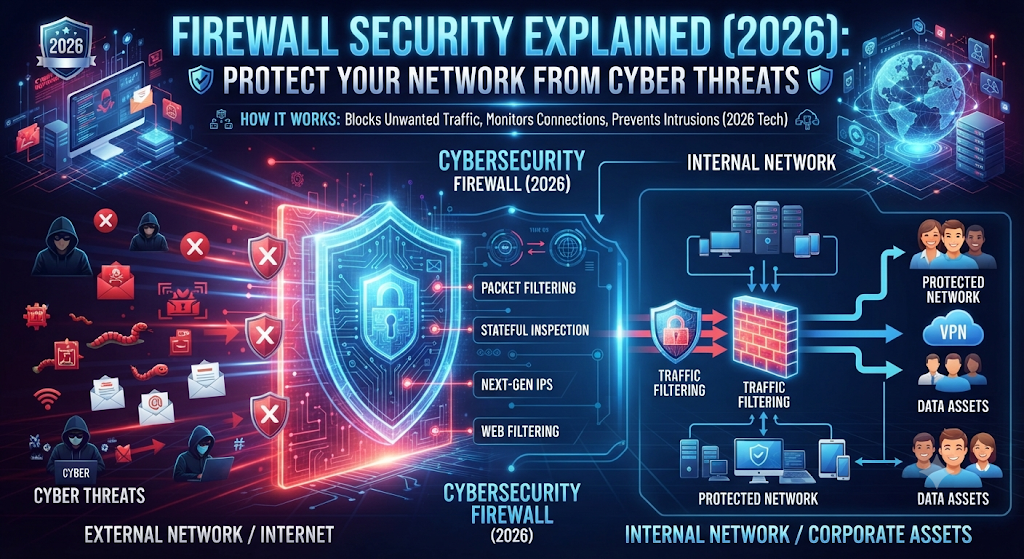
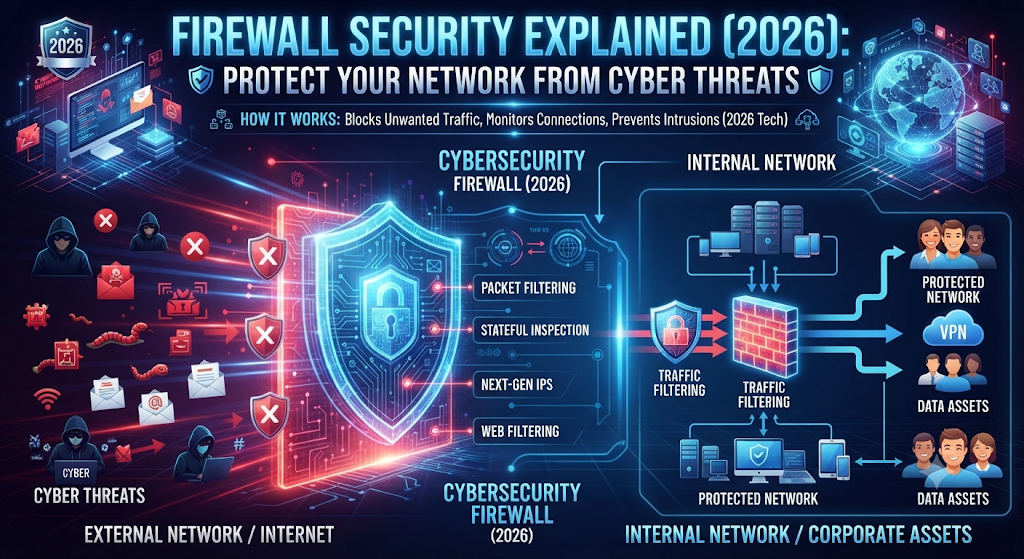
This is exactly why Firewall Security has become one of the most important parts of modern cybersecurity. Whether you use a Windows PC, Mac, smartphone, or manage a business network, Firewall Security acts as the first line of defense against cyber threats. It continuously monitors network traffic, blocks suspicious connections, and helps prevent attackers from reaching your devices before they can cause damage.
Cyberattacks are becoming more advanced every year. Ransomware attacks, phishing campaigns, AI-powered malware, and data breaches are no longer problems only for large organizations. Small businesses, remote workers, students, and home users are now frequent targets because attackers often look for weak network security and unprotected systems.
A firewall does not replace antivirus software or safe browsing habits. Instead, Firewall Security works alongside antivirus programs to create multiple layers of digital security. This layered approach significantly reduces the risk of unauthorized access and helps protect your personal information, financial records, and online accounts from evolving cyber risks.
In this complete guide, you’ll learn how Firewall Security works, the different types of firewalls, how they protect home users and businesses, how they compare with antivirus software, and the best practices to strengthen your online security in 2026. By the end of this guide, you’ll have a clear understanding of why a firewall remains one of the most effective tools for protecting devices, networks, and sensitive data in today’s connected world.
By the end of this guide, you’ll clearly understand how firewall security protects your digital life and why it remains one of the most effective cybersecurity tools in 2026.
What Is Firewall Security?
Firewall Security is a cybersecurity technology that monitors, filters, and controls the data moving between trusted devices or networks and untrusted networks such as the internet. It acts as a digital security checkpoint, allowing safe traffic to pass while blocking connections that appear suspicious or dangerous.
In simple words, think of a firewall as a professional security guard standing at the entrance of a building. Every visitor must be checked before entering. Trusted visitors are allowed inside, while suspicious individuals are stopped at the door. A firewall follows the same principle.
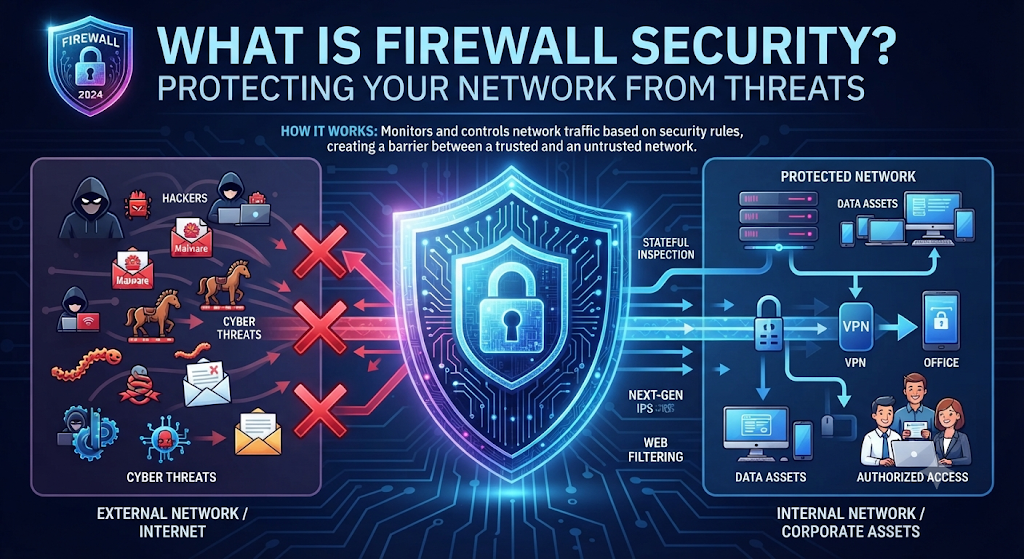
Whenever your computer, smartphone, or business network communicates with the internet, thousands of small pieces of information—called data packets—travel back and forth. Before those packets reach your device, the firewall examines them based on predefined security rules.
If the traffic appears safe, the firewall allows the connection.
If it detects malicious activity, unauthorized access attempts, or suspicious behavior, it immediately blocks the communication before it reaches your system.
Modern firewall solutions do much more than simple traffic filtering. They also help:
| Firewall Security Function | Benefit |
|---|---|
| Traffic Filtering | Blocks suspicious network traffic |
| Threat Detection | Identifies malicious activities |
| Access Control | Prevents unauthorized users |
| Network Monitoring | Detects unusual behavior |
| Malware Prevention | Stops dangerous connections |
| Data Protection | Reduces data theft risks |
This makes firewall security an essential layer of protection for home users, businesses, educational institutions, government organizations, and cloud environments.
Why Firewall Security Matters More Than Ever in 2026
The internet has changed dramatically over the last few years.
Today, almost everything is connected online.
People work remotely, attend online classes, shop through eCommerce stores, manage bank accounts from mobile apps, store files in cloud platforms, and even control home appliances using smartphones.
While this digital transformation has made life easier, it has also created more opportunities for cybercriminals.
Modern hackers no longer target only multinational companies.
Instead, they increasingly attack individuals, freelancers, students, healthcare providers, schools, and small businesses because these users often have weaker security defenses.
Some of today’s most common cyber threats include:
- Ransomware attacks
- Phishing emails
- Credential theft
- Spyware
- Data breaches
- AI-powered cyberattacks
- Remote access attacks
- Botnet infections
Without firewall protection, attackers can exploit open network ports, insecure applications, and weak configurations to gain access to valuable information.
A properly configured firewall helps reduce these risks by inspecting every connection before it reaches your device.
Instead of reacting after an attack has already happened, firewall security helps stop many threats before they enter your network.
That proactive protection is one of the biggest reasons cybersecurity professionals continue recommending firewalls as a core part of every security strategy.
How Does a Firewall Work?
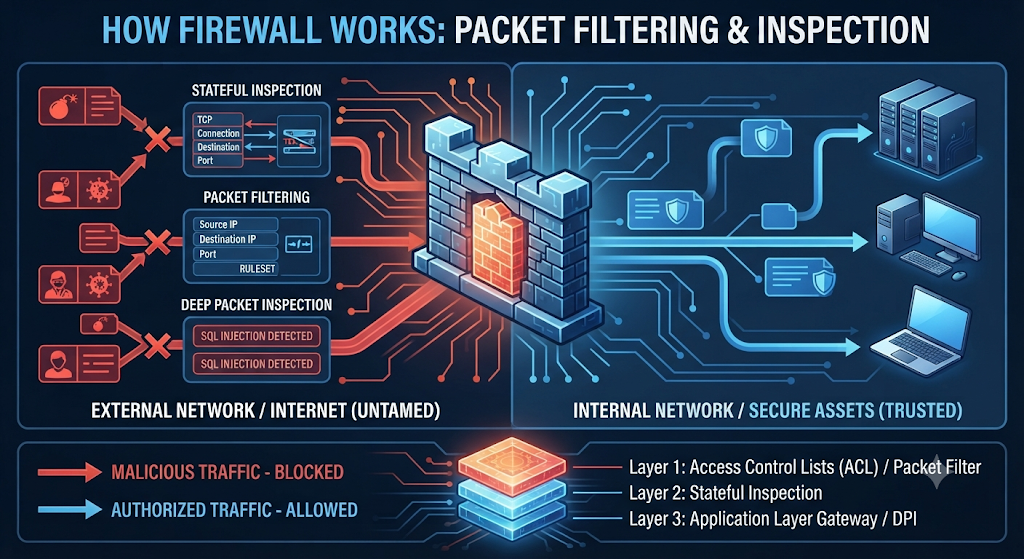
A firewall security your device by carefully inspecting the data that travels between your network and the internet. Every time you visit a website, stream a video, download a file, or use an online application, your device exchanges thousands of small pieces of information known as data packets.
Instead of allowing every packet to enter your system automatically, a firewall checks each one before deciding whether it should be accepted or rejected.
Think of it like airport security.
Before passengers board a flight, they go through security screening. Their identity is verified, their luggage is inspected, and anything suspicious is stopped before entering the aircraft.
A firewall performs a similar job for your network. It examines incoming and outgoing traffic, compares it against predefined security rules, and blocks anything that appears harmful or unauthorized.
For example, imagine you’re browsing a trusted online shopping website. The firewall recognizes the request as legitimate and allows the connection. However, if a malicious server attempts to communicate with your computer without permission, the firewall security can detect unusual behavior and block the connection before it reaches your device.
This continuous monitoring helps reduce the risk of cyberattacks, unauthorized access, and malware infections.
How Firewall Traffic Inspection Works
Modern firewalls perform several security checks in just a fraction of a second.
Step 1: Data Packet Inspection
Every internet request is divided into small packets. The firewall reads important information such as:
- Source IP address
- Destination IP address
- Port number
- Communication protocol
- Packet size
- Connection request
Step 2: Rule Verification
The firewall security every packet with predefined security policies.
If the request follows approved rules, it is allowed.
If it violates security policies, the connection is immediately blocked.
Step 3: Threat Detection
Modern firewalls do much more than basic filtering.
They analyze:
- Suspicious behavior
- Unusual traffic patterns
- Known malicious IP addresses
- Malware communication
- Botnet activity
- Brute-force login attempts
Advanced firewalls can even identify attacks that have never been seen before by analyzing abnormal network behavior instead of relying only on known attack signatures.
Step 4: Decision Making
After completing its inspection, the firewall makes one of three decisions:
| Firewall Action | Result |
|---|---|
| Allow | Safe traffic is permitted. |
| Block | Dangerous traffic is rejected immediately. |
| Monitor | Activity is logged for future analysis. |
This entire process happens within milliseconds without affecting your normal browsing experience.
How Firewall Rules Control Network Traffic
Firewall rules are the instructions that tell a firewall exactly what should be allowed and what should be blocked.
Without these rules, a firewall wouldn’t know which connections are safe.
Security administrators create firewall rules based on several factors, including:
- IP addresses
- Applications
- Ports
- Protocols
- Users
- Device types
- Geographic locations
For example, a company may allow employees to access Microsoft Teams and Office 365 while blocking unauthorized file-sharing applications.
Similarly, parents can configure firewall rules to block inappropriate websites for children.
Well-designed firewall rules reduce unnecessary exposure while allowing legitimate business applications to work normally.
Real-Life Example of Firewall Rules
Imagine a small business with twenty employees.
The company wants staff to:
- Access company email
- Use Microsoft Teams
- Browse business websites
However, it wants to block:
- Torrent software
- Gambling websites
- Malicious downloads
- Unauthorized remote access
The firewall simply follows the company’s security policy.
Approved traffic passes through.
Everything else is denied automatically.
This is why properly configured firewall rules are considered one of the strongest defenses against modern cyber threats.
How Modern Firewalls Detect Suspicious Activities
Cybercriminals no longer rely only on simple viruses.
Today’s attacks often involve:
- AI-powered malware
- Credential theft
- Zero-day exploits
- Fileless malware
- Ransomware
- Phishing infrastructure
Modern firewalls are designed to recognize these advanced threats by continuously monitoring network behavior instead of only checking static security rules.
For example, imagine an employee accidentally downloads a malicious attachment.
The malware immediately attempts to connect to a command-and-control server located in another country.
A traditional firewall might only inspect the destination IP address.
A modern Next-Generation Firewall (NGFW) goes much further.
It analyzes:
- The application’s behavior
- Communication pattern
- Destination reputation
- File characteristics
- Threat intelligence databases
If the activity matches known attack behavior, the firewall blocks the connection automatically before the malware can communicate with its server.
This proactive approach significantly reduces the chances of ransomware infections and data breaches.
Different Types of Firewalls You Should Know
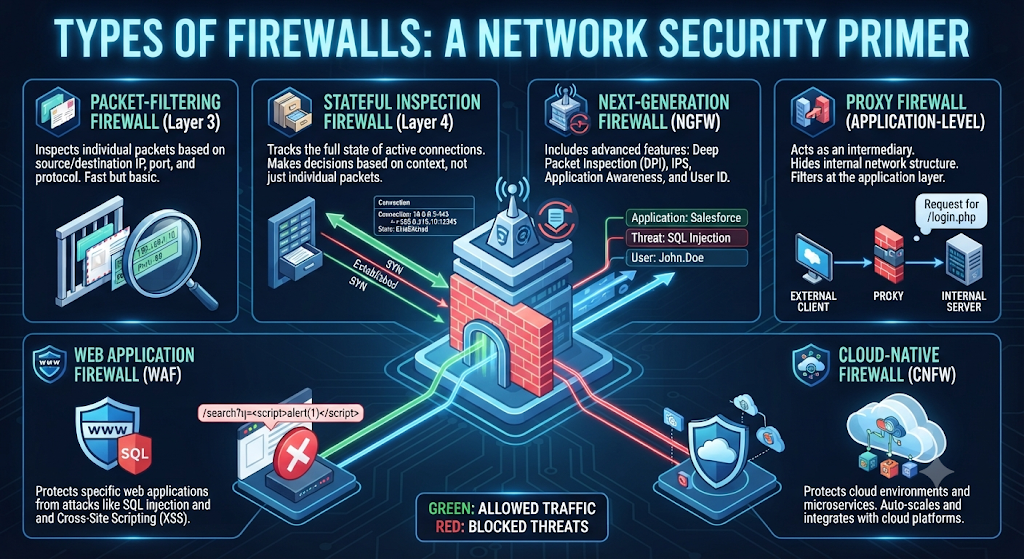
Not every firewall works the same way.
Different users require different levels of protection.
A home user has very different security needs compared to a multinational company.
That’s why several firewall technologies are available today.
Choosing the right firewall depends on:
- Network size
- Budget
- Number of connected devices
- Security requirements
- Technical expertise
- Cloud usage
Below are the most common firewall types used in 2026.
| Firewall Type | Best For | Main Advantage |
|---|---|---|
| Hardware Firewall | Businesses | Protects the entire network |
| Software Firewall | Home users | Protects individual devices |
| Cloud Firewall | Cloud environments | Flexible cloud security |
| Next-Generation Firewall (NGFW) | Enterprises | Advanced threat detection |
Hardware Firewall
A hardware firewall is a dedicated physical device installed between your internet connection and your internal network.
Instead of protecting just one computer, it protects every connected device.
This makes hardware firewalls ideal for:
- Offices
- Schools
- Hospitals
- Government agencies
- Data centers
- Large businesses
For example, if an office has 200 computers, a single hardware firewall can inspect traffic for the entire network before it reaches employees’ devices.
Advantages
- Protects multiple devices
- High performance
- Centralized security management
- Better enterprise protection
- Lower risk of direct attacks
Limitations
- Higher cost
- Requires technical setup
- Best managed by IT professionals
Software Firewall
A software firewall is installed directly on a computer, laptop, or mobile device.
Most modern operating systems already include built-in software firewalls.
Examples include:
- Microsoft Defender Firewall
- macOS Application Firewall
- Linux UFW (Uncomplicated Firewall)
Software firewalls are especially useful for:
- Home users
- Students
- Freelancers
- Remote workers
- Small businesses
Unlike hardware firewalls, software firewalls monitor traffic only for the device on which they are installed.
For example, when you connect your laptop to public Wi-Fi in a coffee shop, the software firewall helps prevent unauthorized devices from communicating directly with your computer.
Advantages
- Easy installation
- Affordable
- Device-level protection
- Suitable for personal use
Limitations
- Protects only one device
- Uses some system resources
- Requires regular updates
Cloud Firewall: Securing Modern Cloud Environments
As more businesses move their applications, databases, and services to the cloud, traditional security methods are no longer enough. Employees now work from different locations, access cloud applications remotely, and connect using multiple devices. This has made cloud security more important than ever.
A Cloud Firewall, also known as a Firewall as a Service (FWaaS), is a security solution delivered through the cloud instead of a physical device. Rather than installing hardware at every office or branch, organizations can manage firewall protection from a centralized cloud platform.
Cloud firewalls inspect internet traffic before it reaches cloud applications or business resources. They apply security policies consistently, regardless of where employees are working.
For example, imagine a marketing company with employees in New York, London, and Dubai. Everyone accesses the same cloud-based CRM and file storage platform. Instead of deploying separate hardware firewalls in every office, the company can use a cloud firewall to secure all users through one centralized system.
Benefits of Cloud Firewalls
- Easy deployment without physical hardware
- Centralized security management
- Protection for remote workers
- Scalable as businesses grow
- Lower infrastructure maintenance costs
- Better visibility across cloud environments
Challenges
- Depends on a reliable internet connection
- Subscription-based pricing
- Requires proper cloud security configuration
Cloud firewalls are especially valuable for organizations adopting hybrid work models and cloud-first strategies.
What Is a Next-Generation Firewall (NGFW)?
Cyber threats have become much more sophisticated than they were a decade ago. Basic firewalls that only filter traffic based on ports or IP addresses are no longer enough to stop advanced attacks.
A Next-Generation Firewall (NGFW) is an advanced firewall that combines traditional traffic filtering with intelligent threat detection, application awareness, intrusion prevention, and deep packet inspection.
Instead of asking only, “Where is this traffic coming from?” an NGFW also asks:
- What application is generating this traffic?
- Does this behavior look suspicious?
- Is the file malicious?
- Does the destination have a bad reputation?
- Does this match a known attack pattern?
This additional context allows NGFW solutions to stop attacks that traditional firewalls might miss.
Key Features of a Next-Generation Firewall
Modern NGFW solutions include several advanced capabilities that improve overall cybersecurity.
| NGFW Feature | Why It Matters |
|---|---|
| Deep Packet Inspection | Examines traffic beyond basic headers |
| Intrusion Prevention System (IPS) | Stops known attack techniques |
| Application Awareness | Controls application-level traffic |
| Malware Detection | Blocks malicious files and downloads |
| Threat Intelligence | Uses updated threat databases |
| SSL/TLS Inspection | Detects hidden encrypted threats |
| User Identity Awareness | Applies rules based on users instead of only IP addresses |
These features make NGFW solutions one of the most effective security technologies for modern organizations.
Deep Packet Inspection (DPI)
Traditional firewalls mainly inspect packet headers, such as the source IP address, destination IP address, and port number.
Deep Packet Inspection (DPI) goes much further.
It analyzes the actual contents of network packets to identify malware, suspicious files, hidden attacks, and unauthorized applications.
For example, an attacker may disguise malicious software as a harmless PDF attachment.
A traditional firewall may only see a normal download request.
An NGFW using DPI can inspect the contents, recognize malicious code, and block the file before it reaches the user.
This additional inspection significantly improves protection against advanced cyber threats.
Hardware Firewall vs Software Firewall
Many people wonder which firewall is better.
The answer depends entirely on your environment.
A student using a laptop has different security requirements than a company managing hundreds of employee devices.
The comparison below makes the differences easier to understand.
| Feature | Hardware Firewall | Software Firewall |
|---|---|---|
| Protection Scope | Entire network | Single device |
| Installation | Physical appliance | Installed as software |
| Best For | Businesses | Home users |
| Cost | Higher | Lower |
| Management | Centralized | Individual device |
| Performance Impact | Minimal on endpoints | Uses device resources |
| Scalability | Excellent | Limited |
Which One Should You Choose?
Choose a Software Firewall if you:
- Use one or two personal devices
- Work from home
- Need affordable protection
- Want simple installation
Choose a Hardware Firewall if you:
- Manage multiple devices
- Own a business
- Need centralized security
- Require advanced network control
Many organizations use both hardware and software firewalls together. This layered approach provides stronger protection because the network is secured at multiple levels.
Firewall Protection for Home Users
Many people believe cybercriminals only target large companies.
Unfortunately, that is no longer true.
Home users have become attractive targets because personal devices often store valuable information such as banking credentials, saved passwords, tax documents, family photos, and personal emails.
Today, a typical home network may include:
- Laptops
- Smartphones
- Tablets
- Smart TVs
- Gaming consoles
- Smart speakers
- Security cameras
- Wi-Fi routers
Every connected device increases the potential attack surface.
A firewall helps reduce these risks by monitoring traffic and blocking unauthorized connections before they reach your home network.
Example
Suppose you connect your laptop to public Wi-Fi at a café to finish some work. An attacker on the same network scans nearby devices looking for open ports and vulnerable systems.
If your firewall is enabled and properly configured, it can reject those unwanted connection attempts, helping keep your files and personal information safe.
Best Firewall Practices for Home Users
To improve your home cybersecurity:
- Keep your firewall enabled at all times.
- Change the default password on your Wi-Fi router.
- Install operating system updates regularly.
- Avoid downloading software from unknown websites.
- Use strong, unique passwords for every online account.
- Enable Multi-Factor Authentication (MFA) whenever available.
These simple habits, combined with firewall protection, can significantly reduce your risk of cyberattacks.
How Firewalls Help Businesses Prevent Cyberattacks
Businesses store valuable information every day, including customer records, payment details, intellectual property, financial reports, and employee data.
This information makes organizations attractive targets for cybercriminals.
A firewall acts as a protective barrier between the company’s internal network and the internet, helping prevent unauthorized access and reducing the risk of security incidents.
For example, if an attacker attempts to exploit an exposed service on a company server, the firewall can identify suspicious traffic patterns and block the connection before the attacker gains access.
Modern business firewalls also help organizations:
- Control employee internet access
- Protect cloud applications
- Secure remote workers
- Reduce ransomware risks
- Detect unusual network behavior
- Meet security and compliance requirements
Whether it’s a small business with 20 employees or a global enterprise with thousands of users, firewall security remains one of the most important layers of modern cybersecurity.
Firewall vs Antivirus: What’s the Difference?
Many people think a firewall and antivirus are the same thing. While both are essential cybersecurity tools, they serve different purposes.
A firewall focuses on monitoring and controlling network traffic. It acts as a security gate between your device and the internet, blocking unauthorized connections before they reach your system.
An antivirus, on the other hand, scans files, programs, and applications already on your device. Its job is to detect, quarantine, and remove malware such as viruses, ransomware, spyware, and trojans.
Think of your home as an example.
A firewall is like the security guard standing at your front gate, checking everyone before they enter.
An antivirus is like a security team inside the house that searches every room for intruders that may have slipped through.
The strongest protection comes from using both together.
| Feature | Firewall | Antivirus |
|---|---|---|
| Main Purpose | Filters network traffic | Detects and removes malware |
| Protects Against | Unauthorized access | Viruses, ransomware, spyware |
| Works Before Attack | Yes | Mostly after malicious files reach the device |
| Monitors Internet Traffic | Yes | Limited |
| Removes Malware | No | Yes |
| Best Practice | Use with antivirus | Use with firewall |
Common Firewall Mistakes That Reduce Your Security
Even the best firewall cannot protect you if it is configured incorrectly. Many cyberattacks succeed because users unknowingly weaken their own security.
One of the most common mistakes is disabling the firewall to install software or troubleshoot network issues and then forgetting to enable it again. This leaves the device exposed to unnecessary risks.
Another common problem is allowing every application through the firewall without understanding why it needs access. Over time, this creates unnecessary openings that attackers may exploit.
Some users also ignore firewall update notifications or continue using outdated router firmware. Cybercriminals actively search for these outdated systems because known vulnerabilities are easier to exploit.
Weak Wi-Fi passwords, open remote desktop access, and using public networks without proper protection can also reduce the effectiveness of a firewall.
Regularly reviewing your firewall settings, removing unused applications, and keeping software updated are simple habits that can make a significant difference.
Best Firewall Security Practices
Whether you are protecting a personal laptop or managing an entire business network, following cybersecurity best practices can greatly improve your overall security.
Here are some practical recommendations:
- Keep your firewall enabled at all times.
- Update your operating system and firewall software regularly.
- Use strong and unique passwords for every account.
- Enable Multi-Factor Authentication (MFA) wherever possible.
- Avoid downloading software from untrusted websites.
- Regularly review firewall logs for unusual activity.
- Secure your Wi-Fi router with WPA3 or WPA2 encryption.
- Disable unnecessary services and open ports.
- Back up important files on a regular schedule.
- Train employees and family members to recognize phishing attacks.
A firewall is only one layer of protection. Combining it with safe online habits creates a much stronger defense against modern cyber threats.
AI-Powered Firewalls: The Future of Network Security
Artificial intelligence is transforming cybersecurity.
Traditional firewalls rely on predefined rules and known attack signatures. While these methods are still effective, they may struggle to identify entirely new attack techniques.
AI-powered firewalls take a more intelligent approach.
Instead of looking only for known threats, they analyze user behavior, application activity, network traffic patterns, and device communication to identify suspicious actions in real time.
For example, if an employee who normally logs in from New York suddenly attempts to access sensitive company data from another country within minutes, an AI-powered firewall may flag the activity as suspicious and trigger additional security checks.
Artificial intelligence can also help security teams prioritize alerts, reduce false positives, and respond to attacks much faster than manual monitoring alone.
As cyber threats continue to evolve, AI will play an increasingly important role in protecting both businesses and individual users.
How to Choose the Right Firewall
There is no single firewall that fits every situation. The right choice depends on your needs, the number of devices you manage, and your budget.
| User Type | Recommended Firewall |
|---|---|
| Home Users | Built-in software firewall with antivirus |
| Students | Windows Defender Firewall or macOS Firewall |
| Freelancers | Software firewall plus secure VPN |
| Small Businesses | Hardware firewall with centralized management |
| Large Enterprises | Next-Generation Firewall (NGFW) with threat intelligence |
| Cloud-Based Organizations | Cloud Firewall (FWaaS) |
Before choosing a firewall, consider the following questions:
- How many devices need protection?
- Will employees work remotely?
- Do you store sensitive customer data?
- Do you use cloud applications?
- Do you have an IT administrator to manage security?
Answering these questions will help you select a firewall solution that matches your environment.
The Future of Firewall Security
Cybersecurity is constantly evolving, and firewalls are evolving with it.
Over the next few years, firewall technology is expected to become more intelligent, automated, and cloud-focused.
Future firewalls will increasingly rely on artificial intelligence and machine learning to detect unknown threats, automate security decisions, and respond to attacks without human intervention.
Cloud-native firewalls, Zero Trust security models, and integrated threat intelligence platforms are also becoming standard for modern organizations.
While the technology will continue to improve, one thing is unlikely to change: firewalls will remain one of the most important layers of cybersecurity.
Conclusion
Firewall Security is no longer optional in today’s digital world. Whether you are protecting a personal laptop, a home Wi-Fi network, or an entire business infrastructure, a properly configured firewall helps reduce cyber risks before they become serious security incidents.
Modern firewalls do much more than block unwanted traffic. They analyze network behavior, detect suspicious activity, support remote work, protect cloud environments, and work alongside antivirus software to create a stronger, layered defense.
However, no firewall can guarantee complete protection on its own. The best cybersecurity strategy combines firewall protection with software updates, strong passwords, Multi-Factor Authentication, regular backups, and safe browsing habits.
As cyber threats continue to grow in complexity, understanding how firewalls work and using them correctly will remain one of the smartest investments you can make to protect your personal information, business data, and online privacy.
Frequently Asked Questions (FAQs)
What is Firewall Security?
Firewall Security is a cybersecurity system that monitors and filters incoming and outgoing network traffic based on predefined security rules. It helps block unauthorized access while allowing legitimate communication.
Do I need a firewall if I already have antivirus software?
Yes. A firewall and antivirus serve different purposes. A firewall filters network traffic, while antivirus software detects and removes malicious files. Using both together provides stronger protection.
Is Windows Defender Firewall enough?
For most home users, Microsoft Defender Firewall provides a solid level of protection when combined with regular updates, safe browsing habits, and reputable antivirus software. Businesses with advanced security requirements may need a dedicated hardware firewall or Next-Generation Firewall (NGFW).
Can hackers bypass a firewall?
A firewall significantly reduces the risk of unauthorized access, but no security solution is perfect. Weak passwords, outdated software, phishing attacks, and configuration errors can still expose systems to cyber threats.
Should I keep my firewall enabled all the time?
Yes. Unless you are troubleshooting a specific issue under trusted guidance, keeping your firewall enabled at all times is one of the simplest and most effective ways to improve your cybersecurity.
Which firewall is best for a small business?
Many small businesses benefit from a hardware firewall or an NGFW with centralized management, intrusion prevention, and threat detection capabilities. The best choice depends on the company’s size, budget, and security requirements.
Meta Description
Learn what Firewall Security is, how firewalls work, the different firewall types, and why firewall protection is essential in 2026. Discover expert tips to secure your devices, home network, and business from modern cyber threats
Continue Reading
Expand your cybersecurity knowledge with these related DailyTecho guides:
- What Is Malware?
- Password Manager Explained (2026)
- Multi-Factor Authentication (MFA) Explained
- Endpoint Security Explained
- Cloud Security Explained
- Zero Trust Security Explained
- Identity and Access Management (IAM) Explained
- Network Security Explained
- VPN Explained (2026)
- Firewall Security Explained (2026)
- Common Cyber Threats Explained
- Types of Cybersecurity Explained
- Cybersecurity for Beginners (2026)
- Cybersecurity for Small Businesses
The more you understand cybersecurity, the better prepared you’ll be to protect your devices, personal information, and online accounts.
Ready to Improve Your Cybersecurity?
The best time to protect your devices is before an attack happens. Continue exploring our expert guides to learn about malware, firewalls, password managers, network security, and other essential cybersecurity topics.
8 Comments