

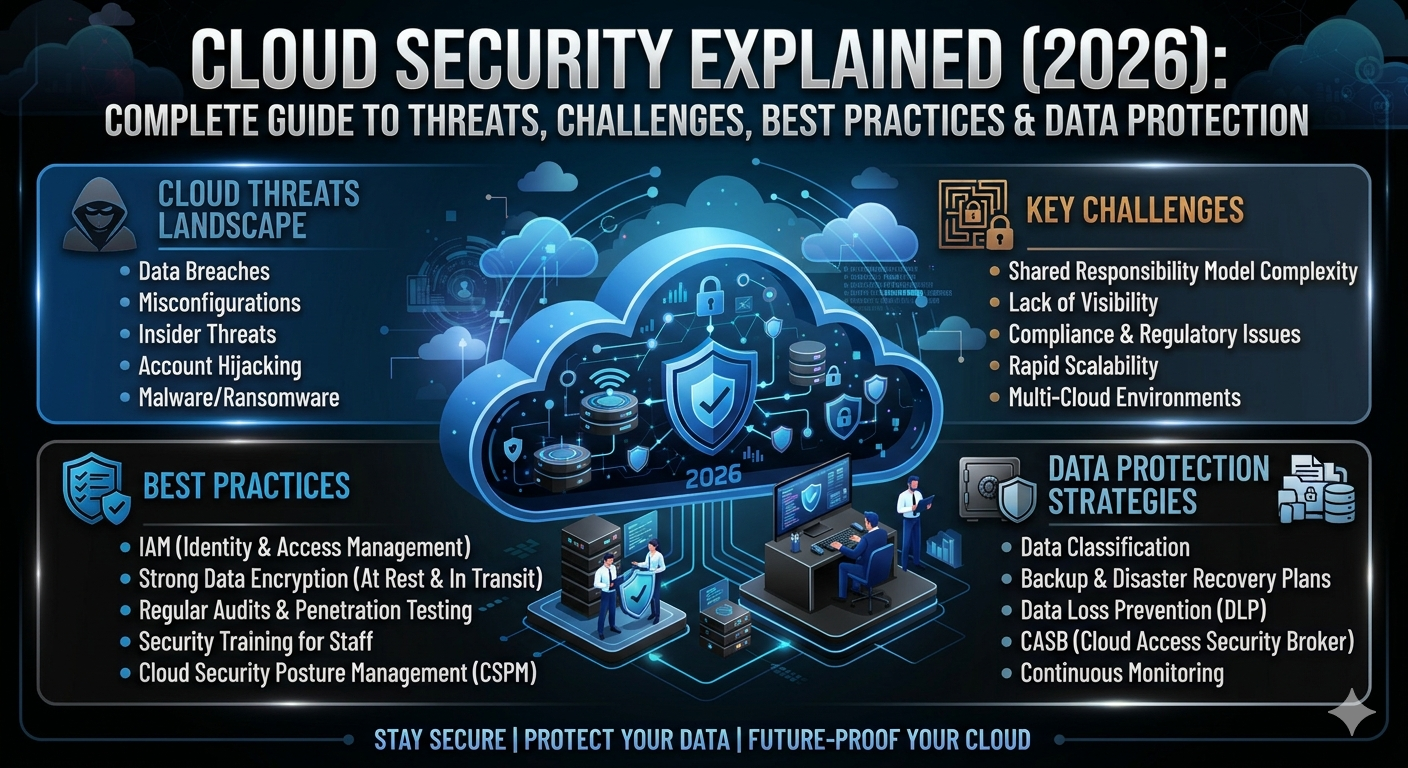
Cloud technology has transformed the way people store files, run applications, and manage business operations. From online banking to video streaming, millions of users depend on cloud services every day. As cloud adoption continues to grow, protecting digital information has become more important than ever. That is why Cloud Security is now a top priority for individuals, businesses, and government organizations.
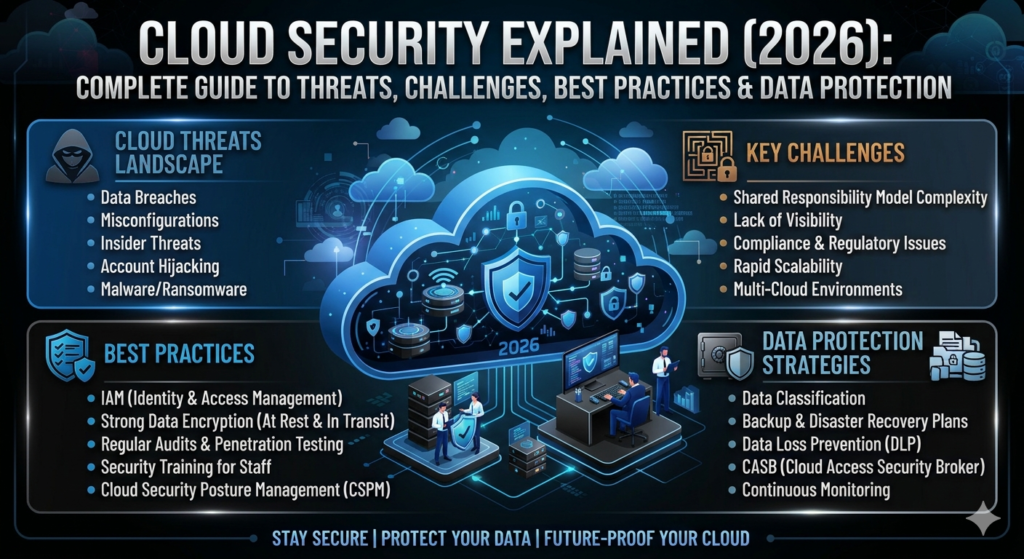
This guide will help you understand Cloud Security Explained in simple English. You will learn how cloud security works, why it matters, the biggest Cloud Security Threats, common challenges, and the best ways to keep your data safe. Whether you are a beginner, an IT professional, or a business owner, this guide will help you build a stronger understanding of Cybersecurity in Cloud Computing and modern Cloud Data Protection.
What Is Cloud Security?
Cloud Security is the collection of technologies, policies, tools, and processes that protect cloud-based systems, applications, and data from cyber threats. It helps keep sensitive information safe while ensuring that only authorized users can access important resources. As organizations continue moving workloads to the cloud, strong security has become an essential part of modern Cloud Computing.
Good cloud security is much more than installing security software. It combines Access Control, Authentication, continuous Security Monitoring, and modern Encryption methods to protect information from cybercriminals. A well-designed security strategy also helps businesses meet legal requirements, reduce risks, and maintain customer trust.
Definition of Cloud Security
At its core, Cloud Security Explained means protecting every part of a cloud environment, including servers, applications, databases, user accounts, and stored information. Security teams work together with the Cloud Service Provider to defend systems against unauthorized access, data theft, and cyberattacks. This shared effort creates a safer digital environment for everyone.
Why Cloud Security Matters in 2026
Cyberattacks have become more advanced every year. Criminal groups now target cloud environments because they often contain valuable personal records, financial information, and business data. Strong Cloud Security Best Practices reduce these risks while improving Cloud Risk Management, protecting Data Privacy, and supporting business continuity during unexpected incidents.
How Does Cloud Security Work?
Cloud security works through multiple protective layers that secure every stage of data storage, processing, and communication. Instead of depending on one security tool, modern cloud environments combine several technologies that work together. This layered approach makes it much harder for attackers to exploit weaknesses inside cloud systems.
Every cloud environment also follows a security partnership between the customer and the provider. This partnership defines who is responsible for protecting infrastructure, applications, user accounts, and sensitive information. Understanding these responsibilities helps organizations avoid costly mistakes and improve overall Cloud Security Compliance.
Security Layers in Cloud Computing
Cloud environments use several security layers, including Cloud Network Security, Cloud Application Security, Cloud Infrastructure Security, Firewall protection, Endpoint Security, and Threat Detection systems. Each layer performs a different job while working together to create stronger protection against modern cyber threats.
Shared Responsibility Model
The Shared Responsibility Model explains that security responsibilities are divided between the cloud provider and the customer. The provider usually protects the physical infrastructure, while customers secure their accounts, applications, stored data, and user permissions. Understanding this model helps prevent security gaps and improves Cloud Compliance.
| Security Area | Cloud Provider | Customer |
| Physical Data Centers | ✔ | |
| Hardware Maintenance | ✔ | |
| Operating Systems (Depending on Service Model) | ✔ / Shared | ✔ / Shared |
| User Accounts | ✔ | |
| Data Protection | ✔ | |
| Application Security | ✔ |
Why Cloud Security Is Important for Individuals and Businesses
Every day, people upload photos, financial documents, emails, healthcare records, and business files to cloud platforms. Without proper security, this information could become an easy target for cybercriminals. Strong Cloud Security Solutions protect valuable digital assets while giving users confidence that their information remains private.
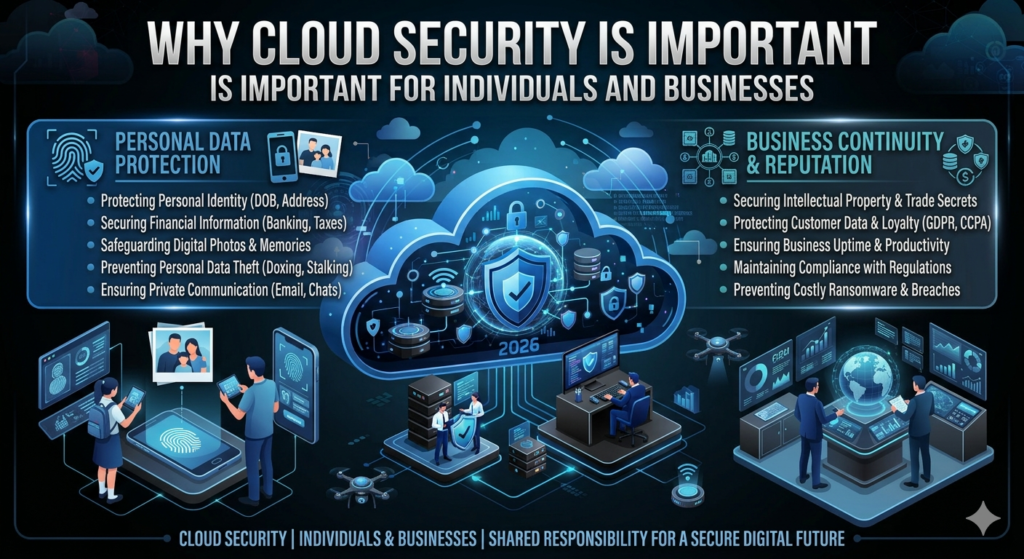
Businesses face even greater risks because they store customer records, payment details, employee information, and intellectual property. A single security breach can damage reputation, interrupt operations, and create significant financial losses. Investing in Cloud Security Tools helps organizations reduce these risks while maintaining customer trust.
Protecting Personal Data
Personal information has become one of the most valuable digital assets. Strong Data Encryption, secure Digital Identity management, and Multi-Factor Authentication (MFA) help protect online accounts from unauthorized access. These security measures greatly reduce the chances of identity theft and account compromise.
Protecting Business Information
Organizations depend on reliable Cloud Backup, secure Authorization, and continuous Security Audit processes to protect business operations. Strong security controls also support Backup and Recovery planning, allowing companies to restore important systems quickly after cyber incidents or accidental data loss.
“Cloud security is not just about protecting technology. It is about protecting people, businesses, and the trust they place in digital services.”
Common Cloud Security Threats
Cloud technology provides excellent flexibility, but it also introduces new security risks. Cybercriminals continuously search for weaknesses they can exploit to steal information, disrupt operations, or demand ransom payments. Understanding these threats helps organizations prepare stronger defenses before an attack occurs.
No security system can eliminate every risk. However, organizations that understand common Cloud Security Challenges and implement proactive protection strategies are far more likely to detect attacks early and minimize potential damage.
Data Breaches
A data breach happens when unauthorized individuals gain access to confidential information. Weak passwords, poor Access Control, and software vulnerabilities often contribute to these incidents. Strong authentication methods and regular security reviews help reduce the likelihood of data breaches.
Malware Attacks
Malware includes harmful software designed to damage systems, steal information, or monitor user activity. Attackers often distribute malware through infected email attachments, fake downloads, or compromised websites. Modern Threat Detection tools help identify suspicious activity before malware spreads.
Ransomware
Ransomware encrypts valuable files and demands payment for their release. Businesses without reliable Cloud Backup and Disaster Recovery plans may experience severe operational disruptions. Regular backups and strong security controls remain the best defense against ransomware attacks.
Insider Threats
An Insider Threat comes from employees, contractors, or trusted users who intentionally or accidentally expose sensitive information. Organizations reduce this risk through proper Identity and Access Management (IAM), regular permission reviews, and employee security awareness training.
Phishing Attacks
Phishing attacks trick users into revealing passwords, financial information, or other sensitive data. Criminals often create fake emails or websites that closely resemble trusted organizations. Security awareness training combined with Multi-Factor Authentication (MFA) significantly reduces the success of phishing campaigns.
DDoS Attacks
A DDoS Attack overwhelms online services with massive amounts of internet traffic, making websites and applications unavailable. Cloud providers often deploy advanced traffic filtering, intelligent Security Monitoring, and automated defense systems to reduce the impact of these attacks.
| Threat | Primary Risk | Recommended Protection |
| Data Breach | Data Theft | Encryption, MFA |
| Malware | System Infection | Endpoint Protection |
| Ransomware | File Encryption | Cloud Backup |
| Insider Threat | Unauthorized Access | Identity and Access Management (IAM) |
| Phishing | Credential Theft | User Training + MFA |
| DDoS Attack | Service Downtime | Firewall + Traffic Filtering |
Biggest Cloud Security Challenges in 2026
Cloud technology continues to evolve at a remarkable pace. However, every innovation introduces new security concerns that organizations must address. Many security incidents happen because of human mistakes rather than technical failures. Understanding these Cloud Security Challenges helps organizations strengthen Cloud Risk Management and build a safer cloud environment before attackers discover weaknesses.
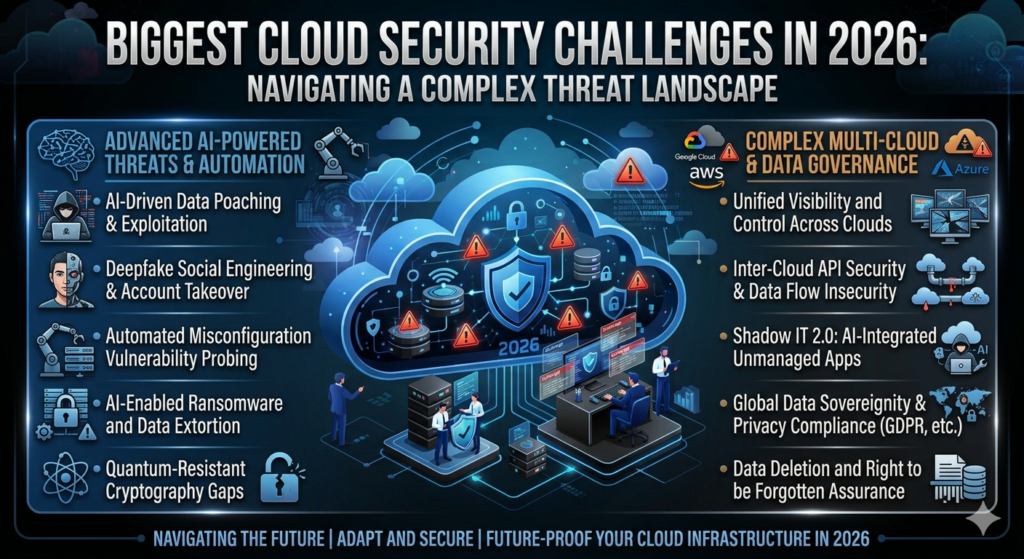
Modern businesses often use several cloud platforms at the same time. Managing users, applications, and security policies across multiple environments becomes more difficult as organizations grow. Regular Security Monitoring, continuous Risk Assessment, and strong Cloud Security Compliance help reduce these challenges while improving overall protection.
Misconfigured Cloud Services
A misconfigured cloud service is one of the leading causes of cloud security incidents. An incorrectly configured storage bucket, database, or virtual machine may accidentally expose confidential information to the public. Regular reviews, automated configuration checks, and secure deployment practices help organizations close these security gaps before they become serious problems.
Weak Passwords
Weak passwords remain one of the easiest ways for attackers to compromise cloud accounts. Short passwords, reused credentials, and predictable combinations increase security risks. Organizations should combine strong password policies with Multi-Factor Authentication (MFA) and secure Authentication methods to reduce unauthorized access.
Lack of Visibility
Organizations cannot protect what they cannot see. Limited visibility into cloud resources makes it difficult to identify suspicious activity, unauthorized users, or unusual data transfers. Advanced Cloud Security Monitoring, centralized dashboards, and continuous logging improve operational awareness while supporting faster Incident Response.
Compliance Issues
Many industries must follow strict legal and regulatory requirements when storing customer information. Organizations that fail to maintain proper Cloud Compliance, Data Privacy, and documentation may face legal penalties and reputational damage. Regular audits and security assessments help maintain compliance while improving customer confidence.
| Challenge | Potential Impact | Recommended Solution |
| Misconfigured Services | Data Exposure | Regular Security Reviews |
| Weak Passwords | Account Compromise | Strong Passwords + Multi-Factor Authentication (MFA) |
| Lack of Visibility | Delayed Detection | Cloud Security Monitoring |
| Compliance Issues | Legal Risks | Regular Security Audit |
Types of Cloud Security
Cloud security consists of several specialized areas that work together to protect cloud environments. Each security layer focuses on different risks while supporting the overall security strategy. Combining these layers creates stronger protection against modern cyber threats.
Organizations should never depend on a single security technology. Instead, they should implement multiple defensive layers that protect infrastructure, applications, identities, devices, and stored information. This approach strengthens Cybersecurity in Cloud Computing while reducing the likelihood of successful attacks.
Network Security
Network Security protects data as it moves across cloud networks. Technologies such as secure routing, traffic filtering, and modern Firewall systems help prevent unauthorized access while improving overall network resilience against cyberattacks.
Application Security
Cloud Application Security focuses on protecting cloud-hosted software from vulnerabilities, coding flaws, and unauthorized access. Secure software development, routine updates, and regular vulnerability testing reduce security risks while improving application reliability.
Endpoint Security
Every laptop, smartphone, desktop, or tablet connected to cloud services becomes a potential entry point for attackers. Strong Endpoint Protection helps detect suspicious activity, block malicious software, and protect devices before threats spread throughout the organization.
Identity Security
User identities remain one of the most valuable security assets. Effective Identity and Access Management (IAM) controls who can access cloud resources, while secure Authorization policies ensure users receive only the permissions required to perform their work.
Data Security
Protecting sensitive information remains the primary goal of Cloud Data Protection. Strong Encryption, secure backups, and Data Loss Prevention (DLP) technologies help organizations protect confidential information whether it is stored, transmitted, or processed inside the cloud.
| Security Type | Primary Focus |
| Cloud Network Security | Protecting Network Traffic |
| Cloud Application Security | Securing Cloud Applications |
| Endpoint Protection | Protecting User Devices |
| Identity and Access Management (IAM) | Managing User Access |
| Cloud Data Protection | Protecting Sensitive Information |
Essential Cloud Security Features
Modern cloud platforms include many built-in security features that work together to protect users and business data. These features improve system resilience, strengthen access controls, and reduce the likelihood of successful cyberattacks. Organizations should enable these protections from the beginning rather than adding them after an incident occurs.
Security is strongest when multiple protective features operate together. Combining Encryption, Access Control, monitoring, and intelligent detection systems creates several defensive layers that attackers must overcome. This layered strategy significantly improves overall cloud resilience.
Encryption
Encryption converts readable information into coded data that unauthorized users cannot understand. Even if attackers intercept encrypted files, they cannot read the information without the correct decryption key. Encryption remains one of the most effective methods for protecting sensitive cloud data.
Multi-Factor Authentication (MFA)
Multi-Factor Authentication (MFA) adds an additional verification step before users can access cloud accounts. Even if a password becomes compromised, attackers still need a second authentication factor, making unauthorized access much more difficult.
Identity and Access Management (IAM)
Identity and Access Management (IAM) helps administrators control user identities, assign permissions, and manage secure access throughout cloud environments. Proper identity management reduces insider risks while strengthening overall Access Control.
Firewalls
A modern Firewall monitors network traffic and blocks suspicious connections before they reach cloud resources. Cloud firewalls automatically inspect incoming and outgoing traffic, helping organizations stop many attacks before they cause damage.
Security Monitoring
Continuous Security Monitoring helps organizations detect suspicious activity in real time. Many companies also use a Security Information and Event Management (SIEM) platform to collect security logs, analyze unusual behavior, and accelerate Incident Response during cyber incidents.
Cloud Security Best Practices
Strong security depends on consistent daily habits rather than expensive technology alone. Organizations that follow proven Cloud Security Best Practices significantly reduce their exposure to cyber threats while improving long-term resilience. Security should become part of everyday business operations instead of an occasional task.
Building a secure cloud environment requires continuous improvement. Regular training, software updates, strong authentication, and reliable backup strategies work together to reduce security risks. These simple practices help organizations maintain better protection as cyber threats continue evolving.
Strong Password Policies
Every user should create long, unique passwords for cloud accounts. Password managers simplify this process while reducing the temptation to reuse passwords across multiple services. Combined with Multi-Factor Authentication (MFA), strong passwords create a much stronger defense.
Regular Software Updates
Software vendors frequently release updates that fix newly discovered vulnerabilities. Installing updates quickly helps close security gaps before attackers exploit them. Delayed updates often leave organizations exposed to avoidable risks.
Employee Security Training
Employees remain one of the strongest defenses against cybercrime when they receive proper training. Teaching staff how to recognize Phishing, suspicious links, and social engineering attempts helps prevent many successful attacks before they begin.
Backup Strategy
A reliable Cloud Backup strategy protects organizations from accidental deletion, hardware failure, and Ransomware attacks. Regular Backup and Recovery testing ensures that important information can be restored quickly whenever an unexpected incident occurs.
Case Study: A small U.S. marketing agency experienced a ransomware attack after an employee clicked a malicious email attachment. Because the company maintained encrypted cloud backups and regularly tested its recovery process, it restored its systems within hours without paying the ransom. The incident highlighted how proactive planning and consistent security practices can significantly reduce business disruption.
Cloud Security vs Traditional Security
Organizations have protected computer systems for decades, but cloud technology has changed how security works. Traditional security focuses mainly on protecting on-premises servers inside a company building. Cloud security protects applications, data, identities, and services that may operate across multiple data centers around the world. Both approaches aim to protect information, yet they use different methods and responsibilities.
Modern businesses often combine cloud and on-premises environments to create a flexible IT infrastructure. Understanding the differences helps organizations choose the right security strategy while improving Cloud Security, Cybersecurity, and overall Cloud Risk Management.
Key Differences
Traditional environments require organizations to manage almost every part of their infrastructure. In contrast, cloud platforms follow the Shared Responsibility Model, where the Cloud Service Provider secures the underlying infrastructure while customers protect their applications, user accounts, and Data Security.
Advantages and Limitations
Cloud environments offer automatic updates, better scalability, and advanced Security Monitoring, while traditional systems provide greater physical control over hardware. The best approach depends on business goals, regulatory requirements, and long-term IT strategy.
| Feature | Cloud Security | Traditional Security |
| Infrastructure | Managed by Provider | Managed by Organization |
| Scalability | Excellent | Limited |
| Updates | Mostly Automatic | Manual |
| Initial Cost | Lower | Higher |
| Remote Access | Easy | More Limited |
| Maintenance | Shared | Organization |
Best Cloud Security Tools
Technology alone cannot stop every cyberattack, but the right security tools make a significant difference. Modern organizations use specialized platforms to monitor activity, detect threats, and respond quickly to suspicious behavior. Selecting the right Cloud Security Tools strengthens Cloud Infrastructure Security and improves overall resilience.
No single tool protects everything. Most organizations combine multiple solutions that work together to secure networks, workloads, user identities, and applications. This layered approach provides stronger protection against evolving cyber threats.
Microsoft Defender for Cloud
Microsoft Defender for Cloud helps organizations secure workloads running on Microsoft Azure and hybrid environments. It continuously scans resources, identifies vulnerabilities, and provides security recommendations that improve Threat Detection and regulatory compliance.
CrowdStrike
CrowdStrike delivers advanced Endpoint Protection using Artificial Intelligence (AI) and behavioral analysis. Its cloud-native platform detects suspicious activity quickly while helping organizations stop attacks before they spread.
Palo Alto Networks
Palo Alto Networks provides enterprise-grade Cloud Network Security, advanced firewall technology, and cloud workload protection. Many large organizations rely on its security platform to protect distributed cloud environments.
Trend Micro
Trend Micro focuses on Cloud Workload Protection, vulnerability management, and compliance support. Its platform helps businesses secure applications, servers, and cloud workloads across multiple cloud providers.
Wiz
Wiz offers deep visibility across Multi-Cloud environments. It identifies configuration risks, security weaknesses, and exposed assets without requiring complicated deployment, making it a popular choice for organizations managing several cloud platforms.
| Security Tool | Primary Strength | Best Use Case |
| Microsoft Defender for Cloud | Cloud Protection | Azure & Hybrid Environments |
| CrowdStrike | Endpoint Detection | Enterprise Security |
| Palo Alto Networks | Network Protection | Large Organizations |
| Trend Micro | Workload Security | Hybrid Cloud |
| Wiz | Cloud Visibility | Multi-Cloud Environments |
Cloud Security Compliance Standards
Many industries must follow legal and industry standards when handling sensitive information. Compliance frameworks help organizations protect customer data while demonstrating that proper security controls are in place. Meeting these standards also strengthens customer confidence and supports long-term business growth.
Compliance is not a one-time project. Organizations should perform regular Security Audit activities, maintain documentation, and review security controls continuously. This ongoing effort supports Cloud Security Compliance and reduces regulatory risks.
ISO 27001
ISO 27001 is an internationally recognized information security standard. It helps organizations establish structured security policies, manage risks, and continuously improve their Data Security practices.
SOC 2
SOC 2 evaluates how service providers protect customer information. It focuses on security, availability, processing integrity, confidentiality, and privacy, making it especially valuable for technology companies.
GDPR
The General Data Protection Regulation protects the personal information of individuals within the European Union. Even organizations outside Europe may need to comply when serving European customers and protecting Data Privacy.
HIPAA
HIPAA establishes security and privacy requirements for healthcare organizations in the United States. Healthcare providers and related businesses use HIPAA controls to safeguard patient information stored in cloud environments.
| Compliance Standard | Primary Focus |
| ISO 27001 | Information Security Management |
| SOC 2 | Trust and Security Controls |
| GDPR | Personal Data Privacy |
| HIPAA | Healthcare Information Protection |
How Artificial Intelligence Is Improving Cloud Security
Cyber threats continue evolving every day, making manual monitoring increasingly difficult. Modern cloud security platforms now use Artificial Intelligence (AI) and Machine Learning to analyze massive amounts of security data within seconds. These technologies help identify unusual behavior much faster than traditional methods.
AI does not replace human security professionals. Instead, it supports them by automating repetitive tasks, prioritizing alerts, and improving response times. This combination allows security teams to focus on high-risk incidents while reducing false alarms through intelligent Automation.
AI Threat Detection
AI-powered systems continuously analyze user behavior, network traffic, and application activity. When unusual patterns appear, the system immediately generates alerts, improving Threat Detection before attackers can cause significant damage.
Automated Response
Modern platforms automatically isolate compromised devices, block suspicious connections, or disable risky accounts when they detect serious threats. Faster Incident Response limits damage and helps organizations recover more quickly after security events.
User Activity
│
▼
AI Security Analysis
│
▼
Threat Detection
│
▼
Automatic Alert
│
▼
Incident Response
Cloud Security for Small Businesses
Small businesses often believe cybercriminals only target large corporations. In reality, attackers frequently choose smaller organizations because they may have fewer security resources. Even a simple security improvement can dramatically reduce business risk while protecting valuable customer information.
Building strong cloud security does not always require a large budget. Careful planning, employee awareness, and proven security practices help small businesses strengthen Cloud Security Solutions without unnecessary spending.
Affordable Security Tips
Small businesses should enable Multi-Factor Authentication (MFA), use reliable Cloud Backup, encrypt sensitive information, review user permissions regularly, and perform routine software updates. These affordable measures provide strong protection against many common attacks.
Common Mistakes to Avoid
Many organizations overlook software updates, reuse passwords, ignore security alerts, or grant excessive user permissions. Correcting these mistakes improves Cloud Access Security, reduces vulnerabilities, and strengthens overall Cloud Security Best Practices.
Case Study: A small online retail company migrated its customer database to the cloud. After enabling MFA, encrypting customer records, and conducting monthly permission reviews, the company significantly reduced unauthorized login attempts and improved customer confidence. Simple security improvements created measurable long-term benefits without requiring expensive infrastructure.
Cloud Security for Enterprises
Large organizations manage thousands of employees, devices, applications, and cloud resources every day. As their digital footprint grows, the attack surface grows too. Enterprise security requires a proactive strategy that combines technology, governance, and continuous monitoring. A strong Cloud Security program helps organizations protect sensitive information while maintaining business continuity and customer trust.
Enterprise security is not only about stopping cyberattacks. It also supports compliance, protects business reputation, and reduces financial risk. Organizations that invest in Cloud Security Solutions, continuous Security Monitoring, and regular Risk Assessment are better prepared to defend against modern cyber threats.
Enterprise Risk Management
Enterprise Risk Management helps organizations identify, evaluate, and reduce security risks before they become serious incidents. Security teams perform continuous Vulnerability Management, maintain regular Security Audit processes, and develop response plans that minimize operational disruption during cyber events.
Zero Trust Security
Zero Trust Security follows a simple principle: never trust any user or device automatically. Every login request must be verified through strong Authentication, Authorization, and continuous identity verification. This approach significantly reduces unauthorized access and strengthens overall Cloud Access Security.
| Enterprise Security Area | Primary Goal |
| Identity Management | Secure User Access |
| Risk Management | Reduce Business Risk |
| Continuous Monitoring | Detect Threats Early |
| Compliance | Meet Legal Requirements |
| Incident Response | Recover Quickly |
Cloud Security Certifications
Professional certifications help cybersecurity professionals validate their knowledge and demonstrate practical cloud security skills. Many employers prefer certified candidates because certifications show a strong understanding of industry standards, cloud platforms, and security best practices.
Whether you are starting your cybersecurity career or advancing into cloud security, earning the right certification can improve your technical knowledge and career opportunities. It also helps organizations build stronger security teams capable of protecting modern cloud environments.
CCSP
The Certified Cloud Security Professional (CCSP) certification focuses on cloud architecture, Cloud Security Compliance, Data Security, and cloud governance. It is widely respected among experienced cybersecurity professionals.
CompTIA Security+
CompTIA Security+ provides a strong foundation in Cybersecurity, Network Security, risk management, identity management, and incident response. It is an excellent certification for beginners entering the cybersecurity field.
AWS Security Specialty
The AWS Security Specialty certification focuses on securing workloads within Amazon Web Services (AWS). It covers identity management, logging, encryption, monitoring, and cloud infrastructure protection.
Microsoft Azure Security Engineer
This certification prepares professionals to secure workloads running on Microsoft Azure. Topics include identity management, cloud networking, platform protection, and security operations.
| Certification | Best For |
| CCSP | Advanced Cloud Security Professionals |
| CompTIA Security+ | Beginners |
| AWS Security Specialty | AWS Security Engineers |
| Microsoft Azure Security Engineer | Azure Professionals |
Future Trends in Cloud Security (2026 and Beyond)
Cloud security continues evolving as technology advances. Organizations now face increasingly sophisticated attacks that require faster detection, stronger automation, and smarter defensive strategies. Businesses that stay informed about emerging trends will be better prepared for future cyber threats.
The future of cloud security will focus on intelligent automation, stronger identity protection, and improved data privacy. Organizations adopting these technologies today will gain stronger resilience against tomorrow’s attacks while improving operational efficiency.
AI-Powered Security
Modern Artificial Intelligence (AI) systems analyze billions of security events every day. Combined with Machine Learning, they recognize unusual behavior, prioritize alerts, and improve Threat Detection with greater speed and accuracy than traditional methods.
Zero Trust
Zero Trust Security continues becoming the preferred security model for organizations worldwide. Continuous identity verification, least-privilege access, and ongoing monitoring reduce the likelihood of unauthorized access even when attackers obtain user credentials.
Multi-Cloud Security
Many businesses now operate across Multi-Cloud environments using services from Amazon Web Services (AWS), Microsoft Azure, and Google Cloud Platform (GCP). Security teams must maintain consistent protection across every cloud platform while managing identities, workloads, and compliance requirements.
Quantum-Resistant Encryption
Researchers are developing new Encryption technologies designed to resist future quantum computing attacks. Although practical quantum threats remain limited today, organizations are already preparing stronger cryptographic protections for the years ahead.
Common Cloud Security Mistakes to Avoid
Many cloud security incidents happen because of avoidable mistakes rather than advanced hacking techniques. Simple errors such as weak passwords or outdated software often create opportunities for attackers. Understanding these common mistakes helps organizations strengthen their overall security posture.
Building a secure cloud environment requires consistency. Regular reviews, employee awareness, and proactive security management reduce risks while supporting long-term Cloud Security Best Practices.
Weak Passwords
Weak passwords remain one of the leading causes of compromised accounts. Organizations should require long, unique passwords supported by password managers and Multi-Factor Authentication (MFA) for every important account.
No MFA
Disabling Multi-Factor Authentication (MFA) leaves cloud accounts vulnerable even when passwords are strong. Adding a second verification factor dramatically reduces unauthorized login attempts and improves account security.
Poor Access Control
Granting excessive permissions increases the risk of accidental or intentional misuse. Strong Identity and Access Management (IAM) ensures users receive only the minimum access required to perform their responsibilities.
Ignoring Updates
Software updates frequently fix newly discovered security vulnerabilities. Delaying updates gives attackers more time to exploit known weaknesses. Organizations should establish a routine update schedule for operating systems, applications, and cloud services.
Case Study: A mid-sized financial company delayed several security updates because of operational concerns. Attackers later exploited one of those known vulnerabilities to gain unauthorized access. After strengthening patch management, implementing Zero Trust Security, and improving Cloud Security Monitoring, the company significantly reduced future security risks.
Frequently Asked Questions (FAQs)
What is cloud security?
Cloud Security is the combination of technologies, policies, and processes that protect cloud systems, applications, and data from cyber threats. It includes Data Encryption, Access Control, Authentication, continuous monitoring, and secure identity management to keep information safe.
Why is cloud security important?
Cloud security protects sensitive information from unauthorized access, data breaches, ransomware, and other cyber threats. Strong security also improves Data Privacy, supports business continuity, and builds customer trust.
What are the biggest cloud security threats?
Common threats include Ransomware, Malware, Phishing, DDoS Attack, Insider Threat, weak passwords, and cloud misconfigurations. Organizations reduce these risks by following Cloud Security Best Practices and maintaining proactive security programs.
Which cloud provider is the most secure?
Major providers such as Amazon Web Services (AWS), Microsoft Azure, and Google Cloud Platform (GCP) all offer strong security features. Security depends not only on the provider but also on how customers configure and manage their cloud environment.
Is cloud storage safe?
Yes. Cloud storage is generally very secure when users enable Multi-Factor Authentication (MFA), strong passwords, Encryption, and regular Cloud Backup. Security also improves when organizations review user permissions frequently.
Expert Tips to Improve Cloud Security
Protecting cloud environments requires continuous attention rather than a one-time setup. Small improvements made consistently often provide greater protection than expensive technology alone. Organizations that develop strong security habits are better prepared for both current and future cyber threats.
A successful security strategy combines technology with people and processes. Regular reviews, employee awareness, and proactive planning create a stronger defense against evolving attacks while improving long-term Cloud Risk Management.
Build a Security-First Culture
Every employee should understand their role in protecting business information. Regular awareness training helps users recognize suspicious emails, report unusual activity quickly, and follow secure working practices. A strong security culture reduces human error, which remains one of the leading causes of security incidents.
Monitor Cloud Activity
Continuous Cloud Security Monitoring helps security teams identify unusual login attempts, unexpected data transfers, and suspicious behavior before attackers cause significant damage. Organizations that monitor their cloud environment around the clock respond faster to emerging threats.
Encrypt Sensitive Data
Always protect confidential information using modern Encryption technologies. Encrypting files both during transmission and while stored significantly reduces the impact of unauthorized access and strengthens Cloud Data Protection.
Review Permissions Regularly
User roles change over time. Employees join departments, change responsibilities, or leave the organization. Regular permission reviews ensure users have only the access they need, strengthening Identity and Access Management (IAM) and reducing unnecessary security risks.
| Expert Recommendation | Benefit |
| Enable Multi-Factor Authentication | Stronger Account Protection |
| Encrypt Sensitive Data | Better Data Privacy |
| Monitor Cloud Activity | Faster Threat Detection |
| Review User Permissions | Improved Access Control |
| Keep Software Updated | Reduced Vulnerabilities |
| Test Backup Recovery | Faster Disaster Recovery |
Conclusion – Protect Your Cloud Data with Strong Cloud Security
Cloud technology continues to transform how people work, communicate, and store information. As organizations move more applications and data into the cloud, security becomes even more important. Understanding Cloud Security Explained gives you the knowledge needed to protect valuable information from modern cyber threats while improving long-term resilience.
Strong cloud security is built on several important foundations. These include Identity and Access Management (IAM), Multi-Factor Authentication (MFA), Data Encryption, continuous Security Monitoring, regular software updates, and employee awareness. When these practices work together, they create multiple layers of protection that reduce security risks and improve business continuity.
No security solution can eliminate every threat. However, organizations that follow proven Cloud Security Best Practices, conduct regular security assessments, and stay informed about emerging technologies are far better prepared to defend against evolving cyberattacks. Security is an ongoing journey that requires continuous improvement rather than a single implementation.
Whether you are protecting personal files, managing a growing business, or leading a large enterprise, investing in strong cloud security is one of the smartest technology decisions you can make. By applying the strategies discussed in this guide, you can protect your data, strengthen customer trust, and confidently embrace the future of Cloud Computing.
Continue Reading on DailyTecho
If you found this guide helpful, continue exploring our Cloud Computing series:
| Related Guide | Why Read It? |
| What Is Cloud Computing? The Ultimate Beginner’s Guide (2026) | Learn cloud fundamentals. |
| Public Cloud vs Private Cloud vs Hybrid Cloud | Compare deployment models. |
| Cloud Service Models Explained: IaaS, PaaS & SaaS | Understand cloud service types. |
| Cloud Deployment Models Explained | Explore public, private, hybrid, and multi-cloud. |
| Cloud Storage Explained (2026) | Learn how cloud storage works and compare providers. |
→ Explore More Technology Guides
Meta Description
Learn Cloud Security with this complete 2026 guide. Explore common threats, security challenges, best practices, compliance standards, AI, and proven ways to protect your personal and business data.
3 Comments