

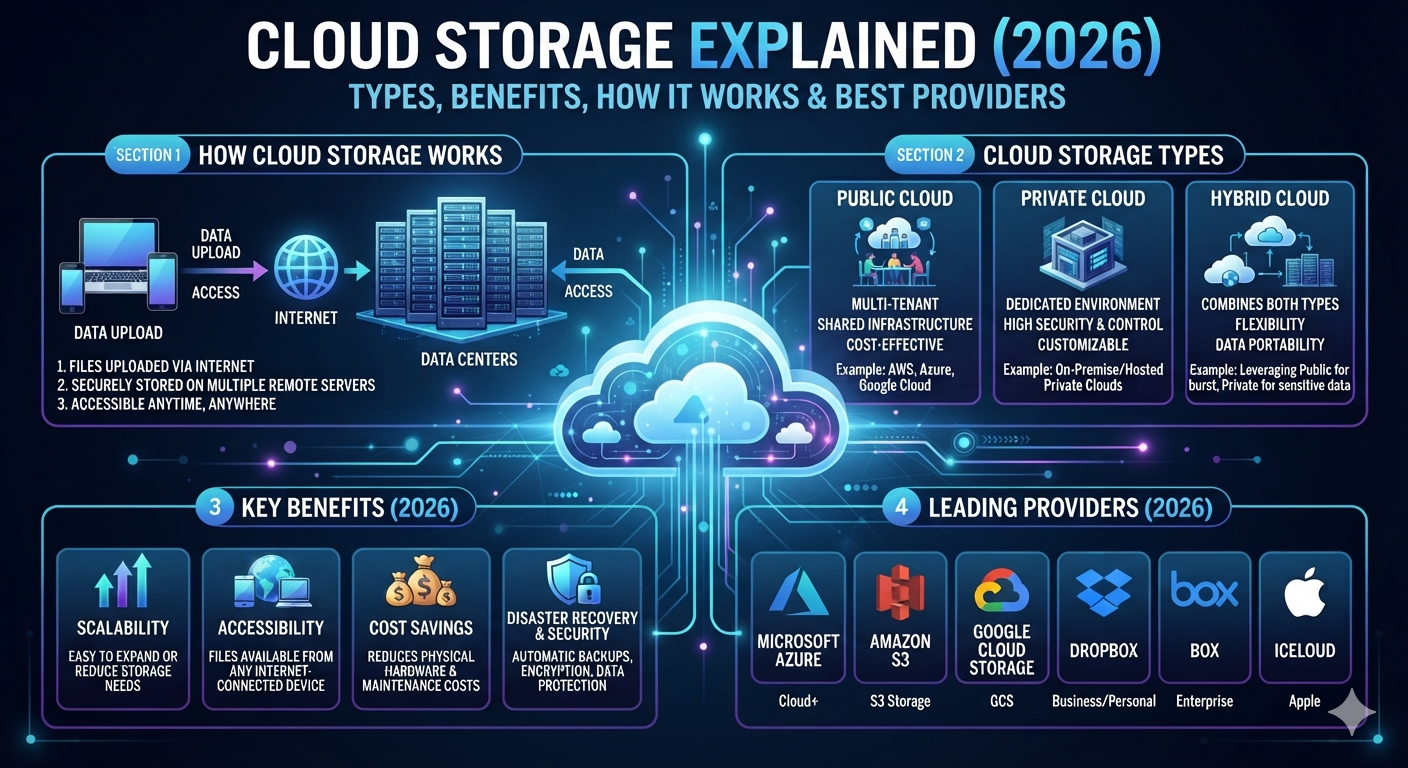
Cloud storage has changed the way people save, manage, and share information. Instead of keeping everything on a computer or an external hard drive, you can store your digital files on remote servers connected through the internet. This approach makes your data available whenever you need it, whether you’re working from home, traveling, or using a different device. As cloud computing continues to grow, cloud storage has become one of the most important technologies for students, professionals, businesses, and developers across the United States.
Today, millions of people rely on cloud storage every day without even realizing it. Saving photos to Google Photos, backing up an iPhone with iCloud, syncing documents through OneDrive, or hosting business files in Dropbox all depend on modern cloud storage services. These platforms provide secure cloud storage, improve teamwork, simplify file sharing, and protect important information from hardware failures. In this guide, you’ll learn how cloud storage works, the different storage types available, the advantages and limitations of each option, and how to choose the best provider for your needs.
What Is Cloud Storage?
Cloud storage is a technology that allows you to save digital files on remote servers instead of storing everything on your local computer or smartphone. Those servers are maintained by trusted cloud storage providers inside highly secure data centers. Once your files are uploaded through the internet, you can access them from almost anywhere using a compatible device. This makes cloud storage a practical solution for personal users, businesses, and organizations that need flexible and reliable online storage.
Unlike traditional storage devices that remain in one physical location, cloud storage gives you greater freedom and flexibility. You don’t have to worry about carrying USB drives or external hard disks because your information stays protected inside a professional cloud infrastructure. Modern cloud storage solutions also include advanced data protection, automatic synchronization, and strong security features that keep your information safe while making collaboration much easier.
Simple Definition of Cloud Storage
Cloud storage is a service that stores your cloud files on internet-connected storage servers instead of your own device. You simply upload your data through a secure connection, and the provider stores it inside professionally managed data centers. Whenever you need a file, you can download or view it from any authorized device with an internet connection.
Why Cloud Storage Is Important Today
Modern life depends on fast access to information. Whether you’re working remotely, attending online classes, running a business, or sharing family photos, cloud storage makes your information available whenever you need it. It also supports cloud collaboration, improves remote access, and reduces the risk of losing valuable information due to hardware failure or accidental deletion.
Cloud Storage vs Traditional Storage
Traditional storage keeps files on a physical device that you own, such as a hard drive or USB flash drive. Cloud storage keeps information inside professionally managed storage infrastructure connected through the internet. While local storage offers direct offline access, cloud storage provides greater flexibility, easier file synchronization, stronger data availability, and simpler sharing across multiple devices.
Cloud Storage vs Traditional Storage
| Feature | Cloud Storage | Traditional Storage |
| Storage Location | Remote data centers | Local device |
| Internet Required | Usually Yes | No |
| Device Access | Multiple devices | Usually one device |
| Data Backup | Automatic | Manual |
| File Sharing | Easy | Limited |
| Hardware Maintenance | Provider manages | User manages |
| Storage Expansion | Simple | Hardware upgrade needed |
How Does Cloud Storage Work?
Cloud storage works by sending your files through an encrypted internet connection to highly secure remote servers owned by a cloud provider. The provider stores your information inside multiple data centers to improve high availability, redundancy, and reliability. When you request a file later, the system quickly retrieves it and delivers it to your device. This entire process usually happens in seconds, making cloud storage feel almost as fast as local storage.
Behind the scenes, providers use advanced storage management, intelligent storage optimization, and automatic data synchronization to ensure your files remain available even if hardware fails. Many platforms also use artificial intelligence (AI) and machine learning (ML) to improve storage efficiency, detect unusual activity, and enhance security. These technologies help businesses and personal users trust cloud storage for both everyday tasks and mission-critical workloads.
Uploading Files to the Cloud
Uploading begins when you select a file and send it through a secure internet connection. During the upload process, the provider may compress, encrypt, and distribute the file across multiple storage servers. This approach improves storage performance, protects data, and ensures your information remains available if one server experiences a problem.
Remote Data Centers
Professional cloud providers operate highly secure data centers equipped with backup power systems, cooling technology, physical security, and constant monitoring. These facilities store millions of cloud files while maintaining excellent data availability and business continuity for users around the world.
Internet Connection and Data Access
Once your information is stored, you can access it from almost any location using a browser or mobile application. Whether you switch between a laptop, tablet, or smartphone, cross-device synchronization ensures your latest files remain available through secure remote access.
File Synchronization Process
Whenever you edit a document or upload a new photo, the platform updates your account automatically. This real-time synchronization keeps every connected device current without requiring manual updates. Many providers also support automatic backup, making sure your newest files stay protected.
How Cloud Storage Works
| Step | Description |
| Upload | Files travel securely through the internet. |
| Encryption | Data is protected before storage. |
| Storage | Files are saved inside secure data centers. |
| Synchronization | Changes appear across connected devices. |
| Retrieval | Files are delivered whenever requested. |
History and Evolution of Cloud Storage
Cloud storage didn’t appear overnight. Early computer systems relied on floppy disks, magnetic tapes, and hard drives with very limited storage capacity. As internet speeds improved during the late 1990s and early 2000s, companies began exploring ways to store information online instead of depending only on local hardware. This shift created the foundation for today’s cloud storage platform and modern cloud storage software.
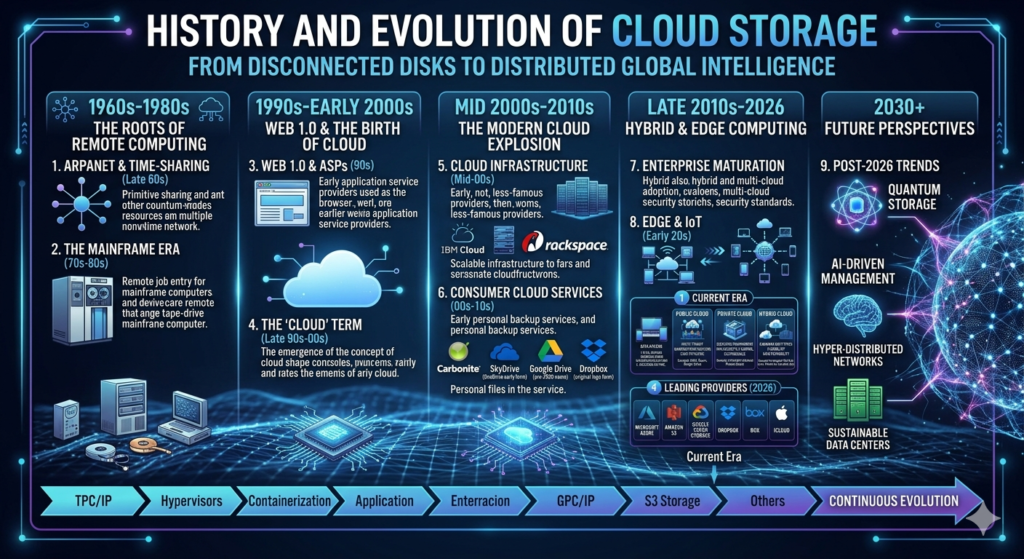
Over the past two decades, cloud storage has evolved into a critical part of digital transformation. Businesses now rely on business cloud storage, while families use personal cloud storage for photos, videos, and documents. Improvements in cybersecurity, data encryption, and storage scalability have transformed cloud storage into one of the most trusted technologies for personal and enterprise use.
Early Data Storage
Before cloud technology became common, people stored files on floppy disks, CDs, DVDs, external hard drives, and local servers. These devices offered limited space and could fail without warning, increasing the risk of permanent data loss.
Rise of Online Storage
As broadband internet became widely available, companies introduced online file storage services that allowed users to upload documents through the web. This innovation eliminated many limitations of physical storage devices and introduced easier file hosting and collaboration.
Modern Cloud Storage Services
Today’s cloud storage services combine intelligent automation, advanced security, and nearly unlimited scalable storage. Many providers integrate with Software as a Service (SaaS) platforms and support cloud migration, making it easier for businesses to move workloads into modern cloud environments.
Types of Cloud Storage
Not every cloud storage system works the same way. Providers use different storage architectures depending on the type of information being stored and how it will be accessed. The three main categories are object storage, file storage, and block storage. Each one serves a different purpose and offers unique strengths for personal users, developers, and large organizations.
Understanding these storage models helps you choose the right solution for your needs. Whether you’re storing family photos, running enterprise databases, or hosting websites, selecting the proper storage type improves performance, reliability, and long-term efficiency.
Object Storage
Object storage organizes information as separate objects instead of folders or fixed blocks. This model works extremely well for photos, videos, backups, and large collections of unstructured information. It also supports excellent storage scalability, making it popular among modern cloud applications.
File Storage
File storage organizes information into folders and directories, making it familiar for most users. Businesses often use this approach for shared documents, office files, and collaborative workspaces that require frequent file sharing and cloud collaboration.
Block Storage
Block storage divides information into smaller blocks that applications can process quickly. Databases, virtual machines, and high-performance enterprise workloads frequently depend on block storage because it delivers excellent speed and consistent performance.
Which Storage Type Is Best?
The best option depends on your workload. Object storage excels at storing large amounts of unstructured content, file storage works best for everyday documents, and block storage is ideal for performance-intensive business applications. Understanding your requirements helps you choose the most efficient cloud storage solution.
Cloud Storage Types Comparison
| Storage Type | Best For | Main Advantage |
| Object Storage | Photos, videos, backups | Massive scalability |
| File Storage | Documents and collaboration | Familiar folder structure |
| Block Storage | Databases and virtual machines | High performance |
Public Cloud Storage Explained
Public Cloud Storage is the most common cloud storage model used by individuals and businesses. In this model, a third-party provider owns and manages the cloud infrastructure, while users rent storage space through the internet. Providers maintain secure data centers, handle updates, and monitor system performance, allowing customers to focus on using their data instead of managing hardware.
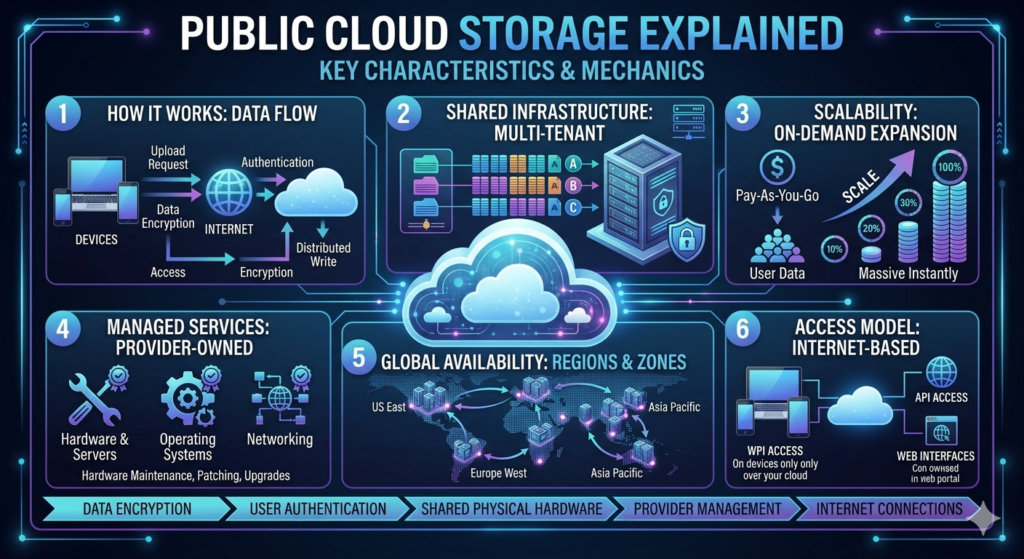
For most users, Public Cloud offers an excellent balance between affordability and convenience. You can increase storage capacity whenever needed without purchasing expensive equipment. Many organizations also use public cloud platforms to support cloud computing, cloud applications, and remote teams because they provide reliable online storage with strong security features.
Features
Public cloud platforms offer flexible cloud storage services, automatic software updates, and high storage scalability. Users can upload digital files, share documents, and access information from almost any internet-connected device while benefiting from professionally managed storage infrastructure.
Benefits
One of the biggest advantages is cost efficiency. Businesses avoid investing in physical servers while gaining access to secure cloud storage, excellent data availability, and built-in data backup features. Most providers also guarantee strong uptime through redundancy across multiple locations.
Common Use Cases
Public cloud storage is ideal for personal documents, website hosting, business collaboration, media libraries, application development, and educational projects. Companies also use it to support cloud migration, remote employees, and scalable business operations.
Public Cloud Storage Overview
| Feature | Public Cloud Storage |
| Ownership | Third-party provider |
| Cost | Pay-as-you-go |
| Scalability | Excellent |
| Maintenance | Provider manages everything |
| Best For | Individuals, startups, businesses |
Private Cloud Storage Explained
Unlike public cloud environments, Private Cloud storage is dedicated to a single organization. The infrastructure may operate inside the company’s own facility or within a hosted environment managed exclusively for that business. Since no other customers share the storage environment, organizations gain greater control over security, compliance, and performance.
Many industries choose Enterprise Cloud Storage because they must protect confidential information and follow strict regulatory requirements. Healthcare providers, financial institutions, and government agencies often depend on private cloud environments to maintain data privacy, strengthen access control, and improve cybersecurity without sacrificing performance.
Features
Private cloud environments provide dedicated storage servers, customizable storage architecture, stronger Identity and Access Management (IAM), and complete administrative control. Organizations can also configure security policies that match their specific operational needs.
Advantages
Private cloud storage improves compliance, increases performance consistency, and offers advanced data encryption for highly sensitive workloads. Since resources remain dedicated to one organization, businesses also experience predictable storage performance.
Enterprise Use Cases
Large corporations use private cloud storage for financial records, customer databases, healthcare information, research projects, and confidential business documents where security remains the highest priority.
Public Cloud vs Private Cloud
| Feature | Public Cloud | Private Cloud |
| Infrastructure | Shared | Dedicated |
| Cost | Lower | Higher |
| Control | Limited | Full |
| Security | Very Strong | Maximum |
| Best For | General workloads | Sensitive business data |
Hybrid Cloud Storage Explained
Hybrid Cloud storage combines the strengths of both public and private cloud environments. Businesses can keep sensitive information inside a private infrastructure while storing less critical data in the public cloud. This balanced approach provides greater flexibility without compromising security or performance.
As organizations continue their digital transformation, hybrid storage has become one of the most practical solutions. Companies can optimize costs, improve business continuity, and expand resources during periods of high demand. It also supports gradual cloud migration, allowing organizations to modernize existing systems without major disruptions.
How Hybrid Storage Works
A hybrid environment connects private infrastructure with public cloud resources through secure networking technologies. Data moves intelligently between both environments based on business policies, performance needs, and security requirements.
Benefits
Hybrid storage improves flexibility, enhances storage optimization, reduces operational costs, and strengthens disaster recovery planning. Businesses also gain the freedom to scale resources without replacing their existing infrastructure.
Business Examples
A retail company might store customer payment information inside a private cloud while keeping product images in the public cloud. Hospitals often use private environments for patient records while storing educational content and public documents in shared cloud platforms.
Hybrid Cloud Storage Benefits
| Benefit | Description |
| Flexibility | Uses both public and private resources |
| Security | Sensitive data stays protected |
| Cost Optimization | Pay only for extra resources |
| Scalability | Expand storage whenever needed |
| Disaster Recovery | Better protection against outages |
Multi-Cloud Storage Explained
Multi-Cloud storage means using cloud storage services from two or more providers instead of depending on a single vendor. For example, a business might use Amazon S3 for application storage, Microsoft OneDrive for office documents, and Google Drive for collaboration. This strategy allows organizations to take advantage of each provider’s strengths.
As cloud technology becomes more advanced, many organizations adopt multi-cloud strategies to improve reliability and reduce business risks. Using multiple cloud storage providers prevents dependence on one platform while improving high availability, data protection, and operational flexibility.
What Is Multi-Cloud?
Multi-cloud is a strategy where organizations distribute workloads across several cloud platforms. Instead of placing all resources with one vendor, companies select different providers based on pricing, performance, security, or specialized services.
Benefits
Multi-cloud increases resilience, improves storage management, supports better data recovery, and reduces vendor dependence. Businesses can also choose the most suitable platform for each workload while improving overall system reliability.
Challenges
Managing multiple providers requires careful planning. Organizations must monitor different billing systems, security settings, compliance requirements, and storage network configurations. Without proper management, complexity can increase operational costs.
Cloud Deployment Models Comparison
| Model | Best For | Main Advantage |
| Public Cloud | Individuals & growing businesses | Affordable and scalable |
| Private Cloud | Enterprises | Maximum security and control |
| Hybrid Cloud | Mixed workloads | Flexibility and balance |
| Multi-Cloud | Large organizations | Vendor independence and resilience |
Expert Insight: There is no single cloud model that fits every situation. The best choice depends on your security requirements, budget, compliance obligations, and long-term business goals. Many modern organizations combine multiple cloud approaches to build a reliable and future-ready storage strategy.
Top Benefits of Cloud Storage
Cloud storage offers much more than a place to save files. It helps individuals and businesses work smarter by providing secure access to information from almost anywhere. Modern Cloud Storage platforms improve Cloud Collaboration, strengthen Data Protection, and support Business Continuity without requiring expensive hardware. Whether you are managing personal documents or business operations, cloud storage makes daily work faster and more reliable.
Another major advantage is flexibility. You can increase Storage Capacity whenever your data grows without replacing physical equipment. Many organizations also improve Cloud Computing performance because cloud storage integrates easily with modern applications and digital services. As technology evolves, cloud storage continues to play a central role in Digital Transformation across every industry.
Accessibility
One of the greatest strengths of Cloud Storage is its ability to provide instant Remote Access. Whether you are using a laptop at home, a smartphone while traveling, or a tablet at work, your Cloud Files remain available whenever you need them through secure Online Storage.
Scalability
Traditional storage eventually runs out of space. Cloud storage grows with your needs. Modern providers offer highly Scalable Storage, excellent Storage Scalability, and flexible plans that allow users to increase storage without purchasing new hardware.
Cost Savings
Businesses save money because they no longer need to maintain expensive servers. Cloud providers manage the Storage Infrastructure, software updates, and maintenance, allowing organizations to focus their budget on innovation instead of hardware.
Collaboration
Teams can work on the same document from different locations. Features like File Sharing, Cloud Collaboration, and Real-Time Synchronization help employees stay productive while reducing communication delays.
Disaster Recovery
Hardware failures, accidental deletion, and cyberattacks can happen at any time. Cloud storage supports Disaster Recovery, automatic Data Backup, and reliable Data Recovery, helping users restore important files quickly.
Business Continuity
Unexpected events should not stop business operations. Cloud storage improves Business Continuity by providing secure backups, reliable Data Availability, and continuous access to important information during emergencies.
Top Benefits of Cloud Storage
| Benefit | Why It Matters |
| Remote Access | Access files anywhere |
| Scalability | Expand storage instantly |
| Cost Savings | Lower hardware expenses |
| Collaboration | Work together in real time |
| Disaster Recovery | Recover lost data quickly |
| Security | Protect valuable information |
| Business Continuity | Keep operations running |
Common Uses of Cloud Storage
Cloud storage supports nearly every aspect of modern digital life. Students use it to organize assignments, professionals manage work documents, photographers store large image libraries, and businesses protect valuable customer information. Because Cloud Storage Services are flexible and secure, they have become an essential part of everyday computing.
Organizations also depend on cloud storage to power websites, mobile applications, software development, and enterprise systems. As companies continue adopting Hybrid Cloud and Multi-Cloud strategies, cloud storage helps simplify operations while improving performance and reducing infrastructure costs.
Personal File Storage
People store photos, videos, school projects, tax documents, and personal records using Personal Cloud Storage. Automatic Online Backup protects important memories even if a device is damaged or lost.
Business Documents
Companies use Business Cloud Storage to organize contracts, reports, presentations, spreadsheets, and employee records. Shared workspaces improve teamwork while maintaining secure Access Control for sensitive information.
Website Backups
Website owners create regular Cloud Backup copies of databases and website files. These backups simplify Data Recovery after accidental changes, malware attacks, or server failures.
Media Files
Creative professionals store videos, graphics, music, and high-resolution photographs using Cloud Data Storage because it provides flexible space and reliable Storage Performance for large digital assets.
Mobile Device Backup
Modern smartphones automatically upload contacts, photos, messages, and application settings to the cloud. This Automatic Backup feature makes replacing or upgrading devices much easier.
Software Development
Developers rely on cloud storage to manage application resources, testing environments, and project files. Integration with Infrastructure as a Service (IaaS) and Platform as a Service (PaaS) also simplifies software deployment and collaboration.
Popular Uses of Cloud Storage
| Use Case | Primary Users |
| Personal Photos | Individuals |
| Business Documents | Companies |
| Website Backups | Website Owners |
| Mobile Backup | Smartphone Users |
| Software Development | Developers |
| Media Libraries | Content Creators |
Best Cloud Storage Providers in 2026
Choosing the right provider depends on your storage needs, budget, security requirements, and preferred ecosystem. Some platforms focus on personal productivity, while others are designed for enterprise-scale applications. The best Cloud Storage Providers combine excellent security, reliable performance, and easy-to-use features.
Before selecting a service, compare storage limits, pricing, collaboration tools, encryption methods, and compatibility with your devices. A provider that works well for a student may not be the best choice for a growing business or enterprise.
Google Drive
Google Drive integrates smoothly with Google Docs, Sheets, and Gmail. It offers reliable Cloud File Storage, simple collaboration, and generous free storage for everyday users.
Microsoft OneDrive
OneDrive works especially well with Microsoft 365. Businesses benefit from strong document management, seamless synchronization, and secure Cloud Storage Solutions for professional workflows.
Dropbox
Dropbox remains one of the easiest platforms for File Sharing and Cross-Device Synchronization. It is popular among freelancers, creative teams, and small businesses.
Apple iCloud
iCloud is designed for Apple users. It automatically synchronizes photos, contacts, messages, and device backups across iPhones, iPads, and Mac computers.
Amazon S3
Amazon S3 is a powerful Object Storage service built for developers and enterprises. It provides exceptional scalability, reliability, and integration with modern cloud applications.
Box
Box focuses on enterprise collaboration and document management. Organizations appreciate its advanced security, compliance tools, and strong Enterprise Cloud Storage capabilities.
Best Cloud Storage Providers Comparison
| Provider | Best For | Key Strength |
| Google Drive | Personal & Students | Google Workspace integration |
| Microsoft OneDrive | Businesses | Microsoft 365 integration |
| Dropbox | Collaboration | Easy file sharing |
| Apple iCloud | Apple Users | Device synchronization |
| Amazon S3 | Developers | Highly scalable object storage |
| Box | Enterprises | Business security & compliance |
Cloud Storage vs Cloud Backup
Many people think cloud storage and cloud backup are the same, but they serve different purposes. Cloud Storage focuses on storing, organizing, and sharing files, while Cloud Backup protects your information by creating recoverable copies. Understanding this difference helps you choose the right solution for your personal or business needs.
The best strategy often combines both services. Cloud storage keeps your everyday files organized and accessible, while cloud backup ensures those files can be restored after accidental deletion, ransomware attacks, or hardware failures. Together, they create a stronger Data Protection strategy.
Key Differences
Cloud storage is designed for active file access, collaboration, and sharing. Cloud backup works quietly in the background, creating secure copies through Automatic Backup so your data can be restored when needed.
Which One Should You Choose?
If you need easy access and teamwork features, cloud storage is the better choice. If protecting valuable information is your highest priority, cloud backup is essential. Many businesses use both to maximize reliability and Business Continuity.
Real-Life Examples
A university student may use cloud storage to edit assignments across multiple devices. A business owner may use cloud backup to recover financial records after a cyberattack or accidental server failure.
Cloud Storage vs Cloud Backup
| Feature | Cloud Storage | Cloud Backup |
| Main Purpose | Store and access files | Protect and restore data |
| File Sharing | Yes | Limited |
| Collaboration | Yes | No |
| Automatic Backup | Optional | Primary feature |
| Data Recovery | Limited | Full recovery |
| Best For | Daily work | Disaster recovery |
Expert Tip: The smartest approach is not choosing one over the other. Use Cloud Storage for productivity and collaboration, and use Cloud Backup as your safety net. Together, they provide stronger security, better reliability, and long-term peace of mind.
Cloud Storage Security Best Practices
Cloud storage providers invest billions of dollars in protecting customer information, but security also depends on how you use the service. Even the most advanced platform cannot protect weak passwords or careless account management. Following a few simple security practices can greatly reduce risks while keeping your Cloud Storage, Cloud Data Storage, and Digital Files safe from unauthorized access.
A secure cloud environment combines modern technology with responsible user habits. Features like Data Encryption, Multi-Factor Authentication (MFA), and strong Access Control create multiple layers of protection. Together, these measures strengthen Cybersecurity, improve Data Privacy, and help prevent data breaches, ransomware attacks, and account hijacking.
Encryption
Encryption converts readable information into coded data before it travels across the internet or is stored inside Remote Servers. Even if attackers intercept encrypted information, they cannot easily understand it without the correct encryption keys. Most leading Cloud Storage Providers now use encryption during both data transfer and storage.
Multi-Factor Authentication (MFA)
Multi-Factor Authentication (MFA) adds an extra verification step beyond your password. After entering your password, you may also confirm your identity using a mobile app, fingerprint, or verification code. This simple feature significantly improves account security.
Access Control
Strong Access Control ensures that only authorized people can view or edit important information. Businesses often combine this with Identity and Access Management (IAM) to assign different permission levels to employees, reducing the risk of accidental or unauthorized access.
Regular Backups
Even secure cloud platforms recommend creating regular Cloud Backup copies of critical information. Frequent Data Backup protects against accidental deletion, ransomware, software errors, and unexpected system failures.
Strong Passwords
A long and unique password remains one of the simplest security improvements. Avoid using personal information or the same password across multiple services. Password managers can help generate and store secure credentials safely.
Cloud Storage Security Checklist
| Security Practice | Why It Matters |
| Encryption | Protects stored and transferred data |
| Multi-Factor Authentication (MFA) | Prevents unauthorized logins |
| Access Control | Limits who can view files |
| Regular Cloud Backup | Improves Data Recovery |
| Strong Passwords | Reduces hacking risks |
| Security Updates | Protects against new threats |
Security Tip: Even the safest cloud platform becomes vulnerable if basic security habits are ignored. Strong passwords, MFA, and regular backups provide excellent protection with very little effort.
Cloud Storage Challenges and Limitations
Although cloud storage offers many benefits, it is not perfect. Understanding its limitations helps you make informed decisions and prepare for potential challenges. Knowing these risks also allows businesses to build stronger storage strategies while reducing unexpected disruptions.
Most challenges can be managed through careful planning, reliable providers, and good security practices. Businesses that combine proper Storage Management, regular backups, and multiple security layers often experience very few long-term problems.
Internet Dependency
Cloud storage depends on an internet connection. Without reliable internet access, downloading or uploading large files may become slow or impossible. Many providers now offer limited offline access to reduce this issue.
Privacy Concerns
Some users worry about where their information is stored and who can access it. Reputable providers protect customer data through strong Data Encryption, strict Data Privacy policies, and compliance with international security standards.
Vendor Lock-In
Moving large amounts of data between providers can sometimes be difficult. Organizations should plan their Cloud Migration strategy carefully before choosing a long-term storage platform.
Subscription Costs
While cloud storage reduces hardware expenses, monthly or yearly subscriptions may increase over time as your Storage Capacity grows. Comparing pricing plans helps control long-term costs.
Data Transfer Speed
Uploading large videos, databases, or backups depends on internet speed. Faster broadband connections and modern Content Delivery Network (CDN) technologies continue improving transfer performance.
Cloud Storage Challenges
| Challenge | Possible Solution |
| Slow Internet | Use faster broadband or offline sync |
| Privacy Concerns | Choose providers with strong security |
| Vendor Lock-In | Plan migration carefully |
| Subscription Costs | Compare pricing before upgrading |
| Large File Transfers | Schedule uploads during low traffic hours |
How to Choose the Best Cloud Storage Provider
Choosing the right provider requires more than comparing storage size. You should evaluate security, reliability, pricing, collaboration tools, customer support, and future growth. The best provider should match your personal or business requirements instead of simply offering the lowest price.
Before making a decision, consider how you plan to use cloud storage over the next several years. Students, families, small businesses, and large enterprises all have different priorities. Selecting a platform that supports your future growth can save both time and money.
Storage Capacity
Estimate how much space you currently use and how quickly your data grows. Flexible Storage Capacity allows you to expand without changing providers later.
Security Features
Look for providers offering Encryption, Multi-Factor Authentication (MFA), Access Control, and advanced Cybersecurity protections. These features greatly improve long-term security.
Pricing Plans
Compare free plans, monthly subscriptions, and enterprise packages. Consider both current needs and future expansion before making a decision.
File Sharing
Good File Sharing tools simplify collaboration with coworkers, classmates, and clients. Secure sharing permissions also improve productivity while protecting sensitive information.
Device Compatibility
Choose a provider that works smoothly across Windows, macOS, Android, iPhone, and web browsers. Reliable Cross-Device Synchronization creates a consistent user experience.
Customer Support
Reliable technical support becomes valuable when recovering lost files or solving account issues. Look for providers with responsive support channels and detailed documentation.
Choosing the Right Provider
| Feature | Why It Matters |
| Storage Capacity | Supports future growth |
| Security | Protects sensitive information |
| Pricing | Fits your budget |
| File Sharing | Improves collaboration |
| Device Compatibility | Works across all devices |
| Customer Support | Solves problems quickly |
Expert Advice: Don’t choose a cloud storage provider based only on free storage. Security, reliability, scalability, and long-term value matter much more than saving a few dollars.
Future of Cloud Storage
Cloud storage continues to evolve as businesses demand faster performance, stronger security, and smarter automation. Technologies such as Artificial Intelligence (AI), Machine Learning (ML), and Edge Computing are already transforming how cloud platforms manage information. These innovations help providers improve efficiency while delivering better user experiences.
Over the next few years, cloud storage will become even more intelligent. Increased automation, stronger privacy protections, sustainable infrastructure, and improved Cloud Computing technologies will support businesses of every size. As organizations continue their Digital Transformation, cloud storage will remain a foundation of modern technology.
AI-Powered Storage
Artificial Intelligence (AI) helps identify duplicate files, optimize storage usage, detect suspicious activity, and improve Storage Optimization automatically.
Edge Computing Integration
Edge Computing processes information closer to users instead of relying only on distant Data Centers. This reduces delays and improves application performance.
Green Cloud Storage
Many providers now build energy-efficient Storage Infrastructure powered by renewable energy. Sustainable operations reduce environmental impact while lowering long-term operating costs.
Advanced Security
Future platforms will strengthen Cybersecurity through smarter threat detection, behavioral analysis, and automated response systems that identify attacks before damage occurs.
Faster Cloud Infrastructure
Modern Cloud Infrastructure, improved Storage Networks, and faster internet technologies will continue increasing upload speeds, download performance, and global reliability.
Future Trends in Cloud Storage
| Technology | Expected Impact |
| Artificial Intelligence (AI) | Smarter storage management |
| Machine Learning (ML) | Better threat detection |
| Edge Computing | Lower latency |
| Green Infrastructure | Sustainable operations |
| Faster Networks | Improved performance |
| Advanced Security | Stronger protection |
Industry Insight: Cloud storage is no longer just a place to save files. It is becoming an intelligent platform that supports collaboration, security, automation, and innovation for both individuals and businesses.
Frequently Asked Questions (FAQs)
Is Cloud Storage Safe?
Yes. Most trusted Cloud Storage Providers use advanced Data Encryption, Multi-Factor Authentication (MFA), and strict Access Control to protect your information. However, you should also use strong passwords and enable MFA to improve your personal account security.
Is Cloud Storage Free?
Many providers offer free plans with limited Storage Capacity. These plans are suitable for storing documents, photos, and personal files. If you need more space, advanced collaboration, or enterprise features, you can upgrade to a paid subscription.
Which Cloud Storage Is Best?
There is no single provider that fits everyone. Google Drive works well for everyday productivity, Microsoft OneDrive integrates perfectly with Microsoft 365, Dropbox excels in collaboration, Amazon S3 is ideal for developers, while Box focuses on enterprise document management. The best choice depends on your storage needs, security requirements, and budget.
Can I Access Files Offline?
Yes. Most major cloud storage platforms allow you to mark files for offline access. After downloading them to your device, you can continue working without an internet connection. Once you reconnect, Real-Time Synchronization updates your changes automatically.
How Much Storage Do I Need?
Your storage requirements depend on how you use cloud storage. Students and casual users usually need less space, while photographers, video creators, and businesses often require much larger Scalable Storage plans. Choosing a provider with flexible upgrades makes future expansion easier.
What Happens If I Lose Internet Access?
Without internet access, you may not be able to open files stored only in the cloud. However, many providers allow selected files to remain available offline. Once your connection returns, Data Synchronization updates your latest changes automatically.
Final Thoughts
Cloud storage has become one of the most important technologies in modern computing. It allows individuals and organizations to store, protect, and access information from almost anywhere while reducing dependence on physical storage devices. Whether you are saving family photos, managing business documents, or building cloud applications, choosing the right Cloud Storage solution can improve productivity, security, and long-term reliability.
As Cloud Computing continues to evolve, cloud storage will become even more intelligent, secure, and efficient. Technologies like Artificial Intelligence (AI), Machine Learning (ML), and Edge Computing are already changing how providers manage data. Understanding today’s storage options prepares you for tomorrow’s digital world.
If you are selecting a cloud storage provider in 2026, compare security, pricing, storage capacity, performance, and collaboration features before making your decision. A well-informed choice will help you protect your information, simplify teamwork, and support future growth.
Cloud storage is no longer a luxury. It is a fundamental part of personal computing, business operations, and digital transformation. Learning how it works today will help you make smarter technology decisions for years to come.
Key Takeaways
| Topic | Summary |
| Cloud Storage | Stores data securely on remote servers. |
| Main Types | Object Storage, File Storage, and Block Storage. |
| Deployment Models | Public, Private, Hybrid, and Multi-Cloud. |
| Key Benefits | Accessibility, scalability, collaboration, and disaster recovery. |
| Security | Encryption, MFA, IAM, and regular backups protect data. |
| Best Providers | Google Drive, OneDrive, Dropbox, iCloud, Amazon S3, and Box. |
| Future | AI, Edge Computing, stronger security, and sustainable infrastructure. |
Continue Reading on Daily Techo
Expand your cloud computing knowledge with these related guides:
- What Is Cloud Computing? The Ultimate Beginner’s Guide (2026)
- Cloud Service Models Explained: Everything You Need to Know About IaaS, PaaS & SaaS (2026)
- Public Cloud vs Private Cloud vs Hybrid Cloud: Key Differences, Pros, Cons & Best Use Cases (2026)
- Cloud Deployment Models Explained: Public, Private, Hybrid & Multi-Cloud (2026)
These articles will help you build a complete understanding of modern cloud technologies.
→ Explore More Technology Guides
Featured Snippet Answers
What Is Cloud Storage?
Cloud storage is a technology that stores digital files on remote servers connected to the internet, allowing users to access, manage, and share data from almost any device.
How Does Cloud Storage Work?
Cloud storage works by uploading files through an internet connection to secure data centers. The provider stores the information safely and makes it available whenever authorized users request it.
What Are the Main Types of Cloud Storage?
The three primary types are Object Storage, File Storage, and Block Storage. Each type is designed for different workloads, performance requirements, and business needs.
Meta Description
Learn Cloud Storage in simple English. Discover how cloud storage works, explore storage types, compare the best cloud storage providers, understand security best practices, and choose the right solution for personal or business use in 2026.