

Technology has changed the way people work, learn, communicate, and store information. Instead of saving files on a single computer or carrying physical storage devices everywhere, millions of people now rely on cloud computing to access data from almost any location. Whether you watch movies on Netflix, save photos to Google Photos, edit documents in Microsoft 365, or back up files using iCloud, you already use cloud computing in everyday life without realizing it. This modern approach makes digital services faster, smarter, and more convenient for both individuals and businesses.
If you’re wondering what cloud computing is or why it has become one of today’s most valuable technologies, this guide is for you. This beginner cloud computing guide explains every important concept in simple English. You’ll learn how cloud technology works, its benefits, different deployment models, popular providers, security basics, career opportunities, and future trends. By the end of this guide, you’ll have a strong understanding of cloud computing for beginners and feel confident exploring more advanced topics.
What Is Cloud Computing?
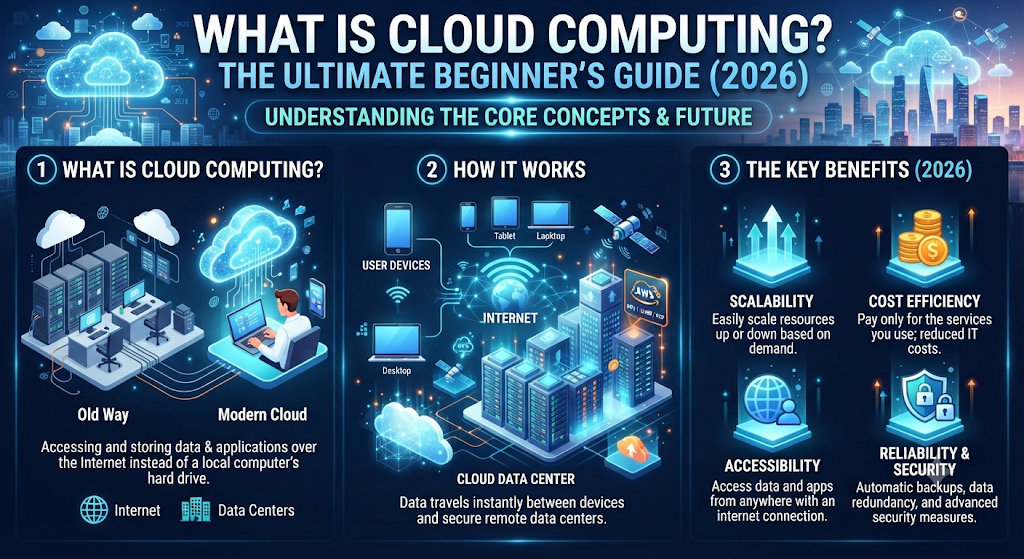
Cloud computing simply means using computing services over the internet instead of relying only on your personal computer. These services include storage, software, databases, networking, and processing power that run on secure remote servers owned by cloud providers. Rather than installing everything on one device, you connect to powerful systems through the internet whenever you need them. This modern cloud computing definition makes technology more flexible, efficient, and affordable for people around the world.
Think of cloud computing like electricity in your home. You don’t build your own power station before turning on a light. Instead, you receive electricity whenever you need it and pay only for what you use. Cloud computing explained works in a similar way. Companies provide computing resources through the internet, allowing users to access applications and data without buying expensive hardware. This simple idea has transformed the cloud computing ecosystem and continues to shape the future of technology.
Understanding Cloud Computing in Simple Words
Imagine writing an important document on your laptop. Instead of saving it only on your hard drive, you save it to Google Drive or Microsoft OneDrive. Later, you open the same document from your phone, tablet, or another computer within seconds. That is one of the easiest cloud computing examples to understand. Your files stay on secure remote servers rather than one physical device, making access simple wherever you have an internet connection.
Cloud computing also supports many services people use every day. Video streaming, online gaming, banking apps, email platforms, virtual meetings, and business software all depend on cloud computing applications running inside large data centers. Behind the scenes, advanced cloud computing architecture allows millions of users to access these services at the same time without noticeable delays.
Why Cloud Computing Matters Today
Every year, organizations create more digital information than ever before. Businesses need reliable ways to store, process, and protect that information while keeping costs under control. That’s one reason why cloud computing is important today. Instead of purchasing expensive servers and maintaining large IT departments, many companies choose flexible cloud computing solutions that grow with their business needs.
Cloud technology also supports modern lifestyles. Students study online, employees work from home, healthcare providers manage patient records, and businesses serve customers worldwide using secure cloud computing services. As more industries embrace digital transformation, cloud technology continues to become an essential part of everyday life across the United States and around the world.
Why Cloud Computing Is Important in 2026
Businesses no longer see cloud computing as an optional upgrade. Instead, it has become the foundation of modern operations. Organizations use the cloud to improve speed, reduce costs, strengthen collaboration, and deliver better customer experiences.
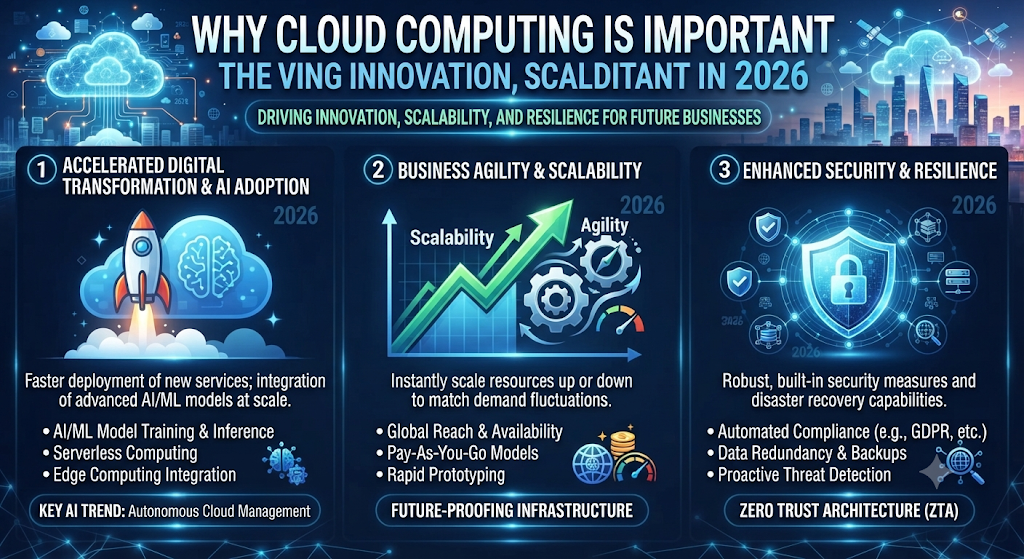
The demand for cloud services also continues to grow because people expect instant access to information from anywhere. Employees work remotely, students attend online classes, and customers shop through digital platforms every day. These changing habits have made cloud computing for businesses and personal users more valuable than ever. In 2026, cloud technology supports everything from small startups to global enterprises.
Rapid Digital Transformation
The world is becoming increasingly digital. Businesses now automate daily tasks, manage customer relationships online, and analyze huge amounts of information within minutes. These capabilities are possible because of scalable cloud computing infrastructure that provides fast processing power without requiring expensive physical equipment. Companies can launch new services much faster than they could only a few years ago.
Modern organizations also benefit from improved online collaboration because employees can work together from different cities or even different countries. Documents update in real time, meetings happen through cloud platforms, and project management becomes much easier. As remote work technology continues expanding, cloud computing remains one of the biggest drivers of workplace innovation.
Why Businesses Depend on Cloud Computing
Cloud computing helps organizations spend money more wisely. Instead of investing heavily in hardware that may become outdated, businesses pay only for the resources they actually use. This approach creates significant cost savings while allowing companies to increase or reduce resources whenever needed. Flexible cloud computing scalability supports growth without major infrastructure changes.
Another major advantage is reliability. Leading cloud providers maintain secure facilities with backup systems, continuous monitoring, and automatic updates. These features improve business continuity, reduce downtime, and help organizations recover quickly from unexpected problems. For many businesses, cloud technology has become the backbone of their daily operations.
How Does Cloud Computing Work?
Understanding how cloud computing works is easier than many beginners expect. When you open a cloud-based application or upload a file, your device sends a request through the internet to powerful remote servers. Those servers process the information, store your data securely, and send the results back almost instantly. Most of this happens within seconds, creating a smooth experience for users without requiring expensive local hardware.
Instead of depending only on your computer’s storage and processing power, cloud providers use thousands of connected servers inside secure facilities. These systems share workloads using advanced cloud computing resources, virtualization, and intelligent networking technologies. This design improves performance while allowing millions of users to access services simultaneously without slowing the system.
Step-by-Step Cloud Computing Process
Suppose you upload a family photo to Google Photos. First, your device connects to the internet and securely transfers the image to cloud servers. The system then stores multiple protected copies inside highly secure cloud storage facilities. Whenever you open the app from another device, the stored image appears almost instantly because the cloud retrieves it on demand.
This same process supports email platforms, business software, streaming services, and online collaboration tools. Secure cloud computing deployment ensures that data remains available whenever authorized users need it. Advanced networking, automatic synchronization, and intelligent resource management keep everything running efficiently in the background.
Cloud Data Flow Explained
Every cloud request follows a simple path. Your device sends information to the cloud. Powerful servers process the request, retrieve the required data, and return the results within moments. This continuous communication forms the foundation of modern cloud computing systems and enables seamless digital experiences across different devices.
Large cloud providers improve performance by distributing workloads across multiple cloud servers and regional data centers. This approach supports high availability, increases reliability, and allows services to remain online even if one server experiences technical issues. That level of resilience is one reason cloud computing has become essential for businesses and everyday users alike.
The Simple Architecture of Cloud Computing
At first, cloud computing architecture may sound technical, but the basic idea is easy to understand. Every cloud service depends on different parts working together. These parts allow users to upload files, run applications, store information, and access services from anywhere. A well-designed cloud computing environment keeps everything connected while delivering speed, reliability, and a smooth user experience.
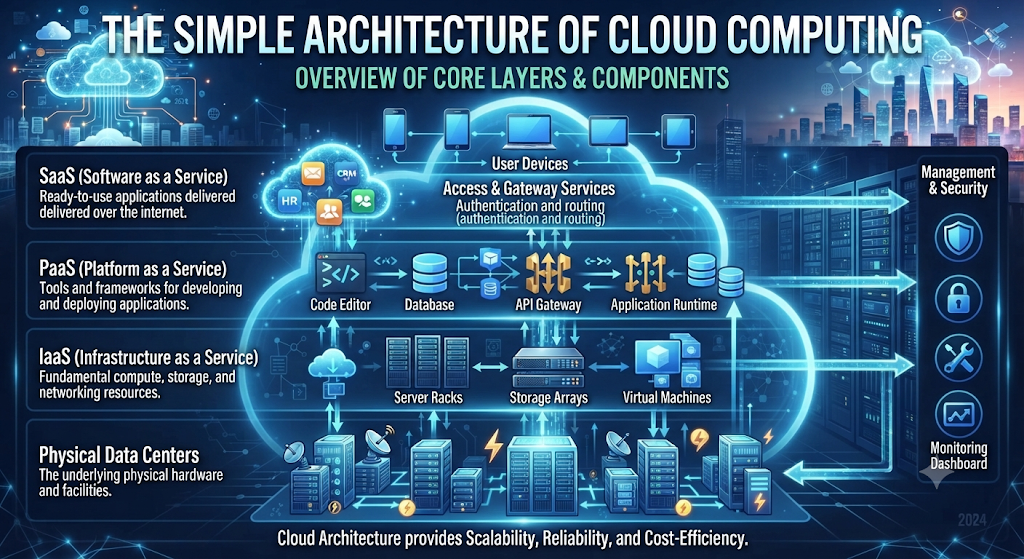
Think of cloud architecture as a modern city. Roads connect homes, offices, hospitals, and schools so people can travel easily. In the same way, cloud computing infrastructure, networks, storage systems, and applications work together to deliver information whenever users request it. This design makes cloud technology flexible, secure, and efficient for millions of people every day.
Front-End Components
The front end is the part users interact with every day. It includes laptops, smartphones, tablets, desktop computers, web browsers, and mobile apps. These devices allow users to connect with cloud software and cloud applications through a simple internet connection. Whether you open Gmail, Microsoft 365, or Dropbox, you are using the front end of cloud computing.
Back-End Components
Behind every cloud service is a powerful back end. It consists of cloud servers, cloud databases, virtual machines, storage systems, networking equipment, and advanced management software. Large data centers contain thousands of servers working together to process information quickly and securely. Users never see these systems, but they power almost every cloud service available today.
Internet Connection
The internet acts as the bridge between users and cloud providers. Every time you upload a document, stream a movie, or join an online meeting, information travels securely between your device and remote servers. Reliable cloud networking and distributed computing ensure data moves quickly while maintaining performance and security.
Key Components of Cloud Computing
Every cloud platform contains several essential building blocks that work together to deliver reliable services. These components improve speed, security, and flexibility while supporting millions of users at the same time. Understanding these basics helps beginners learn how cloud technology operates behind the scenes.
Modern cloud providers continuously upgrade their infrastructure to improve performance and reliability. Advanced scalable infrastructure, intelligent automation, and efficient resource management allow organizations to grow without replacing expensive hardware. This flexibility is one of the biggest reasons businesses continue investing in cloud technology.
Core Components of Cloud Computing
| Component | Purpose |
| Data Centers | Store and process massive amounts of information securely. |
| Cloud Servers | Run applications, websites, and business services. |
| Cloud Storage | Save files, backups, images, and databases online. |
| Virtualization | Allows multiple virtual systems to run on one physical server. |
| Cloud Networking | Connects users, applications, and cloud resources securely. |
| Cloud Database | Stores structured business and application data. |
| APIs | Enable communication between different cloud services. |
| Security Systems | Protect cloud resources against cyber threats. |
How These Components Work Together
When you upload a file to cloud storage, your device sends the request through the internet. The cloud platform authenticates your identity, stores the file on secure servers, creates backup copies, and allows access whenever needed. Every component works together automatically to deliver a fast and reliable experience.
Types of Cloud Computing
Not every organization has the same technology needs. Some businesses need maximum security, while others focus on flexibility or lower costs. To solve these different requirements, cloud providers offer several cloud deployment models. Choosing the right model depends on budget, security requirements, business size, and compliance needs.
Understanding the different types of cloud computing helps individuals and organizations select the best solution for their goals. The four main deployment models are public cloud, private cloud, hybrid cloud, and community cloud. Each offers unique advantages for different situations.
Public Cloud
A public cloud is owned and managed by third-party cloud service providers such as Amazon Web Services, Microsoft Azure, and Google Cloud Platform. Customers share the provider’s infrastructure while keeping their own data secure. This option offers excellent flexibility, affordability, and quick deployment for startups, students, and small businesses.
Public cloud platforms also provide automatic updates, reliable performance, and access to hundreds of cloud services without requiring companies to build their own infrastructure. This makes them one of the most popular choices for modern organizations.
Private Cloud
A private cloud is built for a single organization. The infrastructure is dedicated to one business, providing greater control, stronger security, and easier compliance with industry regulations. Large enterprises, financial institutions, and healthcare organizations often choose this model to protect sensitive information.
Although private clouds usually cost more than public clouds, they offer greater customization and tighter control over security policies, making them ideal for organizations handling confidential business data.
Hybrid Cloud
A hybrid cloud combines both public and private cloud environments. Businesses can keep sensitive information inside private systems while using public cloud services for less critical workloads. This balanced approach provides flexibility, cost efficiency, and improved business continuity.
Many organizations adopt hybrid cloud strategies because they can scale resources during busy periods without investing in expensive permanent hardware. It also helps companies modernize gradually instead of replacing their entire IT infrastructure at once.
Community Cloud
A community cloud is shared by several organizations with similar security, legal, or operational requirements. Government agencies, universities, healthcare providers, and research institutions commonly use this model to reduce costs while maintaining shared standards and compliance.
Because every participating organization has similar objectives, community clouds encourage collaboration, secure information sharing, and efficient resource management while protecting sensitive data.
Cloud Service Models Explained
Every cloud platform delivers services in different ways. These service models help businesses choose exactly what they need instead of paying for unnecessary resources. Whether you want complete control over your infrastructure or simply need ready-to-use software, the right cloud service models can save time, reduce costs, and improve productivity. Understanding these models is an important step in learn cloud computing because almost every modern cloud solution is built around them.
Think of cloud service models like renting a home. You can rent an empty house and furnish it yourself, move into a fully furnished apartment, or stay in a hotel where everything is managed for you. Cloud-based services follow the same concept. Some models provide complete control, while others handle almost everything on your behalf through managed cloud services.
Infrastructure as a Service (IaaS)
Infrastructure as a Service (IaaS) gives businesses virtual hardware over the internet. Instead of buying expensive physical servers, organizations rent cloud infrastructure, storage, networking, and virtual machines from cloud providers. This model offers flexibility and allows companies to expand resources whenever demand increases.
Popular IaaS providers include Amazon Web Services (AWS), Microsoft Azure, and Google Cloud Platform (GCP). These services help businesses reduce hardware costs while building scalable and reliable digital environments.
Platform as a Service (PaaS)
Platform as a Service (PaaS) provides developers with everything needed to build, test, and deploy applications without managing servers or operating systems. Developers can focus on writing code while the cloud provider manages the infrastructure behind the scenes.
PaaS improves productivity because software teams spend less time maintaining hardware and more time creating innovative cloud applications. It also speeds up software development and simplifies project management.
Software as a Service (SaaS)
Software as a Service (SaaS) is the most familiar cloud model for everyday users. Instead of installing software on a computer, users access applications through a web browser or mobile app. Services such as Microsoft 365, Google Workspace, Zoom, Dropbox, and Salesforce all follow the SaaS model.
This approach reduces maintenance because providers manage updates, security, and performance automatically. Users simply sign in and start working using reliable cloud software from almost any connected device.
Top Features of Cloud Computing
Cloud computing has become popular because it offers flexibility that traditional computing often cannot match. Organizations can increase or reduce resources within minutes while paying only for what they actually use. These capabilities help businesses respond quickly to changing customer demands and market conditions.
Another important advantage is reliability. Leading cloud providers continuously monitor their systems, perform automatic updates, and maintain multiple backup locations. These features improve performance while giving users access to modern cloud computing resources whenever they need them.
Key Features of Cloud Computing
| Feature | Description |
| On-Demand Computing | Access computing resources whenever needed. |
| Scalability | Increase or reduce resources instantly. |
| Elasticity | Automatically adjust resources during changing workloads. |
| Resource Pooling | Multiple users securely share the same infrastructure. |
| Broad Network Access | Access services from computers, phones, and tablets. |
| Measured Service | Pay only for the resources you use. |
| High Availability | Services remain available with minimal downtime. |
| Automatic Scaling | Resources expand automatically during heavy traffic. |
Why These Features Matter
These features help organizations remain competitive while reducing unnecessary expenses. Businesses can launch new services quickly, support remote employees, and improve customer experiences using flexible cloud computing technology. Individuals also enjoy faster file sharing, reliable storage, and seamless access to digital services from almost anywhere.
Major Benefits of Cloud Computing
One of the biggest reasons organizations move to the cloud is efficiency. Instead of investing heavily in physical hardware, businesses can use cloud services that grow with their needs. This approach supports business scalability while reducing maintenance costs and simplifying IT management.
Cloud technology also improves teamwork because employees can work from different locations without losing access to important files or applications. Secure remote access, automatic synchronization, and improved collaboration make daily work faster and more productive for businesses of every size.
Top Benefits at a Glance
| Benefit | Why It Matters |
| Cost Savings | Reduces hardware and maintenance expenses. |
| Business Scalability | Resources grow as your business grows. |
| Remote Access | Work securely from almost anywhere. |
| Data Backup | Protects important files against accidental loss. |
| Disaster Recovery | Helps restore operations after unexpected events. |
| Business Continuity | Keeps services running during disruptions. |
| Automatic Updates | Software stays current without manual effort. |
| Operational Efficiency | Improves productivity and resource management. |
Cloud Computing in Everyday Life
People often use cloud services without realizing it. Streaming movies, backing up photos, attending virtual classes, shopping online, and joining video meetings all depend on reliable cloud computing services. These everyday experiences show how cloud technology has become an essential part of modern digital life for homes, schools, and businesses across the United States.
Common Challenges of Cloud Computing
Although cloud computing offers many advantages, it also presents challenges that businesses should understand before moving their systems online. Every organization has different security, compliance, and operational requirements. Choosing the right cloud strategy helps reduce risks while improving performance and long-term reliability. Knowing these limitations allows companies to make smarter technology decisions and build stronger cloud computing solutions.
Many cloud challenges can be managed with careful planning and the right security practices. Reliable cloud computing providers offer advanced tools, monitoring, and support to help customers overcome common issues. Businesses that follow recommended guidelines often enjoy the benefits of cloud technology while minimizing potential risks.
Common Cloud Computing Challenges
| Challenge | Description | Possible Solution |
| Internet Dependency | Cloud services require a stable internet connection. | Use backup internet connections. |
| Data Privacy | Sensitive information must remain protected. | Apply strong security policies and encryption. |
| Downtime | Service interruptions may affect business operations. | Choose providers with high uptime guarantees. |
| Vendor Lock-in | Switching providers can be difficult. | Design flexible cloud strategies. |
| Compliance | Businesses must meet legal and industry regulations. | Follow compliance standards and regular audits. |
| Security Risks | Cyber attacks may target cloud environments. | Implement strong cloud security best practices. |
Managing Cloud Challenges Successfully
Successful organizations prepare before migrating to the cloud. They create backup plans, monitor system performance, train employees, and regularly review cloud compliance requirements. Strong cloud risk management combined with continuous improvement helps businesses build secure and reliable cloud environments that support long-term growth.
Real-World Uses of Cloud Computing
Cloud computing has become part of everyday life across nearly every industry. From small businesses to global enterprises, organizations depend on cloud technology to improve productivity, reduce costs, and deliver better customer experiences. The flexibility of cloud computing applications allows companies to innovate faster while responding quickly to changing customer needs.
Individuals also benefit from cloud technology every day. Students attend online classes, families store photos securely, doctors access medical records, and businesses analyze customer data using powerful cloud computing. These real-world examples show why cloud computing continues to shape modern digital life.
Business
Businesses use cloud technology to manage customer information, run websites, process payments, and support employees working from different locations. Modern enterprise cloud solutions improve efficiency while reducing hardware costs. Small startups and large corporations alike rely on cloud platforms to scale operations quickly without purchasing expensive equipment.
Education
Schools, colleges, and universities use cloud computing to provide virtual classrooms, online assignments, and digital learning resources. Students can access study materials from home, while teachers collaborate using shared documents and cloud-based communication tools. This flexibility has transformed education in recent years.
Healthcare
Hospitals and healthcare providers use secure cloud platforms to manage patient records, schedule appointments, and support telemedicine services. Strong cloud data protection and cloud encryption help protect sensitive medical information while allowing authorized professionals to access records whenever needed.
Banking
Banks process millions of secure transactions every day using cloud technology. Cloud systems help detect fraud, improve customer service, and provide secure online banking experiences. Advanced identity and access management systems ensure that customer accounts remain protected against unauthorized access.
Government
Government agencies use cloud computing to improve public services, manage digital records, and strengthen communication between departments. Cloud platforms also help governments deliver faster online services while improving efficiency and reducing operational costs.
Entertainment
Streaming services like Netflix, Spotify, and YouTube depend heavily on cloud computing. Millions of users watch movies, listen to music, and play online games every day because powerful cloud infrastructure delivers content quickly across the world. Without cloud technology, these services would struggle to support such massive audiences.
Popular Cloud Computing Providers
Several companies dominate today’s cloud computing industry by offering reliable services to businesses, developers, and individuals. These providers operate massive global data centers and invest billions of dollars in security, innovation, and performance. Choosing the right provider depends on your goals, budget, and technical requirements.
Each provider offers similar core services while focusing on different strengths. Some lead in enterprise solutions, while others excel in artificial intelligence, analytics, or developer tools. Learning about these companies helps beginners understand the cloud ecosystem before selecting a platform.
Amazon Web Services (AWS)
Amazon Web Services (AWS) is the world’s largest cloud platform and offers hundreds of cloud services for businesses of every size. AWS provides computing power, databases, networking, storage, artificial intelligence, and security tools. Many startups and Fortune 500 companies use AWS because of its global infrastructure and wide range of services.
Microsoft Azure
Microsoft Azure is a leading cloud platform designed for businesses that already use Microsoft products. Azure integrates smoothly with Windows Server, Microsoft 365, and other enterprise applications. It is especially popular among organizations looking for secure hybrid cloud solutions and business-focused cloud services.
Google Cloud Platform (GCP)
Google Cloud Platform (GCP) is known for its expertise in artificial intelligence, machine learning, big data analytics, and container technologies. Businesses choose GCP for advanced data processing, cloud innovation, and scalable application development. Google’s global network also delivers fast and reliable cloud performance.
Cloud Computing vs Traditional Computing
Many beginners wonder whether cloud computing is better than traditional computing. The answer depends on your needs. Traditional computing stores software and data on local computers or company-owned servers. Cloud computing, on the other hand, delivers resources over the internet, making systems more flexible and easier to manage.
For most modern organizations, cloud computing provides better scalability, lower maintenance costs, and easier collaboration. However, some businesses with strict regulatory requirements may still keep certain workloads on local infrastructure while using cloud services for other operations.
| Feature | Cloud Computing | Traditional Computing |
| Infrastructure | Internet-based | Local hardware |
| Initial Cost | Lower | Higher |
| Scalability | Easy to expand | Limited by hardware |
| Maintenance | Managed by provider | Managed internally |
| Accessibility | Anywhere with internet | Usually office-based |
| Software Updates | Automatic | Manual |
| Backup | Built-in options | Often manual |
| Flexibility | High | Lower |
| Collaboration | Real-time | More limited |
| Business Growth | Supports rapid expansion | Requires hardware upgrades |
Which One Should You Choose?
Small businesses, startups, students, and growing organizations usually benefit more from cloud computing because it offers flexibility and lower costs. Large enterprises often combine cloud services with existing infrastructure to create balanced technology strategies. Understanding your business goals is the key to choosing the right approach.
Cloud Security Basics Every Beginner Should Know
Cloud computing has made technology more convenient, but security remains one of the most important responsibilities for every user and business. Protecting sensitive information requires more than strong passwords. A secure cloud environment combines modern technology, smart security policies, and regular monitoring. Understanding cloud security from the beginning helps prevent data loss, cyber attacks, and unauthorized access.
Leading cloud providers invest billions of dollars in protecting their infrastructure. However, security is a shared responsibility. Providers secure the cloud platform itself, while customers protect their accounts, applications, and data. This approach is known as the shared responsibility model, and it plays a key role in modern cloud computing security.
Essential Cloud Security Practices
Strong security starts with simple habits. Businesses should use multi-factor authentication, encrypt sensitive information, create regular backups, and monitor user activity. These practices greatly reduce security risks while improving cloud data protection for both personal and business information.
Another important step is controlling who can access cloud resources. Modern identity and access management systems allow administrators to assign permissions based on job roles. This reduces unnecessary access and helps organizations maintain stronger cloud computing security practices.
| Security Practice | Why It Matters |
| Multi-Factor Authentication | Adds an extra layer of account protection. |
| Cloud Encryption | Protects sensitive data during storage and transfer. |
| Identity and Access Management | Controls who can access cloud resources. |
| Regular Data Backups | Helps recover information after accidental loss. |
| Security Monitoring | Detects suspicious activities quickly. |
| Software Updates | Fixes security vulnerabilities automatically. |
Common Cloud Computing Myths
Many people avoid cloud technology because they believe outdated information or common misconceptions. These myths often create unnecessary fear and prevent businesses from enjoying the advantages of cloud services. Understanding the facts helps users make informed technology decisions.
Today’s cloud platforms are far more advanced than many people realize. They include enterprise-grade security, automated backups, global infrastructure, and continuous monitoring. Separating myths from reality helps beginners understand how modern cloud technology truly works.
Myth vs Reality
| Myth | Reality |
| Cloud computing is only for large companies. | Businesses of every size use cloud services successfully. |
| Cloud computing is not secure. | Leading providers invest heavily in security technologies. |
| Cloud services are too expensive. | Most services use flexible pay-as-you-go pricing. |
| Everything should move to the cloud immediately. | Many organizations adopt cloud technology gradually. |
| Cloud computing replaces IT professionals. | It creates new technology roles and career opportunities. |
Understanding the Facts
Cloud technology continues improving every year. Better security, smarter automation, and global infrastructure have made cloud services more reliable than ever before. Organizations that understand the facts often adopt cloud solutions faster because they recognize the long-term business value.
Is Cloud Computing Safe?
One of the most common questions beginners ask is whether cloud computing is safe. The short answer is yes, provided you choose trusted providers and follow recommended security practices. Large cloud companies employ thousands of cybersecurity experts who continuously monitor their systems and respond to emerging threats.
Security also depends on how users manage their own accounts. Weak passwords, poor access control, and ignored software updates can create unnecessary risks. Combining strong security habits with reliable cloud providers creates a much safer digital environment for both individuals and businesses.
Building a Secure Cloud Environment
Organizations should perform regular security assessments, monitor user activity, and educate employees about cyber threats. Following cloud security basics, using encryption, and maintaining proper cloud compliance significantly reduce the chances of security incidents.
Businesses should also prepare for unexpected situations by creating backup strategies and disaster recovery plans. Good planning improves resilience while protecting valuable business information against accidental loss or cyber attacks.
Cloud Computing Career Opportunities in 2026
Cloud computing has become one of the fastest-growing areas in the technology industry. Organizations across the United States continue hiring skilled professionals to design, manage, and secure cloud environments. As digital transformation accelerates, the demand for experienced cloud specialists keeps increasing every year.
Whether you are a student, career changer, or IT professional, learning cloud technology can open many exciting opportunities. Building strong cloud computing skills, earning respected certifications, and gaining practical experience can help you start a rewarding cloud computing career.
Cloud Engineer
A cloud engineer builds, manages, and maintains cloud infrastructure. This role involves configuring servers, deploying applications, monitoring system performance, and solving technical issues. Strong networking and cloud platform knowledge are essential for success.
Cloud Architect
A cloud architect designs complete cloud solutions that meet business requirements. This role focuses on planning secure, scalable, and reliable systems while selecting the right technologies for long-term growth.
Cloud Administrator
A cloud administrator manages daily cloud operations. Responsibilities include monitoring resources, managing user accounts, performing backups, and ensuring systems remain available and secure.
Cloud Security Engineer
A cloud security engineer protects cloud environments against cyber threats. This role includes implementing security controls, monitoring risks, managing encryption, and improving overall cloud protection strategies.
DevOps Engineer
A DevOps engineer combines software development with IT operations. Automation, continuous integration, deployment pipelines, and infrastructure management are major responsibilities in this rapidly growing career field.
| Career | Primary Responsibility |
| Cloud Engineer | Build and maintain cloud infrastructure |
| Cloud Architect | Design cloud solutions |
| Cloud Administrator | Manage daily cloud operations |
| Cloud Security Engineer | Protect cloud environments |
| DevOps Engineer | Automate deployment and operations |
Cloud Computing Certifications for Beginners
Professional certifications help beginners validate their knowledge and stand out in a competitive job market. Many employers value certifications because they demonstrate practical understanding of cloud platforms and industry best practices. Starting with beginner-level certifications builds confidence before moving to more advanced topics.
The right certification depends on your career goals. Some focus on general cloud concepts, while others specialize in a particular platform. Following a structured cloud certification roadmap makes learning more organized and increases career opportunities.
AWS Certified Cloud Practitioner
The AWS Certified Cloud Practitioner certification introduces cloud fundamentals, AWS services, pricing, security, and architecture. It is one of the best beginner cloud certifications for people entering the cloud industry.
Microsoft Azure Fundamentals (AZ-900)
Microsoft Azure Fundamentals (AZ-900) teaches Azure services, cloud concepts, security principles, and pricing models. It is an excellent starting point for learners interested in Microsoft’s cloud ecosystem.
Google Associate Cloud Engineer
The Google Associate Cloud Engineer certification focuses on deploying applications, managing cloud resources, and operating solutions on Google Cloud. It suits learners who want practical cloud administration experience.
CompTIA Cloud+
CompTIA Cloud+ is a vendor-neutral certification that covers cloud infrastructure, networking, virtualization, troubleshooting, and security. It provides a strong foundation for professionals working across multiple cloud platforms.
| Certification | Best For | Level |
| AWS Certified Cloud Practitioner | Beginners | Beginner |
| Microsoft Azure Fundamentals (AZ-900) | Beginners | Beginner |
| Google Associate Cloud Engineer | Cloud Administrators | Intermediate |
| CompTIA Cloud+ | IT Professionals | Intermediate |
Future of Cloud Computing
Cloud computing continues to evolve at an incredible pace. Businesses are no longer using the cloud only for file storage. Today, organizations rely on cloud platforms to power artificial intelligence, analyze massive datasets, automate workflows, and deliver digital services to millions of users worldwide. As cloud computing trends 2026 continue to shape the technology industry, cloud platforms will become even faster, smarter, and more secure.
The future also points toward greater automation and intelligent resource management. Businesses want technology that adapts automatically without constant human intervention. Innovations such as AI in cloud computing, edge computing, and serverless technology are transforming how organizations build applications, manage infrastructure, and serve customers across the United States and around the world.
Emerging Cloud Computing Trends
Artificial intelligence is becoming deeply integrated into cloud platforms. Modern systems can automatically detect unusual activity, optimize performance, and predict future resource requirements. Cloud automation reduces manual work while helping businesses improve efficiency and lower operational costs.
Another exciting development is edge computing, which processes data closer to users instead of sending everything to distant data centers. This reduces delays and improves performance for smart devices, autonomous vehicles, healthcare systems, and industrial automation. At the same time, serverless computing allows developers to build applications without managing servers, making software development faster and more efficient.
| Future Trend | Why It Matters |
| AI in Cloud Computing | Improves automation, security, and analytics. |
| Edge Computing | Reduces latency and improves real-time performance. |
| Serverless Computing | Simplifies application development and lowers costs. |
| Cloud Automation | Automates infrastructure management and scaling. |
| Green Cloud Computing | Reduces energy consumption and supports sustainability. |
| Quantum Cloud Computing | May solve complex computing problems much faster in the future. |
Why the Future Looks Bright
Experts expect cloud adoption to continue growing because businesses need flexible and scalable technology. Organizations of every size are investing in modern cloud platforms to improve productivity, strengthen security, and support innovation. Learning cloud computing today prepares you for technologies that will shape the next decade.
Frequently Asked Questions (FAQs)
What is cloud computing in simple words?
Cloud computing means using internet-based services instead of relying only on your own computer. Files, applications, and computing power are stored on secure remote servers, allowing you to access them from almost anywhere with an internet connection.
How does cloud computing work?
Your device sends a request through the internet to remote cloud servers. Those servers process the information, store your data securely, and return the results within seconds. This process allows users to access cloud services from multiple devices without installing everything locally.
What are the main types of cloud computing?
The four main deployment models are Public Cloud, Private Cloud, Hybrid Cloud, and Community Cloud. Each model offers different levels of flexibility, security, and cost depending on business requirements.
Is cloud computing safe?
Yes. Trusted cloud providers use encryption, identity management, monitoring, and advanced security technologies to protect user information. Following good security habits such as strong passwords and multi-factor authentication makes cloud services even safer.
Is cloud computing a good career in 2026?
Yes. Cloud computing remains one of the fastest-growing technology fields. Businesses continue hiring cloud engineers, architects, administrators, DevOps engineers, and security specialists, creating strong career opportunities across many industries.
Which cloud platform is best for beginners?
Many beginners start with Amazon Web Services (AWS) because it offers extensive learning resources and a large market share. Microsoft Azure and Google Cloud Platform are also excellent choices depending on your interests and career goals.
What skills are needed for cloud computing?
A strong foundation includes networking, operating systems, virtualization, security, cloud architecture, troubleshooting, and basic programming knowledge. Communication and problem-solving skills are also valuable for cloud professionals.
Can I learn cloud computing without coding?
Yes. Many beginner cloud concepts do not require programming. Learning cloud fundamentals, networking, storage, and security first provides a solid foundation. Basic scripting can be added later as your knowledge grows.
Conclusion
Cloud computing has transformed the way people store information, run applications, and build modern businesses. From personal file storage to enterprise-scale digital services, cloud technology provides flexibility, scalability, security, and cost efficiency that traditional computing often cannot match. Understanding what is cloud computing gives beginners a strong starting point for exploring one of today’s most valuable technologies.
As cloud platforms continue evolving, new opportunities will emerge in business, education, healthcare, finance, government, and countless other industries. Whether your goal is to improve technical knowledge, earn professional certifications, or build a successful career, learning cloud computing today is an investment in the future.
Start Your Cloud Computing Journey Today
Every technology expert begins with the basics. Take time to understand cloud concepts, explore different service models, and practice using platforms like Amazon Web Services, Microsoft Azure, and Google Cloud Platform. Building knowledge step by step will help you gain confidence and prepare for more advanced cloud technologies.
Continue exploring DailyTecho to discover beginner-friendly guides, practical tutorials, technology comparisons, cybersecurity resources, and the latest cloud computing insights. Consistent learning and hands-on practice are the fastest ways to develop valuable cloud skills and stay ahead in the rapidly changing technology industry.
Explore More Technology Categories on DailyTecho
Technology evolves every day, and staying informed helps you build valuable digital skills. DailyTecho publishes easy-to-understand guides, practical tutorials, and the latest technology insights for beginners, students, professionals, and curious learners. Explore your favorite category below and continue learning with trusted, in-depth content.
| Technology Category | What You’ll Learn |
| 🔐 Cybersecurity | Malware, ransomware, phishing, network security, firewalls, VPNs, Zero Trust, and online safety. |
| ☁️ Cloud Computing | Cloud basics, AWS, Azure, Google Cloud, cloud security, certifications, and career guides. |
| 🤖 Artificial Intelligence | AI fundamentals, machine learning, generative AI, ChatGPT, automation, and future AI trends. |
| 📱 Technology News | Product launches, technology updates, innovations, and industry trends. |
If you enjoy learning about technology in simple English, bookmark Daily Techo and continue exploring our growing collection of expert guides. Every article is written to help you build practical knowledge one topic at a time.
Explore More information
Meta Description :
What is Cloud Computing? Learn how cloud computing works, its types, benefits, security, AWS, Azure, GCP, careers, and future trends in this ultimate 2026 beginner’s guide.
8 Comments