

Modern businesses depend on digital systems every day. Customer records, financial data, websites, applications, and business operations all rely on technology. A single cyberattack, hardware failure, natural disaster, or accidental mistake can stop everything within minutes. Without a proper recovery plan, companies may lose valuable information, customer trust, and revenue. That’s why Cloud Disaster Recovery has become one of the most important parts of modern IT planning.
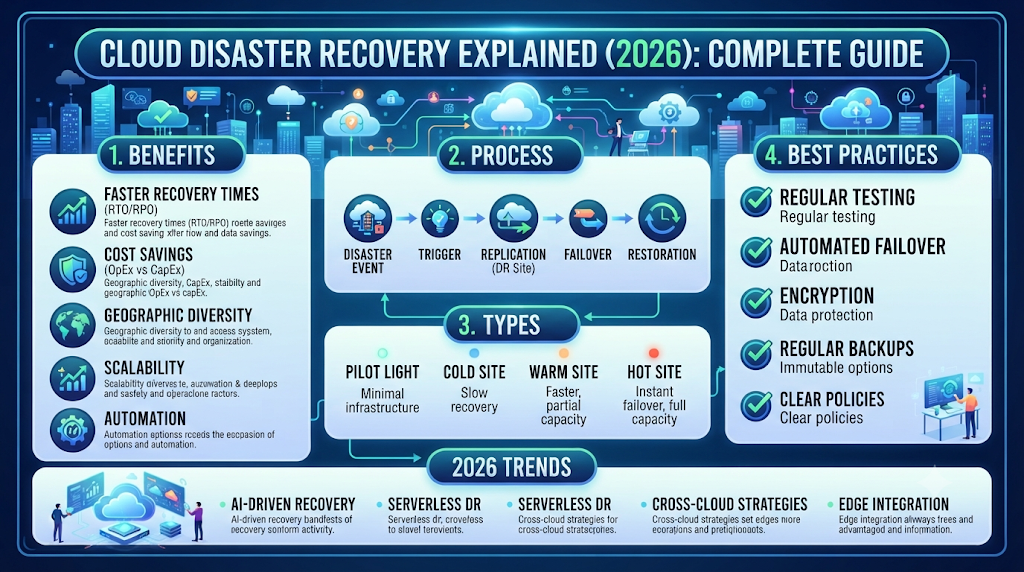
If you want to protect your business from unexpected downtime, this complete guide will help you understand everything about Cloud Disaster Recovery. You’ll learn how it works, why businesses use it, its benefits, different recovery methods, and the best practices for protecting critical business data. Whether you own a small startup or manage a large enterprise, understanding Cloud Disaster Recovery can help you build stronger business continuity, improve data protection, and create a more secure cloud environment.
“It’s not a matter of if a disaster happens. It’s a matter of when. Preparation always costs less than recovery.”
What Is Cloud Disaster Recovery?
Businesses face unexpected risks every day. Hardware failures, ransomware attacks, power outages, human mistakes, and natural disasters can interrupt important services without warning. Cloud Disaster Recovery is a strategy that helps organizations recover their systems, applications, and data quickly after these incidents. Instead of rebuilding everything from scratch, businesses use cloud technology to restore operations with minimal downtime.
Unlike traditional recovery methods, cloud-based recovery stores copies of business data in secure cloud environments. This allows organizations to recover information from almost anywhere with an internet connection. A well-designed cloud disaster recovery plan, combined with reliable cloud backup, strong cloud security, and regular recovery testing, keeps business operations running even during major disruptions.
Cloud Disaster Recovery Definition
Cloud Disaster Recovery is the process of using cloud technology to restore business systems, applications, and data after an unexpected event. It combines disaster recovery, data recovery, cloud infrastructure, and backup strategy into one reliable solution. Instead of relying only on physical servers, businesses use secure cloud platforms to protect their most valuable digital assets.
How Cloud Disaster Recovery Works
Cloud Disaster Recovery works by creating secure copies of important business data and applications. These copies are stored in remote cloud locations. If the main system fails, the backup environment becomes available through cloud replication, failover, backup automation, and system recovery. This process reduces downtime and allows employees to continue working with minimal interruption.
Why Businesses Need Cloud Disaster Recovery
Every business depends on data. Losing customer information, financial records, or business applications can create serious financial and legal problems. A strong business resilience strategy protects organizations from these risks while improving cloud recovery, enterprise backup, and workload recovery. Companies also gain greater confidence because they know their critical systems remain protected even during unexpected emergencies.
Why Cloud Disaster Recovery Is Important
Today’s businesses cannot afford long service interruptions. Customers expect websites, online stores, and business applications to remain available at all times. Even a few hours of downtime can lead to lost sales, damaged reputation, and unhappy customers. Cloud Disaster Recovery helps organizations recover quickly while maintaining reliable cloud services, stronger business continuity, and better cloud operations.
Cloud technology also makes disaster recovery more affordable than traditional recovery systems. Businesses no longer need expensive secondary data centers to protect their information. Modern cloud recovery services, supported by effective cloud risk management, cloud availability, and regular disaster recovery testing, provide reliable protection without excessive infrastructure costs.
Protect Business Data
Business information is one of a company’s most valuable assets. Customer records, financial transactions, employee files, and operational documents require constant protection. A strong data protection strategy uses secure offsite backup, reliable cloud backup solutions, and continuous critical data recovery to prevent permanent data loss during unexpected events.
Reduce Downtime
Every minute of downtime costs money. Online businesses may lose sales, while service providers may lose customer confidence. Cloud platforms reduce interruptions through fast cloud failover, efficient recovery time objective, intelligent cloud replication, and reliable cloud infrastructure recovery, allowing organizations to resume operations much faster.
Improve Business Continuity
Business continuity means keeping important services available even when problems occur. Companies that prepare in advance recover faster and experience fewer operational disruptions. Effective business continuity planning, supported by cloud resilience, backup management, and a reliable disaster recovery strategy, allows organizations to continue serving customers during difficult situations.
Meet Compliance Requirements
Many industries must follow strict regulations for protecting customer information. Healthcare organizations, banks, and online businesses often need documented recovery procedures to meet compliance standards. A professional enterprise disaster recovery strategy supports cloud compliance, improves secure cloud environment practices, and strengthens overall IT disaster recovery readiness.
How Cloud Disaster Recovery Works
Cloud Disaster Recovery follows a structured process that protects business systems before a disaster happens and restores them afterward. The process combines automated backups, data replication, recovery planning, and continuous monitoring. Every step works together to reduce downtime and protect critical business operations.
Modern cloud providers automate most recovery tasks. Businesses can schedule backups, monitor system health, and perform regular recovery tests without interrupting daily operations. This combination of backup strategy, mission-critical applications, cloud migration, and recovery point objective creates a reliable recovery system that supports long-term business growth.
| Recovery Stage | Purpose | Business Benefit |
| Backup | Store business data securely | Prevent permanent data loss |
| Replication | Copy data to multiple locations | Increase availability |
| Failover | Switch to backup systems | Reduce downtime |
| Recovery | Restore systems and applications | Resume business quickly |
Backup
Backup creates secure copies of important business information before problems occur. Modern backup and restore systems automatically save files, databases, applications, and virtual machines to protected cloud locations. This ensures valuable business information remains available whenever recovery becomes necessary.
Replication
Replication continuously copies business data between multiple cloud environments. Real-time cloud replication reduces the risk of losing recent information and improves cloud workload protection. Businesses benefit from faster recovery and stronger protection against unexpected failures.
Failover
Failover automatically redirects workloads from failed systems to healthy backup environments. Reliable cloud failover, supported by public cloud disaster recovery or private cloud disaster recovery, keeps business applications available while minimizing service interruptions.
Recovery
Recovery is the final step where systems, applications, and business data return to normal operation. Effective cloud recovery, supported by recovery testing, business disaster recovery, and continuous monitoring, helps organizations return to normal as quickly and safely as possible.
Types of Cloud Disaster Recovery
Not every business needs the same recovery solution. A small startup has different requirements than a large enterprise with thousands of customers. That’s why cloud providers offer several disaster recovery models. Each option balances cost, recovery speed, and infrastructure requirements. Choosing the right method depends on your business goals, available budget, and acceptable downtime.
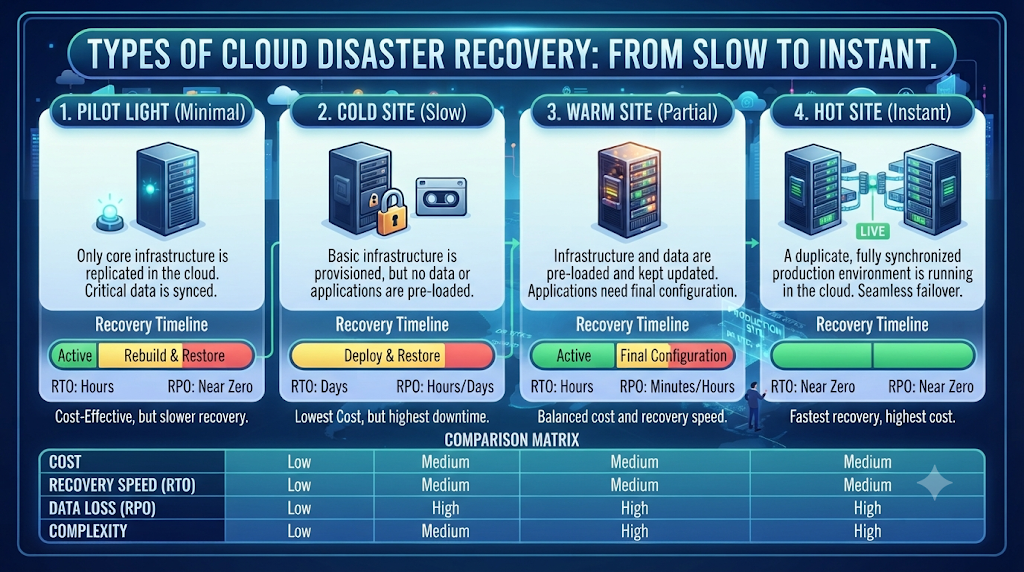
Some recovery models focus on low cost while others prioritize maximum uptime. Understanding these options helps you select the best solution for your organization. Whether you choose hybrid cloud disaster recovery, public cloud disaster recovery, or private cloud disaster recovery, your strategy should always support business continuity, cloud resilience, and long-term data protection.
Backup and Restore
Backup and Restore is the simplest recovery method. Business data is copied to secure cloud storage and restored whenever a disaster occurs. This approach works well for small businesses that can tolerate a longer recovery time. Modern backup and restore solutions combine cloud backup, offsite backup, and automated backup management to protect important information while keeping costs low.
Pilot Light
The Pilot Light model keeps only the most important systems running in the cloud. Critical applications remain ready while other resources start only when needed. This method reduces infrastructure costs while maintaining reliable cloud infrastructure recovery, faster system recovery, and better cloud availability during unexpected incidents.
Warm Standby
Warm Standby maintains a scaled-down version of your production environment in the cloud. Essential services continue operating in the background, allowing businesses to recover much faster after an outage. Organizations that depend on mission-critical applications often choose this model because it improves cloud operations, strengthens business resilience, and shortens the recovery time objective.
Multi-Site Disaster Recovery
Multi-Site Disaster Recovery stores applications and data across multiple cloud regions or data centers. If one location becomes unavailable, another location immediately takes over. This approach uses cloud replication, intelligent failover, and advanced cloud workload protection to deliver maximum availability for large enterprises.
Disaster Recovery as a Service (DRaaS)
Disaster recovery as a service allows businesses to outsource disaster recovery to a cloud provider. Instead of building their own recovery infrastructure, organizations pay for managed cloud recovery services. DRaaS reduces operational complexity while improving enterprise disaster recovery, cloud risk management, and overall recovery performance.
Key Components of a Cloud Disaster Recovery Plan
A successful recovery plan includes much more than storing backup files. Every organization should understand its critical systems, identify potential risks, and define clear recovery objectives. Without proper planning, businesses may struggle to restore operations when an emergency occurs. A complete cloud disaster recovery plan reduces uncertainty and provides clear recovery procedures.
Good planning also includes regular testing and continuous improvement. Technology changes quickly, so recovery plans should evolve alongside business systems. Combining business continuity planning, cloud compliance, recovery testing, and backup strategy creates a reliable foundation for long-term protection.
| Component | Purpose | Business Value |
| Risk Assessment | Identify possible threats | Better preparation |
| Business Impact Analysis | Prioritize important systems | Faster recovery |
| Recovery Time Objective (RTO) | Define acceptable downtime | Reduce business loss |
| Recovery Point Objective (RPO) | Define acceptable data loss | Better data recovery |
| Recovery Testing | Verify recovery readiness | Improve reliability |
Risk Assessment
Risk assessment identifies events that could interrupt business operations. Cyberattacks, hardware failures, power outages, natural disasters, and human mistakes should all be evaluated. A proper assessment strengthens cloud security, improves cloud infrastructure, and supports smarter recovery planning.
Business Impact Analysis (BIA)
Business Impact Analysis identifies the systems that are most important to daily operations. Customer databases, payment platforms, communication tools, and websites usually receive the highest priority. This process improves business continuity, supports enterprise backup, and protects mission-critical applications.
Recovery Time Objective (RTO)
The recovery time objective defines how quickly systems must return online after an incident. Businesses with online services often require very short recovery times to avoid financial losses and customer frustration.
Recovery Point Objective (RPO)
The recovery point objective measures how much recent data a business can afford to lose. Smaller RPO values require more frequent backups and stronger backup automation, reducing the risk of permanent information loss.
Disaster Recovery Documentation
Clear documentation explains every recovery step. It includes technical procedures, emergency contacts, backup locations, testing schedules, and recovery priorities. Well-written documentation improves business disaster recovery and helps employees respond confidently during emergencies.
Recovery Testing and Updates
Testing ensures that recovery plans actually work when needed. Organizations should perform regular disaster recovery testing, verify cloud recovery, and update recovery procedures whenever systems or business requirements change.
Benefits of Cloud Disaster Recovery
Cloud Disaster Recovery provides much more than backup storage. It protects business operations, improves customer confidence, and allows organizations to recover quickly after unexpected disruptions. Businesses that invest in disaster recovery experience less downtime, lower financial losses, and stronger long-term stability. Modern cloud platforms also simplify recovery management while reducing infrastructure costs.
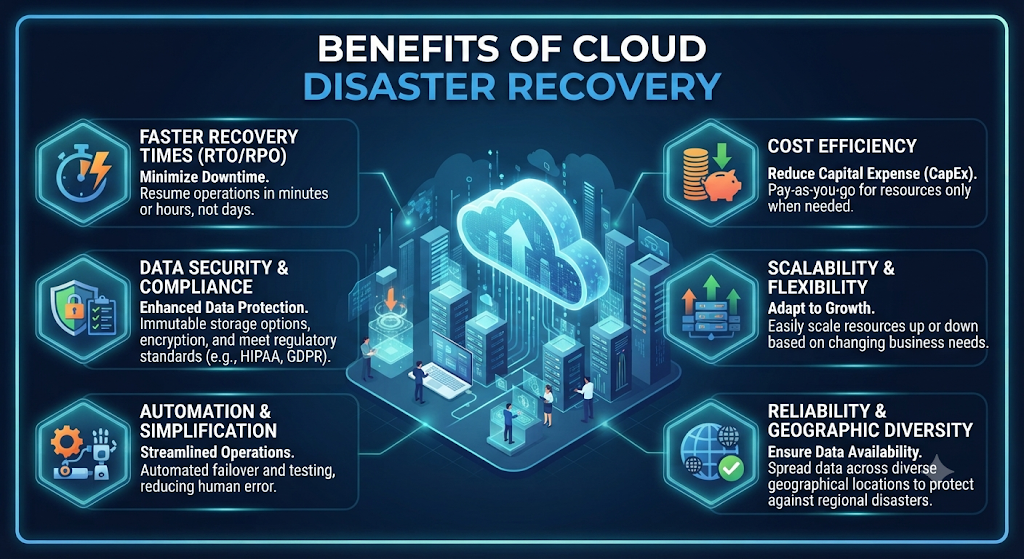
Another important advantage is flexibility. As your business grows, cloud recovery solutions can grow with it. Companies can increase storage, improve performance, and protect new applications without rebuilding their entire infrastructure. Combining cloud services, cloud migration, cloud recovery, and secure cloud environment practices creates a recovery strategy that supports both current operations and future expansion.
| Benefit | Business Impact |
| Faster Recovery | Less downtime |
| Better Data Protection | Reduced data loss |
| Lower Costs | No secondary data center |
| Improved Security | Stronger business protection |
| Easy Scalability | Supports business growth |
| Remote Accessibility | Recover from anywhere |
Cloud Disaster Recovery vs Traditional Disaster Recovery
Traditional disaster recovery depends on physical backup servers located in secondary data centers. While this approach can protect business information, it often requires significant investment, dedicated hardware, and ongoing maintenance. Recovery can also take longer because businesses must manage their own infrastructure and recovery processes.
Cloud Disaster Recovery offers a more flexible alternative. Businesses use cloud platforms instead of maintaining expensive backup facilities. Features like cloud infrastructure recovery, cloud availability, automated cloud replication, and intelligent failover make recovery faster and easier while reducing operational costs.
| Feature | Cloud DR | Traditional DR |
| Cost | Lower | Higher |
| Deployment | Fast | Slow |
| Scalability | Excellent | Limited |
| Maintenance | Managed | Self-managed |
| Recovery Speed | Faster | Slower |
Cloud Disaster Recovery vs Cloud Backup
Many people think Cloud Backup and Cloud Disaster Recovery are the same, but they serve different purposes. Cloud backup focuses on storing copies of files and databases. If information is deleted or damaged, businesses can restore those files. Backup alone does not automatically restore complete business operations.
Cloud Disaster Recovery goes much further. It protects applications, servers, networking, databases, and complete business environments. Through cloud recovery services, cloud failover, workload recovery, and comprehensive disaster recovery strategy, organizations can quickly resume operations after major disruptions instead of restoring files one by one.
| Cloud Backup | Cloud Disaster Recovery |
| Protects files | Protects entire business |
| Manual restoration | Automated recovery |
| Lower cost | Higher protection |
| Slower recovery | Faster recovery |
| Data focused | Business focused |
Best Practices for Cloud Disaster Recovery
Building a recovery plan is only the first step. Keeping it updated is equally important. Technology changes quickly, and your recovery strategy should grow with your business. Regular reviews help identify weak points before they become serious problems. A well-maintained recovery plan improves business continuity, strengthens cloud security, and supports reliable cloud operations during unexpected events.
Successful businesses don’t wait for disasters to test their systems. They perform scheduled recovery testing, improve their backup strategy, and monitor cloud infrastructure continuously. These simple habits reduce recovery time and increase confidence that every critical system will work when it matters most.
| Best Practice | Why It Matters |
| Encrypt Backup Data | Protect sensitive information |
| Automate Backups | Reduce human errors |
| Test Recovery Plans | Verify recovery readiness |
| Monitor Infrastructure | Detect issues early |
| Train Employees | Improve emergency response |
| Update Recovery Plans | Keep strategies current |
Encrypt Backup Data
Backup files often contain confidential business information. Encryption protects these files from unauthorized access while they are stored or transferred. Combining data protection, cloud backup, secure cloud environment, and strong encryption helps businesses protect customer information and maintain compliance.
Test Your Recovery Plan Regularly
A recovery plan should never remain untested. Regular recovery testing helps businesses identify weaknesses before a real emergency occurs. Frequent disaster recovery testing, combined with system recovery validation and cloud recovery checks, ensures every recovery process works correctly.
Automate Backups
Manual backups increase the risk of human mistakes. Automated backup systems create regular copies without requiring employee intervention. Modern backup automation, supported by backup management, cloud services, and intelligent scheduling, keeps important data continuously protected.
Monitor Cloud Infrastructure
Continuous monitoring helps identify hardware failures, unusual traffic, and security threats before they affect business operations. Monitoring improves cloud infrastructure, supports cloud workload protection, and reduces the risk of unexpected downtime.
Train Your IT Team
Technology alone cannot protect a business. Employees should understand recovery procedures, security policies, and emergency response plans. Well-trained teams improve business resilience, strengthen IT disaster recovery, and reduce recovery delays.
Review Your Disaster Recovery Strategy Every Year
Business requirements change over time. New applications, employees, and customer data require updated recovery procedures. Reviewing your disaster recovery strategy, improving cloud risk management, and updating documentation keep your recovery plan effective.
Common Cloud Disaster Recovery Challenges
Every recovery solution faces challenges. Businesses often struggle with planning, budget limitations, outdated documentation, and changing technology. Recognizing these challenges early allows organizations to improve their recovery strategy before problems occur.
Cyber threats continue to evolve every year. Organizations must regularly update their security controls and recovery procedures. Combining ransomware protection, cyber attack recovery, cloud compliance, and continuous monitoring creates stronger protection against modern digital threats.
| Challenge | Recommended Solution |
| Poor Planning | Build a documented recovery plan |
| Limited Budget | Prioritize critical systems |
| Human Error | Employee training |
| Security Risks | Strong cybersecurity controls |
| Outdated Documentation | Annual reviews |
| Recovery Delays | Regular testing |
Poor Planning
Many businesses create recovery plans but never update them. Outdated documentation often causes confusion during emergencies. Regular reviews improve business continuity planning, strengthen enterprise disaster recovery, and reduce operational risks.
Budget Limitations
Smaller businesses may hesitate to invest in disaster recovery. However, cloud-based services provide affordable protection without requiring expensive hardware. Modern cloud recovery services, cloud availability, and scalable pricing make disaster recovery accessible for organizations of all sizes.
Security Risks
Hackers frequently target backup systems because they contain valuable business information. Strong cloud security, encrypted backups, and secure authentication protect recovery environments from unauthorized access
Compliance Issues
Industries like healthcare and finance must meet strict data protection regulations. Recovery plans should support cloud compliance, maintain critical data recovery, and follow all applicable legal requirements.
Human Error
Simple mistakes remain one of the leading causes of data loss. Training employees and automating recovery processes reduce errors while improving backup strategy and overall operational reliability.
Outdated Recovery Plans
Technology evolves constantly. Businesses should review recovery documentation whenever systems, applications, or cloud platforms change. Regular updates strengthen cloud resilience and improve long-term recovery success.
How to Create an Effective Cloud Disaster Recovery Plan
Every successful recovery plan begins with understanding your business. Start by identifying the systems, applications, and databases that are essential for daily operations. Next, evaluate possible risks and decide how quickly each system must recover after an outage. This planning process creates a practical roadmap that supports business continuity, cloud infrastructure recovery, and reliable cloud migration strategies.
Once your goals are clear, choose cloud technologies that match your business needs. Automate backups, schedule recovery tests, document every procedure, and review the plan regularly. Combining recovery point objective, recovery time objective, enterprise backup, and continuous cloud operations monitoring creates a recovery plan that remains effective as your organization grows.
| Planning Step | Objective |
| Identify Critical Systems | Protect essential operations |
| Assess Business Risks | Prepare for possible disasters |
| Define RTO & RPO | Set recovery goals |
| Choose Cloud Provider | Build reliable infrastructure |
| Test Recovery Plan | Verify readiness |
| Update Regularly | Keep protection current |
Cloud Disaster Recovery Use Cases
Cloud Disaster Recovery supports businesses across many industries. Every organization depends on digital information, making reliable recovery planning essential. While recovery requirements vary, the goal remains the same: restore operations quickly while protecting valuable business data.
Organizations that invest in recovery planning experience fewer interruptions and recover more efficiently after unexpected incidents. Whether serving customers, processing payments, or managing sensitive records, Cloud Disaster Recovery helps maintain stable operations.
Healthcare
Hospitals and clinics store sensitive patient records that must remain available at all times. Reliable data recovery, business continuity, and cloud compliance protect medical information while reducing service interruptions.
Banking
Banks process thousands of financial transactions every minute. Fast failover, secure cloud recovery, and reliable cloud infrastructure help prevent financial losses during system failures.
E-commerce
Online stores depend on continuous availability. A short outage can result in lost sales and unhappy customers. Effective cloud availability, cloud replication, and business disaster recovery keep websites running smoothly.
Education
Schools and universities rely on online learning platforms, student records, and digital resources. Recovery planning protects educational services while improving backup automation and cloud services reliability.
Small Businesses
Small businesses often have limited IT budgets, making cloud recovery especially valuable. Affordable cloud backup solutions, managed disaster recovery as a service, and scalable cloud recovery services provide enterprise-level protection without requiring expensive infrastructure.
Top Cloud Disaster Recovery Providers
Choosing the right cloud provider is just as important as creating the recovery plan itself. The best providers offer reliable infrastructure, strong security, automated backups, and flexible recovery options. Businesses should compare features, pricing, compliance certifications, and support before making a decision.
Large cloud providers continue investing in advanced recovery technologies. Their global infrastructure helps organizations improve reliability, reduce downtime, and protect mission-critical applications.
Amazon Web Services (AWS)
AWS offers a wide range of disaster recovery tools, including automated backups, replication, storage, and recovery automation. It supports organizations of every size through flexible cloud recovery solutions.
Microsoft Azure
Microsoft Azure provides integrated disaster recovery services that work well with Windows-based environments. Azure supports automated replication, virtual machine recovery, and strong security controls.
Google Cloud Platform (GCP)
Google Cloud Platform delivers scalable disaster recovery services with global infrastructure, secure storage, and advanced data replication. Businesses benefit from fast recovery and high availability.
Common Mistakes to Avoid in Cloud Disaster Recovery
Many businesses invest in recovery solutions but still make simple mistakes that weaken their overall protection. One of the biggest mistakes is assuming that a single backup is enough. A backup alone cannot restore your entire business environment after a major outage. A complete Cloud Disaster Recovery strategy should include business continuity, cloud recovery, cloud backup, and regular recovery testing to ensure every critical system can return online quickly.
Another common mistake is ignoring regular testing and updates. Business systems change throughout the year, and recovery plans must change as well. Companies that fail to review their cloud disaster recovery plan, monitor cloud infrastructure, or improve their backup strategy often discover weaknesses only after a disaster has already happened.
| Common Mistake | Better Approach |
| Never testing backups | Perform scheduled recovery testing |
| Keeping one backup copy | Store backups in multiple locations |
| Ignoring cybersecurity | Strengthen cloud security |
| Outdated recovery plans | Review and update regularly |
| No employee training | Train staff every year |
| Choosing the cheapest solution | Focus on reliability and business needs |
Relying on One Backup Location
Saving business data in only one location creates unnecessary risk. If that storage becomes unavailable, recovery may become impossible. Using offsite backup, cloud backup solutions, and cloud replication provides stronger protection and improves overall reliability.
Never Testing Recovery Plans
Many organizations create recovery plans but never verify that they actually work. Regular disaster recovery testing, system recovery, and cloud operations monitoring ensure every recovery process performs correctly before a real emergency occurs.
Ignoring Cybersecurity Threats
Modern cyberattacks target backup systems as well as production environments. Strong ransomware protection, secure authentication, and continuous cyber attack recovery planning help protect valuable business information.
Missing Compliance Requirements
Businesses operating in healthcare, banking, and finance must follow strict regulations. Maintaining cloud compliance, protecting critical data recovery, and documenting recovery procedures help organizations meet legal requirements.
Using Outdated Recovery Procedures
Technology changes quickly. Recovery plans that worked two years ago may no longer protect modern cloud environments. Regular updates improve cloud resilience, strengthen enterprise disaster recovery, and support long-term business growth.
Frequently Asked Questions (FAQs)
What is Cloud Disaster Recovery?
Cloud Disaster Recovery is a cloud-based strategy that helps businesses restore applications, systems, and data after unexpected failures such as cyberattacks, hardware failures, natural disasters, or accidental data loss.
What are RTO and RPO?
The recovery time objective (RTO) defines how quickly systems should recover after an outage. The recovery point objective (RPO) defines how much recent data a business can afford to lose before recovery begins.
Which businesses need Cloud Disaster Recovery?
Every organization that depends on digital information can benefit from Cloud Disaster Recovery. This includes healthcare providers, banks, online stores, educational institutions, government organizations, and small businesses.
How often should a disaster recovery plan be tested?
Most experts recommend testing recovery plans at least once or twice every year. Businesses handling sensitive or mission-critical information may perform recovery testing more frequently.
Is Cloud Disaster Recovery expensive?
Cloud-based recovery solutions are generally more affordable than maintaining traditional secondary data centers. Most cloud providers offer flexible pricing that allows businesses to scale services according to their needs.
Which cloud provider offers the best disaster recovery services?
Amazon Web Services (AWS), Microsoft Azure, and Google Cloud Platform (GCP) all provide excellent disaster recovery features. The best choice depends on your business requirements, budget, existing infrastructure, and compliance needs.
Final Thoughts
Business interruptions are becoming more common as organizations depend increasingly on digital technology. Hardware failures, cyberattacks, natural disasters, and human mistakes can happen at any time. Preparing in advance is always less expensive than recovering after a major incident. A well-designed Cloud Disaster Recovery strategy protects your business, improves business resilience, strengthens data protection, and reduces operational risks.
Whether you manage a startup or a global enterprise, investing in Cloud Disaster Recovery is no longer optional. It is an essential part of modern IT planning. By combining business continuity planning, cloud recovery services, backup management, regular recovery testing, and strong cloud security, your organization can recover faster, protect customer trust, and continue operating with confidence during unexpected events.
“The strongest businesses are not those that avoid disasters. They are the ones that prepare for them.”
Meta Description
Learn Cloud Disaster Recovery in this complete 2026 guide. Explore its benefits, process, types, best practices, DRaaS, cloud backup, and business continuity strategies to protect your data and reduce downtime.
Continue Reading on DailyTecho
Expand your cloud computing knowledge with these related guides:
| Related Article | Purpose |
| What Is Cloud Computing? The Ultimate Beginner’s Guide (2026) | Learn cloud computing fundamentals. |
| Public Cloud vs Private Cloud vs Hybrid Cloud (2026) | Compare deployment models. |
| Cloud Service Models Explained: IaaS, PaaS & SaaS (2026) | Understand cloud service types. |
| Cloud Deployment Models Explained (2026) | Explore modern deployment strategies. |
| Cloud Storage Explained (2026) | Learn how cloud storage works. |
| Cloud Security Explained (2026) | Discover cloud security best practices. |
| Cloud Migration Explained (2026) | Learn how businesses move to the cloud. |
| Edge Computing vs Cloud Computing (2026) | Compare edge and cloud technologies. |
| Cloud Backup vs Cloud Storage (2026) | Understand the differences between backup and storage. |
1 Comment