

Introduction: Understanding Cloud Computing Architecture in 2026
Technology has changed the way businesses operate. Today, companies no longer depend only on physical servers and traditional IT systems. Instead, they use flexible online solutions that help them grow faster, reduce expenses, and serve customers globally. This is where cloud computing architecture explained becomes important.
Cloud computing architecture is the foundation behind modern digital services. It describes how different parts of a cloud environment work together, including applications, servers, networks, storage systems, and security tools. Whether you use online banking, streaming platforms, or business software, cloud architecture works quietly in the background to deliver fast and reliable experiences.
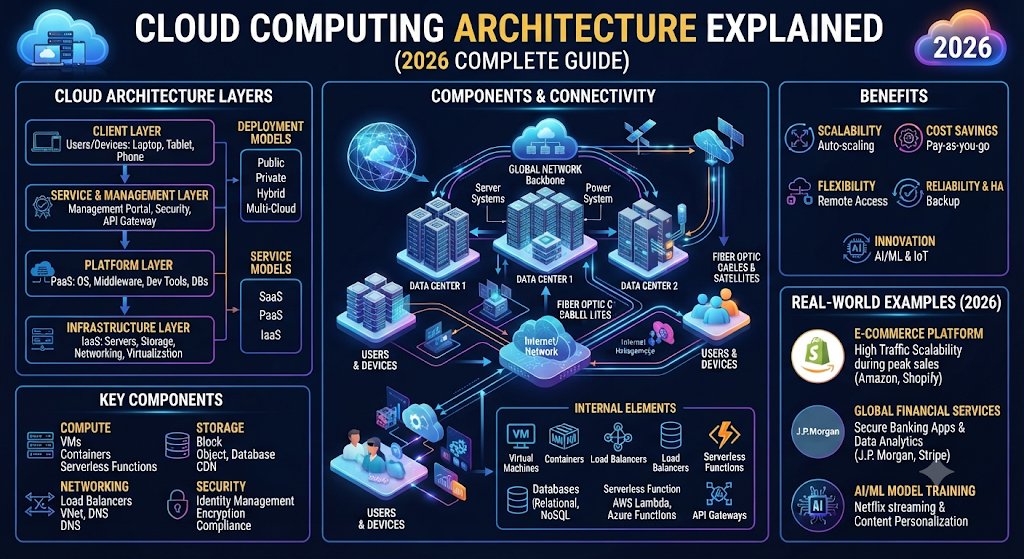
In simple words, cloud architecture works like a digital building plan. Just like an architect designs every part of a building before construction, companies create a cloud architecture design to organize their technology resources properly.
Modern businesses use cloud infrastructure architecture to build scalable applications, manage large amounts of data, and improve customer experiences. From small startups to global enterprises, organizations rely on cloud platforms such as AWS, Microsoft Azure, and Google Cloud Platform to run their digital operations.
According to industry trends, businesses in the USA are increasing cloud adoption because they need better flexibility, stronger security, and faster innovation. Understanding cloud architecture helps companies make smarter technology decisions in 2026.
What Is Cloud Computing Architecture?
Cloud computing architecture is a structure that explains how different cloud components connect and communicate with each other to provide digital services through the internet.
Unlike traditional IT systems where companies buy and maintain physical hardware, cloud architecture uses remote cloud servers, advanced networking systems, and virtual resources managed through professional cloud providers.
A complete cloud environment architecture usually contains two major sides. The first is the front-end side, where users interact with applications through browsers, mobile apps, and software interfaces. The second is the back-end side, where cloud providers manage servers, databases, storage, and security systems.
For example, when you open a cloud-based application, your request travels through the internet to powerful servers located inside global data centers. The cloud system processes your request and sends the required information back within seconds.
The main goal of cloud architecture components is to create a reliable, secure, and scalable technology environment. Every component has a specific role, from storing information to protecting sensitive business data.
A simple cloud computing structure looks like this:
| Cloud Architecture Part | Main Purpose |
| User Interface | Allows users to access applications |
| Application Layer | Runs software and services |
| Cloud Servers | Provide computing power |
| Storage Systems | Save and manage data |
| Networking Layer | Connects different resources |
| Security Layer | Protects systems and information |
Businesses use different cloud architecture models depending on their requirements. Some organizations choose public cloud solutions, while others prefer private cloud environments or a combination known as hybrid cloud.
Why Cloud Computing Architecture Is Important for Modern Businesses
The business world moves quickly. Companies need technology that can adapt to changing customer demands. Traditional IT systems often require expensive hardware upgrades and manual maintenance. However, modern cloud infrastructure provides a more flexible approach.
One major advantage of cloud architecture is cloud scalability. Businesses can increase or decrease their computing resources based on demand. For example, an online store may need extra resources during holiday sales. Cloud systems can automatically handle this increase without requiring companies to purchase new servers.
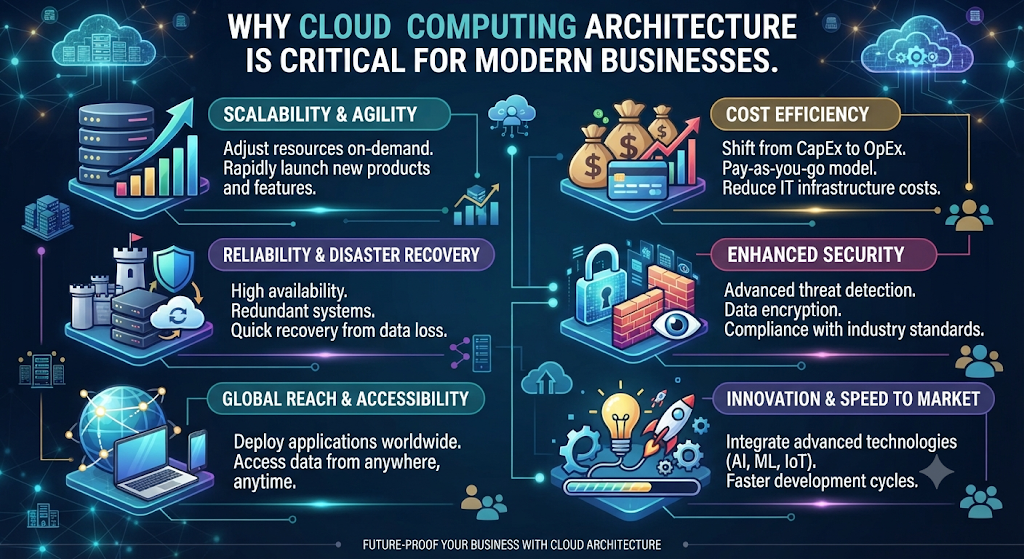
Another important factor is cloud reliability. Leading cloud providers operate multiple global data centers, which helps keep services available even when technical problems occur. This reliability is essential for businesses that cannot afford long periods of downtime.
Cloud architecture also improves collaboration. Teams located in different cities or countries can access the same applications and files through secure cloud systems. This approach supports remote work and global business operations.
Companies also benefit from better cost management. Instead of investing heavily in physical infrastructure, businesses can pay only for the resources they use. This model allows startups and smaller companies to compete with larger organizations.
Here are some key business advantages:
| Benefit | Business Impact |
| Scalability | Supports growth without major hardware investment |
| Flexibility | Allows quick changes based on business needs |
| Cost Control | Reduces infrastructure expenses |
| Security | Protects applications and sensitive information |
| Global Access | Supports teams and customers worldwide |
For example, a growing software company in the USA can launch a new application using cloud resources instead of building its own data center. The company can focus on product development while the cloud provider manages the underlying infrastructure.
How Cloud Computing Architecture Works (Step-by-Step Explanation)
Understanding how cloud computing architecture works helps beginners see what happens behind every online service.
When a user opens a cloud application, the process begins with a request. The user may click a button, upload a file, or search for information. This request travels through the internet using secure communication methods.
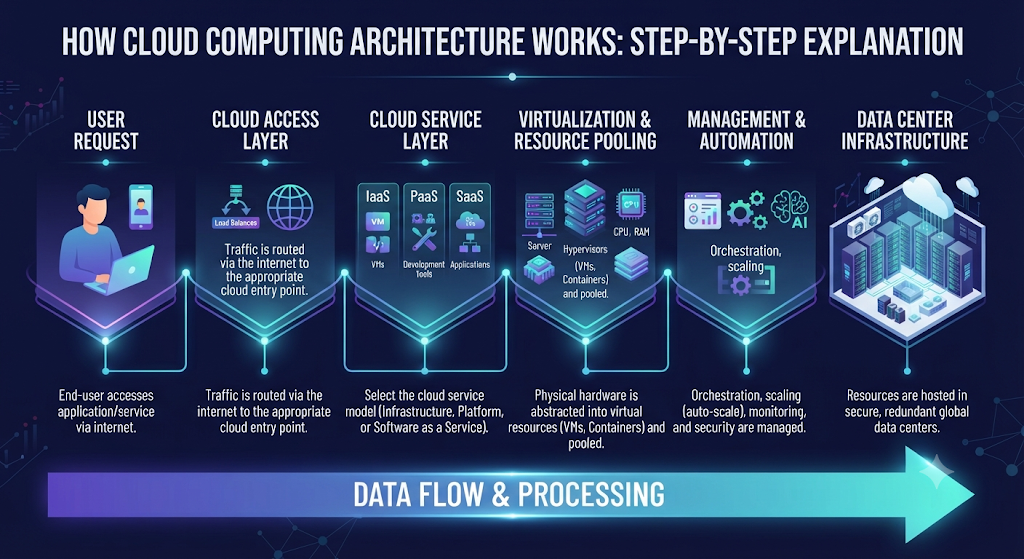
Next, the cloud platform receives the request and identifies the required resources. The system may use virtual machines, databases, or application servers depending on what the user needs.
Cloud providers use virtualization technology to divide physical hardware into multiple virtual environments. This allows one physical server to support many different customers safely and efficiently.
After processing the request, cloud systems retrieve information from storage or generate new results through computing resources. Finally, the response travels back to the user’s device.
The complete process can be explained as:
User Device → Application → Cloud Services → Computing Resources → Storage → Response
This entire system depends on several technologies working together, including cloud networking, automation, APIs, and security controls.
Large organizations often combine cloud architecture with DevOps practices to improve software development speed. Developers can create, test, and deploy applications faster because cloud environments provide ready-to-use resources.
Another important technology is container technology. Containers allow applications to run consistently across different cloud environments. Tools like Kubernetes help organizations manage large numbers of containers efficiently.
As cloud technology continues developing, businesses are creating advanced solutions using automation, artificial intelligence, and serverless architecture to improve performance.
Main Components of Cloud Computing Architecture
Every successful cloud environment depends on several important building blocks. These cloud infrastructure components work together to provide computing power, storage, networking, and protection.
A strong cloud computing framework combines hardware resources, software platforms, management systems, and security solutions. Without proper architecture, businesses may face performance problems, security risks, and higher operational costs.
The main components include front-end systems, back-end infrastructure, networks, storage solutions, and security layers.
Each component plays a different role. Together, they create a complete cloud based architecture that supports modern applications and business services.
Front-End Components in Cloud Architecture
The front-end is the part of cloud architecture components that users directly interact with. It works as a bridge between people and cloud systems. Whenever you open a cloud application through a browser, mobile app, or desktop software, you are using the front-end layer.
The front-end includes user interfaces, client devices, web browsers, and applications. These elements allow users to send requests and receive information from cloud systems. A simple example is using Google Drive. You upload a file through the interface, and the cloud system processes and stores it behind the scenes.
In a complete cloud environment architecture, the front-end focuses on user experience. Companies design this layer carefully because a slow or confusing interface can affect customer satisfaction.
Modern applications also use API integration to connect different systems. APIs allow software applications to communicate with cloud services without requiring users to understand the technical processes happening in the background.
Common front-end elements include:
| Front-End Component | Purpose |
| Web Browser | Allows access through websites |
| Mobile Applications | Provides cloud access on smartphones |
| User Interface | Helps users interact with services |
| APIs | Connects applications with cloud resources |
| Client Devices | Sends requests to cloud platforms |
A strong front-end design improves usability and helps businesses deliver smoother digital experiences. This is especially important for companies building cloud solutions architecture for millions of users.
Back-End Components in Cloud Architecture
Behind every cloud service, powerful back-end systems manage the complicated operations. The back-end represents the internal side of cloud infrastructure architecture where providers handle computing, storage, databases, and application management.
The back-end contains servers, databases, cloud operating systems, virtualization systems, and management tools. These components work together to provide reliable services to users.
Cloud providers operate massive data centers filled with thousands of physical servers. However, users usually do not interact with these physical machines directly. Instead, providers use virtualization technology to create flexible virtual environments.
For example, a single physical server can run multiple virtual machines. Each virtual machine behaves like an independent computer with its own operating system and resources.
The major back-end components include:
| Back-End Component | Function |
| Cloud Servers | Provide processing power |
| Databases | Store and organize information |
| Virtual Machines | Create flexible computing environments |
| Management Software | Controls cloud resources |
| Operating Systems | Support applications and services |
Back-end systems also support automation. Through automation tools, cloud providers can automatically manage resources, monitor performance, and maintain availability.
This approach allows businesses to build reliable applications without managing physical hardware themselves.
Network Infrastructure and Connectivity
A cloud system cannot work without strong networking. Cloud networking connects users, applications, servers, and storage systems together.
Network infrastructure allows data to move quickly between different locations. It includes internet connections, routers, firewalls, load balancers, and private networks.
When businesses use cloud services, they need fast and secure communication between their users and cloud resources. Poor network performance can create delays and reduce customer satisfaction.
Cloud providers create global network systems that connect multiple regions and data centers. This helps companies deliver services closer to their customers.
For example, a company in the USA can serve customers worldwide by using cloud regions located in different geographic areas.
Important networking technologies include:
| Technology | Purpose |
| Load Balancing | Distributes traffic across servers |
| VPN | Creates secure private connections |
| CDN | Delivers content faster |
| Firewalls | Protects network traffic |
| Virtual Networks | Creates flexible cloud environments |
Modern cloud architecture design depends heavily on networking because applications need fast communication between different cloud components.
Data Storage Systems
Data is one of the most valuable resources for modern businesses. Cloud architecture requires reliable storage solutions to save, organize, and protect information.
Cloud providers offer different storage options depending on business requirements. These include object storage, block storage, and file storage.
Cloud storage allows companies to store large amounts of information without purchasing physical storage devices. Businesses can increase storage capacity whenever needed.
For example, an online media company may store millions of videos and images using cloud storage services. The company does not need to maintain its own storage infrastructure.
Different storage types include:
| Storage Type | Best Use Case |
| Object Storage | Photos, videos, backups, large files |
| Block Storage | Applications and databases |
| File Storage | Shared business files |
Major cloud providers offer advanced storage solutions:
- AWS provides Amazon S3
- Microsoft Azure provides Azure Blob Storage
- Google Cloud Platform provides Cloud Storage
Cloud storage also supports cloud migration because businesses can move existing data from traditional systems into flexible cloud environments.
Reliable storage improves business continuity because companies can create backups and recover information quickly after unexpected problems.
Security and Identity Management Layer
Security is one of the most important parts of cloud computing architecture. As businesses store more sensitive information online, protecting data becomes a major priority.
A strong cloud security system controls who can access information and prevents unauthorized activities. Cloud providers use multiple security methods to protect applications and data.
Identity and Access Management (IAM) helps organizations control user permissions. For example, an employee may have permission to view reports but not modify financial records.
Cloud security includes:
| Security Feature | Purpose |
| Encryption | Protects sensitive data |
| Authentication | Verifies user identity |
| Access Control | Manages permissions |
| Monitoring | Detects unusual activities |
| Firewalls | Blocks harmful traffic |
Businesses also use security practices like Zero Trust architecture, regular audits, and automated monitoring.
Strong security is especially important for industries such as healthcare, finance, and government organizations where data protection rules are strict.
A properly designed cloud technology architecture combines performance with protection. Security is not an additional feature. It is a core foundation of every successful cloud system.
Four Main Layers of Cloud Computing Architecture
The cloud computing layers explain how different parts of a cloud environment are organized. Each layer has a specific responsibility and works with other layers to deliver cloud services.
These layers create a complete cloud computing structure that helps businesses understand how applications, services, and infrastructure connect together.
The four major layers are:
| Cloud Layer | Main Purpose |
| Client Layer | User interaction |
| Application Layer | Runs applications |
| Service Layer | Provides cloud services |
| Infrastructure Layer | Manages physical resources |
Understanding these layers makes it easier for businesses to choose the right cloud solutions and create effective cloud deployment architecture.
Client Layer
The client layer is the first level of cloud computing layers because it connects users with cloud services. It represents everything users use to access applications, including laptops, smartphones, tablets, and web browsers.
When you open a cloud application, the client layer sends your request to the cloud environment. It does not manage the complicated infrastructure behind the service. Instead, it provides a simple way for users to interact with powerful cloud systems.
For example, when a customer uses an online banking application, the mobile app acts as the client layer. The user only sees account information and features, while the actual processing happens inside the cloud infrastructure.
The client layer usually includes:
| Client Component | Purpose |
| Web Browsers | Access cloud applications online |
| Mobile Apps | Provide cloud access on smartphones |
| Desktop Software | Connect computers with cloud services |
| User Interfaces | Make applications easy to use |
A well-designed client layer improves customer experience. Businesses focus on creating fast and simple interfaces because users expect quick responses from modern cloud platforms.
Application Layer
The application layer is responsible for running software applications inside the cloud environment. It sits between users and the deeper technical parts of cloud infrastructure architecture.
This layer manages application logic, user requests, and business operations. Developers use this layer to create websites, mobile applications, and enterprise software.
For example, an e-commerce website uses the application layer to manage product searches, shopping carts, customer accounts, and order processing.
The application layer commonly uses modern development technologies such as:
| Technology | Purpose |
| APIs | Connect different applications |
| Databases | Store application information |
| Containers | Run applications consistently |
| DevOps Tools | Improve development and deployment |
Many companies now use container technology to build flexible applications. Containers package software with everything needed to run properly. This makes applications easier to move between different cloud environments.
The application layer also supports serverless architecture, where developers can run code without managing traditional servers. This reduces maintenance work and allows teams to focus more on building useful features.
Service Layer
The service layer provides the actual cloud services that businesses use every day. It is a major part of cloud service architecture because it connects applications with available cloud resources.
Cloud providers organize their services into different categories. These categories allow businesses to choose solutions based on their technical needs and budget.
The three major cloud service models are:
| Service Model | Description | Example |
| IaaS | Provides computing infrastructure | Amazon EC2 |
| PaaS | Provides development platforms | Azure App Service |
| SaaS | Provides ready-to-use software | Microsoft 365 |
The service layer gives companies flexibility. A startup may choose SaaS applications because they need simple solutions. A technology company may choose IaaS because it requires complete control over servers and networking.
This layer is important for modern businesses because it allows them to access advanced technology without building everything from scratch.
Infrastructure Layer
The infrastructure layer is the foundation of cloud computing architecture. It contains the physical and virtual resources that power cloud services.
This layer includes servers, storage systems, networks, and data centers. Cloud providers manage these resources and deliver them to customers through virtual environments.
Through virtualization technology, cloud companies can divide large physical servers into smaller virtual machines. This process improves resource usage and allows multiple customers to safely share hardware.
The infrastructure layer includes:
| Infrastructure Component | Role |
| Physical Servers | Provide computing power |
| Virtual Machines | Create flexible environments |
| Storage Systems | Save business data |
| Networks | Connect cloud resources |
| Data Centers | Host cloud equipment |
Companies rely on this layer for performance, availability, and cloud reliability. A strong infrastructure foundation helps applications run smoothly even during periods of high demand.
Types of Cloud Computing Architecture
Businesses have different technology requirements. Some need maximum control over their systems, while others need affordable solutions that can scale quickly.
That is why companies choose different cloud architecture models. The main types include public cloud, private cloud, hybrid cloud, and multi-cloud architecture.
Each model has unique advantages and challenges. The right choice depends on factors such as security needs, budget, performance requirements, and business goals.
Public Cloud Architecture
Public cloud architecture is one of the most popular cloud models. In this approach, cloud providers offer computing resources to multiple customers through shared infrastructure.
Companies do not own physical servers. Instead, they rent cloud resources from providers such as Amazon Web Services, Microsoft Azure, and Google Cloud Platform.
The provider manages hardware, maintenance, updates, and infrastructure security.
Public cloud benefits include:
| Advantage | Explanation |
| Lower Cost | No need to buy physical servers |
| Scalability | Resources can increase quickly |
| Easy Management | Provider handles maintenance |
| Global Access | Services available worldwide |
Small businesses and startups often choose public cloud because it allows them to launch products without large investments.
For example, a new software company can build an application using AWS resources instead of creating its own data center.
Private Cloud Architecture
Private cloud architecture provides dedicated cloud resources for a single organization. Unlike public cloud systems, the infrastructure is not shared with other customers.
Large companies and organizations with strict security requirements often choose private cloud solutions.
Private cloud provides greater control over:
- Data management
- Security policies
- Compliance requirements
- Infrastructure customization
Industries such as healthcare, finance, and government often use private cloud because they handle sensitive information.
However, private cloud usually requires more investment and technical expertise compared with public cloud solutions.
Hybrid Cloud Architecture
Hybrid cloud architecture combines public cloud and private cloud environments. It allows businesses to keep sensitive information in private systems while using public cloud resources for flexibility.
Many organizations choose hybrid cloud because it creates a balance between control and scalability.
For example, a hospital may store patient records in a private cloud while using public cloud resources for general applications.
Hybrid cloud advantages include:
| Benefit | Explanation |
| Flexibility | Mix different cloud environments |
| Security | Protect sensitive workloads |
| Scalability | Use public resources when needed |
| Cost Efficiency | Optimize resource spending |
As businesses continue their cloud migration journey, hybrid cloud has become a popular strategy.
Multi-Cloud Architecture
Multi-cloud architecture means using services from multiple cloud providers instead of depending on one company.
For example, a business may use AWS for computing, Google Cloud Platform for analytics, and Azure for specific enterprise applications.
The main purpose of multi-cloud is to improve flexibility and avoid complete dependence on one provider.
Benefits of multi-cloud include:
| Benefit | Explanation |
| Reduced Vendor Lock-In | More provider flexibility |
| Better Performance | Choose the best service |
| Improved Reliability | Avoid single provider failure |
| More Options | Access different technologies |
However, managing multiple cloud platforms requires advanced skills, proper planning, and strong automation systems.Cloud architecture selection depends on business goals. Some companies need the simplicity of public cloud, while others require the control of private cloud or the flexibility of hybrid and multi-cloud solutions.
Cloud Computing Architecture Models Explained
Understanding cloud architecture models helps businesses decide how they want to use cloud technology. These models define the level of control, management, and responsibility a company has over its cloud environment.
The three main models are Infrastructure as a Service (IaaS), Platform as a Service (PaaS), and Software as a Service (SaaS). Each model provides different levels of flexibility and management.
In a simple way, IaaS gives you infrastructure, PaaS gives you a development platform, and SaaS gives you ready-to-use software. Together, these models create a complete cloud service architecture for modern businesses.
The right choice depends on business size, technical skills, budget, and application requirements.
| Cloud Model | Who Manages It? | Best For |
| IaaS | Customer manages applications and data | Developers and IT teams |
| PaaS | Provider manages infrastructure | Application developers |
| SaaS | Provider manages everything | General business users |
IaaS Architecture
Infrastructure as a Service (IaaS) provides virtual computing resources through the internet. It gives businesses access to servers, storage, and networking without purchasing physical hardware.
IaaS is the closest cloud model to traditional IT infrastructure. However, instead of owning physical machines, companies rent cloud servers and manage them through online platforms.
This model is popular among developers and enterprises because it provides maximum control. Businesses can install their own operating systems, applications, and security settings.
Common IaaS resources include:
| Resource | Purpose |
| Virtual Machines | Run applications and software |
| Cloud Storage | Store business data |
| Virtual Networks | Connect cloud resources |
| Computing Power | Process large workloads |
A common example of IaaS is Amazon Elastic Compute Cloud (EC2). Companies can create virtual servers within minutes and adjust resources according to demand.
IaaS supports cloud scalability because businesses can increase computing power when traffic grows. For example, an online store can add more resources during a major sales event and reduce them afterward.
IaaS is often used for:
- Website hosting
- Application development
- Data analysis
- Testing environments
- Enterprise applications
Companies that require strong customization usually prefer IaaS because it provides greater technical control.
PaaS Architecture
Platform as a Service (PaaS) provides developers with a complete environment for building, testing, and deploying applications.
Instead of managing servers and operating systems, developers focus mainly on writing code and improving applications.
PaaS removes many infrastructure responsibilities. The cloud provider handles hardware, networking, security updates, and system maintenance.
The main components of PaaS include:
| Component | Function |
| Development Tools | Help developers create applications |
| Databases | Store application information |
| Runtime Environment | Runs application code |
| Deployment Tools | Publish applications quickly |
PaaS works well for software companies that need faster development cycles. It also supports DevOps practices by allowing development and operations teams to work together efficiently.
For example, a startup building a mobile application can use Azure App Service or Google App Engine instead of creating its own server environment.
PaaS is especially useful for teams that want speed, automation, and simplicity.
SaaS Architecture
Software as a Service (SaaS) provides complete software applications through the internet. Users do not need to install or maintain software on their own devices.
SaaS is the most user-friendly cloud model because the provider manages everything, including updates, security, and infrastructure.
Popular SaaS examples include:
| SaaS Product | Purpose |
| Microsoft 365 | Business productivity tools |
| Google Workspace | Online collaboration tools |
| Salesforce | Customer relationship management |
| Zoom | Online communication |
SaaS applications are accessed through web browsers or mobile apps. This makes them convenient for remote teams and global businesses.
Many organizations choose SaaS because it reduces IT workload and provides predictable subscription costs.
SaaS represents one of the biggest examples of cloud based architecture because millions of users access these applications every day.
Cloud Computing Architecture Examples From Leading Providers
The world’s biggest technology companies provide advanced cloud platforms that power millions of applications. These providers create large-scale cloud infrastructure architecture with global data centers, powerful computing resources, and advanced security systems.
The three leading cloud providers are Amazon Web Services, Microsoft Azure, and Google Cloud Platform.
Each provider offers different tools and services, but all follow similar principles of scalability, reliability, and security.
AWS Cloud Architecture
Amazon Web Services (AWS) is one of the largest cloud platforms in the world. AWS provides hundreds of cloud services that help businesses build applications, store data, and manage infrastructure.
A typical AWS architecture includes services such as:
| AWS Service | Purpose |
| Amazon EC2 | Virtual servers |
| Amazon S3 | Cloud storage |
| Amazon VPC | Private networking |
| AWS Lambda | Serverless computing |
| Amazon RDS | Managed databases |
AWS uses a global network of regions and availability zones. This design improves cloud reliability because applications can run across multiple locations.
Many companies use AWS architecture for websites, mobile applications, artificial intelligence projects, and enterprise systems.
AWS also supports serverless architecture through AWS Lambda. Developers can run code without managing traditional servers.
Microsoft Azure Architecture
Microsoft Azure is another major cloud platform used by businesses worldwide. Azure is especially popular among enterprises because it integrates well with Microsoft products.
A typical Azure architecture combines computing, storage, networking, databases, and security services.
Important Azure services include:
| Azure Service | Purpose |
| Azure Virtual Machines | Cloud computing resources |
| Azure Blob Storage | Data storage |
| Azure Functions | Serverless applications |
| Azure Kubernetes Service | Container management |
| Azure Active Directory | Identity management |
Azure supports businesses during their cloud migration journey by providing tools to move existing applications into cloud environments.
Many organizations choose Azure because it works smoothly with Windows Server, Microsoft 365, and enterprise software.
Google Cloud Platform Architecture
Google Cloud Platform (GCP) provides cloud services focused on computing, data analytics, artificial intelligence, and application development.
Google Cloud is known for its advanced data processing capabilities and strong support for modern application technologies.
Important GCP services include:
| Google Cloud Service | Purpose |
| Compute Engine | Virtual machines |
| Cloud Storage | Data storage |
| BigQuery | Data analytics |
| Google Kubernetes Engine | Container management |
| Cloud Functions | Serverless applications |
Google Cloud Platform uses advanced infrastructure developed from Google’s own technology experience.
It is widely used by companies that need powerful analytics, machine learning, and large-scale data processing.
Choosing between AWS, Azure, and Google Cloud depends on business goals, technical requirements, budget, and existing technology systems.
All three platforms provide strong cloud solutions architecture options for startups, enterprises, and developers building the future of digital services.
Benefits of Cloud Computing Architecture
Businesses around the world are adopting cloud computing architecture because it provides flexibility, speed, and better control over technology resources. Instead of depending on expensive physical infrastructure, companies can use cloud systems that grow with their needs.
A well-designed cloud infrastructure architecture helps organizations improve operations, reduce costs, and create better digital experiences. Whether a company is a small startup or a global enterprise, cloud solutions provide opportunities to innovate faster.
The biggest advantage is flexibility. Businesses can quickly add or remove cloud resources based on demand. This ability allows companies to handle sudden traffic increases without purchasing additional hardware.
For example, an online shopping company may experience millions of visitors during a holiday sale. Cloud platforms can automatically provide extra computing power to keep the website running smoothly.
The major benefits include:
| Benefit | Explanation |
| Scalability | Resources increase or decrease according to demand |
| Cost Efficiency | Pay only for the resources you use |
| High Availability | Services remain accessible with minimal downtime |
| Faster Deployment | Applications can launch quickly |
| Global Reach | Businesses can serve customers worldwide |
| Better Collaboration | Teams can work from different locations |
Another important advantage is improved reliability. Leading providers operate multiple data centers around the world. If one location experiences problems, another location can continue supporting services.
Cloud architecture also improves business productivity. Employees can access applications, documents, and tools from anywhere with an internet connection.
Companies using cloud services can focus more on growth instead of spending most of their time managing hardware and infrastructure.
Challenges and Limitations of Cloud Architecture
Although cloud architecture provides many advantages, businesses must also understand possible challenges. A successful cloud strategy requires careful planning, security awareness, and proper management.
One major challenge is data security. Moving information to cloud platforms means companies must carefully control access and protect sensitive data.
Strong cloud security practices are necessary because cyber threats continue to evolve. Businesses need encryption, identity management, monitoring tools, and regular security reviews.
Another challenge is cost management. While cloud services can reduce expenses, poor resource management can increase monthly bills. Companies need proper monitoring to avoid paying for unused resources.
Common cloud architecture challenges include:
| Challenge | Explanation |
| Security Risks | Protecting data from cyber threats |
| Cost Management | Controlling cloud spending |
| Migration Complexity | Moving old systems to the cloud |
| Vendor Dependency | Relying on specific providers |
| Technical Skills | Need for cloud expertise |
Cloud migration can also become complicated for organizations with older systems. Some applications may require redesigning before moving into modern cloud environments.
For example, a company using outdated software may need to update its applications before taking full advantage of cloud technology.
However, with proper planning and expert guidance, businesses can overcome these challenges and build reliable cloud systems.
Cloud Computing Architecture Best Practices for Businesses in 2026
Building an effective cloud environment requires more than simply choosing a cloud provider. Businesses need a clear strategy and proper cloud architecture design.
A strong design helps organizations achieve better performance, security, and cost control.
One important practice is selecting the right cloud model. Companies should evaluate whether public cloud, private cloud, hybrid cloud, or multi cloud solutions match their requirements.
For example, a small startup may benefit from public cloud services, while a financial organization may require private cloud infrastructure for sensitive information.
Important cloud architecture best practices include:
| Best Practice | Why It Matters |
| Plan Before Migration | Reduces technical problems |
| Monitor Resources | Controls costs and performance |
| Automate Processes | Improves efficiency |
| Use Scalable Design | Supports future growth |
| Regular Testing | Finds problems early |
Businesses should also design applications with flexibility in mind. Modern applications often use container technology, microservices, and Kubernetes to improve scalability.
Automation plays a major role in modern cloud environments. Through automation, companies can manage resources, deploy applications, and monitor systems with less manual work.
Another important practice is following DevOps principles. DevOps combines development and operations teams to create faster and more reliable software delivery.
Companies that follow these practices can build stronger enterprise cloud architecture solutions that support long-term growth.
Cloud Architecture Security Best Practices
Security is the foundation of every successful cloud environment. A strong security strategy protects business data, applications, and users from possible threats.
Modern businesses cannot rely only on traditional security methods. They need advanced approaches designed specifically for cloud systems.
A secure cloud computing framework includes identity protection, encryption, monitoring, and access control.
One important approach is the Zero Trust security model. This method assumes that every request needs verification, even if it comes from inside the organization.
Key cloud security practices include:
| Security Practice | Purpose |
| Multi-Factor Authentication | Adds extra identity protection |
| Data Encryption | Protects information during storage and transfer |
| Access Management | Controls user permissions |
| Security Monitoring | Detects suspicious activities |
| Regular Audits | Finds weaknesses in systems |
Identity and Access Management (IAM) is another critical part of cloud technology architecture. It ensures that users only access the information they need.
For example, an employee in the marketing department may access campaign data but should not have permission to view financial records.
Businesses should also maintain regular backups and disaster recovery plans. These strategies improve cloud reliability and help organizations recover quickly after unexpected events.
As cloud adoption grows in 2026, security will remain one of the most important factors in designing successful cloud environments.
Cloud Computing Architecture vs Traditional IT Architecture
For many years, businesses depended on traditional IT infrastructure. Companies purchased physical servers, built data centers, and managed every part of their technology environment themselves.
However, modern businesses need faster, more flexible solutions. This is why many organizations are moving toward cloud computing architecture. Cloud systems provide easier scaling, better accessibility, and advanced technology without requiring large hardware investments.
Traditional IT architecture and cloud architecture follow different approaches. Traditional systems focus on owning physical infrastructure, while cloud systems focus on accessing flexible digital resources through cloud providers.
The main differences are:
| Feature | Cloud Computing Architecture | Traditional IT Architecture |
| Infrastructure | Managed through cloud platforms | Owned physical hardware |
| Cost Model | Pay-as-you-use pricing | High upfront investment |
| Scalability | Quickly increases resources | Requires hardware upgrades |
| Maintenance | Managed partly by provider | Managed internally |
| Accessibility | Available globally through internet | Usually limited to company locations |
| Deployment Speed | Faster application deployment | Slower setup process |
One major difference is resource management. Traditional IT requires businesses to predict future needs and purchase hardware in advance. This can create unused capacity or performance problems during high demand.
Cloud architecture removes this limitation. Businesses can adjust cloud resources whenever needed. This flexibility is one reason companies are investing heavily in cloud transformation.
For example, a growing software company can launch a new application using cloud services within hours. With traditional infrastructure, the same process may require weeks of hardware preparation.
However, traditional IT still has value for certain organizations. Some companies prefer complete control over their infrastructure because of specific compliance or security requirements.
Many modern businesses now choose a balanced approach by combining traditional systems with hybrid cloud environments.
Future of Cloud Computing Architecture
The future of cloud computing architecture is moving toward smarter, faster, and more automated systems. As businesses generate more data, cloud platforms continue evolving to support advanced technologies.
In 2026, cloud environments are becoming more connected with artificial intelligence, automation, and edge computing. Companies are not only using cloud systems for storage and servers but also for innovation.
One important trend is AI-powered cloud infrastructure. Cloud providers are adding artificial intelligence tools that help businesses analyze data, automate tasks, and improve decision-making.
Another growing trend is serverless architecture. This approach allows developers to run applications without managing traditional servers. It reduces maintenance work and helps companies build applications faster.
Important future trends include:
| Cloud Trend | Impact |
| AI Integration | Smarter applications and automation |
| Edge Computing | Faster data processing closer to users |
| Serverless Architecture | Less server management |
| Container Technology | Flexible application deployment |
| Sustainable Cloud | Lower energy consumption |
| Advanced Security | Stronger data protection |
Container technology will continue growing because businesses need applications that can run across different environments. Tools like Kubernetes help companies manage containers at large scale.
Another important development is multi-cloud adoption. More businesses are using multiple providers to improve flexibility and avoid depending on one platform.
Future cloud architecture models will focus on automation, security, and intelligent resource management.
Companies that understand these changes early will have a stronger advantage in the digital economy.
Frequently Asked Questions About Cloud Computing Architecture
What is cloud computing architecture?
Cloud computing architecture is the design structure that explains how cloud components such as applications, servers, storage, networks, and security systems work together to deliver online services.
It acts as a blueprint for creating reliable and scalable cloud environments.
What are the main components of cloud computing architecture?
The main cloud architecture components include front-end systems, back-end infrastructure, networking, storage, virtualization systems, and security layers.
Each component has a specific role in delivering cloud services.
What are the four layers of cloud computing architecture?
The four main cloud computing layers are:
| Layer | Purpose |
| Client Layer | Connects users with cloud services |
| Application Layer | Runs software applications |
| Service Layer | Provides cloud services |
| Infrastructure Layer | Manages servers and resources |
These layers work together to create a complete cloud environment.
What are the different types of cloud architecture?
The major types of cloud architecture include:
- Public cloud
- Private cloud
- Hybrid cloud
- Multi cloud
Each model provides different levels of control, security, and flexibility.
How does cloud architecture improve business performance?
Cloud architecture helps businesses improve performance through scalability, automation, better reliability, and faster deployment.
Companies can quickly access technology resources without managing expensive physical infrastructure.
Conclusion: Building the Future With Cloud Computing Architecture
Cloud technology has completely changed how businesses build and manage digital systems. Understanding cloud computing architecture helps organizations choose better solutions, improve performance, and prepare for future technology changes.
From cloud components and architecture layers to service models and security strategies, every part works together to create a powerful digital environment.
Modern companies rely on cloud infrastructure, cloud services, and advanced platforms to deliver faster experiences to customers around the world.
Whether a business chooses AWS, Azure, Google Cloud Platform, or another provider, the goal remains the same: create a secure, scalable, and reliable technology foundation.
As we move through 2026, cloud architecture will continue expanding with artificial intelligence, automation, serverless technology, and advanced security solutions.
Businesses that understand and adopt effective cloud strategies will be better prepared for the future of digital innovation.
Meta Description :
Learn cloud computing architecture, its components, layers, models, benefits, and real-world examples. Discover how cloud infrastructure works in 2026.
Continue Reading on DailyTecho
To deepen your cloud computing knowledge, explore these related guides:
- What Is Cloud Computing? The Ultimate Beginner’s Guide (2026)
- Public Cloud vs Private Cloud vs Hybrid Cloud
- Cloud Service Models Explained: IaaS, PaaS & SaaS
- Cloud Deployment Models Explained
- Cloud Storage Explained
- Cloud Security Explained
- Cloud Migration Explained
- Edge Computing vs Cloud Computing
- Cloud Backup vs Cloud Storage
- Cloud Disaster Recovery Explained
3 Comments