

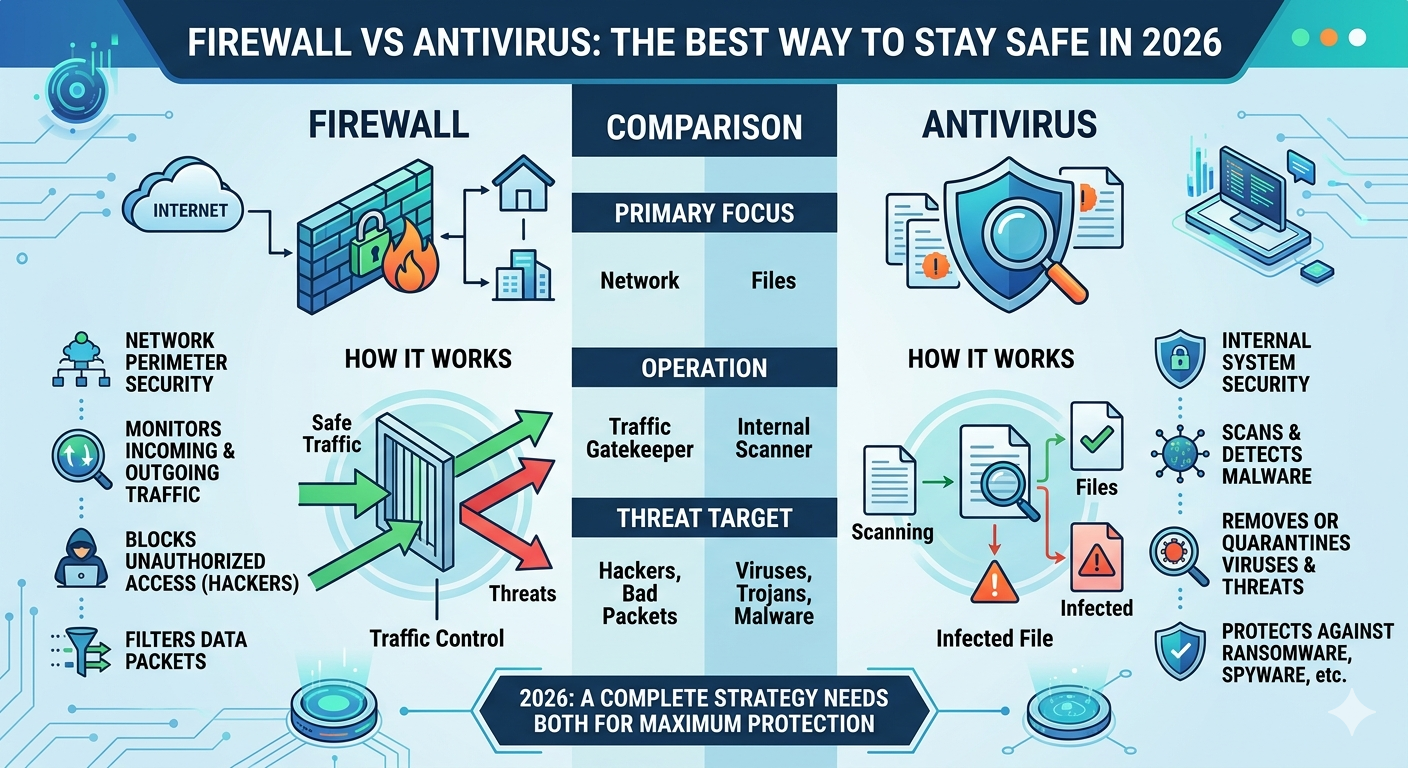
If you’ve ever wondered why your Windows PC has both a firewall and antivirus protection, you’re not alone. Many people assume they do the same thing because both are designed to improve computer security. They don’t. A firewall mainly controls communication between your device and other systems, while antivirus looks for harmful software, suspicious files, and dangerous behavior on the device itself.
That difference becomes much more important in 2026 because cyberattacks are no longer limited to obvious computer viruses. A modern attack can begin with a phishing email, move through a malicious download, execute a dangerous program, steal credentials, and then communicate with an attacker-controlled server. A firewall and antivirus can interrupt different parts of that chain. Understanding how each one works helps you build a much stronger security setup instead of simply installing software and hoping it protects you.
What Is the Difference Between a Firewall vs Antivirus, and How Do They Work?
A firewall and antivirus software are two important parts of modern computer security, but they protect your device in different ways. A firewall mainly controls network traffic between your computer and other devices. Antivirus software focuses on detecting, blocking, and removing malicious software such as viruses, trojans, spyware, worms, and ransomware. In simple terms, the firewall watches the communication coming into and leaving your device, while antivirus watches the programs, files, and activities happening on the device itself.
Think of your computer as a house. The firewall is like the security gate around the property. It checks who or what is trying to enter or communicate with the house and can block unauthorized access. Antivirus is more like an inspector inside the house. If someone gets inside carrying something dangerous, the inspector looks for it and takes action. This is why firewall protection and antivirus protection aren’t competing technologies. They provide different security layers that work together.
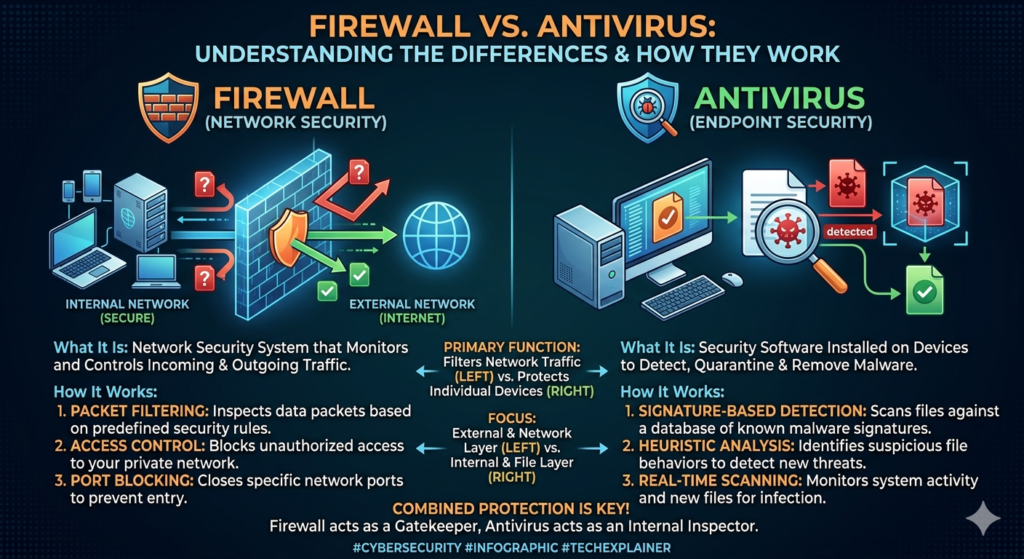
How Does a Firewall Work?
A firewall works by examining network communication and comparing it against predefined firewall rules. When your computer receives or sends data, the firewall can evaluate information such as source and destination IP addresses, network ports, protocols, connection state, and sometimes the application responsible for the communication.
For example, suppose an unknown device on the internet attempts to establish an incoming connection to your computer. If the connection doesn’t match an allowed rule, the firewall can block it. This helps reduce the chance of unauthorized devices reaching exposed services on your computer. Firewalls can also control outbound traffic, which means they may restrict applications that attempt to communicate with external servers.
Ports are another important part of firewall operation. A computer can have many network services running through different ports. If an unnecessary service is exposed through an open port, attackers may attempt to exploit it. A properly configured firewall can restrict access to certain ports while allowing legitimate services to operate normally.
Modern firewalls can use techniques such as packet filtering and stateful inspection. Packet filtering examines characteristics of network packets and applies rules based on those characteristics. Stateful inspection goes further by keeping track of active connections and determining whether incoming packets belong to an established communication session.
A firewall doesn’t simply block everything. That would make the internet almost unusable. Instead, it tries to distinguish between legitimate network connections and traffic that violates its security rules. Windows Firewall, for example, provides host-based network protection directly on supported Windows systems. Microsoft Windows Firewall Documentation
How Does Antivirus Software Work?
Antivirus software approaches security from a different direction. Instead of primarily asking whether a network connection should be allowed, an antivirus program examines files, applications, processes, and system behavior for signs of malicious activity.
When you download a program, open an attachment, install software, or launch an executable file, antivirus protection may inspect that activity. Modern products can use several detection methods, including known malware signatures, heuristic detection, behavioral analysis, file reputation, and cloud-based threat intelligence.
Traditional signature-based detection looks for characteristics associated with known malware. This works well when security researchers have already identified a threat. However, attackers constantly modify their malware, so modern antivirus products also need to detect suspicious behavior and previously unknown threats.
For example, imagine a newly created ransomware program that isn’t yet recognized by a traditional signature. Once executed, it might start modifying hundreds of personal files, create suspicious processes, attempt to disable security controls, and communicate with an external server. Those actions can trigger behavioral detection even when the exact file hasn’t been seen before.
Modern antivirus products can also provide real-time protection. Instead of waiting for you to manually start a scan, they monitor supported activity continuously and can respond when suspicious files or programs are detected. Microsoft Defender Antivirus, for example, includes real-time protection, behavior monitoring, heuristic detection, and cloud-delivered protection capabilities. Microsoft Defender Antivirus Documentation
Firewall vs Antivirus: What Happens During a Real Attack?
The easiest way to understand the difference between a firewall and antivirus is to follow a realistic attack.
Imagine you receive an email that appears to come from a delivery company. The message asks you to open a tracking document. You click the link and download a malicious file.
At the first stage, the firewall is primarily concerned with the network communication. It can control whether particular connections are allowed according to its rules. However, if you intentionally requested the connection, the network traffic may appear legitimate. The firewall doesn’t automatically know that the file being downloaded is malicious.
The antivirus then provides another layer of defense. It can inspect the downloaded file and compare it with known malware information or analyze its characteristics. If the file appears suspicious, the antivirus may block it or place it into quarantine.
Now imagine the malware somehow executes. It begins modifying files and attempts to contact an attacker-controlled server. At this point, multiple security layers may become relevant. Antivirus can examine the suspicious behavior, while firewall controls may restrict certain outgoing connections depending on their configuration.
This example explains why the firewall vs antivirus difference matters. A firewall can control the communication path, while antivirus can investigate what is happening on the endpoint.
Firewall and Antivirus Work Best Together
Using only one layer creates a security gap. A firewall isn’t a complete malware scanner, and antivirus isn’t a complete network access-control system.
A firewall may stop an unauthorized connection while antivirus detects a malicious program. Antivirus may stop malware before it executes while the firewall prevents another application from communicating with an unsafe destination. Neither system needs to perform exactly the same job.
This approach is known as layered security or defense in depth. Instead of expecting one security product to stop every possible attack, you use several complementary controls. A modern setup can combine a firewall, antivirus, secure accounts, software updates, MFA, backups, browser protection, and safe user behavior.
That’s the real answer to the firewall-versus-antivirus question: you don’t normally choose between them. You use them together because they protect different parts of the same digital environment.
How Firewall Technology Started
Early firewalls were much simpler than today’s security systems. They mainly examined packets moving between networks and applied basic filtering rules. Modern firewalls can do much more. Depending on the product, they may understand applications, connection states, users, domains, protocols, and other context.
For a home Windows computer, you don’t need to manually understand every technical feature to benefit from firewall protection. Windows already includes Windows Firewall, which Microsoft describes as a host-based firewall built into the operating system. It can filter network traffic based on configured rules and network conditions. Microsoft Windows Firewall Documentation
How a Firewall Filters Incoming and Outgoing Traffic
One of the most important concepts is the difference between inbound and outbound communication. Inbound traffic is communication coming toward your computer from another device or network. Outbound traffic leaves your computer and travels toward another system.
Imagine your PC is connected to the internet. Someone on the internet attempts to connect directly to a service running on your PC. The firewall can inspect that incoming connection and determine whether an existing rule allows it. If there isn’t an appropriate rule, the connection may be blocked.
Outbound traffic works differently. Your browser might connect to a website, your game might contact its servers, or an application might check for updates. A firewall can also have rules governing these outgoing connections. The exact behavior depends on the firewall’s configuration and product design.
This distinction matters because an attacker doesn’t always need to break into your computer directly. Malware already running on your PC might try to contact an external command-and-control server. Network controls can sometimes restrict that communication, although endpoint protection is still essential.
Firewall Rules, Ports, IP Addresses, and Applications
To understand firewall configuration, you need to understand four basic ideas: IP addresses, ports, protocols, and applications. An IP address identifies a network endpoint. A port identifies a particular communication endpoint on that device. A protocol defines how systems communicate.
For example, TCP and UDP are two major transport protocols. They don’t work exactly the same way. TCP establishes a connection and tracks communication more carefully, while UDP sends datagrams without the same connection-oriented process. Firewalls can create rules that consider TCP and UDP ports when filtering traffic.
A port is easier to understand if you imagine your computer as a large building. The building has many numbered doors. Different services may listen at different doors. A firewall can decide which doors should be accessible and which should remain closed.
That’s why open ports deserve attention. An unnecessary open port can expose a service that attackers may attempt to exploit. Closing or restricting unnecessary services reduces the available attack surface. However, blindly blocking everything isn’t practical either because legitimate applications need communication to work.
What Is Packet Filtering?
At the most basic level, packet filtering means examining network packets and applying rules to them. A packet contains information used to deliver network communication. Depending on the firewall, filtering can consider source and destination addresses, ports, protocols, and other characteristics.
For example, a rule might effectively say that traffic from a particular source to a particular destination port should be blocked. Another rule might allow a trusted application to communicate through a specific service.
Packet filtering is powerful, but basic filtering has limitations. A packet may look acceptable when viewed individually even though the larger communication pattern is suspicious. That’s one reason modern firewalls can use more advanced inspection methods.
What Is Stateful Inspection?
Stateful inspection adds awareness of connection state. Instead of treating every packet as an isolated event, a stateful firewall can keep track of active connections and understand whether packets belong to an established communication session.
Imagine that your browser creates a legitimate connection to a website. Responses from that website are part of that existing communication. A stateful firewall can recognize this relationship rather than treating every incoming response as an unrelated connection attempt.
This makes filtering more intelligent than simple packet-by-packet decisions. It also helps explain why a firewall can allow normal web browsing while still blocking unrelated unsolicited connections.
What Is Application Control?
Modern firewall technology can also make decisions based on applications. Instead of only asking which port is being used, the firewall can consider which program is attempting communication.
For example, your web browser may need internet access. A random unknown program suddenly attempting the same type of communication could deserve more attention. Application-based rules can therefore add another layer of network access control.
This doesn’t mean application control automatically detects malware. A malicious program can sometimes disguise itself or exploit a legitimate process. That’s another reason firewall protection and antivirus protection work better together.
Router Firewall vs Software Firewall vs Hardware Firewall
Not every firewall exists in the same place. This is an important distinction that many beginner guides skip. You may encounter a router firewall, a software firewall running directly on your computer, or a dedicated hardware firewall used in business environments.
A router firewall sits at the network boundary. Your home router can inspect traffic between your local network and the internet. A software firewall such as Windows Firewall runs on an individual computer. A dedicated hardware firewall can protect larger networks and may provide centralized controls for many devices.
How a Router Firewall Protects a Home Network
Your home router is often the first security boundary between your private network and the public internet. It can help prevent unsolicited internet traffic from directly reaching devices inside your home network.
However, a router firewall doesn’t make individual device protection unnecessary. Suppose your laptop downloads malware while browsing the web. The connection may have passed through the router normally because the user requested it. The router can’t replace endpoint-level malware protection.
That’s why using both network-level and device-level defenses makes sense. The router can protect the network boundary, while the computer’s firewall and antivirus protect the individual device.
Software Firewall on Your Computer
A software firewall runs directly on your operating system. Windows Firewall is one example. Because it operates on the endpoint, it can make decisions about local applications, services, and network connections.
This gives it a different perspective from a router. The router knows about network traffic crossing the network boundary. The endpoint firewall knows more about what is happening on the individual computer.
Hardware Firewalls for Businesses
A hardware firewall or dedicated network security appliance can sit between a business network and external networks. Businesses may use these systems to create detailed rules, segment networks, control applications, monitor traffic, and manage security centrally.
Large organizations may combine firewalls with intrusion detection, endpoint security, identity controls, VPNs, network segmentation, and centralized monitoring. The firewall becomes one component of a much larger business firewall strategy rather than the entire security system.
What Is Antivirus Software and How Does It Work?
Now we can move to the other half of the comparison. Antivirus software protects the endpoint by looking for malicious files, programs, processes, and behaviors. Traditional antivirus was heavily associated with computer viruses. Modern endpoint protection is much broader and can address ransomware, spyware, trojans, potentially unwanted programs, and other forms of malicious software.
The biggest difference is what the software is examining. A firewall mainly evaluates communication. Antivirus examines what is happening on the device. If a downloaded program starts modifying thousands of files, creating suspicious processes, or attempting other harmful actions, antivirus technology can investigate that behavior.
Microsoft Defender Antivirus is Microsoft’s built-in malware protection for Windows. Microsoft documents capabilities including real-time protection, behavior monitoring, heuristics, cloud-delivered protection, and other detection technologies. Microsoft Defender Antivirus Documentation
How Antivirus Detects Suspicious Files and Programs
Modern antivirus doesn’t rely on one detection method. That’s important because attackers constantly change their malware. A security product that only recognized previously cataloged files would struggle with new threats.
Traditional signature-based detection looks for known characteristics associated with malware. It remains useful because many threats have recognizable patterns. However, new or modified malware may not match an existing signature.
That’s where heuristic detection becomes useful. Heuristics look for characteristics or patterns that suggest a file may be dangerous. The system doesn’t necessarily need an exact match to previously identified malware.
Behavioral detection takes another approach. Instead of focusing only on what a program looks like, it watches what the program does. This can help identify suspicious activity that becomes obvious only after execution.
Known Malware vs Suspicious Behavior
Consider a program that appears harmless when you first download it. After launching, it begins changing hundreds of documents, attempts to disable security tools, creates persistence mechanisms, and contacts an unfamiliar server.
The individual actions might tell a much clearer story than the program’s name or appearance. Behavioral detection can identify patterns like these and trigger protection even when the exact malware variant wasn’t previously known.
This is particularly important for modern ransomware. Attackers can modify malware frequently, but the behavior required to encrypt large numbers of files can still provide valuable detection signals.
Real-Time Malware Protection
Real-time protection means the antivirus doesn’t wait for you to manually start a scan. It continuously monitors supported activity and can respond when suspicious files or processes appear.
Imagine downloading an executable from an unknown website. A traditional manual scan would require you to remember to scan the file. Real-time protection can inspect the file as part of normal system activity.
Modern antivirus products can also use cloud intelligence. Instead of relying only on information stored locally, the security system may use cloud-based reputation and analysis to identify newer threats more quickly. Microsoft describes cloud-delivered protection as an important part of Defender’s modern threat detection capabilities. Microsoft Defender Cloud-Delivered Protection
What Happens When Antivirus Finds Malware?
Detection is only the first step. Depending on the threat and security product, antivirus may block execution, quarantine the file, remove it, or request additional action from the user.
Quarantine is especially useful because it isolates a suspicious file from normal system activity. Instead of immediately deleting everything, the security system can place the item in a restricted location while the threat is assessed.
For serious infections, malware removal can involve more than deleting one file. Malware may create scheduled tasks, modify settings, install additional components, or establish persistence. Advanced endpoint security may therefore need to investigate related activity rather than treating one file as the entire problem.
Firewall vs Antivirus: The Difference You Need to Remember
Now the core idea should be much clearer. A firewall primarily controls network traffic and connections. Antivirus primarily detects and responds to malicious software and suspicious activity on the endpoint.
Neither tool is a universal replacement for the other. A firewall may block an unauthorized connection while allowing a legitimate download. Antivirus may detect that downloaded file as malicious even though the network connection itself was normal.
That’s why the firewall vs antivirus difference isn’t simply “one is better.” They protect different parts of the attack surface. When combined with updates, account security, backups, and safe browsing, they become part of a broader defense in depth strategy.
A Real-World Example
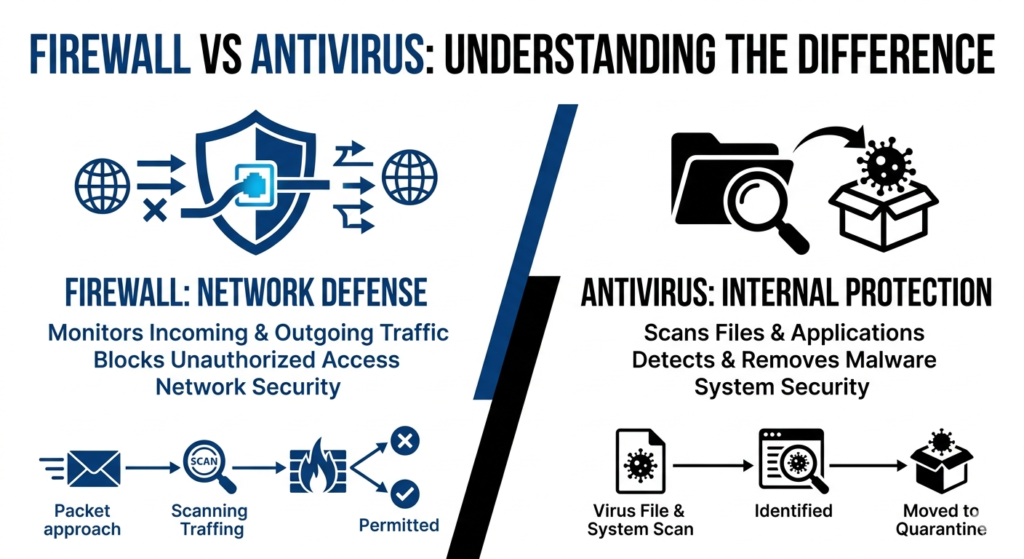
Imagine you receive an email pretending to be from a shipping company. It contains a link to a fake tracking page. You click it and download an executable file.
The firewall doesn’t automatically know that the file is malicious simply because the connection was made. If the website uses normal HTTPS communication, the network connection may appear legitimate.
The antivirus then gets an opportunity to inspect the downloaded file. If the file contains known malware, suspicious characteristics, or dangerous behavior, the antivirus may block it.
Now imagine the malware somehow executes. It begins modifying files and tries to contact an external server. The endpoint’s behavioral protection may detect the suspicious activity, while firewall controls may restrict some communications.
This example shows why security works best as layers, not as one magical product.
Firewall vs Antivirus Comparison: The Complete Picture
| Security Layer | Firewall | Antivirus |
| Primary job | Controls network communications | Detects malicious software |
| Main target | Network connections | Files, programs, processes |
| Network ports | Can control them | Not its main function |
| IP addresses | Can use them in rules | Not its main function |
| Incoming connections | Can allow or block them | May detect related malicious activity |
| Outgoing connections | Can restrict them depending on configuration | Can detect suspicious processes making connections |
| Malware scanning | Not its primary purpose | Core function |
| Virus detection | Limited or indirect | Core function |
| Ransomware detection | Indirect | Direct endpoint capability |
| Application control | Often supported | May monitor application behavior |
| Real-time monitoring | Network activity | Files and endpoint activity |
| Best role | Network defense | Endpoint defense |
Can a Firewall Stop Viruses, Malware, and Ransomware?
A firewall can help stop some parts of a malware attack, but it isn’t designed to identify every infected file. Its main job is controlling network traffic, not inspecting every document, program, or script for malicious code. If malware arrives through a normal web connection that you requested, the firewall may have no reason to block that connection.
This is where the difference between network protection and endpoint protection becomes important. A firewall can restrict suspicious network connections, while antivirus software can examine the file that arrived through that connection. In other words, the firewall can help protect the road to your computer, while antivirus checks what actually enters and runs on the computer.
Why a Firewall Can’t Reliably Detect Every Virus
A firewall usually doesn’t need to understand the complete contents or intentions of every file transferred through an allowed connection. For example, when you download a PDF from a website, the network communication may look completely normal. The firewall sees an allowed connection rather than necessarily seeing “this PDF contains malware.”
That doesn’t make the firewall useless against malware. A network firewall can block known malicious destinations, restrict suspicious connections, or prevent certain applications from communicating. However, malware detection requires additional technologies that examine files, processes, and behavior directly.
Can a Firewall Block Ransomware?
A firewall can sometimes interrupt ransomware communication, especially when the malicious program attempts to contact an external server. However, the most important protection against ransomware usually comes from endpoint security, backups, access controls, and behavior-based detection.
Ransomware creates a particularly interesting example. The malware may arrive through phishing, execute locally, begin changing files, and then communicate with an attacker. A firewall addresses the communication layer. Ransomware protection on the endpoint can focus on the dangerous file activity itself.
What Does Antivirus Protect You From?
Antivirus software is designed to identify, block, quarantine, and sometimes remove malicious software. Modern antivirus protection covers far more than traditional computer viruses. Depending on the product, it may detect ransomware, trojans, spyware, worms, malicious scripts, potentially unwanted applications, and other suspicious software.
The important change is that modern security isn’t based entirely on matching a file against a database of known viruses. Attackers constantly create new variants. Modern threat detection therefore combines multiple signals, including file reputation, signatures, heuristics, behavior, cloud intelligence, and other security telemetry.
Virus Detection vs Modern Malware Detection
A computer virus traditionally refers to malware that can replicate by attaching itself to other files or programs. Today, people often use “virus” to describe almost any malicious program. Security products therefore tend to use the broader term malware detection.
Modern protection looks at a much wider range of threats. A ransomware program may not behave like a traditional virus. Spyware may quietly collect information. A trojan may pretend to be legitimate software. A malicious browser extension may abuse permissions. Each threat can require different detection techniques.
This is why modern virus protection is better understood as a broader security system rather than a simple virus scanner.
What Is a Virus Scanner?
A virus scanner examines files, applications, memory, or other system areas for signs of malicious activity. Scanning can happen manually when you start a security check or automatically through real-time protection.
A full system scan can take considerably longer than a quick scan because it checks more areas. However, real-time protection is equally important because waiting for a scheduled scan isn’t ideal when a malicious file is being opened right now.
How Antivirus Detects Malware
Modern antivirus systems generally use several detection approaches together. No single method is perfect. Combining them gives the security product more opportunities to recognize a threat.
Signature-Based Detection
Signature detection looks for known characteristics associated with previously identified malware. When security researchers identify a malicious file, they can create detection information that helps security products recognize related threats.
This method remains useful because known malware can often be identified quickly. The weakness is obvious, though. A completely new threat may not yet have a known signature.
Attackers understand this limitation. They can modify malware, pack it differently, change sections of code, or create new variants. That’s why modern malware protection can’t rely entirely on signatures.
Heuristic Detection
Heuristic detection looks for characteristics that suggest a file may be malicious even when there isn’t an exact known signature.
For example, a program that contains unusual code structures or performs actions commonly associated with malware may receive additional scrutiny. Heuristics help security software recognize suspicious files that don’t perfectly match known threats.
The technique isn’t perfect. Aggressive detection can sometimes produce false positives. That’s why modern security systems combine heuristics with other signals before taking action.
Behavioral Detection
Behavioral detection watches what software actually does.
Imagine a program suddenly starts opening hundreds of personal documents, changing their contents, attempting to disable security settings, creating unusual processes, and contacting unfamiliar servers. Those actions can form a suspicious pattern even if the file itself isn’t recognized as known malware.
This is especially important for modern ransomware detection. The file may be new, but its behavior can still reveal its purpose.
Microsoft Defender includes behavior monitoring and other protection technologies designed to detect suspicious activity. Microsoft Defender Antivirus Protection Features
Cloud-Based Threat Detection
Modern antivirus products can also use cloud intelligence. Instead of depending entirely on information stored on your computer, the security service can use continuously updated threat information from its cloud infrastructure.
This can be useful when a threat is new or when additional analysis is needed. Cloud protection doesn’t replace local security. Instead, it adds another source of intelligence to the overall cybersecurity protection system.
What Is Real-Time Protection?
Real-time protection constantly watches supported activity instead of waiting for you to manually run a scan. When you download a file, open an application, or start a process, security software can examine relevant activity.
This makes a major practical difference. Suppose you download a malicious executable at 10:05 AM but your scheduled antivirus scan doesn’t run until midnight. Waiting until midnight isn’t ideal. Real-time protection can potentially identify the threat when the file is accessed or executed.
Microsoft describes Microsoft Defender Antivirus as providing always-on protection with capabilities including real-time protection, behavior monitoring, heuristics, and cloud-delivered protection. Microsoft Defender Antivirus Overview
Real-Time Scanning Doesn’t Mean Perfect Protection
Real-time scanning is powerful, but it doesn’t make a computer invulnerable.
Attackers can exploit vulnerabilities, steal credentials, trick users, abuse legitimate applications, or use techniques that don’t look like traditional malware. That’s why antivirus is one layer of a broader security strategy.
A strong setup combines real-time scanning, software updates, account protection, backups, firewall controls, and cautious user behavior.
What Happens When Antivirus Finds a Threat?
When antivirus detects something suspicious, it can take different actions depending on the threat and the security product’s configuration. The software may block the file, quarantine it, remove it, or ask you to choose what happens next.
Quarantine is particularly useful because it isolates the suspicious item from normal system activity. Instead of allowing the file to continue running, the security software places it somewhere where it can’t easily interact with the rest of the system.
However, serious infections can be more complicated. Malware can create additional files, scheduled tasks, registry changes, startup entries, or other persistence mechanisms. Simply deleting one visible file doesn’t always tell the whole story.
What Is Malware Quarantine?
Think of quarantine as a digital isolation room.
The security product takes a suspicious file away from its normal location and restricts its ability to execute. This gives the security system or security team time to determine whether the file is genuinely dangerous.
If the detection is confirmed, the item can be removed. If it’s a false positive, some security products allow it to be restored after appropriate review.
How Ransomware Changes the Security Problem
Ransomware deserves special attention because its damage can happen quickly. Instead of simply installing unwanted software, ransomware may attempt to encrypt documents, databases, photos, backups, and other valuable files.
The attack can become much worse when users have excessive permissions or when backups remain connected to the same environment. If attackers can reach both the computer and its backups, recovery becomes much harder.
This is why ransomware protection shouldn’t depend on antivirus alone. Offline or otherwise protected backups, least-privilege access, patching, phishing awareness, and endpoint controls all matter.
Why Backups Matter Even With Antivirus
Imagine antivirus blocks 99% of ransomware attempts but one new variant gets through. If your important files exist only on that computer, the consequences could be severe.
A reliable backup changes the situation completely. You may still have an incident, but you have a recovery option.
CISA recommends maintaining backups and protecting them as part of ransomware preparedness. CISA Ransomware Guide
How Spyware and Trojans Differ From Ransomware
Not every threat tries to encrypt your files.
Spyware protection focuses on software that may secretly collect information or monitor activity. A trojan, meanwhile, often disguises itself as something legitimate so that a user willingly installs or executes it.
For example, a fake browser update might look completely normal. You click “Update,” but the downloaded installer contains malicious code. The firewall may allow the download because the connection itself is legitimate. Endpoint protection then becomes critical.
This example shows why malicious downloads remain a major security concern even when a firewall is active.
What Happens When a Threat Gets Past the Firewall?
Getting past a firewall doesn’t necessarily mean an attacker has complete control of your computer. It simply means the network layer didn’t stop the communication.
The next defensive layer can include antivirus, endpoint detection, application controls, user permissions, exploit protection, and behavior monitoring. Each layer has a different perspective.
Think about airport security. One checkpoint doesn’t guarantee that nothing dangerous can ever pass. Security becomes stronger when several checkpoints inspect different things at different stages.
That’s the basic idea behind defense in depth.
Can Antivirus Replace a Firewall?
No. Antivirus and firewalls solve different problems.
An antivirus program can identify a dangerous application after it reaches the computer. It doesn’t automatically become a full network access-control system. A firewall can restrict network communication without being a complete malware analysis engine.
For example, suppose an unknown application attempts to connect to an external server. A firewall may decide whether that connection is allowed based on its rules. Antivirus can separately determine whether the application itself behaves like malware.
Using both therefore gives your computer two different defensive perspectives.
Can a Firewall Replace Antivirus?
No. A firewall can’t reliably determine whether every file entering through an allowed connection contains malicious code.
A website may legitimately send a file over HTTPS. The connection can be encrypted and technically normal while the downloaded file is malicious. Malware detection requires endpoint-focused inspection and analysis.
That’s why the question isn’t really “firewall or antivirus?” The better question is “how can these technologies work together?”
Why One Security Layer Isn’t Enough
Modern attacks can move through several stages. A criminal might first send a phishing message. The victim clicks a link. A website delivers malicious content. A file executes. Malware establishes persistence. The infected device communicates externally. Data may then be stolen or encrypted.
No single security control is guaranteed to stop every stage.
A firewall may block one communication. Antivirus may stop the malicious file. MFA may prevent stolen credentials from being used. A backup may make recovery possible. Security awareness may stop the attack before any technical control needs to respond.
That’s layered security in practical terms.
Firewall vs Antivirus: Which One Is More Important?
For most people, asking which one is “more important” creates the wrong comparison. Your firewall protects network communication. Your antivirus protects the endpoint. Removing either one can leave a gap.
If you connect your computer to the internet but never download or run software, network controls still matter. If you regularly download applications and documents, endpoint protection becomes equally important. In real life, you do both.
Therefore, a sensible computer security setup keeps both layers active rather than choosing one.
Do You Need Both a Firewall and Antivirus in 2026?
For most Windows users, keeping both active is the sensible approach. The good news is that you don’t necessarily need to purchase two expensive products.
Windows includes Windows Firewall, Microsoft Defender Antivirus, and the Windows Security interface. These built-in tools provide a baseline of network and endpoint protection for supported Windows systems. Microsoft Windows Security Documentation
The more important question is whether the protections are enabled, updated, and configured appropriately. A security product can’t protect you effectively if you’ve deliberately disabled its main features.
Should You Install Multiple Antivirus Programs?
Usually, installing several full antivirus products isn’t a smart way to become “extra protected.”
Multiple products can compete for the same files and processes. They may create performance issues, duplicate alerts, or interfere with each other’s operation.
For most users, choose one reputable primary antivirus solution and keep it properly updated. Add other security tools only when you understand what additional capability they provide.
Windows Firewall and Microsoft Defender: How Do They Work Together?
Windows Firewall and Microsoft Defender Antivirus complement each other because they operate in different security areas.
The firewall manages network communication. Defender focuses on malicious files, processes, and suspicious activity. Windows Security provides an interface where users can review several security features and alerts.
This combination demonstrates the basic idea behind defense in depth. One system watches communication. Another watches the endpoint. Additional protections can address identity, applications, updates, and data recovery.
Windows Firewall vs Third-Party Firewall
For many home users, Windows Firewall provides a practical baseline. A third-party firewall can offer additional controls, but “third-party” doesn’t automatically mean “better.”
Before installing one, consider what it actually adds. Does it provide application controls, advanced network monitoring, centralized management, or another capability you genuinely need?
If the only reason is that you believe Windows Firewall is automatically weak, that’s not a strong reason by itself.
Microsoft Defender Antivirus vs Traditional Antivirus
The word “antivirus” can create an outdated picture of what modern protection actually does.
Microsoft Defender includes multiple detection technologies. Its capabilities include real-time protection, behavior monitoring, cloud-delivered protection, and heuristic analysis. Microsoft Defender Antivirus Capabilities
That doesn’t mean every third-party security product is unnecessary. Some products provide additional identity protection, privacy controls, parental controls, password management, centralized business administration, or other features.
The important thing is to evaluate capabilities rather than simply counting how many security programs you have.
Firewall vs Antivirus for Home Users
Home users usually don’t need a complicated enterprise-style security architecture. They do need the basics configured correctly.
Keep your operating system updated. Keep your firewall enabled. Use reputable endpoint protection. Secure your Wi-Fi router. Enable MFA on important accounts. Maintain backups of valuable files. Be cautious with unexpected links and attachments.
These simple actions cover several different parts of the attack surface.
Home Wi-Fi and Router Firewall Protection
Your home router can provide a network-level security boundary. However, don’t confuse that protection with endpoint protection.
A router may prevent unsolicited traffic from reaching your laptop. It can’t necessarily tell that a file you intentionally downloaded contains a trojan.
That’s why home network security should include both network-level controls and device-level protection.
Security for Laptops and Personal Computers
Laptops move between environments. You might use one at home in the morning, at a coffee shop later, and on a different network in the evening.
That mobility increases the importance of endpoint protection. A laptop should not depend entirely on the security of one network.
Your laptop security travels with the device. That’s one reason host-based firewall and antivirus protection remain useful even when the device leaves your home.
Firewall vs Antivirus for Businesses
Businesses have a much larger security problem because they manage many devices, users, applications, accounts, and data sources.
A company may use a business firewall to control network traffic while endpoint security protects employee computers. Identity management can restrict access. MFA can reduce account takeover risk. Centralized logging can help security teams investigate suspicious activity.
The firewall is therefore one piece of the architecture, not the whole architecture.
Security for Small Businesses and Remote Workers
Remote workers make traditional network boundaries less useful. An employee may work from home today and a hotel tomorrow.
That means businesses increasingly need security controls that protect the endpoint wherever it connects. Device management, endpoint protection, MFA, secure remote access, software updates, and least-privilege permissions all become important.
CISA recommends a range of cybersecurity measures for organizations, including MFA, software updates, access controls, backups, and protective technologies. CISA Cybersecurity Guidance
Common Firewall and Antivirus Mistakes to Avoid
One of the worst mistakes is disabling security features simply because an application doesn’t work correctly.
Another mistake is opening a port without understanding why it needs to be open. Every additional network service can potentially increase your attack surface.
Microsoft warns that allowing applications through Windows Firewall can increase risk, especially when the application isn’t trusted. The goal isn’t to block everything. The goal is to allow only what you understand and need. Microsoft: Risks of Allowing Apps Through Windows Firewall
Why Turning Off Security Features Can Be Dangerous
Turning off a security layer doesn’t make the underlying problem disappear. It simply removes one protection.
If an application requires an unusual firewall rule, investigate why. If antivirus reports a suspicious file, don’t automatically create an exclusion just because you want the program to run.
Security warnings are sometimes inconvenient. They’re still worth investigating.
How to Build a Stronger Security Setup Beyond Firewall and Antivirus
A firewall and antivirus are important, but they aren’t the complete picture.
Your stronger digital security setup should also consider software updates, MFA, password security, backups, browser protection, account permissions, Wi-Fi security, and safe browsing habits.
The reason is simple. Some attacks don’t require malware at all.
An attacker might steal your password through phishing. They could then sign into an account from a completely legitimate device. Your firewall may see normal encrypted traffic. Your antivirus may see nothing malicious because no malware exists.
That’s why identity protection matters alongside malware protection.
Why Multi-Factor Authentication Matters
MFA adds another verification step when someone attempts to sign in. Even if an attacker obtains your password, they may still be unable to access the account without the additional factor.
This is particularly valuable for email accounts because attackers can use compromised email to reset passwords for other services.
Why Software Updates Matter
Security updates fix vulnerabilities that attackers may exploit.
A firewall can limit network exposure, but it doesn’t repair vulnerable software. Antivirus can detect some exploit behavior, but preventing the vulnerability from existing in the first place is usually better.
This is why patching belongs in the same conversation as firewall and antivirus protection.
A Practical 2026 Security Setup for a Windows PC
For a typical home Windows computer, the security stack can be surprisingly straightforward.
Keep Windows Firewall enabled. Keep Microsoft Defender Antivirus or another reputable antivirus solution active. Turn on automatic updates. Use MFA on important accounts. Keep your router firmware updated. Use strong Wi-Fi security. Maintain backups. Avoid suspicious downloads.
You don’t need ten security applications running at the same time.
You need the right layers working together.
Final Verdict: Firewall and Antivirus Are Different but Complementary
The biggest lesson from this entire guide is simple: a firewall and antivirus aren’t competing products. They’re different security layers.
The firewall focuses on network communication, access rules, ports, and connections. Antivirus focuses on malicious software, suspicious files, processes, and behavior.
A firewall can stop an unwanted connection. Antivirus can stop a dangerous program. MFA can protect an account. Updates can remove vulnerabilities. Backups can help you recover after an attack.
That’s what modern cybersecurity protection really looks like.
For most Windows users in 2026, keeping the built-in firewall and reputable antivirus protection active is a sensible starting point. From there, strengthen your accounts, update your software, protect your backups, and develop safer browsing habits.
The goal isn’t to find one perfect security tool.
Meta Description
Firewall vs antivirus explained in simple terms. Learn the key differences, how each protects you, and why you may need both in 2026.
Ready To Explore Now
| RELATED ARTICLE | EXPLORE NOW |
|---|---|
| AI Cybersecurity Threats in 2026 | 🔵Explore Now |
| AI-Powered Cybersecurity | 🔵Explore Now |
| Identity and Access Management (IAM) | 🔵Explore Now |
| Zero Trust Security | 🔵Explore Now |
| AI Scams in 2026 | 🔵Explore Now |
| Generative AI in 2026 | 🔵Explore Now |
| AI Agents in 2026 | 🔵Explore Now |
| Agentic AI in 2026 | 🔵Explore Now |
1 Comment