

Data moves everywhere inside a modern business. Employees send emails, upload documents to cloud platforms, copy files to laptops, share links, use messaging apps, and access customer records from different devices. That flexibility creates a difficult security question: how can a business allow people to use information without letting sensitive information escape?
That is where data loss prevention, commonly called DLP, becomes important. A well-designed data loss prevention system can identify sensitive information, understand how it is being used, monitor risky activity, and enforce security policies when a transfer looks unsafe. NIST describes DLP as protecting data across storage, processing, and network activity through inspection and contextual analysis.
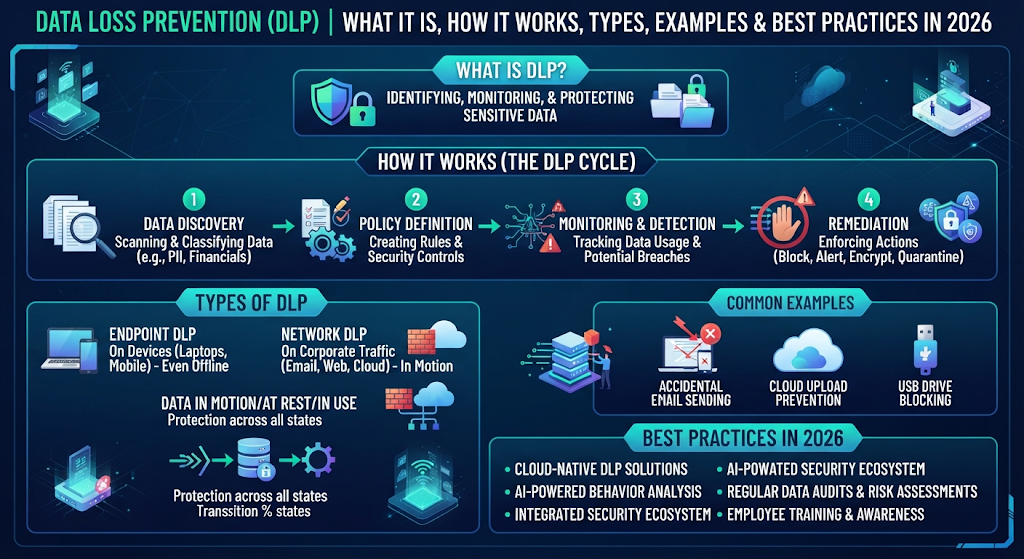
For a U.S. business, DLP can support data security, data privacy, regulatory obligations, and broader cybersecurity goals. It can help protect customer records, financial information, employee data, intellectual property, and other business-critical material. However, DLP isn’t simply another security product. The strongest programs combine technology with classification, access controls, policies, monitoring, and a practical response process.
This guide explains Data Loss Prevention (DLP) from the ground up. You’ll learn how DLP works, where it operates, what types exist, how it differs from firewall security, and how organizations can build a sensible protection strategy in 2026.
Trusted Source
| Source | EXPLORE NOW |
|---|---|
| NIST | NIST Cybersecurity Framework↗️ |
| CISA | CISA Cybersecurity Best Practices↗️ |
| NIST | NIST Privacy Framework↗️ |
| FTC | FTC Data Security↗️ |
| CISA | CISA Insider Threat Mitigation↗️ |
What Is Data Loss Prevention (DLP)?
At its simplest, data loss prevention is a security approach that helps organizations discover, monitor, and protect sensitive information. A DLP platform examines how information is stored, accessed, copied, transmitted, or shared. When an action violates an organization’s data protection policies, the system can alert security teams or automatically block the activity.
Think of DLP as a security checkpoint for information. A firewall mainly examines network connections and traffic rules. DLP looks deeper at the information itself. For example, an employee might legitimately access a spreadsheet containing customer records. DLP can recognize that the file contains personally identifiable information and apply rules when someone tries to send it to an unauthorized destination.
NIST guidance describes DLP as covering three important states: data at rest, data in use, and data in motion.
| Data State | What It Means | Example |
| Data at rest | Information stored somewhere | Database or cloud storage |
| Data in use | Information being accessed or processed | Employee opening a customer file |
| Data in motion | Information moving between locations | Email attachment or file upload |
The goal isn’t to stop employees from using information. Instead, a practical DLP security program tries to distinguish legitimate business activity from risky behavior. That distinction matters because excessive blocking can disrupt normal work while weak controls can allow data leakage.
Why Is Data Loss Prevention Important for Businesses?
Sensitive information has become one of the most valuable assets inside modern organizations. Customer records, payment information, employee files, source code, product designs, contracts, and strategic documents can all create serious consequences when exposed. NIST notes that data breaches can produce financial, operational, legal, and reputational impacts.
A strong data protection strategy therefore needs more than antivirus software or a network firewall. Businesses need visibility into where sensitive information exists and how people interact with it. Data discovery, data classification, and monitoring help security teams understand what deserves stronger protection.
For example, imagine a U.S. healthcare company storing thousands of patient records. An employee might accidentally attach a patient spreadsheet to the wrong email. There may be no malware involved. There may be no hacker either. Yet the organization could still experience an information leakage incident.
DLP can help detect this type of activity before the information leaves the organization’s controlled environment. Depending on the policy, the system might warn the employee, require additional approval, quarantine the message, or block the transfer entirely.
How Does Data Loss Prevention Work?
DLP generally follows a continuous cycle: discover important information, identify its sensitivity, monitor activity, compare activity against policies, and respond when something violates those policies. This creates a practical data loss prevention architecture rather than relying on one isolated security control.
The first stage is visibility. Organizations need to know where sensitive information lives. A DLP platform can scan files, databases, endpoints, cloud repositories, email systems, and other locations. This process is often called data discovery.
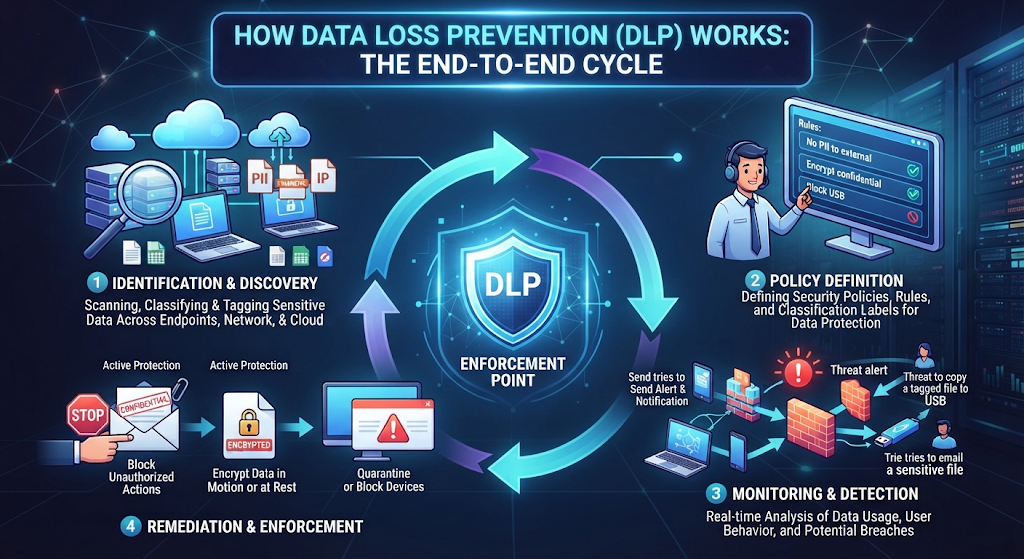
Next comes identification. The system may recognize information using patterns, keywords, file properties, metadata, labels, fingerprints, or predefined data types. For example, a policy could look for credit card numbers, Social Security numbers, account information, or proprietary documents.
The final stages involve monitoring and enforcement. DLP observes actions such as copying, printing, uploading, emailing, downloading, or transferring files. If an activity matches a risky rule, the system can generate an alert or enforce the organization’s policy.
A Simple DLP Workflow
Sensitive Data
↓
Data Discovery
↓
Data Identification
↓
Data Classification
↓
Activity Monitoring
↓
Policy Evaluation
↓
Allow / Warn / Block / Quarantine
↓
Security Alert & Incident Response
This approach aligns with established DLP principles. NIST guidance emphasizes inventory and classification, policy development, monitoring, and protection across different data states.
What Are the Main Types of Data Loss Prevention?
DLP can operate across several environments because information doesn’t remain in one place anymore. Modern businesses commonly use endpoint DLP, network DLP, cloud DLP, and email DLP capabilities. Some organizations combine these technologies through a centralized management platform.
| DLP Type | Main Focus | Typical Protection |
| Endpoint DLP | User devices | USB, copying, printing, screenshots |
| Network DLP | Network traffic | Transfers and communications |
| Cloud DLP | Cloud services | Cloud files and collaboration |
| Email DLP | Email communication | Sensitive attachments and messages |
| Enterprise DLP | Organization-wide protection | Centralized policies and monitoring |
Endpoint DLP
Endpoint DLP protects information on computers, laptops, and other managed devices. It can monitor activities such as copying files to removable drives, printing sensitive documents, moving information between applications, or uploading files.
This becomes particularly useful when employees work remotely. A laptop can leave the corporate office every day. The security controls must therefore travel with the data and device.
Network DLP
Network DLP focuses on information moving through network channels. It can inspect traffic and identify transfers that match defined policies. This makes it useful for controlling certain forms of data exfiltration and unauthorized transmission.
However, network DLP isn’t the same thing as a network firewall. A firewall primarily controls network connections according to rules such as source, destination, port, protocol, and application context. DLP can inspect the information being transferred.
Cloud DLP
Cloud applications have changed how companies store and share information. Cloud DLP helps organizations protect sensitive information inside cloud services and collaboration environments.
For example, a company might have confidential documents stored in a cloud repository. A DLP policy could detect sensitive content and prevent an unauthorized public sharing configuration.
Email DLP
Email remains one of the easiest ways to accidentally expose information. Email DLP can inspect messages and attachments before delivery.
Suppose an employee sends a spreadsheet containing customer records to an external recipient. A properly configured policy can recognize the sensitive content and apply an appropriate action.
What Data Does DLP Protect?
DLP can protect many categories of information. The exact categories depend on the organization, industry, regulations, and internal risk model. A financial company may prioritize payment information while a technology company may focus heavily on source code and intellectual property.
Common examples include confidential data, financial data, customer information, employee records, intellectual property, contracts, credentials, business plans, and other protected information.
| Data Category | Example |
| Personal data | Names, addresses, identification numbers |
| Financial data | Bank details, payment records |
| Healthcare data | Patient and medical information |
| Customer data | Account and contact records |
| Intellectual property | Source code, designs, formulas |
| Business data | Contracts, strategy documents |
| Credentials | Passwords, API keys, access tokens |
NIST’s 2026 work on data classification highlights the importance of discovering and labeling sensitive unstructured information because organizations cannot protect information effectively when they don’t know where it exists.
Common Data Loss Prevention Examples
Real-world DLP becomes easier to understand through everyday situations. Consider an employee who downloads a confidential customer database before leaving the company. The action may trigger insider threat protection rules because the employee suddenly accessed a large amount of information outside their normal pattern.
Another example involves email. An employee accidentally sends a document containing customer information to a personal email account. An email DLP policy could detect sensitive content and stop the message.
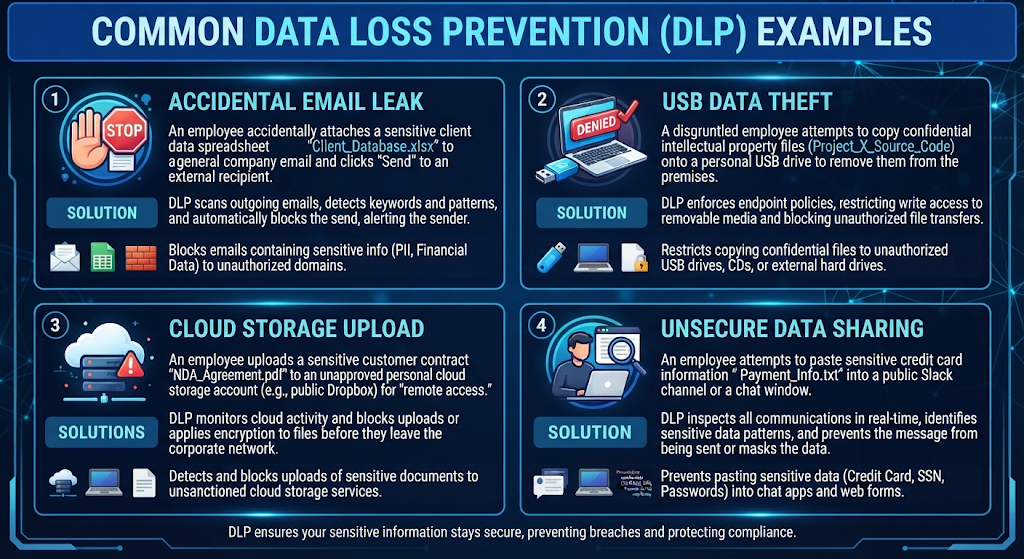
A third example involves removable storage. Someone copies proprietary files onto a USB drive. Endpoint protection can detect the operation and block or record it according to company policy.
Cloud sharing creates another common scenario. An employee changes a confidential document from private to publicly accessible. Cloud data protection controls can detect the configuration change and prevent unintended exposure.
These examples show why DLP isn’t only about malicious hackers. Accidental mistakes, compromised accounts, careless sharing, and intentional insider activity can all create data exposure risks. NIST similarly distinguishes data theft from accidental leakage such as lost devices or inappropriate storage and transfers.
Data Loss Prevention vs Data Classification: What Is the Difference?
Data classification tells an organization what its information means and how sensitive it is. DLP uses that understanding to determine how the information should be handled.
Think of classification as putting labels on boxes. DLP acts like the security system that decides where those labeled boxes can go.
For example, a company might classify a document as “Confidential.” A DLP policy could then prevent that document from being uploaded to an unauthorized personal cloud account.
| Data Classification | Data Loss Prevention |
| Identifies sensitivity | Enforces protection rules |
| Labels information | Monitors information activity |
| Defines handling requirements | Blocks or allows actions |
| Supports governance | Supports prevention |
| Answers “What is this?” | Answers “What can happen to it?” |
The two technologies work best together. NIST’s 2026 data-classification guidance specifically connects discovery and labeling with reducing the risk of sensitive information being lost or mismanaged.
Data Loss Prevention vs Firewall Security: How Are They Different?
This distinction is especially important for your firewall security cluster. A firewall protects network boundaries and controls traffic according to defined network rules. DLP focuses on protecting sensitive information from inappropriate use, movement, or disclosure.
Imagine a company employee uploading a confidential document to an approved cloud service. The network firewall may see a legitimate encrypted connection to that service. DLP can examine the activity and determine that the document contains restricted information.
| Security Control | Primary Purpose |
| Firewall security | Controls network traffic |
| DLP | Protects sensitive information |
| Antivirus | Detects malicious software |
| IAM | Controls identities and permissions |
| Encryption | Protects data confidentiality |
| EDR | Detects suspicious endpoint behavior |
This means DLP doesn’t replace firewall protection. Instead, the two controls address different layers of risk.
How Does DLP Work With Firewall Security and Network Security?
A strong security architecture combines controls rather than expecting one product to solve every problem. Network security provides traffic-level defenses while DLP focuses on information-level protection.
For instance, a network firewall can prevent unauthorized connections. Intrusion prevention can identify suspicious traffic patterns. DLP can then examine sensitive information moving through permitted channels.
This layered approach reduces the chance that one missed control becomes a major weakness. NIST’s data confidentiality guidance similarly describes data protection alongside access controls and network protections rather than treating any single technology as sufficient.
Layered Protection Model
User Identity
↓
Identity & Access Management
↓
Endpoint Security
↓
Firewall Security
↓
Network Security
↓
DLP Inspection
↓
Data Classification
↓
Encryption & Access Policies
The important idea is simple: firewall security protects the path while DLP protects the information moving through that path.
What Are the Most Common Data Loss Prevention Threats?
The biggest DLP risks usually come from several directions. Some incidents involve deliberate theft while others happen because someone makes an innocent mistake.
Insider threats are particularly important because authorized users already have some level of access. A malicious employee might deliberately copy confidential files. A careless employee might upload sensitive information to the wrong service.
Other risks include compromised accounts, phishing, malware, unauthorized cloud sharing, removable media, accidental email disclosure, weak access permissions, and uncontrolled file transfers.
| Threat | Potential DLP Response |
| Insider data theft | Monitor and block unusual transfers |
| Accidental email leak | Inspect attachments and recipients |
| USB copying | Restrict removable media |
| Cloud oversharing | Detect risky sharing |
| Compromised account | Identify unusual activity |
| Unauthorized upload | Block restricted destinations |
DLP should therefore support broader security monitoring and security incident response rather than operate as an isolated alert generator.
What Are the Benefits of Data Loss Prevention?
The biggest advantage of DLP is visibility. Organizations gain a clearer understanding of where sensitive information exists and how users interact with it. That visibility can improve data security, reduce unnecessary exposure, and support better risk decisions.
DLP can also reduce accidental leakage. Employees don’t always realize that sending a spreadsheet to a personal email account can create a security incident. A well-designed system can intervene at the right moment and explain why the action violates company policy.
Another benefit involves compliance. Organizations may need to protect different types of personal, financial, healthcare, or business information. DLP can help enforce internal rules that support applicable regulatory compliance requirements.
NIST notes that effective DLP programs combine management, discovery, and protection rather than treating DLP purely as a technology problem.
What Are the Challenges and Limitations of DLP?
DLP isn’t a magic shield. Poorly designed policies can generate thousands of alerts and overwhelm security teams. This problem is commonly called alert fatigue.
Another challenge involves context. Not every sensitive-data transfer is malicious. An employee may legitimately send a confidential contract to an approved attorney. If DLP blocks every external transfer, business operations can suffer.
Data visibility also creates difficulties. Modern organizations use SaaS platforms, personal devices, remote work environments, APIs, collaboration tools, and cloud infrastructure. Protecting every location requires careful planning.
There is also a human factor. Employees may work around controls when policies become frustrating. That’s why successful DLP programs combine security policy enforcement, user education, sensible exceptions, and continuous policy improvement.
NIST specifically recommends prioritizing the most important loss vectors instead of attempting to solve every DLP problem simultaneously.
Data Loss Prevention (DLP): Best Practices, Implementation, Tools & Data Security in 2026
Data Loss Prevention Best Practices for 2026
A strong data loss prevention strategy starts with knowing what matters most. Instead of monitoring every file equally, identify your highest-risk sensitive data first. Then connect protection rules to business needs, user roles, and realistic security threats. This approach makes DLP more useful without creating unnecessary restrictions.
In 2026, organizations should also consider cloud applications, remote employees, AI tools, personal devices, and third-party services. Your data protection policies should explain what users can share, where they can store information, and which transfers require approval. Regular reviews are equally important because business processes and cybersecurity risks change over time.
| Best Practice | Why It Matters |
| Discover sensitive information | Shows where important data exists |
| Classify important files | Helps apply the right controls |
| Create clear policies | Defines acceptable data usage |
| Monitor risky activity | Finds unusual transfers |
| Protect endpoints | Controls copying and local movement |
| Secure cloud data | Reduces cloud oversharing |
| Review alerts | Separates real risks from noise |
| Test policies | Prevents unnecessary business disruption |
| Train employees | Reduces accidental mistakes |
| Update controls | Keeps protection aligned with new threats |
One useful principle is to start small and improve continuously. A company doesn’t need hundreds of complicated rules on day one. Begin with high-value information such as customer records, financial records, credentials, and intellectual property. Once those controls work reliably, expand the DLP framework to additional systems.
How to Implement a Data Loss Prevention Strategy
Implementation works best when DLP becomes part of the organization’s broader information security program. Start by creating an inventory of important information. Determine where it lives, who accesses it, how it moves, and which systems process it.
Next, perform data classification. You might classify information as Public, Internal, Confidential, or Restricted. The exact labels can differ between organizations. What matters is that employees understand what each classification means and what actions are allowed.
After classification, create policies around realistic scenarios. For example, a Restricted file might be blocked from being uploaded to an unauthorized personal cloud account. A Confidential document might require an approved business destination.
A Practical DLP Implementation Model
| Stage | Main Question | Example Action |
| Discover | Where is our data? | Scan repositories |
| Identify | Which data is sensitive? | Detect PII |
| Classify | How sensitive is it? | Apply labels |
| Monitor | How is it being used? | Track transfers |
| Control | What should happen? | Warn or block |
| Review | Is the policy effective? | Analyze incidents |
| Improve | What needs changing? | Tune policies |
The most important part is policy testing. Begin in monitoring mode whenever possible. Review real activity before enforcing aggressive blocking. This helps security teams understand normal behavior and reduces false positives.
DLP for Small Businesses: What Should You Protect First?
Small businesses often assume enterprise DLP is only for large corporations. That’s not necessarily true. A smaller company can use the same basic principles without building an expensive security operation.
The first priority should usually be information that could cause serious damage if exposed. Customer records, payment information, employee information, passwords, business contracts, source code, and confidential financial documents deserve early attention.
For a small business, the best DLP solution doesn’t need to monitor everything immediately. Start with the systems employees actually use. That might include Microsoft 365, Google Workspace, laptops, cloud storage, email, and business applications.
Example: A 25-Employee Business
Imagine a small U.S. consulting company with 25 employees. Its most valuable information includes client contracts, tax documents, employee records, and proprietary reports.
Rather than creating dozens of complicated rules, the company could begin by identifying sensitive documents, restricting external sharing, monitoring downloads, protecting employee devices, and requiring stronger controls for high-risk transfers.
This creates practical business data protection without turning security into an obstacle.
Data Loss Prevention Tools and Technologies
Modern DLP tools can protect information across endpoints, networks, email platforms, cloud services, and business applications. Some platforms focus heavily on one environment while others provide broader centralized management.
A typical data loss prevention software platform may include content inspection, data discovery, classification, policy management, activity monitoring, alerts, reporting, and automated enforcement. Advanced platforms may also connect with identity systems, security information and event management platforms, endpoint tools, and cloud security controls.
| Technology | DLP Role |
| Endpoint DLP | Controls activity on devices |
| Network DLP | Monitors data moving across networks |
| Cloud DLP | Protects cloud information |
| Email DLP | Controls sensitive email transfers |
| Data classification | Determines sensitivity |
| Content inspection | Examines information |
| SIEM | Correlates security events |
| IAM | Controls identity-based access |
| Encryption | Protects stored and transmitted information |
| EDR | Detects suspicious endpoint activity |
The best DLP software isn’t automatically the platform with the longest feature list. It should match the organization’s data, technology stack, workforce, risk level, and operational capacity.
What Is the Difference Between DLP and Data Security?
Data security is the broader discipline of protecting information from unauthorized access, modification, disclosure, destruction, or loss. Data loss prevention is one important part of that larger discipline.
Think of data security as the entire building. DLP is one of the security systems inside it. Other systems include encryption, identity management, access controls, backups, network defenses, endpoint security, and incident response.
| DLP | Data Security |
| Focuses strongly on data leakage | Covers broader information protection |
| Monitors data movement | Protects data throughout its lifecycle |
| Enforces handling policies | Includes many security controls |
| Detects risky transfers | Addresses multiple security risks |
| Can block unauthorized sharing | Can include encryption and backups |
Therefore, DLP shouldn’t replace your broader data security program. Instead, it should strengthen your data protection strategy by adding visibility and policy enforcement around sensitive information.
How DLP Supports Zero Trust Security
Modern organizations increasingly follow zero trust security, where users and devices aren’t automatically trusted simply because they are inside a corporate network.
DLP fits naturally into this model. A user might have permission to access a document. That doesn’t necessarily mean the user should be allowed to copy it to a USB drive or upload it to a personal account.
When DLP works alongside identity and access management, endpoint controls, device health checks, and application policies, organizations can make more context-aware decisions.
For example, an employee accessing a confidential file from a managed laptop during normal working hours may represent ordinary activity. The same account suddenly downloading thousands of sensitive files from an unfamiliar device deserves closer inspection.
DLP, Encryption, IAM and Firewall Security: How They Work Together
No single security control provides complete protection. Firewall security controls network traffic. Identity and access management controls who can access resources. Encryption protects information from unauthorized reading. DLP focuses heavily on how sensitive information is used and transferred.
These controls work like different locks on the same building. Each one addresses a different part of the attack surface.
| Control | Main Security Question |
| Firewall | Which network traffic is allowed? |
| IAM | Who is allowed to access something? |
| Encryption | Can unauthorized people read the data? |
| DLP | Can sensitive data leave through an unsafe action? |
| EDR | Is the endpoint behaving suspiciously? |
| Backup | Can important information be recovered? |
This layered design creates stronger cybersecurity controls. It also explains why DLP should complement your existing firewall protection instead of replacing it.
DLP Case Study: Preventing an Accidental Customer Data Leak
Consider a fictional U.S. marketing company that stores customer names, contact details, contracts, and campaign information. An employee needs to send a report to an external client.
The employee attaches the wrong spreadsheet. That spreadsheet contains thousands of customer records. The email address itself looks legitimate. A basic network security control may not recognize the problem.
The company’s email DLP policy detects sensitive information inside the attachment. Instead of immediately delivering the message, the system warns the employee and places the message into review.
The employee realizes the mistake and replaces the attachment. No customer information leaves the organization.
This example demonstrates an important point. Effective DLP doesn’t only stop hackers. It can also prevent ordinary human mistakes from becoming expensive security incidents.
The best DLP control often stops a mistake before it becomes a breach.
What Should a DLP Policy Include?
A practical data loss prevention policy should tell employees and administrators how sensitive information may be stored, accessed, shared, transferred, and destroyed.
The policy should also explain which actions trigger warnings or blocking. For example, an organization might permit external sharing for Public information while requiring approval for Restricted information.
A useful policy structure can look like this:
| Policy Area | Example Requirement |
| Data classification | Label sensitive information |
| Block restricted attachments | |
| USB | Restrict confidential file copying |
| Cloud | Prevent public sharing |
| Printing | Monitor restricted documents |
| Personal devices | Limit sensitive transfers |
| External sharing | Require approved destinations |
| Incident response | Escalate serious violations |
Clear policies reduce confusion. Employees should know what the organization protects and why the restriction exists.
How DLP Helps Prevent Data Exfiltration
Data exfiltration means moving information from an authorized environment to an unauthorized destination. Attackers can attempt exfiltration through cloud storage, email, removable media, messaging platforms, or compromised accounts.
DLP can help detect these activities by examining content and context. A system might notice a large transfer of sensitive files, an unusual destination, or an attempt to send restricted information through an unapproved channel.
However, DLP isn’t designed to catch every form of malicious behavior by itself. Strong data exfiltration prevention usually combines DLP with endpoint detection, identity monitoring, network controls, authentication, and incident response.
DLP and Insider Threat Protection
Insider risk deserves special attention because authorized users can access information legitimately. The problem begins when that access becomes excessive, careless, compromised, or intentionally abusive.
A good insider threat protection program doesn’t assume every employee is malicious. Instead, it monitors risky behaviors while respecting legitimate business activity.
For example, downloading one customer report may be normal for a sales employee. Downloading tens of thousands of customer records shortly before leaving the company could require investigation.
DLP can provide valuable evidence by recording policy violations and suspicious data movement. Security teams can then combine that information with identity logs and endpoint activity.
How to Reduce DLP False Positives
DLP becomes difficult when it generates too many alerts. Security teams may start ignoring warnings if almost every event looks suspicious.
The solution is better context. Policies should consider the data type, user, destination, device, application, and business purpose where possible.
Start with high-confidence detection rules. Test them in monitoring mode. Review real-world results. Then gradually introduce warnings and blocking.
This tuning process turns a noisy data monitoring system into a more useful security control.
How DLP Supports Compliance and Data Privacy
Organizations often need to protect personal and business information because of contractual requirements, industry obligations, internal policies, or applicable laws. DLP can support those efforts by helping identify sensitive information and enforce handling rules.
For example, a company handling personally identifiable information may create controls around external transfers. A healthcare organization may apply additional safeguards to protected health information. A financial company may prioritize payment and account information.
DLP doesn’t automatically make an organization compliant. Compliance depends on the applicable requirements and the complete control environment. Still, DLP can provide useful technical support for privacy protection, security compliance, monitoring, and evidence collection.
A Practical 2026 DLP Framework
A modern data loss prevention framework should connect people, processes, and technology. Technology alone won’t solve weak classification or unclear policies.
The framework can follow this sequence:
Discover
↓
Classify
↓
Prioritize
↓
Define Policies
↓
Monitor
↓
Detect
↓
Respond
↓
Review
↓
Improve
The cycle should continue throughout the year. New cloud applications appear. Employees change roles. Attack techniques evolve. Business information changes value.
That means DLP should be treated as an ongoing program rather than a one-time installation.
Data Loss Prevention Checklist for 2026
| Area | Key Question |
| Data discovery | Do we know where sensitive information exists? |
| Classification | Is important information properly labeled? |
| Access | Who can access restricted information? |
| Endpoints | Can users copy sensitive files to USB devices? |
| Can sensitive attachments leave unchecked? | |
| Cloud | Can confidential files become publicly accessible? |
| Network | Are risky transfers monitored? |
| Policies | Are rules clear and practical? |
| Monitoring | Are alerts reviewed regularly? |
| Response | Does the team know what happens after detection? |
| Training | Do employees understand data handling rules? |
| Testing | Are DLP controls tested before enforcement? |
Frequently Asked Questions About Data Loss Prevention
What is data loss prevention in simple terms?
Data loss prevention is a security approach that helps stop sensitive information from being exposed, misused, or transferred to unauthorized locations. It monitors how information is stored and used. Depending on policy, DLP can warn users, generate alerts, or block risky actions.
What does DLP protect?
DLP can protect sensitive data, customer records, financial information, employee information, intellectual property, credentials, contracts, and other confidential business information. The exact data types depend on the organization’s classification system and security requirements.
Is DLP the same as a firewall?
No. A firewall primarily controls network traffic. DLP focuses on protecting sensitive information. Firewall security and DLP work together because they address different layers of protection.
Can DLP stop data breaches?
DLP can reduce certain types of data leakage and unauthorized transfers. However, it cannot prevent every breach. Strong protection requires multiple controls such as access control, authentication, encryption, endpoint security, network security, monitoring, and incident response.
Is DLP useful for small businesses?
Yes. Small businesses can benefit from DLP principles without deploying a complicated enterprise environment. They should begin by protecting their most valuable information and the systems employees use most often.
What is endpoint DLP?
Endpoint DLP monitors sensitive-data activity on devices such as laptops and desktops. Depending on the platform, it can control copying, printing, USB transfers, screenshots, application transfers, and uploads.
What is cloud DLP?
Cloud DLP protects sensitive information stored or processed through cloud applications and services. It can help detect risky sharing, unauthorized access, and inappropriate movement of confidential information.
What is network DLP?
Network DLP monitors data moving through network channels. It can inspect traffic and identify transfers that violate defined data protection rules.
What is email DLP?
Email DLP examines messages and attachments for sensitive information. It can warn, quarantine, or block emails that violate an organization’s policies.
Does DLP replace encryption?
No. Encryption protects information by making it unreadable without the appropriate key. DLP focuses on identifying and controlling how information is handled and transferred. Both controls can work together.
Does DLP replace firewall protection?
No. DLP and firewall protection solve different problems. A firewall controls network communication. DLP helps control sensitive information movement.
What is the biggest DLP challenge?
One of the biggest challenges is creating useful policies without generating excessive alerts. Poorly tuned DLP can disrupt legitimate work. Testing, monitoring, policy refinement, and user education can improve the balance.
Final Thoughts on Data Loss Prevention in 2026
Data protection has become much harder because information now moves across laptops, cloud platforms, email systems, mobile devices, collaboration tools, and third-party applications. Businesses therefore need more than a perimeter-based defense.
A mature DLP solution gives organizations visibility into sensitive information and helps enforce rules around how that information moves. Yet technology remains only one part of the equation. Effective data governance, classification, access control, employee awareness, monitoring, and incident response all matter.
For U.S. organizations, the practical goal isn’t to block every transfer. It’s to protect the information that matters most while allowing employees to work efficiently. A thoughtful data loss prevention strategy achieves that balance by combining discovery, classification, monitoring, policy enforcement, and continuous improvement.
The strongest approach is layered. Use DLP alongside firewall security, identity controls, encryption, endpoint protection, cloud security, and other information security controls. When these defenses work together, organizations can reduce accidental exposure, limit insider risk, and build a much stronger foundation for modern data security.
Meta Description
Learn what Data Loss Prevention (DLP) is, how it works, its types, examples, benefits, threats, and best practices for protecting sensitive data in 2026.
💪Strong Internal Information
| Related Article | Suggested Information | Watch and learn now |
|---|---|---|
| AI-Powered Cybersecurity | AI-powered cybersecurity | EXPLORE NOW↗️ |
| AI Cybersecurity Threats | AI cybersecurity threats | EXPLORE NOW↗️ |
| Identity and Access Management | identity and access management | EXPLORE NOW↗️ |
| Zero Trust Security | zero trust security | EXPLORE NOW↗️ |
| Network Security | network security | EXPLORE NOW↗️ |
| Firewall Security | firewall security | EXPLORE NOW↗️ |
| Network Firewall vs Host-Based Firewall | network firewall vs host-based firewall | EXPLORE NOW↗️ |
| Web Application Firewall | web application firewall | EXPLORE NOW↗️ |
| Hardware Firewall vs Software Firewall | hardware firewall vs software firewall | EXPLORE NOW↗️ |
| Firewall vs Antivirus | firewall vs antivirus | EXPLORE NOW↗️ |
| Data Classification | data classification in cybersecurity | EXPLORE NOW↗️ |
| Data Classification Methods | data classification methods | EXPLORE NOW↗️ |
| Data Encryption | data encryption | EXPLORE NOW↗️ |
| Endpoint Security | endpoint security | EXPLORE NOW↗️ |
| Cloud Security | cloud security | EXPLORE NOW↗️ |
| Password Manager | password managers | EXPLORE NOW↗️ |
| Multi-Factor Authentication | multi-factor authentication (MFA) | EXPLORE NOW↗️ |
| Phishing | phishing attacks | EXPLORE NOW↗️ |
| Ransomware | ransomware protection | EXPLORE NOW↗️ |
| Malware | malware protection | EXPLORE NOW↗️ |
| Cybersecurity Pillar | cybersecurity in 2026 | EXPLORE NOW↗️ |
5 Comments