

Cloud technology has changed the way people work, study, shop, and store information. Millions of people now use Cloud Computing every day without even realizing it. From saving photos on a smartphone to editing documents online, cloud services have become part of daily life. However, as more Cloud Data moves online, hackers continue looking for new ways to steal valuable information. That is why understanding Cloud Security has become more important than ever.
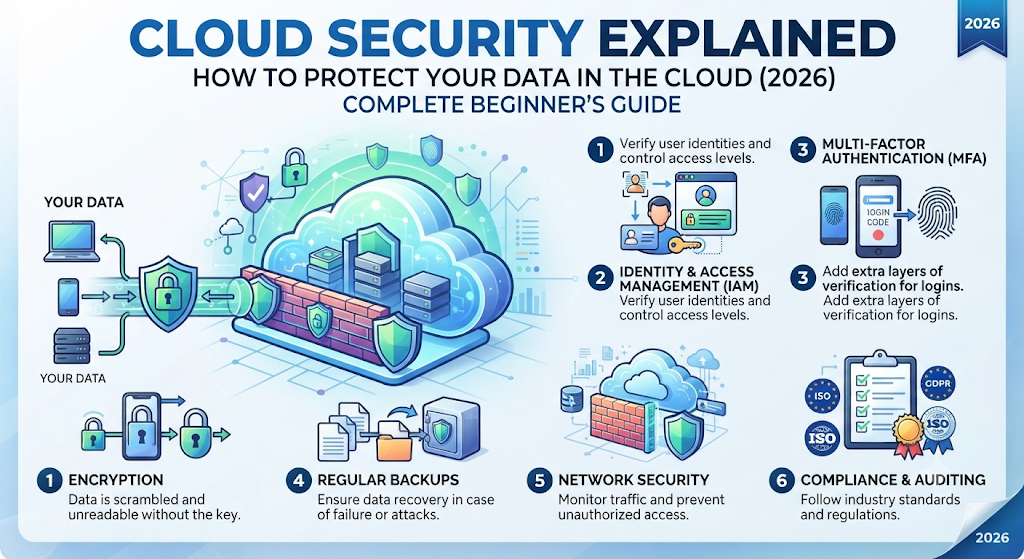
If you are new to cloud technology, don’t worry. This guide explains everything in simple English. You will learn How to Protect Data in the Cloud, understand common security risks, and discover practical ways to stay safe online. Whether you use Google Drive, Microsoft OneDrive, Dropbox, AWS, or another Cloud Platform, these tips will help you improve your Data Protection and keep your information secure.
Featured Snippet: What Is Cloud Security?
Cloud Security is the practice of protecting Cloud Data, Cloud Applications, and Cloud Infrastructure from cyber threats. It uses technologies like Data Encryption, Identity and Access Management (IAM), Multi-Factor Authentication (MFA), and continuous Security Monitoring to keep information safe from unauthorized access, theft, and cyber attacks.
What Is Cloud Security?
Cloud Security is a collection of technologies, policies, and security practices that protect data stored in the cloud. It helps individuals and businesses secure their files, applications, and online services from hackers and other digital threats. Whether you use cloud storage for personal photos or business records, a strong security system helps prevent unauthorized access and protects your valuable information.
Today, almost every online service depends on Cloud Computing. Email platforms, streaming services, banking apps, and collaboration tools all rely on secure cloud systems. A complete Cloud Security Guide teaches users how to reduce Cloud Security Risks, strengthen Data Privacy, and build safer online habits that protect information every day.
Why Cloud Security Matters
Imagine leaving the front door of your house unlocked. Anyone could walk inside without permission. The same idea applies to cloud accounts. Without proper Cloud Security, hackers may steal passwords, access personal files, or damage important business information. Good security helps keep your digital life protected around the clock.
Strong Cloud Data Protection also builds trust. Businesses protect customer information, students secure school projects, and families keep personal memories safe. Following basic Cloud Security Tips reduces the chance of a Data Breach and gives you more confidence when using online services.
How Cloud Security Works
Modern Cloud Security Solutions use several layers of protection instead of relying on a single defense. Your files are protected through Data Encryption, user permissions, secure login systems, and continuous Threat Detection. Even if one security layer fails, other layers continue protecting your information.
Many cloud providers also use Identity and Access Management (IAM) and Multi-Factor Authentication (MFA) to verify every login attempt. This extra protection makes it much harder for attackers to access accounts, even if they discover your password. These technologies are now essential parts of Secure Cloud Computing.
Why Cloud Security Is More Important Than Ever in 2026
Cloud technology continues to grow every year. More businesses now store customer records, financial information, and important documents online. Remote employees also depend on cloud services to work from anywhere. As cloud adoption increases, cybercriminals continue developing more advanced attacks that target both personal and business accounts.
Because of these changes, Cloud Security Explained has become one of the most important topics in modern Cybersecurity. Understanding how cloud protection works helps users make smarter decisions before problems happen. Prevention is always easier than recovering from stolen data or a successful cyber attack.
The Rise of Cloud Computing
Over the past few years, Cloud Computing has become the foundation of modern technology. Companies now rely on Cloud Services, Cloud Servers, and Cloud Applications to improve productivity, reduce costs, and support remote teams. Even small businesses use cloud platforms for email, file sharing, backups, and customer management.
This rapid growth also increases the need for stronger Cloud Security Strategy and better Cloud Security Management. Every new cloud account creates another opportunity for attackers if proper security measures are ignored. Learning safe cloud habits protects both personal and professional information.
Growing Cyber Threats
Cyber threats continue evolving every year. Criminals now use Phishing, Malware, Ransomware, and social engineering to target cloud users. Many attacks begin with stolen passwords or fake login pages that trick people into giving away their information.
Organizations also face Insider Threat risks when employees accidentally expose sensitive data or misuse account permissions. Strong Cloud Threat Prevention, regular Security Monitoring, and effective Access Control help reduce these risks. Staying informed is one of the simplest ways to improve your overall cloud security.
Cloud Security vs Traditional Security
| Feature | Cloud Security | Traditional Security |
| Data Location | Online cloud servers | Local computers or office servers |
| Accessibility | Access from anywhere | Usually limited to one location |
| Security Updates | Automatic from provider | Often managed manually |
| Scalability | Easy to expand | More difficult to upgrade |
| Backup Options | Built-in cloud backups | Manual backups are common |
| Remote Work Support | Excellent | Limited |
“Cloud technology offers incredible convenience, but strong security habits turn convenience into confidence.”
How Cloud Security Protects Your Data
Protecting information in the cloud requires multiple security layers working together. Modern Cloud Security does not depend on only one tool. Instead, it combines Data Encryption, access controls, monitoring systems, and authentication methods to create a safer Cloud Environment. These protections help prevent unauthorized users from viewing, changing, or stealing important information.
When businesses and individuals follow a strong Cloud Security Framework, they can reduce security problems before they happen. A good strategy focuses on protecting files, controlling user access, and identifying suspicious activity quickly. This approach improves Cloud Data Protection and creates a safer digital experience.
Data Encryption
Data Encryption is one of the most important parts of cloud protection. It converts readable information into a coded format that unauthorized users cannot understand. Even if attackers access encrypted files, they cannot easily use the information without the correct encryption key.
Most trusted cloud providers use encryption to protect information during storage and transfer. This helps maintain Data Security and supports stronger Data Privacy. For example, when you upload a private document to cloud storage, encryption helps protect that file from unwanted access.
Identity and Access Management (IAM)
Identity and Access Management (IAM) controls who can access cloud resources and what actions they can perform. Instead of giving every user complete access, IAM allows administrators to create specific permissions based on roles and responsibilities.
For businesses, IAM is a major part of Cloud Access Security. A company employee may only need access to certain files while an administrator manages the entire system. This reduces mistakes and limits damage if an account becomes compromised.
Multi-Factor Authentication (MFA)
Multi-Factor Authentication (MFA) adds an extra security step during login. Instead of using only a password, users must verify their identity through another method such as an authentication app, security key, or phone verification.
Many cyber attacks succeed because criminals steal passwords. MFA creates another barrier that protects accounts even when passwords are exposed. Combining Two-Factor Authentication (2FA) with strong passwords is one of the easiest ways to improve your online safety.
Common Cloud Security Threats
Although cloud platforms provide strong protection, users still face many security challenges. Attackers constantly search for weak points in accounts, applications, and networks. Understanding common Cloud Security Threats helps you recognize problems early and take action before serious damage occurs.
A strong security plan includes Cloud Risk Management, regular monitoring, and proper employee training. Businesses should understand that cloud protection is a shared responsibility. Cloud providers secure their infrastructure, while users must protect passwords, permissions, and account settings.
Data Breaches
A Data Breach happens when unauthorized people gain access to private information. In cloud environments, breaches may expose customer records, financial details, passwords, or confidential company files.
Poor passwords, incorrect permissions, and outdated software often create opportunities for attackers. Using strong Cloud Security Tools, access controls, and regular security reviews helps reduce the chances of sensitive information being exposed.
Malware Attacks
Malware is harmful software designed to damage systems, steal information, or gain unauthorized access. Cloud accounts can become targets when users download infected files or open unsafe links.
Modern Cloud Workload Protection systems help detect suspicious behavior and block dangerous activities. Keeping devices updated and using trusted security software also improves protection against malware infections.
Ransomware
Ransomware is one of the most dangerous cyber threats today. It locks files or systems and demands payment before attackers restore access. Businesses that depend heavily on cloud services can suffer major losses if they lack proper recovery plans.
Strong Cloud Backup Security and regular backups provide a safety net. With reliable Cloud Data Backup and Disaster Recovery planning, organizations can restore important information without depending on attackers.
Insider Threats
An Insider Threat comes from someone who already has access to an organization’s systems. This could be an employee, contractor, or partner who accidentally or intentionally exposes information.
Proper Access Control, user monitoring, and permission management reduce insider risks. Companies should regularly review who can access sensitive files and remove unnecessary Phishing Attacks
Phishing attacks trick users into sharing passwords or personal information. Attackers often create fake emails or websites that look similar to trusted cloud services.
A fake login page may appear identical to a real cloud provider. However, checking website addresses, avoiding suspicious links, and enabling MFA can greatly improve protection against these scams.
Cloud Security Best Practices
Following simple security habits can dramatically improve your cloud protection. Whether you are a beginner or a business owner, these practices create a stronger defense against cyber threats.
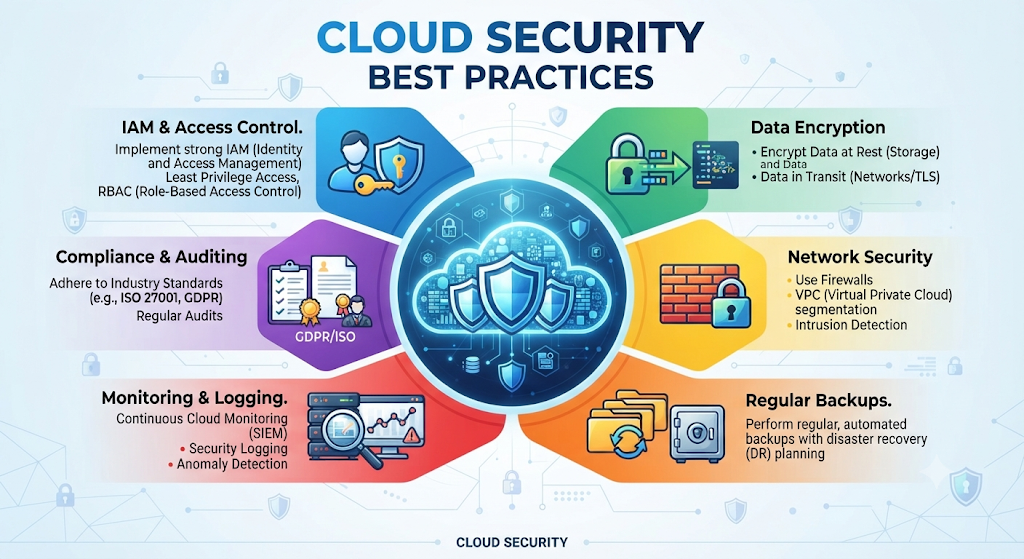
The best Cloud Security Best Practices focus on prevention. Strong passwords, regular updates, backups, and monitoring help protect accounts before attackers find weaknesses. A simple routine can make a big difference in your overall Online Data Protection.
Strong Password Policies
Weak passwords remain one of the biggest security problems. Many users still choose simple passwords that attackers can guess easily. A strong password should be unique, longer, and difficult to predict.
Using a password manager helps create and store secure passwords. Combining strong passwords with Cloud Identity Protection methods reduces the risk of unauthorized account access.
Enable MFA
Turning on Multi-Factor Authentication (MFA) is one of the easiest security improvements. It adds another verification step and protects accounts even when passwords are stolen.
Many cloud providers now recommend MFA because it blocks many common attacks. This simple feature strengthens Secure Remote Access and improves overall account security.
Keep Software Updated
Software updates often include important security fixes. Ignoring updates can leave devices and applications vulnerable to attackers.
Regular updates improve Cloud Vulnerability Management by closing security gaps before criminals can exploit them. This applies to operating systems, browsers, cloud apps, and security tools.
Backup Your Data
Backups protect you when something goes wrong. Hardware failures, ransomware attacks, and accidental deletion can permanently damage important files without proper backup plans.
Reliable Cloud Backup Security combines automatic backups, secure storage, and recovery options. Businesses should test backups regularly to ensure they can restore information quickly.
Monitor User Activity
Security monitoring helps identify unusual behavior. For example, a login from a strange location or multiple failed attempts may indicate an attack.
Using Cloud Monitoring Tools allows businesses to detect problems early. Continuous monitoring supports better Cloud Threat Prevention and helps security teams respond faster.
Simple Cloud Security Checklist
| Security Action | Why It Matters |
| Use strong passwords | Prevents easy account access |
| Enable MFA | Adds extra login protection |
| Update software | Fixes security weaknesses |
| Backup important files | Helps recover lost data |
| Review permissions | Limits unnecessary access |
| Monitor activity | Detects suspicious behavior |
Public Cloud vs Private Cloud Security
Choosing the right cloud model is an important decision for individuals and businesses. Different cloud environments provide different levels of control, flexibility, and security. Understanding Public Cloud Security, Private Cloud Security, and Hybrid Cloud Security helps organizations select the right approach for their needs.
Each model has advantages and challenges. A small company may prefer the convenience of public cloud services, while a large organization may need greater control over private infrastructure. The right choice depends on budget, compliance requirements, workload type, and security goals.
Public Cloud
Public Cloud Security protects services that are shared through third-party cloud providers. Companies like AWS, Microsoft Azure, and Google Cloud manage the physical infrastructure while customers manage their accounts, data, and settings.
Public cloud platforms offer strong security features, automatic updates, and flexible pricing. However, users must properly configure permissions and security settings. A small mistake in account configuration can create unnecessary risks.
Many businesses choose public cloud because it supports growth without requiring expensive hardware. With proper Cloud Security Solutions, monitoring, and access controls, public cloud environments can provide excellent protection for modern applications.
Private Cloud
Private Cloud Security focuses on cloud infrastructure dedicated to one organization. This model gives businesses more control over their systems, security policies, and data management.
Large companies, government organizations, and industries with strict regulations often use private clouds. They benefit from customized security settings and stronger control over sensitive information.
However, private cloud systems usually require more investment, technical expertise, and maintenance. Organizations must manage security updates, hardware, and infrastructure themselves.
Hybrid Cloud
Hybrid Cloud Security combines public and private cloud environments. It allows businesses to store sensitive information in private systems while using public cloud services for flexibility and scalability.
Many organizations choose hybrid models because they provide balance. For example, a company may keep customer records in a private cloud while running applications through a public cloud platform.
A strong hybrid strategy requires careful planning, consistent security policies, and proper Cloud Network Security. Without proper management, moving data between environments can create additional risks.
Public Cloud vs Private Cloud vs Hybrid Cloud Comparison
| Feature | Public Cloud | Private Cloud | Hybrid Cloud |
| Ownership | Cloud provider | Organization | Both |
| Cost | Lower | Higher | Medium |
| Control | Moderate | High | High |
| Scalability | Excellent | Limited | Excellent |
| Best For | Startups and general users | Large organizations | Growing businesses |
| Security Management | Shared responsibility | Fully controlled | Combined approach |
Best Cloud Security Tools
Modern organizations use advanced tools to identify threats, monitor activity, and protect sensitive information. Cloud Security Software helps security teams manage risks across applications, networks, and cloud workloads.
The best tools provide features like threat detection, compliance monitoring, vulnerability scanning, and automated alerts. These solutions support better Cloud Security Management and help businesses respond quickly when problems appear.
Microsoft Defender for Cloud
Microsoft Defender for Cloud provides security monitoring and threat protection for cloud environments. It helps organizations identify weaknesses, improve configurations, and protect workloads across different platforms.
The platform supports Cloud Workload Protection and provides security recommendations that help teams improve their overall cloud posture. It is especially useful for companies already using Microsoft services.
AWS Security Hub
AWS Security Hub helps Amazon Web Services users collect security information from multiple sources. It analyzes security issues and provides recommendations based on industry standards.
Businesses use this tool to improve visibility, manage risks, and maintain better Security Compliance across AWS environments.
Google Cloud Security Command Center
Google Cloud Security Command Center provides centralized security management for Google Cloud users. It helps detect vulnerabilities, monitor threats, and protect cloud resources.
The platform supports better Cloud Vulnerability Management by identifying possible security problems before attackers exploit them.
CrowdStrike Falcon
CrowdStrike Falcon is a security platform focused on threat detection and endpoint protection. It uses advanced technology to identify suspicious activity and respond quickly to attacks.
Businesses use it to improve Cyber Attack prevention and strengthen protection across cloud-connected devices.
Palo Alto Prisma Cloud
Palo Alto Prisma Cloud focuses on cloud-native security. It protects applications, workloads, networks, and data across different cloud environments.
The platform supports Cloud Application Security, compliance monitoring, and advanced threat prevention for modern businesses.
Cloud Data Encryption Explained
Encryption is one of the strongest methods for protecting digital information. Cloud Data Encryption changes readable information into an unreadable format that requires a special key to unlock.
When organizations use proper encryption methods, attackers cannot easily use stolen information. Encryption supports better Cloud Data Protection, stronger privacy, and safer online communication.
Encryption at Rest
Encryption at Rest protects information while it is stored on cloud servers. For example, files saved in cloud storage remain encrypted even when they are not being used.
This protection reduces risks if unauthorized users gain access to storage systems. Many cloud providers automatically apply encryption to stored data.
Encryption in Transit
Encryption in Transit protects information while it moves between your device and cloud servers. Without encryption, attackers may attempt to intercept data during transmission.
Secure connections such as HTTPS and encrypted communication protocols help protect information while it travels online.
End-to-End Encryption
End-to-End Encryption provides stronger privacy by ensuring only the sender and receiver can access the information. Even service providers cannot easily view encrypted content.
This method is commonly used in secure messaging platforms and privacy-focused services. It offers an additional layer of protection for sensitive conversations and files.
Why Encryption Matters in Cloud Security
| Benefit | Explanation |
| Privacy Protection | Keeps information hidden from unauthorized users |
| Data Safety | Reduces damage from stolen files |
| Compliance Support | Helps meet security requirements |
| Customer Trust | Builds confidence in digital services |
Identity and Access Management (IAM) in Cloud Security
Identity and Access Management (IAM) is the foundation of modern cloud protection. It controls who can access cloud resources and determines what actions each user can perform.
Without proper IAM, attackers who steal login information may access important files and systems. Strong identity controls improve Cloud Access Security and reduce unauthorized activity.
Least Privilege Access
Least privilege access means users receive only the permissions they actually need. A regular employee does not require the same access level as an administrator.
This approach reduces damage if an account becomes compromised. Limiting permissions is one of the most effective Cloud Security Best Practices.
Role-Based Access Control
Role-Based Access Control assigns permissions based on job responsibilities. For example, an accountant may access financial files while a developer manages applications.
This makes permission management easier and reduces security mistakes in large organizations.
User Authentication
User authentication confirms that a person is really who they claim to be. Passwords, Two-Factor Authentication (2FA), and security keys help verify identities.
Strong authentication improves Cloud Identity Protection and creates a safer environment for employees, customers, and organizations.
How Businesses Can Improve Cloud Security
Businesses depend on cloud technology for communication, storage, and daily operations. However, using cloud services without a proper security plan can create serious risks. A strong Business Cloud Security approach helps companies protect customer information, employee accounts, and important digital assets.
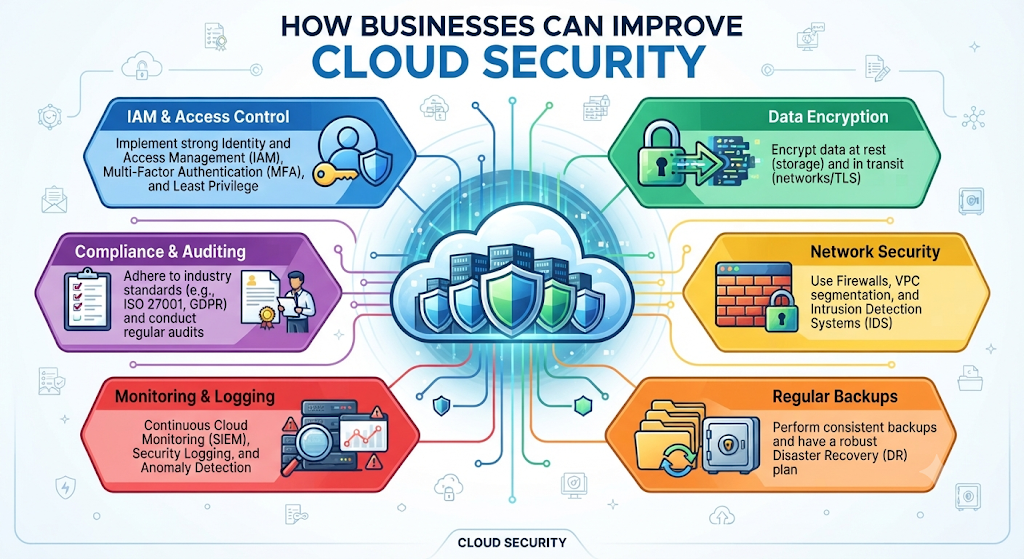
Modern organizations need more than basic passwords. They require a complete Cloud Security Strategy that includes employee awareness, regular testing, monitoring, and recovery planning. These steps create a stronger defense against changing Cloud Security Threats.
Employee Security Training
Employees play an important role in cloud protection. Many security problems happen because of human mistakes such as clicking unsafe links, sharing passwords, or downloading harmful files.
Regular training helps workers recognize Phishing, suspicious messages, and unsafe activities. A security-aware team becomes an important layer of protection against cyber attacks.
Companies should teach employees about Remote Work Security, safe browsing habits, and proper handling of sensitive information. Simple training sessions can prevent major security incidents.
Security Audits
Security audits help businesses find weaknesses before attackers discover them. During an audit, experts review cloud settings, permissions, applications, and security controls.
A regular audit improves Cloud Security Architecture and identifies areas that need improvement. It also helps companies maintain better Cloud Compliance with industry standards.
Organizations should review user access, check unusual activity, and test their security systems regularly. This proactive approach reduces future risks.
Incident Response Plan
Even with strong protection, security incidents can still happen. An incident response plan helps businesses react quickly when problems occur.
A good plan explains what steps to take after a Data Breach, malware infection, or account compromise. It includes communication methods, recovery steps, and responsible team members.
Strong Backup and Recovery planning ensures businesses can restore important information and continue operations after unexpected events.
Common Cloud Security Mistakes to Avoid
Many cloud security problems happen because of simple mistakes. Businesses and individuals often focus on convenience while ignoring basic protection steps.
Avoiding common errors is an important part of Cloud Security for Beginners and experienced users. Small improvements can create major security benefits.
Weak Passwords
Weak passwords remain one of the biggest security problems. Simple passwords are easier for attackers to guess through automated tools.
Using unique passwords with a trusted password manager improves Password Security. Adding Multi-Factor Authentication (MFA) creates another protective layer.
Poor Access Control
Giving users more access than necessary increases security risks. If an account gets hacked, attackers may access more information than they should.
Proper Access Control ensures users only reach the resources they need. This reduces the impact of stolen accounts and protects important cloud assets.
Ignoring Updates
Outdated software often contains security weaknesses. Attackers search for these weaknesses to enter systems and steal information.
Regular updates improve Cloud Vulnerability Management and help protect applications from known security problems.
No Backup Strategy
Some organizations store everything in one place without backup protection. This creates serious problems during ransomware attacks, accidental deletion, or system failures.
A strong backup plan includes Cloud Data Backup, testing, and reliable Cloud Recovery Solutions. Backups provide a safety net when unexpected problems happen.
Cloud Security Trends in 2026
Technology continues changing quickly. In 2026, businesses are adopting smarter tools to improve protection and respond faster to threats.
The future of Cloud Security Trends 2026 focuses on automation, artificial intelligence, and stronger identity protection. These changes will help organizations build safer digital environments.
AI-Powered Security
Artificial intelligence is becoming an important part of modern security systems. AI tools can analyze large amounts of data and identify unusual behavior faster than traditional methods.
AI-powered solutions improve Threat Detection and help security teams respond quickly. They can identify patterns that may indicate attacks before serious damage occurs.
Zero Trust Security
Zero Trust Security follows a simple idea: never trust automatically, always verify. Every user, device, and application must prove its identity before accessing resources.
This approach strengthens Cloud Security Management because it reduces unnecessary access. Even internal users must verify their permissions before using sensitive information.
Automated Threat Detection
Automation helps security teams monitor systems continuously. Instead of waiting for manual checks, automated tools can detect suspicious activity instantly.
Modern Cloud Monitoring Tools improve response speed and reduce the time attackers have inside a system. Faster detection often means less damage.
Frequently Asked Questions About Cloud Security
Is Cloud Storage Safe?
Yes, cloud storage can be very safe when users follow proper security practices. Trusted providers use encryption, monitoring, and authentication systems to protect information.
However, users must also secure their accounts with strong passwords, MFA, and careful permission settings. Good habits improve overall Secure Cloud Storage protection.
What Is the Biggest Cloud Security Risk?
One of the biggest risks is unauthorized access caused by stolen passwords, weak permissions, or phishing attacks.
A strong security strategy using Cloud Threat Prevention, authentication, and monitoring helps reduce these risks.
Which Cloud Provider Is Most Secure?
Major providers like AWS, Microsoft Azure, and Google Cloud invest heavily in security. The most secure option depends on proper configuration and how users manage their accounts.
A secure Cloud Provider combined with good practices creates stronger protection.
How Can Beginners Protect Cloud Data?
Beginners should start with simple steps. Use strong passwords, enable MFA, update devices, avoid suspicious links, and regularly review account activity.
These basic actions create strong Online Data Protection and help users safely enjoy cloud services.
Final Thoughts: Stay Safe with Modern Cloud Security
Cloud technology provides amazing opportunities, but security should always remain a priority. Whether you store personal files or manage business systems, understanding Cloud Security Explained helps you make smarter decisions.
A secure cloud environment requires awareness, good habits, and the right tools. By following Best Cloud Security Practices, you can reduce risks and protect your valuable information.
Why Cloud Security Should Be Your Priority
Your digital information has real value. Personal documents, business records, and private conversations all require protection.
Investing in Cloud Security Solutions for Businesses and personal security habits helps prevent data loss, privacy problems, and financial damage.
Protect Your Data Before It’s Too Late
Cyber threats continue evolving, but users can stay ahead by taking practical steps. Strong authentication, encryption, backups, and monitoring create a safer cloud experience.
The goal is simple: enjoy the benefits of cloud technology while keeping your information protected.
Meta Description
Cloud Security Explained Learn how to protect your data in the cloud in 2026. Discover cloud security threats, best practices, encryption, IAM, and tools for safer cloud computing.
Continue Reading on DailyTecho
To deepen your cloud computing knowledge, explore these related guides:
- What Is Cloud Computing? The Ultimate Beginner’s Guide (2026)
- Public Cloud vs Private Cloud vs Hybrid Cloud
- Cloud Service Models Explained: IaaS, PaaS & SaaS
- Cloud Deployment Models Explained
- Cloud Storage Explained
- Cloud Security Explained
- Cloud Migration Explained
- Edge Computing vs Cloud Computing
- Cloud Backup vs Cloud Storage
- Cloud Disaster Recovery Explained
- Cloud Computing Architecture Explained
- Serverless Computing Explained (2026)