

Cloud technology is changing the way businesses build and run software. Companies no longer want applications that are difficult to update, expensive to maintain, or unable to handle sudden traffic growth. Instead, they need software that is fast, flexible, secure, and always available. This is where Cloud Native Applications come into the picture.
If you have explored Cloud Computing, Serverless Computing, or modern software development, you have probably heard the term “cloud native.” Although it sounds technical, the concept is much easier to understand than many people think. A cloud native application is simply an application designed specifically for the cloud instead of being moved from traditional servers. This approach allows businesses to release new features faster, improve reliability, and scale their services without rebuilding the entire application.
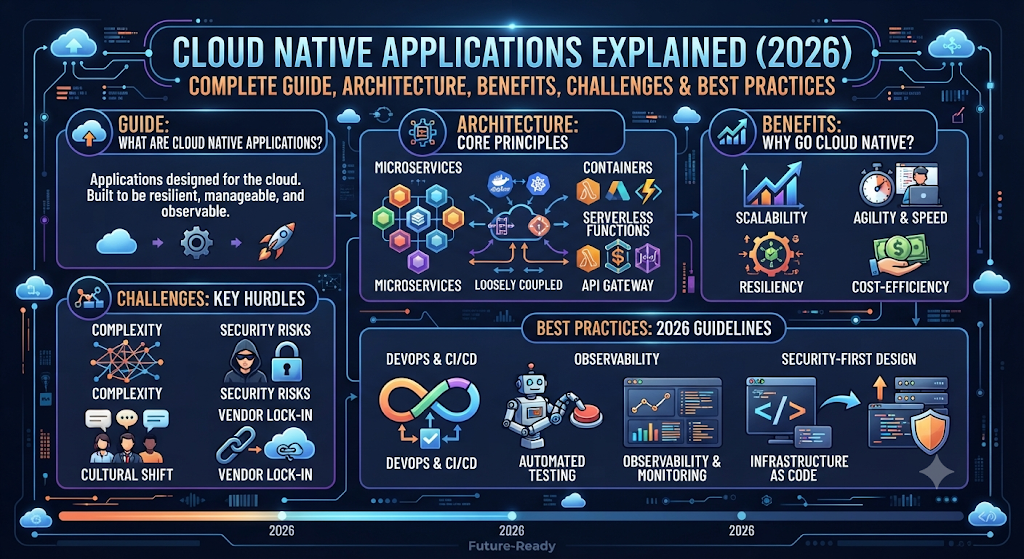
Today, companies like Netflix, Spotify, Amazon, Uber, and Airbnb rely on cloud native technologies to serve millions of users every day. These businesses use Cloud native architecture, Microservices, Containerization, and modern Cloud platforms to deliver better user experiences while keeping costs under control. Whether you are a student, developer, IT professional, or business owner, understanding cloud native applications will help you understand where modern software is heading.
In this complete beginner’s guide, you will learn what cloud native applications are, how they work, why businesses are adopting them, the technologies behind them, their benefits, challenges, security practices, and real-world examples. By the end of this guide, you will have a clear understanding of how cloud native technology is transforming modern software development in 2026.
What Are Cloud Native Applications?
Cloud Native Applications are software programs built specifically for cloud environments rather than traditional physical servers. Instead of creating one large application, developers divide it into smaller independent services that can be developed, tested, updated, and managed separately. This design makes applications faster, more reliable, and easier to improve over time. Modern Cloud application development, Cloud-native software, Cloud infrastructure, and Software architecture all work together to help businesses build applications that respond quickly to changing customer needs.
Unlike traditional software that depends on fixed hardware, cloud native applications take advantage of the flexibility offered by cloud providers. They use technologies such as Docker, Containers, Kubernetes, and DevOps to automate deployment and management. Imagine building a city instead of a single building. Each building can be repaired or upgraded without shutting down the entire city. Cloud native applications follow the same principle, allowing businesses to update one service without affecting the rest of the application.
Why Cloud Native Applications Are Important in Modern Cloud Computing
Modern businesses operate in a digital world where customer expectations change quickly. Users expect websites and applications to load instantly, remain available around the clock, and introduce new features regularly. Cloud Native Applications help companies meet these expectations through better Cloud scalability, improved Cloud performance, faster Cloud deployment, and stronger Cloud resilience. Instead of spending months releasing software updates, organizations can deploy improvements within hours or even minutes.
Cloud native technology also supports innovation. Companies can experiment with new features without risking their entire platform. Technologies like Continuous Integration, Continuous Deployment, Serverless Computing, Amazon Web Services (AWS), Microsoft Azure, and Google Cloud Platform (GCP) allow development teams to automate repetitive work while focusing on building better products. As a result, businesses respond faster to customer feedback and remain competitive in rapidly changing markets.
How Cloud Native Applications Work
Cloud native applications work by dividing one large application into many smaller services that communicate through secure interfaces. Each service performs a specific task, such as managing user accounts, processing payments, storing data, or sending notifications. These services run independently inside Containers, making it possible to update one feature without interrupting the entire application. This design supports Distributed applications, improves Cloud automation, and simplifies Cloud orchestration across multiple environments.
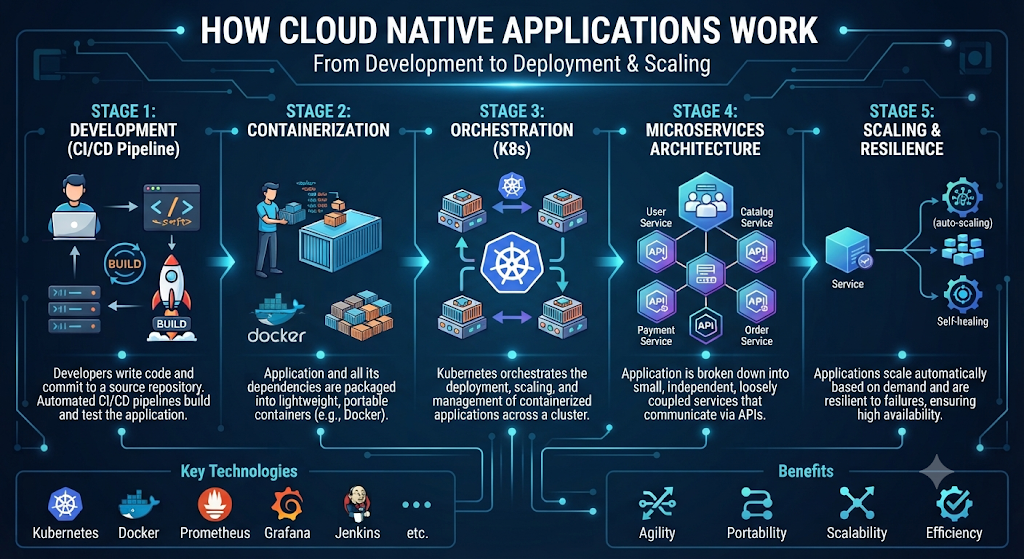
Behind the scenes, technologies such as Kubernetes, API Gateway, Load Balancer, Monitoring, and Logging keep everything running smoothly. When user traffic suddenly increases, the platform automatically creates additional application instances using Auto Scaling. If one service fails, other services continue working because cloud native systems are designed with High Availability, Fault Tolerance, and Observability in mind. This intelligent architecture helps businesses deliver reliable digital services while reducing downtime and improving customer satisfaction.
Simple Workflow of a Cloud Native Application
| Step | What Happens |
| User Request | A user opens a website or mobile app. |
| API Processing | The API Gateway receives the request and sends it to the correct service. |
| Microservice Execution | Individual Microservices process specific tasks independently. |
| Container Management | Kubernetes manages the Containers running each service. |
| Data Processing | Services communicate with databases and cloud resources securely. |
| Auto Scaling | Additional resources are added automatically during high traffic. |
| Monitoring | Prometheus, Grafana, and other tools track system health. |
| Response | The application quickly returns the requested information to the user. |
Cloud Native Application Architecture Explained
The architecture behind Cloud Native Applications is what makes them reliable, scalable, and easy to maintain. Instead of running as one large application, cloud native systems consist of several independent services that work together. Each service performs a specific task and communicates securely with others. This design improves Cloud native architecture, Software architecture, and Cloud infrastructure while making applications easier to update without causing downtime.
You can think of a cloud native application as a well-organized city. Every department has its own responsibility, yet they all work together to keep the city running smoothly. If one department needs an upgrade, the rest continue operating without interruption. Technologies like Microservices, Containers, Kubernetes, DevOps, and Cloud orchestration help create this flexible and efficient architecture.
Microservices Architecture
Microservices Architecture divides a large application into many small services. Each service performs only one business function and operates independently. For example, an online shopping website can have separate services for user accounts, product catalogs, payments, shipping, and notifications. This approach improves Microservices, Cloud application development, and Enterprise applications because developers can update one service without affecting the others.
Unlike traditional monolithic software, where every feature is connected, microservices reduce complexity and improve reliability. If the payment service experiences a problem, the product catalog can continue working normally. This separation allows development teams to build better Cloud-native software while increasing Cloud resilience and overall application stability.
Containers
A Container is a lightweight package that includes an application and everything it needs to run. This includes code, libraries, runtime files, and system settings. Because everything is packaged together, developers can run the same application on different computers without compatibility issues. Technologies like Docker and Containers have become the standard foundation for modern Containerization.
Containers also improve efficiency because they start much faster than traditional Virtual Machines and use fewer system resources. Businesses can deploy hundreds of containers across multiple servers while maintaining consistent performance. This flexibility improves Cloud deployment, Cloud performance, and application portability across different cloud providers.
Kubernetes
Managing a few containers is simple. Managing thousands manually is nearly impossible. This is where Kubernetes becomes essential. Kubernetes automatically deploys, manages, scales, and monitors containers across multiple servers. It acts as the central management system for modern cloud native applications.
For example, if an e-commerce website suddenly receives thousands of visitors during Black Friday sales, Kubernetes automatically launches additional containers through Auto Scaling. If one server fails, the Kubernetes Cluster moves workloads to healthy servers without interrupting users. These capabilities improve High Availability, Fault Tolerance, and business continuity.
APIs
Applications rarely work alone. They constantly exchange information with other applications and online services. An Application Programming Interface, or API, acts like a secure messenger that allows different systems to communicate efficiently.
In cloud native environments, an API Gateway manages incoming requests before sending them to the correct service. This approach improves security, simplifies communication, and increases overall performance. APIs also support Distributed applications, making it possible for independent services to work together while maintaining flexibility.
CI/CD Pipelines
Modern software development requires frequent updates. Instead of releasing new versions every few months, companies often release improvements every day. CI/CD pipelines automate this entire process, reducing manual work and minimizing human error.
Continuous Integration automatically tests new code whenever developers make changes. After the code passes every test, Continuous Deployment delivers updates safely to production environments. This automated workflow allows businesses to improve Cloud automation, accelerate Cloud deployment, and deliver new features with confidence.
Service Mesh
As applications grow, communication between services becomes increasingly complex. A Service Mesh provides a dedicated communication layer that manages how services interact with one another while improving security and reliability.
Popular solutions such as Istio help developers control network traffic, encrypt service communication, and observe application behavior without modifying application code. Combined with Load Balancer, Monitoring, and Observability, service meshes improve performance while making troubleshooting much easier.
DevOps
Building cloud native applications is not only about technology. It also requires teams to work together effectively. DevOps combines software development and IT operations into one collaborative workflow that encourages automation, faster delivery, and continuous improvement.
Instead of waiting weeks for approvals, developers and operations engineers work together throughout the software lifecycle. This collaboration increases productivity while reducing deployment risks. Modern Cloud services become more reliable because teams continuously monitor performance and respond quickly to customer needs.
Infrastructure as Code (IaC)
Managing cloud servers manually becomes difficult as applications grow larger. Infrastructure as Code solves this problem by allowing developers to define infrastructure using code instead of manual configuration. Every server, database, network, and storage resource can be created automatically.
Tools like Terraform allow organizations to build identical environments within minutes. Instead of configuring hundreds of servers manually, developers execute a script that creates the complete infrastructure automatically. Combined with Helm, Cloud migration, and automated deployments, IaC reduces errors while improving consistency across development, testing, and production environments.
Cloud Native Architecture at a Glance
| Architecture Layer | Purpose | Popular Technologies |
| User Access | Receives user requests | Browser, Mobile App |
| Traffic Management | Routes requests securely | API Gateway, Load Balancer |
| Application Layer | Runs business logic | Microservices |
| Runtime Layer | Packages applications | Docker, Containers |
| Orchestration Layer | Manages containers | Kubernetes, Helm |
| Communication Layer | Secure service communication | Service Mesh, Istio |
| Automation Layer | Automates deployment | CI/CD, DevOps |
| Infrastructure Layer | Creates cloud resources | Infrastructure as Code, Terraform |
| Monitoring Layer | Tracks health and performance | Prometheus, Grafana, Monitoring, Logging |
| Cloud Platform | Provides infrastructure | Amazon Web Services (AWS), Microsoft Azure, Google Cloud Platform (GCP) |
Expert Insight: Cloud native architecture isn’t about using one tool. It’s about combining modern technologies that help applications become faster, more reliable, scalable, and easier to manage throughout their lifecycle.
Key Components of Cloud Native Applications
Every successful Cloud Native Application is built using several modern technologies that work together as one system. Each component has a specific responsibility, yet all of them support faster development, better reliability, and easier management. Together, they strengthen Cloud native architecture, Cloud infrastructure, Cloud services, and modern Software architecture, allowing applications to handle millions of users without sacrificing performance.
The most important components include Microservices, Containers, Kubernetes, DevOps, CI/CD, APIs, service discovery, monitoring tools, security controls, and cloud databases. These technologies help developers automate repetitive tasks, improve Cloud performance, simplify Cloud deployment, and build highly reliable applications that continue running even when unexpected problems occur.
Core Components of a Cloud Native Application
| Component | Purpose | Popular Technology |
| Application Architecture | Breaks applications into small services | Microservices |
| Application Packaging | Packages applications consistently | Docker, Containers |
| Container Management | Deploys and manages containers | Kubernetes |
| Communication | Connects services securely | API Gateway |
| Automation | Builds and deploys software automatically | CI/CD |
| Operations | Improves collaboration and automation | DevOps |
| Infrastructure | Creates cloud resources using code | Infrastructure as Code, Terraform |
| Monitoring | Tracks health and performance | Prometheus, Grafana |
| Networking | Balances application traffic | Load Balancer |
| Service Communication | Manages secure service traffic | Service Mesh, Istio |
Cloud Native vs Traditional Applications
Choosing between cloud native and traditional applications is more than selecting a technology. It is about deciding how software will grow over the next several years. Traditional applications usually run on dedicated servers with tightly connected components. Updating one feature often requires deploying the entire application, which increases maintenance time and creates unnecessary downtime. In contrast, Cloud Native Applications use Cloud-native software, Cloud scalability, and Distributed applications to support continuous improvement without interrupting users.
Cloud native applications also provide greater flexibility for businesses experiencing rapid growth. They automatically allocate resources when demand increases and reduce resource usage when traffic drops. This approach lowers infrastructure costs while improving Application modernization, Cloud environment, and long-term business agility. Companies can release updates more frequently and respond to customer feedback much faster than organizations using traditional software.
Cloud Native vs Traditional Applications Comparison
| Feature | Cloud Native Applications | Traditional Applications |
| Architecture | Small independent services | One large application |
| Deployment | Automated | Mostly manual |
| Scalability | Automatic | Limited |
| Infrastructure | Cloud-based | Physical servers |
| Updates | Frequent and fast | Slow and complex |
| Availability | Very high | Moderate |
| Recovery | Automatic | Manual |
| Maintenance | Easier | More difficult |
| Cost | Flexible pay-as-you-go | Higher upfront investment |
| Innovation | Faster | Slower |
Benefits of Cloud Native Applications
The biggest advantage of Cloud Native Applications is flexibility. Businesses can launch new features quickly, scale resources automatically, and recover from failures without affecting customers. Instead of spending weeks planning infrastructure upgrades, teams can focus on building better products. This modern approach improves Cloud resilience, Cloud automation, Cloud migration, and overall software quality while reducing operational complexity.
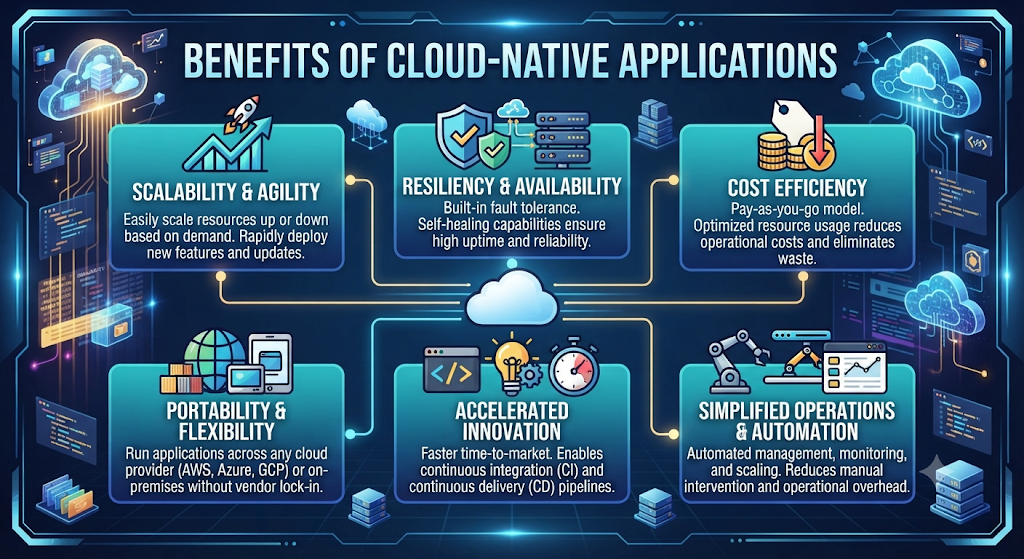
Cloud native technology also supports long-term business growth. Automated deployments reduce human error, while intelligent monitoring helps teams identify problems before users notice them. Features like Auto Scaling, High Availability, Fault Tolerance, Monitoring, and Logging ensure applications remain available even during periods of heavy traffic. This reliability increases customer trust and creates a better user experience.
Major Benefits
| Benefit | Business Value |
| Faster Deployment | Release updates in minutes |
| Better Scalability | Handle millions of users easily |
| Improved Reliability | Less downtime |
| Lower Costs | Pay only for resources used |
| Higher Security | Modern security practices |
| Faster Innovation | Quicker product improvements |
| Better Performance | Faster application response |
| Easier Maintenance | Independent service updates |
| Improved Productivity | Developers work more efficiently |
| Better Customer Experience | Faster and more reliable applications |
Example: Imagine a streaming platform releasing a new recommendation feature. With a cloud native approach, developers can update only the recommendation service instead of shutting down the entire platform. Users continue watching videos while the update happens quietly in the background.
Challenges of Cloud Native Applications
Although Cloud Native Applications offer many advantages, they also introduce new challenges. Organizations must learn modern tools, redesign existing software, and train development teams. Managing hundreds of independent services requires careful planning and effective communication. Without proper architecture, businesses may struggle with Cloud orchestration, Enterprise applications, and maintaining consistent application performance.
Security and operational complexity also increase as applications grow. Teams must secure APIs, monitor container workloads, protect sensitive data, and maintain compliance across multiple cloud environments. Technologies such as Kubernetes, Service Mesh, Observability, Infrastructure as Code, and automated security testing help reduce these risks, but they require skilled professionals and continuous learning.
Common Challenges and Solutions
| Challenge | Recommended Solution |
| Complex Architecture | Start with simple microservices |
| Security Risks | Apply Zero Trust security |
| Learning Curve | Train development teams |
| Container Management | Use Kubernetes |
| Monitoring Complexity | Deploy Prometheus and Grafana |
| Cost Control | Monitor cloud resource usage |
| Deployment Errors | Automate with CI/CD |
| Infrastructure Management | Use Terraform and IaC |
| Network Communication | Implement Service Mesh |
| Scaling Applications | Enable Auto Scaling |
Expert Insight: Cloud native technology is not a shortcut to success. It is a long-term strategy that combines the right architecture, automation, skilled teams, and continuous improvement. Organizations that invest in these areas often build applications that are faster, more reliable, and easier to scale than traditional software.
Best Practices for Building Cloud Native Applications
Building successful Cloud Native Applications requires more than choosing the latest technology. A strong foundation starts with careful planning, clear goals, and an architecture that can grow with your business. Developers should design applications as small, independent services that communicate securely while remaining easy to update. This approach improves Cloud native architecture, Cloud application development, Application modernization, and long-term Cloud scalability without increasing unnecessary complexity.
Automation should become part of every development stage. Teams should automate testing, deployment, monitoring, and infrastructure management to reduce manual work and improve software quality. Using technologies like DevOps, CI/CD, Containers, Kubernetes, and Infrastructure as Code helps organizations release software faster while maintaining stability and reliability across different cloud environments.
Best Practices Comparison
| Best Practice | Why It Matters |
| Design with Microservices | Easier maintenance and scaling |
| Automate Deployments | Faster software releases |
| Monitor Everything | Detect problems early |
| Secure APIs | Protect sensitive data |
| Use Containers | Consistent deployments |
| Implement Auto Scaling | Handle traffic spikes |
| Apply Infrastructure as Code | Reduce configuration errors |
| Regular Performance Testing | Improve reliability |
| Backup Critical Data | Faster disaster recovery |
| Document Every Service | Easier collaboration |
Best Practice Tip: Build applications that can grow gradually. It is much easier to expand a well-designed cloud native application than to rebuild an outdated system later.
Cloud Native Security Best Practices
Security should never be treated as an afterthought. Every cloud native application handles valuable business information, customer records, and sensitive data. Organizations should secure every layer of the application, including infrastructure, APIs, containers, databases, and user access. A strong security strategy improves Cloud resilience, Cloud infrastructure, Cloud services, and overall application trust.
Modern cloud-native security depends on continuous protection instead of occasional security checks. Development teams should scan container images, encrypt sensitive information, monitor application activity, and control user permissions carefully. Technologies such as Service Mesh, API Gateway, Monitoring, Logging, Observability, and Terraform help organizations detect unusual activity before it becomes a serious problem.
Cloud Native Security Framework
| Security Area | Recommended Practice |
| Identity Management | Multi-factor authentication |
| API Security | Secure API Gateway |
| Container Security | Scan Containers regularly |
| Network Protection | Use Service Mesh |
| Data Protection | Encrypt sensitive information |
| Monitoring | Use Prometheus and Grafana |
| Infrastructure | Secure with Infrastructure as Code |
| Access Control | Apply least-privilege permissions |
| Compliance | Regular security audits |
| Disaster Recovery | Automated backup strategy |
Expert Insight: Modern security is not about building higher walls. It is about continuously monitoring every layer so threats are detected before they affect customers.
Popular Cloud Native Tools and Technologies
Cloud native development depends on a collection of specialized tools that simplify deployment, monitoring, automation, and application management. Each tool solves a different problem while working together as part of one complete ecosystem. Businesses combine Cloud Computing, Cloud orchestration, Cloud deployment, and modern automation platforms to deliver reliable software at scale.
The good news is that many of these technologies work together naturally. Developers often build applications using Docker, manage them with Kubernetes, automate deployments through CI/CD, monitor performance with Prometheus and Grafana, and deploy infrastructure using Terraform. Major cloud providers such as Amazon Web Services (AWS), Microsoft Azure, and Google Cloud Platform (GCP) offer managed services that reduce operational complexity.
Popular Cloud Native Technologies
| Category | Popular Tools |
| Containers | Docker |
| Container Orchestration | Kubernetes |
| Package Management | Helm |
| Infrastructure Automation | Terraform |
| Monitoring | Prometheus |
| Visualization | Grafana |
| Service Networking | Istio, Service Mesh |
| Cloud Platforms | Amazon Web Services (AWS), Microsoft Azure, Google Cloud Platform (GCP) |
| CI/CD | GitHub Actions, Jenkins, GitLab CI |
| Application Runtime | Serverless Computing, Kubernetes |
Real-World Examples of Cloud Native Applications
Many of the world’s largest technology companies rely on Cloud Native Applications to serve millions of users every day. Their success demonstrates how cloud-native design improves speed, scalability, and reliability. Instead of depending on one large application, these organizations build independent services that can grow separately. This modern strategy strengthens Enterprise applications, Cloud performance, and overall customer experience.
Netflix is a well-known example. Millions of people stream movies every day without noticing the enormous infrastructure working behind the scenes. Netflix uses Microservices, Cloud automation, Load Balancer, Kubernetes, and advanced monitoring tools to keep its platform available worldwide. Spotify, Uber, Airbnb, and Amazon also use similar cloud-native principles to release new features quickly while maintaining reliable service for their users.
Companies Using Cloud Native Technology
| Company | Cloud Native Benefit |
| Netflix | Global streaming with automatic scaling |
| Spotify | Continuous feature releases |
| Amazon | Reliable e-commerce platform |
| Uber | Real-time ride management |
| Airbnb | High traffic accommodation platform |
| Scalable cloud services | |
| Microsoft | Enterprise cloud solutions |
| Shopify | Reliable online stores |
| Discord | Stable communication platform |
| Slack | Fast business collaboration |
Case Study: During major shopping events such as Black Friday, Amazon experiences massive traffic increases. Cloud native technologies automatically scale computing resources, allowing customers to continue shopping without noticeable slowdowns.
Industries Using Cloud Native Applications
Cloud native technology is no longer limited to technology companies. Organizations across healthcare, finance, education, manufacturing, retail, logistics, and entertainment now depend on cloud-native applications to improve efficiency and customer satisfaction. These industries benefit from faster software updates, better security, and reliable digital services. As businesses continue their Cloud migration, cloud-native systems have become a competitive advantage rather than an optional investment.
Healthcare providers use cloud-native platforms to manage patient information securely. Banks process millions of financial transactions through scalable cloud systems. Retail companies deliver personalized shopping experiences, while educational institutions provide online learning platforms that support thousands of students simultaneously. Across every industry, Distributed applications, Cloud environment, Cloud platforms, and Cloud services help organizations innovate faster and respond quickly to changing customer needs.
Industry Adoption Examples
| Industry | Cloud Native Use Case |
| Healthcare | Electronic medical records |
| Banking | Digital payments |
| Retail | Online shopping platforms |
| Education | E-learning systems |
| Manufacturing | Smart factory monitoring |
| Logistics | Shipment tracking |
| Media | Video streaming |
| Telecommunications | Network management |
| Government | Digital public services |
| SaaS | Business software platforms |
Industry Insight: Companies that adopt cloud-native technology often deliver updates much faster than competitors because their applications are designed for continuous improvement rather than occasional large releases.
Common Mistakes to Avoid
Many organizations adopt Cloud Native Applications because they want faster innovation and better scalability. However, they sometimes make avoidable mistakes that reduce performance and increase costs. One common mistake is breaking an application into too many Microservices without a clear business reason. This creates unnecessary complexity and makes Cloud orchestration, communication, and maintenance more difficult than expected.
Another mistake is ignoring automation and security. Teams may deploy applications without proper Monitoring, Logging, automated testing, or security checks. Skipping CI/CD, poor API design, and weak infrastructure planning often lead to downtime and slow software releases. Building a successful cloud-native solution requires careful planning, continuous improvement, and the right balance between simplicity and flexibility.
Common Mistakes and Better Solutions
| Common Mistake | Better Solution |
| Too many Microservices | Start small and expand gradually |
| Ignoring security | Secure every application layer |
| Manual deployments | Automate using CI/CD |
| Poor monitoring | Use Prometheus and Grafana |
| Weak API design | Build secure and scalable APIs |
| No documentation | Document every service |
| Ignoring costs | Monitor cloud spending regularly |
| Poor infrastructure planning | Use Infrastructure as Code |
Future of Cloud Native Applications
The future of Cloud Native Applications looks brighter than ever. Businesses are investing heavily in cloud technologies because they want software that can adapt quickly to changing customer needs. In the coming years, cloud-native development will become even more intelligent as artificial intelligence, automation, and edge computing continue to evolve. This growth will improve Cloud automation, Cloud performance, Cloud scalability, and modern Enterprise applications across every industry.
Future cloud-native platforms will rely more on Serverless Computing, intelligent resource management, predictive monitoring, and AI-powered automation. Technologies like Kubernetes, DevOps, Cloud Computing, and Cloud services will continue to evolve, making application deployment simpler while reducing operational costs. Organizations that adopt cloud-native principles today will be better prepared for tomorrow’s digital economy.
Future Trends for 2026 and Beyond
| Trend | Business Impact |
| AI-Powered Automation | Faster software delivery |
| Edge Computing Integration | Lower latency |
| Smarter Kubernetes | Easier container management |
| Green Cloud Computing | Reduced energy usage |
| Multi-Cloud Adoption | Greater flexibility |
| Intelligent Security | Faster threat detection |
| Advanced Observability | Better application insights |
| Platform Engineering | Simplified developer experience |
Expert Quote: “Cloud native isn’t just a technology trend. It is a modern approach to building software that can grow, adapt, and deliver value continuously.”
Frequently Asked Questions
What are Cloud Native Applications?
Cloud Native Applications are software applications designed specifically for cloud environments. They use Microservices, Containers, automation, and cloud technologies to deliver better scalability, reliability, and performance.
How do Cloud Native Applications work?
They divide one large application into smaller independent services that communicate through APIs. Tools like Kubernetes automatically deploy, scale, and manage these services.
Are Cloud Native Applications only for large companies?
No. Startups, small businesses, and large enterprises all benefit from cloud-native development because it reduces costs and improves flexibility.
What is the difference between Cloud Native and traditional applications?
Traditional applications usually run as one large system on dedicated servers. Cloud native applications consist of independent services that scale automatically and update without downtime.
Why is Kubernetes important?
Kubernetes automates container deployment, scaling, recovery, and resource management, making it one of the most important technologies in cloud-native environments.
Is Docker the same as Kubernetes?
No. Docker creates and packages containers, while Kubernetes manages and orchestrates those containers across multiple servers.
Final Thoughts
Cloud Native Applications have transformed the way modern software is designed, deployed, and managed. Instead of relying on rigid systems that struggle to grow, businesses now build flexible applications that scale automatically, recover quickly, and evolve continuously. Technologies such as Microservices, Containers, Kubernetes, DevOps, and CI/CD work together to create applications that deliver faster updates, stronger security, and a better user experience.
Whether you are beginning your cloud journey or planning your next enterprise project, understanding cloud-native principles will help you build future-ready software. As cloud technology continues to evolve, businesses that embrace cloud-native development will be better positioned to innovate, improve customer satisfaction, and remain competitive. If you want to deepen your cloud knowledge, explore our related DailyTecho guides on Cloud Computing, Cloud Computing Architecture, Serverless Computing, Cloud Security, and Cloud Migration to continue building your expertise.
Meta Description
Learn everything about Cloud Native Applications in 2026. Discover how they work, architecture, benefits, challenges, best practices, Kubernetes, Docker, and real-world examples in this complete beginner-friendly guide.
Continue Reading on DailyTecho
To deepen your cloud computing knowledge, explore these related guides:
- What Is Cloud Computing? The Ultimate Beginner’s Guide (2026)
- Public Cloud vs Private Cloud vs Hybrid Cloud
- Cloud Service Models Explained: IaaS, PaaS & SaaS
- Cloud Deployment Models Explained
- Cloud Storage Explained
- Cloud Security Explained
- Cloud Migration Explained
- Edge Computing vs Cloud Computing
- Cloud Backup vs Cloud Storage
- Cloud Disaster Recovery Explained
- Cloud Computing Architecture Explained
- Serverless Computing Explained (2026)