

Introduction: What Is Ransomware and Why It Matters in 2026?
Imagine opening your computer one morning and discovering that all your important files are locked. Your photos, work documents, business records, and personal information are no longer accessible. A message appears asking for money in exchange for restoring your access. This situation describes a ransomware attack, one of the most dangerous forms of malicious software affecting users worldwide.
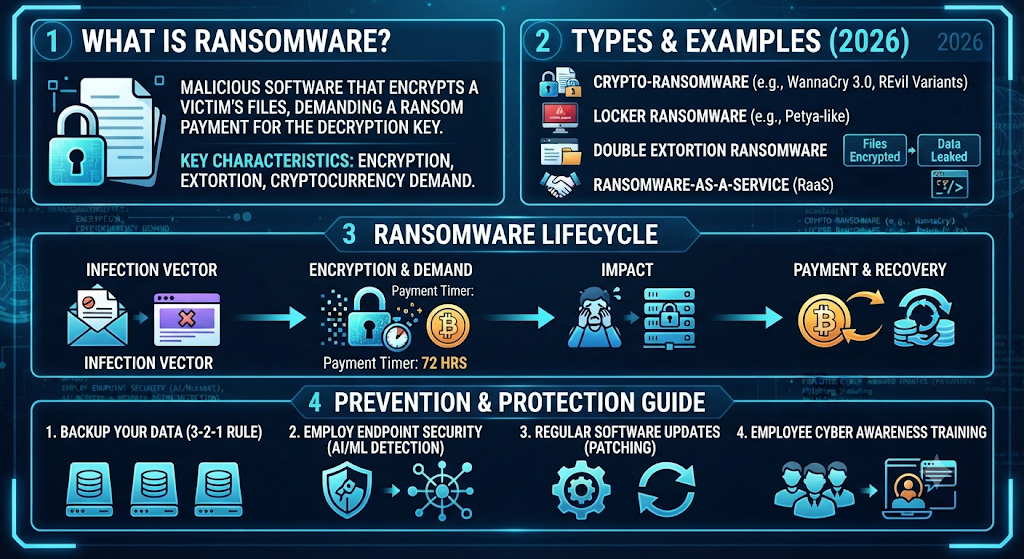
So, what is ransomware? Ransomware is a type of malware that blocks access to files or systems and demands payment from victims. Attackers use advanced methods to enter computer systems, steal valuable information, and force victims into paying a ransom demand. Unlike simple viruses, ransomware focuses on financial extortion and can create serious damage for individuals and organizations.
In 2026, ransomware continues to grow because cybercriminals are becoming more organized. They use automated tools, stolen passwords, and advanced attack methods to target homes, companies, hospitals, and government agencies. These cybersecurity threats are no longer limited to large corporations. Small businesses and everyday internet users are also common targets.
Ransomware ka simple explanation
Ransomware works like a digital lock placed on your important data. When attackers successfully infect a device, they may encrypt files and prevent users from opening them. This process is called file encryption, where data is converted into an unreadable format without the correct decryption key.
For example, imagine someone changing the lock on your house door and keeping the key. Your belongings are still inside, but you cannot access them. Ransomware works in a similar way with digital files. Your information exists, but attackers control access.
Modern ransomware is more advanced than older malware. Today, many attacks involve data encryption, data theft, and public threats to release stolen information. This approach makes ransomware more dangerous because victims face both system disruption and privacy risks.
Why ransomware is one of the biggest cybersecurity threats in 2026
Ransomware has become one of the biggest cybersecurity threats because attackers continue improving their techniques. They no longer depend only on random infections. Instead, many ransomware groups carefully study their targets before launching attacks.
One major reason ransomware is increasing is the growth of remote work, cloud services, and connected devices. More digital systems create more opportunities for attackers to discover security vulnerabilities. A single weak password or outdated application can provide access to an entire network.
Another major change is the rise of ransomware-as-a-service (RaaS). This model allows criminals with limited technical skills to rent ransomware tools from experienced attackers. As a result, more people can launch ransomware attacks without creating their own malware.
According to cybersecurity experts, modern ransomware combines encryption, theft, and pressure tactics. Attackers may threaten to publish sensitive information if victims refuse to pay. This method is known as double extortion.
Impact on individuals, businesses, and organizations
Ransomware affects different victims in different ways. For individuals, losing access to personal files can be stressful and expensive. Family photos, financial documents, and important records may become unavailable after an infection.
For businesses, the damage can be much larger. Ransomware attacks on businesses can stop daily operations, interrupt customer services, and create major financial losses. A company may lose revenue while trying to restore systems and investigate the attack.
Organizations such as hospitals and government departments face even greater risks. Their systems often contain important information that people depend on every day. A ransomware incident can affect public services, safety, and trust.
| Victim Type | Possible Impact |
| Individuals | Lost personal files, financial loss, privacy risks |
| Small Businesses | Downtime, customer problems, recovery costs |
| Large Organizations | Data leaks, reputation damage, operational disruption |
| Healthcare Systems | Service delays and critical system failures |
“Ransomware is not just a technology problem. It is a business risk, privacy risk, and security challenge.”
What Is Ransomware?
Definition of ransomware
Ransomware is a type of malware infection designed to block access to files, devices, or entire networks until attackers receive payment. It belongs to the malware family but has a specific goal: forcing victims to pay money.
The main purpose of ransomware is financial gain. Attackers use different techniques to gain unauthorized access and then damage availability of important systems. Once inside, they may encrypt files, steal information, and demand payment.
Understanding what is ransomware and how does it work helps users recognize risks before an attack happens. Prevention becomes easier when people know how attackers operate.
How ransomware works
The process usually starts when ransomware enters a device through a weak security point. Attackers may use phishing emails, unsafe downloads, stolen login details, or outdated software to access a system.
After entering the device, ransomware begins spreading. It searches for valuable files and starts encryption. During this stage, users may notice unusual activity, missing files, or strange file names.
The final step is the ransom message. Attackers explain that files have been locked and provide instructions for payment. However, paying does not always guarantee recovery because criminals may keep the money without providing access.
How ransomware spreads
Ransomware can spread through several common methods. Understanding these methods helps users build stronger system protection and improve overall digital security.
| Attack Method | How It Happens |
| Phishing emails | Fake messages trick users into opening harmful files |
| Malicious downloads | Infected software installs ransomware |
| Weak passwords | Attackers use stolen credentials |
| Security vulnerabilities | Outdated systems provide entry points |
| Network sharing | Infection moves between connected devices |
Why attackers use ransomware
Attackers choose ransomware because it can generate large profits quickly. Many criminal groups operate like businesses, creating tools, managing payments, and targeting valuable organizations.
Cryptocurrency payments make these attacks attractive because transactions are harder to trace. Attackers can demand thousands or even millions of dollars depending on the target.
Another reason is that many organizations lack strong ransomware security best practices. Without proper backups, employee training, and monitoring systems, victims may have fewer recovery options.
Difference between ransomware and other malware
Many people confuse ransomware with other harmful programs. However, ransomware has a unique purpose compared with general malware.
The main difference is that ransomware focuses on controlling access and demanding payment. Other malware types may steal information, display advertisements, or damage systems without requesting money.
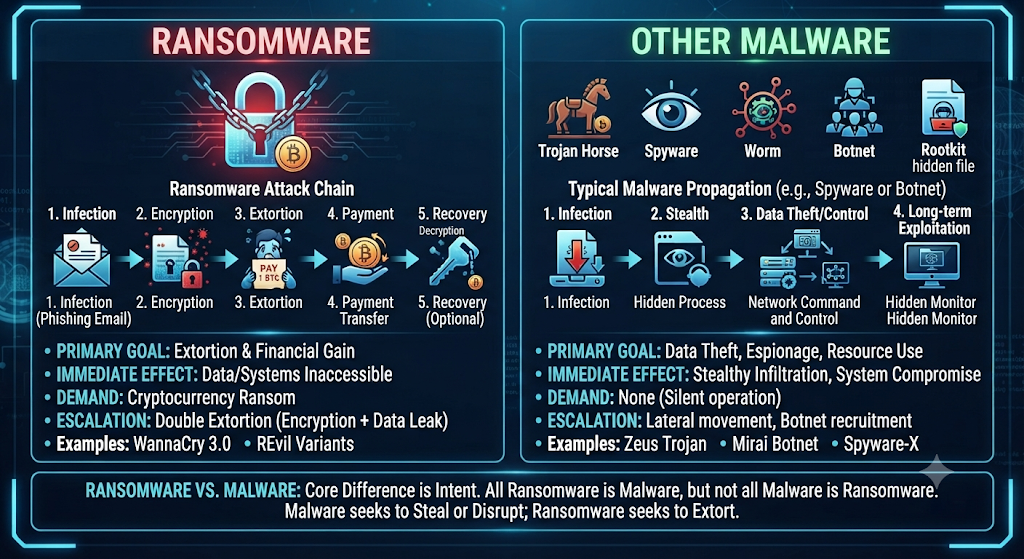
Understanding ransomware vs malware and ransomware vs virus helps users identify the specific risks involved.
| Feature | Malware | Ransomware |
| Main purpose | Damage, spying, or stealing | Financial extortion |
| File encryption | Sometimes | Usually common |
| Payment request | Rare | Main goal |
| Recovery | Security cleanup | Backup or recovery methods |
How Does a Ransomware Attack Work?
A ransomware attack usually follows a series of steps. Attackers do not always break into systems by force. Instead, they search for weak points and use human mistakes, outdated software, or stolen information. Understanding how ransomware works helps you identify risks early and improve your cybersecurity solutions before damage occurs.
Modern attacks are often carefully planned. Cybercriminals may spend weeks inside a network before activating ransomware. During this time, they collect information, move between systems, and prepare the final attack. This approach makes modern ransomware more dangerous than older versions.
A typical ransomware attack includes these stages:
| Attack Stage | What Happens |
| Initial Access | Attackers find a way into the system |
| Malware Installation | Ransomware software enters the device |
| File Encryption | Files become locked and unavailable |
| Ransom Demand | Attackers request payment |
| Data Theft | Stolen information may be used for pressure |
1. Initial Access
The first stage of a ransomware attack is gaining access to a device or network. Attackers search for weaknesses that allow them to enter without permission. These weaknesses may come from human errors, poor security settings, or outdated technology.
Many ransomware incidents begin with simple actions, such as clicking a harmful email link or downloading an infected file. Once attackers gain entry, they try to expand their control over the system.
Strong network security, regular updates, and employee awareness can reduce the chances of unauthorized entry. Businesses that ignore basic protection often become easier targets.
Phishing emails
Phishing emails remain one of the most common ways ransomware enters systems. Attackers create fake messages that look like they come from trusted companies, coworkers, or service providers.
These emails often contain harmful attachments or links. When someone opens the attachment, ransomware may install automatically. In many cases, attackers use urgent language to pressure users into acting quickly.
For example, an email may claim that your account will close unless you verify information immediately. This emotional trick encourages mistakes.
Learning how to recognize phishing attempts is one of the most important ransomware prevention tips for individuals and businesses.
Malicious downloads
Another common entry method involves unsafe downloads. Attackers may hide ransomware inside fake applications, software updates, games, or free tools.
Many users download programs from unknown websites because they want quick solutions. However, these files may contain hidden malware that silently installs on their devices.
Before downloading anything, users should check the source, read reviews, and use trusted security software. Reliable ransomware protection tools can also detect suspicious files before they cause harm.
Vulnerable software
Outdated software creates opportunities for attackers. Developers regularly release updates to fix security vulnerabilities, but many users delay installing them.
When a system remains unpatched, attackers can exploit known weaknesses and enter without permission. This problem affects both personal computers and large business networks.
Organizations should maintain regular update schedules for operating systems, applications, and security programs. Keeping software current is a simple step that greatly improves IT security.
Stolen passwords
Weak or stolen passwords are another major cause of ransomware infections. Attackers often purchase leaked credentials from underground markets or steal passwords through fake login pages.
Once attackers obtain valid credentials, they may access company networks like normal users. This makes detection more difficult because the login activity appears legitimate.
Using strong passwords and Multi-Factor Authentication (MFA) adds an extra security layer. Even if a password is stolen, MFA can prevent attackers from easily entering the account.
2. Malware Installation
After attackers gain access, they install ransomware on the target device. This stage often happens quietly because criminals want to avoid detection.
The ransomware program may hide in the background while it prepares the attack. Some advanced ransomware variants disable security tools, delete backups, or change system settings before starting encryption.
Modern attackers often use advanced endpoint security methods to bypass traditional antivirus programs. Businesses now rely on solutions like Endpoint Detection and Response (EDR) to monitor unusual activity and detect threats earlier.
The installation stage is critical because stopping ransomware before encryption begins can prevent major damage.
3. File Encryption
File encryption is the stage where ransomware becomes visible to victims. The malware searches for important files and converts them into unreadable formats.
Documents, images, databases, and business records can all become locked. Without the correct decryption key, users may not be able to open their own files.
This process creates serious problems because many organizations depend on digital information every day. A hospital, company, or school may struggle to operate if important systems become unavailable.
Attackers use strong encryption methods because they know victims need access to their data. This is why having a reliable ransomware backup strategy is one of the best defenses.
4. Ransom Demand
After encrypting files, attackers display a ransom note. This message explains what happened and provides payment instructions.
The demand usually asks for cryptocurrency because criminals believe it provides more privacy. The amount requested depends on the victim and the value of the stolen information.
However, paying the ransom does not guarantee success. Some victims pay and never receive working recovery keys. Others may become repeat targets because attackers know they are willing to pay.
Security experts usually recommend focusing on prevention, backups, and proper ransomware recovery methods instead of depending on attackers.
5. Data Theft and Extortion
Modern ransomware attacks are no longer limited to locking files. Many attackers now steal information before encryption begins.
This method is called double extortion. Criminals threaten to publish stolen information if victims refuse to pay. This creates additional pressure because leaked data can damage reputation and create legal problems.
A double extortion ransomware attack may expose customer records, employee information, financial documents, and private business data.
Organizations need strong monitoring, access controls, and an effective ransomware incident response plan to handle these situations.
“The strongest defense against ransomware is not a single security tool. It is a combination of smart habits, strong protection, and preparation.”
Common Types of Ransomware
Ransomware has changed significantly over the years. Attackers now create different versions of ransomware depending on their targets and goals. Understanding the types of ransomware helps individuals and businesses recognize possible risks before an attack happens.
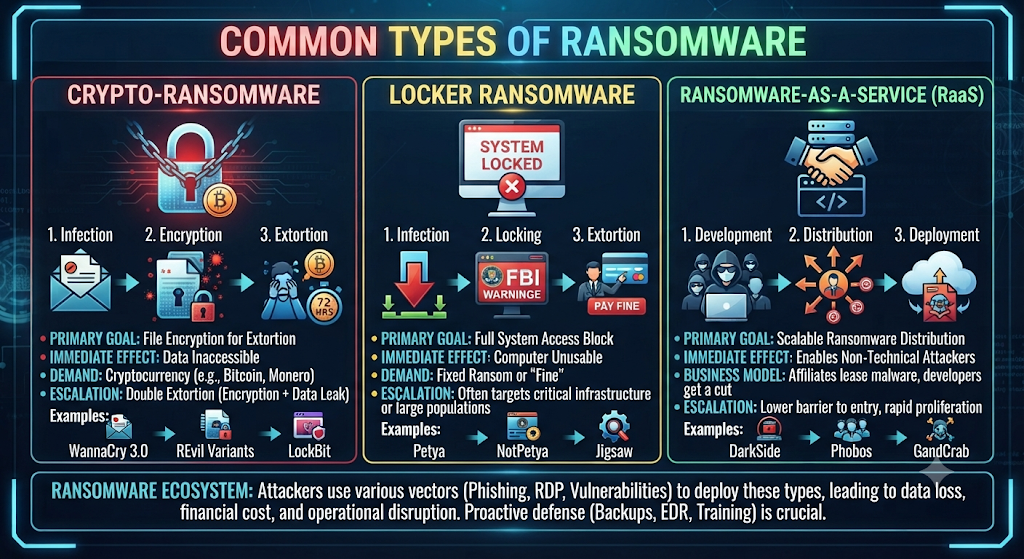
Some ransomware types focus on locking files, while others block access to devices or steal information. Although their methods are different, the main purpose remains the same: gaining money through illegal activity.
The following table explains the most common ransomware categories:
| Ransomware Type | How It Works | Main Target |
| Crypto Ransomware | Encrypts files and demands payment | Individuals and businesses |
| Locker Ransomware | Blocks access to devices | Personal users |
| Double Extortion Ransomware | Encrypts files and steals data | Organizations |
| Ransomware-as-a-Service (RaaS) | Provides attack tools to criminals | Businesses and networks |
| Mobile Ransomware | Targets smartphones and tablets | Mobile users |
| Scareware | Uses fake warnings to trick users | Individual users |
1. Crypto Ransomware
Crypto ransomware is one of the most common and dangerous ransomware types. It focuses on encrypting files so victims cannot open their important data.
When this ransomware enters a system, it searches for valuable files such as documents, images, databases, and business records. After encryption, victims usually see strange file extensions or receive a message demanding payment.
For example, a company may suddenly lose access to customer records and financial documents. Without a proper backup system, recovery can become extremely difficult.
This is why businesses should follow strong data protection practices and maintain regular backups. A reliable backup allows users to restore files without depending on criminals.
2. Locker Ransomware
Locker ransomware works differently from crypto ransomware. Instead of encrypting individual files, it blocks access to the entire device or operating system.
A victim may turn on their computer and see a full-screen message preventing normal use. The attacker then demands payment to unlock the device.
Locker ransomware is often designed to create panic. Users may believe they have permanently lost access to their computers.
However, strong security habits can reduce the risk. Keeping software updated, avoiding suspicious downloads, and using trusted cybersecurity solutions can help prevent infections.
3. Double Extortion Ransomware
Double extortion ransomware has become one of the biggest concerns in modern cybersecurity. Attackers do not only encrypt files. They also steal information before locking systems.
After stealing data, criminals threaten to release it publicly unless the victim pays. This creates two problems:
- The organization cannot access its files.
- Sensitive information may become public.
This method has increased ransomware attacks on businesses because companies worry about losing customer trust and facing legal consequences.
Organizations need strong access controls, monitoring systems, and a clear recovery strategy to handle these attacks.
4. Ransomware-as-a-Service (RaaS)
Ransomware-as-a-Service (RaaS) has changed how cybercriminals operate. Instead of creating their own ransomware, attackers can rent tools created by experienced ransomware groups.
This business model works like a criminal subscription service. Developers create the ransomware, while affiliates launch attacks against targets.
Because of RaaS, more attackers can participate in ransomware campaigns. They do not need advanced technical skills to cause serious damage.
Security teams now monitor ransomware groups closely because these organizations often develop new attack methods and target businesses worldwide.
5. Mobile Ransomware
Mobile ransomware targets smartphones and tablets instead of traditional computers. As people store more personal information on mobile devices, these attacks have become more attractive.
Attackers may spread mobile ransomware through fake applications, harmful links, or unofficial app stores. Once installed, the malware may lock the device or steal personal information.
Users can reduce risks by downloading apps only from trusted sources and reviewing app permissions carefully. Mobile security updates also play an important role in protection.
6. Scareware
Scareware is a less advanced but still harmful form of ransomware. Instead of actually encrypting files, it uses fake warnings to frighten users into paying money.
For example, a fake message may claim that your computer contains dangerous viruses and that you must pay for immediate removal.
Although scareware may not always cause technical damage, it uses fear and confusion to trick people. Learning basic security awareness can help users identify these scams.
Real-World Ransomware Examples
Real attacks show how dangerous ransomware can become when attackers successfully target vulnerable systems. Studying ransomware attack examples helps individuals and organizations understand common patterns and improve their defenses.
Large incidents have affected hospitals, governments, energy companies, and global businesses. These cases prove that ransomware is not only a personal computer problem. It is a worldwide security challenge.
WannaCry Ransomware Attack
What happened
The WannaCry ransomware attack became one of the most famous ransomware incidents in history. It spread globally in 2017 and affected hundreds of thousands of computers across many countries.
WannaCry used a vulnerability in older Windows systems to spread quickly between connected devices. Many organizations were affected because their systems had not installed important security updates.
The attack showed how a single software weakness could create a worldwide crisis.
Global impact
The WannaCry attack disrupted hospitals, businesses, and government organizations. One of the most affected sectors was healthcare, where some hospitals experienced system problems and delays.
The incident highlighted the importance of regular updates, strong network security, and effective backup planning.
| Lesson From WannaCry | Why It Matters |
| Install security updates | Reduces system vulnerabilities |
| Use backups | Helps recover files |
| Monitor networks | Detects unusual activity |
| Train employees | Reduces human mistakes |
Colonial Pipeline Ransomware Attack
Business impact
The Colonial Pipeline ransomware attack in 2021 showed how ransomware can affect critical infrastructure. The attack forced the company to temporarily stop operations, creating concerns about fuel availability in parts of the United States.
Although the incident involved a specific organization, it affected many people because fuel supply systems are connected to everyday life.
The attack demonstrated that ransomware can create problems beyond computers. It can affect transportation, supply chains, and essential services.
Lessons learned
The Colonial Pipeline incident showed why organizations need strong security planning. Businesses must prepare before an attack happens instead of reacting after damage occurs.
Important lessons included:
- Protect important accounts
- Improve access controls
- Monitor suspicious activity
- Maintain recovery plans
A strong ransomware incident response plan allows companies to react faster and reduce damage.
LockBit Ransomware
How it targeted organizations
LockBit ransomware became one of the most active ransomware groups by targeting organizations across different industries. It used advanced techniques to break into networks, steal data, and demand payment.
LockBit often used affiliate-based attacks through the Ransomware-as-a-Service model. This allowed different criminals to use the same ransomware platform against multiple targets.
The growth of groups like LockBit shows why businesses need stronger endpoint security, employee training, and continuous threat monitoring.
Signs Your Device May Have Ransomware
Recognizing ransomware early can prevent serious damage. Many victims only realize they have been attacked after their files become locked or their systems stop working properly. However, ransomware often leaves warning signs before the final attack happens.
Learning the common ransomware infection signs helps you take action quickly. Early detection gives you a better chance of protecting your files, limiting damage, and starting safe recovery steps.
| Warning Sign | What It May Mean |
| Files cannot open | Files may have been encrypted |
| Strange file extensions | Ransomware may have modified files |
| Ransom note appears | Attackers are demanding payment |
| Slow performance | Malware may be running in the background |
| Unknown programs running | Suspicious software may be active |
Files cannot open
One of the first signs of ransomware is when your files suddenly stop opening. Documents, photos, videos, or business files may show errors or appear corrupted.
This usually happens because ransomware uses data encryption to lock files. The original information still exists, but the system cannot read it without a special decryption key.
For example, a business employee may try to open a financial report and receive an error message instead. A home user may discover that family photos are no longer accessible.
If important files suddenly become unavailable, avoid making random changes. Disconnecting the device from the network can help prevent further spread.
Strange file extensions
Another common warning sign is unusual file names or extensions. Ransomware often changes file formats after encryption.
For example, a normal document like:
report.docx
may become something like:
report.locked
Attackers often add unique extensions to show that files have been affected.
However, strange file extensions do not always mean ransomware. Some legitimate programs also change file names. That is why users should check other symptoms before making decisions.
Ransom note appears
A ransom note is one of the clearest signs of a ransomware infection. Attackers usually leave a message explaining that files have been locked.
The message often includes:
- Payment instructions
- Cryptocurrency details
- Deadlines
- Threats about deleting or publishing data
Modern ransomware groups use these messages to create fear. They want victims to feel pressure and make quick decisions.
Security experts recommend avoiding immediate payment because attackers may not provide a working solution after receiving money.
Slow performance
A sudden decrease in device performance can also indicate ransomware activity. Some ransomware programs use system resources while scanning files, spreading through networks, or communicating with attackers.
Users may notice:
- Longer startup times
- Programs opening slowly
- High processor usage
- Unexpected crashes
These signs are not always caused by ransomware. They can also result from normal computer problems. However, unusual performance changes combined with other warning signs require attention.
Unknown programs running
Suspicious applications or processes running in the background can indicate a possible infection. Advanced ransomware may hide itself while preparing an attack.
Checking your device activity can reveal unusual programs that you do not recognize. Businesses often use threat detection systems to identify suspicious behavior automatically.
Modern organizations rely on tools such as Endpoint Detection and Response (EDR) because they can detect unusual actions before ransomware causes major damage.
How to Prevent Ransomware Attacks in 2026
Preventing ransomware is much easier than recovering after an attack. Once files become encrypted, recovery can be complicated, expensive, and time-consuming.
The best protection strategy combines technology, employee awareness, and smart security habits. Following strong ransomware prevention tips can significantly reduce your risk.
Whether you are protecting a personal computer or an entire company network, prevention should always be the first priority.
Keep Software Updated
Software updates are one of the simplest ways to improve security. Developers release updates to fix bugs and remove dangerous weaknesses that attackers may exploit.
Many ransomware attacks succeed because systems run outdated software. Attackers search for known vulnerabilities because they know some users delay updates.
Regularly update:
- Operating systems
- Web browsers
- Business applications
- Security software
- Network devices
Keeping everything updated improves system protection and reduces opportunities for cybercriminals.
Use Strong Passwords and MFA
Weak passwords remain one of the biggest security problems. Attackers often use stolen or guessed passwords to access accounts.
A strong password should be unique and difficult to predict. Users should avoid using the same password across multiple websites.
Adding Multi-Factor Authentication (MFA) provides another layer of protection. Even if attackers steal a password, they may still fail to access the account without the second verification step.
MFA is especially important for:
- Email accounts
- Business systems
- Cloud services
- Administrative accounts
Avoid Suspicious Emails
Phishing remains a major ransomware entry method. Attackers often create realistic-looking emails to trick users.
Before clicking links or opening attachments, check:
- Sender details
- Email language
- Unexpected requests
- Suspicious files
A message that creates urgency or asks for private information should always be treated carefully.
Strong security awareness training helps employees recognize dangerous messages before they create problems.
Create Regular Backups
Backups are one of the strongest defenses against ransomware. If attackers lock your files, a recent backup allows you to restore information without depending on criminals.
A good ransomware backup strategy includes multiple copies stored in different locations.
The 3-2-1 backup method is commonly recommended:
| Backup Rule | Meaning |
| 3 copies | Keep three versions of your data |
| 2 different storage types | Use different storage methods |
| 1 offline copy | Keep one backup away from attackers |
Backups should also be tested regularly. A backup is only useful if it works during an emergency.
Use Endpoint Security Tools
Modern ransomware requires modern protection. Traditional antivirus programs alone may not always detect advanced attacks.
Organizations increasingly use advanced ransomware protection tools such as endpoint security platforms, behavior monitoring systems, and EDR solutions.
These tools analyze unusual activities and can block suspicious actions before files become encrypted.
Security solutions should work together with good user habits. Technology provides protection, but people also play an important role.
Train Employees
Employees are often the first line of defense against ransomware. A single mistake, such as opening a harmful attachment, can create a security incident.
Regular training teaches workers how to identify:
- Fake emails
- Suspicious links
- Social engineering attempts
- Unsafe downloads
Businesses that invest in training create stronger business security because employees become more aware of online risks.
Follow Zero Trust Security Practices
Traditional security models often trusted users after they entered a network. Modern threats require a different approach.
Zero Trust Security follows the idea of “never trust, always verify.” Every user, device, and request must be checked before receiving access.
Zero Trust helps reduce ransomware damage by limiting permissions and preventing attackers from moving freely through networks.
Important Zero Trust practices include:
- Least privilege access
- Identity verification
- Continuous monitoring
- Device security checks
“The best ransomware defense is preparation. Strong passwords, backups, updates, and awareness can stop many attacks before they begin.”
How Businesses Can Protect Against Ransomware
Businesses are some of the most common targets for ransomware because they store valuable information and depend heavily on digital systems. A successful attack can stop daily operations, damage customer trust, and create major financial losses.
To reduce risks, companies need a complete security approach. Technology alone is not enough. Strong policies, trained employees, and proper planning create better business security against modern cyber attacks.
A successful protection strategy combines prevention, detection, and recovery. Businesses should prepare before an incident happens instead of trying to solve problems after systems are already damaged.
| Security Strategy | How It Helps |
| Employee training | Reduces mistakes and phishing risks |
| Network segmentation | Limits ransomware movement |
| Access control | Prevents unauthorized actions |
| Security monitoring | Detects suspicious activity |
| Response planning | Improves recovery speed |
Employee cybersecurity training
Employees play a major role in protecting organizations from ransomware. Even advanced security systems can fail if someone clicks a harmful link or downloads an infected file.
Attackers often use social engineering techniques because people can be easier to trick than computer systems. A fake invoice, urgent message, or suspicious login request can become the starting point of a ransomware attack.
Regular training helps employees understand common threats and recognize warning signs. Companies should teach workers about phishing emails, password safety, suspicious downloads, and safe browsing habits.
A strong training program improves security awareness and creates a human firewall against ransomware.
Network segmentation
Network segmentation is an important security practice that divides a company network into smaller sections. This prevents attackers from easily moving from one system to another.
Without segmentation, ransomware can spread quickly across an entire organization. A single infected device may put many departments at risk.
For example, if an employee computer becomes infected, proper segmentation can prevent the ransomware from reaching financial systems or important databases.
This approach strengthens network security and limits the impact of a successful attack.
Access control
Strong access control ensures that users only receive the permissions they actually need. Giving every employee full access creates unnecessary risks.
Attackers often search for accounts with high-level permissions because these accounts allow them to cause more damage.
Businesses should follow the principle of least privilege. This means users should only access the files and systems required for their work.
Access control protects important sensitive information and reduces opportunities for unauthorized access.
Security monitoring
Continuous monitoring helps organizations detect suspicious activity before ransomware causes serious damage.
Security teams use monitoring tools to watch network traffic, login activity, and unusual system behavior. These tools can identify possible attacks early.
Modern companies use advanced technologies such as Endpoint Detection and Response (EDR) and other cybersecurity platforms to improve visibility.
Early detection allows security teams to isolate infected devices and reduce the spread of malware.
Incident response plan
Every organization should have a clear plan for handling ransomware attacks. Waiting until an attack happens can create confusion and increase damage.
A good ransomware incident response plan explains what employees should do during an emergency. It includes steps for identifying the attack, containing the infection, restoring systems, and communicating with affected people.
An effective response plan usually includes:
| Response Step | Purpose |
| Detection | Identify the ransomware attack |
| Containment | Stop the spread |
| Investigation | Understand the cause |
| Recovery | Restore systems safely |
| Review | Improve future protection |
Preparation helps businesses recover faster and reduces downtime.
How to Remove Ransomware
Removing ransomware requires careful action. A rushed response can make the situation worse or damage evidence needed for investigation.
If you discover ransomware, avoid immediately deleting files or making major changes. First, focus on stopping the attack from spreading and identifying what happened.
Understanding how to recover from a ransomware attack helps users make better decisions during a stressful situation.
Disconnect infected device
The first step after detecting ransomware is disconnecting the infected device from the network.
This prevents ransomware from spreading to other computers, shared folders, and connected systems.
You should:
- Disconnect internet access
- Remove network cables
- Disable unnecessary connections
However, do not turn off the device immediately if security professionals need to analyze it. Some situations require collecting information before shutting systems down.
Identify ransomware type
Identifying the ransomware type helps determine the best recovery approach. Different ransomware families use different techniques and may have different solutions.
Security experts examine:
- Ransom notes
- File extensions
- Malware behavior
- Attack methods
Known ransomware families such as Ryuk ransomware, REvil ransomware, and LockBit ransomware have different characteristics.
Proper identification improves recovery decisions and helps organizations understand the attack source.
Restore from backups
Backups are often the safest recovery option after ransomware. If clean backups exist, organizations can restore systems without negotiating with attackers.
Before restoring files, security teams must ensure the ransomware has been removed. Restoring infected backups can restart the problem.
A reliable backup system should include:
- Regular backup schedules
- Offline storage copies
- Backup testing
- Access protection
A strong backup plan is one of the most valuable ransomware recovery methods available.
Use security tools
Security tools can help detect and remove ransomware from infected systems. Modern solutions analyze suspicious activity and identify harmful files.
Businesses often use:
- Antivirus software
- Endpoint security platforms
- Malware removal tools
- Threat intelligence services
Solutions such as Microsoft Defender provide built-in protection features for many Windows users.
However, removal tools cannot always restore encrypted files. Prevention and backups remain essential.
Contact cybersecurity professionals
Some ransomware attacks require expert assistance. This is especially true for businesses, healthcare organizations, and companies handling sensitive customer information.
Cybersecurity professionals can help with:
- Malware investigation
- Data recovery planning
- Security improvements
- Legal and reporting requirements
Professional support can reduce mistakes and improve recovery outcomes.
Ransomware Prevention Checklist
Following a simple checklist helps individuals and organizations maintain better protection against ransomware.
| Security Practice | Benefit |
| Regular backups | Protects important files |
| MFA | Prevents unauthorized access |
| Software updates | Fixes vulnerabilities |
| Antivirus protection | Detects threats |
| Employee training | Reduces human mistakes |
These actions may seem basic, but they create a strong foundation for ransomware security best practices.
Ransomware vs Malware: What’s the Difference?
Many people use malware and ransomware as the same term, but they are different. Malware is a broad category that includes many harmful programs. Ransomware is one specific type of malware designed for extortion.
Understanding ransomware vs malware makes it easier to choose the right protection methods. While all ransomware is malware, not all malware is ransomware.
Another common comparison is ransomware vs virus. A virus usually spreads and damages files, while ransomware focuses on blocking access and demanding payment.
| Feature | Malware | Ransomware |
| Purpose | General damage, spying, or stealing | Financial extortion |
| File Encryption | Sometimes | Usually |
| Payment Demand | Rare | Common |
| Recovery | Depends on malware type | Often requires backups or recovery methods |
Future of Ransomware in 2026
Ransomware continues to evolve as technology changes. Attackers are finding new ways to target users, companies, and large organizations. In 2026, ransomware is expected to become more advanced, more automated, and more focused on valuable information.
The future of ransomware will not only involve locking files. Attackers are combining stolen data, artificial intelligence, and advanced techniques to create more powerful attacks. Organizations must improve their security strategies to stay ahead of these growing online threats.
Understanding future trends helps businesses and individuals prepare stronger defenses instead of reacting after an attack occurs.
AI-powered attacks
Artificial intelligence is changing the cybersecurity landscape. While AI provides many benefits for security teams, attackers can also misuse it to improve their methods.
Cybercriminals may use AI to create more realistic phishing emails, automate attack processes, and discover possible weaknesses faster. This makes traditional security awareness more important than ever.
For example, AI-generated messages can look highly professional and may be difficult for users to recognize as fake. Attackers can personalize emails using information collected from social media and public sources.
To fight AI-powered threats, organizations need stronger threat detection, better employee training, and advanced cybersecurity solutions.
More targeted business attacks
Ransomware attacks are becoming more targeted. Instead of randomly infecting thousands of devices, many ransomware groups carefully select valuable organizations.
Businesses are attractive targets because they often have important customer records, financial information, and critical systems. Attackers know that downtime can pressure companies into making quick decisions.
Industries such as healthcare, finance, education, and manufacturing remain common targets because their operations depend heavily on technology.
Companies should focus on improving IT security, protecting sensitive systems, and regularly testing their defenses.
Ransomware automation
Automation allows attackers to launch ransomware campaigns faster and with less effort. Criminal groups can use automated tools to scan networks, identify weaknesses, and deploy malware.
The rise of Ransomware-as-a-Service (RaaS) has increased this problem. Attack tools are now available to more criminals, making ransomware easier to launch.
Security teams must also use automation for protection. Automated monitoring, alerts, and response systems can help detect suspicious behavior quickly.
The future battle between attackers and defenders will depend heavily on who uses automation more effectively.
Increased cloud security risks
Cloud services have transformed how businesses store and manage information. However, cloud environments also create new security challenges.
Many organizations use cloud platforms for important files, applications, and customer data. If cloud accounts are poorly protected, attackers may gain access and cause serious damage.
Common cloud risks include:
- Weak passwords
- Incorrect settings
- Poor access management
- Stolen login credentials
Strong cloud security requires proper configuration, identity protection, and continuous monitoring.
Using Zero Trust Security principles can help organizations protect cloud systems by verifying every user and device before granting access.
Final Thoughts
Ransomware remains a major cybersecurity threat
Ransomware has become one of the most serious digital risks facing individuals and organizations. From small personal devices to large enterprise networks, anyone can become a target.
Throughout this guide, we explored what is ransomware, how attacks happen, different ransomware types, real-world incidents, and ways to improve protection.
Modern ransomware combines encryption, data theft, and social engineering. Attackers continue changing their methods, which means users must also improve their security habits.
Prevention is better than recovery
Recovering from ransomware can be expensive, stressful, and time-consuming. Prevention provides a much stronger defense because it reduces the chance of losing important information.
Simple actions can make a big difference:
- Keep software updated
- Use strong passwords
- Enable MFA
- Maintain backups
- Avoid suspicious links
- Train employees
Following these steps creates stronger protection against ransomware attacks.
Strong security habits reduce risk
Cybersecurity is not only about using expensive tools. Good security starts with everyday habits and smart decisions.
Individuals should protect personal accounts and important files. Businesses should build security plans that include monitoring, employee education, backups, and recovery procedures.
The best ways to protect against ransomware involve combining technology, awareness, and preparation. No security method provides a 100% guarantee, but strong defenses can greatly reduce the risk.
“Ransomware prevention is not a single action. It is a continuous process of protecting data, improving awareness, and preparing for possible threats.”
Frequently Asked Questions About Ransomware
What is ransomware and how does it work?
Ransomware is a type of malware that blocks access to files or systems and demands payment from victims. It usually enters through phishing emails, unsafe downloads, stolen passwords, or software vulnerabilities. After installation, it may encrypt files and display a ransom message.
How to prevent ransomware attacks in 2026?
The best prevention methods include keeping software updated, using MFA, creating regular backups, avoiding suspicious emails, and using reliable security tools. Businesses should also follow Zero Trust practices and train employees.
Can ransomware be removed without paying?
Yes, ransomware can sometimes be removed without payment. Recovery depends on the ransomware type, available backups, and security tools. Paying criminals does not guarantee that files will be restored.
What are common signs your computer has ransomware?
Common signs include files that cannot open, unusual file extensions, ransom messages, slow performance, and unknown programs running in the background.
Conclusion
Ransomware is one of the biggest cybersecurity challenges of 2026, but preparation can significantly reduce the risk. Understanding how ransomware works, recognizing warning signs, and following strong security practices can protect both individuals and businesses.
With regular backups, updated systems, strong authentication, and security awareness, users can build a safer digital environment.
Cybersecurity is not about waiting for an attack. It is about preparing before one happens.
Meta Description:
What is ransomware and how does it work? Learn ransomware types, real-world attacks, warning signs, prevention tips, and powerful protection strategies to keep your data safe in 2026.
Continue Reading
Expand your cybersecurity knowledge with these related DailyTecho guides:
The more you understand cybersecurity, the better prepared you’ll be to protect your devices, personal information, and online accounts.
Ready to Improve Your Cybersecurity?
The best time to protect your devices is before an attack happens. Continue exploring our expert guides to learn about malware, firewalls, password managers, network security, and other essential cybersecurity topics.
2 Comments