

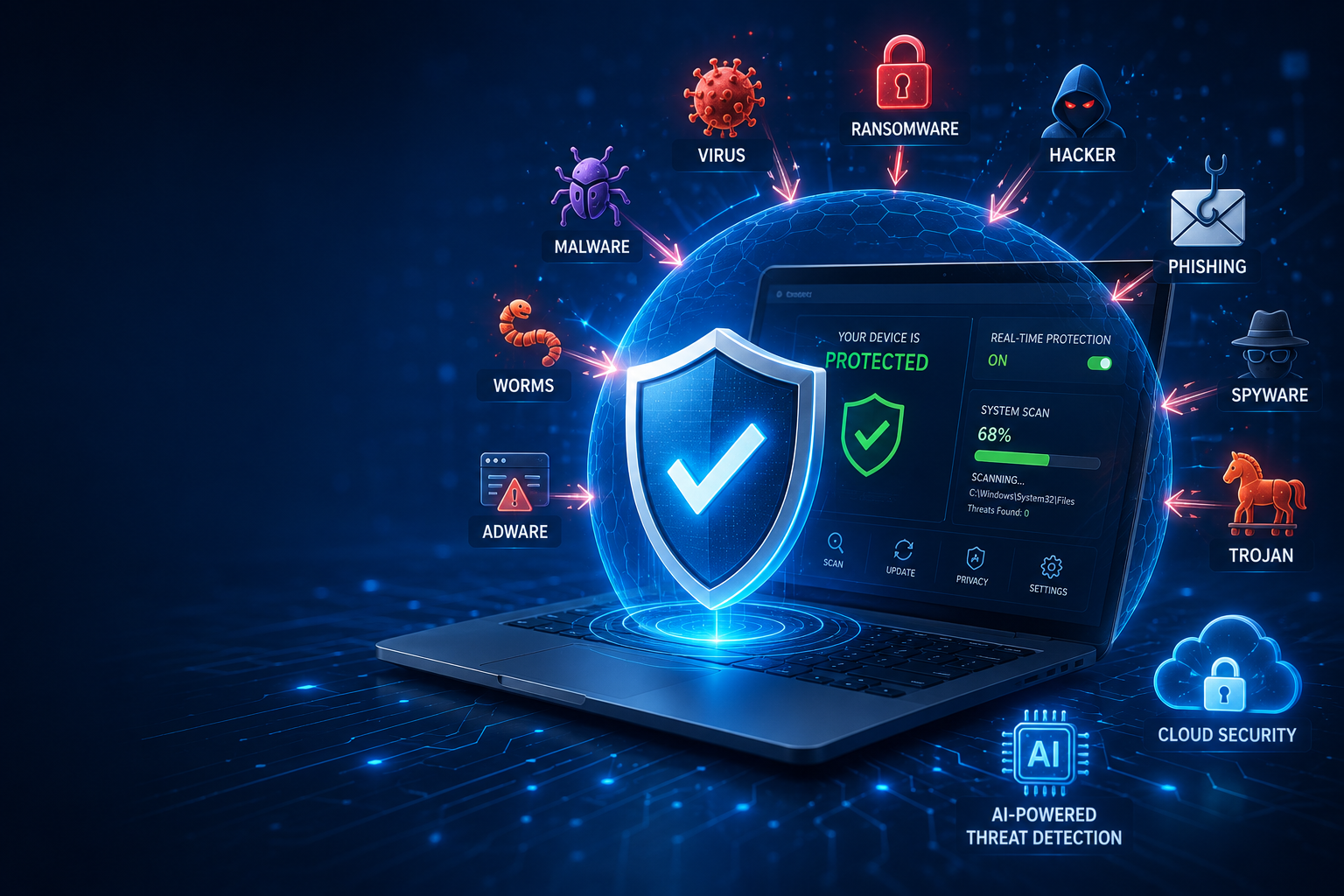
Cybercriminals never take a day off. Every time you browse a website, download a file, or open an email, your device could face new cyber threats. That doesn’t mean you should stop using the internet. It simply means you need the right protection. This is where antivirus, antivirus software, and internet security become essential. They work together to detect dangerous files, stop attacks, and keep your personal information safe.
Many people believe an antivirus only removes a virus after it infects a computer. Modern security tools do much more. Today’s antivirus software can block malware, prevent phishing attacks, monitor suspicious activity, and provide real-time protection before damage occurs. Whether you use a Windows PC, Mac, Android phone, or tablet, choosing the right best antivirus software is one of the smartest steps you can take for better computer security.
In this complete antivirus guide, you’ll learn how antivirus works, the different types available, the threats it can stop, and how to choose the right solution for your needs. By the end of this guide, you’ll understand how antivirus fits into a complete cybersecurity strategy and why it remains one of the most important tools for staying safe online.
What Is Antivirus?
An antivirus is a type of security software designed to find, block, and remove harmful programs before they damage your device. It constantly checks files, applications, downloads, and websites for signs of dangerous activity. Modern antivirus solutions protect much more than computers. They also secure laptops, smartphones, tablets, and even some smart devices connected to your home network.
Without reliable antivirus protection, a single infected file can steal passwords, encrypt important documents, or slow your entire system. Good antivirus software works quietly in the background while allowing you to browse, shop, study, and work with confidence. Think of it as a security guard that watches your device every second of the day.
Definition of Antivirus Software
Antivirus software is a program that detects, blocks, and removes malicious software from a device. It uses different technologies to identify known and unknown threats before they can harm your files or compromise your privacy. Modern solutions combine virus protection, malware protection, and intelligent threat detection into one complete security package.
Unlike early antivirus programs that only scanned files manually, today’s solutions automatically monitor your computer in real time. Many products also include web filtering, email scanning, ransomware defense, and cloud-based intelligence to improve overall cybersecurity protection.
Why Antivirus Is Important Today
The internet has changed dramatically over the last decade. Criminals now use fake websites, phishing emails, malicious downloads, and infected advertisements to spread harmful software. As online banking, remote work, and digital payments continue to grow, protecting your personal information has become more important than ever.
A reliable antivirus helps reduce these risks by identifying suspicious behavior before it becomes a serious problem. Combined with safe browsing habits and regular updates, antivirus software forms the foundation of strong online safety and computer security for individuals, families, and businesses alike.
| Why Antivirus Matters | Benefit |
| Stops malicious files | Better malware removal |
| Protects personal data | Improved data protection |
| Blocks unsafe websites | Safer secure browsing |
| Detects suspicious activity | Faster threat detection |
| Monitors your device | Continuous real-time protection |
“An antivirus doesn’t just clean infected devices. It helps prevent infections before they happen.”
How Does Antivirus Software Work?
Many people install antivirus software without understanding what it actually does behind the scenes. Modern antivirus programs perform thousands of security checks every day. They inspect files, monitor running programs, scan websites, and analyze downloads in seconds. This continuous monitoring helps stop threats before they gain access to your system.
Today’s antivirus solutions no longer rely on one detection method. Instead, they combine signature databases, artificial intelligence, cloud intelligence, and behavioral analysis to recognize both known and emerging attacks. This layered approach gives users stronger protection against modern cyber threats that constantly evolve.
Virus Detection
Traditional antivirus programs compare files against a database containing millions of known virus signatures. When the software finds a match, it immediately blocks or quarantines the infected file before it can spread. This process remains one of the fastest ways to identify familiar threats.
Although signature detection is highly effective against known malware, new attacks appear every day. For this reason, modern antivirus products combine signature scanning with smarter detection methods to improve computer virus protection.
Real-Time Protection
Real-time protection continuously watches your device while you use it. Instead of waiting for a manual virus scan, the antivirus automatically checks downloads, email attachments, websites, and new applications the moment they appear on your system.
Imagine downloading a free application from an unknown website. Before you even open the file, the antivirus checks it for dangerous code. If the file looks suspicious, the software blocks it immediately. This proactive approach helps prevent infections instead of cleaning them later.
Behavior-Based Detection
Cybercriminals regularly create new malware that has never been seen before. Behavior-based detection focuses on what a program does rather than what it looks like. If an application suddenly begins encrypting hundreds of files, modifying system settings, or accessing sensitive information without permission, the antivirus treats this activity as suspicious.
This technology helps stop brand-new attacks that traditional signature databases may not yet recognize. It is especially useful against rapidly changing ransomware and advanced malware families.
Cloud-Based Threat Detection
Modern cloud antivirus technology allows security companies to analyze suspicious files using powerful cloud servers instead of relying only on your device. Millions of users contribute anonymous threat information, helping researchers discover new attacks much faster.
Because updates happen almost instantly through the cloud, users receive protection against newly discovered threats without waiting for large software downloads. This makes AI antivirus and cloud intelligence valuable tools in today’s fast-moving cybersecurity landscape.
| Detection Method | Purpose |
| Signature Detection | Finds known viruses |
| Behavior Analysis | Detects suspicious actions |
| Cloud Intelligence | Identifies emerging threats |
| AI Analysis | Improves threat accuracy |
| Real-Time Monitoring | Stops attacks instantly |
Why Do You Need Antivirus Protection?
Many people believe they are safe because they only visit trusted websites. Unfortunately, even legitimate websites can become infected. A single fake email, malicious advertisement, or compromised download can expose your personal information. Strong antivirus protection reduces these risks by protecting your device before problems appear.
Antivirus software also provides peace of mind. Whether you work from home, shop online, stream movies, or manage your finances, your personal information deserves strong protection. Investing in reliable security today can save you from expensive data loss and identity theft tomorrow.
Protecting Personal Data
Your computer stores valuable information every day. Passwords, banking details, tax records, family photos, and business documents all deserve protection. Modern antivirus software helps secure this information by blocking malicious applications before they gain access.
Imagine losing years of personal photos because ransomware encrypted every file. A strong antivirus solution dramatically reduces the chance of such incidents by identifying suspicious behavior early and strengthening your overall data protection strategy.
Preventing Malware Attacks
Every day, criminals create thousands of new malware samples designed to steal information or damage devices. Antivirus software continuously checks incoming files and internet traffic to stop these threats before they spread.
When combined with safe browsing habits, software updates, and a properly configured firewall, antivirus becomes one of the strongest defenses against modern cybercrime. Together, these layers create a much safer computing environment.
Keeping Devices Secure
Today’s households often include Windows computers, MacBooks, Android phones, tablets, and smart devices. Fortunately, antivirus products are now available for almost every platform. Whether you need antivirus for Windows, antivirus for Mac, or antivirus for Android, choosing the right solution helps protect every device connected to your digital life.
A complete security strategy also includes endpoint protection, regular software updates, and responsible online behavior. Antivirus alone cannot stop every attack, yet it remains one of the most important building blocks of modern network security and personal cybersecurity.
| Device | Recommended Protection |
| Windows PC | Antivirus for Windows with real-time protection |
| Mac | Antivirus for Mac with web protection |
| Android | Antivirus for Android with app scanning |
| Business Devices | Endpoint protection with centralized management |
“The safest computer isn’t the one that never goes online. It’s the one protected by smart habits and reliable security tools.”
Common Types of Antivirus Software
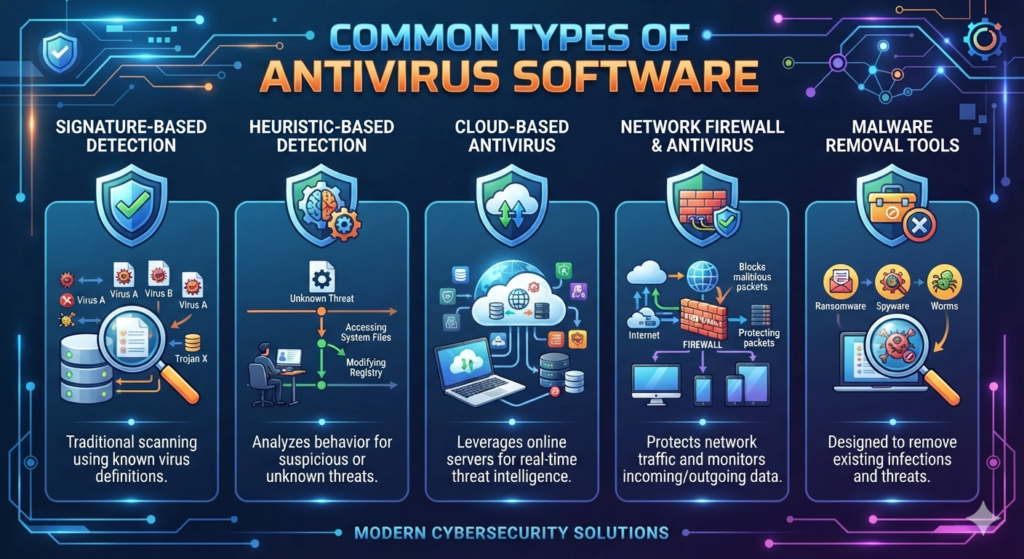
Not every antivirus software works in the same way. Security companies use different technologies to detect and stop threats. Some solutions focus on known malware, while others analyze suspicious behavior or use cloud intelligence. Understanding these differences helps you choose the best antivirus software for your needs instead of selecting one based only on price.
Modern antivirus products often combine several detection methods into one program. This layered approach improves antivirus protection, strengthens computer security, and offers better defense against constantly changing cyber threats. A combination of technologies always provides stronger security than relying on a single method.
Signature-Based Antivirus
Signature-based antivirus compares every scanned file with a large database of known malware signatures. When it finds a match, the software immediately blocks or quarantines the infected file. This method is fast, reliable, and still forms the backbone of many security products.
Heuristic Antivirus
Heuristic antivirus looks beyond known signatures. Instead of searching for an exact match, it studies how a file behaves. If a program performs unusual actions, such as changing system files or attempting unauthorized access, the antivirus flags it as suspicious. This approach improves threat detection against newly created attacks.
Cloud Antivirus
A cloud antivirus sends anonymous threat information to secure cloud servers for analysis. Because millions of users contribute data, security researchers can identify emerging threats much faster. Cloud technology also delivers quicker updates without slowing your computer.
AI-Powered Antivirus
Modern AI antivirus uses machine learning to recognize suspicious patterns that traditional methods may miss. It continuously learns from new attacks and improves detection over time. AI-powered protection has become an important part of advanced cybersecurity protection because cybercriminals constantly develop new attack methods.
| Antivirus Type | Main Strength | Best Use |
| Signature-Based | Detects known threats quickly | Everyday protection |
| Heuristic | Finds unknown malware | Advanced security |
| Cloud Antivirus | Fast global updates | Modern internet users |
| AI Antivirus | Smart threat analysis | Emerging cyber threats |
What Threats Can Antivirus Protect You From?
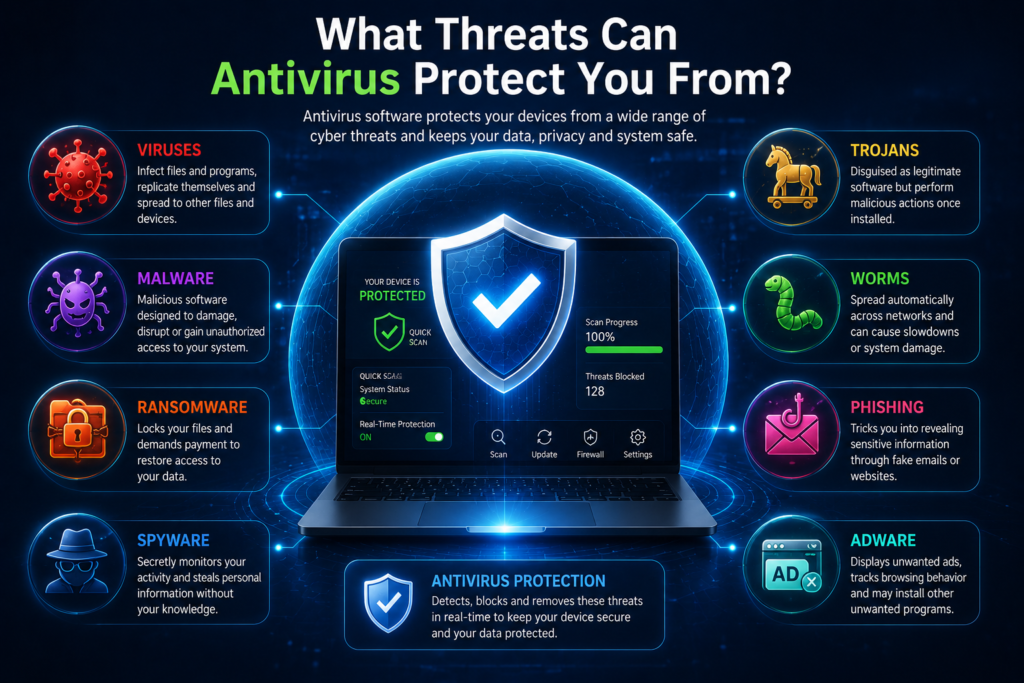
The internet exposes users to many different kinds of digital threats. Some attacks simply slow down a device, while others steal passwords, encrypt files, or spy on online activity. A modern antivirus protects against many of these risks by detecting dangerous files before they cause damage.
Although no security solution guarantees complete protection, a quality antivirus significantly reduces your chances of becoming a victim. Combined with safe browsing habits and regular software updates, it creates a much stronger defense against today’s online dangers.
Viruses
A virus attaches itself to legitimate files and spreads when those files are opened or shared. Once active, it can damage files, slow down your system, or corrupt important data. Modern antivirus software quickly identifies infected files during a virus scan and prevents them from spreading.
Malware
Malware is a general term that includes many types of malicious software. Viruses, ransomware, spyware, and trojans all fall under this category. Effective malware protection helps stop these threats before they compromise your device or personal information.
Ransomware
Ransomware encrypts your files and demands payment to unlock them. These attacks often target both individuals and businesses. Modern antivirus software uses behavioral monitoring and real-time protection to detect ransomware before it locks your documents.
Spyware
Spyware secretly monitors your activity and collects sensitive information such as passwords, browsing history, or financial details. Good antivirus software detects spyware early and removes it before your privacy is compromised.
Trojans
A trojan disguises itself as legitimate software. Once installed, it may steal information, install additional malware, or give attackers remote access to your computer. Antivirus programs analyze downloads carefully to prevent these hidden threats.
Worms
A worm spreads automatically from one device to another without user interaction. Worms can consume network resources and infect many computers within minutes. Strong network security and antivirus software help stop worms before they spread across connected devices.
Adware
Adware displays unwanted advertisements and may track your browsing behavior. While some adware is only annoying, other versions collect personal information or install additional malware. Reliable antivirus software detects unwanted applications and improves secure browsing.
| Threat | What It Does | Antivirus Can Help? |
| Virus | Infects files | Yes |
| Malware | Damages or steals data | Yes |
| Ransomware | Encrypts files | Yes |
| Spyware | Steals personal information | Yes |
| Trojan | Pretends to be safe software | Yes |
| Worm | Spreads across networks | Yes |
| Adware | Displays unwanted ads | Yes |
“The earlier an antivirus detects a threat, the easier it is to stop damage before it starts.”
Key Features of Modern Antivirus Software
Today’s antivirus solutions do much more than remove infected files. They provide several layers of protection that work together to defend your device while you browse, shop, work, or study online. Choosing software with the right features gives you stronger long-term security.
When comparing products, don’t focus only on the price. Look at the complete package, including updates, web protection, and support. The best antivirus software balances performance, security, and ease of use without slowing down your device.
Real-Time Protection
Real-time protection continuously checks files, downloads, and applications before they run. This prevents many attacks from ever reaching your system and reduces the need for manual scanning.
Automatic Updates
Cybercriminals create new threats every day. Automatic updates ensure your antivirus always has the latest malware database and security improvements. Regular updates strengthen computer virus protection against newly discovered attacks.
Firewall Integration
Many premium antivirus products include firewall integration. A firewall monitors incoming and outgoing network traffic and blocks suspicious connections. Together, antivirus and a firewall create stronger internet security.
Web Protection
Web protection checks websites before they load and warns you about dangerous or fake pages. This feature reduces the risk of downloading malware or entering passwords on fraudulent websites.
Email Protection
Email remains one of the most common ways malware spreads. Email protection scans attachments and links before you open them, helping stop phishing attempts and malicious downloads before they reach your inbox.
| Feature | Benefit |
| Real-Time Protection | Stops threats instantly |
| Automatic Updates | Protects against new malware |
| Firewall Integration | Blocks suspicious network traffic |
| Web Protection | Safer browsing experience |
| Email Protection | Detects dangerous attachments |
Free Antivirus vs Paid Antivirus
Many users wonder whether free antivirus is enough or if upgrading to a paid antivirus is worth the money. The answer depends on how you use your device. Free solutions usually provide basic protection against common threats, making them suitable for light internet users.
Premium antivirus products include additional antivirus features such as ransomware protection, password managers, VPN services, identity monitoring, and priority customer support. If you shop online, manage sensitive information, or work remotely, these extra features often provide valuable protection.
Main Differences
Free antivirus focuses on essential security, while paid versions provide broader protection against modern attacks. Premium products also receive more advanced security tools and better technical support.
Which One Should You Choose?
If you mainly browse trusted websites and use your device for everyday tasks, a quality free antivirus may be enough. However, users who store financial information, run businesses, or manage important personal files should consider investing in paid protection for greater peace of mind.
| Feature | Free Antivirus | Paid Antivirus |
| Basic malware detection | ✅ | ✅ |
| Real-Time Protection | Usually included | ✅ Advanced |
| Ransomware protection | Limited | ✅ |
| VPN | ❌ | Often included |
| Password manager | ❌ | Often included |
| Customer support | Limited | Priority support |
| Multi-device protection | Limited | Usually included |
“Free antivirus protects against many common threats. Paid antivirus adds stronger security, privacy tools, and extra peace of mind.”
Best Antivirus Software in 2026
Choosing the best antivirus software depends on your device, budget, and security needs. Some users only need basic antivirus protection, while others require advanced endpoint protection, identity monitoring, and ransomware defense. The best antivirus is the one that protects your data without slowing down your device.
Instead of looking only at popularity, compare security performance, update frequency, ease of use, customer support, and additional antivirus features. A well-balanced solution provides strong computer security and reliable internet protection for everyday use.
Microsoft Defender
Windows Defender comes built into Windows and offers solid protection for everyday users. It includes real-time protection, a built-in firewall, and automatic updates through Windows Update. For many home users, it provides a strong starting point without extra cost.
Bitdefender
Bitdefender is well known for excellent malware protection and lightweight performance. It uses advanced threat detection technologies and consistently performs well in independent security tests. Many users choose it because it offers powerful security without noticeably slowing their computers.
Norton
Norton combines antivirus with privacy and identity protection. Many plans include a VPN, cloud backup, password manager, and dark web monitoring. It is a good choice for families and users who want an all-in-one security software solution.
ESET
ESET focuses on speed, reliability, and advanced threat detection. It offers strong computer virus protection while using very few system resources. This makes it a popular option for professionals and business users.
Kaspersky
Kaspersky offers comprehensive cybersecurity protection, intelligent malware detection, and advanced privacy features. It is recognized for strong detection capabilities and detailed security controls that appeal to experienced users.
| Antivirus | Best For | Key Strength |
| Windows Defender | Windows users | Built-in protection |
| Bitdefender | Home users | Excellent malware detection |
| Norton | Families | Complete security suite |
| ESET | Professionals | Fast and lightweight |
| Kaspersky | Advanced users | Strong threat detection |
The best antivirus isn’t always the most expensive. It’s the one that matches your security needs and usage habits.
How to Choose the Best Antivirus
Selecting the right antivirus can feel overwhelming because many products promise similar protection. Instead of choosing the first option you see, compare important features that affect daily use and long-term security. A little research today can save you from major problems later.
Think about how you use your computer. Someone who checks email and browses the web has different needs than a business owner managing sensitive customer information. Matching the antivirus to your lifestyle leads to better protection and better value.
Security Features
Look for strong real-time protection, ransomware defense, web protection, email scanning, and intelligent threat detection. These features help stop attacks before they reach your files.
Performance
Good antivirus software should protect your device without causing slow startup times or poor performance. Lightweight programs often provide better everyday experiences.
Ease of Use
A clean interface makes security easier for beginners. Important features should be simple to find, and scheduled scans should require minimal effort.
Pricing
Don’t choose software based only on price. Compare the features, number of protected devices, renewal costs, and customer support before making your decision.
| Buying Factor | Why It Matters |
| Security Features | Better protection |
| Performance | Faster computer |
| Ease of Use | Beginner friendly |
| Price | Better overall value |
| Customer Support | Faster problem solving |
How to Install Antivirus Software
Installing antivirus correctly is just as important as choosing the right product. A proper installation ensures all security features work from the beginning. Skipping important steps may leave your device partially protected.
Before installing new antivirus software, remove any existing antivirus program if recommended by the vendor. Running multiple antivirus programs together can sometimes create software conflicts and reduce performance.
Download
Always download antivirus software from the official website. Avoid unknown download sites because they may distribute modified or infected installation files.
Installation
Follow the installation wizard carefully and allow the software to complete its initial setup. During installation, enable recommended security settings whenever possible.
First Scan
After installation, perform a complete virus scan. This helps detect any existing threats that may already be stored on your device before real-time protection begins monitoring new activity.
Keep It Updated
New threats appear every day. Automatic updates ensure your antivirus stays prepared for the latest forms of malware and other cyber threats.
Common Antivirus Mistakes to Avoid
Many security problems happen because users make simple mistakes instead of because antivirus software fails. Understanding these common errors helps you get the best protection from your security solution.
Good cybersecurity is about building smart habits. Even the best antivirus software cannot fully protect a device if users ignore updates or download unsafe files.
Ignoring Updates
Outdated antivirus software cannot recognize the newest threats. Keeping your antivirus updated improves malware protection and strengthens overall cybersecurity.
Installing Multiple Antivirus Programs
Running two antivirus programs at the same time often causes conflicts, slower performance, and unreliable scanning. One trusted antivirus is usually the better choice.
Disabling Real-Time Protection
Some users temporarily disable real-time protection while installing software and forget to turn it back on. This creates an unnecessary security gap that attackers may exploit.
| Mistake | Better Practice |
| Ignoring updates | Enable automatic updates |
| Multiple antivirus programs | Use one trusted solution |
| Turning off protection | Keep security enabled |
| Skipping scans | Schedule regular scans |
Antivirus Best Practices
Installing antivirus is only one part of staying safe online. Good digital habits work alongside antivirus software to provide stronger protection against modern cybercrime. Small daily actions can prevent many security problems before they begin.
Cybersecurity works best when several protective layers work together. Antivirus, software updates, careful browsing, and secure passwords all contribute to better online safety.
Keep Your Operating System Updated
Operating system updates fix security weaknesses that attackers often target. Install updates as soon as they become available.
Use Strong Passwords
Create unique passwords for every important account. A password manager makes this much easier while improving data protection.
Avoid Suspicious Downloads
Download software only from trusted developers and official websites. Unknown sources increase your risk of downloading malware or other harmful files.
Back Up Important Files
Regular backups protect important documents against hardware failure, accidental deletion, and ransomware attacks. Store backups in a secure cloud service or an external drive.
Strong cybersecurity comes from good habits combined with reliable security software.
Frequently Asked Questions About Antivirus
Is Windows Defender Enough?
For many home users, Windows Defender provides solid everyday protection. However, users who need advanced privacy tools, ransomware defense, or identity protection may benefit from premium antivirus software.
Can Antivirus Remove Malware?
Yes. Most modern antivirus programs detect, quarantine, and remove many types of malware. The sooner you scan an infected device, the better your chances of preventing damage.
Can Antivirus Stop Hackers?
Antivirus helps block many attack methods, but it cannot stop every hacking attempt. Safe browsing, strong passwords, software updates, and a properly configured firewall remain essential.
Do Smartphones Need Antivirus?
Android devices often benefit from antivirus software because users frequently install third-party apps. iPhones include strong built-in security, although practicing safe browsing remains important.
How Often Should I Scan My Computer?
Enable continuous real-time protection and schedule a full virus scan at least once each week. If you download files frequently, additional scans are a good idea.
Final Thoughts
Understanding What Is Antivirus is the first step toward protecting your digital life. Modern antivirus software does much more than remove viruses. It detects malware, blocks phishing, improves internet security, and helps protect your personal information before attackers can misuse it.
Whether you choose free antivirus or paid antivirus, make sure it matches your needs and receives regular updates. Pair your antivirus with smart online habits, strong passwords, software updates, and regular backups. When these layers work together, you create a safer digital environment for yourself, your family, and your business.
“Antivirus is your digital safety net. It can’t prevent every threat, but it gives you the protection and confidence to use the internet more securely.”
Meta Description
Learn what is antivirus , how it works, its types, key benefits, and the best antivirus software in 2026. Protect your devices from malware and cyber threats.
Continue Reading
Expand your cybersecurity knowledge with these related DailyTecho guides:
The more you understand cybersecurity, the better prepared you’ll be to protect your devices, personal information, and online accounts.
Ready to Improve Your Cybersecurity?
The best time to protect your devices is before an attack happens. Continue exploring our expert guides to learn about malware, firewalls, password managers, network security, and other essential cybersecurity topics.
2 Comments