

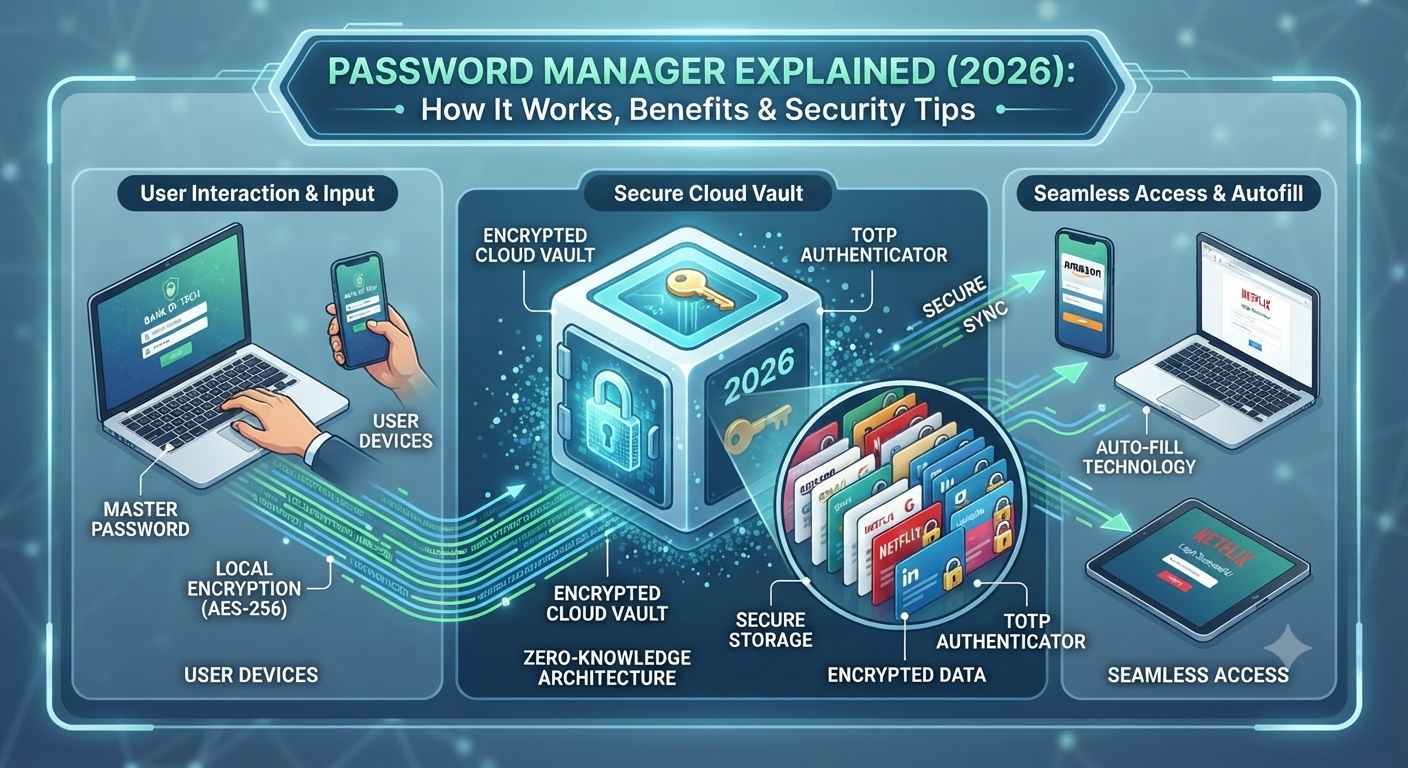
Passwords are part of everything in your digital life from email and online banking to shopping and work accounts. Still many people use weak passwords, which makes them simple for bad people to take advantage of. This Password Manager Explained guide helps you see why a Password Manager is one of the choices for making your online life safer in 2026.
You will learn how Password Managers Work look at the Password Manager Benefits and find out how features like a secure Password Vault and Multi-Factor Authentication (MFA) help keep your personal and business accounts safe, from new dangers online while making daily logins easier and more secure.
What Is a Password Manager?
A Password Manager is a secure application that stores your usernames, passwords, and other login information inside an encrypted digital vault. Instead of remembering dozens of passwords, you only need to remember one Master of Password. The password manager protects the rest using advanced encryption. This makes Password Protection much easier while reducing the chance of using weak or repeated passwords.
A modern Password Manager App also creates unique passwords for every website you visit. It automatically fills in your login details on trusted websites and helps protect your Digital Identity. This simple approach improves Account Security, saves time, and keeps your personal information safer from common cyber attacks.
Simple Definition of a Password Manager
Think of a password manager as a highly secure digital safe. Instead of storing cash or documents, it stores your login credentials inside a protected Password Vault. Every password remains locked using technologies like AES-256 Encryption and Zero-Knowledge Encryption, meaning even the service provider cannot read your stored data. This is why millions of individuals and businesses now rely on password managers every day.
Why Password Managers Are Essential for Online Security in 2026
Cybercriminals no longer attack only large companies. Today they target everyone. Every week, new reports reveal stolen passwords, leaked databases, phishing campaigns, and ransomware attacks. As people create more online accounts, managing passwords manually becomes almost impossible. A Password Manager helps reduce these risks by creating unique credentials for every account and strengthening your overall Identity Security.
Remote work, cloud computing, and online banking have also increased the need for better login protection. Businesses now depend on secure authentication more than ever before. Whether you manage five accounts or five hundred, proper Password Management reduces security risks while improving Cloud Security, Business Security, and Data Security.
Rising Password Breaches, Credential Theft, and Cyber Attacks
Most successful cyber attacks begin with stolen passwords. Attackers use techniques like Credential Theft, phishing emails, malware, and Credential Stuffing Prevention bypass attempts to access accounts. Once one password is stolen, hackers often test it across many websites because many people reuse passwords. Using a password manager creates unique passwords for every account, making these attacks far less effective.
How a Password Manager Works
Using a password manager is surprisingly simple. First, you create a strong Master Password. This single password unlocks your encrypted vault. Every website username, password, payment card, and secure note is stored inside this protected database. Whenever you visit a trusted website, the password manager recognizes the page and securely fills in your login information.
Many password managers also synchronize information across multiple devices. Whether you sign in from your laptop, smartphone, or tablet, your credentials stay available while remaining protected through Secure Password Storage, Password Sync, and advanced Password Encryption technologies. This combination offers convenience without sacrificing security.
Password Vault, Encryption, Autofill, and Secure Login Process
The security process begins when your information enters an encrypted Password Vault. Modern password managers protect data using End-to-End Encryption, AES-256 Encryption, and Zero-Knowledge Encryption. When you open a trusted website, the software performs Password Autofill automatically, reducing typing errors and lowering the risk of phishing attacks. This secure process protects your User Authentication while making everyday logins fast and convenient.
How a Password Manager Works
| Step | What Happens |
| 1 | Create a strong Master Password |
| 2 | Store passwords inside an encrypted Password Vault |
| 3 | Generate unique passwords using the built-in Password Generator |
| 4 | Save credentials securely |
| 5 | Automatically fill login details on trusted websites |
| 6 | Sync encrypted passwords across approved devices |
| 7 | Protect accounts using Multi-Factor Authentication (MFA) when available |
Types of Password Managers Explained
Choosing the right Password Manager depends on your needs, budget, and the devices you use every day. Some people only need a simple solution for personal accounts, while businesses often require advanced security tools for hundreds of employees. Understanding the different types helps you select the right option for better Password Management, stronger Account Protection, and improved Online Security.
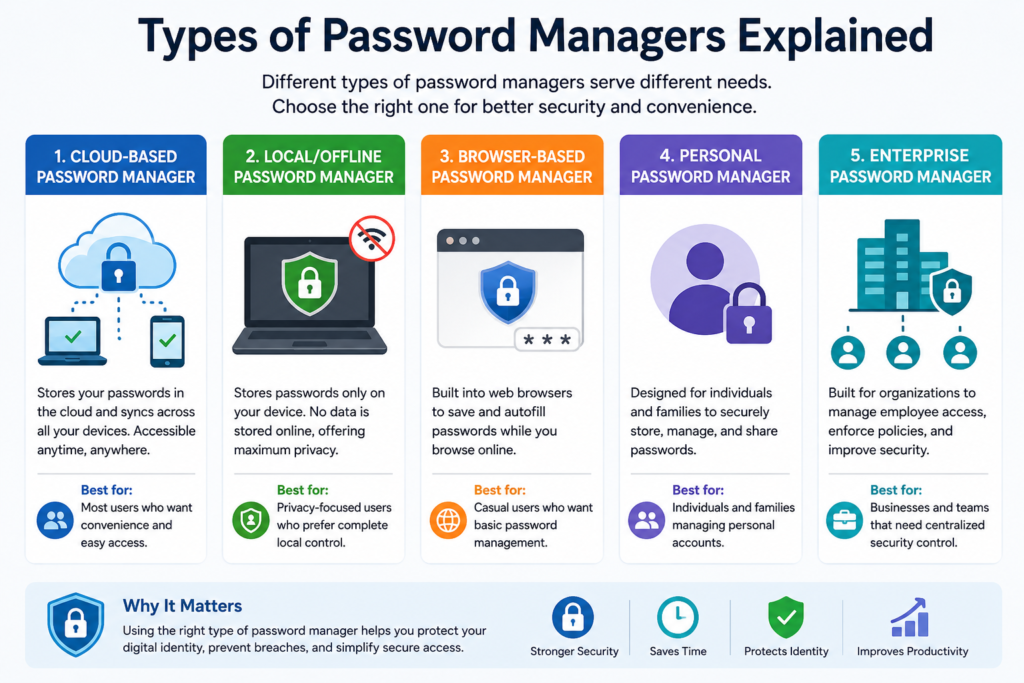
Each type offers different features, but they all share the same goal. They keep your passwords secure and make logging in easier. Whether you choose a Cloud Password Manager, an Offline Password Manager, or an Enterprise Password Manager, the right solution will improve your Password Security and reduce the risk of password-related attacks.
Cloud-Based, Local, Browser-Based, Enterprise, and Offline Password Managers
A Cloud Password Manager stores your encrypted vault online and securely syncs it across your devices. An Offline Password Manager keeps your vault only on your device, giving you complete control but requiring manual backups. A Browser Password Manager is built into web browsers and offers basic convenience, while an Enterprise Password Manager includes centralized administration, user permissions, and security policies for organizations.
Password Manager Types Comparison
| Type | Best For | Advantages | Limitations |
| Cloud Password Manager | Most users | Easy sync across devices | Requires internet for syncing |
| Offline Password Manager | Privacy-focused users | Full local control | Manual backup required |
| Browser Password Manager | Casual users | Built into browsers | Fewer security features |
| Personal Password Manager | Individuals & families | Easy to use | Limited business tools |
| Enterprise Password Manager | Businesses | Central management & reporting | Higher subscription cost |
Key Features of the Best Password Managers
A modern Password Manager does much more than store passwords. It helps you create unique credentials, monitor weak passwords, detect compromised accounts, and secure important information in one place. The Best Password Managers 2026 continue adding new features that improve both security and convenience without making everyday use more complicated.
Many premium solutions also support passkeys, secure document storage, emergency access, and encrypted sharing. These features reduce manual work while improving your overall Information Security. Instead of relying on memory, you can trust technology designed specifically for protecting your digital life.
Password Generator, Autofill, Password Sharing, Dark Web Monitoring, and Secure Notes
The most valuable feature is the built-in Password Generator, which creates long, random passwords that are extremely difficult to guess. Autofill Passwords save time by entering credentials automatically on trusted websites. Features like Secure Notes, Password Sharing, and Dark Web Monitoring provide additional protection by helping you store sensitive information safely and receive alerts if your credentials appear in known data breaches.
Common Features Comparison
| Feature | Why It Matters |
| Password Generator | Creates strong, unique passwords |
| Password Health Check | Finds weak or reused passwords |
| Password Audit | Reviews overall password strength |
| Password Sharing | Securely shares credentials with trusted users |
| Secure Notes | Stores confidential information safely |
| Autofill Passwords | Speeds up secure logins |
| Password Backup | Helps recover stored credentials |
| Password Recovery | Provides secure account recovery options |
| Cross-Platform Password Manager | Works across computers and mobile devices |
| Dark Web Monitoring | Alerts you when credentials are exposed |
Benefits of Using a Password Manager for Individuals and Businesses
One of the biggest advantages of using a Password Manager is peace of mind. You no longer need to remember dozens of complex passwords or worry about using the same password on multiple websites. Every account receives a unique password, reducing the chance of unauthorized access. This simple habit strengthens your Identity Protection, improves Secure Login, and supports better Cyber Defense against modern threats.
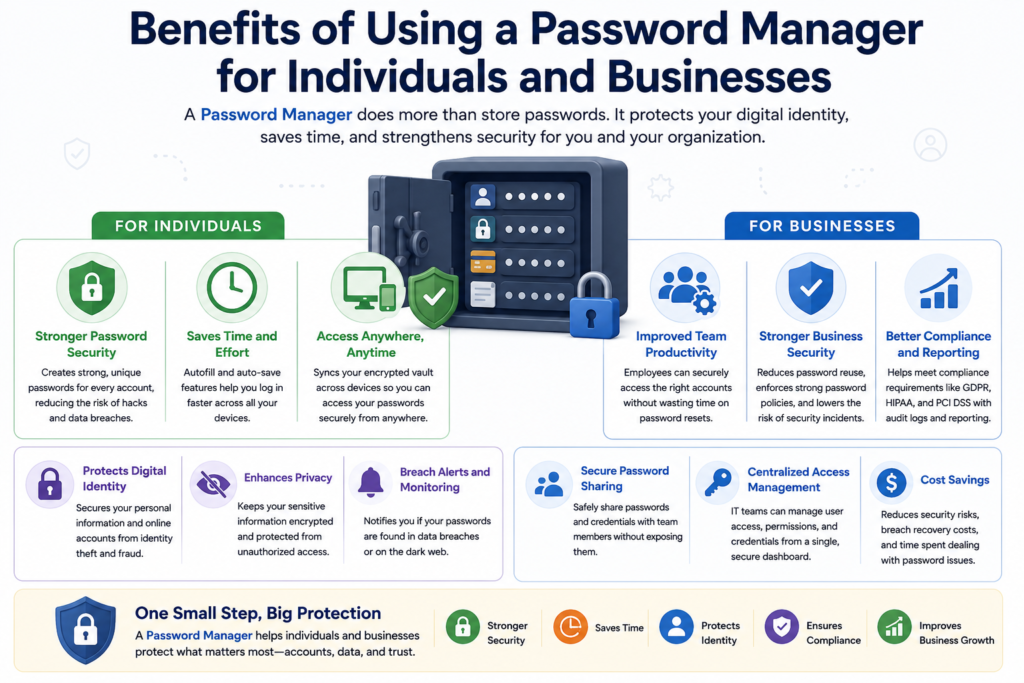
Businesses benefit even more. Employees can safely manage company accounts without writing passwords on paper or storing them in unsecured files. Teams can securely share credentials, protect sensitive systems, and support company-wide Access Management policies. As organizations continue moving to cloud platforms, password managers also strengthen Enterprise Security, Cloud Security, and Remote Access Security.
Better Security, Productivity, Compliance, and Identity Protection
Password managers help organizations meet important Compliance Requirements by improving password policies and reducing human error. They also support standards such as GDPR Compliance, HIPAA Compliance, and PCI DSS Compliance. Combined with strong authentication and regular security reviews, they become an important part of modern Cybersecurity Best Practices and long-term Threat Prevention strategies.
Security Insight:
“A password manager doesn’t just remember passwords for you. It helps you build stronger security habits that protect every online account.”
Password Manager vs Browser Password Saving
Many people save passwords directly in their web browser because it is quick and easy. While this works for basic use, it does not provide the same level of protection as a dedicated Password Manager. Browser tools usually focus on convenience, whereas password managers are built with advanced Password Security, Secure Password Storage, and Identity Protection in mind.
A dedicated password manager also offers stronger encryption, better password organization, secure sharing, and security monitoring. It supports personal users as well as businesses that need better Business Password Management and stronger Access Control. If protecting your online accounts is a priority, a password manager is usually the safer choice.
Which Option Is More Secure?
A Browser Password Manager stores passwords inside your browser profile. A dedicated password manager protects them inside an Encrypted Password Vault using technologies such as AES-256 Encryption and Zero-Knowledge Encryption. Most premium password managers also include password health reports, dark web monitoring, secure sharing, and support for Multi-Factor Authentication (MFA), making them a more complete security solution.
Password Manager vs Browser Password Saving
| Feature | Password Manager | Browser Password Saving |
| Security | Excellent | Good |
| Encryption | AES-256 Encryption | Browser dependent |
| Password Generator | ✅ Yes | Limited |
| Password Health Check | ✅ Yes | Rare |
| Password Audit | ✅ Yes | No |
| Password Sharing | ✅ Secure | Limited |
| Autofill Passwords | Advanced | Basic |
| Cross-Device Sync | Excellent | Browser only |
| Passkeys Support | Yes | Limited |
| Dark Web Monitoring | Available | No |
| Business Features | Complete | Very Limited |
| Best For | Personal & Business | Casual Users |
Best Password Managers in 2026
The best password manager depends on your needs. Some people want a free solution with strong security, while others prefer premium features such as encrypted file storage, secure sharing, and business administration. Fortunately, several trusted products offer excellent protection and continue improving their security every year.
When comparing password managers, don’t focus only on price. Look for strong encryption, regular security updates, passkey support, reliable synchronization, and an easy-to-use interface. A good password manager should make security simple without slowing down your daily work.
1Password, Bitwarden, Dashlane, LastPass, NordPass, Keeper, and Proton Pass
Popular options include 1Password, Bitwarden, Dashlane, LastPass, NordPass, Keeper, and Proton Pass. Each provides secure password storage, password generation, and synchronization across multiple devices. Some focus on privacy, while others offer advanced business tools, making it important to choose one that matches your personal or professional requirements.
Best Password Managers Comparison (2026)
| Password Manager | Free Plan | Best For | Passkeys | Business Features | Overall Rating |
| 1Password | No | Families & Professionals | ✅ | Excellent | ⭐⭐⭐⭐⭐ |
| Bitwarden | Yes | Budget & Open Source | ✅ | Excellent | ⭐⭐⭐⭐⭐ |
| Dashlane | Yes (Limited) | Personal Security | ✅ | Very Good | ⭐⭐⭐⭐☆ |
| LastPass | Yes (Limited) | Everyday Users | ✅ | Good | ⭐⭐⭐⭐☆ |
| NordPass | Yes | Beginners | ✅ | Good | ⭐⭐⭐⭐☆ |
| Keeper | Trial | Businesses | ✅ | Excellent | ⭐⭐⭐⭐⭐ |
| Proton Pass | Yes | Privacy-Focused Users | ✅ | Good | ⭐⭐⭐⭐☆ |
Quick Tip: If you’re looking for a balance between security, ease of use, and value, Bitwarden and 1Password remain among the strongest choices for most users in 2026.
How Password Managers Support Multi-Factor Authentication (MFA)
A strong password is important, yet it should never be your only line of defense. Even the most complex password can be stolen through phishing, malware, or a data breach. Combining a Password Manager with Multi-Factor Authentication (MFA) creates multiple layers of protection. If one layer fails, the second layer continues protecting your account.
This combination has become a recommended Cybersecurity Best Practice for individuals, businesses, and government organizations. Password managers create and store strong passwords, while MFA verifies that the person signing in is really you. Together, they significantly reduce the risk of Credential Theft, Identity Theft Prevention, and unauthorized account access.
Stronger Authentication with Password Managers and MFA
Modern password managers work smoothly with Two-Factor Authentication (2FA), Biometric Authentication, Face ID Login, Fingerprint Authentication, Security Keys, and Passkeys. These technologies strengthen Secure Authentication and reduce the success of phishing attacks. As more organizations adopt passwordless sign-in, password managers continue playing an important role in protecting digital identities.
Related Guide: Continue reading Multi-Factor Authentication (MFA) Explained (2026): How It Works, Benefits, Types, Best Practices, and Why It Matters to learn how MFA adds another powerful layer of account security.
Common Password Manager Security Risks and Myths
Many people hesitate to use a Password Manager because they believe storing every password in one place is dangerous. This concern is understandable, but modern password managers are built with multiple security layers. When you choose a trusted provider and follow good security habits, your passwords remain much safer than keeping them in notebooks or reusing the same password everywhere. Good Password Manager Security depends on both strong technology and responsible user behavior.
Another common myth is that password managers can never be hacked. In reality, no technology is completely immune to attacks. However, leading password managers protect your data using advanced encryption, security audits, and continuous updates. Even if attackers steal encrypted data, they cannot easily read it without your Master Password. That is why creating a strong master password remains one of the most important parts of Password Protection.
Master Password Risks, Device Security, Phishing, and Common Misconceptions
Your Master Password should be long, unique, and impossible to guess. If someone discovers it through phishing or malware, your entire Password Vault could be at risk. Keeping your devices updated, avoiding fake login pages, and enabling Phishing Protection significantly improve your overall Account Security. Staying alert against Social Engineering attacks is just as important as using strong encryption.
Myth vs Reality
| Myth | Reality |
| Password managers are easy to hack. | Trusted password managers use strong encryption and multiple security layers. |
| One password is enough forever. | Your Master Password should be reviewed if you suspect compromise. |
| Browsers provide the same protection. | Dedicated password managers offer stronger security features. |
| Password managers eliminate all risks. | Safe habits and regular updates are still essential. |
| Only businesses need password managers. | Everyone with online accounts benefits from using one. |
Password Manager Best Practices for Maximum Security
Installing a password manager is only the first step. To get the best protection, you should also follow smart security habits. Create long and unique passwords, review your saved accounts regularly, and replace weak or reused passwords whenever possible. These simple actions improve Password Management, strengthen Identity Security, and reduce your exposure to cyber threats.
Regular maintenance is equally important. Review security alerts, remove accounts you no longer use, and update your software whenever new versions become available. These small habits support better Cyber Hygiene and help protect both personal and business accounts throughout the year.
Strong Master Password, MFA, Secure Backup, and Regular Password Audits
Use a unique Master Password that you never reuse anywhere else. Enable Multi-Factor Authentication (MFA) for your password manager, store recovery codes in a secure location, and perform a Password Audit regularly. Many password managers also include a Password Health Check that identifies weak or duplicate passwords before they become security problems.
Password Manager Security Checklist
| Best Practice | Why It Matters |
| Create a strong Master Password | Protects your encrypted vault |
| Enable Multi-Factor Authentication (MFA) | Adds an extra security layer |
| Use the Password Generator | Creates unique passwords |
| Perform a Password Audit | Finds weak or reused passwords |
| Update the application | Fixes security vulnerabilities |
| Review saved accounts | Removes unused credentials |
| Keep recovery codes safe | Helps recover access securely |
Security Tip: Think of your password manager as the front door to your digital home. A strong lock works best when you also keep the windows closed and the alarm turned on.
How Password Managers Support Zero Trust, IAM, and Endpoint Security
Modern organizations no longer depend on passwords alone. They build layered security strategies that verify every user, every device, and every login attempt. A Password Manager supports this approach by protecting credentials, encouraging strong authentication, and reducing password reuse. It becomes an important part of Identity and Access Management (IAM), strengthens Zero Trust Security, and improves Endpoint Security across computers and mobile devices.
Businesses also benefit from centralized credential management, secure sharing, and policy enforcement. Employees gain secure access without exposing sensitive passwords, while administrators maintain better visibility and control. This approach supports Cloud Security, improves Access Management, and helps organizations meet modern Compliance Requirements as cyber threats continue evolving.
Building a Strong Identity Security Strategy
A password manager works alongside Identity and Access Management (IAM) systems, Zero Trust Architecture, and Endpoint Protection to verify users before access is granted. Combined with the Least Privilege Access principle and strong authentication, it creates a more resilient security framework for both small businesses and large enterprises.
Strengthening Your Cybersecurity Ecosystem
| Security Technology | How Password Managers Help |
| Identity and Access Management (IAM) | Secures user credentials |
| Zero Trust Security | Supports continuous identity verification |
| Endpoint Security | Protects logins on trusted devices |
| Cloud Security | Secures cloud application accounts |
| Network Security | Reduces unauthorized access risks |
| Access Management | Simplifies secure credential control |
Continue reading these related DailyTecho guides to build a complete cybersecurity foundation:
- Multi-Factor Authentication (MFA)
- Endpoint Security Explained
- Cloud Security Explained
- Zero Trust Security Explained
- Identity and Access Management (IAM) Explained
- Network Security Explained
- VPN Explained (2026)
- Firewall Security Explained (2026)
- Common Cyber Threats Explained
- Types of Cybersecurity Explained
Common Password Manager Mistakes to Avoid
Even the best Password Manager cannot protect you if you ignore basic security habits. Many users install a password manager but continue using weak passwords, skip important updates, or ignore security warnings. These mistakes reduce the benefits of strong Password Security and increase the risk of unauthorized access. A few simple changes can make your online accounts much safer.
Another common mistake is believing that a password manager works without any maintenance. Just like antivirus software or your operating system, it needs regular updates and occasional reviews. Keeping your vault organized, removing old accounts, and checking password strength will improve Account Protection and support better Information Security over time.
Weak Master Passwords, Reused Credentials, and Ignoring Security Alerts
Your Master Password is the most important password you own. Never reuse it on another website or share it with anyone. Also, don’t ignore alerts about weak passwords or possible breaches. Features like Password Health Check, Password Recovery, and breach notifications help you fix problems before attackers can take advantage of them.
Common Mistakes and Better Solutions
| Mistake | Better Solution |
| Using a weak Master Password | Create a long, unique passphrase |
| Reusing passwords | Generate a different password for every account |
| Ignoring security alerts | Review alerts immediately |
| Not enabling Multi-Factor Authentication (MFA) | Turn on MFA for extra protection |
| Skipping software updates | Install updates as soon as they are available |
| Saving passwords in plain text | Store everything inside an encrypted vault |
| Forgetting backup codes | Keep recovery codes in a secure location |
Frequently Asked Questions About Password Managers
Are password managers safe?
Yes. Trusted password managers protect your information using AES-256 Encryption, Zero-Knowledge Encryption, and other modern security technologies. They are much safer than reusing passwords or storing them in documents.
Can a password manager be hacked?
No system is completely risk-free. However, reputable password managers use strong encryption and regular security testing. Choosing a strong Master Password and enabling Multi-Factor Authentication (MFA) provides excellent protection.
Should I use a free or paid password manager?
A Free Password Manager is suitable for many personal users. Paid versions usually include advanced features such as Dark Web Monitoring, secure sharing, encrypted file storage, and business management tools.
Which password manager is best in 2026?
The right choice depends on your needs. 1Password, Bitwarden, Dashlane, Keeper, NordPass, and Proton Pass are among the most trusted options for individuals and businesses.
Can I use a password manager on multiple devices?
Yes. Most modern password managers support Password Sync, allowing you to access your encrypted vault securely from your computer, smartphone, and tablet.
Do password managers work with passkeys?
Yes. Many leading password managers now support Passkeys and Passwordless Authentication, making future logins even more secure and convenient.
Final Thoughts: Protect Every Account with a Password Manager in 2026
Online security is no longer optional. Every email account, banking app, shopping website, and business platform contains valuable personal information that deserves strong protection. A Password Manager helps you create unique passwords, organize your digital life, and reduce the risk of cyber attacks without making daily logins more difficult. It is one of the simplest upgrades you can make to improve your overall Cybersecurity.
For even stronger protection, combine your password manager with Multi-Factor Authentication (MFA), follow Cybersecurity Best Practices, and review your passwords regularly. Together with modern security frameworks like Identity and Access Management (IAM), Zero Trust Security, Endpoint Security, Cloud Security, and Network Security, a password manager becomes an essential part of a safer digital future.
“Strong cybersecurity starts with strong passwords. Smart cybersecurity starts with a trusted password manager.”
Continue Reading These DailyTecho Guides
If you want to strengthen your cybersecurity knowledge further, continue reading our guides on Identity and Access Management (IAM), Multi-Factor Authentication (MFA), Endpoint Security, Zero Trust Security, Cloud Security, Network Security, VPN Explained, Common Cyber Threats, and Cybersecurity for Beginners. Together, these technologies create a strong security foundation for individuals and organizations in 2026 and beyond.
More information to tab cybersecurity and get information
cybersecurity
Meta description
Password Manager Explained (2026): Learn how it works, its benefits, top password managers, and expert security tips to protect every account.
6 Comments