

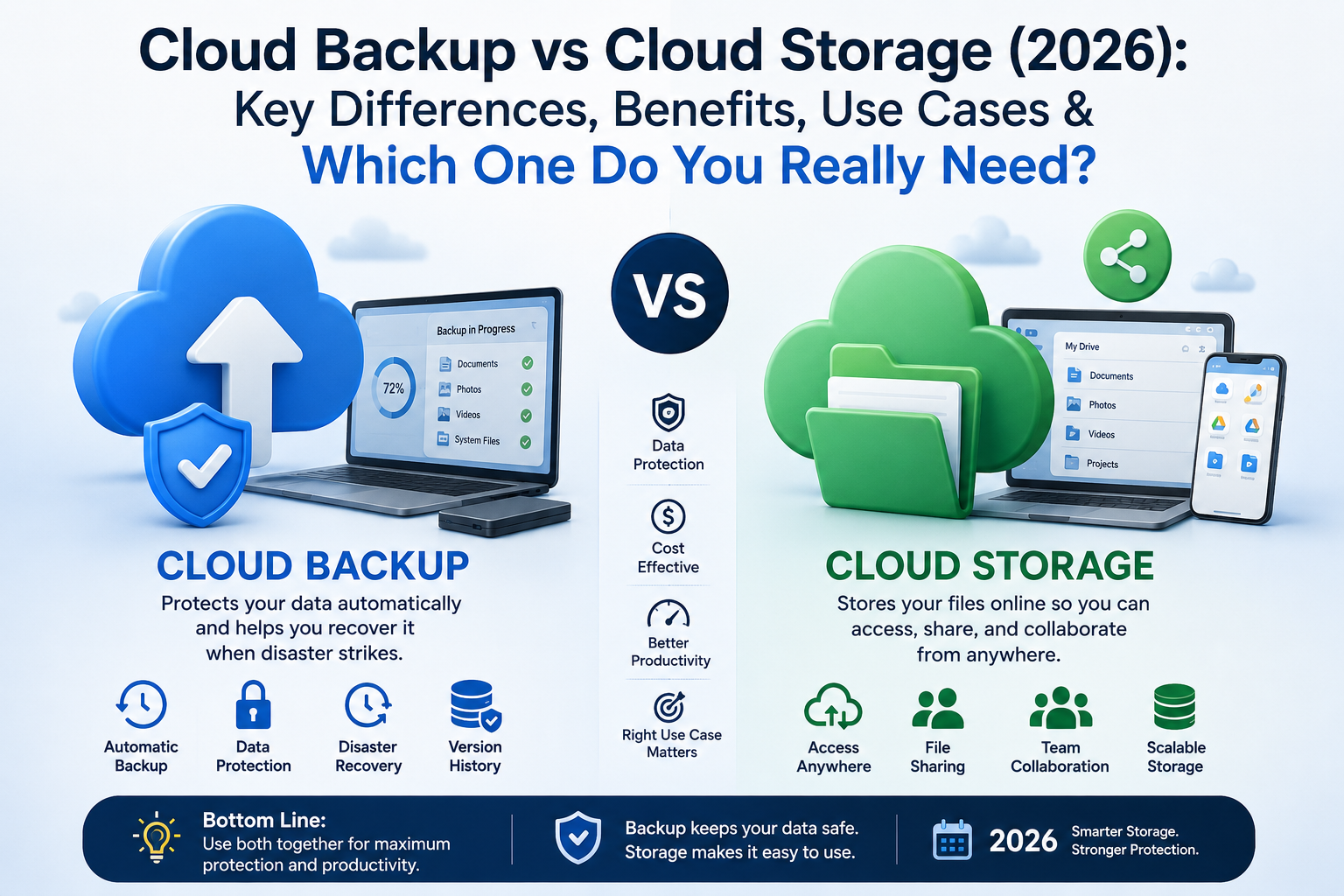
Have you ever wondered whether Cloud Backup and Cloud Storage are the same thing? You’re not alone. Many people use these terms as if they mean the same thing. In reality, they solve different problems. Choosing the wrong option could leave your important files unprotected when you need them most. Whether you work from home, run a business, or simply want to keep family photos safe, understanding the difference can save time, money, and valuable data.
In 2026, more people and businesses depend on Cloud Computing than ever before. Documents, photos, videos, and business records are stored online every day. At the same time, cyberattacks, hardware failures, and accidental deletion continue to increase. This guide explains Cloud Backup vs Cloud Storage in simple English. You will learn how each service works, where each one performs best, and why many experts recommend using both for complete Data Protection and Data Recovery.
Why People Confuse Cloud Backup and Cloud Storage
At first glance, both services look almost identical. They save files on the internet instead of your computer. Both allow you to access information from different devices. Both also use secure data centers managed by cloud providers. Because of these similarities, many people believe they offer the same level of protection. They don’t. Cloud Backup focuses on protecting your files against loss, while Cloud Storage focuses on making files easy to access and share.
Think about your smartphone. If you upload vacation photos to an online folder, you are using Cloud Storage. If your computer automatically creates a protected copy of every important file every night, you are using Cloud Backup. One helps you work with files every day. The other helps you recover files after accidents, malware, or hardware failure. Understanding this small difference makes a huge impact on your Backup Strategy.
Why Understanding the Difference Matters in 2026
The digital world has changed quickly. Businesses now rely on remote work, cloud applications, and online collaboration. At the same time, cybercriminals continue developing more advanced attacks. Modern ransomware can encrypt thousands of files within minutes. Without a proper Backup Solution, recovering important information may become impossible. This is why companies now invest heavily in Cloud Disaster Recovery, Data Security, and Backup and Recovery plans.
Home users also face growing risks. A laptop can fail without warning. A phone may be stolen. A mistaken click can permanently delete years of family memories. Choosing between Cloud Backup and Cloud Storage is no longer just a technical decision. It is an important step toward protecting your digital life. Whether you are a student, freelancer, or business owner in the USA, understanding these technologies helps you make smarter decisions.
What Is Cloud Backup?
Cloud Backup is a service that automatically creates secure copies of your files and stores them in remote cloud servers. These copies stay protected even if your computer crashes, your hard drive fails, or malware attacks your system. Unlike normal file storage, backup systems focus on recovery rather than daily file editing. Their main goal is to ensure you never lose valuable information.
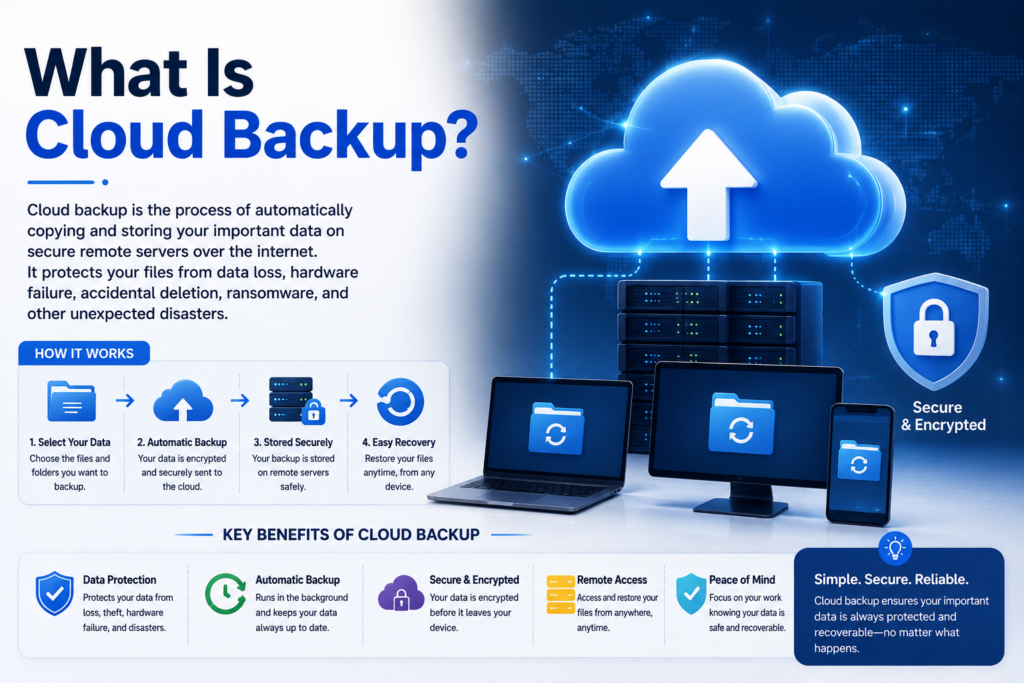
Imagine writing an important business proposal for several weeks. One morning your laptop refuses to start. Without a backup, the work may disappear forever. With Online Backup, your files remain safely stored in the cloud. You simply restore them onto another device and continue working. That peace of mind is one of the biggest reasons businesses invest in reliable Cloud Backup Solutions.
How Cloud Backup Works
Most modern Backup Software runs quietly in the background. After installation, it scans selected folders and uploads encrypted copies to secure cloud servers. Many services perform Automatic Backup, meaning new or changed files are protected without requiring any manual work. Advanced systems also use Incremental Backup, which transfers only the parts of files that changed. This saves internet bandwidth and speeds up future backups.
When disaster strikes, restoring files is simple. You sign in to your account, select the files you need, and download them. Some providers even allow complete system recovery, letting you restore an entire computer instead of individual files. This process greatly improves File Recovery, reduces downtime, and strengthens your overall Business Backup strategy.
Key Features of Cloud Backup
One of the strongest features of Cloud Backup is automation. After setup, backups continue without daily attention. Many services also include advanced encryption before data leaves your computer. This extra security protects sensitive information during transfer and storage. Strong Cloud Backup Encryption helps prevent unauthorized access while improving overall Cloud Data Protection.
Another valuable feature is Version History. Instead of keeping only the latest file, backup systems save multiple versions over time. If you accidentally overwrite an important document or become infected by ransomware, you can restore an earlier clean version. Combined with File Versioning, this feature gives users greater confidence when working with important projects.
Advantages of Cloud Backup
The biggest advantage of Cloud Backup is reliable protection against unexpected disasters. Hard drives eventually fail. Computers can be stolen. Natural disasters may damage office equipment. Since backup copies remain safely stored online, recovering files becomes much easier. This makes Remote Backup an essential part of every modern Backup Strategy.
Another important benefit is protection against cyber threats. Modern backup platforms include strong encryption, secure authentication, and intelligent recovery tools. These features improve Data Loss Prevention, support Ransomware Protection, and provide dependable Data Recovery Solutions. Businesses especially benefit because restoring operations quickly reduces downtime and financial losses.
Limitations of Cloud Backup
Although Cloud Backup offers excellent protection, it is not designed for daily teamwork or instant file sharing. Restoring very large amounts of data may also take time depending on your internet speed. This makes backup different from regular Cloud File Storage, where files remain available for immediate editing and collaboration.
Pricing can also vary depending on storage size, retention periods, and recovery options. Some premium services include advanced security, unlimited storage, and business management tools, while others focus on home users. Comparing Cloud Backup Pricing carefully helps you choose a service that matches both your budget and your protection needs.
What Is Cloud Storage?
Cloud Storage is an online service that lets you save, organize, and access your files from almost anywhere with an internet connection. Instead of keeping everything on your computer or an external hard drive, your files stay on secure cloud servers managed by trusted providers. This makes it easy to open documents, view photos, or edit presentations from different devices without carrying physical storage.
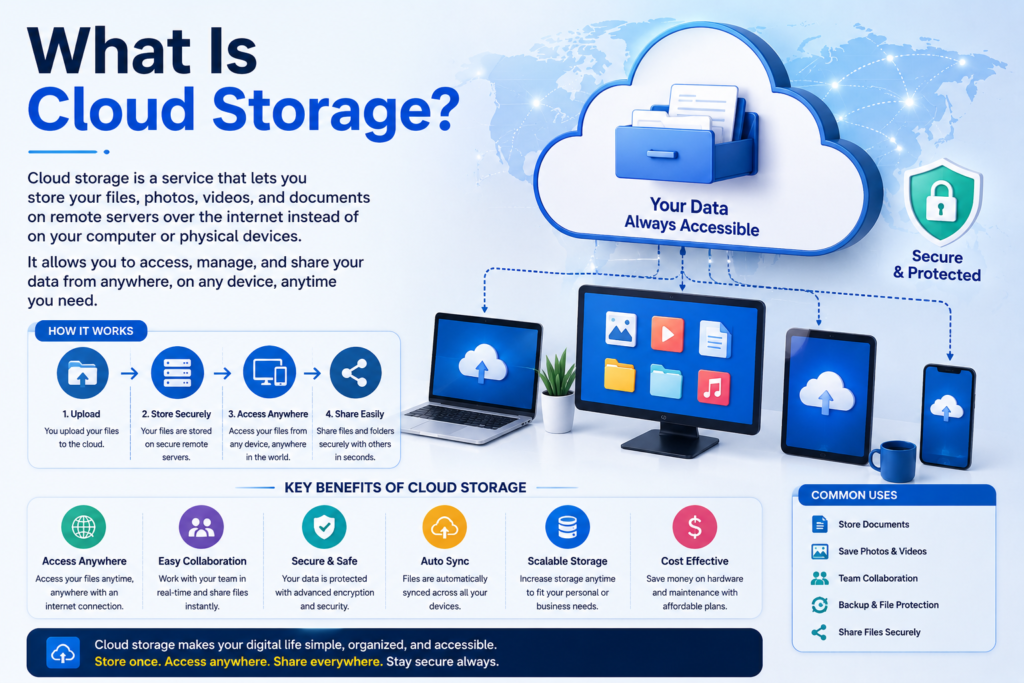
Unlike Cloud Backup, which focuses on recovering lost data, Cloud Storage is built for everyday productivity. It allows you to upload, edit, and share files in real time. Many businesses use Cloud Storage for Teams because employees can work on the same document together. Students, freelancers, and families also benefit from Personal Cloud Storage because it keeps important files organized and available whenever they need them.
How Cloud Storage Works
When you upload a file, the service stores it in a secure data center. After signing in with your account, you can access the same file from a laptop, tablet, or smartphone. Most platforms also support Cloud Sync, which automatically updates files across all connected devices. If you edit a document on your laptop, the latest version becomes available on your phone within seconds.
Many providers also include File Synchronization and Online File Storage features that simplify teamwork. Instead of emailing different versions of a document, everyone works from the same shared copy. This reduces confusion, improves productivity, and helps teams stay organized without creating duplicate files.
Key Features of Cloud Storage
One of the biggest strengths of Cloud Storage is flexibility. Users can store documents, photos, videos, spreadsheets, and other digital files in one secure location. Most services also include File Sharing Services, allowing users to send secure links instead of large email attachments. This saves time and makes collaboration much easier.
Modern platforms also focus heavily on Cloud Storage Security. Advanced encryption, two-factor authentication, and secure access controls help protect personal and business information. Many providers also offer Encrypted Cloud Storage, giving users additional confidence that sensitive files remain private.
Advantages of Cloud Storage
The greatest advantage of Cloud Storage is convenience. You can open your files from almost anywhere without carrying a USB drive or external hard disk. This flexibility is especially valuable for remote workers, students, and businesses that rely on Cloud Services every day.
Another major benefit is collaboration. Teams can edit documents together, leave comments, and track changes in real time. Combined with strong Cloud Data Management, businesses can improve efficiency while reducing dependence on local servers. These Cloud Storage Benefits make cloud platforms an essential part of modern workplaces.
Limitations of Cloud Storage
Although Cloud Storage is excellent for sharing and accessing files, it should not replace a proper backup system. If a file becomes corrupted or is accidentally deleted, the changes may quickly sync across every connected device. This common problem highlights the difference between Backup vs Sync. Synchronization keeps files updated while backup protects previous copies.
Another limitation involves storage capacity and subscription costs. Free plans usually offer limited space, while premium plans require monthly or yearly payments. Comparing Cloud Storage Pricing carefully helps users choose a service that matches their needs without paying for unnecessary features.
Cloud Backup vs Cloud Storage: Quick Comparison Table
| Feature | Cloud Backup | Cloud Storage |
| Primary Purpose | Protects files from loss | Stores and shares files |
| Main Focus | Data Protection | Easy file access |
| File Updates | Automatic scheduled backups | Real-time synchronization |
| Collaboration | Limited | Excellent |
| Recovery | Complete File Recovery | Basic recovery options |
| Security | Strong encryption and backup protection | Strong security with sharing controls |
| Version History | Extensive Version History | Limited version tracking |
| Best For | Business continuity and recovery | Daily productivity and teamwork |
| Internet Requirement | Needed for backup and restore | Needed for access and collaboration |
| Ideal Users | Businesses and professionals | Students, freelancers, and teams |
Key Differences Between Cloud Backup and Cloud Storage
The biggest difference is purpose. Cloud Backup exists to protect your information from unexpected loss. Cloud Storage exists to help you store, access, and share files efficiently. Although both use cloud technology, they solve completely different problems. Choosing the wrong service may leave your important files exposed when disaster strikes.
Think of a house. Cloud Storage works like a bookshelf where you keep books for daily use. Cloud Backup works like a fireproof safe containing emergency copies of your most valuable documents. You use the bookshelf every day. You hope never to need the safe, yet it becomes priceless during an emergency.
Another important difference is automation. Most Cloud Backup Software runs automatically in the background. It creates secure copies without requiring daily attention. Cloud Storage, however, usually depends on users uploading, editing, or moving files themselves. While synchronization is automatic, protecting deleted or damaged files is not always guaranteed.
Security also differs slightly. Backup providers prioritize Secure File Backup, long-term retention, and recovery after disasters. Storage providers focus on sharing, collaboration, and accessibility. Both use encryption, yet backup platforms often include stronger recovery features that support Cloud Disaster Recovery and business continuity planning.
Businesses usually use both services together. Employees work daily through Business Cloud Storage, while automated backups protect critical company information. This layered approach reduces downtime, improves Data Recovery, and protects against ransomware, accidental deletion, and hardware failures.
Real-World Example 1
A university student saves assignments in cloud storage. The files remain available from a laptop, tablet, and smartphone. If the student accidentally deletes the assignment and the deletion synchronizes across devices, recovering it may become difficult without a separate Cloud Backup.
Real-World Example 2
A small accounting firm stores client reports in Cloud Storage so employees can collaborate during tax season. At the same time, the company uses Cloud Backup for Business to create encrypted copies every night. If ransomware attacks the office computers, the team restores clean files from backup instead of paying criminals.
Real-World Example 3
A professional photographer stores edited photos in Personal Cloud Storage to share albums with clients. Every evening, automatic backups create protected copies of the original images. Even if a hard drive fails, years of creative work remain safe through Backup and Recovery services.
Benefits of Cloud Backup
One of the biggest reasons people choose Cloud Backup is peace of mind. Your important files stay protected even if your computer crashes, gets stolen, or suffers hardware failure. A reliable Backup Solution works quietly in the background and creates secure copies without interrupting your work. This simple process greatly improves Data Protection and reduces the risk of permanent data loss.
Businesses also depend on Cloud Backup because downtime can be expensive. Losing customer records, financial documents, or project files can stop operations for days. Modern Cloud Backup Solutions help organizations recover quickly while protecting valuable information from unexpected events.
Automatic Backup
The best backup systems work automatically. Once you choose the folders you want to protect, the software monitors changes and saves new versions without requiring manual action. This Automatic Backup process reduces human error and ensures important files never get overlooked.
Automatic backups also save time. Instead of remembering to copy files every evening, the system handles everything for you. This makes Cloud Backup Software ideal for busy professionals, students, and growing businesses.
Disaster Recovery
Unexpected events happen every day. Hard drives fail, offices experience power outages, and cyberattacks can lock entire systems. A strong Disaster Recovery plan allows you to restore important information quickly and continue working with minimal interruption.
Many organizations include Cloud Disaster Recovery as part of their business continuity strategy. Instead of rebuilding everything from scratch, they simply recover clean backup copies and return to normal operations much faster.
Protection Against Ransomware
Ransomware remains one of today’s biggest cybersecurity threats. Criminals encrypt files and demand payment before allowing access. Without secure backups, recovering those files may become impossible.
Modern backup platforms include strong Ransomware Protection, advanced encryption, and isolated backup copies. These features improve Data Security and allow businesses to restore healthy files instead of paying attackers.
Version History
Sometimes mistakes happen without malware or hardware failure. You may accidentally overwrite a document or save incorrect information. Good backup systems solve this problem through Version History.
Instead of keeping only one copy, backup services maintain multiple file versions over time. Combined with File Versioning, users can restore an earlier version within minutes.
Business Continuity
Every business depends on data. Customer information, financial records, contracts, and internal documents all support daily operations. Losing access to these files can damage revenue and customer trust.
Reliable Business Backup systems protect this information every day. Combined with dependable Backup and Recovery processes, companies reduce downtime and maintain productivity during unexpected emergencies.
Benefits of Cloud Storage
Cloud Storage has become essential because people now work from multiple devices every day. Instead of carrying USB drives or external hard disks, users simply sign in and access files instantly. This flexibility improves productivity while making digital information easier to manage.
Modern organizations also rely on Cloud Storage because collaboration has become a normal part of business. Teams can work together on projects without sending endless email attachments or worrying about outdated document versions.
Easy File Sharing
Sharing files has never been easier. Instead of attaching large documents to emails, users simply create secure links and send them within seconds. Modern File Sharing Services simplify teamwork while reducing storage limits often found in email systems.
Secure sharing also improves communication between employees, clients, and business partners. Everyone works from the latest version instead of downloading multiple copies.
Access Anywhere
One of the greatest Cloud Storage Benefits is flexibility. Your files remain available from almost any location with internet access. Whether you’re working from home, traveling, or visiting clients, your important documents remain within reach.
This convenience also supports hybrid work environments where employees switch between office computers, laptops, and smartphones throughout the day.
Team Collaboration
Collaboration is where Cloud Storage truly shines. Multiple people can edit the same document, leave comments, and review changes together. This improves efficiency while reducing confusion caused by different file versions.
Businesses especially benefit from Cloud Storage for Teams because projects move faster when everyone works from the same shared workspace.
Lower Hardware Costs
Companies no longer need expensive local servers for every file. Moving documents to the cloud reduces maintenance costs and minimizes hardware upgrades.
This approach also improves Cloud Data Management because administrators manage storage centrally instead of maintaining separate devices across multiple offices.
Scalable Storage
As businesses grow, so does their data. Cloud providers make expansion simple by allowing customers to increase storage whenever needed.
Whether you store a few family photos or millions of business documents, modern Online Storage platforms scale without requiring major infrastructure changes.
Cloud Backup vs Cloud Storage: Which One Is Better?
There isn’t a single answer because the right choice depends on your needs. Students usually benefit most from Personal Cloud Storage because they need easy access to assignments from different devices. However, students working on important research should also keep secure backups.
Freelancers often combine both services. They use Cloud Storage for daily collaboration with clients while relying on Cloud Backup to protect completed projects.
Small businesses usually require both solutions. Employees collaborate through Business Cloud Storage, while automatic backups protect financial records, customer information, and legal documents.
Large enterprises depend heavily on Enterprise Backup systems because even a few hours of downtime can cost thousands of dollars. Backup platforms help restore operations quickly after cyberattacks or hardware failures.
Developers frequently use cloud storage for sharing code repositories and documentation. They also maintain backup copies of source code to prevent accidental loss during development.
Photographers and content creators store edited work in cloud storage for client delivery. At the same time, original high-resolution files remain protected through secure backup systems.
In simple terms, Cloud Storage improves productivity while Cloud Backup protects your digital life. Together they provide the strongest long-term solution.
Can You Use Both Together?
Absolutely. In fact, this is the approach recommended by most IT professionals. Cloud Storage allows you to work, edit, and collaborate every day. Cloud Backup quietly protects those same files in case something goes wrong.
Many organizations also follow the well-known 3-2-1 backup rule. They keep three copies of important data, store those copies on two different types of media, and maintain one copy off-site. Combining cloud storage with backup creates a stronger Backup Strategy, improves Cloud Data Protection, and significantly reduces the risk of permanent data loss.
Best Cloud Backup Services in 2026
Choosing the right Cloud Backup provider depends on your budget, storage needs, and security requirements. Some services focus on personal users, while others provide advanced tools for businesses. The providers below have built strong reputations for reliability, performance, and Cloud Backup Encryption.
| Cloud Backup Service | Best For | Key Strength | Free Plan |
| Backblaze | Home users | Unlimited backup | No |
| Acronis Cyber Protect | Businesses | Backup + cybersecurity | Trial |
| Carbonite | Small businesses | Automatic backup | Trial |
| IDrive | Personal & Business | Multiple device backup | Limited |
| CrashPlan | Businesses | Advanced recovery | Trial |
Backblaze is popular because it offers simple setup and unlimited computer backups. Users who want a “set it and forget it” solution often choose this platform. It also performs reliable Remote Backup while protecting important files with strong encryption.
Acronis goes beyond traditional backup by combining Data Security, malware protection, and recovery tools in one platform. Businesses that need complete protection often prefer this service because it supports advanced Cloud Backup for Business environments.
Carbonite focuses on automatic backups and simple recovery. Small businesses appreciate its ease of use because employees don’t need advanced technical knowledge.
IDrive supports multiple devices under one account. This makes it attractive for families, freelancers, and professionals who use several computers and smartphones every day.
Best Cloud Storage Providers in 2026
The best Cloud Storage provider depends on how you work. Some platforms focus on collaboration, while others prioritize privacy or integration with existing software.
| Cloud Storage Provider | Best For | Main Advantage | Free Storage |
| Google Drive | General users | Excellent collaboration | 15 GB |
| Microsoft OneDrive | Microsoft 365 users | Office integration | 5 GB |
| Dropbox | Teams | Easy file sharing | Limited |
| Apple iCloud | Apple users | Device synchronization | 5 GB |
| Box | Businesses | Enterprise collaboration | Trial |
Google Drive remains one of the most popular options because it combines Cloud File Storage, document editing, and sharing in one platform. Students and remote workers benefit from its smooth collaboration features.
Microsoft OneDrive integrates perfectly with Microsoft Office. Businesses already using Word, Excel, and PowerPoint often choose OneDrive because it fits naturally into their daily workflow.
Dropbox is known for fast synchronization and reliable Cloud Sync. Many creative professionals use it to exchange files with clients.
Apple iCloud works best inside the Apple ecosystem. Photos, contacts, and documents stay synchronized across iPhones, iPads, and Macs with very little effort.
Box focuses on enterprise users who require advanced permissions, compliance features, and secure collaboration.
Common Mistakes to Avoid
Many users believe Cloud Storage automatically protects every file forever. Unfortunately, that is not always true. Accidentally deleting a synchronized file can remove it from every connected device. This is why understanding Backup vs Sync is so important.
Another common mistake is ignoring Cloud Backup Pricing and choosing the cheapest service without checking recovery features. A low monthly cost may not provide the security, storage, or recovery speed you need during an emergency.
Weak passwords remain another major problem. Even the best cloud platform cannot fully protect your account if login credentials are easy to guess. Always enable multi-factor authentication and create strong passwords.
Many people also forget to test their backups. A backup only becomes valuable if you can successfully restore your files. Testing recovery regularly ensures your Backup Copy is complete and usable.
Future of Cloud Backup and Cloud Storage
The future of Cloud Computing continues to evolve rapidly. Artificial intelligence is already helping cloud platforms detect unusual activity, identify security threats, and improve backup performance. AI-powered systems will continue making Data Recovery faster and more accurate.
Automation will also become smarter. Instead of following fixed schedules, backup platforms will recognize important files automatically and prioritize their protection. This will improve Automatic Backup while reducing unnecessary storage usage.
Cybersecurity will remain one of the industry’s highest priorities. Stronger encryption, behavioral threat detection, and Zero Trust security models will help organizations defend against increasingly sophisticated attacks.
Many businesses are also adopting Hybrid Cloud Storage strategies. This approach combines private infrastructure with public cloud services, giving organizations greater flexibility, better performance, and stronger security.
As cloud technology continues growing, users can expect faster synchronization, smarter recovery tools, lower storage costs, and stronger Cloud Data Protection.
Frequently Asked Questions
Is cloud backup the same as cloud storage?
No. Cloud Backup protects your files against loss, while Cloud Storage helps you access, organize, and share files across devices.
Which is better for photos?
Cloud storage works well for everyday access. Cloud backup is better for protecting original photos from accidental deletion or hardware failure.
Can cloud storage replace backup?
No. Storage improves accessibility, but it does not always provide complete recovery after accidental deletion or ransomware attacks.
Which option is more secure?
Both are secure when configured correctly. However, backup services usually provide stronger recovery features and long-term protection.
Is Google Drive a backup service?
Google Drive is mainly a cloud storage platform. It can store backup files, but it is not a complete backup solution by itself.
What is the difference between sync and backup?
Synchronization keeps files identical across devices. Backup creates protected recovery copies that remain available even after accidental deletion.
Final Verdict
Understanding Cloud Backup vs Cloud Storage is easier once you know their real purpose. Cloud Storage helps you access, organize, and share files every day. Cloud Backup protects those same files from accidental deletion, ransomware, hardware failure, and unexpected disasters.
If you only need to work with documents across multiple devices, cloud storage may be enough for daily productivity. However, if your files are valuable, replacing them could be difficult or impossible. In that situation, cloud backup becomes essential.
For most people and businesses in the USA, the smartest solution is not choosing one over the other. It is using both together. Cloud storage improves collaboration and convenience, while cloud backup provides security, recovery, and peace of mind. Together, they create a reliable system that keeps your digital life safe today and ready for tomorrow.
Meta Description
Learn the difference between Cloud Backup vs Cloud Storage in 2026. Compare features, benefits, pricing, security, use cases, and discover which solution is best for your personal or business needs.
Continue Reading on DailyTecho
Expand your cloud computing knowledge with these related guides and build a stronger understanding of modern cloud technologies.
- What Is Cloud Computing? The Ultimate Beginner’s Guide (2026)
- Cloud Service Models Explained: Everything You Need to Know About IaaS, PaaS & SaaS (2026)
- Public Cloud vs Private Cloud vs Hybrid Cloud: Key Differences, Pros, Cons & Best Use Cases (2026)
- Cloud Deployment Models Explained: Public, Private, Hybrid & Multi-Cloud (2026)
- Cloud Storage Explained (2026): Types, Benefits, How It Works & Best Cloud Storage Providers
- Cloud Security Explained (2026): Complete Guide to Threats, Challenges, Best Practices & Data Protection
- Cloud Migration Explained (2026): The Complete Guide to Successfully Moving Your Business to the Cloud
- Edge Computing vs Cloud Computing (2026): Key Differences, Benefits, Use Cases & Which One Is Right for Your Business?
These in-depth guides will help you understand cloud computing, cloud security, cloud storage, cloud migration, and modern cloud architectures. Whether you’re a beginner, IT professional, or business owner, this learning path will help you build a complete understanding of today’s cloud technologies.
1 Comment