

Data has become one of the most valuable assets for modern businesses. Customer records, financial documents, employee files, contracts, emails, source code, and business strategies all carry different levels of risk. If an organization treats every file the same way, it can waste security resources while leaving valuable information exposed.
That’s why data classification in cybersecurity matters. It helps a business identify what information it owns, determine how sensitive it is, and apply the right data security controls. In this guide, you’ll learn how classification works, why it matters, and how common classification levels help organizations protect sensitive information.
What Is Data Classification in Cybersecurity?
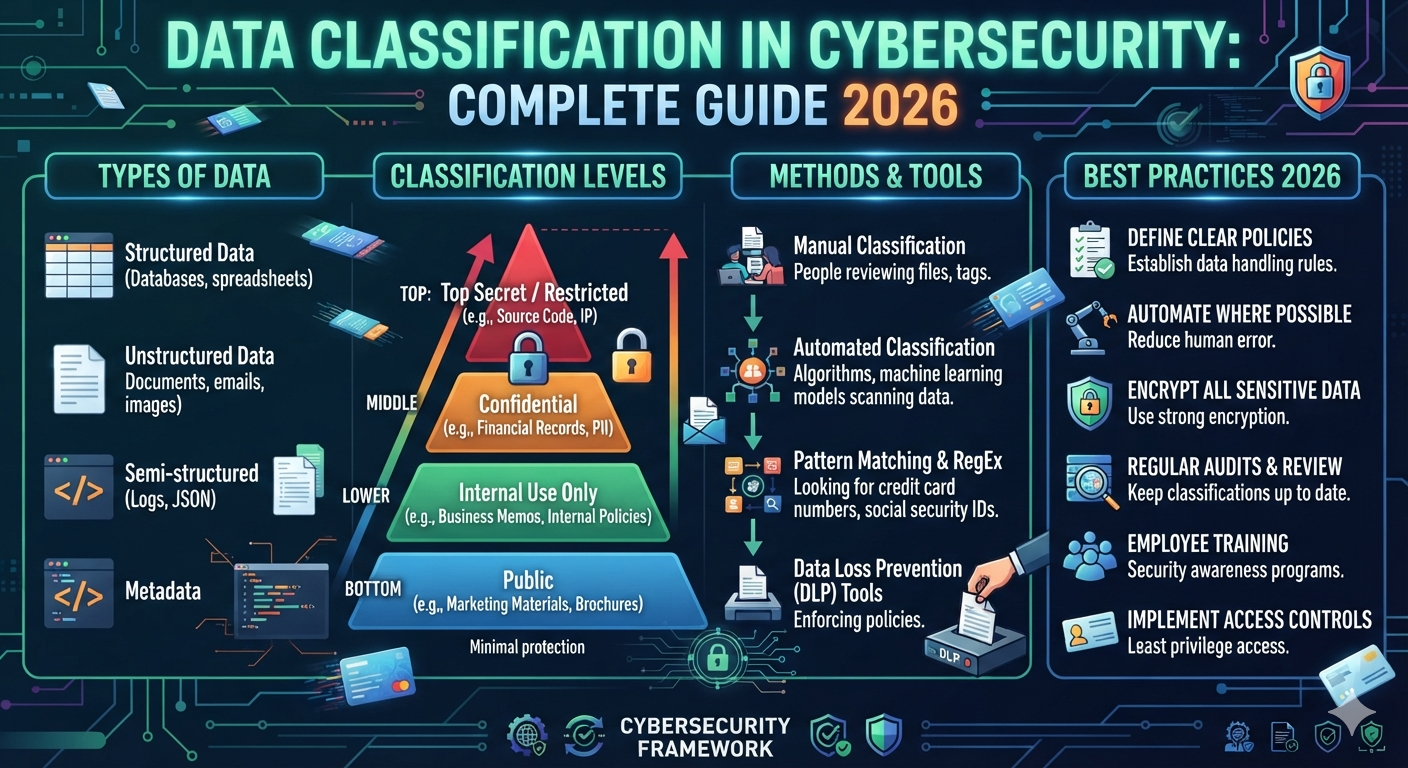
Data classification is the process of identifying information and assigning a label based on its sensitivity, business value, privacy impact, or security risk. For example, a company might classify a public product page as Public while marking customer financial records as Confidential or Restricted. This creates a practical data classification system that guides employees and security tools.
Classification applies to many forms of information. It can cover structured data stored in databases and spreadsheets as well as unstructured data found in emails, PDFs, presentations, contracts, images, and documents. NIST’s current work on data classification focuses heavily on discovering, identifying, and labeling sensitive unstructured data so organizations can manage it more effectively.
Data Classification vs Data Labeling
These terms are closely related but aren’t exactly the same. Data classification is the decision about how sensitive information is. Data labeling communicates that decision through a visible or machine-readable label.
For example, a document containing employee payroll information might receive a Confidential label. That label can then help employees understand its handling requirements and allow security tools to apply additional security controls.
Why Is Data Classification Important for Cybersecurity?
A security team can’t protect information effectively if it doesn’t know what information exists. Data classification helps organizations prioritize their security efforts by identifying information that could cause significant harm if exposed, modified, stolen, or destroyed.
Imagine a company has 500,000 files. Some are old marketing images. Others contain customer records, financial information, contracts, or intellectual property. Applying identical protection to all of them would be inefficient. A data classification policy allows the organization to focus stronger protection on information with greater risk.
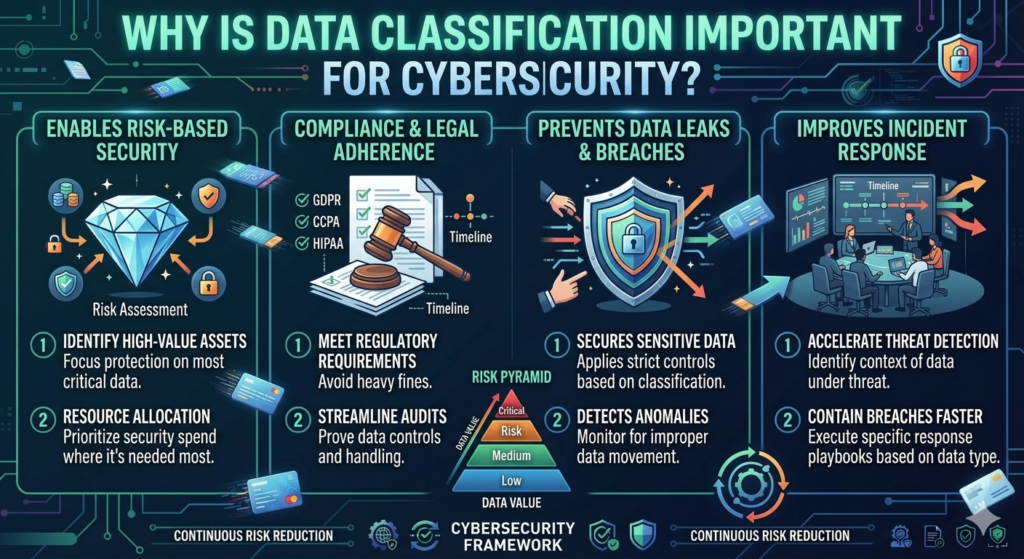
Classification can also support risk assessment, access control, encryption, monitoring, retention, and incident response. The Federal Trade Commission recommends that businesses understand what personal information they hold, where it exists, who can access it, and how it moves through their systems.
Why Classification Matters for U.S. Businesses
For U.S. businesses, information can be subject to different legal, contractual, and industry requirements. Healthcare organizations may handle protected health information. Financial companies may manage sensitive account records. Online businesses may collect customer and payment information.
A sensible data governance framework helps connect these different requirements with practical handling rules. Classification doesn’t automatically make an organization compliant. Instead, it gives security and compliance teams a clearer understanding of what information needs attention.
How Does Data Classification Protect Sensitive Information?
Classification creates a connection between information and protection. Once an organization identifies sensitive data, it can decide which controls should apply. A public brochure may need basic integrity protection. A database containing customer financial records may require encryption, strict access permissions, monitoring, and limited sharing.
The basic process can be visualized like this:
Discover → Identify → Classify → Label → Protect → Monitor → Review
This process should continue throughout the data lifecycle. Information can change over time. A document that starts as Internal may become Confidential when it receives customer information. Old information may also become unnecessary and should eventually be securely removed.
NIST’s data classification work emphasizes the importance of discovering and labeling sensitive information across different environments.
Classification and Zero Trust Security
Classification can also strengthen zero trust security. Zero Trust doesn’t assume that someone should automatically access information simply because they’re inside the corporate network.
Instead, access decisions can consider identity, device status, location, activity, and the sensitivity of requested information. A Restricted document can therefore receive stronger protection than an ordinary Internal file.
What Are the Main Data Classification Levels?
There isn’t one universal classification model that every private organization must follow. Businesses should create levels that match their information, risk profile, legal obligations, and operational needs.
A practical model uses four levels: Public, Internal, Confidential, and Restricted. Some organizations may use different names such as Open, Private, Sensitive, or Highly Confidential. The labels matter less than having clear definitions and consistent handling rules.
| Classification Level | General Meaning | Example |
| Public | Approved for public access | Website content |
| Internal | Intended for authorized employees | Internal procedures |
| Confidential | Information requiring stronger protection | Customer records |
| Restricted | High-risk information requiring strict controls | Credentials or sensitive financial data |
A good data classification framework should explain what each level means. It should also describe who can access the information, where it can be stored, how it can be shared, and when it should be deleted.
Public Data
Public data is information that an organization intentionally makes available to customers, partners, or the general public. Examples include public website pages, product descriptions, press releases, job advertisements, and approved marketing content.
Because anyone can access it, confidentiality usually isn’t the main concern. Integrity still matters, though. An attacker who changes a public webpage could damage a company’s reputation or redirect visitors to malicious content. Public information therefore still needs sensible information security controls.
Internal Data
Internal data is information intended for authorized people within an organization. It can include employee procedures, project documentation, internal announcements, meeting records, operational instructions, and company communications.
Internal doesn’t mean everyone inside the company should have unrestricted access. A marketing employee may need marketing documents but have no reason to access payroll records. Good access control keeps internal information available to the right people without making it unnecessarily public.
Internal Data Handling
Organizations should define clear rules for data handling. Employees should understand whether internal documents can be emailed outside the company, uploaded to personal cloud storage, copied to removable drives, or shared with contractors.
These rules become especially important when employees work remotely. A file that was safe inside a corporate office can create additional risk when downloaded to an unmanaged personal device.
Confidential Data
Confidential data contains information that could create meaningful harm if unauthorized people obtain it. Examples include customer records, employee files, contracts, financial reports, business strategies, internal research, and valuable intellectual property.
The appropriate controls depend on the information’s risk. A company might require authentication, restricted access, encryption, logging, and controlled sharing for confidential records. Employees should also understand that confidential information shouldn’t automatically be copied into public AI tools, personal accounts, or unauthorized applications.
Confidential Information in Business
Consider a software company developing a new product. Its public product description may be Public. The development roadmap could be Internal. Source code and customer contracts might be Confidential. A private encryption key could require Restricted handling.
The classification should reflect the potential impact of exposure rather than simply the file’s location.
Restricted or Highly Sensitive Data
Restricted data represents information that requires the strongest protection within an organization’s classification model. It may include authentication credentials, payment information, Social Security numbers, sensitive health information, encryption keys, or critical business secrets.
Highly sensitive data can create serious consequences when exposed. For that reason, organizations may apply strict least privilege, strong authentication, encryption, detailed logging, security monitoring, and limited retention. The FTC recommends limiting access to sensitive information based on legitimate business need.
Examples of Restricted Data
| Type of information | Why it may require restricted handling |
| Passwords | Can enable unauthorized account access |
| API keys | Can provide access to applications or services |
| Payment information | May create financial and privacy risks |
| Social Security numbers | Can contribute to identity-related harm |
| Encryption keys | Can undermine protected information |
| Sensitive health information | Can create serious privacy consequences |
| Critical source code | May expose valuable intellectual property |
Not every organization will classify these items exactly the same way. The correct level depends on the company’s risk assessment, legal obligations, business context, and security policy.
Part 1: What You Should Understand
At this point, the main idea is simple: not all data has equal risk.
A public webpage doesn’t require the same protection as a database containing customer records. An internal meeting document doesn’t carry the same risk as an authentication key. Classification gives an organization a structured way to make these differences clear.
The next step is understanding how organizations actually classify this information. That’s where manual classification, automated classification, rule-based classification, and AI-powered approaches become important.
Part 2: Data Classification Methods and Process
Once an organization knows what data it has, the next question is simple: how should that information be classified?
There isn’t one perfect method for every business. A small company may rely heavily on employees and simple rules. A large enterprise may scan millions of files with automated tools and machine learning. The strongest approach usually combines technology with human judgment.
What Are the Different Data Classification Methods?
Organizations commonly use manual classification, automated classification, rule-based classification, and machine learning classification. Each method solves a different problem.
Manual methods provide human context. Automated tools provide scale. Rules provide predictable decisions. AI can help identify complex patterns across large amounts of unstructured data. Choosing the right combination depends on data volume, risk, staff, and the organization’s data governance requirements.
| Classification Method | Best For | Main Advantage | Main Limitation |
| Manual classification | Smaller datasets | Human judgment | Time-consuming |
| Automated classification | Large datasets | Fast and scalable | Can make mistakes |
| Rule-based classification | Known patterns | Consistent decisions | Limited context |
| Machine learning | Complex datasets | Finds broader patterns | Requires testing and governance |
The goal isn’t simply to automate everything. A mature data classification framework uses the method that fits the type and sensitivity of information being examined.
Manual Data Classification
Manual classification happens when employees, data owners, or security teams review information and assign a classification. This method works particularly well when context matters more than simple keywords.
For example, an employee might recognize that a document contains confidential negotiations even though it doesn’t contain obvious terms such as “password” or “Social Security number.” Human judgment can catch details that automated systems might miss.
However, manual classification becomes difficult at scale. Reviewing thousands of files takes time, and employees can forget to apply labels or choose the wrong level. That’s why organizations should provide clear data classification policies and practical examples.
When Manual Classification Works Best
Manual review is especially useful for high-value documents, legal records, executive information, sensitive contracts, and unusual files. It can also help validate results produced by automated tools.
The strongest model isn’t always “human versus machine.” In many environments, technology performs the initial data discovery while trained employees review important or uncertain results.
Automated Data Classification
Automated classification uses software to examine large amounts of information and assign labels according to predefined signals or models. It can scan files, databases, cloud storage, email repositories, and collaboration platforms far faster than humans can.
For a large organization, automation can turn a huge collection of unknown files into a searchable data inventory. Security teams can then focus their attention on information that appears sensitive or incorrectly protected.
Automated systems can examine content, metadata, file location, ownership, permissions, and other characteristics. However, automation isn’t automatically accurate. False positives and false negatives can occur, especially when context is unclear.
Automated Classification Example
Imagine a company has 800,000 documents stored across cloud drives. A classification system can scan those documents and identify files containing potential customer information.
Instead of manually opening every file, security staff can review the results and confirm high-risk classifications. This saves time while keeping human oversight in the process.
Rule-Based Data Classification
Rule-based classification uses predefined conditions to identify information. The organization creates rules that tell the system what patterns, words, formats, or metadata should trigger a classification.
For example, a rule could search for a Social Security number pattern. Another could identify payment-card patterns. A third might classify documents stored inside a specific restricted folder.
Two common techniques are keyword matching and pattern matching. Rules are easy to understand and audit because security teams can see why a particular file received a label.
Keyword Matching and Pattern Matching
Keyword matching looks for specific words or phrases. Pattern matching looks for recognizable structures.
| Technique | Example | Possible Result |
| Keyword matching | “confidential”, “salary”, “password” | Potential sensitive file |
| Pattern matching | SSN-like number | Potential personal data |
| File metadata | Restricted department | Higher sensitivity |
| Location-based rule | Payroll folder | Confidential classification |
Rules still have weaknesses. A document could contain the word “password” while simply discussing cybersecurity. The word alone doesn’t prove that an actual password exists.
That’s why effective information classification often combines rules with context and review.
AI and Machine Learning for Data Classification
Machine learning classification takes a more advanced approach. Instead of depending entirely on fixed rules, models can learn patterns from examples and analyze context across large datasets.
This is useful for AI data classification, particularly when organizations need to examine large amounts of unstructured content. A document might contain sensitive business information without using obvious keywords. Machine learning can potentially identify broader patterns across language, document structure, metadata, and other signals.
NIST’s current work on data classification specifically addresses sensitive unstructured data and discusses emerging technologies such as AI as organizations improve data protection.
How AI Classification Can Help
Imagine a company has thousands of contracts. A basic rule might search for words such as “agreement” or “confidential.” An AI-based system can potentially analyze the surrounding language and identify whether the document contains customer obligations, financial terms, proprietary information, or other sensitive content.
However, AI shouldn’t become a black box that nobody checks. Classification errors can create real security problems. Organizations should test models, review uncertain results, monitor performance, and maintain human oversight for important decisions.
How Does the Data Classification Process Work?
A strong data classification process starts before the first label is applied. Organizations need to understand what information exists, where it lives, who owns it, and how it moves.
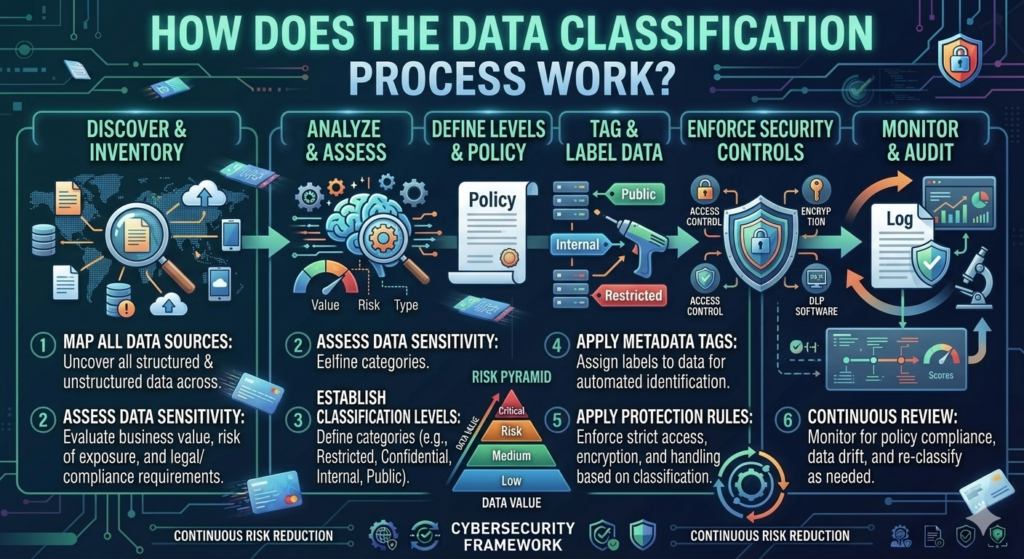
This is why data discovery, data inventory, and data mapping are important foundations. The FTC recommends that businesses know what personal information they hold, where they keep it, who can access it, and how it moves through their operations.
Step 1: Discover the Data
First, identify where information exists. This can include databases, laptops, cloud storage, email systems, shared drives, applications, backups, and third-party platforms.
The purpose is visibility. You can’t protect information that your organization doesn’t know it has.
Step 2: Build a Data Inventory
Next, create a data inventory that records important information assets. The inventory can include the type of information, owner, location, format, sensitivity, and relevant systems.
A useful inventory doesn’t need to document every insignificant file manually. Start with important datasets and expand as the program matures.
Step 3: Map How Data Moves
Data mapping shows how information travels through the organization. For example, customer information may move from a website to a CRM platform and then into an analytics system.
Understanding these flows helps identify where sensitive information could be copied, transferred, exposed, or stored unnecessarily.
Step 4: Identify Sensitive Information
Now determine what the information actually contains. Look for personal data, financial records, credentials, intellectual property, customer information, employee information, and regulated data.
This stage can use manual review, automated tools, rules, or machine learning.
Step 5: Assign a Classification
Once the information is understood, assign the appropriate classification level. A simple organization might use Public, Internal, Confidential, and Restricted.
The classification should reflect the potential impact if the information is disclosed, modified, lost, or accessed without authorization.
Step 6: Apply Data Labels
After classification, apply a label that humans and security systems can recognize. Labels may appear in document headers, filenames, metadata, email systems, or security platforms.
Good data labeling makes the classification visible and actionable.
Step 7: Apply Security Controls
Classification becomes valuable when it changes how information is protected. Sensitive information may require stronger access control, encryption, monitoring, retention rules, or DLP policies.
For example, a Restricted document could require stronger authentication and prevent external sharing.
Step 8: Monitor and Review
Classification shouldn’t be treated as permanent. Information can change over time.
A document may begin as Internal and later contain customer information. An old dataset may become unnecessary. A new regulation may change how specific information must be handled.
Regular reviews keep the data classification system accurate.
Data Classification Process Example
Consider a U.S. software company collecting customer information through its website.
A visitor submits their name and email address. The information enters a customer database. The marketing team uses some of it for legitimate business purposes while another system processes account information.
The organization first discovers the information. It records the dataset in its inventory. It maps where the information travels. Then it evaluates sensitivity and applies a classification.
The result could look like this:
| Data Asset | Classification | Example Protection |
| Public product information | Public | Integrity protection |
| Internal marketing plan | Internal | Employee access |
| Customer profile | Confidential | Access control + encryption |
| Account credentials | Restricted | Strong authentication + strict access |
| API secrets | Restricted | Secrets management + limited access |
This example shows why classification isn’t just about putting a label on a document. It’s about connecting the label to actual security policies and controls.
Structured Data vs Unstructured Data Classification
One major challenge is that information doesn’t always look the same. Structured data usually follows a predictable format. Databases and spreadsheets are common examples.
Unstructured data is less predictable. Emails, PDFs, images, presentations, contracts, and text documents can contain sensitive information in many different forms.
| Data Type | Examples | Classification Challenge |
| Structured data | Databases, spreadsheets | Easier to search systematically |
| Unstructured data | PDFs, emails, documents | Context can be difficult |
| Semi-structured data | JSON, XML, logs | Structure varies by system |
Unstructured information is particularly important because organizations often hold enormous amounts of it. NIST’s current draft work specifically addresses discovering, identifying, and labeling sensitive unstructured data.
Data Classification and the Data Lifecycle
Classification should follow information throughout its data lifecycle. Data doesn’t stay in one place forever. It can be created, stored, accessed, copied, shared, archived, and eventually deleted.
A classification label can help determine what protection should apply during each stage.
For example, a sensitive customer record might require restricted access when stored, encryption when transmitted, monitoring during use, and secure disposal when the organization no longer has a legitimate reason to retain it.
The FTC recommends keeping sensitive information only when there is a legitimate business need and securely disposing of information that is no longer necessary.
Why Combining Classification Methods Works Better
No single classification method handles every situation perfectly. Manual review understands context but doesn’t scale well. Rules are predictable but can miss meaning. Automated tools process large datasets quickly. AI can analyze complex patterns but requires governance and validation.
A layered approach can therefore work better:
Automated Discovery → Rule-Based Detection → AI Analysis → Human Review → Final Classification
This model gives organizations both scale and oversight. It also creates a stronger foundation for data protection, access control, data loss prevention, and security monitoring.
Part 2 Summary
The classification method determines how information gets identified and labeled. Manual classification provides human judgment. Automated classification provides scale. Rule-based classification provides predictable detection. Machine learning can help analyze complex information and large collections.
The process itself starts with discovery and continues through inventory, mapping, classification, labeling, protection, monitoring, and review. When these stages work together, classification becomes part of a broader information security strategy rather than just another administrative task.
Part 3: Data Classification in Cybersecurity Applications
Now that we’ve covered classification methods and the classification process, it’s time to connect them with real cybersecurity controls. A label alone doesn’t protect information. Its real value appears when that label influences access control, DLP, encryption, monitoring, and incident response.
For example, a company may identify customer financial records as Confidential. The next step is deciding who can access them, whether employees can download them, how they’re encrypted, and what happens if someone tries to send them outside the organization.
Data Classification Examples in Cybersecurity
Real-world data classification examples become easier to understand when you look at the information businesses handle every day. A software company may treat source code as Confidential while classifying its public documentation as Public.
A financial organization could classify customer account information as Confidential or Restricted. A healthcare organization may apply stronger controls to protected health information. The exact classification depends on the organization’s security risk, business requirements, and applicable regulations.
| Data Type | Possible Classification | Typical Security Concern |
| Public website content | Public | Unauthorized modification |
| Internal procedures | Internal | Unapproved disclosure |
| Customer records | Confidential | Privacy exposure |
| Financial reports | Confidential | Financial or competitive harm |
| Employee records | Confidential | Privacy and identity risks |
| Passwords and API keys | Restricted | Account compromise |
| Sensitive payment data | Restricted | Fraud and financial exposure |
| Source code | Confidential/Restricted | Intellectual property theft |
The important point is that classification isn’t identical across every organization. A company’s data classification standards should reflect its own environment instead of copying another organization’s labels without understanding the underlying risk.
Data Classification and Access Control
Classification becomes much more powerful when it determines who can access information. Access control ensures users receive permissions based on legitimate business needs rather than simply receiving broad access because they work for the company.
The principle of least privilege is especially useful here. An employee should receive only the access needed to perform their job. A marketing employee may need Internal campaign files but shouldn’t automatically receive access to payroll records or sensitive customer databases.
Classification and Identity and Access Management
Identity and access management connects users with permissions. Classification can provide another layer of context for those decisions.
For example, an application could require stronger authentication before allowing access to Restricted information. A security team could also monitor unusual access to highly sensitive records and investigate activity that doesn’t match normal behavior.
This approach supports zero trust security, where access isn’t automatically trusted simply because someone is inside a corporate network.
Data Classification and Data Loss Prevention (DLP)
Data loss prevention helps organizations detect and control sensitive information when users attempt to move, copy, upload, print, or share it. Classification can give DLP systems a clearer signal about which information deserves stronger controls.
For example, a DLP policy might allow employees to email Public documents externally while blocking an attempt to send Restricted customer information to an unauthorized address.
How DLP Uses Classification Labels
DLP software can use classification labels, content inspection, patterns, metadata, or other signals to identify sensitive information. A policy could be designed around a specific classification level.
| Classification | Possible DLP Action |
| Public | Normal sharing |
| Internal | Restrict unauthorized external sharing |
| Confidential | Warn, log, or block risky transfers |
| Restricted | Strong restrictions and security alerts |
DLP isn’t a replacement for classification. Data classification determines how sensitive information is. DLP helps enforce rules based on that sensitivity.
Data Classification and Encryption
Encryption protects information by transforming readable data into a protected form. Classification can help an organization decide which information requires encryption and where stronger encryption controls should apply.
For example, a company may have basic protections around Public information while requiring encryption for Confidential customer records. Restricted information may require encryption both while stored and while transmitted.
However, encryption isn’t a complete security strategy. Organizations must also protect encryption keys, control access, monitor activity, and remove unnecessary permissions. Otherwise, an attacker who obtains authorized access could still reach protected information.
Encryption at Rest and in Transit
Encryption at rest protects stored information. This includes data inside databases, cloud storage, laptops, and backup systems.
Encryption in transit protects information while it moves between systems. HTTPS connections and secure communication protocols are common examples.
Classification can help security teams determine which datasets require these protections based on their sensitivity and data protection requirements.
Data Classification for Compliance and Regulations
Classification can make regulatory compliance easier to manage because it helps organizations identify information that may be subject to specific legal or contractual requirements.
However, classification alone doesn’t make a company compliant. U.S. requirements vary by industry, state, business model, and type of information collected. Organizations should identify the rules that actually apply to their operations.
For example, healthcare organizations may handle protected health information under HIPAA. Financial institutions may face requirements under laws and regulations such as GLBA. Businesses handling payment-card environments may also need to consider PCI DSS requirements.
Why Classification Helps Compliance Teams
Compliance teams need to know what information exists before they can determine which requirements apply. A good data governance framework can connect data types with applicable policies, retention requirements, access rules, and regulatory obligations.
This also makes audits easier. Instead of searching through thousands of unrelated files, teams can focus on identified datasets and their associated controls.
Data Classification and NIST Security Categorization
NIST provides important guidance around information security, but it’s useful to distinguish data classification from NIST’s formal security categorization concepts.
FIPS 199 establishes security categorization for federal information and information systems based on potential impact to confidentiality, integrity, and availability. NIST’s risk-management publications then build on these concepts to support federal information security practices.
For private organizations, an internal classification system can use different labels. The key is creating clear definitions and connecting each level with appropriate security controls.
NIST’s current work on data classification also focuses on discovering, identifying, and labeling sensitive unstructured data. Its 2026 Initial Public Draft discusses how classification can support stronger data protection across modern environments.
Data Classification and Insider Threats
Not every data security incident starts with an outside attacker. Insider threats can involve employees, contractors, partners, or other authorized users who intentionally or accidentally expose information.
Classification can reduce this risk by making sensitive information easier to identify and protect. A Restricted dataset can receive tighter permissions than ordinary Internal information.
Security teams can also monitor access to highly sensitive records. If an employee suddenly downloads thousands of confidential files without a business reason, that activity may deserve investigation.
Classification doesn’t identify malicious intent by itself. It provides useful context for security monitoring and behavioral analysis.
Data Classification and Unauthorized Access
Unauthorized access occurs when someone gains access to information they shouldn’t be able to reach. Weak permissions are one common contributor.
Classification can help organizations build more precise access policies. Instead of asking only “Who is this user?” security systems can consider “What information are they trying to access?” and “How sensitive is that information?”
This creates a stronger relationship between data access, identity, permissions, authentication, and risk.
Data Classification and Data Breaches
A data breach can expose different types of information with very different consequences. Losing a public marketing document isn’t comparable to exposing customer financial records or authentication credentials.
Classification can help incident response teams prioritize what matters most. If a Restricted database is compromised, the organization can quickly identify the sensitivity of the affected information and determine which response procedures should apply.
Classification During Incident Response
During incident response, security teams need accurate information about affected systems and data. Classification labels can provide useful context during investigation.
For example, investigators may discover that an attacker accessed a folder containing Confidential customer information. The classification helps the organization understand the potential impact and identify appropriate containment and notification procedures.
Classification won’t prevent every breach. It can make the response more organized and risk-focused.
Data Classification and Security Monitoring
Security monitoring becomes more useful when teams understand the value of the information being accessed.
A login from an employee’s normal device may not immediately look suspicious. However, if that account suddenly accesses hundreds of Restricted files, downloads large volumes of data, and transfers them externally, the activity deserves closer attention.
Classification can therefore provide another signal for security analytics. High-sensitivity information can receive stronger monitoring than ordinary Public or Internal content.
Data Classification and Data Retention
Organizations often focus heavily on protecting information while forgetting that unnecessary information creates additional risk.
If a company no longer needs an old dataset, keeping it indefinitely can increase the potential impact of a future incident. Classification can support data retention decisions by helping organizations identify the sensitivity and business value of stored information.
The FTC advises businesses to keep sensitive information only when there’s a legitimate business need and to securely dispose of information that is no longer required.
Common Challenges in Data Classification
Classification sounds straightforward until an organization starts looking at its actual data. Modern businesses often have information scattered across cloud platforms, employee devices, email accounts, databases, SaaS applications, backups, and third-party services.
The first challenge is visibility. If sensitive information exists in an unknown location, security teams may not know that it needs protection.
Another challenge is unstructured data. A database may have clearly defined fields. An email or PDF can contain sensitive information hidden inside ordinary language. That makes context much harder to analyze automatically.
| Challenge | Why It Causes Problems |
| Unknown data locations | Sensitive information may remain unprotected |
| Too many labels | Employees become confused |
| Poor training | Users classify information inconsistently |
| Outdated labels | Protection may no longer match risk |
| False positives | Systems flag harmless information |
| False negatives | Sensitive information may be missed |
| Shadow IT | Data moves outside approved systems |
| Legacy systems | Older platforms may lack classification support |
| Excessive access | More users can reach sensitive information |
| Poor governance | Nobody owns classification decisions |
Classification Challenges With Cloud Data
Cloud environments make classification more complicated because information can move quickly between services. A document might start on a company server and later appear in cloud storage, an email attachment, a collaboration platform, and a backup.
This makes data mapping especially important. Security teams need to understand where sensitive information travels and which systems process it.
Cloud classification also requires careful consideration of third-party providers. Organizations should know what data a provider receives, where it stores that information, who can access it, and how the provider protects it.
Classification Challenges With AI-Generated Data
AI creates another layer of complexity. Employees can use AI systems to summarize documents, analyze customer information, generate reports, or process internal business content.
If a company doesn’t have clear security policies, employees may accidentally send sensitive information to an AI service that isn’t approved for that type of data.
Classification can help create clearer rules. For example, an organization could prohibit Restricted information from being entered into certain external AI tools while allowing approved Internal information under defined conditions.
How Organizations Can Overcome Classification Challenges
The best solution isn’t creating an enormous policy that employees never read. A practical approach starts with a small number of clear classification levels and simple handling rules.
Organizations should then build a data inventory, identify important data owners, automate discovery where possible, train employees, and regularly review classification results.
NIST’s current data classification work emphasizes the importance of discovering, identifying, and labeling sensitive data across modern environments.
Why Classification Must Connect With Other Security Controls
A classification label becomes valuable when it changes what happens to the information.
Think of classification as a traffic signal. The label tells the organization how much caution is required. Access control determines who can enter. Encryption protects the information while stored or transferred. DLP watches how it moves. Monitoring looks for suspicious activity. Incident response determines what happens when something goes wrong.
When these controls work together, classification becomes a central part of information security rather than an isolated administrative exercise.
Part 3 Summary
The biggest lesson from these applications is simple: classification should drive security decisions.
A Confidential file shouldn’t merely display a Confidential label. That label should influence who can access it, where it can be shared, whether it needs encryption, how DLP handles it, and how security teams respond when unusual activity occurs.
For organizations, this creates a connected security model:
Classification → Access Control → Encryption → DLP → Monitoring → Incident Response
That connection is what turns a basic data classification policy into a useful cybersecurity control.
Part 4: Data Classification Best Practices, Mistakes, and FAQs
A classification program only works when people can use it consistently. Creating labels is the easy part. The harder task is making those labels meaningful across employees, applications, cloud services, security tools, and business processes.
The best programs keep the model understandable while connecting it to real data protection controls. The following practices can help organizations build a classification system that remains useful as their data environment grows.
Best Practices for Data Classification in Cybersecurity
Start with a small number of clearly defined data classification levels. Four levels such as Public, Internal, Confidential, and Restricted are often easier for employees to understand than a complicated system containing dozens of categories.
Each level should have a clear definition and practical handling rules. Employees should know who can access the information, where they can store it, whether they can share it externally, and what protection the organization expects.
Create a Clear Data Classification Policy
A data classification policy should explain how employees identify, label, handle, share, store, and dispose of information. It should also define who owns classification decisions.
The policy should use real examples. Telling employees that “sensitive information requires protection” is vague. Showing them examples of customer records, financial documents, credentials, and public content makes the rules easier to follow.
Build a Complete Data Inventory
You can’t classify information effectively if you don’t know where it exists. Build a data inventory that identifies important systems, datasets, documents, applications, and storage locations.
Include cloud platforms, databases, shared drives, email systems, laptops, backups, and important third-party services. The inventory doesn’t have to be perfect on day one. Start with high-value information and expand over time.
Use Data Mapping to Understand Data Movement
A data inventory tells you what exists. Data mapping helps explain where information goes.
For example, customer information may move from a website into a CRM system. The CRM might then send selected information to an analytics platform. A support system could receive another copy.
Understanding these connections helps security teams identify where sensitive data may be copied, transferred, stored, or exposed.
Assign Data Owners
Every important dataset should have someone responsible for deciding how it should be handled. This person or team can act as the data owner.
A data owner doesn’t necessarily manage the technology. Instead, they understand the business value and sensitivity of the information. Security teams can then help translate those decisions into technical security controls.
Apply the Principle of Least Privilege
Don’t give employees access simply because they belong to the company. Apply least privilege so users receive only the access required for their responsibilities.
This reduces unnecessary exposure. If an employee’s account is compromised, the attacker may have fewer opportunities to reach highly sensitive information.
The FTC recommends limiting access to sensitive information according to legitimate business needs.
Combine Manual and Automated Classification
A strong data classification process doesn’t need to choose between people and technology.
Automated tools can scan large amounts of information. Rules can identify recognizable patterns. AI can help analyze difficult content. Human reviewers can validate important or uncertain classifications.
This layered approach can improve both scale and accuracy.
Review Classification Regularly
Information changes. A document’s sensitivity can increase or decrease as business circumstances change.
For example, an internal project document may initially contain ordinary planning information. Later, it could receive unreleased product details, customer information, or financial data.
Regular reviews help ensure that classified information still receives the right level of protection.
Train Employees on Data Handling
Technology can’t fix every human mistake. Employees need to understand what classification labels mean and how they affect everyday actions.
Training should explain common situations such as sending email attachments, sharing cloud documents, using removable storage, working remotely, and uploading information to external services.
Short practical examples are usually more useful than lengthy policy documents.
Connect Classification With DLP and Security Monitoring
Classification becomes much more useful when security systems can act on it.
A data loss prevention platform can use labels to control sensitive information. Security monitoring can prioritize unusual access to Restricted files. Incident response teams can use classifications to understand the potential impact of an event.
This creates a stronger connection between data governance and operational cybersecurity.
Minimize Unnecessary Data
One of the simplest security improvements is not keeping information you no longer need.
Every unnecessary database, document, backup, or customer record creates another potential target. The FTC recommends keeping sensitive information only when there is a legitimate business need and securely disposing of information that is no longer necessary.
Data minimization therefore complements classification. The safest sensitive record can sometimes be the record you no longer need to keep.
Common Data Classification Mistakes to Avoid
Many classification programs fail because they become too complicated or disconnected from everyday work. Employees may ignore labels if the rules are difficult to understand.
Another common mistake is treating classification as a one-time project. Information constantly moves through the data lifecycle. New applications appear. Employees change roles. Business processes evolve. Old systems remain active.
Mistake 1: Creating Too Many Classification Levels
A company might create eight or ten levels believing that more detail means better security. In practice, excessive complexity can make classification harder.
Employees may struggle to distinguish between similar categories. They might simply choose the safest-looking label for everything or stop applying labels correctly.
Mistake 2: Relying Only on Keywords
Keyword matching is useful but limited. A document containing the word “password” doesn’t necessarily contain an actual password.
Similarly, sensitive information might not contain obvious keywords at all. Context matters.
Mistake 3: Trusting Automation Without Review
Automated classification can process huge datasets, but no tool is perfect. False positives can overwhelm security teams while false negatives can leave sensitive information unidentified.
Important decisions should have appropriate validation and oversight.
Mistake 4: Ignoring Unstructured Data
Organizations often focus on databases while overlooking emails, PDFs, documents, images, presentations, and collaboration files.
This is a serious gap because unstructured data can contain valuable private information, business secrets, and regulated information.
Mistake 5: Giving Everyone Broad Access
Classification doesn’t help much if every employee can access every classification level.
Permissions should reflect job responsibilities. Sensitive information should receive stronger access control and tighter authorization.
Mistake 6: Forgetting Third-Party Services
Modern businesses rely heavily on SaaS providers, cloud platforms, contractors, and external vendors.
Organizations should understand what information third parties receive, why they receive it, where it is stored, and what controls protect it.
Data Classification vs Data Categorization
Although these terms sound similar, they solve different problems.
Data classification generally determines how sensitive information is and what protection it requires. Data categorization usually groups information according to its type, subject, department, or business function.
| Comparison | Data Classification | Data Categorization |
| Main purpose | Determine sensitivity | Group similar information |
| Example | Confidential | Customer data |
| Security impact | Direct | Usually indirect |
| Typical result | Classification label | Category |
| Main question | “How sensitive is it?” | “What type is it?” |
A company can use both approaches at the same time. For example, “Customer Data” could be the category while “Confidential” is the security classification.
What Happens When Sensitive Data Is Not Classified?
Unclassified sensitive information creates uncertainty. Employees may not know whether they can share it. Security systems may not know which files require stronger controls.
This can lead to excessive permissions, accidental sharing, weak retention practices, and slower incident response. It can also make it harder for security teams to determine which information was affected after an incident.
The risk becomes particularly serious when sensitive information is spread across cloud services, employee devices, email accounts, backups, and third-party platforms.
How Classification Helps During a Data Breach
During a data breach, security teams need to understand what information an attacker may have accessed.
Classification can help investigators distinguish between low-impact Public information and potentially serious Restricted information. That distinction can influence investigation priorities, containment decisions, notification analysis, and incident response.
Classification doesn’t prevent every breach. Instead, it provides useful context before and during a security event.
How Data Classification Supports Risk Assessment
Not every piece of information creates the same security risk. A good risk assessment considers what could happen if information is exposed, changed, destroyed, or accessed without authorization.
Classification helps turn that assessment into an operational model.
For example, if Restricted information receives the strongest classification, security teams can prioritize access reviews, encryption, monitoring, DLP policies, and incident-response preparation around those assets.
Data Classification and Zero Trust Security
Zero trust security assumes that access should be continuously evaluated rather than automatically trusted.
Classification can strengthen this approach by adding information sensitivity to access decisions. A user may have permission to access Internal files but require additional authorization for Restricted information.
This creates a more precise security model where identity, device, context, and data sensitivity can work together.
Data Classification and AI Security
AI systems introduce new data-handling risks because employees may copy company information into external AI tools.
Organizations should define which classification levels can be processed by approved AI systems. Restricted information may require stronger restrictions than Public or Internal content.
This is another reason data labeling matters. Clear labels can help employees understand which information is safe to use with particular tools.
Frequently Asked Questions About Data Classification
What is data classification in cybersecurity?
Data classification in cybersecurity is the process of identifying information and assigning a security level based on sensitivity, value, risk, privacy impact, or protection requirements.
What are the four main data classification levels?
A common model includes Public, Internal, Confidential, and Restricted. Organizations can use different names or levels based on their specific needs.
What is an example of data classification?
A public product page could be classified as Public. An internal company procedure could be Internal. Customer records could be confidential. Passwords or sensitive authentication keys could be Restricted.
What are the main data classification methods?
The main methods include manual classification, automated classification, rule-based classification, and machine learning or AI-based classification.
Why is data classification important?
It helps organizations understand which information needs stronger protection. It can support data security, access control, encryption, DLP, monitoring, compliance, retention, and incident response.
What is manual data classification?
Manual classification involves people reviewing information and assigning appropriate labels. It can provide strong context but becomes difficult to manage across very large datasets.
Final Takeaway
Effective data classification isn’t about putting labels on files for the sake of documentation. It’s about making security decisions based on the value and sensitivity of information.A strong data classification framework starts with discovery and inventory. It then connects classification with access control, least privilege, encryption, DLP, monitoring, retention, and incident response.
The most practical approach is simple: know what data you have, understand its sensitivity, give it the right label, protect it according to risk, and review those decisions regularly. For organizations building a mature cybersecurity program, classification can become the bridge between data governance and day-to-day security operations. It gives employees clearer rules and gives security teams better visibility into the information that matters most.
Related Article to explore Now
| AI Cybersecurity Threats | Explore now |
| AI-Powered Cybersecurity | Explore now |
| Identity and Access Management (IAM) | Explore now |
| Zero Trust Security | Explore Now |
| AI Scams | Explore Now |
| Prompt Injection Attacks | Explore now |
| Deepfake Scams | Explore now |
| Network Firewall vs Host-Based Firewall | Explore now |
Trusted source
Source: NIST SP 1800-39: Data Classification Practices↗️↗️↗️
Source: NIST IR 8496: Data Classification Concepts and Considerations ↗️↗️↗️
Source: NIST FIPS 199 ↗️↗️↗️
Source: FTC: Protecting Personal Information ↗️↗️↗️
Source: FTC: Start with Security ↗️↗️↗️
Meta Description:
Learn data classification in cybersecurity, including types, levels, methods, examples, and best practices to protect sensitive data and reduce security risks in 2026.
1 Comment