

Introduction
Every day, millions of people receive messages that look completely genuine. Some appear to come from banks. Others pretend to be from Microsoft, Google, PayPal, Amazon, or even your employer. However, behind these messages is often a carefully planned phishing attack designed by cybercriminals to steal sensitive information. As technology evolves, these scams become more convincing. That’s why understanding What Is Phishing has become an essential part of modern Internet Security.
Whether you shop online, use social media, check your email, or manage business accounts, phishing can target you at any moment. A single click on malicious links or a fake sign-in page can lead to credential theft, identity theft, financial loss, or even a serious data breach. Learning How to Prevent Phishing Attacks isn’t just helpful anymore. It’s one of the smartest steps you can take to improve your Digital Security and stay safe online.
Why Phishing Attacks Are Increasing
Cybercriminals don’t need to break into secure computer systems if they can simply trick people into opening the door themselves. Modern phishing campaigns use fake websites, convincing emails, text messages, and even phone calls that closely resemble trusted organizations. Artificial intelligence and automation have made many phishing attempts harder to detect, allowing attackers to launch thousands of scams within minutes. This rapid growth has made Email Phishing one of the most common Cybersecurity Threats worldwide.
Another reason phishing continues to grow is that people rely more than ever on digital services. Online banking, cloud storage, remote work, shopping, and mobile payments create more opportunities for attackers. Every new online account becomes another possible target. Even experienced users sometimes fall victim because today’s scams look incredibly realistic and often create a false sense of urgency.
Why Everyone Should Understand Phishing
You don’t need to work in cybersecurity to become a phishing target. Students, parents, employees, business owners, healthcare workers, and retirees all receive suspicious emails every day. Attackers don’t always focus on technical weaknesses. Instead, they exploit human emotions such as fear, curiosity, excitement, or urgency. This form of social engineering tricks people into making quick decisions without thinking carefully.
Understanding phishing helps you recognize warning signs before damage occurs. Instead of reacting emotionally, you’ll learn to verify messages, inspect links, and protect your online accounts. Strong cybersecurity awareness, better email security, and good online habits significantly reduce your chances of becoming the next victim of an online fraud attempt.
What You Will Learn in This Guide
This complete guide explains What Is Phishing, how phishing attacks work, the different Types of Phishing, real-world Phishing Examples, and practical ways to protect yourself. You’ll also learn How to Identify Phishing Emails, recognize fake websites, compare phishing with malware and spam, understand current phishing trends, and discover the best tools that strengthen your online safety.
By the end of this guide, you’ll know how attackers think, why phishing continues to succeed, and what simple habits can protect your personal information, bank accounts, and digital identity. Whether you’re protecting yourself, your family, or your business, these lessons will help you build stronger Identity Protection against modern cyber threats.
What Is Phishing?
Phishing is a type of cyberattack where criminals pretend to be trusted people or organizations to steal valuable information. A typical phishing email may ask you to verify your account, reset your password, or confirm payment details. In reality, the goal is to trick you into revealing passwords, banking information, or other sensitive data. This simple definition explains What Is Phishing, yet the attack itself can take many different forms.
Unlike traditional hacking, phishing rarely relies on breaking security systems. Instead, attackers manipulate human behavior through social engineering. They create believable stories, fake urgency, and convincing websites that appear legitimate. This combination makes phishing one of the easiest and most successful forms of modern cybercrime.
Definition of Phishing
The word “phishing” comes from the idea of fishing. Instead of using bait to catch fish, attackers use fake messages to catch victims. They send thousands of emails hoping that a small number of people will click dangerous links or provide confidential information. Those stolen details often become the starting point for credential theft, financial fraud, or malware delivery.
A phishing attempt usually includes a fake message, a fraudulent website, or a request for sensitive information. Once victims enter their login credentials into a fake login page, attackers can access email accounts, banking services, cloud storage, or business systems. That’s why phishing remains one of the biggest threats to account security today.
How Phishing Works
Most phishing attacks follow a simple pattern. First, attackers send messages that appear trustworthy. These messages often claim that your account has been locked, your payment failed, or suspicious activity has been detected. The goal is to make you react quickly without verifying the information.
When you click the provided link, you’re usually redirected to a fake website that closely copies the appearance of a legitimate company. After entering your username and password, the information is immediately sent to the attackers. In many cases, victims don’t realize what happened until unauthorized activity appears in their accounts or money disappears from their bank.
Why Hackers Use Phishing Attacks
Phishing remains popular because it’s inexpensive, scalable, and surprisingly effective. Instead of attacking complex security systems directly, criminals exploit trust and human psychology. A successful phishing campaign can provide access to financial accounts, personal information, business networks, and confidential documents with very little technical effort.
Attackers also use stolen credentials to launch additional attacks. A compromised email account may spread more phishing scams to friends and coworkers. Business credentials may lead to ransomware incidents or large-scale data breaches. This chain reaction explains why phishing often becomes the first step in much larger cyberattacks.
“Technology can block many attacks, but awareness remains your strongest defense against phishing.”
Key Facts About Phishing
| Fact | Why It Matters |
| Phishing targets people instead of software | Human mistakes are easier to exploit than secure systems. |
| Emails remain the most common delivery method | Most phishing campaigns begin with an email message. |
| Fake websites closely copy legitimate brands | Visual appearance alone cannot prove a website is safe. |
| Businesses and individuals are both targeted | Anyone with online accounts can become a victim. |
| Awareness greatly reduces risk | Recognizing warning signs prevents many successful attacks. |
How Does a Phishing Attack Work?
Most phishing attacks follow a carefully planned process instead of happening by chance. Attackers first study their victims, prepare convincing messages, and then wait for someone to make a small mistake. A single click on a phishing website, malicious links, or a fake attachment can expose private information within seconds. Understanding What Is Phishing also means understanding how these attacks unfold from beginning to end.
Although phishing campaigns use different techniques, they all share one goal: tricking you into trusting something that isn’t real. Once that trust is earned, cybercriminals attempt credential theft, financial fraud, or identity theft. Learning this process helps you recognize warning signs before attackers succeed.
Choosing the Target
Every phishing campaign begins with selecting a target. Sometimes attackers send millions of messages to random users. In other cases, they carefully research one person or one company before launching a highly personalized attack. Businesses, students, healthcare workers, government employees, and online shoppers all become attractive targets because they use valuable digital accounts every day.
Creating Fake Emails or Websites
Once a target is selected, attackers build convincing messages that imitate trusted organizations. They copy company logos, colors, fonts, and writing styles to create realistic Fake Emails or a convincing phishing email. Many scams even include company signatures and customer support information to appear authentic.
Stealing Personal Information
The next step is collecting sensitive information. Victims are usually directed to a fake login page where they unknowingly enter usernames, passwords, banking details, or personal information. Every piece of stolen data strengthens the attacker’s ability to compromise additional accounts and expand the attack.
Using Stolen Data
After stealing information, attackers rarely stop with a single account. They often access email services, financial accounts, cloud storage, shopping platforms, or company systems. In many incidents, stolen credentials become the starting point for malware delivery, financial fraud, or a large data breach that affects many people.
Types of Phishing Attacks
Not every phishing attack looks the same. Attackers continuously invent new methods to deceive victims because people become better at recognizing older scams. Understanding the different Types of Phishing helps you identify suspicious activity before it causes damage.
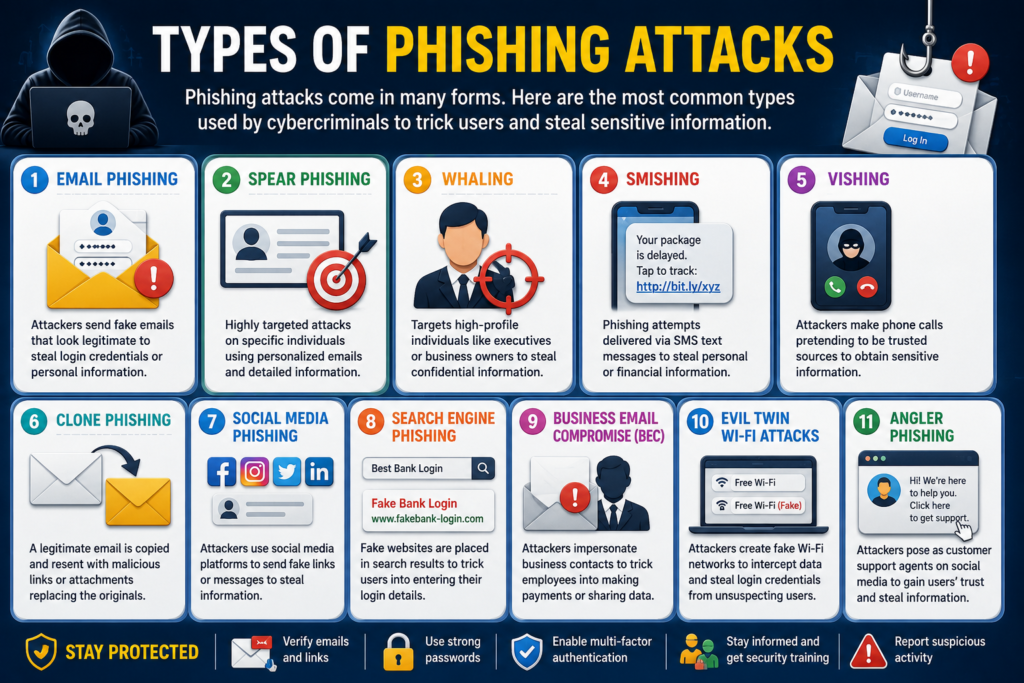
Some phishing attacks target thousands of random people. Others focus on a single executive, employee, or business owner. While the delivery method changes, every attack attempts to steal information, money, or access to valuable accounts through deception instead of technical hacking.
Email Phishing
Email Phishing remains the most common phishing technique worldwide. Attackers send emails pretending to be banks, delivery companies, streaming services, government agencies, or popular technology companies. These emails usually contain urgent warnings that encourage immediate action.
Many Email Scam messages claim your account has been suspended, your payment failed, or suspicious activity has been detected. Clicking the provided link usually opens a fake website designed to steal login credentials or install malicious software.
Spear Phishing
Unlike ordinary phishing, Spear Phishing targets specific individuals. Attackers spend time researching the victim through social media, company websites, or public information before sending personalized messages.
Because the email includes accurate names, job titles, or company details, it often appears more trustworthy. This makes spear phishing significantly more dangerous than traditional mass email campaigns.
Whaling
A Whaling Attack focuses on executives, CEOs, business owners, and senior managers. These individuals often control financial systems, confidential documents, and company decisions, making them valuable targets.
Attackers frequently impersonate lawyers, business partners, or government agencies. Since executives handle sensitive requests daily, a convincing message can result in major financial losses if proper verification isn’t performed.
Smishing (SMS Phishing)
Smishing uses text messages instead of email. Victims receive messages claiming package delivery problems, banking alerts, refund notifications, or account verification requests.
These messages usually contain shortened links that redirect users to fraudulent websites. Because many people trust text messages more than emails, smishing continues to grow rapidly across mobile devices.
Vishing (Voice Phishing)
Vishing replaces emails with phone calls. Attackers pretend to represent banks, internet providers, government agencies, or technical support departments.
The caller often creates panic by claiming your account has been compromised or your identity has been stolen. Victims are pressured into revealing confidential information without taking time to verify the caller’s identity.
Clone Phishing
Clone Phishing begins with a legitimate email that the victim previously received. Attackers copy the original message almost perfectly while replacing the safe attachment or link with a malicious version.
Since the email looks familiar, many people trust it without noticing the small changes. This makes clone phishing especially difficult to detect.
Social Media Phishing
Social media has become another favorite hunting ground for attackers. Fake customer support accounts, giveaway scams, and direct messages often trick users into sharing passwords or personal information.
Many attackers also create fake profiles that imitate celebrities, companies, or friends. These scams frequently request money, verification codes, or account credentials.
Search Engine Phishing
Instead of sending emails, attackers sometimes build fake websites designed to appear in search engine results. These pages imitate popular brands and encourage visitors to sign in or enter payment information.
People searching for banking websites, software downloads, or customer support may unknowingly visit fraudulent pages before realizing something is wrong.
Business Email Compromise (BEC)
Business Email Compromise, commonly called BEC, targets organizations rather than individuals. Attackers impersonate executives, suppliers, or financial departments to request wire transfers or confidential documents.
Unlike traditional phishing campaigns, BEC attacks often contain no attachments or malicious links. They rely entirely on trust, urgency, and convincing communication.
Evil Twin Wi-Fi Attacks
An Evil Twin attack creates a fake Wi-Fi network that looks identical to a legitimate public hotspot. Victims connect to the network believing it is genuine.
Once connected, attackers can monitor internet traffic, capture login credentials, and redirect users to fake websites. Public places such as airports, hotels, and coffee shops are common locations for these attacks.
Angler Phishing
Angler phishing takes place on social media platforms. Attackers create fake customer support accounts that quickly respond to users asking companies for help.
Victims believe they are communicating with official support representatives. Instead, they are guided toward fake websites or persuaded to share passwords and personal information.
Comparison of the Most Common Types of Phishing
| Type | Main Target | Delivery Method | Primary Goal |
| Email Phishing | General public | Steal login credentials | |
| Spear Phishing | Specific individuals | Personalized email | Account compromise |
| Whaling | Executives | Financial fraud | |
| Smishing | Mobile users | SMS | Credential theft |
| Vishing | Phone users | Voice call | Personal information |
| Clone Phishing | Existing contacts | Modified email | Install malware or steal credentials |
| Social Media Phishing | Social media users | Direct messages | Account theft |
| Search Engine Phishing | Web users | Fake websites | Financial and login theft |
| Business Email Compromise | Organizations | Business fraud | |
| Evil Twin Wi-Fi | Public Wi-Fi users | Fake hotspot | Data interception |
| Angler Phishing | Customer support seekers | Social media | Identity theft |
“The more realistic a phishing message looks, the more dangerous it becomes. Always verify before you trust.”
Real-Life Examples of Phishing Attacks
Reading about phishing is helpful, but seeing how real scams work makes the danger much easier to understand. Most phishing campaigns don’t use advanced hacking tools. Instead, they imitate trusted brands that millions of people use every day. These Phishing Examples show how a simple message can become a successful phishing attack when someone reacts without verifying the source.
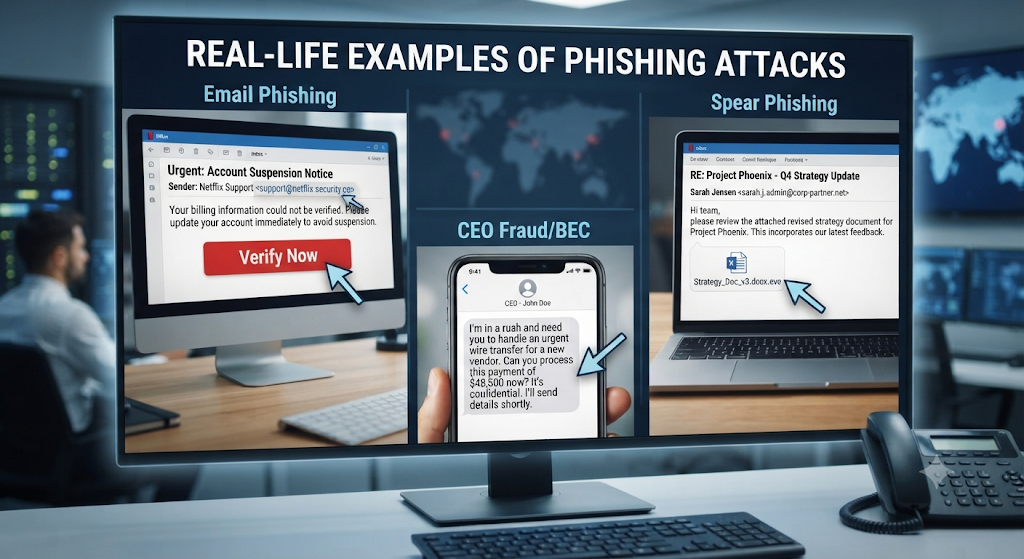
The good news is that most phishing attempts leave small warning signs behind. If you slow down, inspect the message, and think before clicking, you can avoid many common scams. Understanding these real-world situations strengthens your Internet Security, improves online safety, and helps you recognize suspicious activity before it causes harm.
Fake Bank Emails
Imagine receiving an email claiming your bank has detected suspicious activity. The message asks you to verify your account immediately or risk having your online banking suspended. It includes your bank’s logo, professional colors, and even customer support information, making the phishing email appear completely legitimate.
When you click the provided link, you’re taken to a convincing phishing website that closely copies the bank’s login page. After entering your username and password, the information goes directly to cybercriminals, who may quickly access your financial accounts before you even realize what happened.
Fake PayPal Messages
PayPal users are frequent targets because many people make online purchases every week. Attackers often send emails claiming that a payment failed, an unusual login occurred, or account verification is required to restore access.
The message usually encourages immediate action by creating panic. Instead of logging into your account through the official website, victims unknowingly enter their details into a fake login page, resulting in credential theft and possible financial fraud.
Fake Microsoft Login Pages
Microsoft accounts often store emails, documents, photos, and business files. Attackers know this, so they frequently impersonate Microsoft security alerts that warn users about suspicious login attempts or expiring passwords.
Victims who follow the provided link arrive at a professional-looking sign-in page that closely resembles Microsoft’s official website. Once login details are entered, attackers gain access to email accounts and connected services, placing sensitive information at serious risk.
Fake Google Account Alerts
Google services connect Gmail, Google Drive, YouTube, Photos, and many other accounts. Attackers exploit this by sending convincing security notifications that claim unusual activity has been detected.
The fake alert usually requests immediate verification to protect the account. However, instead of increasing account security, the victim unknowingly hands over passwords that attackers later use to access multiple Google services.
Cryptocurrency Scams
Cryptocurrency has created new opportunities for scammers because transactions are difficult to reverse. Fake investment opportunities, wallet verification requests, and exchange notifications frequently appear through emails, advertisements, and social media messages.
Victims are often directed to fraudulent websites where they enter wallet credentials or transfer digital assets. Since cryptocurrency transactions cannot usually be canceled, recovering stolen funds becomes extremely difficult.
Online Shopping Scams
Online shopping scams become especially common during major sales and holiday seasons. Attackers send fake delivery notifications, order confirmations, or refund requests that appear to come from well-known retailers.
These messages encourage users to click tracking links or verify payment information. Instead of receiving package updates, victims expose personal information that may later be used for identity theft, financial fraud, or additional phishing campaigns.
Common Signs of a Phishing Email
Most phishing emails follow similar patterns because attackers rely on urgency instead of careful thinking. Learning these warning signs helps you identify dangerous messages before they compromise your personal information.
Even highly convincing emails often contain small mistakes that reveal the scam. Paying attention to these details greatly improves How to Identify Phishing Emails and strengthens your overall Phishing Prevention strategy.
Suspicious Sender Address
Always look beyond the display name. Many phishing emails appear to come from trusted companies, but the actual email address contains unusual words, extra characters, or misspelled domains.
For example, an email claiming to be from a bank might use a completely unrelated email address. Verifying the sender before responding remains one of the easiest ways to avoid an Email Scam.
Urgent Language
Phishing emails frequently create panic by claiming your account will be suspended, your payment failed, or unauthorized activity has been detected. This pressure encourages quick decisions instead of careful thinking.
Whenever a message demands immediate action, pause before responding. Legitimate companies rarely force customers to reveal sensitive information within minutes.
Grammar Mistakes
Professional organizations usually review important emails carefully before sending them. Many phishing messages contain spelling mistakes, awkward grammar, or unusual formatting because attackers often create large numbers of emails quickly.
Although some scams are professionally written, obvious language mistakes remain an important warning sign that should never be ignored.
Fake Links
A hyperlink may appear legitimate while secretly redirecting you somewhere completely different. Attackers often hide dangerous destinations behind familiar text to make victims feel comfortable clicking.
Before opening any link, hover your mouse over it and check the destination. If the address looks unusual, misspelled, or unrelated to the company, avoid clicking it.
Unexpected Attachments
Unexpected files should always raise concerns, especially if you weren’t expecting documents, invoices, or receipts. Opening these attachments may trigger malware delivery or install harmful software without your knowledge.
If you have any doubts, contact the sender through an official communication channel before opening the attachment.
Requests for Passwords
Legitimate companies almost never ask customers to send passwords through email. Any message requesting passwords, verification codes, banking information, or personal details should be treated with extreme caution.
Protecting confidential information is one of the most effective ways to reduce the risk of identity theft and strengthen your overall Digital Security.
How to Identify a Phishing Website
Modern phishing websites closely imitate trusted brands, making visual appearance alone an unreliable way to judge safety. Logos, colors, layouts, and images can all be copied within minutes.
Instead of trusting appearance, verify the website itself. Careful inspection helps prevent online fraud and protects your personal information before it reaches attackers.
Fake Domain Names
Attackers often register domains that closely resemble legitimate websites. They may replace letters with numbers, add extra words, or use slight spelling changes that many users overlook.
Always read the complete web address carefully before entering usernames, passwords, or payment information.
Missing HTTPS
Secure websites normally use HTTPS encryption, shown by a padlock icon in your browser. While HTTPS alone doesn’t guarantee safety, its absence should immediately raise concerns.
If a website handling sensitive information doesn’t use HTTPS, avoid entering personal data.
Poor Website Design
Many phishing websites contain broken images, inconsistent fonts, missing pages, or unusual formatting. These quality issues often reveal that the website was created quickly to support a phishing campaign.
Comparing the website with the company’s official homepage can help identify suspicious differences.
Fake Login Pages
One of the most dangerous phishing techniques involves copying legitimate login pages almost perfectly. Victims believe they are signing into trusted services while their credentials are secretly collected.
Whenever possible, visit websites by typing the official address directly into your browser instead of following links from emails or messages.
Suspicious Pop-Ups
Unexpected pop-ups requesting account verification, software downloads, or payment details should never be trusted automatically. Attackers frequently use alarming messages to pressure users into acting without thinking.
If a pop-up appears suspicious, close the browser tab and access the website again using its official address instead of interacting with the message.
“A phishing attack succeeds when trust replaces verification. Taking a few extra seconds to check a message can prevent months of financial and personal damage.”
How to Prevent Phishing Attacks
You can’t stop attackers from sending phishing messages, but you can stop them from succeeding. Most phishing attacks rely on quick decisions instead of technical weaknesses. When you slow down and verify what you see, you make life much harder for cybercriminals. Understanding How to Prevent Phishing Attacks is one of the best investments you can make for your Internet Security and long-term Digital Security.
There isn’t one tool that blocks every scam. Instead, strong protection comes from combining smart habits with reliable security software. Better cybersecurity awareness, safer browsing practices, and careful email security dramatically reduce the chances of becoming the next phishing victim.
Think Before Clicking
Attackers want you to react immediately without thinking. They often claim your account has been locked, your payment failed, or your package cannot be delivered. These urgent messages encourage emotional decisions instead of careful ones.
Before opening any email, attachment, or website, pause for a few seconds. Ask yourself whether you expected the message and whether the request makes sense. That short pause can stop an entire phishing attack before it begins.
Verify the Sender
Never trust an email simply because it displays a familiar company name. Always check the full sender address carefully because attackers often use domains that closely resemble legitimate businesses.
If you receive an unexpected request, contact the company using its official website or customer support number instead of replying directly. This simple habit protects your account security and reduces the risk of falling for Fake Emails.
Enable Multi-Factor Authentication (MFA)
Even strong passwords can be stolen during a phishing attack. That’s why multi-factor authentication adds an extra layer of protection by requiring another verification step before someone can access your account.
Most major online services support MFA through authentication apps, security keys, or text message verification. Although it takes only a few seconds, this extra step can prevent attackers from accessing your accounts even if they know your password.
Use a Password Manager
Many people reuse the same password across multiple websites. If one account becomes compromised, attackers often try that password everywhere else. This greatly increases the damage caused by credential theft.
A trusted password manager creates unique passwords for every account and stores them securely. You only need to remember one master password while the manager protects the rest of your login credentials.
Keep Software Updated
Software updates do more than introduce new features. They also repair security weaknesses that attackers actively search for. Ignoring updates leaves your computer and mobile devices vulnerable to both phishing and malware attacks.
Enable automatic updates whenever possible. Keeping browsers, operating systems, and applications current improves online safety and reduces opportunities for malware delivery.
Install Antivirus Software
Reliable antivirus software can detect dangerous files, block malicious websites, and warn you before harmful downloads begin. Although antivirus cannot prevent every phishing attempt, it adds another important layer of protection.
Modern security solutions also monitor suspicious behavior, helping stop threats before they compromise your personal information. Combining antivirus with safe browsing habits provides much stronger protection than relying on software alone.
Learn Cybersecurity Awareness
Technology alone cannot stop phishing. People remain the primary target because attackers know human emotions are easier to exploit than computer systems. Learning basic security habits helps you recognize suspicious emails before interacting with them.
Organizations that provide regular security awareness training experience fewer successful phishing attacks because employees learn how to identify warning signs and verify unusual requests.
Never Share Sensitive Information
Legitimate companies rarely ask customers to provide passwords, banking information, or verification codes through email or text messages. If someone requests confidential information unexpectedly, verify the request through official communication channels first.
Protecting personal information reduces the risk of identity theft, financial fraud, and unauthorized account access. When in doubt, don’t share anything until you’ve confirmed the request is genuine.
Practical Habits That Reduce Phishing Risk
| Security Habit | Why It Matters |
| Verify every sender | Prevents fake company impersonation |
| Check website URLs | Helps identify fraudulent websites |
| Enable MFA | Protects accounts after password theft |
| Use unique passwords | Limits damage from stolen credentials |
| Update software regularly | Fixes known security vulnerabilities |
| Install trusted antivirus | Blocks many known threats |
| Think before clicking | Prevents emotional decision-making |
| Report suspicious emails | Helps stop future phishing campaigns |
Best Tools to Protect Against Phishing
Security awareness remains your strongest defense, but modern security tools provide valuable backup. They help detect dangerous websites, scan suspicious downloads, and block known phishing campaigns before they reach you.
No single product offers complete protection. The safest approach combines multiple layers of security, including browser protection, antivirus software, spam filters, and careful browsing habits.
Microsoft Defender
Microsoft Defender is built into modern Windows systems and provides real-time protection against many security threats. It scans files, monitors suspicious activity, and helps block known phishing websites before users accidentally interact with them.
Google Safe Browsing
Google Safe Browsing protects millions of users every day by identifying dangerous websites. If you attempt to visit a known phishing page, your browser may display a warning before the website loads, helping improve Safe Browsing and overall security.
Bitdefender
Bitdefender offers advanced protection against phishing websites, malicious downloads, and online threats. Its web protection features monitor internet activity and help identify suspicious pages before sensitive information is entered.
Norton
Norton combines antivirus technology with phishing detection, identity monitoring, and privacy tools. It helps protect users against fake websites while strengthening Identity Protection across multiple online accounts.
Malwarebytes
Malwarebytes focuses on detecting modern cyber threats that traditional antivirus products sometimes miss. It also blocks many malicious websites associated with phishing campaigns and other forms of online fraud.
Spam Filters
Modern email providers automatically use spam filters to identify suspicious messages before they reach your inbox. Although these filters catch many scams, they aren’t perfect. Always review unexpected emails carefully, even if they appear in your primary inbox.
Password Managers
A password manager does more than store passwords. Many password managers recognize legitimate website addresses and refuse to autofill passwords on fraudulent websites. This simple feature helps users avoid entering credentials into a fake phishing website.
Comparison of Popular Anti-Phishing Tools
| Tool | Primary Protection | Best For |
| Microsoft Defender | Real-time security | Windows users |
| Google Safe Browsing | Dangerous website detection | Safe web browsing |
| Bitdefender | Advanced threat protection | Home and business users |
| Norton | Identity and phishing protection | Complete security suites |
| Malwarebytes | Malware and phishing detection | Extra protection layer |
| Spam Filters | Suspicious email detection | Email security |
| Password Managers | Credential protection | Secure account management |
“The strongest defense against phishing isn’t one security tool. It’s a combination of smart decisions, updated software, and good online habits.”
What Should You Do If You Fall for a Phishing Scam?
Realizing you’ve clicked a suspicious link can feel overwhelming. However, don’t panic. Acting quickly often limits the damage and prevents attackers from gaining further access. The first few minutes are critical because cybercriminals move fast once they obtain stolen credentials. If you understand What Is Phishing and respond immediately, you can often protect your accounts before serious harm occurs.
The goal is to secure your accounts, remove possible threats, and reduce the chance of identity theft or financial loss. Follow each step carefully, even if you’re unsure whether the message was genuine. It’s always better to be cautious than regret ignoring the warning signs.
Disconnect the Device
If you believe you’ve opened a dangerous attachment or downloaded a suspicious file, disconnect your computer or mobile device from the internet immediately. This simple action may stop the malware delivery process from communicating with external servers and reduce additional damage.
Change Passwords Immediately
If you entered your login details into a phishing website or fake login page, change your password immediately. Start with the affected account, then update any other accounts using the same password. A strong, unique password greatly improves your account security and reduces the impact of credential theft.
Enable MFA
After changing your passwords, activate multi-factor authentication if it isn’t already enabled. MFA adds another verification step that helps prevent unauthorized access even if attackers already know your password.
Scan for Malware
Run a complete security scan using trusted antivirus or anti-malware software. Some phishing attacks don’t just steal passwords. They also install harmful programs that quietly monitor your activity or collect sensitive information in the background.
Contact Your Bank
If you shared banking information or payment card details, contact your bank immediately. Explain the situation and ask them to monitor your account, temporarily freeze your card, or issue a replacement if necessary. Fast reporting often helps reduce financial losses.
Report the Phishing Attack
Reporting suspicious emails helps email providers and security teams protect other users. Most email services include a built-in option to report phishing messages. You can also notify the company being impersonated so they can warn their customers.
Monitor Your Accounts
Continue checking your email, banking, shopping, and social media accounts for unusual activity during the following weeks. Unexpected password reset emails, unfamiliar purchases, or unknown login notifications may indicate attackers are still attempting to access your information.
Immediate Response Checklist
| Action | Why It Matters |
| Disconnect the internet | Helps stop ongoing malicious activity |
| Change passwords | Protects compromised accounts |
| Enable MFA | Adds another layer of security |
| Scan the device | Detects hidden malware |
| Contact your bank | Helps prevent financial fraud |
| Report the attack | Protects other users |
| Monitor your accounts | Detects suspicious activity early |
Phishing vs Malware
Many people think phishing and malware are the same. They often appear together, but they are different threats. A phishing attack focuses on tricking people into giving away information, while malware is harmful software designed to damage systems, steal data, or spy on users.
Understanding the difference helps you choose the right protection strategy. Good Internet Security combines phishing awareness with reliable antivirus software because one attack often leads to the other.
| Feature | Phishing | Malware |
| Primary Goal | Steal personal information | Damage or control a device |
| Attack Method | Deception and social engineering | Malicious software |
| User Interaction | Usually requires a click or login | May install silently after execution |
| Main Target | People | Devices and systems |
| Example | Fake bank email | Ransomware or spyware |
| Prevention | Awareness and verification | Antivirus and software updates |
Phishing vs Spam
Spam and phishing emails may look similar because both arrive in your inbox. However, their purpose is very different. Spam usually advertises products or unwanted services, while phishing attempts to steal information or money.
Although spam can be annoying, phishing presents a much greater security risk. Recognizing this difference improves email security and helps users respond appropriately.
| Feature | Phishing | Spam |
| Purpose | Steal sensitive information | Send unwanted promotions |
| Intent | Fraud and deception | Marketing or advertising |
| Risk Level | High | Usually low |
| Personalization | Often targeted | Usually generic |
| Typical Content | Fake security alerts | Promotional offers |
| Prevention | Verification and awareness | Spam filters |
Phishing vs Social Engineering
Many people use these terms interchangeably, but they are not identical. Social engineering is a broad technique that manipulates people into revealing information or performing certain actions. Phishing is one specific type of social engineering.
Every phishing attack uses deception, but not every social engineering attack involves email. Some attackers use phone calls, text messages, or even face-to-face conversations.
| Feature | Phishing | Social Engineering |
| Definition | Fraud using fake messages or websites | Manipulating people to gain information |
| Attack Method | Emails, websites, SMS, or calls | Psychological manipulation |
| Communication Channel | Mostly digital | Digital and physical |
| Human Manipulation | Yes | Yes |
| Common Examples | Fake bank email | Impersonating IT support |
| Prevention | Verify messages and links | Awareness and critical thinking |
“The faster you respond after a phishing attack, the greater your chances of protecting your accounts and personal information.”
Why Phishing Is One of the Biggest Cybersecurity Threats
Phishing remains one of the most dangerous Cybersecurity Threats because it targets people instead of computers. Firewalls, antivirus software, and security systems continue improving every year. However, a single careless click can bypass many technical defenses. That’s why learning What Is Phishing and practicing Phishing Prevention are essential for everyone who uses the internet.
Unlike many cyberattacks that require advanced technical skills, phishing relies on trust and human behavior. Attackers create convincing messages that appear genuine. Once victims believe the message, they may unknowingly reveal passwords, banking details, or personal information. This simple technique makes phishing one of the most successful forms of online fraud worldwide.
Financial Losses
Financial damage is often the first consequence of a successful phishing attack. Criminals may steal banking credentials, credit card information, or online payment accounts within minutes. Individuals can lose their savings, while businesses may face significant financial losses due to fraudulent transactions and operational disruption.
Identity Theft
A phishing attack can expose names, addresses, Social Security numbers, phone numbers, and other personal information. Criminals often combine this data with stolen passwords to commit identity theft, open fraudulent accounts, or impersonate victims for additional scams.
Data Breaches
Many businesses become victims when employees unknowingly enter company credentials into fraudulent websites. Attackers can then access confidential documents, customer databases, and internal systems, resulting in expensive data breaches and regulatory challenges.
Business Attacks
Organizations face even greater risks because one compromised employee account may provide access to multiple business systems. Modern phishing campaigns frequently target finance departments, executives, and human resources teams to steal sensitive information or initiate fraudulent payments.
Reputation Damage
Recovering from a phishing attack involves more than financial costs. Individuals may lose trust in online services, while businesses can suffer lasting damage to their reputation. Customers expect companies to protect their personal information, and a single successful attack may reduce confidence for years.
Phishing Statistics (2026)
Phishing continues to grow because attackers constantly adapt their techniques. They use artificial intelligence, automated tools, and convincing fake websites to reach millions of potential victims every day. Although security technology improves each year, phishing remains one of the most reported cybercrimes worldwide.
The following trends highlight why individuals and organizations should continue investing in cybersecurity awareness, stronger email security, and better Digital Security practices.
Global Phishing Trends
| Trend | What It Means |
| Email remains the primary attack method | Most phishing campaigns still begin with email. |
| Mobile phishing continues to grow | More users are targeted through text messages and mobile apps. |
| AI-generated phishing messages are increasing | Scams are becoming more convincing and harder to recognize. |
| Business Email Compromise keeps rising | Organizations remain valuable targets for financial fraud. |
| Credential theft remains a primary objective | Attackers focus on stealing usernames and passwords. |
| Multi-factor authentication reduces account compromise | MFA continues to be one of the most effective defenses. |
What These Trends Mean for Individuals
These trends show that anyone with an email account or smartphone can become a target. Practicing Safe Browsing, verifying every unexpected message, and using a password manager significantly reduce personal risk.
What These Trends Mean for Businesses
Businesses should regularly educate employees through security awareness training, implement multi-factor authentication, and encourage prompt reporting of suspicious emails. Strong security policies combined with employee awareness provide much better protection than technology alone.
Phishing Prevention Checklist
Protecting yourself from phishing doesn’t require advanced technical knowledge. Following a few consistent habits every day can dramatically lower your chances of becoming a victim.
| ✔ Security Habit | Benefit |
| Verify the sender before responding | Reduces email impersonation risks |
| Check website URLs carefully | Helps identify fake websites |
| Never click unexpected links | Prevents accidental phishing attacks |
| Enable Multi-Factor Authentication | Protects accounts after password theft |
| Use unique passwords | Limits damage if one account is compromised |
| Store passwords in a password manager | Improves login security |
| Keep devices updated | Fixes known security vulnerabilities |
| Install trusted antivirus software | Blocks many malicious threats |
| Report suspicious emails | Helps protect other users |
| Think before taking action | Stops emotional decision-making |
“The best defense against phishing isn’t fear. It’s awareness, verification, and smart online habits.”
Frequently Asked Questions
What is phishing?
Phishing is a cyberattack where criminals pretend to be trusted organizations to steal passwords, banking information, or other sensitive data.
What is an example of phishing?
A fake bank email asking you to verify your account through a fraudulent website is one of the most common phishing examples.
How can I identify a phishing email?
Look for suspicious sender addresses, urgent language, fake links, unexpected attachments, grammar mistakes, and requests for confidential information.
What should I do after clicking a phishing link?
Disconnect from the internet if necessary, change your passwords immediately, enable MFA, scan your device, and monitor your accounts for suspicious activity.
Is phishing illegal?
Yes. Phishing is a criminal offense in many countries because it involves fraud, identity theft, and unauthorized access to personal or business information.
Can phishing steal bank information?
Yes. Attackers often create fake banking websites that collect usernames, passwords, payment card details, and online banking credentials.
What is Spear Phishing?
Spear Phishing is a targeted phishing attack that uses personal information to create highly convincing messages for a specific individual or organization.
What is Smishing?
Smishing is phishing delivered through text messages instead of email. These messages often include fraudulent links or requests for sensitive information.
What is Vishing?
Vishing uses phone calls instead of emails. Attackers pretend to represent trusted organizations and pressure victims into revealing confidential information.
How can businesses prevent phishing attacks?
Businesses should provide employee training, enable MFA, deploy email filtering, update software regularly, and encourage staff to report suspicious messages immediately.
Conclusion
Understanding What Is Phishing is one of the most important steps toward protecting your personal information in today’s digital world. While phishing attacks continue to evolve, the basic goal remains the same: trick people into trusting fake messages, fraudulent websites, or deceptive requests. By learning how these scams work and recognizing their warning signs, you can make smarter decisions and reduce the risk of becoming a victim.
Strong cybersecurity doesn’t depend on a single security tool. It comes from combining awareness, careful thinking, secure passwords, multi-factor authentication, trusted security software, and good online habits. Whether you’re protecting your personal accounts or your business, staying alert remains your most valuable defense against modern phishing attacks.
Remember: If a message creates panic, demands immediate action, or asks for confidential information, stop and verify it first. A few extra seconds of caution can prevent months of financial loss and stress.
Continue Learning Cybersecurity
Expand your cybersecurity knowledge with these related guides:
| Related Guide | Learn More About |
| What Is Cybersecurity? | Cybersecurity fundamentals and why they matter |
| Types of Cybersecurity | Different areas of cybersecurity protection |
| Common Cyber Threats | Modern online threats affecting individuals and businesses |
| Network Security | How networks are protected from cyberattacks |
| Firewall Explained | How firewalls filter and block malicious traffic |
| VPN Guide | Secure browsing and online privacy |
| Identity and Access Management (IAM) | Managing user identities and permissions |
| Endpoint Security | Protecting laptops, desktops, and mobile devices |
| What Is Malware? | Understanding malicious software and infections |
| What Is Ransomware? | How ransomware attacks work and how to stay protected |
Ready to Improve Your Cybersecurity?
The best time to protect your devices is before an attack happens. Continue exploring our expert guides to learn about malware, firewalls, password managers, network security, and other essential cybersecurity topics.
Meta Description
Learn what is phishing , explore common types and real-life examples of phishing attacks, and discover effective ways to prevent scams in 2026.
4 Comments