

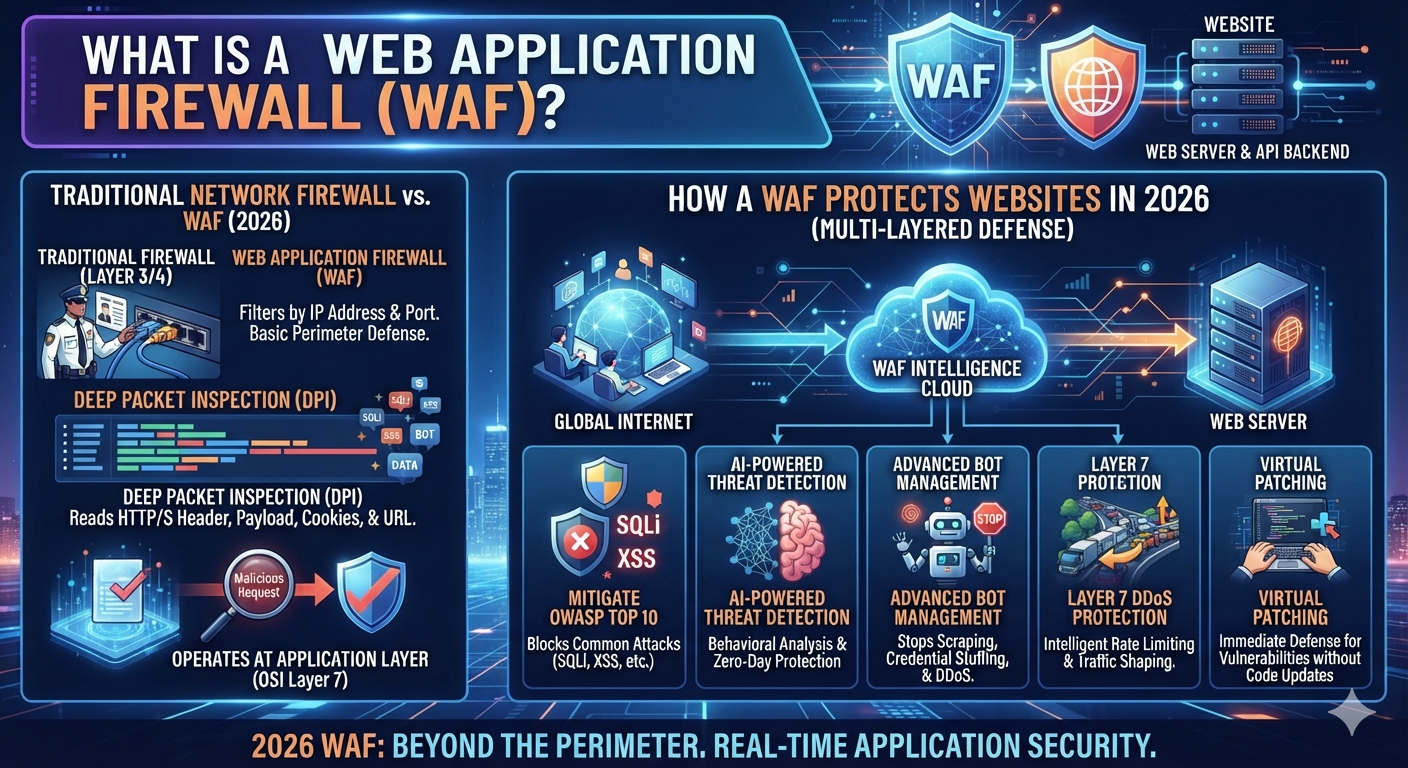
A website can look completely normal to you while receiving suspicious requests every minute. Attackers may test login forms, probe APIs, search for vulnerable plugins, or send carefully crafted input toward a database. A web application firewall adds a security layer between those requests and your application.
In simple terms, a WAF watches web requests and applies security rules before traffic reaches the application. It can help identify patterns associated with attacks such as SQL injection and cross-site scripting. OWASP describes a WAF as an application firewall for HTTP applications that applies rules to an HTTP conversation.
That role has become more important as websites have grown more complicated. Modern sites often depend on APIs, cloud services, JavaScript frameworks, databases, authentication systems, third-party tools, and content management systems. Each component can introduce another security concern.
This guide explains what a WAF does, how it works, what attacks it can help stop, where it fits beside other security tools, and when a website should consider using one. It also explains the limitations because no single security product can protect every part of a modern application.
Trusted Sources
| Source | Where to Use | Link |
|---|---|---|
| OWASP – Web Application Firewall | WAF definition / how WAF works | OWASP Web Application Firewall |
| OWASP – Core Rule Set (CRS) | OWASP CRS section | OWASP Core Rule Set |
| OWASP Top 10 | Common web application attacks | OWASP Top 10 |
| NIST – API Security | API/WAF section | NIST API Security Guidance |
| NIST – API Security PDF | Technical API security reference | NIST SP 800-228 |
| CISA – DDoS Guidance | WAF and DDoS section | CISA DDoS Mitigations Guidance |
What Is a Web Application Firewall (WAF)?
A web application firewall is a security system that inspects HTTP and HTTPS requests sent toward a web application. Its main purpose is web application security rather than general protection for every device connected to a network.
Think of a WAF as a security checkpoint at the entrance of your website. A normal visitor sends a request and the WAF examines it before forwarding it. If the request matches suspicious attack patterns, the system can block it, challenge it, log it, or take another configured action.
Unlike a traditional network firewall, a WAF focuses on application-level communication. OWASP notes that WAFs can be deployed as appliances, server plugins, filters, or reverse proxies. They can also be customized for a specific application.
| Security Technology | Main Focus | Typical Protection |
| Network firewall | Network connections | Ports, protocols, IP traffic |
| Host firewall | Individual device | Local network connections |
| WAF | Web applications | HTTP/HTTPS requests |
| Antivirus | Endpoints | Malware and malicious software |
| EDR | Endpoints | Detection and response |
The key idea is simple. A network firewall asks whether certain network traffic should pass. A WAF can go deeper into the web request itself.
How Does a Web Application Firewall Work?
The process starts when someone requests your website. Their browser sends HTTP requests or HTTPS requests toward the public-facing service. Depending on the architecture, the request reaches a WAF before reaching the origin server.
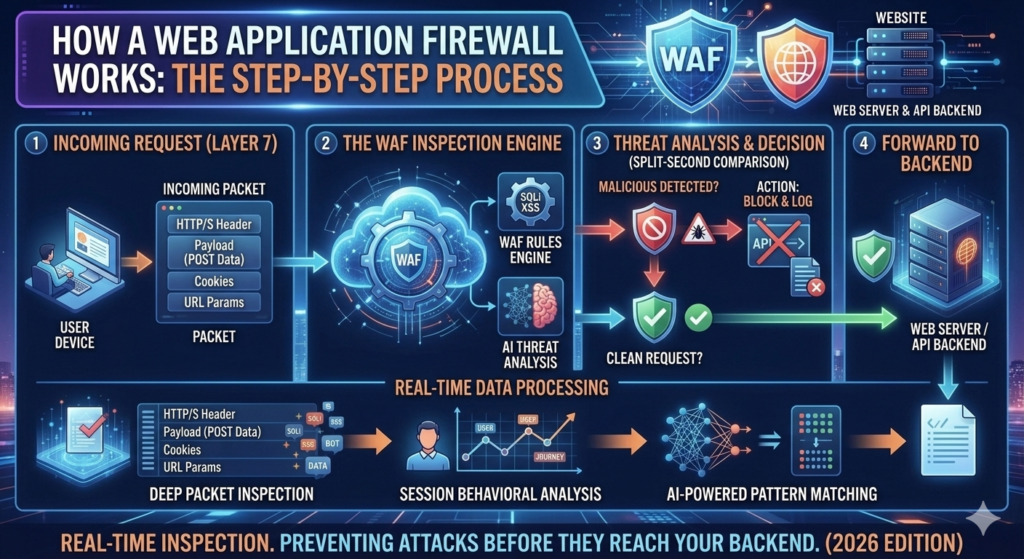
The WAF performs traffic inspection and checks elements such as URLs, headers, parameters, cookies, and request bodies. It compares those details against WAF rules and security policies. A legitimate request can continue toward the web server, while suspicious traffic may be blocked or challenged.
A Simple WAF Request Flow
INTERNET
│
▼
Visitor Request
│
▼
┌─────────────┐
│ WAF │
│ Inspection │
└──────┬──────┘
│
┌─────────┴─────────┐
│ │
Allowed Suspicious
│ │
▼ ▼
Origin Server Block / Challenge
│
▼
Web Application
│
▼
Database
This architecture makes the WAF a useful security layer because it can examine requests before application code processes them. NIST explains that WAFs can operate on parsed HTTP requests and inspect elements such as headers and request bodies.
Why Do Websites Need a WAF in 2026?
The modern website is rarely just a collection of static pages. A typical application may connect to a database, payment provider, authentication system, analytics service, mobile application, and several APIs. That wider attack surface gives attackers more opportunities to test the application.
For businesses, a successful attack can affect much more than a homepage. It can expose customer information, interrupt sales, damage trust, or create expensive recovery work. Strong website security therefore requires multiple layers rather than one product.
The WAF can provide an additional layer of WAF protection against suspicious web traffic. It can also provide visibility into attack attempts, depending on the platform. However, it should complement secure development, authentication, patching, monitoring, backups, and other cybersecurity controls.
WAF vs Traditional Firewall: What’s the Difference?
The biggest WAF vs firewall difference is the level at which each technology operates. A traditional firewall generally focuses on network connections, while a WAF specializes in web application traffic.
For example, a network firewall may control whether traffic can reach a particular port or service. A WAF can inspect an HTTP request and identify suspicious input inside that request. OWASP specifically describes WAFs as application firewalls for HTTP applications.
| Feature | Network Firewall | Web Application Firewall |
| Primary focus | Network security | Application security |
| Examines | Network connections | HTTP/HTTPS requests |
| Common controls | IPs, ports, protocols | URLs, headers, parameters, payloads |
| Protects | Networks and systems | Web applications |
| SQL injection detection | Usually not its main role | Common WAF capability |
| XSS detection | Usually not its main role | Common WAF capability |
| Typical position | Network boundary | In front of web application |
Neither technology makes the other obsolete. Strong network security can work alongside WAF security as part of defense in depth.
What Types of Attacks Can a WAF Prevent?
A WAF can help detect or block several common categories of cyber attacks against web applications. These include SQL injection, cross-site scripting, path traversal, local file inclusion, command injection, suspicious automated traffic, and certain application-layer denial-of-service patterns.
OWASP’s Core Rule Set provides generic detection rules for common web application attacks, including SQL injection, cross-site scripting, and local file inclusion.
However, “prevent” should not be interpreted as “guarantee.” Attackers can use new techniques, application-specific weaknesses, stolen credentials, or business-logic flaws that a generic WAF may not understand.
The current OWASP Top 10 release is the 2025 edition. It remains a useful awareness resource for understanding major web application security risks.
How Does a WAF Protect Against SQL Injection?
SQL injection happens when an application incorrectly handles user-controlled input that reaches a database query. An attacker may try to manipulate that input so the database performs something the developer never intended.
A WAF can inspect incoming requests for patterns associated with SQL injection. If its rules identify suspicious input, the WAF may block the request before it reaches the application.
That can be valuable because the WAF becomes another barrier between an attacker and the database. Still, secure coding remains the real foundation. Parameterized queries, proper input handling, least privilege, and safe database configuration should remain in place.
A useful way to think about this is simple: the WAF is the security guard at the door. Secure application code is the strong lock inside the building. You want both.
How Does a WAF Protect Against Cross-Site Scripting (XSS)?
Cross-site scripting occurs when an attacker manages to inject content that can execute in another user’s browser. Depending on the vulnerability, the attacker may attempt to manipulate a page, steal information, or perform actions through a victim’s browser session.
A WAF can inspect malicious requests for patterns associated with XSS attacks. Generic WAF rules can recognize many common attack signatures and block suspicious requests before they reach the application.
However, XSS defense shouldn’t rely entirely on filtering. Developers should also use appropriate output encoding, safe input handling, secure frameworks, and other application-level protections.
OWASP lists XSS among the common attack types that WAF rules can address.
Can a WAF Protect Websites From DDoS Attacks?
A WAF can help with some forms of application-layer DDoS activity, especially attacks that generate suspicious HTTP requests. WAF rate limiting, bot controls, traffic filtering, and request inspection can reduce certain abusive patterns.
However, not every DDoS attack looks like a malicious web request. Large volumetric attacks can overwhelm network capacity before an application firewall has an opportunity to inspect every request. CISA notes that WAFs can closely inspect website communications for malicious intent but also highlights capacity and bandwidth limitations for some WAF deployments.
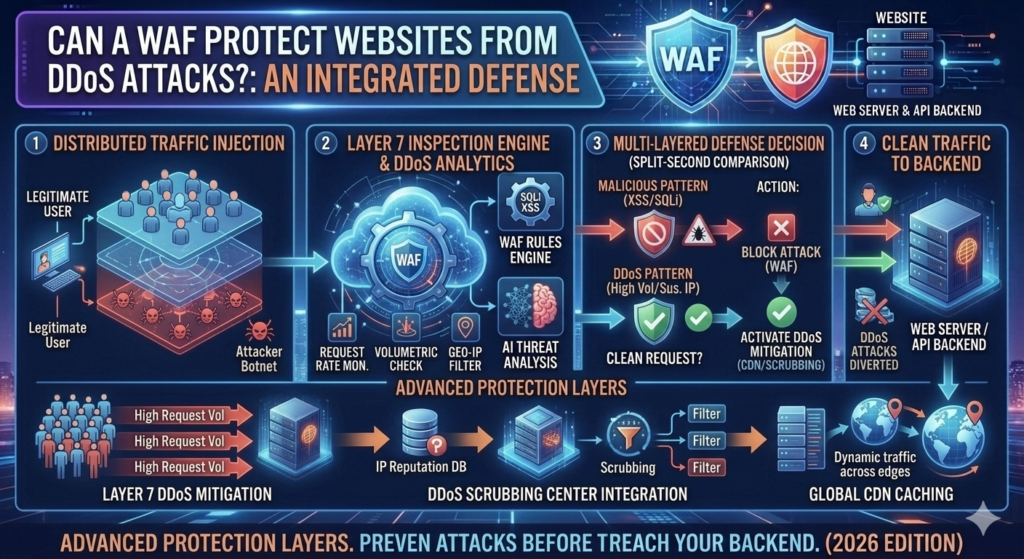
That is why WAF DDoS protection should be viewed as one part of a broader DDoS strategy. Cloud-scale mitigation, traffic distribution, network capacity, rate controls, and origin protection may also matter.
How Does a WAF Protect APIs and Web Applications?
APIs have become a central part of modern software. A website may use an API for authentication, payments, search, mobile applications, dashboards, or communication between different services.
A WAF can inspect HTTP traffic reaching an API and identify certain suspicious payloads. It can also apply rate limiting, access policies, and other controls depending on the platform. NIST’s 2026 API security work emphasizes that modern organizations need dedicated controls across the API lifecycle because APIs introduce their own risks.
However, a WAF doesn’t automatically understand every business rule. For example, it might identify a suspicious SQL injection pattern but not know whether a particular API field should contain a number, a short string, or a specific business value. NIST describes WAFs as useful but not complete API protection.
WAF Rules and Security Policies Explained
At the heart of WAF security rules are instructions that tell the system how to evaluate requests. A rule may look for a known attack pattern, restrict certain traffic, apply a rate threshold, or create a custom condition for a sensitive endpoint.
Organizations can also create custom WAF rules for their own applications. This becomes useful when generic rules don’t understand a site’s unique behavior. A login endpoint, API route, administrator page, or checkout process may need different controls.
The challenge is finding the right balance. A rule that’s too weak may miss suspicious traffic. A rule that’s too aggressive may create WAF false positives and block legitimate customers.
What Is the OWASP Core Rule Set (CRS)?
The OWASP Core Rule Set (CRS) is a collection of generic attack detection rules designed for compatible WAF engines. It aims to provide broad protection against common web application attacks.
OWASP says CRS can protect against categories such as SQL injection, cross-site scripting, and local file inclusion. It works with ModSecurity and compatible WAF implementations.
The distinction is important. CRS is a rule set rather than a complete WAF product by itself. The WAF engine processes requests while the rule set provides detection logic.
OWASP also maintains projects such as ModSecurity and Coraza. Coraza is an open-source WAF framework compatible with the OWASP Core Rule Set.
Cloud WAF vs On-Premises WAF
A cloud WAF usually sits in front of the application infrastructure. Traffic reaches the provider’s security layer before being forwarded to the backend. This approach can reduce infrastructure management for the customer and can scale with the provider’s network.
An on-premises WAF gives an organization more direct control over its own deployment. It may run as an appliance, virtual machine, server component, or another infrastructure-based implementation. OWASP identifies cloud, hardware, and server-based WAF deployments as possible architectures.
| Factor | Cloud-Based WAF | On-Premises WAF |
| Infrastructure | Provider-managed | Organization-managed |
| Scaling | Usually easier | Organization handles capacity |
| Maintenance | Lower operational burden | More internal responsibility |
| Control | Provider-dependent | Greater infrastructure control |
| Deployment | Often quicker | Can require more planning |
| Best fit | Many public applications | Controlled enterprise environments |
The right WAF deployment depends on budget, infrastructure, technical expertise, compliance needs, traffic volume, and operational preferences.
WAF vs Firewall vs Antivirus: What’s the Difference?
These technologies protect different parts of the environment. A WAF focuses on web application requests. A network firewall focuses on network connections. Antivirus and endpoint security focus on malicious software and threats affecting devices.
This makes WAF vs antivirus a misleading either-or comparison. A website owner doesn’t normally choose between them because they solve different security problems.
| Technology | Main Security Role |
| WAF | Web application protection |
| Network firewall | Network traffic control |
| Antivirus | Malware detection |
| EDR | Endpoint detection and response |
| MFA | Account protection |
| Backup | Recovery |
A layered design creates stronger firewall protection because each control handles a different part of the attack surface.
Can a WAF Protect a WordPress Website?
WordPress sites can benefit from a WAF because their public-facing applications often include login pages, plugins, themes, forms, APIs, and third-party integrations. A vulnerability in one component can expose a site to unwanted web traffic.
A WAF for WordPress can add another security layer by inspecting requests before they reach the WordPress application. It may help block known malicious patterns and suspicious automated activity.
Still, WordPress security requires more than a WAF. Keep WordPress and its plugins updated. Remove unnecessary components. Use strong administrator credentials and MFA where appropriate. Maintain reliable backups and monitor unusual activity.
The best WAF protection for websites works alongside secure maintenance rather than replacing it.
What Can a WAF Not Protect Against?
A WAF has limits because it sees web requests rather than the entire business context of an organization. It can identify suspicious patterns, but it cannot automatically understand every legitimate or illegitimate business action.
For example, imagine an online store accidentally allows a customer to change the price of an order through a normal-looking request. The request itself might contain no obvious malicious payload. The flaw exists in the application’s business logic.
OWASP notes that WAFs are less effective against access-control and business-logic issues.
A WAF also doesn’t replace authentication, authorization, secure coding, software updates, endpoint security, backups, or incident response. NIST similarly describes WAF technology as an important control rather than a complete solution.
WAF Benefits for Websites and Businesses
The biggest WAF benefits come from adding another inspection point between the public internet and the application. A WAF can help reduce exposure to common attacks while providing visibility into suspicious requests.
For businesses, that visibility can be useful. Security teams can examine security logs, identify attack patterns, investigate unusual requests, and tune policies. Depending on the service, organizations may also gain rate limiting, bot controls, custom rules, and centralized management.
There is another practical advantage called virtual patching. When a vulnerability appears in a web application, a suitable WAF rule may sometimes reduce exposure while developers work on the permanent code fix.
That isn’t a replacement for patching. It’s a temporary defensive layer.
WAF Limitations and Disadvantages
The main WAF disadvantages involve complexity, cost, tuning, and incomplete visibility. A WAF that blocks too little may provide weak protection. A WAF that blocks too much can interfere with legitimate customers.
WAF limitations also become obvious when attackers exploit stolen credentials, business-logic flaws, insecure internal systems, or compromised endpoints. The WAF may see a perfectly valid request even though the person behind it is abusing a legitimate account.
Configuration requires care as well. OWASP notes that application-specific customization can require significant effort and must be maintained as the application changes.
What Is WAF Rate Limiting and Bot Protection?
WAF rate limiting controls how frequently requests can reach an application or endpoint. It’s particularly useful for login pages, password-reset forms, search functions, APIs, and other resources that attackers may repeatedly target.
WAF bot protection takes the idea further by analyzing automated traffic. Not every bot is bad. Search engines, uptime monitors, and legitimate services may crawl websites regularly. The challenge is separating useful automation from abusive automation.
A WAF may use request patterns, reputation signals, challenges, rate thresholds, or other techniques depending on the provider. These controls can reduce certain automated attacks without requiring every request to be manually reviewed.
What Are WAF False Positives?
A WAF false positive happens when the security system identifies legitimate traffic as suspicious. This can happen because generic rules don’t always understand the exact behavior of a particular application.
Imagine a customer submits a product description containing text that resembles an attack pattern. The request may be completely harmless. Yet an aggressive rule could block it.
This is why WAF monitoring and rule tuning matter. OWASP’s WAF guidance emphasizes customization, while its WARM project highlights the need to tune rules and thresholds to reduce false positives without weakening detection.
CISA also recommends testing WAF deployments before production because security filtering can sometimes disrupt normal operation.
How to Choose the Best WAF in 2026
Choosing the “best” WAF isn’t simply about finding the product with the longest feature list. Your application, traffic pattern, technical team, budget, and risk profile should determine the choice.
For a small site, easy management and reasonable WAF cost may matter most. A large organization may care more about centralized policies, API security, analytics, custom rules, integrations, scalability, compliance requirements, and detailed security telemetry.
| Selection Factor | Why It Matters |
| Managed rules | Provides baseline attack detection |
| Custom rules | Handles application-specific needs |
| Rate limiting | Controls abusive request volume |
| Bot protection | Helps manage automated traffic |
| API support | Protects modern application interfaces |
| Logging | Supports investigation and monitoring |
| Scalability | Handles changing traffic levels |
| Integrations | Connects security with existing systems |
| Support | Helps during configuration and incidents |
The best choice is therefore the WAF that fits your environment rather than the one with the most marketing claims.
How Much Does a WAF Cost?
WAF cost varies considerably because providers use different pricing models. Some services charge according to requests, bandwidth, features, protected applications, or subscription tiers. Self-hosted solutions may reduce licensing costs but require more technical management.
A free or open-source WAF can still create operational costs because someone needs to configure rules, monitor logs, investigate alerts, maintain infrastructure, and tune false positives.
For a business, the real cost should therefore include both the product and the people required to operate it.
| Cost Area | What to Consider |
| Subscription | Provider’s plan or license |
| Traffic | Requests and bandwidth |
| Infrastructure | Servers or appliances |
| Management | Configuration and maintenance |
| Monitoring | Logs and security analytics |
| Support | Vendor or specialist assistance |
Always check the provider’s current pricing before making a purchasing decision because WAF plans and limits can change.
Do Small Websites Need a WAF?
Not every small website needs an advanced WAF. A personal static website with little sensitive information has a different risk profile from a business site that accepts customer accounts and processes important transactions.
A WAF for small business becomes more attractive when the site has login systems, contact forms, customer information, e-commerce functions, APIs, valuable intellectual property, or a history of suspicious traffic.
The right decision should come from risk rather than fear. Even when a WAF isn’t necessary, basic website security still matters. Updates, strong authentication, HTTPS, backups, secure hosting, and careful access control should remain priorities.
Do E-Commerce Websites Need a WAF?
E-commerce websites have more reasons to consider application-level protection because they often expose login pages, account systems, search functions, shopping carts, checkout workflows, and APIs.
A WAF for enterprise or a growing online store can help inspect application traffic, apply rate controls, detect suspicious requests, and provide another barrier around public-facing services.
However, a WAF doesn’t make payment processing automatically secure. Businesses still need secure development, access controls, trusted payment integrations, monitoring, vulnerability management, and appropriate compliance practices.
For an online store, security should protect both the application and the customer journey.
WAF Security Best Practices for 2026
A strong WAF deployment begins with accurate knowledge of the application. Understand which URLs, APIs, login routes, administrative paths, and third-party integrations need protection.
Next, enable suitable managed rules and test them before aggressive blocking. Monitor security alerts and investigate unusual traffic. Keep the WAF rules updated and review custom policies whenever the application changes.
HTTPS should protect traffic in transit. Authentication should protect accounts. MFA can reduce account compromise risk. Developers should fix application vulnerabilities rather than relying permanently on WAF rules.
The goal is layered cybersecurity, not a single defensive wall.
How to Set Up and Configure a WAF
A sensible WAF configuration starts with mapping the application. Identify the public endpoints, origin infrastructure, APIs, login systems, administrative paths, and normal traffic patterns.
The WAF can then be placed in the appropriate position, often as a reverse proxy in front of the application. Managed rules can be enabled in a monitoring or detection mode first. This gives the team time to observe how legitimate traffic behaves.
After testing, the organization can move suitable rules into blocking mode and tune exceptions where legitimate requests are incorrectly detected.
This staged approach matters because changing security rules directly on a busy production site can create unexpected problems. CISA recommends testing WAF deployments before production where disruption is a concern.
How to Monitor WAF Logs and Security Alerts
Installing a WAF is only the beginning. WAF monitoring helps you understand whether the system is working as intended.
Security teams can review blocked requests, source information, requested URLs, timestamps, rule identifiers, request patterns, and response behavior. A sudden increase in blocked traffic may indicate scanning, exploitation attempts, bot activity, or another event worth investigating.
The same logs can also reveal false positives. If legitimate customers repeatedly trigger one rule, the security team can investigate the application behavior and adjust the policy carefully.
CISA has recommended using WAFs alongside logging to help prevent and detect exploitation attempts.
WAF vs CDN: Are They the Same Thing?
A CDN and a WAF often appear together because both can sit between visitors and the origin server. However, they serve different primary purposes.
A CDN focuses on delivering content efficiently through distributed infrastructure and caching. A WAF focuses on web application security, request inspection, and attack mitigation.
Modern cloud platforms may combine both services. In that situation, one network layer can provide content delivery while another capability provides security filtering.
| Feature | CDN | WAF |
| Main purpose | Content delivery | Application security |
| Caching | Core feature | Usually secondary |
| Request inspection | Limited or service-dependent | Core function |
| Attack filtering | Some services provide it | Core function |
| Performance | Major focus | Security-focused |
| DDoS features | Often available | Often available |
So WAF vs CDN isn’t necessarily a competition. Many modern websites use both.
Is a WAF Enough to Secure a Website?
A WAF is valuable, but it isn’t enough by itself. Modern online security depends on multiple controls working together.
Secure application code reduces vulnerabilities. Software updates close known weaknesses. Strong authentication protects accounts. Authorization controls what users can access. Endpoint security protects devices. Network controls protect infrastructure. Backups support recovery.
The WAF adds another layer by inspecting public-facing web traffic.
Think of it like protecting a house. A WAF is one lock on the front door. You still need strong windows, an alarm, trusted occupants, maintenance, and a plan for emergencies.
That layered approach is especially important because application vulnerabilities don’t all appear as suspicious network traffic.
Web Application Firewall FAQs
What does WAF stand for?
WAF stands for Web Application Firewall. It is designed to inspect HTTP application traffic and apply security rules that can identify or block suspicious requests. OWASP describes it as an application firewall specifically designed for HTTP applications.
Is a WAF the same as a firewall?
No. A WAF is a specialized type of application firewall. A traditional network firewall focuses mainly on network traffic, while a WAF focuses on web application requests such as HTTP and HTTPS traffic.
Does a WAF stop hackers?
A WAF can block certain malicious requests and reduce exposure to common web attacks. However, it cannot stop every attacker because some threats involve stolen credentials, vulnerable application logic, insider access, or other techniques outside normal WAF visibility.
Can a WAF prevent SQL injection?
A WAF can detect and block many SQL injection patterns through suitable rules. However, secure application development remains essential. Developers should still use parameterized queries and proper database security.
Can a WAF prevent XSS attacks?
A WAF can identify many common XSS patterns and block suspicious requests. It shouldn’t replace secure coding techniques such as appropriate output encoding and safe handling of user input.
Does WordPress need a WAF?
Not every WordPress site requires one. A WAF can be particularly useful for sites with customer accounts, valuable data, e-commerce features, APIs, or significant public exposure. WordPress updates, secure plugins, MFA, backups, and strong administrator security remain essential.
Is a cloud WAF better than a hardware WAF?
Neither is automatically better. A cloud WAF often offers easier scaling and less infrastructure management. A hardware or on-premises deployment can provide greater infrastructure control. The better choice depends on the organization’s architecture, budget, expertise, and requirements.
Is a WAF necessary for a small business website?
It depends on the website’s risk. A small business site handling customer accounts, forms, payments, or sensitive information may benefit from WAF protection. A simple low-risk static site may have different priorities.
Does a WAF protect against DDoS attacks?
A WAF can help with certain application-layer attacks and HTTP floods. However, large volumetric DDoS attacks may require additional network-level or cloud-scale mitigation. A WAF shouldn’t be treated as a complete DDoS solution.
How much does a WAF cost in 2026?
There isn’t one standard price. Providers may charge according to requests, bandwidth, features, applications, or subscription tiers. Self-hosted WAFs can have lower licensing costs but may require more technical work and infrastructure.
Final Verdict: Is a Web Application Firewall Worth It in 2026?
A web application firewall can be a powerful addition to a modern website’s security architecture. It sits close to the application and gives organizations a way to inspect web requests before those requests reach the backend.
Its strongest use cases include detecting common patterns associated with SQL injection, XSS, malicious requests, automated abuse, and other web application threats. OWASP’s WAF guidance and Core Rule Set provide useful foundations for understanding these capabilities.
But the smartest approach is layered. A WAF shouldn’t become an excuse to ignore secure code, updates, authentication, authorization, monitoring, backups, or endpoint security.
Modern applications also rely heavily on APIs. NIST’s current guidance emphasizes that API security requires controls across development and runtime rather than depending on one security mechanism.
So the real question isn’t simply whether a WAF is “good.”
The better question is whether your website’s risk profile justifies another security layer.
For a growing business, e-commerce platform, SaaS application, or public-facing service, the answer may often be yes. For a simple personal website, other security controls may come first.
Either way, understanding WAF security helps you make a better decision about protecting the applications that customers, employees, and visitors rely on every day.
Ready-to-Explore Now
| RELATED ARTICLE | EXPLORE NOW |
|---|---|
| Hardware Firewall vs Software Firewall: Which Is Better in 2026? | Explore Now |
| AI Cybersecurity Threats in 2026 | Explore Now |
| AI-Powered Cybersecurity | Explore Now |
| Identity and Access Management (IAM) | Explore Now |
| Zero Trust Security | Explore Now |
| AI Scams in 2026 | Explore Now |
| Prompt Injection: What It Is and How It Works | Explore Now |
| Deepfake Scams and AI Fraud | Explore Now |
| Firewall Security | Explore Now |
🛡️ Explore More Topics
EXPLORE ARTIFICIAL INTELLIGENCE →
Meta Description:
Learn what a Web Application Firewall (WAF) is, how it protects websites from SQL injection, XSS, DDoS attacks, bots, and other threats in 2026.
2 Comments