

Artificial intelligence is changing the internet faster than most people expected. The same AI technology that helps people write, code, analyze data, and automate work can also help attackers improve their methods. NIST now treats AI-related cybersecurity as a distinct area involving both AI-enabled cyber attacks and AI-assisted defense.
That doesn’t mean AI has suddenly made every hacker unstoppable. The bigger change is efficiency. Generative AI can help create convincing text, analyze information, automate parts of an attack, and support highly personalized scams. NIST’s generative-AI risk profile specifically notes that offensive AI capabilities can augment phishing, malware, vulnerability discovery, and other attack activities.
For everyday users, that means an old security habit still matters: don’t trust something simply because it looks professional. A polished email, familiar voice, realistic image, or urgent login warning can all be manufactured or manipulated.
This guide explains the major AI cybersecurity threats emerging in 2026. You’ll learn how they work, what attackers are trying to achieve, who is most exposed, and what practical steps can reduce your risk.
What Are AI Cybersecurity Threats?
At the simplest level, AI cybersecurity threats are security risks involving artificial intelligence. AI can become part of the attack itself, help an attacker prepare an attack, or create new weaknesses inside an AI-powered system.
For example, an attacker might use AI-generated phishing to create a convincing email. Another attacker could use AI social engineering to personalize messages around information collected from public profiles. A criminal could also target an AI application itself through prompt injection, poisoned data, or other attacks against the system.
So the term covers more than one situation.
| Type of AI security risk | What happens |
| AI used by attackers | AI assists with phishing, fraud, reconnaissance, or other malicious activity |
| AI systems being attacked | Attackers manipulate or compromise an AI application |
| AI-created content | Fake text, images, audio, or video support deception |
| AI-assisted automation | Attackers automate repetitive parts of campaigns |
| AI used for defense | Security teams use AI for detection and response |
NIST’s Cyber AI Profile organizes this broader problem around three areas: securing AI systems, using AI for cyber defense, and addressing AI-enabled attacks.
How Artificial Intelligence Is Changing Cybersecurity
The biggest shift is speed and scale. Traditional attacks often required people to manually research targets, write messages, inspect information, and repeat tasks. Artificial intelligence can assist with some of those activities much faster.
Imagine a scammer targeting 50 people. Writing 50 different messages manually takes time. With AI tools, the attacker may generate variations based on publicly available information. Each message can appear more relevant to its recipient.
However, AI doesn’t magically remove the need for skill. Attackers still need access, infrastructure, targets, and workable techniques. AI simply changes how efficiently certain tasks can be performed.
Defenders are using the same technology. Machine learning, automated detection, behavioral analysis, and AI-assisted security operations can help identify unusual activity. NIST’s current Cyber AI work specifically recognizes AI-enabled defense as an important part of the modern security picture.
Why AI Creates New Security Risks
AI introduces another layer into systems that already have security weaknesses. An organization might now have an AI chatbot connected to company documents, an AI coding assistant connected to development tools, or an AI agent capable of taking actions.
That creates questions traditional security programs didn’t always have to answer. What data can the AI access? Which instructions should it trust? Can an attacker manipulate its input? What happens if the model produces an unsafe action?
NIST’s research identifies several categories of attacks against AI and machine-learning systems, including evasion, poisoning, privacy, and misuse attacks.
The danger isn’t limited to sophisticated laboratories. A poorly protected AI application can become another doorway into a larger environment.
AI Used by Hackers vs AI Used for Defense
The AI security battle works in both directions. Attackers can use AI to improve reconnaissance, generate convincing communications, analyze information, or automate parts of an operation. Defenders can use AI to detect suspicious behavior, prioritize alerts, analyze large datasets, and respond faster.
That creates an unusual situation. AI-powered security isn’t automatically better simply because it uses AI. The quality of the underlying data, configuration, monitoring, human oversight, and security controls still matters.
NIST’s Cyber AI Profile deliberately addresses both sides: organizations need to secure AI systems while also using AI for defense and preparing for AI-enabled attacks.
Why Are AI Cybersecurity Threats Becoming More Dangerous in 2026?
AI tools have become easier to access and more capable. That doesn’t mean every criminal has advanced offensive AI. It does mean more people can experiment with automation, synthetic media, and language-generation tools.
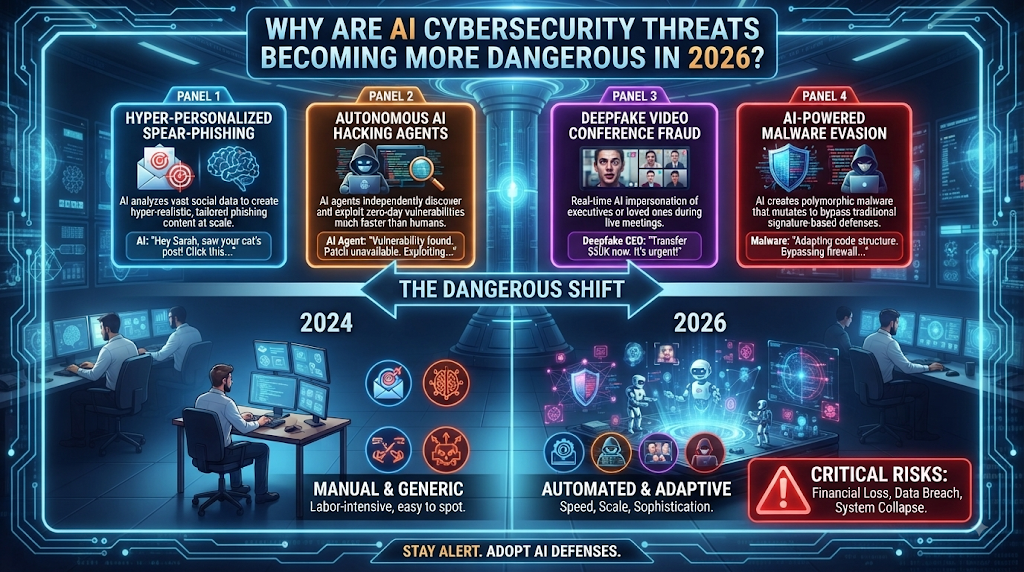
The concern is particularly strong when AI is combined with existing criminal techniques. Cyber threats don’t need to become completely new to become more effective. An old phishing campaign can become more convincing. An impersonation attack can become more personal. A fraud operation can reach more targets.
NIST’s work in 2026 reflects this changing environment. Its Cyber AI Profile is being developed specifically because organizations face new or expanded cybersecurity risks as AI adoption grows.
AI Makes Cyber Attacks Faster
Speed matters because defenders often have limited time to react. An attacker who can quickly analyze information, generate content, and modify an approach may move through parts of an operation faster than a completely manual process.
Consider a phishing campaign. The attacker doesn’t necessarily need AI to invent phishing. Phishing already existed for decades. The difference is that AI phishing attacks can potentially produce more variations and tailor language to different targets.
The same principle applies to defensive teams. Faster analysis can help security professionals investigate alerts and identify patterns sooner.
AI Helps Hackers Personalize Attacks
Personalization makes deception stronger. A generic message saying “Your account has a problem” may be ignored. A message mentioning your employer, recent activity, or a service you actually use can feel much more believable.
AI social engineering can support this personalization by helping attackers organize information and create targeted messages. Public information can become useful when combined with other stolen or leaked data.
This is why protecting your personal information matters. You don’t need to publish passwords for attackers to learn useful details about you.
Automation Makes Attacks Easier to Scale
Automation changes the economics of cybercrime. If a person can automate repetitive work, they may attempt larger campaigns without increasing their workforce.
However, scale doesn’t guarantee success. Security controls still create obstacles. Email filtering, MFA, endpoint protection, fraud monitoring, and user awareness can disrupt attacks.
The important lesson is simple: automation increases opportunity, not certainty. A well-protected account can still resist an automated campaign.
Why Traditional Security Methods May Not Be Enough
Traditional security remains important. Firewalls, antivirus software, MFA, patching, access controls, and backups aren’t suddenly obsolete.
What changes is the environment around them. Security teams now have to consider AI security risks alongside familiar threats such as malware, phishing, credential theft, and data breaches.
NIST’s current approach emphasizes integrating AI-related risks into broader cybersecurity risk management rather than treating AI as a completely separate universe.
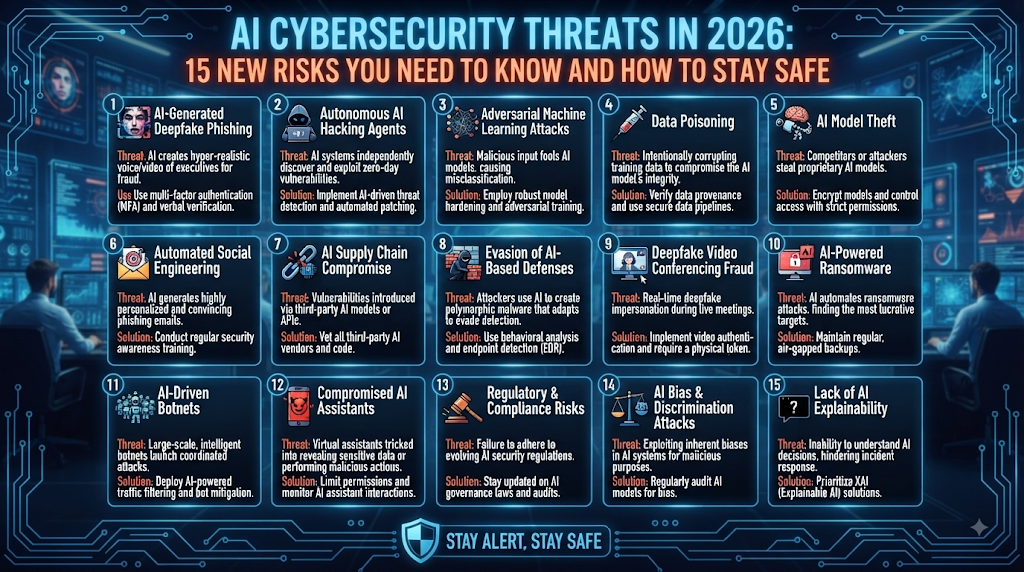
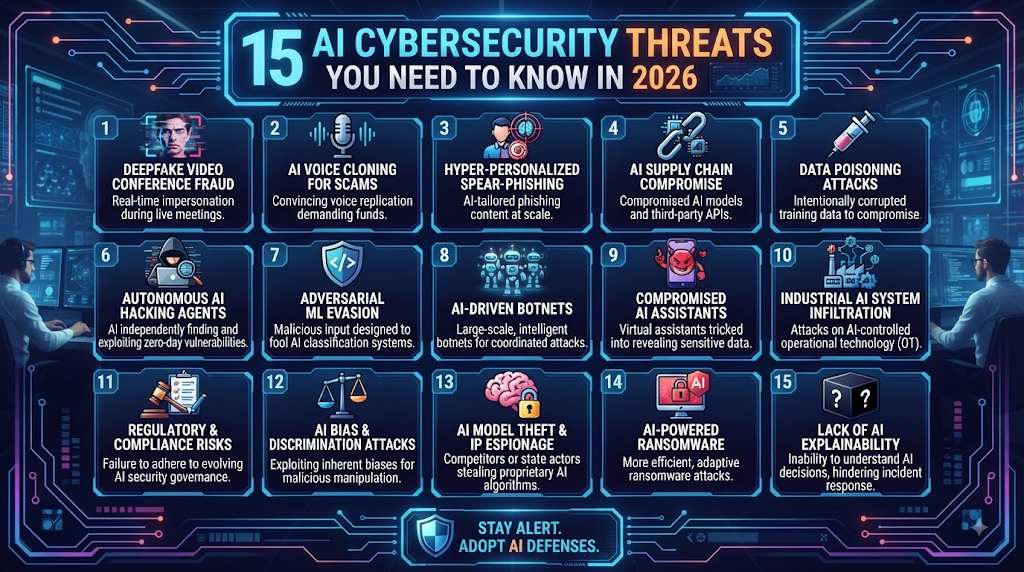
15 AI Cybersecurity Threats You Need to Know in 2026
The following threats aren’t all equally likely for every person. A home user, small business, large corporation, and AI developer face different exposure.Still, understanding the categories helps you recognize where AI changes the attack surface.
AI-Powered Phishing AttacksPhishing has always relied on deception. AI can make that deception harder to recognize.An attacker can use generative AI to produce natural-sounding emails, messages, or support conversations. Grammar mistakes are no longer a reliable warning sign. A message can look polished while still leading to a malicious website.
The real danger comes when AI-generated content is combined with stolen information. A targeted email may mention your company, a real service, or a believable business event.
How AI Phishing Works
A typical attack may begin with information gathering. The attacker identifies a target, studies publicly available details, and creates a message designed around the victim.
The message might claim that your account needs verification. It could imitate a bank, employer, delivery company, software provider, or colleague.
The final goal is usually straightforward: steal login credentials, financial information, authentication codes, or access to an account.
Why AI Phishing Is Harder to Spot
People have traditionally looked for obvious clues such as strange grammar, awkward wording, and obvious spelling mistakes.
Those clues still matter. They’re simply less dependable now.
A convincing message should never be trusted solely because it sounds professional. Check the sender, verify the request independently, inspect the destination before signing in, and avoid using links from unexpected messages.
AI Voice Cloning and Impersonation
A familiar voice can create instant trust. That’s exactly why AI voice cloning is such a serious concern.
Modern voice-generation technology can create synthetic speech that resembles a real person. An attacker may then use that audio during a phone call or combine it with other impersonation techniques.
The technology doesn’t need to perfectly reproduce every detail. In a stressful situation, a convincing voice combined with urgency can be enough to influence someone’s decision.
How AI Voice Attacks Work
An attacker may first obtain audio of the person they want to imitate. Public videos, interviews, social media posts, and other recordings can provide samples.
The attacker then generates synthetic speech and uses it during a fraudulent conversation.
One common scenario involves a supposed family emergency. Another involves a fake executive asking an employee to transfer money or share sensitive information.
The strongest defense is independent verification. Don’t rely on the voice itself.
AI Deepfake Attacks
A deepfake is synthetic or manipulated media designed to make someone appear to say or do something they didn’t actually say or do.
AI deepfake attacks can involve video, images, audio, or combinations of these formats.
The risk goes beyond fake celebrity videos. Criminals can potentially use synthetic media for impersonation, fraud, reputation attacks, social engineering, and identity deception.
Why Deepfakes Can Be Dangerous
Humans naturally trust what they see and hear. That’s a weakness attackers can exploit.
A video call showing a familiar person may feel more convincing than an email. Yet visual evidence isn’t automatically authentic.
When money, passwords, account access, or confidential information are involved, verify through another channel.
For example, if a supposed executive requests a large payment during a video call, confirm the request using a previously known phone number or established company procedure.
AI-Generated Malware
AI can assist with software development. That capability has legitimate uses. Unfortunately, it can also create security concerns.
AI malware refers broadly to malicious software involving AI assistance or AI-driven capabilities. The exact sophistication varies widely.
NIST’s generative-AI risk research notes that AI systems can augment offensive cybersecurity capabilities, including malware and vulnerability-related activities.
What Makes AI-Assisted Malware Different?
The key issue is not that AI has invented an entirely new class of malware.
Instead, AI may help attackers understand code, modify malicious programs, automate tasks, or adapt campaigns.
Security teams, therefore need strong endpoint security, application controls, patch management, and behavior-based detection.
Automated Social Engineering
Social engineering attacks target people rather than only computers.
Attackers manipulate trust, fear, curiosity, authority, urgency, or confusion. AI can make these conversations more adaptable.
For instance, if someone doesn’t respond to an initial message, an attacker might change the wording. If the target appears concerned about security, the attacker may shift the story toward account protection.
This flexibility makes AI social engineering particularly uncomfortable. The machine can help produce the words. The criminal still controls the objective.
Why Humans Remain a Major Target
Technology can’t completely remove human judgment from security.
You may have excellent antivirus software and still approve a fraudulent payment. You may have MFA enabled and still give an attacker a verification code.
That’s why security awareness remains one of the most important layers in modern cybersecurity.
AI-Powered Password Attacks
Passwords remain a major target because one stolen credential can unlock multiple systems.
Attackers already use techniques such as credential stuffing and password guessing. AI can potentially help organize stolen information, prioritize targets, or identify patterns in exposed data.
The safest approach isn’t trying to create a clever password that you’ll remember everywhere.
Instead, use strong passwords that are unique for each important account. A password manager can make this much easier.
Why MFA Still Matters
A password alone is a single barrier.
Multi-factor authentication adds another verification step. If an attacker obtains your password, MFA can make account access substantially harder.
For especially sensitive accounts, use stronger authentication methods where available, such as passkeys or hardware security keys.
AI Identity Theft
Identity theft doesn’t require an attacker to steal your entire identity in one move.
Criminals can collect small pieces of information from different places. Names, addresses, phone numbers, email addresses, employment details, account information, and leaked credentials can become useful when combined.
AI identity theft becomes more concerning when automation helps attackers organize or exploit these details at scale.
What Attackers Want
The target may be your financial accounts. It could also be your email, social media, cloud storage, or other online services.
Once an attacker controls one account, they may use it to attack additional accounts.
That’s why identity protection should include account security, privacy awareness, MFA, credit monitoring where appropriate, and careful handling of personal information.
Automated Account Takeover
Account takeover happens when an attacker gains unauthorized access to an existing account.
A stolen password may be the starting point. Attackers can also use phishing, credential stuffing, social engineering, session theft, or recovery-process abuse.
AI account takeover isn’t necessarily a completely new attack technique. AI can instead assist with portions of an existing attack process.
Why One Compromised Account Matters
Your email account is especially important.
If someone controls your email, they may attempt password resets for other services. They could also read private messages, impersonate you, or search for financial information.
Protect your primary email account as if it were the master key to your digital life.
AI-Powered Business Email Attacks
Businesses face a different version of the same problem.
A criminal may impersonate a manager, executive, supplier, accountant, or customer. The objective could involve money transfers, invoices, credentials, confidential files, or changes to payment information.
AI can help make communication look more natural.
Executive Impersonation
Imagine receiving a message that appears to come from your CEO.
The writing sounds normal. The request fits the business. The timing seems believable.
That is where a strong payment-verification process matters. Employees shouldn’t approve sensitive financial changes solely because an email appears authentic.
A second verification channel can stop an expensive mistake.
AI-Generated Fake Websites
A website doesn’t need to look terrible to be fraudulent.
Attackers can create professional-looking pages that imitate banks, retailers, software companies, government services, or popular brands.
Fake websites may use convincing layouts, logos, product descriptions, customer reviews, and security-themed language.
What Should You Check?
Look carefully at the domain name. Don’t assume a page is legitimate because it uses HTTPS.
Check how you reached the website. If an unexpected message is sent you there, close it and visit the company’s official website directly.
A polished interface is not proof of authenticity.
AI-Powered Scam Campaigns
AI can support many kinds of scams because scammers need communication at scale.
One campaign might target job seekers. Another could focus on investors. A different campaign might impersonate customer support.
These aren’t always technically sophisticated AI cyber attacks. Sometimes the technology simply improves the criminal’s ability to communicate.
That distinction matters because everyday users don’t need to understand advanced AI to defend themselves.
They need to recognize pressure, verify identities, protect credentials, and slow down when something feels unusual.
AI-Assisted Data Theft
Data has enormous value.
Attackers may want customer records, employee information, financial documents, passwords, API keys, source code, or confidential business files.
AI data theft can involve AI-assisted discovery, analysis, classification, or extraction of information after an attacker gains access.
The defense starts with basic principles: collect less sensitive data, restrict access, encrypt important information, monitor unusual activity, and remove unnecessary permissions.
AI Attacks Against Cloud Systems
Cloud platforms have changed how organizations store data and run applications.
That flexibility also creates a large attack surface.
Cloud cyber attacks can target stolen credentials, exposed storage, weak permissions, vulnerable applications, compromised API keys, or misconfigured resources.
AI may assist attackers with analyzing environments or automating portions of an attack. At the same time, AI can help defenders monitor enormous volumes of cloud activity.
Why Cloud Security Matters
A cloud account isn’t just another login.
It may provide access to databases, applications, backups, customer records, development environments, and internal systems.
Strong cloud security therefore requires identity controls, least-privilege access, logging, MFA, secure configuration, secrets management, and continuous monitoring.
AI-Powered Fraud and Financial Attacks
Financial fraud becomes more dangerous when deception feels personal.
Attackers can combine stolen information, synthetic voices, fake websites, and convincing messages into one campaign.
The victim may believe they’re speaking with a bank employee or trusted business contact.
Why Financial Requests Need Extra Verification
Money transfers should never depend on one communication channel.
If someone suddenly changes bank details, requests an urgent payment, or asks you to bypass normal procedures, stop.
Verify the request independently using contact information you already trust.
A few minutes of verification can prevent a very expensive mistake.
AI Attacks Against Connected Devices
Your computer isn’t the only device that can become a security concern.
Phones, smart TVs, cameras, routers, watches, home assistants, appliances, and other connected products can all become part of a broader digital environment.
Many IoT devices remain vulnerable because owners forget to update them or leave default credentials unchanged.
Protecting Connected Devices
Start with the basics. Change default passwords. Install firmware updates. Disable features you don’t use. Separate important devices from less trusted devices where practical.
Your smart devices don’t need to be perfect.
They simply shouldn’t become the easiest door into everything else.
Quick Comparison: Traditional vs AI-Powered Threats
| Feature | Traditional Cyber Threats | AI-Powered Threats |
| Attack speed | Often slower | Potentially faster |
| Personalization | Limited | More scalable |
| Content creation | Mostly manual | Highly automated |
| Phishing | Common | More convincing |
| Impersonation | Possible | Easier to enhance |
| Automation | Varies | Potentially extensive |
| Attack volume | Often constrained | Potentially much larger |
The table shows the important distinction: AI doesn’t replace traditional cybercrime. It can amplify existing techniques.
NIST similarly describes AI-enabled attacks as an emerging cybersecurity concern while emphasizing that organizations must also secure AI systems themselves.
The Bigger Picture: AI Is Changing the Attack Surface
The most important takeaway isn’t that AI will automatically defeat cybersecurity.
It won’t.
The bigger issue is that organizations are adding AI to more parts of their digital environment. That means there are now more systems, data flows, models, agents, integrations, and permissions that need protection.
NIST’s 2026 work highlights this exact challenge. Its Cyber AI Profile is designed around securing AI systems, using AI for defense, and addressing AI-enabled attacks.
Another important finding from NIST research is that AI defenses cannot simply be installed once and forgotten. Its June 2026 research argues for a continuous monitor-and-update approach because adaptive adversarial prompts can challenge fixed guardrails.
That principle applies beyond AI developers.
For ordinary users, security should also be continuous.
Update your devices. Review account activity. Replace reused passwords. Enable MFA. Check permissions. Question unexpected requests. And when something suddenly feels urgent, slow down.
That’s often the most powerful security control you have.
How AI Is Making Phishing Attacks More Convincing
Phishing has been around for years. What’s changing is the quality, speed, and personalization of the messages. AI phishing attacks can use generative AI to create natural-looking emails, text messages, and social posts. CISA notes that generative AI can make phishing and social engineering more sophisticated while lowering the cost and effort needed to run campaigns.
A modern phishing message may mention your workplace, a service you use, a recent purchase, or an account you actually have. That personal touch can make fake messages feel legitimate. However, AI doesn’t make the message trustworthy. You still need to check the sender, destination, request, and context before clicking or responding.
AI-Generated Phishing Emails
The old phishing email often looked suspicious. It might contain poor grammar, strange formatting, or an obvious request. AI-generated phishing can remove many of those clues. A criminal can produce polished language that sounds like a bank, employer, retailer, or software company.
That creates a new problem for readers. Good grammar no longer proves legitimacy. Instead, look at the behavior behind the message. Does it create unusual urgency? Does it request a password, payment, or verification code? Does the link lead somewhere unexpected?
Personalized Phishing Messages
Personalization is where these attacks can become especially persuasive. An attacker may combine publicly available information with stolen data and then create a message around the victim’s circumstances.
For example, imagine receiving an email that appears to come from your employer’s IT department. It mentions your actual company name and asks you to sign in because of a supposed security issue. The details may look perfect. Still, the safest move is to open the company’s official website yourself rather than using the supplied link.
Fake Security Alerts
Security warnings naturally create fear. A message saying your account has been hacked can make you react before you think.
Attackers exploit that instinct. A fake bank alert may tell you to confirm a transaction. A fake Microsoft or Google warning may ask you to sign in immediately. The page may then collect your credentials.
Real security notifications can also arrive unexpectedly. That’s why you shouldn’t judge them by appearance alone. Open the official app or type the known website address manually.
How to Spot AI Phishing
The best defense isn’t trying to identify whether a machine wrote the message. Instead, focus on whether the request itself makes sense.
| Warning sign | Why it matters |
| Unexpected login request | Could be credential theft |
| Urgent payment request | May be financial fraud |
| Suspicious link | Could lead to a fake website |
| Request for an MFA code | May help an attacker bypass protection |
| Unusual sender address | Possible impersonation |
| Pressure to act immediately | Designed to reduce careful thinking |
CISA recommends familiar cybersecurity practices such as phishing awareness, MFA, and strong security hygiene because many AI-enhanced attacks still depend on established attack methods.
How AI Voice Cloning Creates New Cybersecurity Risks
Your ears can become another attack surface. AI voice cloning can generate speech that resembles a real person’s voice. CISA has warned that malicious actors can use AI-generated audio to imitate individuals and support phishing, impersonation, and social-engineering campaigns.
The important lesson is simple: a familiar voice isn’t enough proof of identity. If someone suddenly asks for money, confidential information, or account access, verify them through another trusted method.
How AI Voice Cloning Works
Voice cloning systems analyze characteristics from recorded speech and generate new audio that resembles the original speaker. The quality depends on the technology and available reference material.
That means public videos and recordings can sometimes provide useful material for impersonation. CISA specifically warns that public photos and videos can contribute to synthetic-media risks.
Fake Family Emergency Calls
A family emergency creates a powerful emotional reaction. A supposed child, parent, sibling, or relative might call and claim they need money immediately.
The voice may sound familiar. The story may include personal details. The caller may insist that you keep the situation secret.
Don’t let emotion replace verification. Hang up and contact the family member through a number you already know. If necessary, contact another relative and confirm the situation.
Executive Voice Impersonation
Businesses face a similar risk. An employee could receive a call that appears to come from a manager or executive.
The request might involve an urgent wire transfer, confidential document, password, or vendor payment. Because the voice sounds familiar, the employee may feel comfortable acting quickly.
A good company should never rely on voice recognition alone for sensitive financial decisions. Payment verification should use an established second channel.
How to Verify a Suspicious Voice
If a call feels unusual, stop the conversation. Don’t provide sensitive information simply because the caller knows your name.
Use a trusted phone number from your existing contacts. Don’t use a number supplied during the suspicious call.
For businesses, establish verification rules before an emergency happens. That way, employees don’t have to improvise when someone creates pressure.
AI Deepfakes and Synthetic Media Threats
A deepfake can manipulate or generate audio, images, or video to make something false appear authentic. CISA explains that deepfake technology can produce media showing people saying or doing things that never happened.
This creates a serious challenge because people naturally trust their eyes and ears. Deepfake cybersecurity therefore requires more than looking for strange facial movements. Verification and source checking are becoming increasingly important.
Fake Videos
A fake video may show a public figure, employee, executive, or ordinary person appearing to say something they never said.
The video could support fraud, impersonation, misinformation, or reputation damage.
A realistic video isn’t automatically evidence. Look for the original source, publication history, and independent confirmation before treating important claims as genuine.
Fake Images
AI-generated images can create convincing people, documents, products, locations, or events.
A fake profile picture can help an attacker create a believable online identity. A manipulated document could also support an impersonation scheme.
Reverse-image search can sometimes help identify reused or altered media. CISA specifically recommends publicly available tools such as reverse-image search as one way to verify suspicious media.
Deepfake Impersonation
The most concerning use is often impersonation.
Imagine receiving a video call from someone who appears to be your company director. The person asks you to transfer money immediately. Everything looks right.
Instead of asking whether the video “looks real,” ask whether the request can be independently verified.
How Deepfakes Can Be Used in Fraud
Deepfakes can strengthen existing social engineering techniques. They can make fake relationships more believable, support financial fraud, imitate executives, or create fake evidence.
The technology itself isn’t inherently malicious. CISA notes that synthetic media has legitimate uses but can also be deployed deceptively.
That distinction matters. The goal isn’t to distrust every video. It’s to apply stronger verification when the consequences are serious.
How Hackers Use AI for Social Engineering
Technology can protect a computer while leaving the person behind the keyboard exposed.
AI social engineering focuses on manipulating human decisions. Attackers may use trust, fear, authority, urgency, curiosity, or financial pressure to influence victims.
Generative AI can make these conversations more adaptable. Instead of sending one generic message, an attacker can create different versions for different people.
Personalized Social Engineering
Personalization makes deception feel less random.
An attacker may know where you work, what service you use, or who you know. That information can make a fraudulent conversation sound authentic.
However, personal details aren’t proof of identity. Some information may already be public or stolen from another source.
Fake Relationships and Trust
Trust develops over time. That’s why scammers may maintain conversations rather than immediately asking for money.
They might act like a friend, romantic partner, recruiter, customer-service representative, or business contact.
Once trust develops, an unusual request may feel less suspicious.
Psychological Manipulation
Successful social engineering often targets emotion rather than technical weaknesses.
Fear can make you click. Excitement can make you invest. Sympathy can make you send money. Authority can make you obey a request without checking it.
When a message creates intense emotion, pause before acting.
Why Humans Remain a Major Security Target
Even strong technical defenses can’t prevent every person from making a bad decision.
That’s why security awareness belongs alongside passwords, MFA, firewalls, and security software.
A simple rule helps: important requests deserve independent verification.
AI-Powered Malware and Automated Cyber Attacks
Malware remains one of the oldest major cybersecurity problems. AI doesn’t make the concept new. It can potentially make certain parts of the development and operation process more efficient.
CISA has warned that malicious actors may use generative AI to assist malware development and potentially create malware that can better evade some defenses.
How AI Can Assist Malware Development
AI coding systems can understand programming languages and generate or modify code. That capability has legitimate uses for developers.
The risk appears when attackers use similar capabilities for malicious purposes.
Security teams therefore need layered protection rather than relying on one detection mechanism.
Automated Attack Campaigns
Automation can allow attackers to repeat activities at greater scale.
Instead of manually handling every target, criminals may automate portions of reconnaissance, communication, credential testing, or campaign management.
That doesn’t mean every automated attack succeeds. Strong authentication, rate limits, monitoring, and access controls can still create significant barriers.
AI-Assisted Ransomware Threats
Ransomware is designed to disrupt access to data or systems and demand payment.
AI could potentially assist attackers with target research, code development, or operational tasks. Yet ransomware still depends on the underlying compromise succeeding.
For organizations, reliable backups remain crucial. Backups should be protected from the same attack rather than simply sitting permanently connected to production systems.
Why Malware Detection Is Becoming More Important
Traditional signature-based detection remains useful. Modern security systems also examine behavior.
A suspicious process, unexpected network connection, unusual file activity, or abnormal login pattern may reveal malicious behavior even when the exact malware sample is unfamiliar.
That is why threat detection and continuous monitoring matter.
AI Identity Theft and Account Takeover
Identity theft becomes much more dangerous when attackers can connect information from multiple sources.
Your name alone has limited value. But your name combined with an email address, phone number, leaked password, employer information, and financial details can create a much more complete profile.
AI can assist criminals with organizing and exploiting information at scale. The result is a growing concern around AI identity theft and digital impersonation.
How AI Helps Criminals Collect Personal Information
Attackers may gather information from public profiles, data breaches, compromised accounts, fake forms, phishing messages, and other sources.
AI can help process large amounts of information and identify useful relationships.
That doesn’t mean you should disappear from the internet. Instead, limit unnecessary public information and avoid sharing sensitive details casually.
Stolen Credentials
A stolen username and password can be dangerous when people reuse the same password across multiple services.
If one website suffers a breach, attackers may try those credentials elsewhere.
Use unique passwords for important accounts. A password manager can make this practical without forcing you to memorize dozens of complicated passwords.
Account Takeover Attacks
An attacker who gets into your email may have a path toward other accounts.
They could attempt password resets, read private messages, search for financial information, or impersonate you.
Protect your email first. Enable multi-factor authentication, review recovery settings, and investigate unfamiliar login alerts.
How to Protect Your Digital Identity
Your digital identity deserves the same care as your physical identity.
Reduce unnecessary public information. Use unique credentials. Enable MFA. Keep devices updated. Review account activity and act quickly if something looks unfamiliar.
For a deeper guide, DailyTecho can internally link this section to its existing Identity Theft Protection article.
AI-Powered Attacks Against Businesses
Businesses have more valuable targets than ordinary personal accounts. Customer records, invoices, payment systems, employee accounts, source code, and confidential documents can all attract attackers.
AI can strengthen familiar business attacks by making impersonation and communication more convincing.
Business Email Compromise
Business email compromise happens when criminals manipulate or compromise business communications to steal money or information.
An attacker might impersonate an executive or supplier and request a payment change.
The solution isn’t simply “teach employees to spot bad grammar.” Modern messages may look perfectly professional.
Fake Executive Requests
A fake executive may ask for an urgent transfer or confidential file.
Employees should know that seniority doesn’t cancel security procedures.
For high-value transactions, require independent verification. A phone call using a trusted number can be more valuable than another email.
Vendor and Invoice Fraud
Attackers may impersonate suppliers and request changes to banking information.
This is especially dangerous because the request may arrive during a legitimate transaction.
Never change payment information based solely on an unexpected email. Confirm the change through an established vendor contact.
AI-Generated Business Messages
AI can produce polished business language quickly.
That makes writing quality a weaker security signal.
Companies should focus more heavily on identity verification, authentication, access control, payment procedures, and business cybersecurity training.
Protecting Employees From AI Attacks
Employees need practical rules rather than vague warnings.
They should know exactly when to stop, who to contact, and how to verify unusual requests.
Security procedures work best when they’re simple enough to follow during pressure.
AI Cybersecurity Threats in Cloud Computing
Cloud environments contain enormous amounts of valuable information. A compromised cloud identity can expose databases, applications, files, development systems, and business services.
That’s why cloud security has become an important part of the AI-era security conversation.
AI Attacks Against Cloud Accounts
Attackers may target cloud credentials, API keys, administrative accounts, or applications.
AI may help analyze information or automate portions of an attack. Still, basic weaknesses remain common entry points.
Strong authentication and least-privilege access can reduce the damage from compromised credentials.
Cloud Data Theft
Cloud data can include customer records, financial information, employee files, source code, and confidential business documents.
Organizations should know exactly where sensitive data lives and who can access it.
You can’t protect information effectively if you don’t know where it exists.
AI and Misconfigured Cloud Systems
Misconfiguration can expose resources unintentionally.
Examples include excessive permissions, publicly accessible storage, exposed secrets, or poorly protected administrative interfaces.
AI doesn’t need to create weaknesses. It can simply make the existing weakness more valuable to attackers.
Protecting Cloud Data From AI Threats
Use MFA for privileged accounts. Apply least privilege. Rotate secrets. Monitor unusual activity. Encrypt sensitive information and maintain reliable backups.
Cloud environments also benefit from centralized logging because security teams need visibility across many services.
AI-Powered Attacks on Passwords and Login Systems
Passwords remain one of the easiest things for attackers to target.
A criminal doesn’t necessarily need to “break” a password mathematically. They may steal it through phishing, obtain it from a breach, guess a weak password, or reuse credentials from another service.
Password Guessing
Weak passwords create predictable opportunities.
Names, birthdays, simple phrases, and common patterns should be avoided.
A password manager can generate long random passwords that are difficult to reuse or guess.
Credential Stuffing
Credential stuffing uses previously stolen username-password combinations against other websites.
This works because many people reuse passwords.
Unique passwords dramatically reduce the damage when one service is compromised.
Stolen Login Credentials
Treat unexpected login alerts seriously.
If you receive an alert you don’t recognize, don’t automatically click the link in the notification. Open the service directly through its known website or app.
Then review sessions, change the password if necessary, and investigate other suspicious activity.
Why Multi-Factor Authentication Matters
MFA adds another security layer beyond the password.
It’s not perfect. Attackers can still use social engineering to trick people into approving authentication requests or sharing codes.
Still, properly implemented MFA can make stolen passwords much less useful.
AI Cybersecurity Threats to Personal Devices
Your phone and computer contain an enormous amount of personal information.
Emails, photos, saved passwords, documents, payment applications, browser sessions, and private conversations may all be available from one compromised device.
Smartphones
Phones are particularly valuable because they combine communication, authentication, banking, photography, and account recovery.
Keep the operating system updated. Use a screen lock. Install apps from trusted sources and review permissions.
Laptops and Computers
Computers remain common targets for malware, phishing, credential theft, and unauthorized access.
Use security software and keep browsers, operating systems, and important applications patched.
Avoid running unknown files simply because someone sent them through email or messaging.
Smart Home Devices
Cameras, routers, smart speakers, televisions, and other devices can create additional entry points.
Change default credentials and install firmware updates.
Your router deserves special attention because it connects many devices to your home network.
Connected IoT Devices
Internet-connected devices often have different security capabilities.
Some receive regular updates. Others may receive very limited support.
Before buying a connected device, consider how long the manufacturer promises security updates. A cheap device can become expensive if it becomes an unmanaged security risk.
How Can You Tell If an AI Cyber Attack Is Targeting You?
There isn’t one magic sign that proves AI is involved.
Instead, look for combinations of unusual behavior. Unexpected login alerts, password-reset messages, strange payment requests, unfamiliar contacts, suspicious links, and sudden changes to account settings deserve attention.
The key is not proving that an attacker used AI. Your priority is recognizing that something isn’t right.
| Suspicious activity | Recommended response |
| Unknown login | Review account activity |
| Unexpected password reset | Open the service directly |
| Strange payment request | Verify independently |
| Suspicious MFA prompt | Deny it and investigate |
| Unknown device session | Sign it out |
| Unexpected account change | Contact the provider |
How to Protect Yourself From AI Cybersecurity Threats
Good security doesn’t require you to become a cybersecurity expert.
Start with the basics. Use unique passwords, enable MFA, update your devices, protect your personal information, and treat unexpected requests carefully.
Most importantly, don’t allow urgency to make decisions for you.
Use Strong and Unique Passwords
Every important account should have its own password.
Your email, banking, cloud storage, social media, and shopping accounts shouldn’t all depend on the same secret.
Turn On Multi-Factor Authentication
Enable MFA wherever it’s available.
For highly sensitive accounts, consider stronger options such as passkeys or hardware security keys.
Keep Your Devices Updated
Updates often contain security fixes.
Delaying them gives attackers more time to exploit known weaknesses.
Avoid Suspicious Links
If a message asks you to log in, don’t automatically use its link.
Open the official application or type the known website address yourself.
Protect Your Personal Information
Think before publishing personal details publicly.
Information that seems harmless can become useful when combined with other data.
Verify Unexpected Requests
This is one of the most powerful habits you can develop.
If someone asks for money, credentials, confidential information, or an unusual action, verify the request independently.
How Businesses Can Protect Against AI Cyber Attacks
For businesses, AI cybersecurity threats aren’t only a technical problem. They can affect employees, payments, customer data, cloud systems, and everyday operations. NIST’s Cyber AI Profile treats AI-enabled attacks and AI-enabled defense as separate areas that organizations need to address.
The strongest approach is layered protection. A company shouldn’t depend on one security product or assume employees will recognize every fake message. Business cybersecurity works better when authentication, access controls, employee training, monitoring, backups, and incident response support one another.
Employee Security Training
Employees are often the first people to encounter a suspicious message. Training should therefore cover more than traditional phishing examples.
Workers should understand AI-generated phishing, fake invoices, executive impersonation, suspicious MFA requests, deepfake calls, and unusual payment instructions. Training should also teach employees what to do when they’re uncertain.
A good security culture makes asking “Can I verify this?” normal rather than embarrassing.
Strong Authentication
Passwords alone create unnecessary exposure. Businesses should protect important systems with multi-factor authentication, preferably using stronger phishing-resistant methods where practical.
Privileged accounts deserve extra protection because they can provide access to sensitive systems. Companies should also review who has administrative access and remove unnecessary privileges.
Payment Verification
Financial requests deserve special treatment.
Suppose an employee receives a message that appears to come from a company executive. The request says a vendor’s bank details have changed and payment must happen immediately.
The employee shouldn’t approve the change from the message alone. A predefined verification procedure can stop the transaction before money leaves the company.
Email Security
Modern email security needs multiple layers. Filtering can block known malicious content while authentication technologies can help reduce domain impersonation.
However, no filter catches everything. Employees still need a reliable way to report suspicious messages.
Organizations should also monitor compromised accounts because an attacker who takes over a legitimate mailbox can send messages that appear much more trustworthy.
Incident Response Planning
A company should decide what happens before a serious incident occurs.
An incident response plan should identify who investigates suspicious activity, who can disable accounts, who contacts banks, who handles customers, and who communicates with leadership.
CISA emphasizes secure-by-design principles and continued security throughout the AI system lifecycle.
Can AI Also Help Defend Against Cyber Attacks?
There’s another side to this story. Artificial intelligence isn’t only useful to attackers. Security teams can also use AI to process large amounts of information and identify unusual activity.
NIST’s Cyber AI Profile specifically includes AI-enabled cyber defense as one of its three major focus areas. CISA has likewise described AI and machine learning as technologies that can support threat hunting and security analysis.
That makes the AI security race more complicated. Attackers can gain new capabilities while defenders can use the same broad technology to improve detection and response.
AI Threat Detection
Security systems generate enormous amounts of information.
A large organization may have millions of login events, network connections, application events, and device signals. Humans can’t manually inspect every event.
AI can help identify patterns that deserve investigation. A sudden login from an unusual location combined with unfamiliar device activity may become more interesting when multiple signals are analyzed together.
AI-Powered Email Security
AI can examine language, sender behavior, links, attachments, and communication patterns to identify suspicious messages.
The goal isn’t simply to determine whether an email contains a particular keyword. Modern security systems can consider multiple signals at once.
Still, AI detection isn’t perfect. Legitimate messages can look unusual while sophisticated attacks can sometimes avoid detection.
Fraud Detection
Banks and payment companies already use automated systems to identify suspicious transactions.
AI can analyze patterns such as unusual locations, spending behavior, transaction timing, and other signals.
A suspicious transaction doesn’t automatically mean fraud. Instead, it can trigger additional verification or review.
Automated Security Monitoring
Security teams can use automation to prioritize alerts and investigate repetitive events.
This matters because analysts often face enormous alert volumes.
Good automation can reduce repetitive work while allowing human experts to focus on incidents that require judgment.
Human Oversight in AI Security
AI shouldn’t become a blind replacement for security professionals.
Models can make mistakes. They can misunderstand context. Attackers can deliberately manipulate systems. NIST’s Cyber AI work recognizes that organizations need to manage risks across AI systems, AI-enabled attacks, and AI-enabled defense.
The best model is usually a human plus machine.
AI handles scale. Humans handle context, judgment, accountability, and difficult decisions.
What Is the Future of AI Cybersecurity?
The next phase of cybersecurity won’t simply be “AI versus humans.” It will be a continuous contest involving AI systems, traditional security tools, human defenders, automated attacks, and new defensive technologies.
NIST’s current Cyber AI initiative reflects this broader view by focusing on securing AI itself, defending with AI, and preparing for AI-enabled attacks.
For everyday users, that means cybersecurity habits will become even more important. Technology may become better at detecting threats while attackers become better at creating believable deception.
More Advanced AI Attacks
Future attacks may become more adaptive and personalized.
Instead of sending one message to thousands of people, attackers could potentially create campaigns that adjust based on a target’s behavior.
However, predictions about exactly how these attacks will develop should be treated carefully. AI capabilities are changing quickly.
Faster Threat Detection
The defensive side is moving quickly too.
AI can help analyze large datasets and prioritize suspicious activity. CISA has already highlighted AI/ML applications for threat hunting and analysis.
Faster detection can reduce the time an attacker has inside a system.
Human and AI Security Teams
Cybersecurity professionals aren’t disappearing.
Instead, their roles may change. Analysts may spend less time sorting repetitive alerts and more time investigating complex incidents, validating AI decisions, improving security controls, and managing risk.
Why Security Awareness Will Matter More
Technology cannot completely remove human judgment from cybersecurity.
You still need to decide whether a request makes sense. You still need to verify unexpected payments. You still need to protect your accounts.
In an AI-heavy internet, security awareness may become even more valuable because seeing or hearing something will no longer guarantee that it’s authentic.
How to Build an AI Cybersecurity Protection Routine in 2026
The best AI attack prevention strategy isn’t one complicated product. It’s a collection of small habits that work together.
For personal accounts, start with unique passwords and MFA. Keep devices updated and protect your primary email account. For businesses, add least-privilege access, employee training, payment verification, backups, monitoring, and an incident response process.
| Security layer | What it protects |
| Unique passwords | Reduces credential reuse |
| MFA | Adds another authentication layer |
| Software updates | Fixes known vulnerabilities |
| Security software | Helps detect malicious activity |
| Privacy controls | Reduces exposed personal information |
| Employee training | Reduces social-engineering risk |
| Backups | Helps recover from destructive attacks |
| Monitoring | Helps identify unusual activity |
| Verification procedures | Reduces fraud and impersonation |
CISA’s guidance emphasizes that many fundamental cybersecurity practices still apply even as AI changes the threat landscape.
That’s an important point. You don’t need to throw away everything you already know about cybersecurity.
You need to strengthen it for a world where attackers can create more convincing content and where AI itself becomes another system that must be protected.
AI Cybersecurity Threats FAQ
What are AI cybersecurity threats?
AI cybersecurity threats are security risks involving artificial intelligence. They include AI-assisted phishing, impersonation, fraud, malware development, identity theft, and attacks against AI systems themselves.
NIST’s current Cyber AI framework groups the issue into securing AI systems, AI-enabled attacks, and AI-enabled defense.
How is AI used in cyber attacks?
AI can assist attackers with tasks such as generating convincing messages, analyzing information, personalizing communications, automating repetitive work, and potentially supporting malware or vulnerability-related activities.
The exact capabilities depend on the tools, access, and attack environment.
What is the biggest AI cybersecurity threat in 2026?
There isn’t one universal biggest threat for everyone.
For consumers, phishing, impersonation, account takeover, and fraud can be major concerns. Businesses also face risks involving email compromise, cloud environments, data theft, and attacks against AI applications.
Can AI be used to steal passwords?
AI can assist existing credential attacks such as phishing, social engineering, credential analysis, and automated attempts.
It doesn’t mean AI can simply “guess every password.” Strong unique passwords and MFA remain important defenses.
Can AI create malware?
AI can assist with software-related tasks and may support malicious development. NIST’s generative-AI risk research identifies malware and vulnerability-related offensive capabilities as areas of concern.
That doesn’t mean every AI system can independently create sophisticated malware.
Can AI steal your identity?
AI can assist criminals with processing information used in identity theft or impersonation.
The underlying problem remains the unauthorized collection and use of personal information, credentials, financial information, and account access.
Final Takeaway
The biggest mistake would be to think AI cybersecurity threats mean ordinary security rules no longer work.They still do.
What has changed is the quality and scale of some attacks. A phishing email can sound natural. A fake voice can sound familiar. A fake video can look convincing. A business request can appear perfectly professional.
That’s why your best defense is layered.
Verify before trusting. Protect important accounts. Use MFA. Keep software updated. Limit exposed personal information. Train employees. Monitor important systems. And never let artificial urgency make an important decision for you.
AI is changing cybersecurity. But good security habits still give you a strong foundation for dealing with that change.
Meta Description:
AI cybersecurity threats in 2026 are evolving fast. Learn 15 new AI cyber risks, real examples, warning signs, and practical ways to stay safe.
Continue Reading
Expand your Artificial Intelligence knowledge with these related DailyTecho AI guides:
- AI Scams in 2026: 15 Warning Signs That Could Save You From Losing Money
- Powerful AI Search Optimization: How to Make Your Website Visible in AI Search Results in 2026
- AI-Powered Cybersecurity: How Artificial Intelligence Is Changing Online Security in 2026
- AI Prompt Engineering Guide (2026): Techniques, Best Practices, Examples & Real-World Use Cases
- AI Workflow Automation in 2026: How Smart AI Workflows Are Transforming Business Productivity
- AI-Native Companies in 2026: How Artificial Intelligence Is Building the Future of Business
- Generative AI in 2026: How Advanced AI Models Are Transforming Business, Creativity, and Everyday Life
- Best AI Automation Tools in 2026: Top AI Platforms for Business, Workflows, and Productivity
- Agentic AI in 2026: How Autonomous AI Systems Will Transform Business, Software, and Human Work
- AI Agents in 2026: What Are AI Agents and How They Will Change Work, Business, and Daily Life
- AI Tools for Content Creators in 2026: Best AI Apps for Writing, Video Creation & Design
- AI Tools for Students in 2026: Best AI Apps for Study and Learning
- What Is AI Automation? Complete Guide to AI Automation Tools and Future Benefits (2026)
- ChatGPT Search vs Perplexity AI: Which AI Search Engine Wins in 2026?
- Best AI Productivity Tools in 2026 (Complete Guide for Maximum Efficiency)
- Why 2026 Belongs to AI-Driven Social Media Managers: The Ultimate Game-Changing Guide
- Ultimate Guide to AI Regulations 2026: US, UK & EU Compliance Explained
The more you understand Artificial Intelligence, the better you can use AI tools, automation, and intelligent technologies in your work, studies, and everyday life.
Ready to Explore Artificial Intelligence?
AI is changing how people work, learn, create, search for information, and run businesses. Continue exploring our expert guides to learn about Generative AI, AI Agents, AI Automation, Prompt Engineering, AI Productivity Tools, and other important AI technologies.
10 Comments