

Introduction
Your online activity leaves a digital trail every single day. Companies collect browsing data. Advertisers follow your interests. Cybercriminals search for weak connections. That is why VPN Explained (2026) has become an important topic for anyone who values Online Privacy and Internet Security. Whether you work from home, shop online, or simply scroll through social media, protecting your personal information should never be an afterthought. Understanding VPN is the first step toward safer internet use.
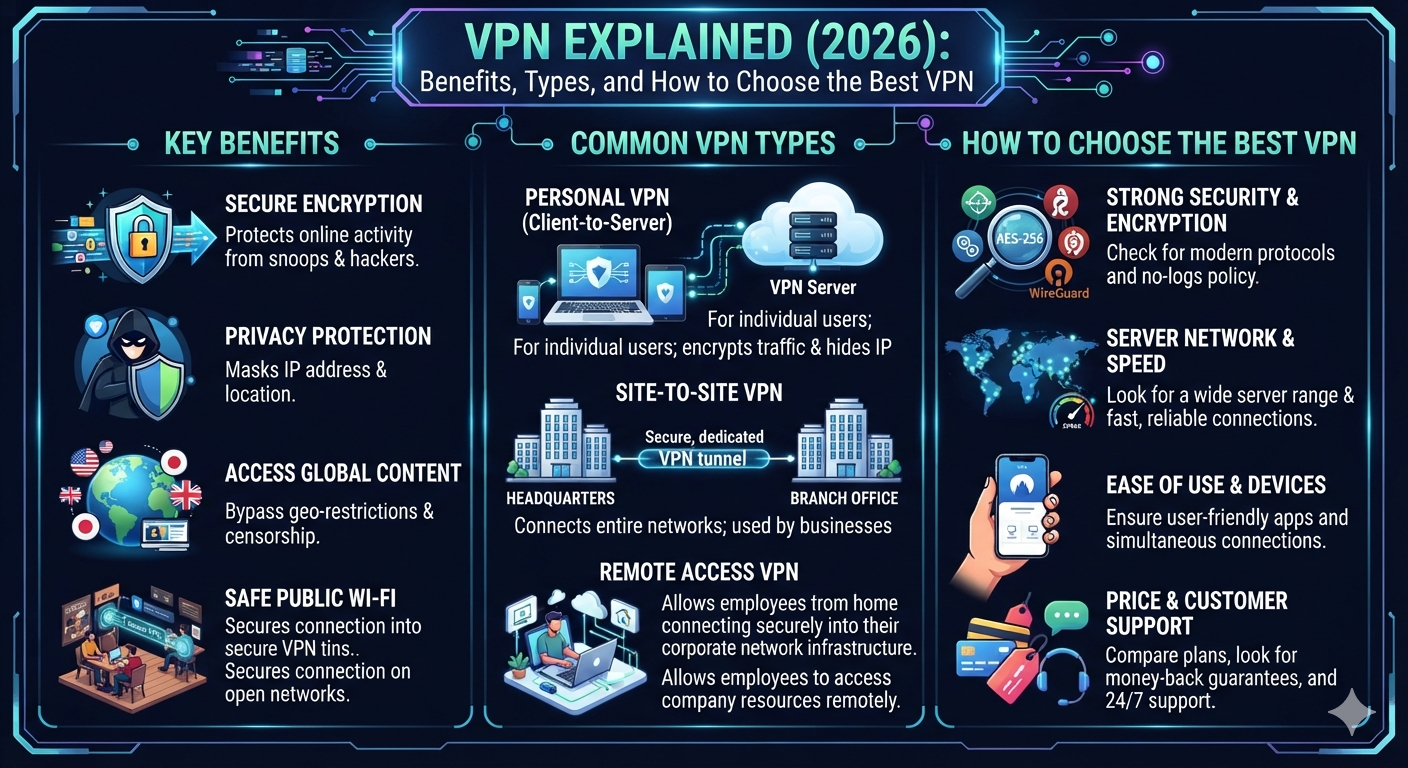
A VPN, also known as a Virtual Private Network, creates a private pathway between your device and the internet. It hides your IP Address, secures your data with VPN Encryption, and improves Secure Browsing on trusted and public networks alike. Throughout this guide, you will learn how VPN works, discover the benefits of VPN, compare different VPN types, understand modern security technologies, and learn how to choose the best VPN for your personal or professional needs in 2026.
What Is a VPN?
Understanding the Meaning of Virtual Private Network
Many people hear the word VPN every day without knowing what it actually does. Simply put, a VPN, or Virtual Private Network, is a technology that creates an Encrypted Connection between your device and the internet. Instead of sending your information directly to a website, the VPN sends it through a secure server first. This process improves Internet Privacy, reduces Online Tracking, and makes your internet activity much harder for outsiders to monitor. If you have ever wondered what a VPN is, think of it as a private tunnel that keeps your digital journey protected from unwanted eyes.
A VPN acts like a protective shield while you browse online. Without one, your internet provider, hackers, advertisers, or even people sharing the same public network may see parts of your online activity. With a trusted VPN Service, your traffic becomes encrypted before it leaves your device. This stronger Secure Internet Connection helps protect personal data during everyday activities such as online shopping, banking, video meetings, and cloud storage access. It also supports Anonymous Browsing, although complete anonymity still depends on your online habits and the services you use.
Why Millions of People Trust VPN Technology
Imagine sending a postcard through the mail. Anyone handling it could read the message because nothing covers the text. Now imagine placing that same message inside a locked metal box before mailing it. Only the person with the correct key can open it. That simple comparison explains VPN encryption better than technical language. A VPN places your internet traffic inside an encrypted tunnel, making the information extremely difficult for anyone else to read.
This protection has become more valuable because cyber threats continue to evolve every year. Businesses, students, travelers, and families all face growing risks from phishing scams, insecure wireless networks, and identity theft. A reliable VPN Provider adds another security layer that supports Internet protection and stronger Privacy Protection. Although a VPN cannot replace other Cybersecurity tools, it plays an important role in building a safer digital experience for both beginners and experienced users.
How Does a VPN Work?
How VPN Encryption Protects Your Internet Traffic
Understanding how VPN works is easier than many people expect. When you connect to a VPN, your device first establishes an encrypted tunnel with a secure VPN server. Every website request travels through that tunnel before reaching its destination. Because the information remains protected by Data Encryption, people trying to intercept your connection usually cannot read the transmitted data. This secure process strengthens Network Security, reduces exposure to cyber risks, and helps Hide IP address information from many websites and online trackers.
Instead of displaying your real location, the VPN shows the IP Address of its own secure server. Websites communicate with that server rather than directly with your device. This approach improves Online Privacy, makes Secure browsing easier on public networks, and limits unnecessary tracking by advertisers. Modern VPN Protocols such as OpenVPN, WireGuard, and IKEv2 create fast and secure encrypted tunnels while maintaining reliable performance for daily internet use.
A helpful way to understand this process is through the comparison below.
| Without a VPN | With a VPN |
| Real IP Address is visible | Real IP is hidden behind the VPN server |
| Internet traffic travels openly | Traffic moves through an Encrypted Connection |
| Higher risk on public Wi-Fi | Better Public Wi-Fi Security |
| More online tracking | Improved Internet Privacy Protection |
| Less protection for personal information | Better Privacy Protection through encryption |
Many people think VPN technology is only for technology experts. That is no longer true. Modern VPN applications work with just a few clicks on Windows, macOS, Android, iPhone, tablets, and even smart TVs. Whether you need VPN for home users, VPN for remote workers, or simply want Safe internet browsing, today’s VPN services make online security much easier than ever before.
Why Is a VPN Important in 2026?
Modern Cybersecurity Challenges That Make VPNs Essential
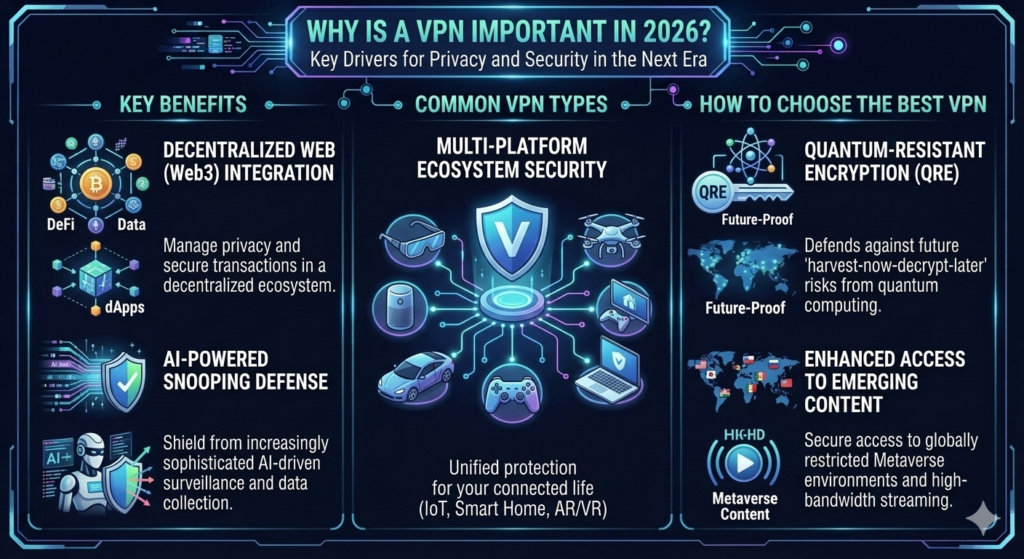
The internet has become a part of everyday life. People work online, manage bank accounts, attend virtual meetings, and shop with a few clicks. At the same time, hackers have become smarter. They use phishing emails, fake websites, ransomware, and data theft to target millions of users every year. This is why VPN Explained (2026) matters more than ever. A trusted VPN, combined with other Cybersecurity practices, helps create a safer online experience and reduces the chances of exposing sensitive information.
In the United States, remote work, cloud computing, and smart devices continue to grow. Every connected device creates another possible entry point for attackers. A secure Virtual Private Network protects your connection when you use hotel Wi-Fi, airport internet, coffee shop networks, or any other public hotspot. Although a VPN cannot stop every cyberattack, it strengthens Internet Security, improves Online Privacy, and supports better Internet protection against many common online threats.
Why Americans Should Use a VPN Every Day
Think about how often you connect to the internet. You may check your bank account in the morning, answer work emails during lunch, and stream movies at night. Every activity shares data across the internet. Without proper protection, your browsing habits, location, and personal information may become visible to advertisers, internet providers, or cybercriminals. Using a trusted VPN Service helps reduce Online Tracking while supporting Anonymous Browsing and stronger Privacy Protection.
Modern VPN technology is no longer limited to businesses. Students use it while studying online. Travelers rely on it during vacations. Families protect multiple devices at home. Professionals secure confidential work files. Even casual internet users benefit from encrypted browsing sessions. If you are searching for the Best VPN for privacy, remember that a VPN works best when combined with strong passwords, two-factor authentication, and updated security software. Together, these layers create a much stronger digital defense.
| Online Activity | Risk Without a VPN | Protection with a VPN |
| Online banking | Data interception | VPN Encryption secures traffic |
| Public Wi-Fi browsing | Hackers may monitor traffic | Better Public Wi-Fi Security |
| Remote work | Business data exposure | Secure Encrypted Connection |
| Online shopping | Personal data theft | Helps Protect personal data |
| General web browsing | Excessive tracking | Improved Internet Privacy |
Top Benefits of Using a VPN
Why Millions of People Use VPN Services Every Day
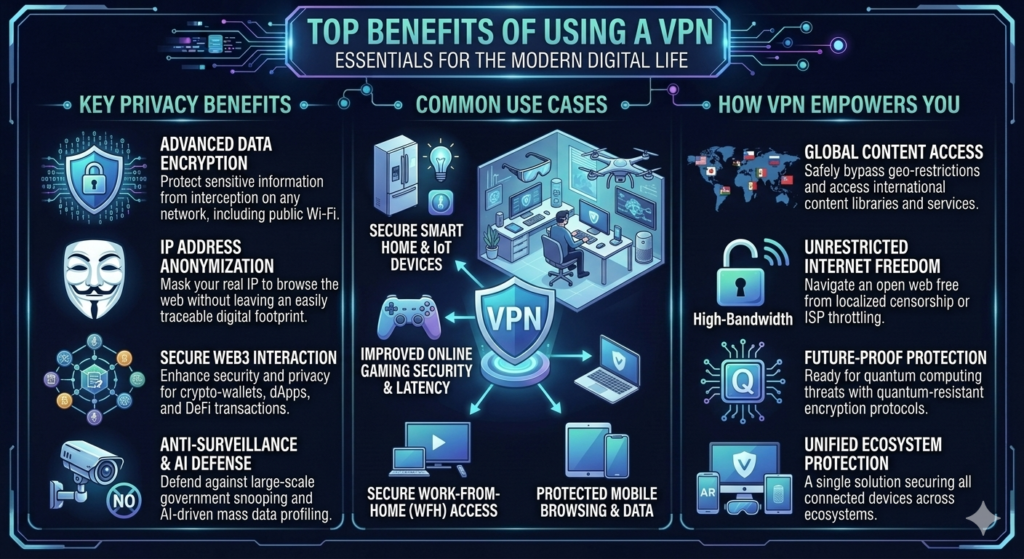
One of the biggest benefits of VPN technology is the extra layer of protection it adds to your internet connection. Instead of exposing your real network details, a VPN creates a secure path that keeps your information private. This makes everyday tasks like online shopping, banking, and logging into work accounts much safer. Whether you are a beginner or an experienced user, understanding VPN explains helps you appreciate how valuable secure internet access has become.
Another important advantage is flexibility. A quality VPN Provider supports phones, laptops, tablets, and desktop computers with a single subscription. Many premium services even protect several devices at once. This makes them ideal for families and small businesses. If you often connect outside your home, using a VPN for public Wi-Fi can significantly reduce the risks associated with unsecured wireless networks.
Real Benefits That Make a VPN Worth Using
Privacy is one reason people install a VPN. Peace of mind is another. When your internet traffic is encrypted, you can browse with greater confidence because your sensitive information is better protected. A VPN also helps Hide IP address information from many websites, making it more difficult for advertisers to build detailed profiles based on your browsing habits. While it does not make you invisible online, it greatly improves Secure Browsing and supports better Internet Privacy Protection.
Businesses also depend on VPN technology every day. A reliable Business VPN allows employees to connect safely to company systems from anywhere in the country. Likewise, a Personal VPN gives home users similar protection for personal activities. Whether you need VPN for business, VPN for remote workers, VPN for streaming, or VPN for home users, choosing a trusted service improves security without making internet access complicated.
| Benefit | Why It Matters |
| Stronger VPN Encryption | Protects your information from interception |
| Better Online Privacy | Reduces tracking by websites and advertisers |
| Improved Secure Internet Connection | Keeps internet traffic encrypted |
| Helps Hide IP address | Makes online tracking more difficult |
| Better Public Wi-Fi Security | Protects you on unsecured networks |
| Safer online banking | Secures financial transactions |
| Secure remote work | Protects business communication |
| Better Network Security | Adds another layer to your cybersecurity strategy |
A VPN should not be viewed as a magic solution. It cannot remove malware from your computer or stop every online scam. However, it remains one of the most practical Cybersecurity tools available today. When combined with antivirus software, software updates, and smart browsing habits, a VPN becomes an essential part of staying safe online in 2026.
Different Types of VPNs
Understanding the Main VPN Categories
Not every VPN serves the same purpose. Some protect personal devices while others secure entire business networks. Learning about the different VPN types helps you select the right solution for your needs. As you continue reading VPN Explained (2026), you will notice that every VPN type focuses on a different security challenge while still delivering strong Internet Security and reliable Online Privacy.
A modern VPN can protect a single smartphone, connect remote employees to office systems, or link company branches across different states. The right choice depends on how you use the internet every day. Whether you need VPN for home users, VPN for business, or VPN for remote workers, understanding each category makes the buying decision much easier.
The Most Common VPN Types You Should Know
The most popular option is the Personal VPN. It protects individuals while browsing, shopping, banking, or using public networks. A Business VPN secures company data and allows employees to work safely from different locations. A Remote Access VPN connects one employee to an organization’s network, while a Site-to-Site VPN securely links multiple office locations together. Cloud VPNs have also become more common because many businesses now rely on cloud platforms for daily operations.
Browser-based VPNs provide limited protection because they usually encrypt only browser traffic instead of the entire device. Mobile VPNs help smartphones and tablets maintain a secure connection even when users switch between Wi-Fi and mobile data. These options show how VPN technology has evolved to meet the needs of different users in VPN in 2026.
| VPN Type | Best For | Main Benefit |
| Personal VPN | Home users | Better Online Privacy and Secure Browsing |
| Business VPN | Organizations | Protects company resources |
| Remote Access VPN | Remote employees | Secure access to office systems |
| Site-to-Site VPN | Multiple office locations | Connects business networks securely |
| Mobile VPN | Smartphones and tablets | Stable encrypted connections |
| Cloud VPN | Cloud-based businesses | Secure cloud access |
| Browser VPN | Casual browsing | Basic browser protection |
Personal VPN vs Business VPN
Which VPN Is Right for Your Needs?
Choosing between a Personal VPN and a Business VPN depends on how you use the internet. A personal VPN focuses on protecting your everyday online activities. It secures your internet connection while you browse websites, watch videos, check emails, or shop online. If your main goal is Safe internet browsing, stronger Privacy Protection, and better Internet Privacy, a personal VPN is usually the right solution.
A business VPN serves a different purpose. Companies use it to protect confidential files, internal applications, customer information, and employee communication. Instead of securing only one person, a business VPN safeguards an entire organization. It also gives administrators greater control over network access and security policies, making it an essential part of modern Cybersecurity strategies.
Understanding the Key Differences
Imagine two people using a VPN. One is a college student checking online banking while traveling. The other manages financial records for a large company from home. Both need protection, yet their security requirements are very different. The student mainly needs privacy. The company employee must also protect sensitive business information and follow corporate security rules.
Although both VPN types rely on VPN Encryption, their features vary. Personal VPNs focus on ease of use, speed, and privacy. Business VPNs prioritize centralized management, secure authentication, and controlled access to company systems. If you simply want the Best VPN for security at home, a personal VPN is usually enough. If you manage employees or sensitive company data, a business VPN becomes a smarter investment.
| Feature | Personal VPN | Business VPN |
| Main Users | Individuals | Companies |
| Primary Goal | Online Privacy | Business Network Security |
| Device Support | Personal devices | Entire organization |
| Setup | Simple | Managed by IT teams |
| Security Controls | Standard | Advanced access management |
| Best Choice | Home users and travelers | Businesses and remote teams |
Remote Access VPN vs Site-to-Site VPN
Comparing Two Popular Business VPN Solutions
Businesses often choose between a Remote Access VPN and a Site-to-Site VPN depending on how their teams work. A Remote Access VPN allows individual employees to connect securely to office resources from almost anywhere. Whether someone works from home, travels for meetings, or visits clients, they can safely access company files through an Encrypted Connection.
A Site-to-Site VPN works differently. Instead of connecting one person, it securely links two or more office networks together. Employees can share resources between locations without exposing important business information to the public internet. Large organizations with offices across several cities commonly rely on this setup because it provides stable and secure communication.
Which Business VPN Should You Choose?
Suppose a company has its headquarters in New York and another office in Texas. A Site-to-Site VPN securely connects both offices so employees can work as though they were in the same building. Now imagine a sales manager working from a hotel while visiting customers. That employee would use a Remote Access VPN to log into the company’s internal network securely.
Both options play an important role in modern Cybersecurity. A Remote Access VPN offers flexibility for individuals, while a Site-to-Site VPN delivers secure communication between entire business locations. Many organizations actually use both technologies together because each solves a different security challenge and contributes to stronger Network Security and dependable Secure Internet Connection.
| Feature | Remote Access VPN | Site-to-Site VPN |
| Connects | Individual users | Entire office networks |
| Best For | Remote employees | Multi-office businesses |
| Flexibility | Very high | Moderate |
| Management | Per user | Per network |
| Typical Users | Remote workers | Large organizations |
| Main Benefit | Secure remote access | Secure office-to-office communication |
Common VPN Protocols Explained
Which VPN Protocol Offers the Best Security?
Every VPN depends on a set of rules called VPN Protocols to create a safe connection between your device and the VPN server. These protocols decide how your data travels, how fast the connection feels, and how secure your information remains. As you continue reading VPN Explained (2026), you will see that choosing the right protocol is just as important as choosing the right VPN provider. Understanding VPN encryption explained helps you make a smarter decision based on your daily internet needs.
The most trusted protocols today include OpenVPN, WireGuard, IKEv2, and IPSec. Each one offers different strengths. Some focus on speed while others prioritize maximum protection. Older protocols such as PPTP still exist, yet most security experts no longer recommend them because they cannot defend against modern Cyber Threats as effectively as newer technologies.
Comparing the Most Popular VPN Protocols
OpenVPN has earned a strong reputation because it balances security, speed, and compatibility. It uses advanced Data Encryption and works on almost every operating system. Many cybersecurity professionals still recommend it for users who want reliable Secure Browsing and long-term protection. It performs especially well when you need a stable Secure Internet Connection for work, banking, or everyday browsing.
WireGuard is one of the newest protocols and has quickly become popular because of its lightweight design and excellent speed. IKEv2/IPSec performs well on smartphones because it reconnects quickly when users switch between Wi-Fi and mobile data. Although every protocol serves a different purpose, most users will enjoy excellent performance by choosing either OpenVPN or WireGuard from a trusted VPN Provider.
| VPN Protocol | Speed | Security | Best Use Case |
| OpenVPN | High | Excellent | Everyday browsing and business use |
| WireGuard | Very High | Excellent | Fast streaming, gaming, and daily use |
| IKEv2/IPSec | High | Excellent | Mobile devices and travelers |
| IPSec | High | Very Good | Enterprise security solutions |
| L2TP/IPSec | Medium | Good | Older business environments |
| PPTP | Very High | Low | Not recommended for modern security |
Free VPN vs Paid VPN: Which One Should You Choose?
Comparing Features, Security, and Value
At first glance, a Free VPN seems like an easy choice. After all, who doesn’t like free software? However, many free services come with important limitations. Some restrict data usage while others offer only a few server locations. A few may even collect browsing information to support advertising. If your goal is strong Online Privacy and dependable Internet Security, it is important to understand these trade-offs before installing any application.
A Paid VPN usually offers a much better experience. Premium providers invest in faster servers, stronger VPN Encryption, regular security updates, and professional customer support. Most also maintain strict no-logs policies, meaning they avoid storing records of your browsing activity. For people who regularly shop online, work remotely, or handle sensitive information, paying a small monthly fee often provides far greater value than relying on a free alternative.
Which Option Is Better for Most Users?
Imagine locking your front door with a basic padlock instead of a high-quality security system. Both offer protection, yet one clearly provides greater peace of mind. The same idea applies when comparing free and paid VPN services. A free VPN may work for occasional browsing, yet a premium service delivers stronger reliability, faster speeds, and better long-term protection.
If you need VPN for streaming, VPN for public Wi-Fi, or secure access while traveling, a premium service usually performs much better. It also supports multiple devices, larger server networks, and improved privacy features. Before making your final decision, use this simple VPN buying guide to compare important features instead of focusing only on price. Choosing the right provider today will help you Choose the best VPN for many years to come.
| Feature | Free VPN | Paid VPN |
| Monthly Cost | Free | Subscription required |
| VPN Encryption | Basic to Good | Advanced and regularly updated |
| Server Locations | Limited | Hundreds or thousands worldwide |
| Speed | Often slower | Faster and more stable |
| Data Limits | Usually limited | Unlimited on most plans |
| Privacy Policy | May vary | Strong no-logs policies |
| Customer Support | Limited | 24/7 support with many providers |
| Best Choice | Casual users | Privacy-conscious users, professionals, and families |
A VPN should never be selected based only on price. Instead, look at its security features, privacy policy, performance, and reputation. A trustworthy provider gives you confidence that your personal information remains protected while you browse, work, or communicate online. That confidence is one of the biggest benefits of VPN technology and a key reason why millions of Americans continue using VPN services in 2026.
How to Choose the Best VPN
Features Every Reliable VPN Should Include
Finding the right VPN may seem confusing because hundreds of services claim to be the best. However, you can make a smart decision by focusing on a few important features instead of flashy advertisements. As you continue reading VPN Explained (2026), remember that the best service is the one that protects your data, respects your privacy, and performs well every day. A trustworthy VPN Provider should always put security before marketing.
The first thing to check is the provider’s privacy policy. A reliable company should clearly explain how it handles user data and whether it keeps activity logs. Next, look for strong VPN Encryption, a large network of secure servers, fast connection speeds, and regular software updates. These features improve Internet Privacy, strengthen Network Security, and help you enjoy a more dependable online experience.
Smart Tips Before You Buy a VPN
Before paying for any VPN subscription, think about how you plan to use it. Someone who travels often may need many international servers. A family may prefer support for multiple devices, while a remote employee might value advanced business security. Reading independent reviews and checking a provider’s history can also help you avoid unreliable services. This simple VPN buying guide helps you compare providers with confidence.
A good VPN should also include useful features such as a kill switch, DNS leak protection, multi-factor authentication support, and responsive customer service. Fast performance matters too because nobody enjoys slow internet. Whether you need the Best VPN for privacy, the Best VPN for security, or a reliable VPN Service for daily browsing, selecting a trusted provider is the most important step toward long-term Internet protection.
| Feature | Why It Matters |
| Strong VPN Encryption | Protects sensitive information |
| No-Logs Policy | Improves Online Privacy |
| Kill Switch | Prevents accidental data exposure |
| Fast Servers | Better speed for browsing and streaming |
| DNS Leak Protection | Keeps your identity protected |
| Multi-Device Support | Protects phones, laptops, and tablets |
| Regular Updates | Defends against new Cyber Threats |
| 24/7 Customer Support | Helps solve problems quickly |
| Independent Security Audits | Builds trust and transparency |
Common VPN Myths You Should Stop Believing
Separating Facts From Fiction
Many people avoid VPNs because they believe information that simply is not true. One common myth is that only hackers use VPNs. In reality, millions of ordinary people use them every day to protect personal information while shopping, banking, working, or using social media. A Virtual Private Network is a legitimate security tool that supports better Online Privacy and safer internet use for everyone.
Another misunderstanding is that a VPN makes you completely invisible online. That is not true. A VPN hides your IP Address and encrypts your connection, yet websites can still collect information through cookies, browser settings, or user accounts. Think of a VPN as one important layer in your overall Cybersecurity strategy rather than a complete solution for every online threat.
Understanding What a VPN Can Really Do
Some users believe every VPN slows internet speed. Modern technologies such as WireGuard and OpenVPN have greatly improved performance, allowing many people to browse, stream, and work with little difference in speed. The quality of your internet connection, the distance to the VPN server, and server traffic usually affect performance more than the VPN itself.
Another myth claims that all VPN services offer the same level of protection. This is far from reality. Trusted providers invest heavily in advanced Data Encryption, privacy policies, and secure infrastructure. Poor-quality services may lack these protections. That is why taking time to Choose the best VPN can make a significant difference in your online safety and overall experience.
VPN Limitations You Should Know
What a VPN Can and Cannot Do
Although a VPN is one of the most valuable Cybersecurity tools, it cannot solve every security problem. It protects your internet connection by creating an Encrypted Connection, yet it cannot remove viruses, stop ransomware, or repair an infected computer. Good online security always depends on multiple protective layers working together.
For example, if someone tricks you into entering your password on a fake website, a VPN cannot prevent that mistake. Likewise, weak passwords remain weak even when you use the strongest VPN available. A VPN strengthens Secure Browsing and helps protect personal data, yet safe online habits still play an essential role in defending against modern cyberattacks.
Building Complete Online Protection
The smartest approach combines a VPN with other security practices. Updated antivirus software, multi-factor authentication, regular system updates, password managers, and careful browsing habits all work together to improve Internet Security. When these protections support each other, cybercriminals have a much harder time stealing valuable information.
Instead of expecting a VPN to do everything, think of it as one strong brick in a solid wall. Every security tool adds another layer of protection. Together they create a safer digital environment for your family, your workplace, and your personal devices. That layered approach remains one of the best ways to stay protected in VPN in 2026.
| Security Tool | Main Purpose |
| VPN | Encrypts internet traffic and protects Online Privacy |
| Antivirus Software | Detects and removes malware |
| Password Manager | Creates and stores strong passwords |
| Multi-Factor Authentication | Adds extra login security |
| Firewall | Monitors and filters network traffic |
| Software Updates | Fix security vulnerabilities |
Expert Tip: A VPN is not a replacement for antivirus software or good security habits. Instead, it works alongside them to create stronger digital protection.
Best Practices for Using a VPN
How to Stay Safe While Using a VPN
Installing a VPN is only the beginning. Using it correctly makes the biggest difference. Keep your VPN turned on whenever you connect to public networks at airports, hotels, coffee shops, or libraries. These places often attract cybercriminals looking for unsecured devices. A trusted VPN creates a Secure Internet Connection that reduces risks while you browse, shop, or work online. This habit improves Public Wi-Fi Security, supports Secure Browsing, and helps protect personal data during everyday internet use.
You should also keep your VPN application updated because software updates often fix newly discovered security weaknesses. Choose a trusted VPN Provider with a clear privacy policy and reliable customer support. If possible, enable features such as a kill switch and DNS leak protection. These tools strengthen Internet Security and reduce the chances of exposing your real identity if the VPN connection suddenly drops.
Everyday Habits That Improve Your Online Security
A VPN works best when combined with smart online habits. Use strong and unique passwords for every account. Turn on multi-factor authentication whenever it is available. Avoid clicking suspicious links in emails or text messages. Even the strongest VPN Encryption cannot protect you if you voluntarily give your personal information to a fake website.
Many security professionals recommend using several protective layers instead of relying on one tool. A VPN protects your internet traffic, antivirus software blocks malware, and a password manager secures your login credentials. Together, these tools create a stronger defense against modern Cyber Threats and improve your overall Internet Privacy Protection.
| Best Practice | Why It Matters |
| Keep your VPN enabled | Protects your connection at all times |
| Update VPN software | Fixes security vulnerabilities |
| Use strong passwords | Reduces account compromise |
| Enable multi-factor authentication | Adds another security layer |
| Avoid suspicious websites | Lowers phishing risks |
| Use antivirus software | Protects against malware |
| Connect to trusted VPN servers | Improves privacy and performance |
The Future of VPN Technology
How VPN Services Are Evolving Beyond 2026
The future of VPN technology looks promising. As cyber threats become more advanced, VPN providers continue improving their services with stronger encryption methods, faster protocols, and smarter security features. Artificial intelligence is beginning to help identify suspicious network activity before it becomes a serious problem. These improvements make VPN Explained (2026) more relevant than ever for people who care about Cybersecurity and Online Privacy.
New technologies will also improve speed and reliability. Developers continue enhancing protocols such as WireGuard while researchers explore encryption methods that may resist future quantum computing attacks. Businesses are investing in cloud security, zero-trust architecture, and intelligent network protection. These trends show that VPNs will remain an important part of digital security for many years.
What Users Can Expect in the Coming Years
Future VPN services will become easier to use while offering stronger protection. Many providers already include built-in malware blocking, tracker prevention, and encrypted DNS services. Instead of being just a privacy tool, a VPN is becoming a complete security platform that protects users from multiple online threats.
For home users, students, travelers, and businesses across the United States, VPN technology will continue supporting safer digital experiences. As online services become more connected, protecting personal information will become even more important. Choosing a reliable VPN today prepares you for the evolving challenges of tomorrow and helps you maintain better Online Privacy in VPN in 2026 and beyond.
Final Thoughts
Should You Start Using a VPN Today?
The internet offers incredible opportunities, yet it also presents real security risks. Learning about What is VPN, understanding How VPN works, and exploring the Benefits of VPN can help you make informed decisions about your digital safety. A Virtual Private Network protects your connection, hides your IP Address, and creates an Encrypted Connection that improves privacy while browsing, working, shopping, or using public Wi-Fi.
No VPN can promise complete online anonymity or replace other security tools. However, when combined with antivirus software, strong passwords, software updates, and safe browsing habits, it becomes one of the most effective ways to improve Internet Security. If you want greater privacy, stronger protection, and more confidence while using the internet, now is the perfect time to Choose the best VPN for your needs.
“Privacy isn’t about hiding something. It’s about protecting something valuable.”
Frequently Asked Questions
1. What is a VPN?
A VPN or Virtual Private Network creates an encrypted connection between your device and the internet. It protects your online activity and improves privacy.
2. How does a VPN work?
A VPN routes your internet traffic through a secure server and encrypts the data. This helps hide your IP address and protects your information from unauthorized access.
3. Is using a VPN legal in the United States?
Yes. Using a VPN is legal in the United States for personal and business purposes, provided it is not used for illegal activities.
4. Can a VPN protect me from hackers?
A VPN reduces many online risks by encrypting your connection. However, it should be combined with antivirus software and safe browsing habits for better protection.
5. Should I choose a free VPN or a paid VPN?
A paid VPN generally offers stronger security, faster speeds, more server locations, and better privacy policies than most free VPN services.
Meta Description
Learn VPN Explained (2026) in this complete beginner’s guide. Discover what a VPN is, how it works, its benefits, VPN types, security protocols, and how to choose the best VPN for privacy and protection.
7 Comments