

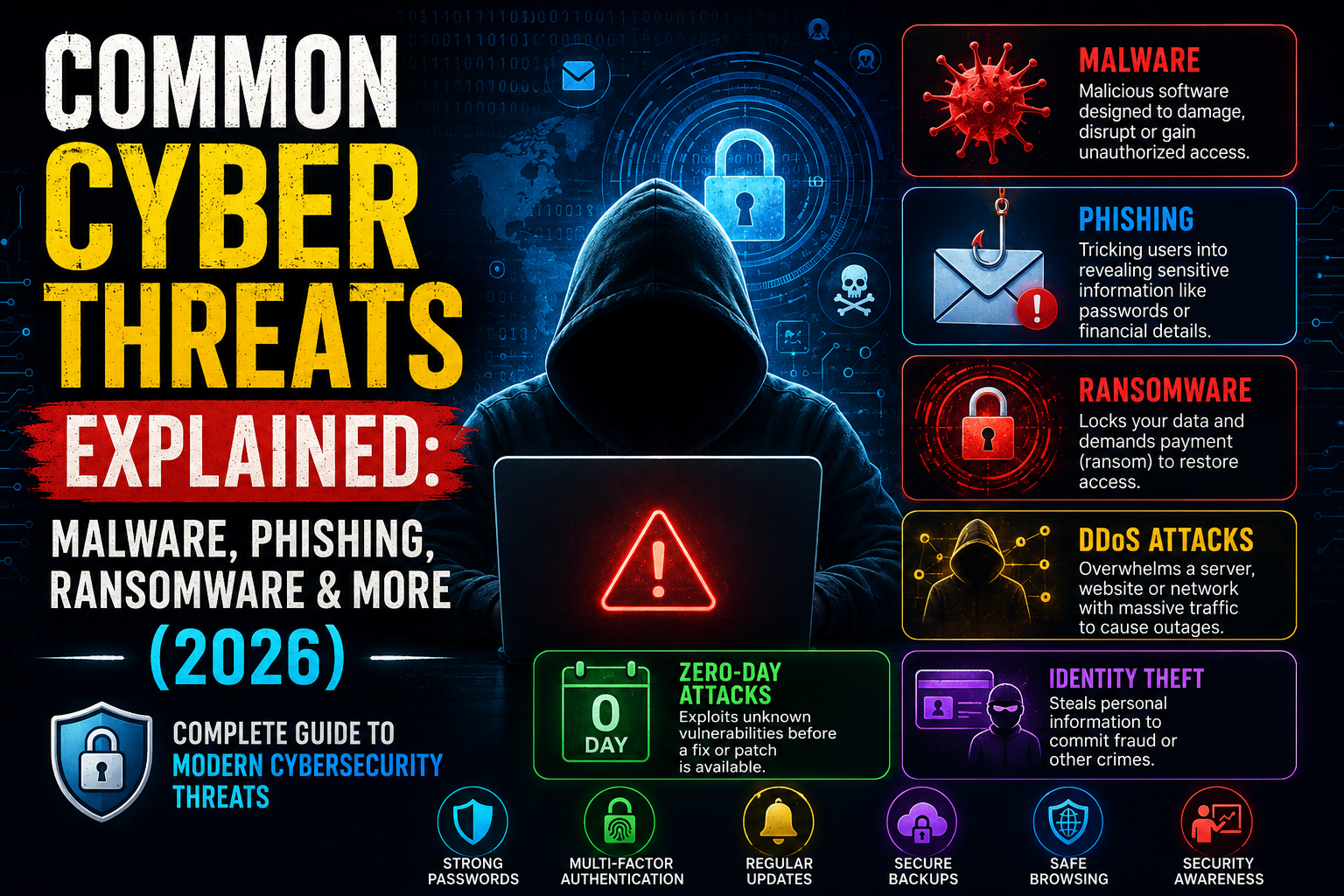
Modern technology has made life easier than ever. You can shop, study, work, and manage your money online within minutes. However, this convenience also attracts Cyber Criminals looking for ways to steal information or damage systems. Every internet user faces Cyber Threats, whether they realize it or not. A single careless click can expose Personal Information, banking details, or business files. Learning how these risks work is the first step toward better Cybersecurity and safer online habits.
This guide explains the most important Common Cyber Threats in simple English. You will learn how Malware, Phishing, Ransomware, and many other attacks work. You will also discover practical ways to improve Digital Security, protect your devices, and reduce your overall Cyber Risk Management. Whether you are a student, business owner, or everyday internet user in the USA, this guide will help you stay one step ahead of modern online threats.
What Are Cyber Threats?
Cyber Threats are harmful actions that target computers, smartphones, websites, networks, or online accounts. These threats aim to steal information, damage systems, interrupt services, or make money illegally. Some attacks happen automatically through infected software. Others rely on human mistakes such as clicking fake emails or downloading unsafe files. Understanding Modern Cyber Threats helps you recognize danger before serious damage occurs.
The number of Types of Cyber Threats continues to grow every year because technology changes quickly. Today’s Hackers use advanced tools, fake websites, and intelligent software to launch attacks against individuals and organizations. Good Information Security, Network Security, and Data Protection reduce these risks. Every internet user should understand basic cyber risks because prevention is much easier than recovering after a successful attack.
How Modern Cyber Threats Work Behind the Scenes
Most Cyber Attacks follow a similar process. First, attackers search for weak passwords, outdated software, or vulnerable websites. Next, they exploit those weaknesses to gain access. After entering a system, they may install Malware, steal files, monitor activity, or encrypt important data. Finally, they hide their tracks to avoid detection while continuing their malicious activity.
Successful attacks rarely happen by chance. Instead, Cyber Criminals often combine technical methods with Social Engineering. They trick users into revealing passwords, clicking fake links, or opening dangerous attachments. Strong Access Control, regular Patch Management, and continuous Threat Detection help stop attackers before they cause serious harm.
Why Cyber Threats Are Becoming More Dangerous in 2026
Technology now connects almost every part of daily life. Homes contain smart devices, businesses store files in the cloud, and employees work remotely from different locations. While these changes improve productivity, they also create more opportunities for Cyber Threats. Every connected device becomes another possible entry point for attackers. Strong Cloud Security, Endpoint Security, and Mobile Security are now essential rather than optional.
Another major reason involves the rapid growth of Artificial Intelligence. Attackers now create realistic fake emails, convincing voice recordings, and sophisticated scams within minutes. AI-Generated Phishing campaigns appear more believable than ever before. At the same time, organizations use AI to improve Threat Intelligence, strengthen Incident Response, and detect suspicious behavior faster. This constant race between attackers and defenders makes cybersecurity more challenging every year.
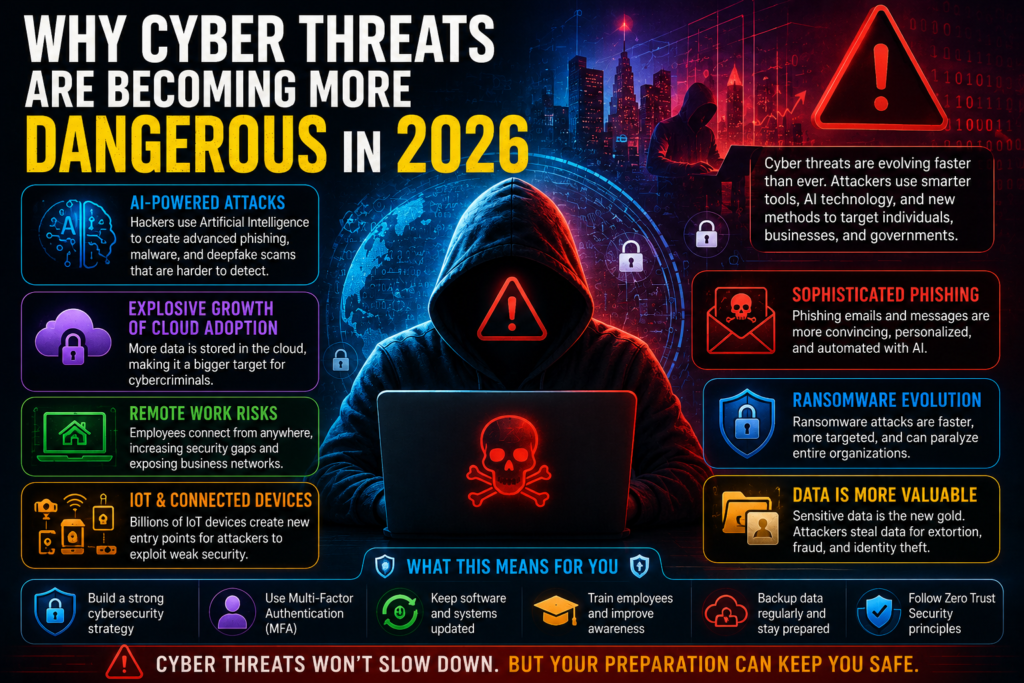
Remote work has also changed the security landscape. Employees often connect from home networks that lack enterprise-level protection. Personal laptops, public Wi-Fi, and unmanaged devices increase security risks. Businesses now invest heavily in Cloud Computing Security, Identity and Access Management (IAM), and Zero Trust Security to protect sensitive company resources. These technologies verify every connection before granting access.
The rapid growth of the Internet of Things (IoT) adds another layer of complexity. Smart cameras, home assistants, medical equipment, and industrial sensors constantly exchange information online. Weak security settings on these devices can create easy opportunities for attackers. Improving Device Security, maintaining Security Awareness, and following Cybersecurity Best Practices help reduce these risks before they become costly incidents.
Key Facts About Cyber Threats in 2026
| Cybersecurity Trend | Why It Matters |
| AI-powered attacks | Creates faster and more convincing scams |
| Remote work | Expands the digital attack surface |
| Cloud adoption | Increases the need for strong Cloud Security |
| IoT growth | Adds millions of connected devices |
| Data theft | Targets valuable personal and business information |
| Ransomware | Continues affecting hospitals, schools, and companies |
| Zero Trust | Becomes a leading modern security approach |
| Security awareness | Remains one of the strongest human defenses |
“Cybersecurity isn’t only about technology. It begins with informed people making smart decisions every day.”
Malware Explained: Types, Examples, and How to Stay Protected
Malware is harmful software designed to damage devices, steal information, or give attackers unauthorized access. A Malware Attack can begin when you download an infected file, visit a fake website, or open a dangerous email attachment. Once installed, malware may slow your computer, monitor your activity, or lock important files. Good Antivirus Software, regular Software Updates, and safe online habits greatly reduce the risk of infection.
Modern malware has become smarter and more difficult to detect. Some programs stay hidden for months before activating. Others silently collect passwords, banking details, or company records. Strong Endpoint Protection, reliable Firewall settings, and continuous Security Monitoring help detect unusual behavior before major damage occurs. Regular Vulnerability Management also closes security gaps that attackers often exploit.
Types of Malware Every User Should Know
A Computer Virus attaches itself to legitimate files and spreads when those files are opened. A Worm moves across networks without user interaction, making it one of the fastest-spreading threats. A Trojan Horse pretends to be useful software while secretly installing malicious code. Spyware quietly records your activity, while Adware floods devices with unwanted advertisements. Rootkits hide deep inside operating systems, allowing attackers to maintain long-term access without being noticed.
Each malware family behaves differently, yet the prevention methods remain similar. Download software only from trusted sources, avoid suspicious links, and scan files before opening them. Strong Email Security, regular Patch Management, and careful Safe Browsing habits greatly reduce infection risks. Even experienced users should never ignore unusual device behavior because early detection limits damage.
Common Malware Comparison
| Malware Type | Main Purpose | Common Target | Prevention |
| Computer Virus | Corrupt files | Personal computers | Updated Antivirus Software |
| Worm | Spread across networks | Business networks | Firewall and updates |
| Trojan Horse | Steal data | All users | Trusted downloads only |
| Spyware | Monitor activity | Personal devices | Security scans |
| Adware | Display unwanted ads | Browsers | Safe software installation |
| Rootkits | Hide attacker access | Operating systems | Regular security updates |
Phishing Attacks Explained: Email, SMS, Voice, and Social Media Scams
A Phishing Attack tricks people into sharing passwords, financial information, or personal details. Instead of attacking software directly, criminals target human trust. They create fake emails, websites, and messages that look genuine. Many victims believe they are communicating with a trusted company, bank, or government agency. Strong Security Awareness Training and careful verification help prevent these scams.
Modern phishing campaigns have become highly personalized. Attackers research victims through social media and public information before sending convincing messages. Advanced AI-Generated Phishing emails now contain fewer spelling mistakes and appear remarkably authentic. Businesses strengthen Identity and Access Management (IAM) and encourage employees to verify unusual requests before sharing sensitive information.
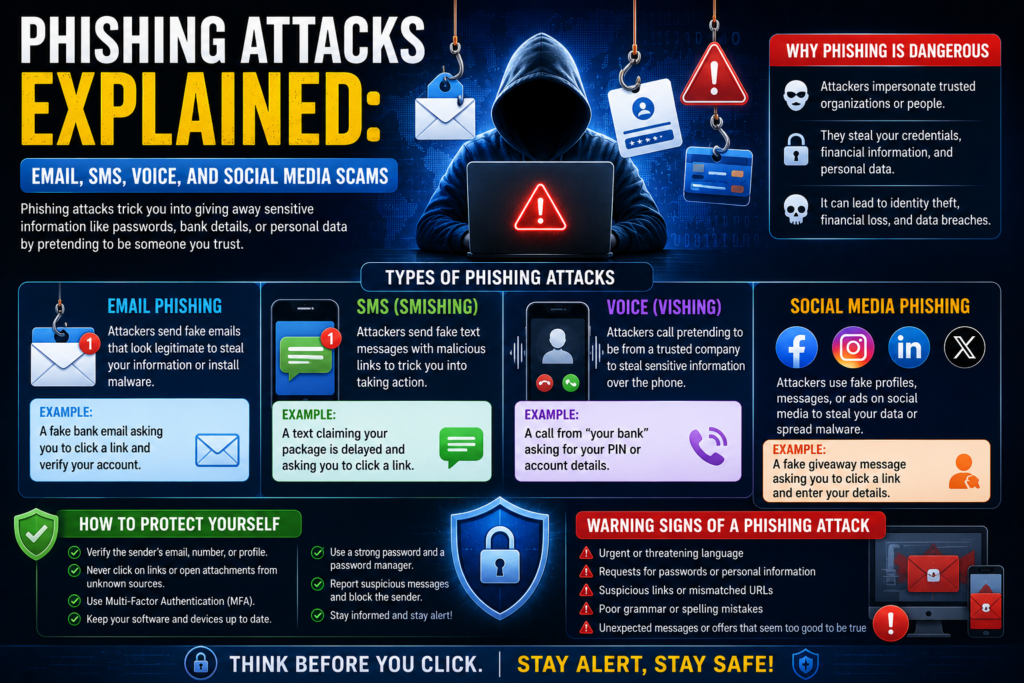
Different phishing methods target users in different ways. Email Phishing remains the most common technique because millions of messages are sent every day. Spear Phishing focuses on a specific person or organization using personalized information. Smishing uses text messages to lure victims into clicking malicious links, while Vishing relies on phone calls from criminals pretending to represent trusted companies. Business Email Compromise (BEC) targets employees responsible for payments or financial approvals.
Before clicking any link, always verify the sender’s identity. Check website addresses carefully and avoid downloading unexpected attachments. A trusted Password Manager, Multi-Factor Authentication (MFA), and secure Browser Security settings provide additional protection. Simple habits often stop sophisticated scams before they succeed.
Common Phishing Methods
| Attack Type | How It Works | Main Goal |
| Email Phishing | Fake email | Steal passwords |
| Spear Phishing | Personalized message | Access business accounts |
| Smishing | SMS message | Trick users into clicking links |
| Vishing | Voice call | Collect financial details |
| Business Email Compromise (BEC) | Fake executive request | Financial fraud |
Ransomware Attacks: How They Work and How to Prevent Them
A Ransomware Attack locks important files using strong Encryption. Attackers then demand payment in exchange for a decryption key. Hospitals, schools, businesses, and government organizations have all suffered costly ransomware incidents. Even after paying the ransom, victims may never recover their information. This makes prevention far more valuable than recovery.
Most ransomware infections begin through phishing emails, weak passwords, or outdated software. Once attackers gain access, they move through connected systems and encrypt valuable files within minutes. Good Business Continuity planning, secure backups, and rapid Incident Response reduce downtime. Regular Disaster Recovery testing also helps organizations restore systems without paying criminals.
Real-World Examples of Ransomware Attacks
Several well-known ransomware incidents have disrupted healthcare providers, energy companies, and public services across the world. Some attacks forced hospitals to delay medical procedures, while others interrupted fuel distribution or government operations. These cases demonstrate that ransomware affects much more than computers. It can impact daily life, public safety, and national economies.
Organizations now combine Threat Intelligence, continuous Threat Detection, and advanced Endpoint Detection and Response (EDR) to identify suspicious activity before ransomware spreads. Regular backups stored offline, strong authentication, and employee education remain some of the most effective defenses. Every business should also perform regular Risk Assessment reviews to identify weaknesses before attackers do.
“The safest ransom is the one you never have to pay because your security strategy stopped the attack before it began.”
Other Common Cyber Threats You Should Know
Not every Cyber Attack uses Malware or ransomware. Some attackers exploit software flaws, weak websites, or unsecured networks to steal information or disrupt services. These Common Cyber Threats often go unnoticed because they work quietly in the background. Learning how they operate improves your Cybersecurity knowledge and helps you make safer decisions every day.
Modern organizations invest in Cyber Defense, Threat Detection, and continuous Security Monitoring to stop these attacks before they spread. Individuals also benefit from understanding these threats because many attacks target personal devices, home networks, and online accounts. Better awareness leads to stronger Digital Security and reduces the chance of becoming a victim.
Common Cyber Threat Comparison
| Cyber Threat | What It Does | Main Target | Prevention |
| Zero-Day Attack | Exploits unknown software flaws | Businesses and governments | Fast security updates |
| Distributed Denial-of-Service (DDoS) | Overloads websites with traffic | Online services | Traffic filtering |
| SQL Injection | Steals website database data | Web applications | Secure coding |
| Cross-Site Scripting (XSS) | Injects harmful scripts | Website visitors | Input validation |
| Man-in-the-Middle Attack | Intercepts communications | Public Wi-Fi users | Virtual Private Network (VPN) |
| Identity Theft | Steals personal identity | Individuals | Multi-Factor Authentication (MFA) |
Understanding These Threats
A Zero-Day Attack happens when attackers exploit a software vulnerability before developers release a fix. Because no official patch exists, these attacks can spread quickly. Organizations perform regular Vulnerability Assessment and Penetration Testing to discover weaknesses before attackers find them. Keeping software updated remains one of the strongest defenses.
A Distributed Denial-of-Service (DDoS) attack floods a website or online service with massive traffic until it becomes unavailable. This attack does not usually steal data, yet it can interrupt business operations and damage customer trust. Strong Network Security, cloud-based protection, and traffic filtering help reduce these attacks.
SQL Injection targets poorly protected websites by inserting harmful database commands into online forms. Attackers may access customer records, login details, or confidential company information. Application Security, secure coding practices, and proper Access Control prevent most SQL injection attempts.
Cross-Site Scripting (XSS) injects malicious code into trusted websites. Visitors unknowingly run harmful scripts inside their browsers. These attacks may steal session cookies or redirect users to fake websites. Better Browser Security, secure development, and regular testing greatly reduce this risk.
A Man-in-the-Middle Attack secretly intercepts communication between two users. Public Wi-Fi networks often create opportunities for these attacks. Using a trusted Virtual Private Network (VPN) encrypts internet traffic and protects sensitive information from interception.
Identity Theft occurs when criminals steal Personal Information such as names, passwords, banking details, or government identification numbers. Victims may experience financial loss, damaged credit, or unauthorized account access. Strong Data Privacy, unique passwords, and Identity and Access Management (IAM) reduce these risks significantly.
Who Is Most at Risk from Cyber Threats?
Anyone who uses the internet can become a target of Cyber Threats. Students, families, professionals, and retirees all store valuable information online. Even simple activities like shopping, online banking, or social media create opportunities for attackers. Good Online Safety habits and regular Security Awareness reduce these everyday risks.
Businesses face even greater challenges because they manage customer records, financial data, and confidential documents. Hospitals protect medical records, banks secure financial transactions, and government agencies safeguard national information. Every organization needs strong Information Security, Cloud Security, and a reliable Cybersecurity Strategy to defend against modern attacks.
Small businesses often believe attackers only target large corporations. However, cybercriminals frequently attack smaller organizations because they usually have fewer security controls. Limited budgets may lead to outdated software or weak passwords. Regular Risk Assessment, better Endpoint Protection, and employee education help small businesses strengthen their defenses without major investments.
Educational institutions also remain attractive targets. Schools and universities manage thousands of student records while supporting large computer networks. Likewise, healthcare providers store highly sensitive patient information. Strong Cyber Resilience, secure backups, and effective Incident Response planning help these sectors recover quickly if an attack occurs.
Warning Signs That Your Device May Be Under a Cyber Attack
Cyber attacks rarely begin with obvious warning messages. Instead, small changes often appear before serious damage occurs. A slow computer, unusual pop-up windows, or unexpected software installations may indicate hidden problems. Paying attention to these early signs allows you to respond before attackers gain complete control. Strong Device Security and regular security scans help identify suspicious activity quickly.
Sometimes users ignore unusual behavior because they believe their device is simply getting old. However, unexplained battery drain, browser redirects, or repeated login alerts may signal an active Cyber Attack. Reliable Antivirus Software, continuous Threat Detection, and proper Security Monitoring make it easier to discover hidden threats before they spread.
Common Warning Signs
| Warning Sign | Possible Cause |
| Computer becomes very slow | Malware infection |
| Unknown pop-ups appear | Adware or Spyware |
| Battery drains unusually fast | Hidden background processes |
| Browser redirects automatically | Browser hijacking |
| Antivirus suddenly stops working | Advanced malware |
| Unknown login notifications | Credential Theft |
| High internet usage | Hidden malicious activity |
| Files disappear or become encrypted | Ransomware Attack |
When you notice any of these symptoms, disconnect the device from the internet if possible. Run a full security scan and change important passwords from a different trusted device. If sensitive business information is involved, begin your organization’s Incident Response plan immediately. Quick action often prevents a small security problem from becoming a major Data Breach.
“The sooner you recognize suspicious activity, the easier it becomes to stop attackers before they cause lasting damage.”
Best Ways to Protect Yourself from Cyber Threats
Protecting yourself from Cyber Threats does not require expensive software or advanced technical knowledge. Most successful attacks happen because people ignore simple security practices. Strong passwords, careful browsing, and regular updates stop many threats before they begin. Following basic Cybersecurity Best Practices strengthens your Digital Security and keeps your personal information safe every day.
Modern attackers constantly search for weak accounts and outdated devices. You can make their job much harder by enabling Multi-Factor Authentication (MFA), using a trusted Password Manager, and installing Software Updates as soon as they become available. Combining Cyber Hygiene, Email Security, and secure browsing habits creates multiple layers of protection that reduce your overall cyber risk.
Daily Cybersecurity Habits That Keep You Safe Online
Good security starts with small daily habits. Verify links before clicking them, download software only from trusted websites, and avoid sharing sensitive information through unknown messages. Public Wi-Fi should always be protected with a Virtual Private Network (VPN) because encrypted connections make it much harder for attackers to intercept your data. Simple actions performed consistently provide better protection than relying on a single security tool.
Another important habit is keeping your devices organized and updated. Delete applications you no longer use because unused software may contain hidden vulnerabilities. Turn on automatic updates whenever possible and regularly review account activity for unusual logins. Strong Security Awareness Training, even for home users, improves decision-making and reduces mistakes that often lead to successful Cyber Attacks.
Daily Security Checklist
| Security Practice | Why It Matters |
| Use Strong Passwords | Prevents unauthorized access |
| Enable Multi-Factor Authentication (MFA) | Adds an extra security layer |
| Install Software Updates | Fixes security weaknesses |
| Use a Password Manager | Creates unique passwords safely |
| Connect through a Virtual Private Network (VPN) | Protects internet traffic |
| Avoid unknown email attachments | Prevents Malware Attack |
| Back up important files | Helps recover from ransomware |
| Practice Safe Browsing | Reduces phishing risks |
Essential Cybersecurity Tools That Help Stop Modern Cyber Threats
Modern security depends on several protective technologies working together. No single application can stop every Cyber Threat because attackers use many different techniques. Businesses and individuals build stronger defenses by combining multiple security layers. This approach improves Cyber Defense, increases Cyber Resilience, and reduces the impact of successful attacks.
Security professionals also rely on continuous monitoring instead of waiting for attacks to happen. Advanced tools detect suspicious behavior, analyze unusual activity, and automatically respond to threats before they spread. Modern Threat Intelligence, Incident Response, and Security Operations Center (SOC) teams work together to identify attacks much faster than traditional security systems.
Essential Cybersecurity Tool Comparison
| Security Tool | Main Purpose | Best For |
| Antivirus Software | Detects and removes malware | Home and business users |
| Firewall | Blocks unauthorized network traffic | All internet-connected devices |
| Endpoint Detection and Response (EDR) | Detects advanced endpoint threats | Business environments |
| Extended Detection and Response (XDR) | Connects multiple security systems | Large organizations |
| Threat Intelligence | Identifies emerging attack patterns | Security teams |
| Security Operations Center (SOC) | Monitors networks around the clock | Enterprises |
| Vulnerability Management | Finds security weaknesses | IT departments |
| Patch Management | Installs security updates | Every organization |
Traditional Antivirus Software still plays an important role because it detects many known threats before they infect devices. A properly configured Firewall filters incoming and outgoing traffic while blocking unauthorized connections. Businesses often add Endpoint Detection and Response (EDR) to monitor computers continuously and identify suspicious behavior that standard antivirus solutions may miss.
Large organizations require even broader protection. Extended Detection and Response (XDR) combines information from endpoints, networks, email systems, and cloud services into one security platform. Meanwhile, Threat Intelligence gathers information about emerging attack techniques, allowing security teams to prepare before new threats become widespread. Together, these technologies strengthen Cloud Computing Security, improve Endpoint Protection, and support faster recovery during security incidents.
How Artificial Intelligence Is Changing Cyber Threats and Cyber Defense
Artificial Intelligence is transforming cybersecurity at an incredible speed. Unfortunately, both attackers and defenders now use AI to improve their capabilities. Cybercriminals create realistic fake emails, convincing websites, and highly personalized scams within minutes. These AI-Generated Phishing campaigns often appear more believable than traditional phishing attempts, making them harder for users to recognize.
At the same time, cybersecurity professionals use AI to strengthen Threat Detection, improve Incident Response, and automate repetitive security tasks. Instead of manually reviewing thousands of alerts, intelligent systems analyze network activity, detect unusual behavior, and identify suspicious patterns almost instantly. This faster response helps reduce the damage caused by modern cyber attacks.
AI vs AI: How Security Teams Fight Modern Cyber Threats
Today’s security teams use AI to defend against increasingly intelligent attackers. Machine Learning Security systems study normal user behavior and immediately detect unusual login attempts, unexpected file activity, or suspicious network traffic. Security analysts receive alerts within seconds instead of hours, allowing them to contain attacks before they spread throughout the organization.
However, AI also creates new challenges. Criminals now generate Deepfake Scam videos, realistic voice recordings, and automated malware that constantly changes its behavior. Organizations respond by adopting Zero Trust Security, improving Identity and Access Management (IAM), and investing in advanced Security Monitoring platforms. As AI continues to evolve, continuous learning and strong security practices will remain essential for staying ahead of emerging cyber threats.
“Artificial Intelligence has changed cybersecurity forever. The winners will be those who learn faster, adapt quicker, and never stop improving their defenses.”
Future Cyber Threat Trends to Watch in 2026 and Beyond
The cybersecurity landscape continues to change every year. As technology becomes smarter, attackers also develop more advanced methods. Future Cyber Threats will rely heavily on automation, AI, and connected devices. Individuals and businesses must prepare today instead of waiting for tomorrow’s attacks. Investing in Cybersecurity Strategy, continuous learning, and stronger Cyber Defense will help reduce future risks.
Experts expect Artificial Intelligence, cloud computing, and the Internet of Things (IoT) to reshape digital security over the next few years. Organizations will strengthen Cloud Security, improve Identity and Access Management (IAM), and adopt modern Zero Trust Security models. Companies that regularly review their Cyber Risk Management plans will respond faster to emerging threats and protect valuable information more effectively.
Emerging Cybersecurity Trends for 2026
| Future Trend | Why It Matters |
| AI-powered cyber attacks | Faster and smarter attacks |
| Quantum computing risks | May weaken current encryption |
| Cloud-first security | Protects growing cloud environments |
| Supply chain attacks | Targets trusted vendors |
| IoT security | Secures connected smart devices |
| Deepfake scams | Increases identity fraud |
| Zero Trust Security | Verifies every user continuously |
| Automated security platforms | Detects threats faster |
Quantum computing may eventually challenge today’s Encryption standards. Although practical quantum attacks are still developing, security experts are already creating stronger encryption methods. Organizations should monitor these developments because future systems may require completely new security technologies.
Supply chain attacks will also remain a serious concern. Instead of attacking one company directly, Hackers compromise trusted software providers or service vendors. Once infected software reaches customers, thousands of organizations become vulnerable. Better Threat Intelligence, regular Risk Assessment, and stronger vendor security reviews help reduce these risks before they spread.
Cyber Threat Prevention Checklist for Individuals and Businesses
Preventing Cyber Threats requires consistent habits rather than one-time fixes. Security works best when multiple layers protect users, devices, and online accounts. Individuals should combine strong passwords, secure browsing, and regular backups. Businesses should strengthen Security Awareness Training, monitor networks continuously, and prepare detailed Incident Response plans. Small improvements made regularly produce stronger long-term protection.
No security solution guarantees complete protection because attackers constantly change their techniques. However, organizations that update software, train employees, and perform routine Vulnerability Assessment greatly reduce successful attacks. Good preparation also improves Business Continuity and supports faster Disaster Recovery after unexpected incidents.
Cyber Threat Prevention Checklist
| Security Practice | Individuals | Businesses | Benefit |
| Use Strong Passwords | ✔ | ✔ | Protects user accounts |
| Enable Multi-Factor Authentication (MFA) | ✔ | ✔ | Adds extra login security |
| Install Software Updates | ✔ | ✔ | Closes known vulnerabilities |
| Keep Secure Backups | ✔ | ✔ | Protects against Ransomware Attack |
| Use Virtual Private Network (VPN) | ✔ | ✔ | Encrypts internet traffic |
| Install Antivirus Software | ✔ | ✔ | Detects malware early |
| Employee Security Training | — | ✔ | Prevents phishing attacks |
| Continuous Security Monitoring | Optional | ✔ | Detects attacks quickly |
| Regular Patch Management | ✔ | ✔ | Improves system security |
| Perform Penetration Testing | Optional | ✔ | Finds hidden weaknesses |
Frequently Asked Questions About Cyber Threats
What are Cyber Threats?
Cyber Threats are activities that attempt to steal information, damage systems, interrupt services, or gain unauthorized access to digital devices, websites, or computer networks.
What is the most common cyber threat?
Phishing remains one of the most common cyber threats because attackers use fake emails, text messages, and websites to steal passwords and personal information.
What is Malware?
Malware is harmful software designed to damage computers, steal data, monitor users, or provide unauthorized access to attackers.
How does Phishing work?
A Phishing Attack tricks users into clicking fake links or sharing confidential information through emails, text messages, phone calls, or social media platforms.
Can Ransomware be removed?
Sometimes ransomware can be removed using professional security tools. However, encrypted files may remain inaccessible without secure backups. Prevention is always the safest approach.
How can businesses prevent Cyber Attacks?
Businesses should use Multi-Factor Authentication (MFA), train employees, install security updates, monitor networks, perform regular backups, and maintain a well-tested Incident Response plan.
What is a Zero-Day Attack?
A Zero-Day Attack exploits a software vulnerability before developers release an official security patch, making it especially dangerous.
How do AI Cyber Attacks work?
AI-powered attacks use Artificial Intelligence to generate realistic phishing emails, automate hacking attempts, identify security weaknesses, and launch attacks much faster than traditional methods.
Conclusion
Cyber Threats continue to evolve as technology becomes more advanced. From Malware and Phishing to Ransomware, Zero-Day Attack, and AI-powered scams, today’s digital world requires constant awareness. Every internet user should understand how these threats work because knowledge is the first layer of protection. Strong passwords, regular updates, secure backups, and safe online habits can prevent many attacks before they begin.
Whether you are protecting personal devices or managing an entire business, building a strong cybersecurity foundation is essential. Combine modern security tools with continuous learning and proactive planning. By following proven Cybersecurity Best Practices, improving Security Awareness, and adopting technologies like Zero Trust Security, you can reduce cyber risks and confidently navigate the digital world in 2026 and beyond.
“Cybersecurity is not a destination. It is an ongoing commitment to protecting your digital life every single day.”
SEO Meta Description:
Common Cyber Threats Explained (2026): Learn how malware, phishing, ransomware, DDoS, and other cyber attacks work, plus expert tips to protect your data and devices.
9 Comments