

Cybersecurity for Beginners (2026) is no longer just a topic for IT experts. It is something every internet user should understand. People use smartphones, laptops, tablets, and smart home devices on a daily basis. They shop online, pay bills, use social media, and store personal files on the internet. These activities make life easier, but they also create new security risks. Learning how to stay safe online is one of the best skills you can have in today’s digital world.
Every year, cybercrime becomes more advanced. Hackers use smarter tools, fake websites, AI-powered scams, and stolen passwords to target people. Even beginners can become victims if they do not know the basics of online security. This beginner internet security guide explains everything in simple English. You will learn practical cybersecurity tips for beginners, understand modern threats, and discover how to protect yourself, your family, and your devices in 2026.
“Cybersecurity is not only about technology. It is about building smart habits that protect your digital life every day.”
What Is Cybersecurity?
Cybersecurity means protecting computers, phones, networks, websites, and online accounts from digital attacks. It helps keep your files, passwords, photos, bank details, and other personal data safe from hackers and cyber criminals. Good digital security protects both individuals and businesses from online dangers. Every time you browse the internet, send emails, or use mobile apps, you rely on internet security to keep your information safe.
Modern cyber protection includes many layers of security. It protects devices, websites, cloud storage, and online services. It also helps stop malware, phishing, identity theft, and other digital attacks before they cause damage. Learning basic cyber awareness helps you make smarter decisions every day and reduces your chances of becoming a victim.
Types of Cybersecurity
| Type | Purpose | Example |
| Network Security | Protects networks from attacks | Secure office network |
| Information Security | Protects confidential data | Customer records |
| Cloud Security | Protects cloud services | Google Drive, OneDrive |
| Application Security | Protects apps from vulnerabilities | Banking apps |
| Mobile Security | Protects smartphones and tablets | Android and iPhone security |
| Home Network Security | Protects home Wi-Fi and connected devices | Home router |
Why Cybersecurity Is Important in 2026
The internet has become part of everyday life in America. People work remotely, attend online classes, manage bank accounts, and store personal documents in the cloud. This digital lifestyle has also increased cyber risk. Criminals now use AI cybersecurity tools to launch smarter attacks that are harder to detect. Learning online safety tips today can prevent major problems tomorrow.
Reports continue to show that data breach, identity theft, and financial fraud affect millions of people every year. Small mistakes, such as using weak passwords or clicking fake links, can lead to serious losses. Strong cyber defense is no longer optional. It is one of the most important parts of protecting your digital life in 2026.
Quick Facts About Cybersecurity in 2026
| Fact | Why It Matters |
| More people work online | More digital targets for criminals |
| AI creates smarter scams | Fake emails and voices look more real |
| Identity theft continues to grow | Personal information is valuable |
| Cloud services are common | Strong cloud protection is necessary |
| Smart devices are everywhere | Every connected device needs security |
Common Cyber Threats Everyone Should Know
Every beginner should understand the most common online dangers. These cyber threats can affect anyone, no matter how much technology experience they have. Criminals do not always attack large companies. They often target ordinary people because many users have weak passwords, outdated software, or poor security habits. Learning about these risks is the first step toward better cyber resilience and stronger security awareness.
Some attacks try to steal money, while others focus on stealing personal information or damaging devices. Knowing how these threats work makes it easier to avoid them. The table below explains the most common dangers every internet user should recognize.
| Cyber Threat | Description | Risk Level | Prevention |
| Malware | Harmful software that damages devices | High | Update software and use antivirus |
| Ransomware | Locks files until money is paid | Very High | Keep backups and avoid unknown downloads |
| Spyware | Secretly collects personal information | High | Install trusted security software |
| Virus | Spreads between files and devices | Medium | Scan downloads before opening |
| Trojan | Looks safe but hides harmful code | High | Download software from trusted websites |
| Botnet | Group of infected devices controlled remotely | Medium | Secure devices and update firmware |
| Phishing | Tricks users into giving passwords | Very High | Verify emails before clicking |
| Social Engineering | Manipulates people into sharing information | High | Think before responding |
| Data Breach | Personal information is leaked | High | Use unique passwords and MFA |
| Zero-Day Attack | Exploits unknown software flaws | High | Install security updates quickly |
Understanding these dangers helps you protect personal information online and reduces the chance of becoming the next victim. Good security habits can stop many attacks before they even begin.
How Hackers Attack People Online
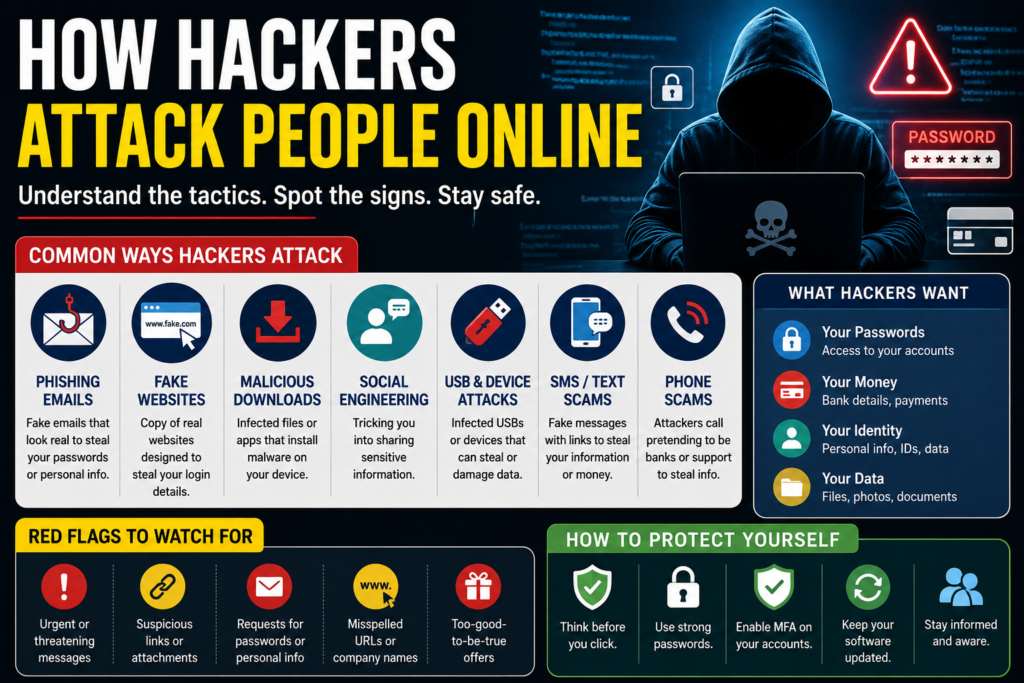
Many people think a hacker needs advanced computer skills to steal information. In reality, most attacks succeed because people make small mistakes. Modern hackers use fake emails, fake websites, and social tricks instead of breaking into computers. They look for users who are in a hurry or do not know the warning signs. Learning how hackers steal passwords helps you stay one step ahead. Strong cyber awareness, better email security, and good browsing habits can stop many attacks before they begin.
Another reason attacks are increasing is the use of artificial intelligence. Criminals now create fake voices, fake videos, and realistic messages within minutes. These AI-powered cyber attacks make scams harder to detect than ever before. The good news is that simple habits, such as checking website addresses and thinking before clicking, can greatly reduce your cyber risk. This is one of the most important cybersecurity tips for beginners because awareness is your first line of defense.
Common Ways Hackers Attack People
| Attack Method | How It Works | How to Stay Safe |
| Fake Emails | Pretend to be from trusted companies | Verify the sender before opening links |
| Fake Websites | Copy real websites to steal login details | Check HTTPS and the domain name |
| Malicious Downloads | Hide malware inside free software | Download only from trusted websites |
| Social Media Scams | Fake giveaways and messages | Verify profiles before sharing information |
| USB Attacks | Infected USB devices install harmful files | Never use unknown USB drives |
| QR Code Scams | Fake QR codes redirect to scam pages | Scan only trusted QR codes |
| AI Voice Cloning | Fake voices request money or passwords | Confirm requests through another method |
| Deepfake Videos | Fake videos create false trust | Verify information before acting |
| SMS Scams | Fake text messages steal data | Never click unknown links |
| Phone Scams | Fake callers pretend to be banks or government agencies | Hang up and call the official number |
“Think before you click. One careful decision can prevent a major cyber attack.”
Strong Password Security Best Practices
A password is the first barrier between your personal information and cyber criminals. Weak passwords make it easy for attackers to enter your accounts. Many people still use birthdays, pet names, or simple words. These passwords can be guessed within seconds. Good password security starts with creating long and unique passwords for every account. If one account is hacked, your other accounts remain safe. Learning best password practices is one of the easiest ways to improve your online security.
Experts recommend using a passphrase instead of a short password. A passphrase is longer, easier to remember, and much harder to crack. You should also understand the password manager benefits because remembering dozens of strong passwords is difficult. A trusted password manager stores your passwords securely and creates random passwords for every website. This helps you secure your online accounts without reusing the same password everywhere.
Strong Password Examples
| Weak Password | Strong Password |
| password123 | BlueRiver!Coffee#2026 |
| qwerty | Mountain$Travel@Sky88 |
| 12345678 | HappyOcean#Sunrise45 |
| john123 | Winter!Forest&Lake2026 |
| abc123 | GreenApple@Cloud#Travel9 |
Password Security Checklist
| Best Practice | Why It Matters |
| Create strong passwords | Harder for attackers to guess |
| Use at least 14–16 characters | Increases protection |
| Never reuse passwords | Limits damage after a breach |
| Enable a password manager | Stores passwords safely |
| Avoid personal information | Easy details can be guessed |
| Update passwords after a breach | Prevents repeated attacks |
What Is Multi-Factor Authentication (MFA)?
A password alone is no longer enough to protect online accounts. Even strong passwords can be stolen during a data breach or through phishing attacks. This is why security experts recommend multi-factor authentication. Many beginners ask why use MFA because they think it takes extra time. In reality, it only takes a few seconds but adds a very powerful layer of authentication. It helps keep your accounts safe even if someone discovers your password.
Understanding how MFA works is simple. After entering your password, the website asks for another verification step. This could be a code from an app, a fingerprint, or a physical security key. This second step makes it much harder for attackers to access your account. Today, MFA, two-factor authentication, and biometric authentication are considered essential parts of modern cybersecurity best practices.
Types of Multi-Factor Authentication
| MFA Method | Security Level | Ease of Use |
| SMS Code | Medium | Easy |
| Authentication App | High | Easy |
| Fingerprint | Very High | Very Easy |
| Face Recognition | Very High | Very Easy |
| Security Key | Excellent | Medium |
Benefits of MFA
| Benefit | Description |
| Better Account Protection | Adds a second security layer |
| Stops Password Theft | Password alone is not enough |
| Reduces Fraud | Prevents unauthorized logins |
| Protects Banking Accounts | Keeps financial accounts safer |
| Improves Business Security | Helps protect company data |
Safe Internet Browsing Tips
The internet is full of useful websites, but it also contains fake pages designed to steal information. Learning safe web browsing tips helps you enjoy the internet without unnecessary risks. Before entering passwords or payment details, always check if the website uses HTTPS and has a valid SSL certificate. A trusted secure website protects data using encryption, making it much harder for criminals to read your information during transmission. Good browser security starts with choosing trusted websites and avoiding suspicious links.
Your browser settings also play an important role in keeping you safe. Regular software updates, modern browser privacy settings, and safe downloading habits reduce many common threats. Always avoid unknown browser extensions because they may contain malicious software. Practicing secure browsing every day also improves online privacy and helps prevent scams before they happen. These simple habits make a big difference for anyone learning how to stay safe online.
Safe Browsing Checklist
| Practice | Benefit |
| Check for HTTPS | Protects data during browsing |
| Verify website address | Avoids fake websites |
| Keep browsers updated | Fixes security weaknesses |
| Avoid unknown downloads | Reduces malware risk |
| Review browser privacy settings | Improves privacy |
| Remove unused extensions | Lowers security risks |
| Use trusted search results | Avoids scam websites |
Good cybersecurity is built through small daily habits, not one big action. Every safe click strengthens your digital security.
How to Avoid Phishing Scams
Phishing is one of the most common forms of cybercrime today. It tricks people into sharing passwords, bank details, or other sensitive information. Attackers create fake emails, text messages, websites, and social media accounts that look real. Many victims believe they are talking to their bank, an online store, or a government agency. This is why learning to recognize phishing emails is an important part of cybersecurity for beginners. A few extra seconds of checking can save you from losing money or personal data.
Modern scams are becoming more advanced because criminals now use AI phishing, AI scams, and deepfake technology. Some attacks even use AI voice cloning to sound like a family member or company employee. Always verify unexpected requests before clicking a link or sharing information. Looking at the sender’s email address, checking the website URL, and calling the company directly are simple ways to avoid online scams and improve your scam prevention skills.
Common Phishing Scams
| Scam Type | Example | How to Stay Safe |
| Email Phishing | Fake bank email | Verify the sender before clicking |
| SMS Phishing | Fake delivery message | Do not open unknown links |
| Social Media Scam | Fake giveaway | Confirm official accounts |
| QR Code Scam | Fake payment QR code | Scan only trusted codes |
| AI Voice Scam | Fake family emergency call | Verify by calling directly |
| Fake Login Page | Looks like Google or Microsoft | Check the website address carefully |
Warning Signs of Phishing
| Warning Sign | Why It Is Dangerous |
| Urgent message | Tries to create panic |
| Spelling mistakes | Common in fake emails |
| Unknown sender | May not be legitimate |
| Suspicious links | Can steal passwords |
| Requests for passwords | Trusted companies rarely ask for them |
Case Study: A college student received an email saying their university account would be closed within one hour. The message looked real, but the website address was different from the official university website. The student checked with the IT department before signing in. The email was fake, and that simple check prevented the theft of their account.
How to Protect Personal Information Online
Your personal data is valuable. It includes your name, address, phone number, email, Social Security number, bank information, and medical records. Criminals can use this information to commit identity theft, open fake accounts, or make illegal purchases. Learning how to protect personal information online should be one of your top priorities. Good privacy protection starts with sharing less information and thinking carefully before posting online.
Many websites and apps ask for information that they do not really need. Before creating an account, check the privacy settings and only provide necessary details. Strong identity protection, careful online privacy settings, and secure passwords help reduce many risks. Safe habits also improve your data security and make it harder for criminals to steal your digital identity.
Personal Information Protection Guide
| Information | Protection Method |
| Social Security Number | Share only when required |
| Bank Details | Use trusted banking websites |
| Credit Card Information | Shop only on secure websites |
| Medical Records | Use protected healthcare portals |
| Home Address | Share only with trusted services |
| Personal Photos | Limit public access on social media |
Online Privacy Checklist
| Best Practice | Benefit |
| Review privacy settings | Controls who sees your information |
| Use strong passwords | Protects accounts |
| Enable MFA | Adds another security layer |
| Limit personal posts | Reduces identity theft risk |
| Check app permissions | Prevents unnecessary data collection |
Quote: “The safest personal information is the information you never share online.”
Public Wi-Fi Safety Tips
Free internet is available in airports, hotels, coffee shops, shopping malls, and restaurants. While these networks are convenient, they are not always safe. Many public networks have weak Wi-Fi security, making it easier for attackers to monitor internet traffic. Learning public Wi-Fi safety helps protect your passwords, emails, and financial information. Avoid logging into banking websites or shopping accounts when using an open network unless extra protection is available.
One of the best ways to stay safe is by using a VPN. A VPN creates an encrypted connection between your device and the internet, making it much harder for attackers to read your data. You should also disable automatic Wi-Fi connections and avoid sharing files while using public networks. These simple habits improve your online security, protect your mobile security, and support better online banking security wherever you travel.
Public Wi-Fi Safety Guide
| Safety Tip | Why It Helps |
| Use a VPN | Encrypts internet traffic |
| Avoid banking websites | Protects financial information |
| Disable file sharing | Prevents unwanted access |
| Turn off auto-connect | Stops automatic connections |
| Log out after use | Protects online accounts |
| Use your mobile hotspot when possible | Safer than public Wi-Fi |
Public Wi-Fi Risk Levels
| Location | Risk Level |
| Airport | High |
| Coffee Shop | High |
| Hotel | Medium |
| Shopping Mall | High |
| Library | Medium |
| Mobile Hotspot | Low |
Home Network Security Guide
Your home internet connection is the center of your digital life. Computers, phones, TVs, security cameras, and smart speakers all connect to the same network. If your home network security is weak, attackers may gain access to every connected device. Learning how to secure home Wi-Fi is one of the easiest ways to improve your cyber protection. A strong router password, regular updates, and secure settings create a safer digital environment for your entire family.
Many routers still use factory passwords that are easy to guess. Change the default password immediately after setting up your router. Enable WPA3 encryption if your router supports it and install security patches whenever they become available. These operating system updates and firmware updates close known security weaknesses. Taking these simple steps helps protect your home network, improves network security, and strengthens cybersecurity for families.
Home Network Security Checklist
| Security Step | Benefit |
| Change default router password | Prevents easy access |
| Enable WPA3 encryption | Improves Wi-Fi security |
| Update router firmware | Fixes security vulnerabilities |
| Create a guest network | Protects your main devices |
| Disable remote management | Reduces attack opportunities |
| Restart your router regularly | Improves performance and security |
Smart Home Device Security
| Device | Best Practice |
| Smart TV | Install updates regularly |
| Smart Camera | Change default password |
| Smart Speaker | Review privacy settings |
| Smart Doorbell | Enable MFA if available |
| Smart Thermostat | Update firmware regularly |
Case Study: A family installed a new Wi-Fi router but never changed the default password. A nearby attacker connected to the network and attempted to access their smart devices. After changing the router password, enabling WPA3, and creating a guest network, the family secured their home and prevented future unauthorized access.
How AI Is Changing Cybersecurity
Artificial intelligence is changing the way people use technology. It is also changing the way organizations protect their systems. Today, AI in cybersecurity helps detect threats much faster than traditional methods. Security tools can study millions of activities every second and quickly identify unusual behavior. This improves threat detection, strengthens AI cybersecurity, and helps stop attacks before they spread. Businesses, schools, hospitals, and government agencies now use AI to improve their overall cyber defense.
At the same time, criminals are also using AI. Modern AI-powered cyber attacks can create fake emails, fake voices, and realistic videos that are difficult to recognize. These attacks increase the need for better machine learning security, stronger threat intelligence, and smarter security tools. Understanding both the benefits and risks of AI helps beginners prepare for the future of cybersecurity and stay protected as technology continues to evolve.
How AI Helps Cybersecurity
| AI Feature | Benefit |
| Threat Detection | Finds suspicious activity quickly |
| Malware Analysis | Identifies harmful software faster |
| Fraud Detection | Stops unusual financial transactions |
| Email Protection | Blocks dangerous messages |
| Network Monitoring | Watches devices all day |
| Security Automation | Responds to attacks automatically |
AI Challenges in Cybersecurity
| Challenge | Impact |
| AI Phishing Emails | Harder to identify fake messages |
| Deepfake Videos | Creates false trust |
| AI Voice Cloning | Tricks victims into sharing information |
| Automated Malware | Attacks spread faster |
| Fake Customer Support | Steals account details |
Case Study: A large retail company used an AI-powered security system to monitor its network. The system detected unusual login attempts from another country within seconds. The accounts were locked automatically before any customer information was stolen. This shows how AI can improve cybersecurity when used responsibly.
Cybersecurity for Small Businesses
Many owners believe attackers only target large companies. The truth is that cybersecurity for small businesses is more important than ever because smaller organizations often have fewer security resources. Criminals know this and look for weak systems. A successful cyber attack can stop business operations, damage customer trust, and cause financial losses. Every small business should treat information security as an essential part of daily operations.
Employees also play a major role in business security. Regular cybersecurity training, secure passwords, backups, and software updates reduce many risks. Companies should also use secure cloud storage, protect every computer with endpoint security, and prepare a reliable backup strategy. These simple actions improve cyber resilience and help businesses recover quickly if an attack happens.
Small Business Security Checklist
| Security Measure | Why It Matters |
| Employee Training | Reduces human mistakes |
| Multi-Factor Authentication | Protects business accounts |
| Cloud Backup | Recovers important files |
| Endpoint Protection | Secures employee devices |
| Software Updates | Fixes known weaknesses |
| Strong Password Policy | Protects business systems |
Business Data Backup Plan
| Backup Type | Recommended Frequency |
| Customer Database | Daily |
| Financial Records | Daily |
| Employee Files | Weekly |
| Website Files | Daily |
| Business Documents | Weekly |
Quote: “Small businesses are not too small for cybercriminals. They are often their easiest targets.”
Best Cybersecurity Habits to Follow Every Day
Good security is built through daily habits, not one-time actions. Small changes can greatly improve your cyber hygiene and reduce the chance of becoming a victim. Keeping devices updated, checking account activity, and using strong passwords are simple habits that protect your digital life. Following these cybersecurity best practices every day helps you stay safe whether you work, study, shop, or communicate online.
Another important habit is staying informed. New scams appear every week, and criminals constantly develop new methods. Reading trusted security news and reviewing your privacy settings regularly improve your security awareness. These habits also support cybersecurity for students, cybersecurity for seniors, and cybersecurity for remote workers, because everyone benefits from learning how to recognize modern threats.
Daily Cybersecurity Habits
| Daily Habit | Benefit |
| Install software updates | Fixes security weaknesses |
| Check bank activity | Detects fraud quickly |
| Use MFA | Protects online accounts |
| Lock your devices | Prevents unauthorized access |
| Back up important files | Protects against ransomware |
| Review privacy settings | Improves online privacy |
| Think before clicking | Prevents phishing attacks |
| Learn about new scams | Builds cyber awareness |
Daily Security Routine
| Time | Security Action |
| Morning | Check important account notifications |
| Afternoon | Install available updates |
| Evening | Review suspicious emails |
| Weekly | Back up important files |
| Monthly | Change passwords if necessary |
Common Cybersecurity Mistakes
Most cyber incidents happen because of simple human mistakes. Weak passwords, old software, and clicking unknown links create opportunities for attackers. Many people ignore security warnings because they believe nothing bad will happen to them. Unfortunately, cyber criminals often search for these easy mistakes. Avoiding common errors greatly improves your digital security and reduces your overall cyber risk.
Another mistake is downloading free software from unknown websites. Some downloads contain spyware, trojan programs, or other forms of malicious software. People also forget to install updates, leaving devices open to known vulnerabilities. Learning from these mistakes is an important step toward stronger cyber protection and better long-term cybersecurity checklist habits.
Common Cybersecurity Mistakes
| Mistake | Better Choice |
| Weak passwords | Use long passphrases |
| Ignoring updates | Install updates immediately |
| Clicking unknown links | Verify before clicking |
| Using public Wi-Fi without protection | Use a VPN |
| Reusing passwords | Create unique passwords |
| Downloading pirated software | Download from official websites |
| Ignoring security alerts | Investigate every warning |
| No backups | Create regular cloud backups |
Security Improvement Guide
| Problem | Solution |
| Password Reuse | Use a password manager |
| Outdated Devices | Install operating system updates |
| Unsafe Downloads | Verify trusted sources |
| Public Wi-Fi Risk | Use encrypted connections |
| Poor Privacy Settings | Review settings regularly |
Case Study: A freelance designer reused the same password on multiple websites. One shopping website experienced a data breach, and attackers used the stolen password to access the designer’s email account. After enabling MFA, creating unique passwords, and using a password manager, the designer secured all online accounts and prevented further damage.
Future of Cybersecurity
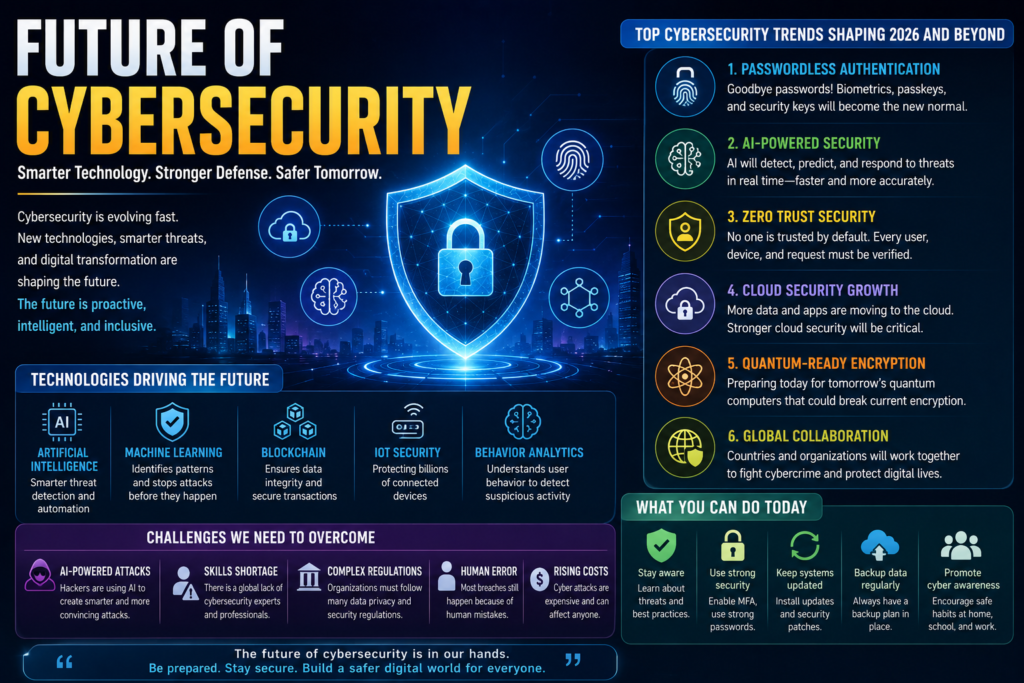
The digital world is changing every year. New technologies make life easier, but they also create new security challenges. The future of cybersecurity will depend on smarter tools, better education, and stronger cooperation between governments, businesses, and internet users. Modern AI security systems will continue to improve threat detection and stop attacks before they spread. At the same time, cyber criminals will keep developing new methods to steal information. This means everyone must continue learning and improving their security habits.
One of the biggest changes will be the move toward passwordless authentication. Many websites are replacing traditional passwords with fingerprints, face recognition, or security keys. These methods improve authentication, reduce password theft, and strengthen identity protection. Experts also expect cybersecurity trends 2026 to focus on stronger cloud protection, smarter AI tools, better privacy laws, and faster responses to new threats. People who continue learning will be better prepared for tomorrow’s digital world.
Future Cybersecurity Trends
| Trend | Why It Matters |
| Passwordless authentication | Reduces password theft |
| AI Security Systems | Detects attacks faster |
| Zero Trust Security | Verifies every login request |
| Cloud Security Growth | Protects cloud-based services |
| Quantum-Ready Encryption | Prepares for future computers |
| Biometric Authentication | Improves account protection |
Skills Everyone Should Learn
| Skill | Benefit |
| Recognize phishing emails | Prevents account theft |
| Create strong passwords | Protects online accounts |
| Use MFA | Adds extra security |
| Safe web browsing | Reduces online risks |
| Protect personal information online | Prevents identity theft |
| Review privacy settings | Improves online privacy |
Quote: “Technology will continue to evolve, but smart security habits will always remain your strongest defense.”
Frequently Asked Questions
What is cybersecurity in simple words?
Cybersecurity means protecting computers, phones, websites, networks, and online accounts from digital attacks. It keeps your information safe from hackers, viruses, scams, and data theft.
Why is cybersecurity important in 2026?
People use the internet for banking, shopping, work, education, and communication every day. Modern cyber threats are becoming more advanced, especially with artificial intelligence. Good security habits help protect your personal information and financial accounts.
What are the biggest cyber threats in 2026?
Some of the biggest threats include phishing, ransomware, malware, identity theft, AI-powered scams, fake websites, and data breaches.
Is antivirus software enough?
No. Antivirus software is important, but it should be combined with software updates, strong passwords, MFA, safe browsing habits, and regular backups for complete protection.
What is the safest password?
The safest password is a long and unique passphrase with letters, numbers, and symbols. Never reuse the same password across different websites.
Should I use a VPN?
Yes. A VPN helps protect your internet connection, especially when using public Wi-Fi. It encrypts your data and improves your online privacy.
Is MFA really necessary?
Yes. Multi-factor authentication adds another security layer. Even if someone steals your password, they still cannot access your account without the second verification step.
Can AI replace cybersecurity professionals?
No. AI helps detect threats and automate many tasks, but human experts are still needed to investigate attacks, improve security systems, and make important decisions.
How can beginners stay safe online?
Beginners should use strong passwords, enable MFA, install updates, avoid suspicious links, verify websites, use antivirus software, and continue learning about new online threats.
What should I do after a data breach?
Change your passwords immediately, enable MFA, monitor your financial accounts, watch for suspicious activity, and follow the instructions provided by the affected company.
Final Thoughts
Learning Cybersecurity for Beginners (2026) is one of the smartest investments you can make. Every day, millions of people use the internet to work, learn, shop, and communicate. While technology offers many benefits, it also brings new risks. The good news is that most cyber attacks can be prevented by following simple security habits. Strong passwords, regular software updates, safe browsing, and multi-factor authentication create a strong foundation for online safety.
You do not need to become a cybersecurity expert overnight. Start with small improvements and build better habits over time. Protect your devices, think before clicking, back up your important files, and stay informed about new threats. These simple actions will help protect your digital life today and prepare you for the future of cybersecurity. As technology continues to evolve, your knowledge and awareness will remain your strongest defense against cybercrime.
Meta Description:
Learn Cybersecurity for Beginners (2026) with this complete guide. Discover online safety tips, phishing protection, password security, MFA, AI threats, and how to stay safe online.
7 Comments