

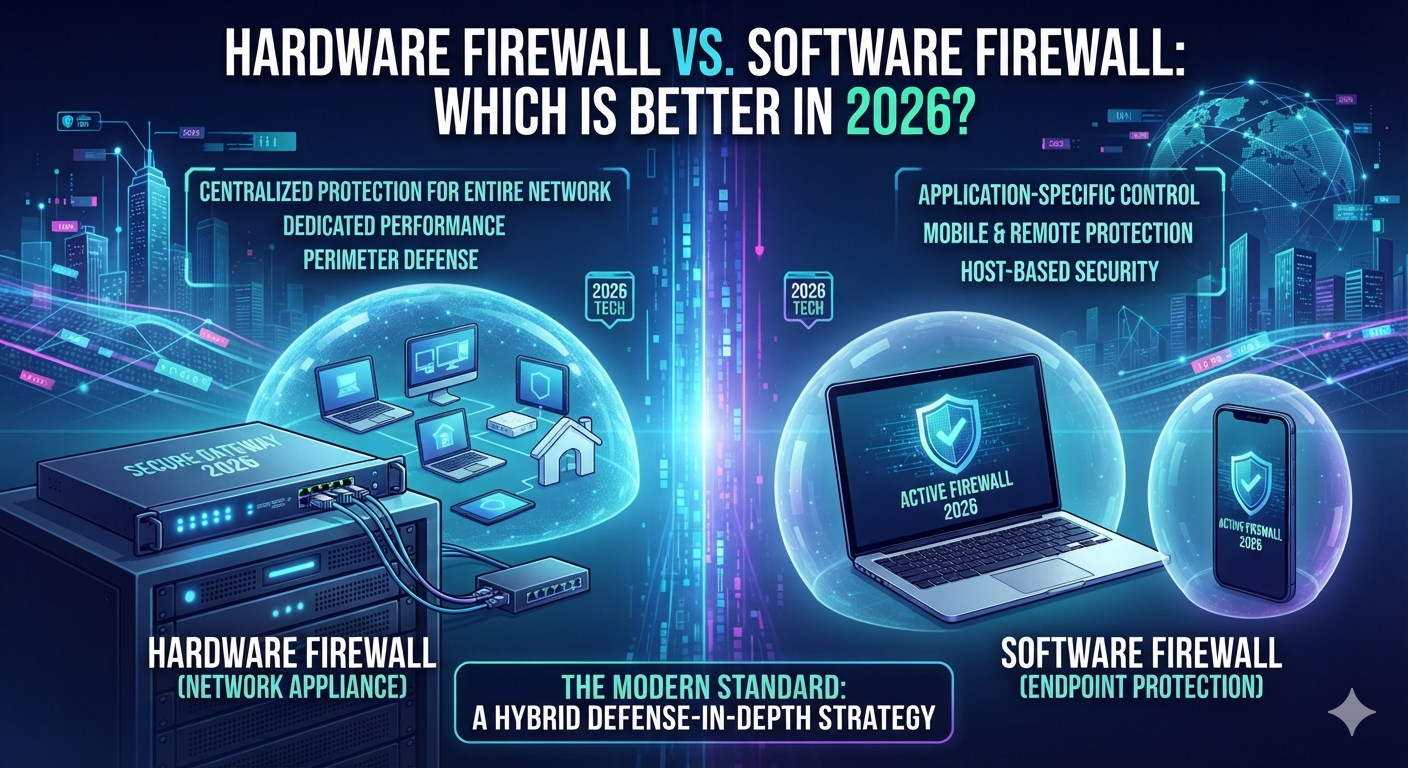
Choosing a firewall isn’t as simple as picking the product with the longest feature list. A firewall sits between trusted and untrusted communication and decides which network connections should be allowed, restricted, or blocked. For a home user, that might mean protecting a laptop and smart TV. For a company, it can mean controlling traffic across offices, servers, cloud systems, remote workers, and thousands of endpoints.
That’s why the hardware firewall vs software firewall debate still matters in 2026. Both technologies can protect systems, but they operate at different points in the network. A hardware firewall normally works at a network boundary, while a software firewall works directly on a computer or server. NIST’s firewall guidance covers both network firewalls and host-based firewalls and explains that their security capabilities and limitations differ.
The difference becomes even more important when you consider modern internet use. Your laptop doesn’t always stay behind your home router. You might take it to work, connect through hotel Wi-Fi, use a public hotspot, or work remotely from another country. At the same time, your home network may contain cameras, gaming consoles, phones, printers, and smart appliances that need protection too.
So which option is actually better?
The answer depends on what you’re protecting. A hardware firewall is usually better at controlling traffic across an entire network. A software firewall is usually better at controlling connections on an individual device. In many situations, the strongest design uses both rather than treating them as competing technologies.
Trusted Sources
- Guidelines on Firewalls and Firewall Policy — NIST /
- Windows Firewall Overview — Microsoft Learn /
- Windows 11 Network Security — Microsoft Learn /
- Firewall Technology Resources — NIST /
- Defense in Depth Guidance — CISA /
What Is a Hardware Firewall?
A hardware firewall is a physical network security device that controls traffic moving between networks. It commonly sits between the internet and an internal network, making it one of the first security controls that network traffic encounters.
At home, you may already have one without realizing it. Many consumer routers combine routing, Wi-Fi, NAT, and firewall functions inside the same device. In a business, the firewall may be a dedicated appliance positioned between the organization’s internal network and its internet connection.
The important concept is network-level protection. Instead of protecting only one computer, the firewall can enforce policies for traffic moving between network zones. If ten computers, twenty phones, printers, cameras, and servers sit behind the gateway, the gateway can apply rules before traffic reaches those devices.
That makes hardware firewall protection particularly useful for environments where many devices share the same network. You don’t need to install a physical firewall beside every laptop. One appropriately configured gateway can become a central control point.
Hardware Firewall vs Router Firewall
This is where many beginners get confused.
A router and a dedicated firewall aren’t necessarily completely different categories. A modern router can include firewall functions. However, the depth of those controls varies significantly between consumer routers and dedicated security appliances.
A basic home router may provide NAT, stateful packet filtering, port controls, and simple inbound protection. A business-grade appliance may add VPN capabilities, VLAN support, network segmentation, logging, advanced inspection, policy management, redundancy, and other controls.
So when someone asks about hardware firewall advantages, the answer depends on the actual hardware.
A $100 consumer router isn’t equivalent to a professionally managed enterprise firewall simply because both can block network traffic.
How Hardware Firewall Protection Works
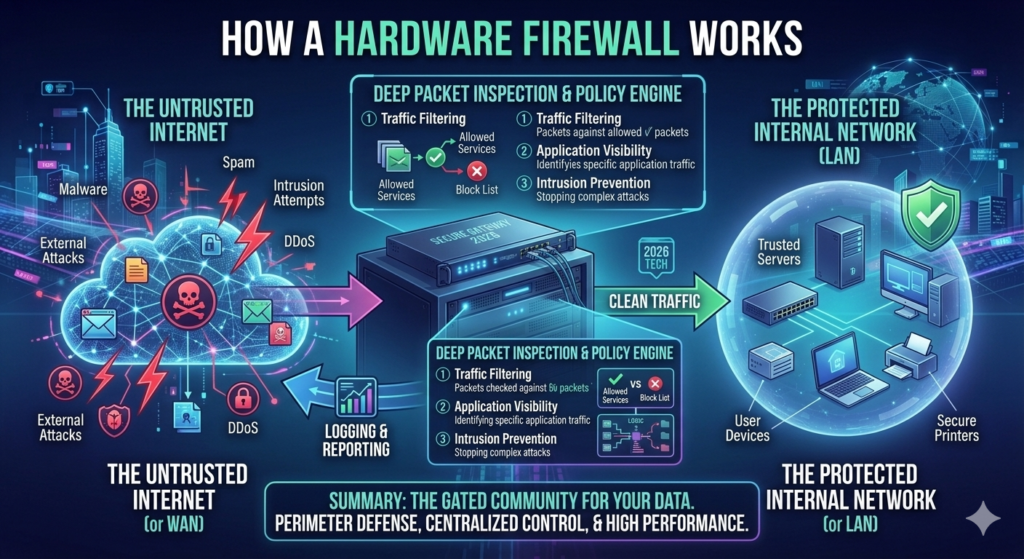
Imagine your home has an internet connection connected to a router. Behind that router are your laptop, phone, smart TV, printer, and security camera.
When traffic arrives from the internet, the gateway can examine it before forwarding it to an internal device. The firewall checks the traffic against its configured policy.
If the traffic is allowed, it continues.
If the traffic violates the policy, the firewall can block or drop it.
This is the basic idea behind firewall traffic filtering.
However, modern firewall decisions can be considerably more sophisticated than simply asking whether a packet contains a particular IP address.
What Is a Software Firewall?
A software firewall is a firewall program or operating-system feature that runs directly on an endpoint such as a laptop, desktop, workstation, or server.
Instead of sitting between an entire network and the internet, it sits on the device it protects.
That gives it a different perspective.
A network firewall can see traffic moving through the network boundary. A host firewall can see traffic associated with the local machine and can often apply rules based on applications, services, ports, protocols, addresses, and network profiles.
Microsoft describes Windows Firewall as a host-based firewall included with Windows. It can filter traffic entering and leaving a device using criteria such as source and destination IP addresses, IP protocols, ports, applications, and services.
That makes software firewall protection especially useful for computers that move between different networks.
Why Endpoint Location Matters
Consider a laptop used by a remote employee.
At 9:00 AM, the laptop is connected to the company’s network.
At noon, the employee takes it to a coffee shop.
At 3:00 PM, the employee connects to a hotel network.
The company’s physical firewall stays in the office.
The laptop doesn’t.
That’s where a software firewall becomes valuable. Its protection remains on the endpoint regardless of which network the computer joins.
This is one of the biggest software firewall benefits that a purely network-based firewall cannot provide by itself.
Hardware Firewall vs Software Firewall: Key Differences
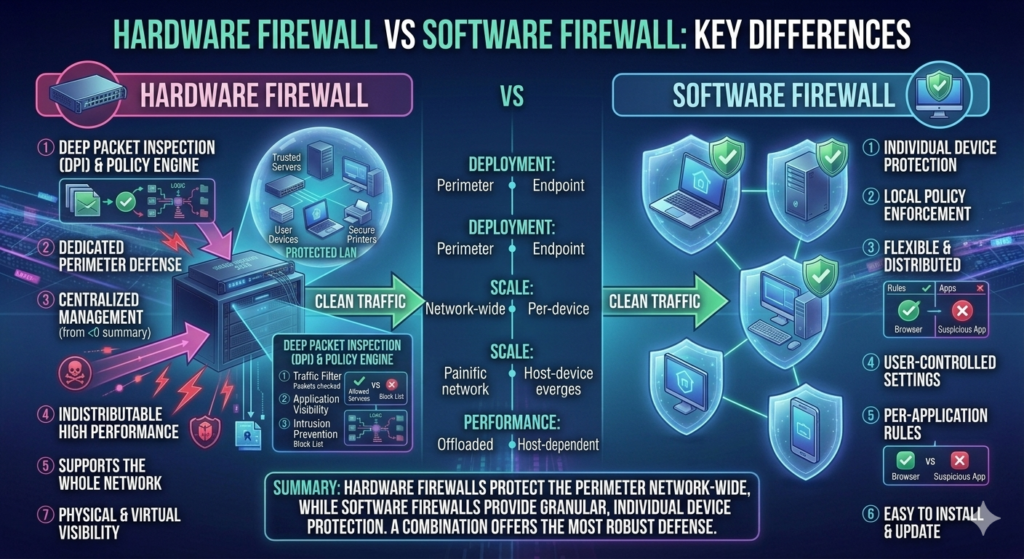
The most important hardware firewall vs software firewall difference is the location where filtering happens.
A hardware firewall normally controls traffic at a network boundary. A software firewall normally controls traffic directly on a host.
That sounds like a small distinction, but it changes almost everything else.
A hardware firewall can protect many devices through one central point. A software firewall can make more granular decisions about an individual computer. A hardware firewall is closely tied to a network architecture. A software firewall travels with its endpoint.
Here’s the bigger picture:
| Feature | Hardware Firewall | Software Firewall |
| Primary location | Network gateway | Individual endpoint |
| Protection scope | Multiple devices | Specific device |
| Application visibility | Depends on firewall technology | Usually strong on the host |
| Network-wide control | Strong | Limited to managed endpoints |
| Mobility | Limited | Excellent |
| Resource usage | Dedicated appliance resources | Uses endpoint resources |
| Public Wi-Fi protection | Not directly on remote device | Yes |
| Centralized network policy | Strong | Possible through endpoint management |
| Network segmentation | Common | Limited by endpoint architecture |
| Home use | Router-based protection | Built-in OS firewall |
| Business use | Gateway protection | Endpoint protection |
| Enterprise use | Gateway, segmentation, perimeter controls | Endpoint security and policy enforcement |
The important lesson is that these technologies aren’t simply duplicates.
They operate at different layers.
How Does a Hardware Firewall Work?
To understand a hardware firewall, it helps to follow one connection from beginning to end.
Suppose your laptop wants to open a website.
Your laptop creates network traffic and sends it toward the internet. The traffic reaches your network gateway. The firewall examines the connection and evaluates it against its rules and connection state.
If the traffic matches an allowed policy, the firewall forwards it.
The response comes back through the gateway. The firewall evaluates that traffic again before forwarding it to the internal device.
This process happens extremely quickly.
Packet Filtering Explained
One of the foundational firewall technologies is packet filtering.
Network communication is divided into packets. These packets contain information that can include source and destination addresses, protocol information, and port numbers.
A firewall can examine those characteristics and compare them with its rules.
For example, a rule might say that traffic destined for a particular service should be allowed only from a specific network.
Another rule could block traffic from a known address range.
Basic filtering can therefore act like a set of traffic checkpoints.
However, modern firewall technology can go further.
Stateful Inspection Explained
A stateful firewall doesn’t look at every packet as if it exists independently. It keeps track of active connections.
NIST explains that stateful inspection tracks connection state and can block packets that don’t match the expected state. A state table can contain information such as source address, destination address, ports, and connection state.
Here’s a simplified example.
Your computer starts a legitimate connection to a web server.
The firewall records information about that connection.
When response traffic returns, the firewall can recognize that it belongs to an existing connection.
Now imagine an unrelated packet arrives claiming to belong to an established session. A stateful firewall can compare it against its connection state instead of blindly trusting the packet.
That’s a major improvement over simple packet filtering.
Why Stateful Inspection Matters
Without connection awareness, a firewall has less context.
With stateful inspection, the firewall can ask a more useful question:
“Does this traffic belong to a connection that actually exists?”
That context helps reduce certain types of unwanted traffic and makes firewall decisions more meaningful.
Still, stateful inspection isn’t magic. It doesn’t mean the firewall understands every application or automatically detects every malicious action.
That’s why modern security systems can add additional inspection and endpoint controls.
How Does a Software Firewall Work?
A software firewall follows the same broad principle of controlling communication, but it operates directly on the endpoint.
Suppose an application on your Windows computer attempts to receive an inbound connection.
The Windows Firewall can evaluate the connection against its configured rules.
Those rules can consider the application, service, IP addresses, protocols, ports, interface types, and network profile.
This creates a much more local view of communication.
The firewall isn’t simply asking:
“Should this network traffic enter the company?”
It can potentially ask:
“Should this particular application on this particular computer receive this connection?”
That’s a major difference.
Inbound Traffic vs Outbound Traffic
Firewall discussions often focus on incoming attacks.
But outgoing traffic matters too.
Imagine a legitimate-looking program running on your computer that attempts to communicate with an unfamiliar server.
A host firewall can apply outbound rules to that connection.
Windows Firewall’s documented default behavior blocks unsolicited inbound traffic unless permitted by a rule while allowing outbound traffic unless a rule restricts it.
Organizations with higher security requirements can create stricter outbound policies. Microsoft documents that enterprise environments can configure firewall profiles with different inbound and outbound behaviors depending on their security requirements.
This is why outgoing traffic deserves as much attention as incoming traffic in a serious security architecture.
Hardware Firewall vs Software Firewall Comparison Table
The following comparison goes beyond the simple question of which one is “stronger.”
| Security Area | Hardware Firewall | Software Firewall |
| Main purpose | Protect network boundaries | Protect individual hosts |
| Protection scope | Network-wide | Endpoint-specific |
| Traffic location | Between networks | On the host |
| Application visibility | Product dependent | Usually detailed |
| Connection tracking | Common | Common |
| Port filtering | Yes | Yes |
| Protocol filtering | Yes | Yes |
| Public network protection | Depends on remote setup | Direct endpoint protection |
| Central management | Strong | Strong with enterprise tools |
| Network segmentation | Strong | Not its primary role |
| Device portability | Low | High |
| Hardware failure impact | Can affect network | Usually affects one endpoint |
| Endpoint resource use | Separate appliance | Endpoint resources |
| Home suitability | Very high through routers | Very high |
| Small-business suitability | Very high | Very high as a complement |
| Enterprise suitability | Very high | Very high as a complement |
The comparison shows why firewall security comparison should focus on architecture rather than marketing claims.
Hardware Firewall vs Software Firewall: Which Is More Secure?
This is probably the question most readers want answered.
Unfortunately, there isn’t an honest answer that says one type is always more secure.
Security depends on what you’re protecting, where the firewall is deployed, how its rules are configured, how it is maintained, and what other security controls exist around it.
NIST specifically discusses the security capabilities and limitations of different firewall technologies and emphasizes proper firewall policy, selection, configuration, testing, deployment, and management.
A hardware firewall has an important security advantage because it can establish a controlled boundary around an entire network.
A software firewall has a different advantage because it protects an individual host directly.
Hardware Firewall Security: Where It Excels
Imagine ten computers inside an office.
Instead of configuring a network boundary separately on every computer, the gateway firewall can enforce traffic rules between the office and external networks.
This creates centralized network firewall protection.
It can also help separate different network zones.
For example, a business might separate employee computers from guest Wi-Fi and sensitive servers. CISA explains that network segmentation creates separate network areas that can limit access to devices, data, and applications while helping contain malicious activity.
Software Firewall Security: Where It Excels
Now imagine one employee takes a company laptop home.
The office firewall isn’t physically between that laptop and the internet anymore.
The endpoint firewall still operates on the laptop.
That creates software firewall security outside the company’s physical network boundary.
This is particularly valuable in a world where remote work and mobile devices are normal.
Why Using Both Can Be Stronger
Here’s where the comparison becomes more interesting.
A company doesn’t necessarily need to choose between network and endpoint protection.
It can use both.
The network firewall controls the larger environment.
The endpoint firewall controls individual systems.
If an attacker gets past one security layer, another control may still restrict what happens next.
NIST has noted that traditional perimeter firewalls cannot recognize every attack, especially traffic moving between internal hosts.
That matters because modern attacks don’t always follow the old pattern of “internet → office network → target.”
An attacker may compromise one endpoint and then attempt to move laterally.
Segmentation and endpoint controls can make that movement harder.
Part 2: Choosing the Right Firewall for Home, Business, and Enterprise
Which Firewall Is Better for Home Users?
For most home users, the answer begins with the router.
A modern home router commonly provides basic network firewall protection. It sits between your local devices and the internet and can restrict unsolicited inbound traffic.
For many households, that’s a useful first layer.
But your home network isn’t just your router.
It may contain a Windows laptop, MacBook, Android phone, iPhone, gaming console, smart TV, printer, cameras, smart speakers, and dozens of other devices.
That creates a more complicated security environment.
The Best Firewall for a Typical Home Network
For a normal household, a practical setup looks like this:
| Layer | Example Protection |
| Internet gateway | Router firewall |
| Computer | Windows Firewall or equivalent |
| Wi-Fi | WPA2/WPA3 security |
| Accounts | Strong passwords and MFA |
| Devices | Firmware and software updates |
| Smart devices | Separate network when practical |
The point isn’t to buy the most expensive firewall.
The point is to create sensible layers.
A home user may already have a router firewall and an operating-system firewall without paying for another dedicated product.
Hardware Firewall for Home Users
A hardware firewall for home becomes more interesting when the user has advanced requirements.
For example, someone may operate a home server, multiple VLANs, security cameras, smart-home equipment, or several separate networks.
In that environment, a more capable firewall can provide better visibility and control than a basic consumer router.
But complexity has a cost.
If you don’t understand the rules you’re creating, adding advanced features doesn’t automatically make the network safer.
Software Firewall for Home Users
A software firewall for home users is especially useful on personal computers.
Windows Firewall, for example, can apply rules to applications, services, addresses, protocols, and ports. It also supports different network profiles.
That means your computer can behave differently on a private network than on a public network.
This is useful because a laptop on trusted home Wi-Fi shouldn’t necessarily expose the same services when connected to an unfamiliar public network.
Which Firewall Is Better for Small Businesses?
A small business needs to think beyond individual computers.
Suppose a company has twelve employees.
There may be twelve laptops, several phones, printers, a file server, Wi-Fi access points, cameras, guest devices, and cloud applications.
The business now has a network architecture rather than a collection of personal computers.
That’s where a firewall for small business becomes important.
Why Small Businesses Need Network-Level Protection
A central firewall can establish a controlled boundary between the company’s internal systems and external networks.
It can also create separate zones.
For example:
Employee Network → Business Systems
Guest Wi-Fi → Internet Only
Server Network → Restricted Access
Management Network → Administrative Devices
The exact architecture depends on the organization, but the principle is simple: not every device needs unrestricted access to every other device.
CISA explains that segmentation can restrict communication between network areas and reduce the ability of an attacker to move toward high-value systems.
Software Firewalls in Small Businesses
Endpoint firewalls still matter.
Imagine an employee’s laptop becomes infected or is connected to an untrusted network outside the office.
The business firewall isn’t necessarily in the traffic path anymore.
The endpoint firewall can continue applying local policies.
That’s why the best firewall for business network protection is often not one firewall. It’s a combination of network and endpoint controls.
Which Firewall Is Better for Large Businesses and Enterprises?
Enterprise environments introduce another level of complexity.
A large company might have offices across several cities or countries. It may run cloud workloads, data centers, remote-access systems, SaaS applications, internal servers, employee laptops, mobile devices, and specialized infrastructure.
A single perimeter firewall isn’t enough to describe that environment.
The enterprise needs a security architecture.
Firewall for Enterprise Networks
A firewall for enterprise environments may provide capabilities such as centralized policy management, network segmentation, VPN connectivity, detailed logging, high availability, and traffic inspection.
But the architecture matters more than the product label.
A company might use firewalls between the internet and corporate network, between internal network segments, around sensitive applications, and at cloud boundaries.
Why Enterprise Segmentation Matters
Consider a company with three areas:
Public-facing services
Employee systems
Sensitive financial databases
Putting everything into one flat network means a compromise of one area may provide an attacker with a much easier path toward another.
Segmentation creates boundaries.
CISA describes segmentation as a way to divide a network into multiple areas that provide additional security and control. It notes that segmentation can help isolate high-value assets and limit lateral movement.
This is where a network firewall becomes more than an internet gatekeeper.
It becomes part of the internal security architecture.
Hardware Firewall Advantages and Disadvantages
The biggest hardware firewall advantages are centralized control, broad network coverage, and dedicated processing resources.
One properly configured gateway can protect traffic involving many systems.
This is particularly useful when an organization needs consistent policies across a network.
A hardware firewall can also serve as an architectural boundary between different network zones. That can be valuable for businesses that need to restrict communication between employee systems, guest networks, servers, and sensitive infrastructure.
However, hardware firewall disadvantages include cost, physical deployment, maintenance, configuration complexity, and limited portability.
A laptop can leave the network.
The firewall cannot.
Hardware Firewall Performance
Dedicated hardware can process large amounts of traffic without consuming the CPU and memory of individual endpoints.
But “hardware” doesn’t automatically mean unlimited performance.
Every appliance has limits.
Traffic inspection, VPN encryption, logging, malware inspection, and other features can consume processing resources. The correct firewall therefore needs enough capacity for the expected workload.
This is why hardware firewall performance should be evaluated using realistic traffic requirements rather than simply looking at the device’s maximum advertised speed.
Software Firewall Advantages and Disadvantages
The biggest software firewall advantages are portability and endpoint-level control.
A software firewall follows the computer.
That makes it useful for remote workers, travelers, laptops, and devices that regularly switch between networks.
It can also provide detailed rules based on applications, services, addresses, protocols, and ports. Microsoft documents these types of conditions for Windows Firewall rules.
The main software firewall disadvantages appear when organizations try to manage huge numbers of endpoints without centralized tools.
One computer is easy.
One thousand computers are different.
Software Firewall Performance
A modern computer generally has enough processing power for ordinary firewall filtering.
Still, the firewall shares system resources with applications and other security software.
The effect depends on the computer’s hardware, the firewall’s features, logging, rule complexity, and overall workload.
So software firewall performance isn’t automatically worse than hardware performance.
It simply operates under different resource constraints.
Can You Use a Hardware Firewall and Software Firewall Together?
Yes, and this is often the most practical approach.
Imagine a company’s traffic passing through a network firewall before reaching an employee laptop.
The network firewall can enforce network-level rules.
The laptop’s software firewall can enforce host-level rules.
Now there are two separate control points.
If the laptop later leaves the office, the endpoint firewall remains with it.
That’s the real advantage of combining both technologies.
A Simple Layered Security Model
| Security Layer | Main Purpose |
| Router/network firewall | Protect network boundary |
| Internal segmentation | Restrict movement between zones |
| Endpoint firewall | Protect individual devices |
| Endpoint security | Detect and respond to threats |
| Authentication | Verify users |
| MFA | Add another identity layer |
| Updates | Remove known software weaknesses |
| Monitoring | Identify suspicious activity |
A firewall isn’t a replacement for all these controls.
Hardware Firewall vs Software Firewall: Performance and Speed
Performance comparisons are often misleading because firewall workloads vary dramatically.
A basic firewall that filters ports may require relatively little processing.
Advanced inspection can require considerably more.
The traffic volume also matters.
A home network with one gigabit internet service has very different requirements from a data center carrying enormous volumes of traffic.
Hardware Firewall Performance vs Software Firewall Performance
A hardware appliance can dedicate processing resources to network security.
A software firewall shares the host’s resources.
That sounds like an automatic victory for hardware.
It isn’t.
Modern computers are powerful, and basic host firewall filtering can be efficient.
Meanwhile, a poorly sized hardware appliance can become a bottleneck.
The better question is:
Can the firewall handle the required traffic while maintaining the security features you actually need?
That’s the performance question that matters.
Hardware Firewall vs Software Firewall: Cost Comparison
Cost is another area where simple comparisons fail.
A hardware firewall may require the device itself, licensing, subscriptions, support, installation, maintenance, and eventual replacement.
A software firewall may already be included with the operating system.
Windows Firewall, for example, is included as a Windows security feature. Microsoft describes it as enabled by default on supported Windows editions.
However, enterprise endpoint security platforms can introduce significant licensing and management costs.
| Cost Factor | Hardware Firewall | Software Firewall |
| Physical device | Usually required | No |
| Basic home cost | Often part of router | Often included in OS |
| Enterprise license | Common | Common |
| Maintenance | Hardware + firmware | Software + endpoint management |
| Deployment | Network-wide | Endpoint-by-endpoint or centralized |
| Mobility | Limited | Strong |
| Scaling | Appliance capacity | Endpoint count and management |
The smartest comparison is therefore total cost of ownership, not purchase price alone.
Part 3: The 2026 Decision Guide
Hardware Firewall vs Software Firewall: Which One Should You Choose in 2026?
If you’re a normal home user, start with what you already have.
Your router likely provides basic gateway protection.
Your computer likely provides a host firewall.
Keep both properly configured.
If you operate a small business, consider a capable network firewall combined with endpoint protection.
If you manage an enterprise, think in terms of architecture rather than individual products. Network firewalls, segmentation, endpoint controls, identity security, monitoring, and secure remote access all have roles.
Quick Decision Guide
| User | Recommended Approach |
| Basic home user | Router firewall + built-in endpoint firewall |
| Gamer | Router firewall + endpoint firewall |
| Smart-home owner | Gateway protection + endpoint controls + device isolation |
| Remote worker | Endpoint firewall + secure network gateway |
| Small business | Business firewall + endpoint protection |
| Growing company | Managed network + centrally managed endpoints |
| Enterprise | Layered network, segmentation, endpoint, and identity controls |
| High-security environment | Multiple control layers with strict policies |
When Should You Choose a Hardware Firewall?
Choose a hardware firewall when your main concern is protecting a network.
It makes particular sense when multiple devices share the same internet connection or when you need centralized traffic controls.
It also becomes more valuable when you need network segmentation, VPN services, logging, or controlled communication between different security zones.
When Should You Choose a Software Firewall?
Choose a software firewall when your main concern is protecting an individual device.
It’s particularly useful for laptops and mobile workers because the protection stays with the endpoint.
It’s also valuable when you need application-level rules that understand which program or service is making a connection.
When Should You Choose Both?
If you want stronger layered protection, choose both.
The hardware firewall protects the network boundary.
The software firewall protects the endpoint.
Neither has to replace the other.
This is one of the most important conclusions from the entire hardware firewall vs software firewall comparison.
Frequently Asked Questions About Hardware and Software Firewalls
Does a Hardware Firewall Slow Down Internet Speed?
It can if the appliance doesn’t have enough capacity for the traffic and security features being used. A properly sized firewall should handle the expected workload without becoming an unnecessary bottleneck.
Does a Software Firewall Slow Down a Computer?
It uses system resources, but basic filtering is usually lightweight on modern computers. More advanced inspection and logging can increase resource usage.
Can a Firewall Stop Malware?
A firewall can restrict network communication, but it isn’t a complete malware defense. It should work alongside endpoint protection, software updates, secure authentication, backups, and other cybersecurity controls.
What Is the Difference Between a Firewall and Antivirus?
A firewall controls network communication. Antivirus and endpoint security tools focus more directly on detecting and responding to malicious software. That’s why firewall vs antivirus is not really an either-or decision.
Should Small Businesses Use a Hardware Firewall?
A suitable network firewall can be very useful for small businesses because employees, servers, printers, and other devices often share the same network. Endpoint firewalls should still complement the gateway.
Can a Hardware Firewall Protect Wi-Fi Devices?
Yes. A gateway firewall can control traffic between the protected network and external networks. However, Wi-Fi encryption, strong credentials, device updates, and network segmentation still matter.
Should I Disable My Software Firewall If I Have a Hardware Firewall?
Generally, no. The network firewall and endpoint firewall serve different purposes. Microsoft recommends keeping Windows Firewall enabled because disabling it removes an important layer of protection.
Can a Software Firewall Protect Me on Public Wi-Fi?
Yes. That’s one of its major advantages. A host firewall remains active on the device even when the device connects to a network you don’t control.
Is a Router Firewall the Same as a Hardware Firewall?
A router can contain hardware-based firewall functionality, but capabilities vary. A basic home router isn’t necessarily equivalent to a dedicated business or enterprise firewall appliance.
Final Verdict: Hardware Firewall vs Software Firewall in 2026
The answer is now much clearer.
A hardware firewall is primarily a network security control. It protects traffic at a network boundary and can cover many devices behind that boundary.
A software firewall is primarily an endpoint security control. It protects an individual computer or server and can travel with that device when it moves between networks.
Neither technology completely replaces the other.
For a home user, the practical setup is often a router firewall plus the firewall already included with the computer’s operating system.
For a small business, a business-grade network firewall combined with endpoint controls provides a stronger foundation.
For an enterprise, the conversation becomes much broader. Network segmentation, internal firewalls, endpoint policies, identity controls, monitoring, remote access security, and other defensive layers all become important.
The deeper lesson is that firewall protection isn’t about buying the biggest firewall.
It’s about placing the right controls in the right locations.
NIST’s guidance emphasizes that firewall effectiveness depends on proper selection, policy development, configuration, testing, deployment, and ongoing management. CISA likewise describes segmentation as a way to create additional boundaries, restrict communications, isolate valuable assets, and limit lateral movement.
So if you’re asking, “Hardware firewall vs software firewall: which is better in 2026?”, the most accurate answer is:
Hardware firewalls are better for network-wide control. Software firewalls are better for endpoint-level control. For stronger defense, using both can provide complementary layers of protection.
Meta Description
Hardware firewall vs software firewall: Compare security, performance, cost, benefits, and use cases to find the best firewall for your home or business in 2026.
🛡️ Ready to Explore Firewall & Cybersecurity
| RELATED ARTICLE | EXPLORE NOW |
|---|---|
| Firewall Security | 🔵 EXPLORE NOW |
| Hardware Firewall vs Software Firewall | 🔵 EXPLORE NOW |
| AI Cybersecurity Threats in 2026 | 🔵 EXPLORE NOW |
| AI-Powered Cybersecurity | 🔵 EXPLORE NOW |
| Identity and Access Management (IAM) | 🔵 EXPLORE NOW |
| Zero Trust Security | 🔵 EXPLORE NOW |
| AI Scams in 2026 | 🔵 EXPLORE NOW |