

Introduction: Understanding Cloud Service Models
Cloud computing has changed how businesses store data, build applications, and manage technology. Today, companies no longer need to purchase expensive hardware for every digital requirement. Instead, they can use cloud service models to access computing power, software, and storage through the internet.
Whether you run a startup, manage an enterprise, or simply use online tools every day, you already interact with cloud-based services. Email platforms, video meetings, online storage, and business applications often depend on modern cloud technology. These services help organizations improve speed, reduce costs, and create better digital experiences.
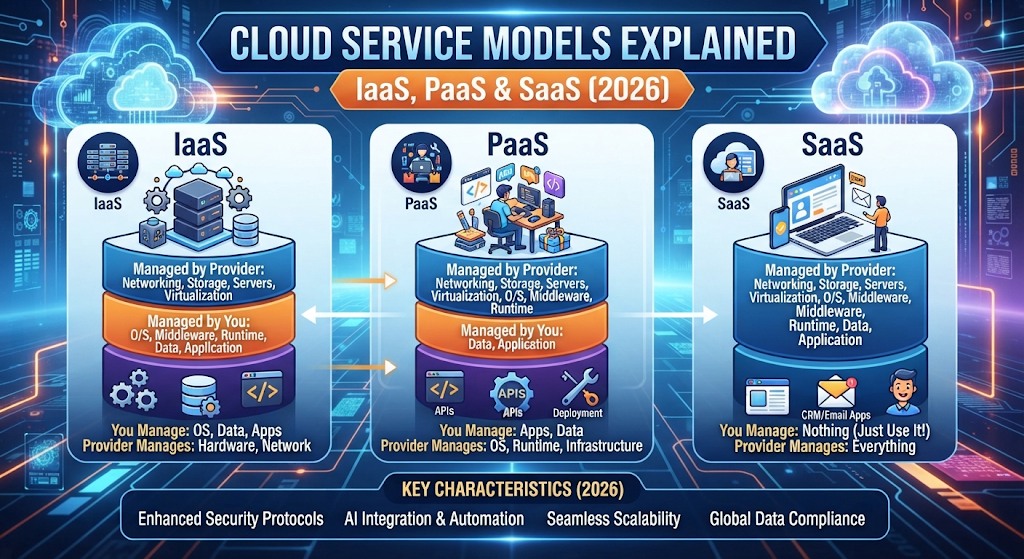
The three main models include infrastructure as a service, platform as a service, and software as a service. Each model provides a different level of control and management. Understanding these differences helps businesses select the right solution for their goals.
The comparison of IaaS vs PaaS vs SaaS is important because each model solves different technology problems. A developer may need complete control over servers, while a small business may only need ready-to-use software. Choosing the wrong model can increase costs and create unnecessary complexity.
In this guide, you will learn how cloud computing models work, what makes each service unique, and how businesses in the USA use these solutions for growth. We will also explore examples, advantages, limitations, security concerns, and future trends in cloud computing.
What Are Cloud Service Models in Cloud Computing?
Cloud service models are different ways that cloud providers deliver technology resources over the internet. Instead of managing everything internally, companies can rent specific resources based on their needs. These resources may include servers, software, storage, databases, and development tools.
In traditional IT environments, businesses usually purchase physical servers, install software, and maintain hardware themselves. This process requires large investments and skilled IT teams. However, modern cloud computing services allow organizations to access powerful technology without owning all the infrastructure.
The main idea behind these models is shared responsibility. Cloud providers manage certain parts of the system, while customers control other areas. The level of responsibility depends on the selected service model.
For example, with software as a service, the provider manages almost everything, including updates and maintenance. With infrastructure as a service, customers have more control over servers, operating systems, and applications.
| Cloud Service Model | Main Purpose | User Control Level |
| IaaS | Provides computing infrastructure | High control |
| PaaS | Provides development environment | Medium control |
| SaaS | Provides ready-to-use applications | Low control |
These cloud platforms make technology more accessible for businesses of every size. From small companies to global enterprises, organizations use these solutions to improve efficiency and support digital growth.
Why Are Cloud Service Models Important for Businesses?
Businesses today depend on technology for almost every operation. From communication to customer management, companies need reliable systems that can grow with changing demands. This is where cloud solutions become valuable.
One major advantage is scalability. Businesses can increase or decrease their technology resources without purchasing new hardware. For example, an online store can handle more visitors during holiday sales by increasing its cloud resources temporarily.
Cloud models also improve flexibility. Employees can access tools and data from different locations through secure remote access. This has become especially important as companies continue supporting remote and hybrid work environments.
Another important benefit is cost efficiency. Instead of spending thousands of dollars on physical servers, businesses can use flexible pricing options from cloud providers. They only pay for the resources they actually need.
Modern companies use cloud technology for many purposes, including:
| Business Need | Cloud Usage |
| Data storage | Online file and backup systems |
| Application development | Building and testing software |
| Customer management | CRM platforms |
| Communication | Collaboration tools |
| Analytics | Processing business data |
For many organizations, cloud adoption supports digital transformation. It helps companies improve productivity, launch services faster, and compete in a technology-driven market.
How Do Cloud Service Models Work?
Cloud service models work through a network of powerful data centers operated by cloud providers. These providers maintain servers, storage systems, and networking equipment that customers can access through the internet.
Behind every cloud service is advanced cloud infrastructure. This includes physical servers, virtualization technology, security systems, and management tools. Virtualization allows one physical machine to create multiple virtual machines that different customers can use.
When a company chooses a cloud service, it receives access to specific resources depending on the model. For example, an IaaS customer may rent cloud servers and manage their own applications. A SaaS customer simply uses a finished application without managing technical systems.
The basic cloud process looks like this:
User Request → Cloud Provider → Cloud Resources → Application or Service Delivery
Cloud providers handle complex tasks such as hardware maintenance, system updates, and network management. This allows businesses to focus more on their products and customers.
Companies also benefit from automation. Cloud systems can automatically adjust resources, monitor performance, and improve reliability. This reduces manual work and helps IT teams manage operations more efficiently.
Overview of the Three Main Cloud Service Models
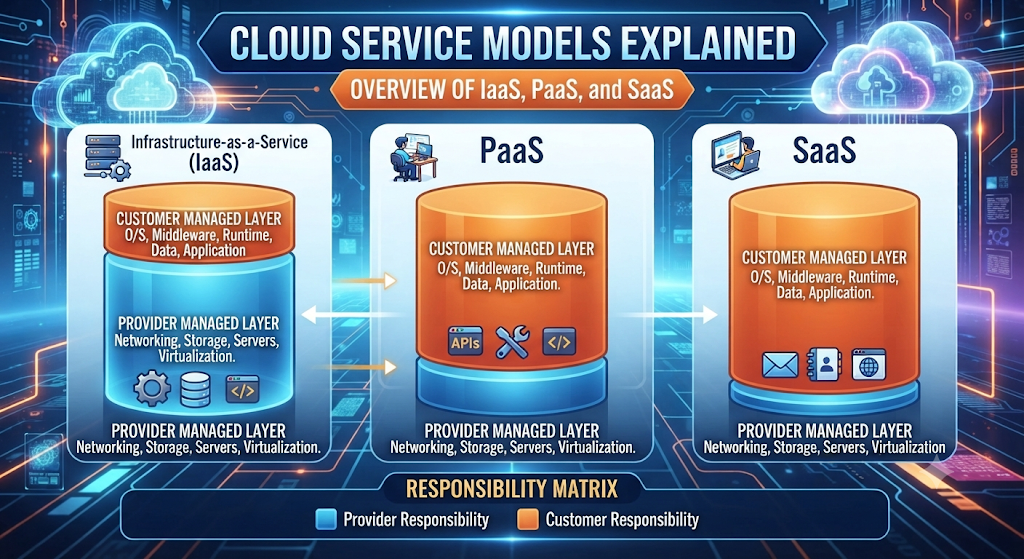
The three major cloud computing models are designed for different users and requirements. They provide different levels of control, responsibility, and convenience.
The easiest way to understand them is by comparing ownership and management responsibilities.
| Feature | IaaS | PaaS | SaaS |
| Full Name | Infrastructure as a Service | Platform as a Service | Software as a Service |
| Best For | IT teams and system administrators | Developers | Everyday users |
| Management Level | User manages more | Shared management | Provider manages most tasks |
| Examples | Cloud servers | Development platforms | Online applications |
Infrastructure as a service provides the foundation. It gives businesses access to computing resources like servers and storage.
Platform as a service sits in the middle. It gives developers tools to create and deploy applications without managing infrastructure.
Software as a service is the simplest option. Users access complete applications through the internet.
Understanding these differences makes the IaaS vs PaaS vs SaaS decision much easier. The right choice depends on business goals, technical skills, and required control.
What Is Infrastructure as a Service (IaaS)?
Infrastructure as a Service or IaaS is one of the most flexible cloud service models that gives businesses access to computing resources through the internet. Instead of purchasing physical servers, companies can rent digital infrastructure from cloud providers and use it whenever needed.
With IaaS, businesses can access important technology resources such as virtual machines, storage, networking, and cloud servers. These resources work like traditional IT systems but are hosted inside professional data centers managed by providers.
The biggest advantage of IaaS is control. Companies can choose their operating systems, install applications, manage databases, and customize their environments according to their requirements. This makes IaaS popular among developers, IT teams, and large organizations.
For example, a software company building a new application may need powerful servers for testing. Instead of buying expensive hardware, the company can use IaaS from providers like Amazon Web Services (AWS), Microsoft Azure, or Google Cloud Platform.
IaaS supports modern businesses by providing flexible cloud infrastructure without the burden of maintaining physical equipment. It gives organizations the freedom to build, manage, and scale their technology environment as they grow.
How Does IaaS Work?
IaaS works by delivering virtualized computing resources through a cloud environment. Cloud providers maintain large data centers filled with powerful servers, storage systems, and networking equipment. Customers access these resources remotely through online dashboards or APIs.
The foundation of IaaS is virtualization. A physical server can be divided into multiple independent virtual machines. Each virtual machine works like a separate computer with its own operating system, applications, and settings.
When a company uses IaaS, the provider manages the physical hardware while the customer manages the software layer. This creates a shared responsibility model between both parties.
The process usually includes:
| Component | Responsibility |
| Physical servers | Managed by cloud provider |
| Networking equipment | Managed by cloud provider |
| Virtual machines | Managed by customer |
| Applications | Managed by customer |
| Data and security settings | Shared responsibility |
For example, a company running an online platform may use IaaS to create multiple cloud servers during high traffic periods. When demand decreases, it can reduce resources and avoid unnecessary costs.
This flexibility makes IaaS a valuable choice for businesses that need powerful computing without investing in expensive hardware.
Examples of IaaS Platforms
Today, many leading technology companies provide IaaS solutions for organizations around the world. These platforms help businesses create reliable digital environments for websites, applications, and enterprise systems.
Some of the most popular IaaS providers include:
| IaaS Provider | Common Services |
| Amazon Web Services (AWS) | Virtual servers, storage, networking |
| Microsoft Azure | Cloud infrastructure, databases, enterprise solutions |
| Google Cloud Platform | Computing resources, analytics, machine learning |
| IBM Cloud | Enterprise cloud services and infrastructure |
Amazon Web Services (AWS) is one of the largest cloud providers globally. It offers services such as Amazon EC2, which allows businesses to create and manage virtual servers.
Microsoft Azure is widely used by enterprises because of its connection with Microsoft products and business systems. Many organizations use Azure for enterprise cloud solutions and large-scale applications.
Google Cloud Platform provides strong solutions for data processing, artificial intelligence, and modern application development.
These platforms help companies manage complex IT operations without building their own large data centers.
Advantages of Infrastructure as a Service
IaaS provides several benefits that help businesses improve performance and reduce technology expenses. One of the biggest advantages is scalability. Companies can quickly increase or decrease resources depending on their workload.
For example, an online business may need additional servers during a major sales event. With IaaS, the company can add resources within minutes instead of waiting weeks to purchase and install new hardware.
Another important benefit is cost savings. Traditional IT infrastructure requires large upfront investments for servers, maintenance, and physical space. IaaS changes this model by offering flexible pricing.
The main advantages include:
| Advantage | Explanation |
| Scalability | Resources can grow with business needs |
| Flexibility | Users customize their technology environment |
| Cost efficiency | No need to buy physical hardware |
| Faster deployment | New systems can launch quickly |
| Better recovery | Easier backup and disaster recovery |
IaaS also supports innovation. Developers can experiment with new ideas, test applications, and create solutions faster. This improves software development processes and helps businesses bring products to market sooner.
Disadvantages of IaaS
Although IaaS offers many benefits, it also has some challenges. The biggest limitation is that it requires technical knowledge. Businesses must understand server management, networking, and security configurations.
Unlike SaaS, where the provider manages most tasks, IaaS users have more responsibility. Poor configuration can create security risks or performance problems.
Some common disadvantages include:
| Challenge | Explanation |
| Technical complexity | Requires skilled IT professionals |
| Security responsibility | Users must manage many security settings |
| Cost monitoring | Poor management can increase expenses |
| Maintenance tasks | Users handle software updates and configurations |
Another concern is cloud management. Organizations must carefully monitor their resources to avoid unnecessary spending. Without proper planning, companies may pay for unused services.
However, with proper training and management practices, businesses can successfully use IaaS while reducing traditional IT challenges.
Best Use Cases of IaaS
IaaS works best for organizations that need control, customization, and powerful computing resources. It is commonly used by technology companies, enterprises, and developers who require flexible environments.
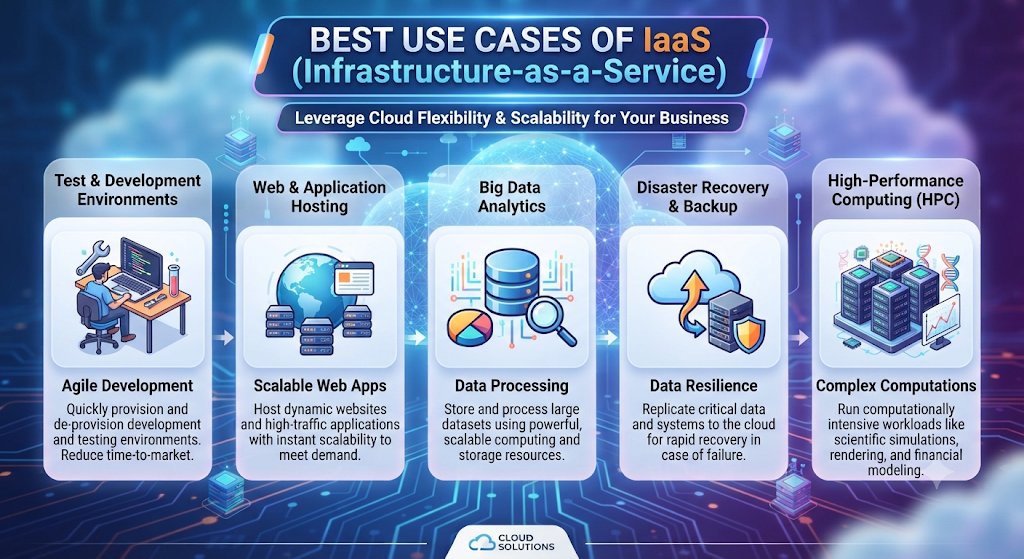
One common use case is application development. Developers use IaaS to create testing environments, run applications, and manage databases without purchasing physical servers.
Businesses also use IaaS for:
| Use Case | Example |
| Website hosting | Running high-traffic websites |
| Application testing | Creating development environments |
| Data processing | Handling large amounts of information |
| Backup solutions | Protecting important business data |
| Cloud migration | Moving systems from local servers |
Large companies often choose IaaS during cloud migration because it allows them to move existing IT systems into the cloud gradually.
For startups, IaaS provides access to enterprise-level technology without requiring millions of dollars in infrastructure investment. This creates opportunities for smaller companies to compete with larger organizations.
IaaS continues to grow because it gives businesses the foundation they need to build modern digital services while maintaining control over their technology environment.
What Is Platform as a Service (PaaS)?
What Is Platform as a Service (PaaS)?
Platform as a Service or PaaS is a cloud service model designed to help developers build, test, and launch applications without managing the complex infrastructure behind them. It provides a ready-made environment where developers can focus on writing code instead of spending time maintaining servers.
Unlike infrastructure as a service, where users manage more technical resources, PaaS handles many backend tasks automatically. The cloud provider manages servers, operating systems, networking, and other infrastructure components while developers focus on application development.
PaaS works like a complete digital workspace for developers. It includes tools, frameworks, databases, and deployment features needed to create modern applications. This makes the development process faster and more efficient.
For example, a startup creating a new web application does not need to purchase servers or configure complex systems. Instead, developers can use a PaaS platform to write code, test features, and publish the application quickly.
Many companies choose PaaS because it balances convenience and control. It gives developers enough flexibility to create customized applications while removing many time-consuming management tasks.
How Does PaaS Work?
PaaS works by providing developers with a complete cloud-based development environment. The cloud provider manages the underlying infrastructure while users access tools needed for building and running applications.
The platform usually includes programming languages, development frameworks, databases, security features, and deployment tools. Developers upload their code to the platform, and the PaaS provider handles the technical environment required to run it.
The basic process looks like this:
Developer Creates Code → PaaS Platform Processes Application → Cloud Environment Runs Application → Users Access Service
One of the biggest advantages of PaaS is automation. Many tasks that normally require manual effort are handled automatically, including software updates, server maintenance, and resource management.
For example, when an application receives more visitors, the platform can automatically adjust resources to maintain performance. This helps businesses achieve better scalability without manually upgrading servers.
PaaS also supports teamwork. Multiple developers can work together in the same environment, making it easier to manage modern software development projects.
Examples of PaaS Platforms
Several major cloud providers offer powerful PaaS solutions for developers and businesses. These platforms support different programming languages and help organizations create reliable applications.
Popular PaaS platforms include:
| PaaS Platform | Provider | Main Purpose |
| Google App Engine | Google Cloud Platform | Application hosting and development |
| Azure App Service | Microsoft Azure | Building and deploying web apps |
| AWS Elastic Beanstalk | Amazon Web Services (AWS) | Application deployment |
| Heroku | Salesforce | Simple application development |
Google Cloud Platform provides tools that help developers build scalable applications without managing servers. It is widely used for web applications, APIs, and data-driven projects.
Microsoft Azure offers PaaS solutions that connect well with enterprise systems. Many businesses use Azure App Service for creating and managing business applications.
Amazon Web Services (AWS) provides multiple PaaS features that help developers deploy applications faster while using reliable cloud infrastructure.
These platforms allow developers to focus on creating valuable products instead of managing technical systems.
Advantages of Platform as a Service
PaaS provides several benefits for companies that want faster and simpler application development. The biggest advantage is that developers can spend more time improving their applications instead of managing infrastructure.
A traditional development environment requires teams to install servers, configure operating systems, and maintain software tools. PaaS removes many of these responsibilities through managed services.
The major advantages include:
| Advantage | Explanation |
| Faster development | Developers can build applications quickly |
| Reduced maintenance | Providers manage infrastructure tasks |
| Better collaboration | Teams work in shared environments |
| Automatic updates | Platforms handle software improvements |
| Cost savings | Less need for infrastructure management |
PaaS also improves productivity because developers can access ready-to-use tools. This reduces delays during the development process and allows businesses to launch products faster.
For startups, PaaS can be especially useful. Small teams can create professional applications without hiring large IT operations teams or investing heavily in hardware.
Disadvantages of PaaS
Although PaaS offers convenience, it also has some limitations. The biggest concern is reduced control. Since the provider manages much of the environment, businesses may have fewer customization options compared to IaaS.
Another challenge is vendor dependency. Once a company builds applications around a specific PaaS platform, moving to another provider may require additional work.
Common disadvantages include:
| Challenge | Explanation |
| Limited control | Users cannot manage every infrastructure detail |
| Vendor lock-in | Migration to another platform may be difficult |
| Platform restrictions | Some tools may not be supported |
| Security concerns | Businesses must review provider security practices |
Businesses should carefully evaluate their requirements before choosing PaaS. A company that needs complete control over servers may prefer IaaS instead.
However, for many organizations, the speed and convenience of PaaS outweigh these limitations.
Best Use Cases of PaaS
PaaS is ideal for businesses and developers who want to create applications quickly without managing complex infrastructure. It is commonly used in modern software projects where speed and collaboration are important.
One major use case is web application development. Developers can create websites, APIs, and online platforms while the PaaS provider manages the technical foundation.
Common PaaS use cases include:
| Use Case | Example |
| Web application development | Building online platforms |
| Mobile app development | Creating smartphone applications |
| API development | Connecting different software systems |
| Software testing | Creating safe testing environments |
| Startup projects | Launching products quickly |
PaaS is also useful for companies going through digital transformation. It helps businesses modernize their technology and create new cloud applications without rebuilding everything from scratch.
For example, a healthcare company may use PaaS to develop a patient management system. The developers can focus on features and user experience while the platform manages servers and infrastructure.
Overall, PaaS provides a middle ground between complete infrastructure control and ready-made software. It gives developers the tools they need while reducing technical complexity.
What Is Software as a Service (SaaS)?
What Is Software as a Service (SaaS)?
Software as a Service or SaaS is the most user-friendly cloud service model that delivers complete software applications through the internet. Instead of installing programs on individual computers, users can access applications directly through a web browser or mobile app.
With SaaS, the provider manages almost everything, including servers, updates, security, and maintenance. Users simply sign in and use the software. This makes SaaS a popular choice for businesses that want simple and reliable cloud-based services without handling complex technical tasks.
Common examples of SaaS include email platforms, project management tools, customer relationship systems, and office applications. Many companies in the USA use SaaS products because they reduce IT workload and improve teamwork.
Unlike infrastructure as a service and platform as a service, SaaS focuses on delivering ready-to-use applications. Users do not need to worry about cloud infrastructure, operating systems, or server configurations.
For example, a company using an online accounting platform does not need to install accounting software on every employee’s computer. The application runs in the cloud, and employees can access it whenever they need.
SaaS has become a major part of modern business technology because it provides convenience, affordability, and easy access to powerful software tools.
How Does SaaS Work?
SaaS works through a subscription-based model where users pay to access software hosted by a cloud provider. Instead of buying a traditional software license, businesses subscribe to a service and receive continuous access.
The SaaS provider manages the entire technical environment. This includes servers, databases, updates, security systems, and performance monitoring. Users only interact with the final application.
The basic process works like this:
Cloud Provider Hosts Application → User Signs In → Software Runs Online → Data Is Stored Securely
A SaaS application usually runs on shared cloud infrastructure. The provider serves many customers while keeping each customer’s data separated and protected.
For example, a company using a customer management platform does not need to install software, configure servers, or manage updates. The SaaS provider handles these responsibilities through managed services.
SaaS also supports modern workplaces by allowing employees to access tools from different locations. This creates better collaboration and improves productivity through secure remote access.
Many SaaS applications use automation to improve user experience. They can automatically update features, fix problems, and add improvements without requiring manual installation.
Examples of SaaS Applications
Thousands of businesses use SaaS applications every day for communication, productivity, sales, and operations. These tools help companies complete tasks faster without building their own software systems.
Some popular SaaS examples include:
| SaaS Application | Purpose |
| Google Workspace | Email, documents, and collaboration |
| Microsoft 365 | Office productivity tools |
| Salesforce | Customer relationship management |
| Slack | Team communication |
| Zoom | Video meetings |
| Dropbox | Cloud storage |
Google Workspace helps businesses manage emails, documents, and team collaboration through online tools.
Microsoft 365 provides popular productivity applications through a cloud-based subscription model. Companies can access software like Word, Excel, and Teams without traditional installations.
Salesforce is widely used for customer management and sales operations. It helps businesses organize customer information and improve relationships.
These examples show how SaaS has transformed everyday business activities. From small startups to large enterprises, companies use SaaS to improve efficiency and reduce technology complexity.
Advantages of Software as a Service
SaaS provides many benefits because it removes the need for businesses to manage complicated software systems. Companies can start using applications quickly without investing in expensive infrastructure.
One major advantage is accessibility. Employees can use SaaS applications from almost anywhere with an internet connection. This supports flexible working environments and global teams.
The main advantages of SaaS include:
| Advantage | Explanation |
| Easy access | Users can access software online |
| Lower costs | No large upfront software purchase |
| Automatic updates | Provider manages improvements |
| Simple maintenance | No server management required |
| Better collaboration | Teams can work together easily |
SaaS also helps businesses improve productivity. Employees spend less time dealing with technical problems and more time focusing on important tasks.
Another important benefit is scalability. Companies can add more users as they grow without rebuilding their technology systems.
For example, a growing company can quickly add new employees to its project management software. This flexibility makes SaaS valuable for both startups and large organizations.
Disadvantages of SaaS
Although SaaS offers convenience, it also has some limitations. Businesses should understand these challenges before choosing a SaaS solution.
One common concern is limited customization. Since the provider controls the software, users may not be able to change every feature according to their exact requirements.
Another challenge is dependency on internet access. Because SaaS applications operate online, poor connectivity can affect productivity.
Some disadvantages include:
| Challenge | Explanation |
| Limited customization | Less control over software features |
| Internet dependency | Requires reliable connection |
| Data privacy concerns | Businesses must review security policies |
| Subscription costs | Long-term expenses may increase |
Security is another important consideration. Businesses must choose trusted providers that follow strong data security practices.
Companies should also evaluate subscription pricing carefully. While SaaS reduces upfront costs, monthly or yearly payments can become expensive as the number of users increases.
However, for many businesses, the convenience and simplicity of SaaS make it one of the most practical cloud solutions available.
Best Use Cases of SaaS
SaaS works best for organizations that need ready-to-use software without managing technical infrastructure. It is especially useful for businesses that want quick deployment and simple management.
Companies use SaaS for many daily operations, including:
| Business Area | SaaS Usage |
| Communication | Email and messaging platforms |
| Sales | Customer relationship tools |
| Finance | Online accounting software |
| Marketing | Campaign management tools |
| Teamwork | Project collaboration platforms |
SaaS is also widely used for enterprise software because large organizations need reliable tools that support thousands of employees.
For example, a global company may use SaaS for employee communication, customer support, and business reporting. The provider manages the technology while the company focuses on operations.
SaaS supports modern digital transformation by helping businesses replace traditional software systems with faster and more flexible solutions.
As cloud adoption continues growing, SaaS remains one of the most important parts of the modern technology ecosystem.
IaaS vs PaaS vs SaaS: Key Differences
Understanding IaaS vs PaaS vs SaaS is important because each cloud model serves a different purpose. Although all three models provide access to technology through the internet, they offer different levels of control, management, and flexibility.
The biggest difference comes from responsibility. With infrastructure as a service, users manage more technical components. With platform as a service, developers focus on creating applications while the provider manages the environment. With software as a service, users simply access finished applications.
Think of these models like renting a house. IaaS is like renting an empty building where you control most things. PaaS is like renting a furnished workspace where some services are already managed. SaaS is like staying at a hotel where almost everything is handled for you.
The choice depends on your business needs, technical skills, and desired control level. A software company may prefer IaaS or PaaS, while a small business may choose SaaS for everyday operations.
IaaS vs PaaS vs SaaS Comparison Table
The following table shows the main differences between these three cloud computing models:
| Feature | IaaS | PaaS | SaaS |
| Full Form | Infrastructure as a Service | Platform as a Service | Software as a Service |
| Main Purpose | Provides computing infrastructure | Provides development environment | Provides ready-to-use applications |
| Best For | IT teams and system administrators | Developers and software teams | Business users and customers |
| User Control | High | Medium | Low |
| Infrastructure Management | User manages more | Shared between user and provider | Provider manages everything |
| Technical Knowledge Required | Advanced | Moderate | Basic |
| Examples | AWS EC2, Azure Virtual Machines | Azure App Service, Google App Engine | Microsoft 365, Salesforce |
This comparison shows that each model provides a different experience. IaaS offers maximum flexibility, PaaS focuses on faster development, and SaaS provides simplicity.
Businesses should not choose a model based only on popularity. They should evaluate their goals, available resources, and long-term technology plans.
Control and Management Differences Between IaaS, PaaS, and SaaS
The level of control is one of the most important differences between these cloud service models. More control usually means more responsibility, while less control often means easier management.
With IaaS, companies manage many parts of their environment, including operating systems, applications, and security settings. The provider mainly handles physical hardware and basic cloud infrastructure.
PaaS removes much of this complexity. Developers receive a ready environment where they can focus on coding and application development. The provider manages servers, operating systems, and development tools.
SaaS provides the least control because the provider manages the complete application. Users simply access the software and use its features.
The responsibility difference can be summarized below:
| Responsibility | IaaS | PaaS | SaaS |
| Hardware | Provider | Provider | Provider |
| Operating System | User | Provider | Provider |
| Applications | User | User | Provider |
| Data | User | User | Shared |
| Updates | User | Shared | Provider |
This structure helps organizations decide how much technical management they want to handle.
Cost Differences Between IaaS, PaaS, and SaaS
Cost is another important factor when selecting a cloud model. Each service has a different pricing approach based on the level of resources and management provided.
IaaS usually follows a pay-as-you-go model. Businesses pay for computing resources such as storage, servers, and network usage. This provides flexibility but requires careful cost monitoring.
PaaS pricing is often based on application usage, development resources, or platform features. It can reduce costs because companies do not need to maintain development infrastructure.
SaaS commonly uses a subscription-based pricing system. Businesses pay monthly or yearly fees based on the number of users or features they need.
| Model | Common Pricing Style |
| IaaS | Resource-based pricing |
| PaaS | Platform usage pricing |
| SaaS | Subscription-based software pricing |
For startups, SaaS may be the easiest option because it requires less technical investment. For technology companies, IaaS and PaaS may provide better value because they offer more customization.
Which Cloud Service Model Is Best for Your Business?
Choosing the right cloud model depends on what your business wants to achieve. There is no single option that works perfectly for everyone.
Businesses that need complete control over their technology environment often choose IaaS. It is useful for companies with skilled IT teams that want customized systems and flexible cloud resources.
Companies focused on building applications often choose PaaS. It allows developers to create software faster without spending time managing servers and infrastructure.
Organizations that need simple tools for daily work usually choose SaaS. It provides ready-made solutions for communication, accounting, marketing, and other business tasks.
A simple decision guide:
| Business Need | Recommended Model |
| Need full infrastructure control | IaaS |
| Need faster software development | PaaS |
| Need ready-to-use applications | SaaS |
| Limited IT resources | SaaS |
| Custom enterprise systems | IaaS or PaaS |
Before choosing a model, businesses should consider security requirements, budget, technical skills, and future growth plans.
Cloud Service Models Examples in Real Life
Cloud service models are already part of many technologies people use every day. Most users interact with cloud services without realizing the complex systems working behind them.
For example, streaming platforms use massive cloud infrastructure to deliver videos to millions of users. Online businesses use cloud hosting to handle website traffic and customer requests. Companies use SaaS tools for communication, project management, and customer support.
A few real-world examples include:
| Company or Service | Cloud Usage |
| Netflix | Uses cloud infrastructure for streaming services |
| Google Workspace | SaaS productivity tools |
| Salesforce | SaaS customer management platform |
| Developers using AWS | IaaS for applications and servers |
Many businesses also combine different models. A company may use IaaS for servers, PaaS for application development, and SaaS for internal business tools.
This combination creates a flexible cloud environment where organizations can use the best solution for each requirement.
Security Considerations for IaaS, PaaS, and SaaS
Security is one of the most important factors when adopting cloud services. While cloud providers invest heavily in protection, businesses still have responsibilities for keeping their data safe.
With IaaS, users manage many security settings themselves. They must protect operating systems, applications, and access permissions.
With PaaS, security responsibility is shared. The provider protects the platform while developers must create secure applications.
With SaaS, providers handle most security tasks, but businesses still need to manage user accounts, passwords, and permissions.
Important security practices include:
| Security Practice | Purpose |
| Data encryption | Protects sensitive information |
| Identity management | Controls user access |
| Regular monitoring | Detects unusual activity |
| Backup systems | Prevents data loss |
Strong data security practices help businesses safely use cloud solutions. Companies should always review provider security standards before moving important information online.
Future of Cloud Service Models in 2026
Cloud technology continues to evolve quickly as businesses search for faster, smarter, and more secure ways to manage their digital operations. In 2026, cloud service models are becoming more advanced with the integration of artificial intelligence, automation, and improved security systems.
Companies are no longer using cloud platforms only for storage or basic computing. They now depend on cloud solutions for analytics, software development, machine learning, and advanced business operations. These changes are helping organizations create better customer experiences and improve efficiency.
One major trend is the growth of AI-powered cloud services. Cloud providers are adding artificial intelligence features that help businesses analyze data, automate tasks, and make smarter decisions. This allows companies to use technology without building expensive AI systems from scratch.
Another important trend is multi-cloud adoption. Many organizations are using services from different cloud providers instead of depending on a single platform. For example, a company may use Amazon Web Services (AWS) for computing, Microsoft Azure for enterprise systems, and Google Cloud Platform for data analysis.
Artificial Intelligence and Automation in Cloud Computing
Artificial intelligence is becoming a major part of modern cloud computing services. Cloud providers are creating intelligent tools that help businesses automate repetitive tasks and improve performance.
Automation allows companies to manage systems more efficiently. For example, cloud platforms can automatically adjust resources when website traffic increases. This reduces manual work and improves reliability.
Modern cloud automation helps with:
| Area | How Automation Helps |
| Resource management | Automatically adjusts computing power |
| Security monitoring | Detects unusual activities |
| Application updates | Simplifies software maintenance |
| Data processing | Handles large amounts of information faster |
These improvements are changing how companies manage their IT operations. Instead of spending most of their time maintaining systems, teams can focus on innovation and business growth.
AI-powered cloud solutions will continue improving cloud management by making platforms easier, faster, and more intelligent.
Growth of Serverless Computing and Cloud Applications
Serverless computing is another technology that is changing the future of cloud services. It allows developers to run applications without directly managing servers.
With traditional systems, developers need to think about server setup, maintenance, and scaling. Serverless platforms handle these tasks automatically, allowing developers to focus mainly on writing code.
This approach supports faster application development and reduces infrastructure complexity. Businesses can launch new features quickly without worrying about managing physical or virtual servers.
Cloud applications are also becoming more advanced. Companies are creating smarter software tools that use artificial intelligence, automation, and real-time data processing.
In the future, more businesses will depend on:
- Intelligent cloud applications
- Automated workflows
- Real-time analytics
- Advanced cloud security
- Flexible cloud environments
These developments will make cloud services more accessible for businesses of all sizes.
Multi-Cloud and Hybrid Cloud Strategies
Many organizations are moving toward multi-cloud and hybrid cloud approaches. Instead of using only one cloud provider, businesses combine multiple platforms to improve flexibility and reliability.
A hybrid cloud strategy connects private systems with public cloud services. This allows companies to keep sensitive information in controlled environments while using public cloud resources for additional capacity.
For example, a financial company may store confidential customer information privately while using public cloud services for data analysis and customer applications.
The benefits of multi-cloud strategies include:
| Benefit | Explanation |
| Better flexibility | Businesses choose different providers |
| Reduced dependency | Less reliance on one platform |
| Improved performance | Uses the best service for each task |
| Stronger reliability | Multiple environments provide backup options |
As businesses continue their cloud migration, these strategies will become more common.
Cloud Security Trends in 2026
Security will remain one of the biggest priorities in cloud computing. As companies store more sensitive information online, protecting data becomes increasingly important.
Cloud providers are investing in stronger security technologies, including advanced encryption, identity protection, and automated threat detection.
Future cloud security will focus on:
| Security Area | Importance |
| Identity management | Protecting user accounts |
| Zero Trust security | Verifying every access request |
| Data protection | Keeping information secure |
| Compliance | Meeting industry regulations |
Businesses will also pay more attention to shared responsibility models. Understanding who manages security in IaaS, PaaS, and SaaS environments will help prevent mistakes.
Strong security practices will allow organizations to confidently use cloud solutions while protecting valuable information.
Conclusion: Choosing the Right Cloud Service Model
Choosing the right Cloud Service Models depends on your business goals, technical requirements, and available resources. IaaS, PaaS, and SaaS each provide unique advantages for different types of users.
Infrastructure as a service is ideal for organizations that need maximum control over servers, networks, and technology resources. It gives IT teams the flexibility to create customized environments.
Platform as a service works best for developers who want to build applications faster without managing complex infrastructure. It provides the tools needed for modern software development.
Software as a service is the best option for businesses that want ready-to-use applications with minimal maintenance. It helps teams improve productivity through simple and accessible tools.
The comparison of IaaS vs PaaS vs SaaS shows that there is no universal winner. The right choice depends on what your organization needs.
Before selecting a cloud solution, consider your budget, security requirements, technical skills, and future growth plans. A small business may benefit from SaaS applications, while a technology company may require IaaS or PaaS for advanced projects.
Cloud computing will continue transforming the way businesses operate. By understanding different cloud computing models, organizations can make smarter decisions and build a stronger digital future.
As cloud technology continues advancing in 2026 and beyond, businesses that choose the right cloud approach will have better opportunities for innovation, efficiency, and long-term success.
Meta Description:
Learn cloud service models explained in this complete 2026 guide. Understand IaaS vs PaaS vs SaaS, differences, benefits, examples, and the best cloud model for your business.
Start Your Cloud Computing Journey Today
Every technology expert starts with the basics. Take time to understand cloud computing concepts, learn different deployment and service models, and practice using real cloud environments. Building your knowledge step by step will strengthen your skills, boost your confidence, and prepare you for more advanced cloud technologies.
Once you’re comfortable with the fundamentals, you can explore leading cloud platforms such as Amazon Web Services (AWS), Microsoft Azure, and Google Cloud Platform (GCP) through their free learning resources and hands-on practice environments. Real-world experience is one of the fastest ways to build valuable cloud computing skills.
Continue exploring DailyTecho to discover beginner-friendly guides, practical tutorials, technology comparisons, cybersecurity resources, and the latest cloud computing insights. Consistent learning and hands-on practice will help you stay ahead in today’s rapidly evolving technology landscape.
Explore More Technology Categories on DailyTecho
Technology changes every day, and staying informed helps you build practical digital skills. DailyTecho publishes easy-to-understand guides, in-depth tutorials, expert comparisons, and the latest technology news for beginners, students, professionals, and curious learners.
| Technology Category | What You’ll Learn |
| Cybersecurity | Malware, ransomware, phishing attacks, network security, firewalls, VPNs, Zero Trust, endpoint security, and online safety best practices. |
| Cloud Computing | Cloud basics, cloud deployment models, AWS, Azure, Google Cloud, cloud security, certifications, and career guides. |
| Artificial Intelligence AI | AI fundamentals, machine learning, generative AI, ChatGPT, automation, and future AI trends. |
| Technology News | Product launches, software updates, technology innovations, cybersecurity news, and industry developments. |
If you enjoy learning about technology in simple English, bookmark DailyTecho and explore our growing library of expert-written guides. Every article is designed to help you build practical knowledge one topic at a time.
5 Comments