

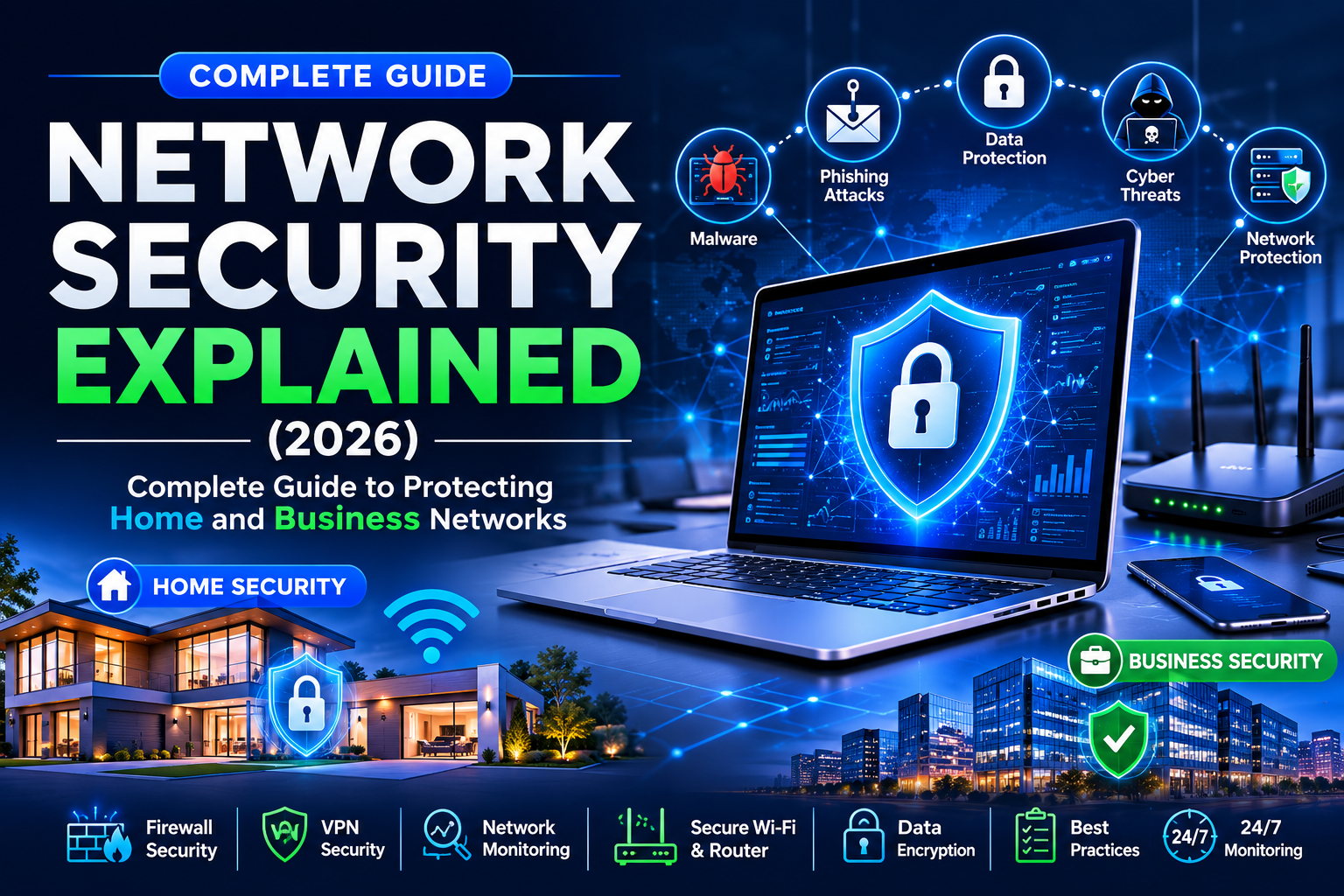
Modern life depends on the internet. People work, study, shop, and manage money online every day. That convenience also creates new risks. Network Security Explained helps you understand how to protect your digital world from growing online threats. Whether you use a home Wi-Fi network or manage a business, learning the basics of Network Security is no longer optional.
Cybercrime continues to evolve in 2026. Criminals use smarter tools to steal personal information, lock important files, and interrupt business operations. Strong Network Protection keeps your devices, applications, and data safe from these dangers. This guide explains how networks stay secure, why protection matters, and which technologies help defend both homes and businesses.
You will also learn how Home Network Security differs from Business Network Security. The guide covers common attacks, modern defense strategies, useful security tools, and practical habits that reduce online risks. By the end, you will know how to build a Secure Network that supports safe browsing, remote work, cloud services, and connected smart devices.
What Is Network Security?
Simple Definition of Network Security
At its core, Network Security is the practice of protecting computers, devices, and communication systems from unauthorized access and harmful activity. It combines technology, security policies, and monitoring tools to create a safe digital environment where information moves securely between users and systems.
A simple example is your home Wi-Fi router. Without protection, anyone nearby could try to connect to it or intercept your internet traffic. Good Computer Network Security prevents that by using encryption, authentication, and access controls. Every modern Network Security Guide begins with this simple idea because every connected device deserves protection.
Why Every Internet User Needs Network Security
Every online activity leaves digital footprints. You may send emails, pay bills, stream videos, or store family photos in cloud storage. Without proper Internet Security, criminals may attempt Phishing Attacks, spread Malware, or steal passwords. Even a single weak device can expose an entire network.
Strong Data Protection also protects your identity. Banking details, health records, tax information, and private conversations all travel across networks. Good Information Security keeps this information confidential. At the same time, modern Digital Security protects both personal users and organizations from constantly changing Cyber Threats.
How Network Security Works
Think of network security as several locked doors protecting a valuable building. Every security layer performs a different job. A Firewall filters incoming traffic. Antivirus Software removes harmful programs. Data Encryption protects information while it travels. Network Monitoring watches activity around the clock to identify suspicious behavior before damage occurs.
Modern security systems work together instead of operating independently. Threat Detection, Access Control, Identity and Access Management (IAM), and Multi-Factor Authentication (MFA) verify users before granting access. If unusual behavior appears, tools such as an Intrusion Detection System (IDS) or Intrusion Prevention System (IPS) react immediately to reduce risk and maintain a Secure Network.
| Network Security Layer | Primary Purpose | Example |
| Firewall | Filters network traffic | Blocks unauthorized connections |
| Data Encryption | Protects information | Secures online banking sessions |
| Multi-Factor Authentication (MFA) | Verifies user identity | Login code on your phone |
| Antivirus Software | Detects harmful files | Removes viruses and spyware |
| Network Monitoring | Watches network activity | Detects unusual traffic patterns |
| Access Control | Limits permissions | Employees access only required files |
Why Network Security Is Important in 2026
Increase in Cyberattacks
Cybercrime has become more organized than ever. Attackers now combine automation with AI-powered cyber threats to scan thousands of devices within minutes. Homes, schools, hospitals, and businesses all face increasing Cyber Attacks because every connected system creates another opportunity for criminals.
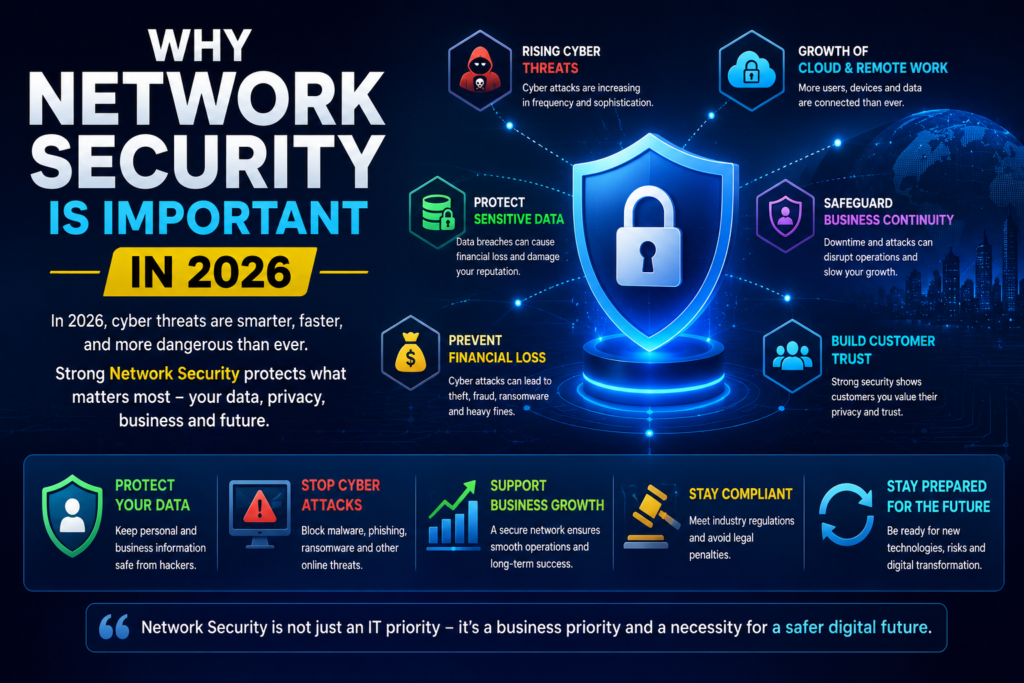
Many attacks no longer target only large companies. Small businesses and families have become common victims because they often use weaker security. Strong Network Defense, continuous Security Monitoring, and regular Risk Assessment help reduce these dangers before they grow into expensive security incidents.
Protecting Personal Information
Personal information has become one of the world’s most valuable digital assets. Criminals search for passwords, payment details, identity documents, and private messages. Once stolen, this information may be sold or used for fraud. Strong Password Security and reliable Endpoint Security make these attacks much harder to succeed.
Privacy also depends on secure communication. Whether you use online banking, healthcare portals, or cloud storage, Data Security and Digital Privacy keep sensitive information away from unauthorized users. A secure network protects every connection between your device and the websites you trust.
Keeping Business Data Safe
Businesses store customer records, employee information, financial reports, and confidential projects. Losing this data can stop daily operations and damage customer confidence. Strong Enterprise Network Security protects valuable assets while supporting normal business activities.
Modern organizations also depend on Cloud Security, secure collaboration platforms, and Remote Work Security. Companies strengthen protection by using Security Information and Event Management (SIEM), regular Patch Management, and effective Vulnerability Management to detect weaknesses before attackers exploit them.
Preventing Financial Loss
A successful cyberattack often costs much more than replacing damaged computers. Businesses may lose customers, face legal penalties, pause operations, and spend months recovering data. Good Business Continuity planning and Disaster Recovery strategies reduce downtime after security incidents.
Strong protection is always cheaper than recovery. Investing in Network Security Tools, Threat Intelligence, and a well-designed Network Infrastructure helps organizations avoid expensive disruptions. Security is no longer just an IT expense. It has become an essential business investment.
How Network Security Works
Modern networks never rely on one protection method. Instead, they use several security layers that work together. Every layer blocks different risks while improving overall Network Security. This layered approach reduces the chance that a single weakness will expose your entire Network Infrastructure.
Every second, thousands of requests move across a network. Security systems inspect each request before allowing it to continue. They verify users, check devices, monitor activity, and stop suspicious behavior. This process creates stronger Network Protection and supports reliable Computer Network Security.
Identifying Devices
Every trusted device must prove its identity before joining a network. This process helps administrators recognize approved computers, smartphones, servers, and smart devices. Strong Network Access Control ensures that unknown or unsafe devices cannot connect without permission.
Modern businesses also register employee devices before granting access. Combined with Identity and Access Management (IAM) and Multi-Factor Authentication (MFA), device verification creates another security layer that protects valuable information.
Monitoring Network Traffic
Data constantly travels between users, applications, cloud platforms, and servers. Network Traffic Monitoring watches every connection to identify unusual activity before it becomes a serious problem. Even small traffic changes may reveal hidden attacks.
Continuous Security Monitoring also helps security teams understand normal behavior. When unexpected traffic appears, alerts allow quick action. Early Threat Detection often prevents attackers from reaching sensitive systems.
Blocking Unauthorized Access
Not everyone should access every system. Security policies decide who can enter each network resource. Access Control limits permissions based on job roles and responsibilities.
A modern Firewall examines incoming and outgoing traffic before allowing communication. When suspicious requests appear, the firewall blocks them automatically. This simple step greatly improves Firewall Security across both home and business environments.
Detecting Suspicious Activity
Attackers rarely announce themselves. Instead, they quietly search for weaknesses. Advanced monitoring systems analyze behavior rather than waiting for damage to happen. This proactive approach strengthens Network Defense.
Technologies such as Intrusion Detection System (IDS), Intrusion Prevention System (IPS), and Security Information and Event Management (SIEM) collect security events from many devices. They identify unusual patterns, trigger alerts, and help security teams respond quickly through effective Incident Response.
| Security Process | Purpose | Benefit |
| Device Identification | Verify trusted devices | Prevent unknown connections |
| Network Traffic Monitoring | Watch network activity | Detect abnormal behavior |
| Access Control | Limit user permissions | Reduce insider risks |
| Threat Detection | Identify attacks early | Faster response |
| Incident Response | Contain security events | Reduce business impact |
Types of Network Security
Modern organizations use multiple technologies instead of relying on one solution. Every security tool solves a different problem. Together they create stronger Network Security Best Practices and protect every part of the digital environment.
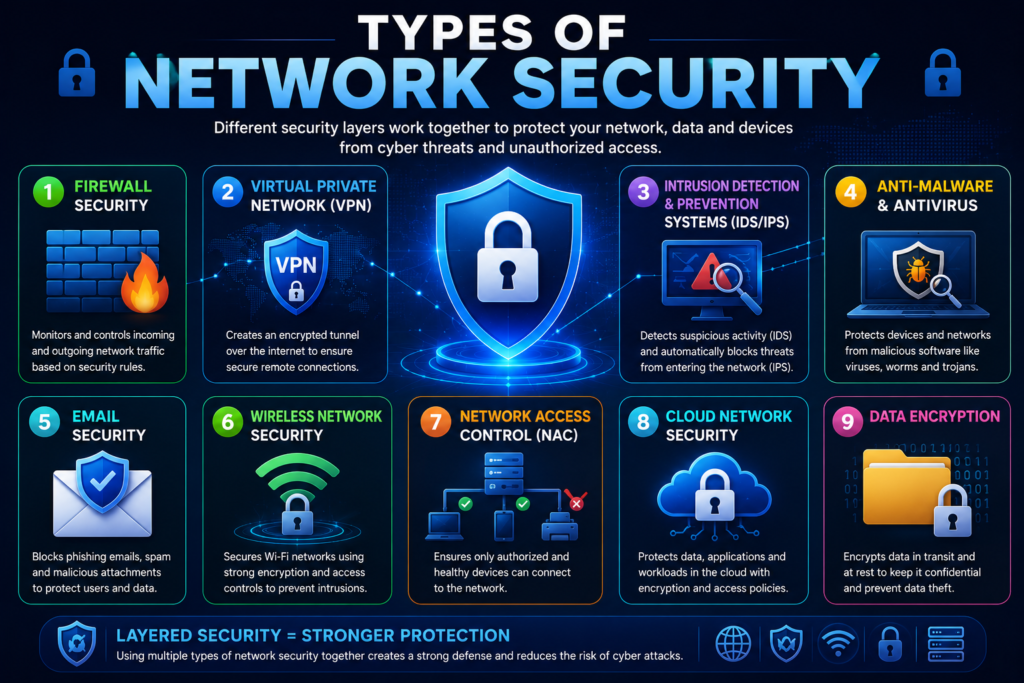
A home user may need only a few protection layers. Large organizations often combine dozens of security solutions to secure users, applications, cloud services, and remote offices. This layered design creates a resilient Secure Network.
Firewall Security
A Firewall acts like a security guard standing at the entrance of your network. Every connection request passes through inspection before reaching internal devices. Safe traffic continues while dangerous requests remain blocked.
Today’s Firewall Security goes beyond simple filtering. Next-generation firewalls inspect applications, detect suspicious behavior, and stop many Cyber Attacks before they spread across the network.
Antivirus and Anti-Malware
Cybercriminals continue creating new forms of Malware every day. Viruses, spyware, worms, and trojans can steal information or damage systems. Reliable Antivirus Software scans files continuously to identify harmful programs.
Modern Anti-Malware tools also use artificial intelligence to recognize unknown threats. Instead of relying only on virus signatures, they analyze suspicious behavior to stop infections earlier.
Intrusion Detection and Prevention Systems (IDS/IPS)
A network may appear normal even while attackers quietly explore vulnerabilities. An Intrusion Detection System (IDS) watches network activity and alerts administrators whenever suspicious behavior appears.
An Intrusion Prevention System (IPS) goes one step further. Instead of only reporting threats, it automatically blocks malicious traffic. Together they strengthen Threat Detection and improve overall Network Defense.
Virtual Private Network (VPN)
Public internet connections expose sensitive information if left unprotected. A Virtual Private Network (VPN) creates an encrypted tunnel between your device and the internet. This protects information from interception.
Strong VPN Security is especially important for employees working from home, travelers using public Wi-Fi, and businesses connecting remote offices. It improves privacy while supporting secure communication.
Network Access Control (NAC)
Every connected device introduces potential risk. Network Access Control checks device health before allowing access. Devices that fail security requirements may receive limited or no access.
Businesses often use NAC to verify software updates, security settings, and antivirus protection. This process prevents infected devices from spreading threats across the organization.
Email Security
Email remains one of the most common attack methods. Criminals often send fake invoices, delivery notices, or login requests to trick users into revealing sensitive information. Strong Email Security blocks many dangerous messages before they reach inboxes.
Advanced filtering also identifies Phishing Attacks, malicious attachments, and suspicious links. Combined with employee training, email protection greatly reduces successful attacks.
Wireless Network Security
Wireless networks offer convenience, yet they also create additional security risks. Weak passwords and outdated encryption allow unauthorized users to enter the network. Strong Wireless Network Security protects both personal and business Wi-Fi.
Using Secure Wi-Fi, changing default router settings, and updating Router Security regularly help reduce common wireless attacks. Modern WPA3 encryption provides stronger protection than older wireless standards.
Cloud Network Security
Businesses increasingly depend on cloud services for storage, collaboration, and applications. While cloud platforms provide excellent flexibility, they also require proper Cloud Network Security.
Organizations strengthen Cloud Security by encrypting sensitive information, limiting user permissions, monitoring cloud activity, and applying regular security updates. These measures protect data whether employees work in the office or remotely.
Case Study:
A small accounting company allowed employees to work remotely without a Virtual Private Network (VPN) or Multi-Factor Authentication (MFA). An attacker stole one employee’s password through a phishing email and accessed customer records. After introducing VPN Security, Identity and Access Management (IAM), stronger Password Security, and continuous Security Monitoring, the company prevented similar incidents and significantly improved its overall Business Network Security.
Common Network Security Threats
Every internet-connected device faces security risks. Attackers constantly search for weak passwords, outdated software, and unprotected systems. Strong Network Security helps reduce these dangers, yet understanding common threats is the first step toward building better Network Protection.
Cybercriminals don’t always attack large companies. Home users, students, freelancers, and small businesses also become easy targets. Learning how these threats work helps you respond faster and strengthen your overall Digital Security.
Malware
Malware is harmful software designed to damage systems or steal information. It can enter a network through unsafe downloads, infected websites, removable devices, or malicious email attachments. Once installed, it often spreads silently across connected devices.
Modern Antivirus Software and advanced Anti-Malware solutions detect suspicious files before they cause damage. Regular software updates and careful browsing habits greatly reduce infection risks.
Ransomware
Ransomware locks important files and demands payment to restore access. Many organizations lose valuable data because they lack proper backups or delay software updates. This attack continues to grow across healthcare, education, and financial sectors.
Strong Data Protection, regular backups, and effective Disaster Recovery planning reduce the impact of ransomware attacks. Businesses should also test recovery procedures before an emergency happens.
Phishing Attacks
Many successful breaches begin with simple Phishing Attacks. Criminals send fake emails that appear to come from trusted companies or coworkers. Their goal is to steal passwords, financial details, or confidential business information.
Good Email Security, employee training, and strong Security Awareness help users recognize suspicious messages. Even one careful decision can prevent a major security incident.
DDoS Attacks
DDoS Attacks overwhelm websites or online services with massive amounts of fake traffic. As servers struggle to respond, legitimate users lose access to important applications and websites.
Organizations reduce this risk by using traffic filtering, cloud protection services, and continuous Network Monitoring. Quick response plans also improve Business Continuity during large-scale attacks.
Insider Threats
Not every security risk comes from outside the organization. Insider Threats involve employees, contractors, or trusted users who accidentally or intentionally expose sensitive information. Simple mistakes can create serious consequences.
Strong Access Control, user activity reviews, and regular Risk Assessment help reduce insider risks. Businesses should only provide employees with the access they truly need.
Man-in-the-Middle (MITM) Attacks
During Man-in-the-Middle (MITM) Attacks, criminals secretly intercept communication between two parties. Victims usually believe they are communicating safely while attackers quietly collect sensitive information.
Using Data Encryption, Secure Wi-Fi, and a Virtual Private Network (VPN) makes interception much more difficult. These protections secure information while it travels across public and private networks.
Password Attacks
Weak passwords remain one of the easiest ways for attackers to enter secure systems. Brute Force Attacks automatically test thousands of password combinations until one succeeds. Reused passwords create even greater risks.
Strong Password Security, password managers, and Multi-Factor Authentication (MFA) dramatically improve account protection. Even if attackers steal a password, additional verification helps stop unauthorized access.
| Network Security Threat | Primary Risk | Recommended Protection |
| Malware | Device infection | Antivirus Software, Anti-Malware |
| Ransomware | Encrypted files | Backup strategy, Disaster Recovery |
| Phishing Attacks | Credential theft | Email Security, Security Awareness |
| DDoS Attacks | Service disruption | Network Monitoring, traffic filtering |
| Insider Threats | Data leakage | Access Control, Risk Assessment |
| MITM Attacks | Data interception | Data Encryption, VPN Security |
| Brute Force Attacks | Password compromise | Password Security, Multi-Factor Authentication (MFA) |
Essential Network Security Tools
Technology continues to evolve quickly. Security professionals now rely on multiple tools instead of one security product. Combining different solutions creates stronger Computer Network Security and improves long-term Network Defense.
Each security tool protects a different part of the network. Together they build multiple layers that identify threats, prevent attacks, and support reliable Information Security for both homes and businesses.
Firewalls
A Firewall remains one of the most important security tools in every network. It controls incoming and outgoing traffic according to security rules. Suspicious requests are blocked before reaching internal systems.
Modern Firewall Security also inspects applications, users, and encrypted traffic. Businesses often deploy hardware and software firewalls together for stronger protection.
VPN Software
Remote work has increased the need for secure internet connections. A Virtual Private Network (VPN) encrypts online communication and protects users from eavesdropping on public networks.
Reliable VPN Security protects employees working from hotels, airports, coffee shops, and home offices. It also improves Remote Work Security by creating secure encrypted connections.
Antivirus Programs
Modern Antivirus Software protects devices against viruses, spyware, trojans, ransomware, and other malicious programs. Real-time scanning identifies suspicious activity before files become infected.
Businesses combine antivirus with Endpoint Security solutions to protect laptops, desktops, mobile devices, and servers. This approach improves overall Data Security across the organization.
Network Monitoring Tools
Administrators need complete visibility across their networks. Advanced Network Monitoring platforms collect information from routers, switches, servers, and cloud services to identify unusual activity.
Continuous Network Traffic Monitoring improves Threat Detection by identifying suspicious behavior before attackers reach valuable systems. Early detection often prevents expensive security incidents.
SIEM Solutions
Large organizations generate millions of security events every day. Security Information and Event Management (SIEM) platforms collect these logs into one centralized dashboard for easier analysis.
Security teams use Threat Intelligence, automated alerts, and historical data to investigate incidents faster. Many organizations also connect SIEM platforms with their Security Operations Center (SOC) to improve Incident Response and reduce recovery time.
| Security Tool | Main Purpose | Best For |
| Firewall | Filters network traffic | Home and business networks |
| Virtual Private Network (VPN) | Encrypts internet connections | Remote workers |
| Antivirus Software | Stops malicious software | All connected devices |
| Network Monitoring | Tracks network activity | Continuous security visibility |
| Security Information and Event Management (SIEM) | Centralizes security events | Enterprise security operations |
Case Study:
A U.S. retail company experienced repeated phishing attempts targeting employee email accounts. The company introduced advanced Email Security, Security Information and Event Management (SIEM), Multi-Factor Authentication (MFA), and stronger Security Awareness training. Within six months, successful phishing incidents dropped significantly, login security improved, and the security team detected suspicious activity much earlier.
Network Security Best Practices
Strong security begins with good habits. Even the best technology cannot protect a network if users ignore basic safety rules. Following proven Network Security Best Practices helps reduce risks and creates stronger Network Protection for homes and businesses.
Good security is not a one-time task. It requires regular updates, careful monitoring, and smart decisions every day. A secure environment combines technology with responsible user behavior to maintain long-term Network Security.
Use Strong Passwords
Every account should have a unique password that is long and difficult to guess. Avoid personal information such as birthdays or names because attackers often test these details first. Strong Password Security creates the first barrier against unauthorized access.
A trusted password manager helps generate and store secure passwords. Combined with Multi-Factor Authentication (MFA), strong passwords make Brute Force Attacks much less likely to succeed.
Enable Multi-Factor Authentication
Passwords alone no longer provide enough protection. Multi-Factor Authentication (MFA) adds another verification step before granting access to an account. This extra layer significantly reduces the chance of unauthorized logins.
Many online services now support authentication apps, hardware keys, or biometric verification. Adding these methods strengthens Identity and Access Management (IAM) while improving overall Access Control.
Update Software Regularly
Software developers regularly release updates that fix newly discovered vulnerabilities. Delaying these updates gives attackers more time to exploit known weaknesses. Installing updates quickly improves overall security.
Effective Patch Management keeps operating systems, routers, applications, and security software current. Regular updates also strengthen Vulnerability Management across the entire Network Infrastructure.
Secure Wi-Fi Networks
Your wireless network should never use default settings. Changing the default administrator password and enabling WPA3 encryption greatly improves Wireless Network Security. These simple changes make your Secure Wi-Fi much harder to attack.
Strong Router Security also includes updating router firmware and disabling unused features. These steps reduce common entry points that cybercriminals often target.
Backup Important Data
Every organization should expect that hardware failures or cyberattacks may happen someday. Reliable backups allow quick recovery without paying criminals or losing valuable information. Regular testing ensures backups actually work.
A strong backup strategy supports Business Continuity and improves Disaster Recovery after unexpected events. Cloud backups and offline copies together provide the best protection.
Train Employees
Technology alone cannot stop every attack. Employees often become the first target because attackers know human mistakes happen. Regular Security Awareness training teaches staff how to recognize suspicious emails, fake websites, and social engineering attempts.
Practical training also improves Email Security and helps reduce successful Phishing Attacks. Well-informed employees become an important part of every security strategy.
Monitor Network Activity
Continuous Security Monitoring helps organizations detect unusual behavior before serious damage occurs. Early alerts allow security teams to investigate problems while they remain small and manageable.
Combining Network Monitoring, Threat Detection, and Threat Intelligence provides better visibility across the entire network. This proactive approach helps maintain a reliable and resilient Network Defense.
| Best Practice | Primary Benefit | Security Impact |
| Strong Passwords | Prevent unauthorized access | High |
| Multi-Factor Authentication (MFA) | Adds identity verification | Very High |
| Regular Updates | Fix security flaws | High |
| Secure Wi-Fi | Protect wireless networks | High |
| Data Backups | Recover after attacks | Very High |
| Employee Training | Reduce human errors | High |
| Security Monitoring | Detect threats early | Very High |
Network Security for Home Users
Home networks have become more connected than ever before. Smart TVs, gaming consoles, cameras, speakers, and mobile devices all share the same internet connection. Without proper Home Network Security, one weak device can expose every other connected system.
Simple security habits make a huge difference. Updating devices, creating strong passwords, and protecting wireless networks help families enjoy the internet safely while reducing exposure to modern Cyber Threats.
Protecting Smart Home Devices
Smart home devices offer convenience, yet they also increase security risks. Cameras, smart locks, and voice assistants should always receive firmware updates to reduce known vulnerabilities. Strong IoT Security keeps these devices protected.
Each smart device should use unique login credentials whenever possible. Separating IoT devices from personal computers through Network Segmentation provides another valuable layer of protection.
Securing Home Wi-Fi
A secure wireless network begins with strong encryption and a unique administrator password. Enabling WPA3 and changing default router settings improve Wireless Network Security immediately.
Good Router Security also includes disabling remote management when it is unnecessary. Creating a separate guest network protects personal devices from visitors and unknown connections.
Safe Internet Browsing
Safe browsing habits reduce many common online risks. Always verify website addresses before entering passwords or payment information. Trusted websites normally use encrypted HTTPS connections.
Avoid downloading files from unknown sources. Reliable Antivirus Software, Data Encryption, and good browsing habits work together to improve Internet Security while protecting your personal information.
Network Security for Small Businesses
Small businesses often believe attackers only target large corporations. In reality, many criminals specifically search for smaller organizations because they usually have fewer security controls. Strong Business Network Security protects customer information, financial records, and daily operations.
Even a small company should create a complete security strategy. Investing in modern Network Security Tools today costs far less than recovering from a major security breach tomorrow.
Building a Security Policy
A written security policy explains how employees should use company devices, passwords, email accounts, and business applications. Clear rules reduce confusion and improve overall Information Security.
Policies should also define reporting procedures for suspicious activity. Quick Incident Response helps organizations contain security problems before they spread throughout the network.
Securing Remote Workers
Remote work continues to grow across the United States. Employees often connect through home internet connections that may not meet company security standards. Secure remote access therefore becomes essential.
Organizations should require a Virtual Private Network (VPN), Multi-Factor Authentication (MFA), and strong Remote Work Security policies for every remote employee. These measures significantly reduce exposure to online threats.
Protecting Customer Data
Customers trust businesses with personal and financial information. Protecting that trust requires strong Data Protection, secure storage, and limited user permissions. Every employee should access only the information required for their job.
Businesses should also support Security Compliance by encrypting sensitive records and reviewing permissions regularly. Strong Cloud Security, regular audits, and continuous Risk Assessment help protect valuable customer information while maintaining long-term confidence.
Case Study:
A small online retailer improved its Business Network Security by introducing Multi-Factor Authentication (MFA), stronger Access Control, encrypted customer databases, and continuous Network Monitoring. Within one year, attempted account compromises dropped significantly, and the company passed its security compliance review without major findings.
Network Security Challenges in 2026
The cybersecurity landscape changes every year. Attackers continue developing smarter techniques while organizations adopt new technologies. Modern Network Security must adapt quickly to defend against emerging risks without slowing business operations.
Homes and businesses now depend on cloud platforms, remote work, artificial intelligence, and connected devices. These advances improve productivity, yet they also create new security gaps. Strong Network Protection requires continuous improvement instead of one-time solutions.
AI-Powered Cyber Threats
Artificial intelligence now helps both defenders and attackers. Criminals use AI-Powered Cyber Threats to automate attacks, create convincing phishing emails, and identify vulnerable systems much faster than before.
Security professionals also use AI to improve Threat Detection, automate investigations, and reduce response time. Combining human expertise with intelligent automation creates stronger protection against evolving Cyber Threats.
Cloud Security Risks
Cloud platforms continue growing because they offer flexibility and lower infrastructure costs. However, poor configurations, weak permissions, and exposed storage can increase security risks. Proper Cloud Security remains essential for every organization.
Businesses should regularly review user permissions, encrypt sensitive files, and monitor cloud activity. Strong Cloud Network Security protects valuable information while allowing employees to work safely from any location.
IoT Device Security
Smart devices continue connecting homes, offices, hospitals, and factories. Every connected device creates another possible entry point for attackers. Without proper updates, these devices may expose the entire network.
Strong IoT Security begins with changing default passwords, updating firmware, and limiting unnecessary internet access. Organizations should also isolate connected devices using Network Segmentation whenever possible.
Remote Work Security
Remote work has become a permanent part of many organizations. Employees often connect from home, hotels, airports, and public locations. These environments increase security risks when devices lack proper protection.
Companies improve Remote Work Security by requiring Virtual Private Network (VPN) connections, enforcing Multi-Factor Authentication (MFA), and applying strict Access Control policies. Continuous Security Monitoring also helps detect suspicious remote activity.
| Challenge | Security Risk | Recommended Solution |
| AI-Powered Cyber Threats | Automated attacks | AI-driven Threat Detection |
| Cloud Security Risks | Data exposure | Encryption and permission reviews |
| IoT Security | Weak connected devices | Firmware updates and Network Segmentation |
| Remote Work Security | Unsafe remote access | VPN Security and Multi-Factor Authentication (MFA) |
Future of Network Security
Technology continues to reshape digital security. Future security strategies will focus on automation, intelligent analysis, and continuous verification instead of traditional perimeter protection. Organizations that adapt early will remain more resilient against modern attacks.
The future also depends on cooperation. Security teams, employees, software vendors, and technology providers must work together to create safer digital environments for everyone.
Artificial Intelligence
Artificial intelligence is becoming an important security assistant. It analyzes millions of security events in seconds and helps identify unusual behavior before attackers cause damage. This improves Threat Intelligence and supports faster decision-making.
Security teams also use AI to reduce repetitive tasks and improve Incident Response. Faster analysis allows experts to focus on complex threats that require human judgment.
Zero Trust Security
Traditional security trusted users once they entered the network. Zero Trust Security follows a different approach. Every user, device, and application must continuously verify its identity before receiving access.This model strengthens Identity and Access Management (IAM) while reducing unauthorized movement inside networks. Continuous verification creates a stronger and more reliable Secure Network.
Automation
Automation reduces manual work by responding to routine security events automatically. Systems can isolate infected devices, block suspicious traffic, and notify administrators within seconds.
Combining automation with Security Information and Event Management (SIEM) improves efficiency and allows organizations to respond faster without increasing operational costs.
Threat Intelligence
Modern security depends on understanding new attack methods before they spread widely. Threat Intelligence collects information about emerging risks from trusted security sources around the world.
Organizations combine this knowledge with Network Monitoring, Risk Assessment, and Vulnerability Management to strengthen defenses before attackers exploit weaknesses.
Common Network Security Mistakes to Avoid
Many successful attacks happen because of simple mistakes rather than advanced hacking techniques. Avoiding these common errors greatly improves Network Security without requiring expensive technology.
Small improvements made consistently often provide stronger protection than complicated security solutions that nobody maintains properly.
Weak Passwords
Simple passwords remain one of the biggest security weaknesses. Reusing passwords across multiple accounts makes it easier for attackers to gain unauthorized access through Brute Force Attacks or stolen credentials.
Unique passwords combined with Password Security practices and Multi-Factor Authentication (MFA) provide much stronger account protection.
Ignoring Software Updates
Outdated software contains known vulnerabilities that attackers actively search for. Ignoring updates gives cybercriminals an unnecessary advantage.
Regular Patch Management strengthens Data Security and reduces security risks across operating systems, applications, and network devices.
Using Public Wi-Fi Without Protection
Public wireless networks often lack strong security controls. Attackers may intercept traffic through Man-in-the-Middle (MITM) Attacks or create fake hotspots that appear legitimate.
Using a Virtual Private Network (VPN) together with Data Encryption protects sensitive information while using public internet connections.
Poor Backup Strategy
Many organizations create backups but never test them. Others store backups on the same network that attackers target during ransomware attacks.
Reliable backups should exist in multiple secure locations. Regular testing supports Business Continuity and ensures effective Disaster Recovery after unexpected incidents.
Frequently Asked Questions
What is network security in simple words?
Network Security protects computers, devices, applications, and data from unauthorized access, cyberattacks, and other online threats. It uses different security technologies to keep networks safe.
What are the main types of network security?
The main types include Firewall Security, VPN Security, Email Security, Wireless Network Security, Cloud Network Security, Endpoint Security, antivirus protection, and Network Access Control.
Why is network security important?
Strong Network Security protects personal information, business data, financial records, and online services. It also reduces the risk of Cyber Attacks, identity theft, and expensive security incidents.
What is the difference between cybersecurity and network security?
Cybersecurity protects all digital systems, users, applications, and information. Network Security focuses specifically on protecting network connections, communication systems, and data traveling across networks.
How can I improve my network security?
You can improve security by enabling Multi-Factor Authentication (MFA), updating software regularly, using strong passwords, installing Antivirus Software, securing Wi-Fi, monitoring network activity, and following proven Network Security Best Practices.
Conclusion
Modern digital life depends on secure networks. Every connected device, cloud application, and online service creates both opportunities and security challenges. Understanding Network Security Explained helps you build safer systems and reduce unnecessary risks before they become costly problems.
Whether you protect a family Wi-Fi network or manage a growing business, strong security should become part of your daily routine. Simple habits such as updating software, using strong passwords, enabling Multi-Factor Authentication (MFA), and monitoring network activity make a significant difference over time.
Technology will continue evolving, and attackers will continue searching for new weaknesses. By following proven Network Security Best Practices, investing in reliable Network Security Tools, and staying informed about emerging threats, you can build a stronger, safer, and more resilient digital environment for years to come.
Meta Description
Learn Network Security Explained in this complete 2026 guide. Discover network security threats, best practices, firewall security, VPN security, and how to protect home and business networks.
7 Comments