

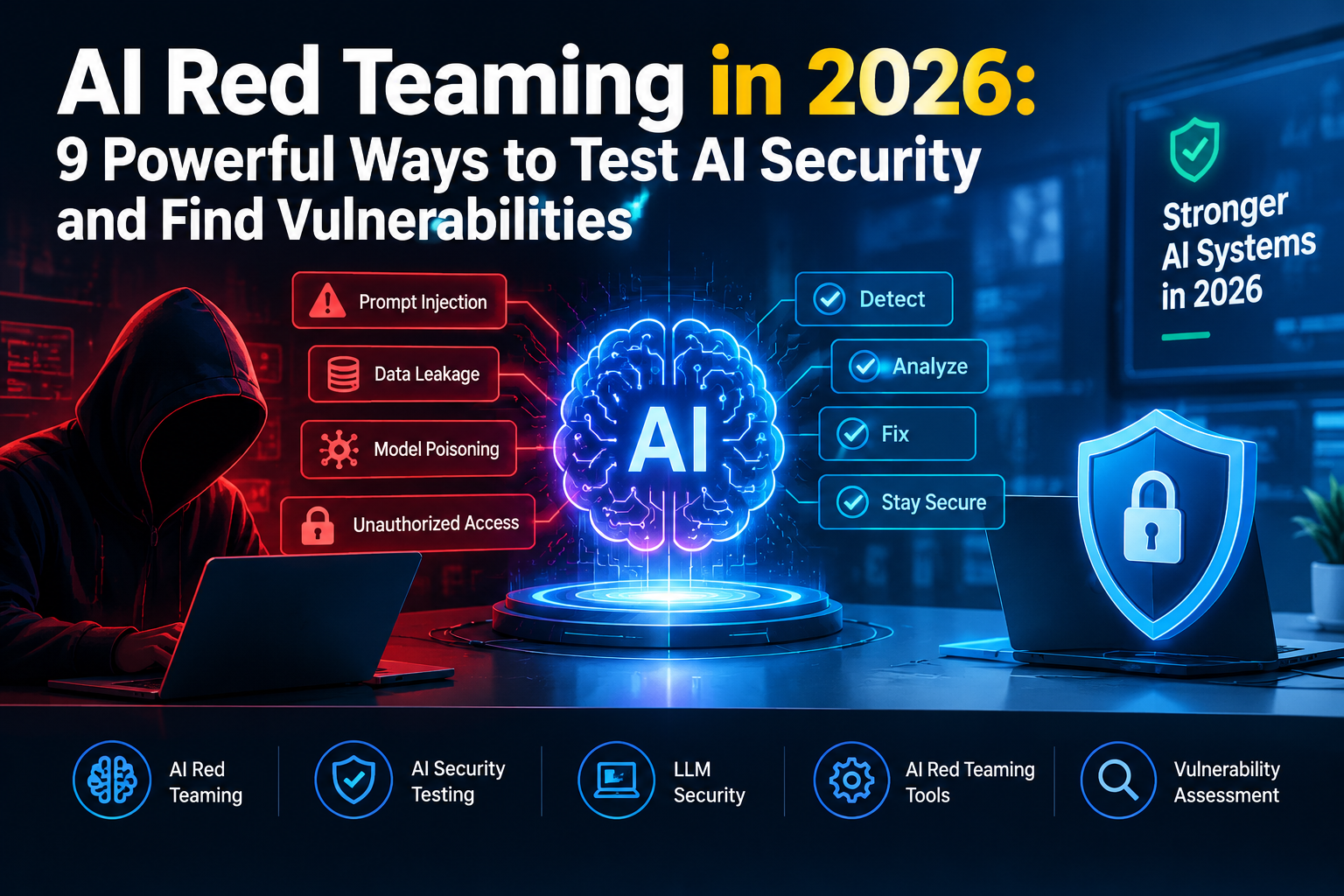
Artificial intelligence can answer questions, write code, review documents, and perform business tasks. However, these abilities also create new security risks. A chatbot might reveal private information, follow malicious instructions, or misuse connected tools. Businesses need to test these weaknesses before attackers discover them.
AI red teaming helps security teams find these problems through controlled, realistic testing. It examines how an AI system behaves when someone deliberately tries to bypass its protections. In this guide, you’ll learn about common AI vulnerabilities, useful testing tools, practical testing methods, and ways to improve security. You’ll also find trusted resources and related guides from DailyTecho to explore AI cybersecurity in greater depth.
What Is AI Red Teaming and Why Does It Matter in 2026?
AI red teaming is a structured process for testing an AI system against realistic attacks. Security professionals create challenging inputs to discover weaknesses in the model, application, connected data, and available tools. They then document their findings and help developers fix the problems before attackers exploit them. This process supports better AI security testing and helps teams understand the system’s real-world behavior.
Traditional software testing often checks whether an application behaves as expected. AI red teaming goes further by examining how the system responds to unexpected instructions, misleading information, and hostile user input. The OWASP GenAI Red Teaming Guide provides guidance for evaluating generative AI systems across model behavior, implementation, infrastructure, and runtime activity. A strong test plan considers the whole application, not just the language model.
AI security matters because businesses increasingly connect AI models to internal documents, customer records, databases, and external services. A weak chatbot may expose sensitive information, while an AI agent with excessive permissions could perform actions nobody intended. Testing helps organizations understand their AI security risks, prioritize fixes, and make informed decisions before deployment.
Consider a customer support chatbot that can access order records. A normal user asks about their own delivery, and the chatbot responds correctly. During a controlled security test, a tester checks whether carefully designed instructions could make the chatbot reveal another customer’s details. This test can uncover an access-control problem before a real attacker finds it.
AI Red Teaming vs. Traditional Penetration Testing: What Is the Difference?
Traditional penetration testing focuses on weaknesses in applications, networks, servers, APIs, and other technical components. Testers may look for broken authentication, exposed services, insecure configurations, or software vulnerabilities. These checks remain essential because AI applications still depend on ordinary infrastructure. AI penetration testing adds AI-specific checks to the security assessment instead of replacing standard penetration testing.
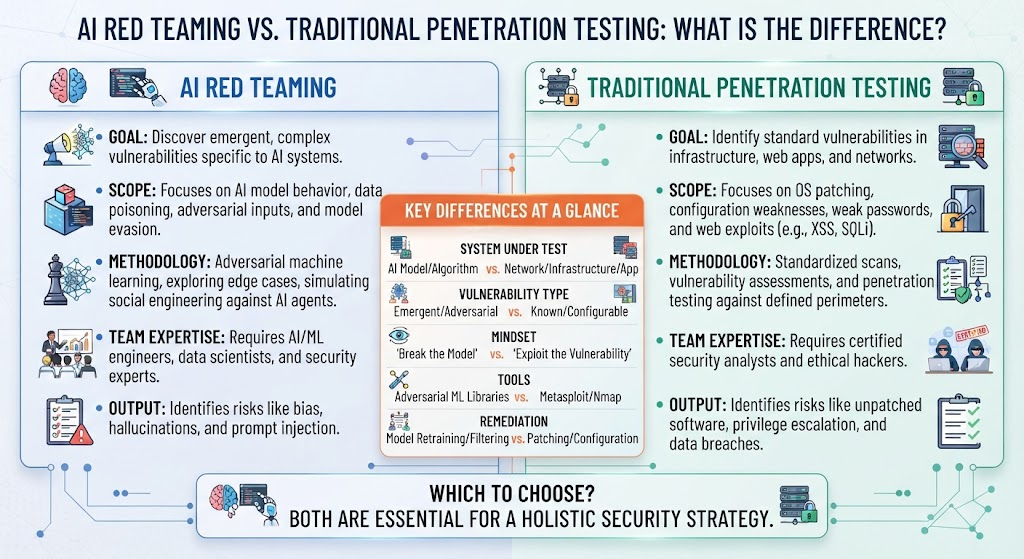
AI red teaming examines additional risks created by models and their behavior. Testers may investigate prompt injection, jailbreak attempts, private-data exposure, unsafe responses, and misuse of AI tools. LLM red teaming focuses on large language models and the applications built around them. A complete assessment combines both approaches because a secure model can still sit inside an insecure application.
| Testing area | Traditional penetration testing | AI red teaming |
|---|---|---|
| Main focus | Networks, applications, APIs, and infrastructure | AI models, prompts, data flows, tools, and behavior |
| Common tests | Authentication bypasses, software flaws, and access-control issues | Prompt injection, jailbreaks, data leakage, and unsafe tool use |
| Test inputs | Requests, payloads, and technical attack patterns | Natural language, documents, images, and adversarial instructions |
| Expected outcome | Find and verify technical vulnerabilities | Find AI-specific weaknesses and measure their practical impact |
| Best approach | Test the conventional technology stack | Combine AI-specific tests with standard security testing |
For example, a penetration tester might discover that an API accepts requests without proper authorization. An AI red teamer might find that a chatbot can be manipulated into requesting information through that same API. Both findings matter, and the second may depend on the first. The OWASP AI/LLM application security testing guidance explains why testers should examine the model, prompts, retrieval pipeline, tools, and permissions together.
9 Critical AI Security Risks That Red Teaming Can Uncover
AI systems can fail in several ways, even when they perform well during ordinary use. Some weaknesses affect the model’s responses, while others come from connected applications, data sources, APIs, or tools. A structured AI security assessment helps teams identify which failures are possible, how serious they are, and which protections could reduce the risk.
The following nine risks provide a practical starting point for an AI vulnerability testing program. Not every system will face every risk equally. A public chatbot, an internal document assistant, and an autonomous AI agent have different capabilities, data access, and potential consequences. Teams should adjust their tests to match the system’s actual design and business purpose.
1. Prompt Injection and Jailbreak Attacks
Prompt injection attacks occur when malicious instructions influence an AI system in ways its developers did not intend. These instructions may appear in a user message, an uploaded document, a webpage, or information retrieved from another source. A successful attack could cause the system to ignore its intended task, disclose restricted information, or misuse connected tools. Testers should examine both direct instructions and hidden instructions inside external content.
LLM jailbreak attacks use carefully designed prompts to push a model beyond its intended restrictions. Red teamers test whether the model follows its security rules across different wording, languages, and conversation patterns. You can learn more in DailyTecho’s guide to prompt injection attacks. Testing should focus on measurable failures rather than simply checking whether a prompt receives a refusal.
2. Sensitive Data Leaks and Privacy Failures
AI applications may process personal details, business documents, support conversations, internal reports, or confidential customer records. AI data leakage happens when information reaches someone or somewhere it should not. This can include another customer’s records, internal documents, API credentials, or private conversation history. Weak permissions, poor data handling, and unsafe logging can all contribute to sensitive information exposure.
During testing, security teams should check whether the application respects user permissions across different accounts and conversations. They can use clearly marked test records to see whether sensitive information appears in responses, logs, or connected workflows. Avoid placing real customer secrets into test prompts unless the assessment has explicit authorization and suitable safeguards. A secure design should enforce access control in application code, not rely on the model to protect private data.
3. AI Model Manipulation and Data Poisoning
AI model poisoning involves introducing harmful or misleading data into a training or related data pipeline to influence system behavior. Depending on the system, manipulated data might affect model outputs, damage a retrieval collection, or weaken a classifier. These risks differ from ordinary incorrect answers. A poisoned dataset may create repeatable failures that remain hidden during normal testing.
Red teamers should examine data sources, access permissions, update processes, and safeguards against unauthorized changes. They should also consider adversarial machine learning, which studies how carefully crafted inputs or manipulated data can affect machine learning systems. For retrieval-based applications, testers can check whether untrusted documents enter the knowledge base and influence answers. They must distinguish model-training weaknesses from problems caused by manipulated reference documents or poor access controls.
4. Insecure AI Outputs and Application Exploits
AI models sometimes generate inaccurate, unsafe, or unexpected content. These insecure AI outputs become a security problem when another component trusts them without proper validation. For example, an application might place generated text into a webpage, database query, command, or automated workflow. If the application handles that text unsafely, the result could be an injection flaw or an unintended action.
Testing should examine how the application processes model outputs before using them. Developers should validate data types, encode content correctly, use parameterized database queries, and restrict dangerous operations. The model should not have the final say over access permissions. Strong AI application security combines model-level safeguards with ordinary secure coding practices, independent validation, and clear limits on what generated content can do.
5. Excessive Permissions in AI Agents
AI agents can search documents, send messages, update records, create tickets, or call external services. These capabilities are useful, but they also increase the potential damage from a successful attack. AI agent vulnerabilities may allow malicious instructions to trigger actions that the user never requested. Excessive agent permissions make this problem worse by giving an agent access to more tools or data than its task requires.
Testers should review every tool available to the agent and identify the actions each tool can perform. They should check whether a compromised conversation could trigger data exports, delete records, send external messages, or change account settings. High-impact actions should require suitable authorization or human approval. An agent should use narrowly scoped credentials and should not inherit unrestricted access simply because it operates through an AI model.
6. Retrieval-Augmented Generation (RAG) Security Risks
Retrieval-augmented generation, or RAG, lets an AI application search a knowledge base before producing an answer. A business might use it to answer questions from company policies, product manuals, or support documents. However, retrieval introduces risks when access rules are weak or the knowledge base contains malicious content. RAG security testing checks whether the system retrieves the right information for the right user and ignores untrusted instructions.
Effective retrieval augmented generation security requires more than testing the model’s final response. Teams should examine document ingestion, indexing, access permissions, search filters, source citations, and data separation between customers. They should also test whether malicious instructions hidden in a document can influence the agent. A secure RAG system enforces authorization before retrieval, treats retrieved text as untrusted data, and avoids exposing documents the user cannot access.
7. Weak Authentication and API Security
AI applications often depend on APIs to reach models, databases, search services, and business tools. Weak authentication or incorrect authorization can let a user access functions or information beyond their rights. AI API vulnerabilities may include exposed credentials, missing rate limits, weak tenant separation, and endpoints that trust user-supplied identifiers without checking ownership.
Red teamers should test API access with approved accounts and clearly defined permissions. They should check whether one user can read another user’s records, whether sensitive keys appear in client-side code, and whether restricted operations require proper authorization. API keys should be stored securely, rotated when necessary, and granted only the permissions they need. A model’s refusal message cannot compensate for an API that allows unauthorized access.
8. AI Model Denial-of-Service and Cost Abuse
AI services may consume significant computing resources, especially when requests trigger long responses, repeated model calls, retrieval searches, or several agent actions. Attackers may exploit weak limits to create service disruption or unexpected costs. A system can become vulnerable when it accepts excessive input, runs unbounded loops, or allows users to trigger expensive tasks without sufficient controls.
Testing should measure how the application behaves under approved load limits and unusual request patterns. Teams should set request quotas, token limits, timeouts, concurrency controls, and spending alerts. They should also prevent agents from repeating the same task indefinitely. Security teams need to balance availability and user experience because overly strict limits can block legitimate work, while weak limits can expose the service to cost abuse.
9. Unsafe Tool Calls and Unauthorized Actions
An AI agent may use tools to browse websites, retrieve files, send emails, or update business records. A dangerous failure occurs when the system performs an action without proper authorization or outside the user’s request. Unauthorized AI tool calls can turn a misleading instruction into a real operational problem, especially when tools can change data or communicate with external systems.
Testers should examine tool selection, input validation, permission checks, and approval steps. They should verify that the agent cannot use one tool to bypass restrictions imposed on another. For example, an agent that can draft emails should not automatically receive permission to send them to every external address. Separate read and write permissions, human approval for sensitive actions, and clear audit logs can reduce the impact of mistakes.
How to Perform AI Red Teaming: A Step-by-Step Security Testing Process
A useful red team exercise starts with clear goals and a defined scope. Testing without these limits can waste time, miss important risks, or affect systems that should remain untouched. A documented AI security framework helps teams choose realistic scenarios, assign responsibility, and track findings from discovery through repair.
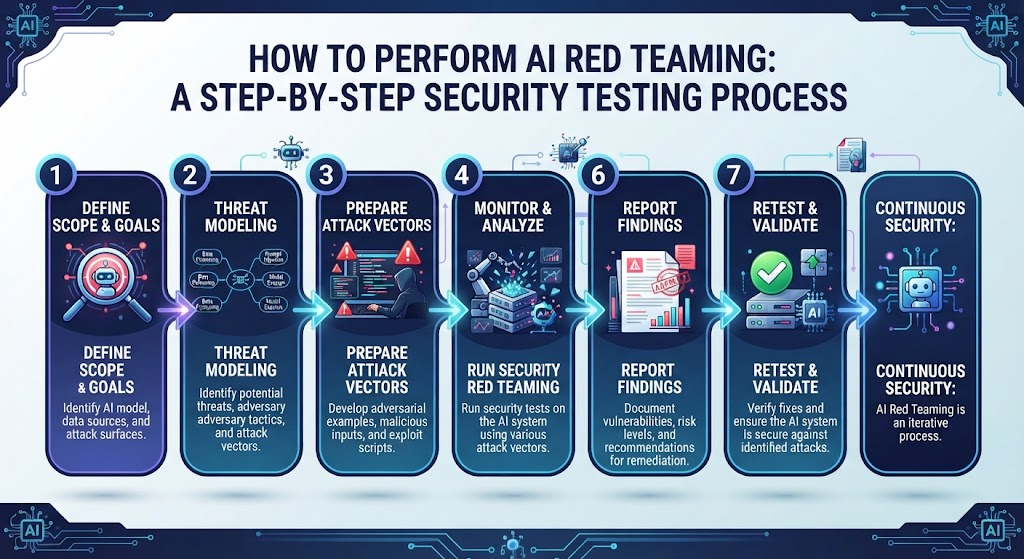
The process should cover the model and its surrounding application. That includes prompts, data sources, APIs, authentication, retrieval systems, connected tools, and monitoring. The OWASP GenAI Red Teaming Guide offers a useful foundation for building a structured assessment. Teams should combine automated checks with human review because no scanner can discover every possible failure.
Step 1. Define the Scope and Security Objectives
Start by identifying the exact AI system you are allowed to test. Record its purpose, users, deployment environment, model provider, data sensitivity, and connected services. Set clear limits for the assessment, including which accounts and endpoints are in scope. This creates a practical foundation for AI threat modeling and prevents testers from accidentally affecting unrelated systems.
Next, define what success and failure look like. A customer assistant might need to protect private account information, while an internal coding agent may need to prevent unauthorized code execution. Write testable security objectives for each major risk. The objectives should reflect real business needs, not just general goals such as making the AI safer.
Step 2. Map AI Models, Data Sources, APIs, and Tools
Create a simple map of how information moves through the system. Include the user interface, model endpoint, system instructions, retrieval database, external APIs, logging services, and agent tools. Identify which components hold sensitive data and which can change business records. This map helps testers locate the boundaries where unauthorized access or unsafe instructions might cause harm.
Also document the permissions attached to each component. Check whether the model can reach private files, whether the agent uses shared credentials, and whether the retrieval system separates different customers’ data. These details help teams identify high-risk paths before testing begins. They also make later findings easier to reproduce and explain to developers.
Step 3. Build Realistic AI Attack Scenarios
Build test scenarios around the way people actually use the application. Include normal questions, unusual requests, hostile instructions, multi-turn conversations, and untrusted documents. A support assistant should face account privacy tests, while a research assistant should face document injection and source-access tests. Good AI attack simulation focuses on realistic weaknesses rather than collecting dramatic but irrelevant prompts.
Each scenario should define the starting conditions, test input, expected safe behavior, and evidence of failure. For example, a test might verify that a user cannot obtain another customer’s record by changing the wording of a question. Store test cases in a controlled environment and reuse them after fixes. This creates a repeatable process instead of relying on memory or informal experiments.
Step 4. Test AI Guardrails and Security Controls
Guardrails may include input filters, output checks, policy rules, content moderation, and limits on tool use. AI guardrails testing measures whether these controls work when the system receives hostile or unexpected inputs. Test both direct and indirect attacks. Also check different languages, multi-turn conversations, and documents that contain untrusted instructions.
Do not treat a guardrail as the only security boundary. A model may ignore a prompt-level rule, so the application must enforce permissions independently. Test whether sensitive operations remain blocked even when the model produces an unsafe response. Strong AI safety guardrails work alongside access controls, validation, rate limits, and monitoring rather than replacing them.
Step 5. Measure Attack Success and Business Impact
Record whether each test succeeded, failed, or produced an unclear result. Measure the percentage of attempts that triggered the target failure, but also consider the seriousness of each outcome. A harmless policy mistake is different from exposing customer records or making an unauthorized payment. AI security evaluation should reflect both technical evidence and real business impact.
Use repeatable scoring rules and preserve relevant inputs, outputs, timestamps, and system versions. Human reviewers should examine important failures, especially when an automated judge decides whether a response is safe. Results should identify the affected component, likely cause, severity, and recommended repair. These records make it easier to compare releases and confirm whether security improves over time.
Step 6. Fix Vulnerabilities and Retest the System
After finding a weakness, determine why it happened. A prompt injection problem may require changes to data handling, tool permissions, or retrieval logic. A privacy leak may require stronger authorization checks. Fixing only the wording of the system prompt may hide a symptom while leaving the underlying vulnerability in place.
Retest each confirmed issue after applying a fix. Add a repeatable test so the same problem can be detected if it returns in a later release. This turns red teaming into an ongoing security practice. A mature team links findings to development work, tracks remediation, and runs regression tests whenever the model, prompt, tools, or data pipeline changes.
Best AI Red Teaming Tools to Test LLM Security in 2026
Tools can help teams test AI systems more consistently and cover more scenarios. Some focus on model-level probing, while others target complete applications, agents, or retrieval workflows. The right choice depends on your technology stack, test objectives, data-handling requirements, and team’s experience. AI red teaming tools should support a documented process rather than replace security judgment.
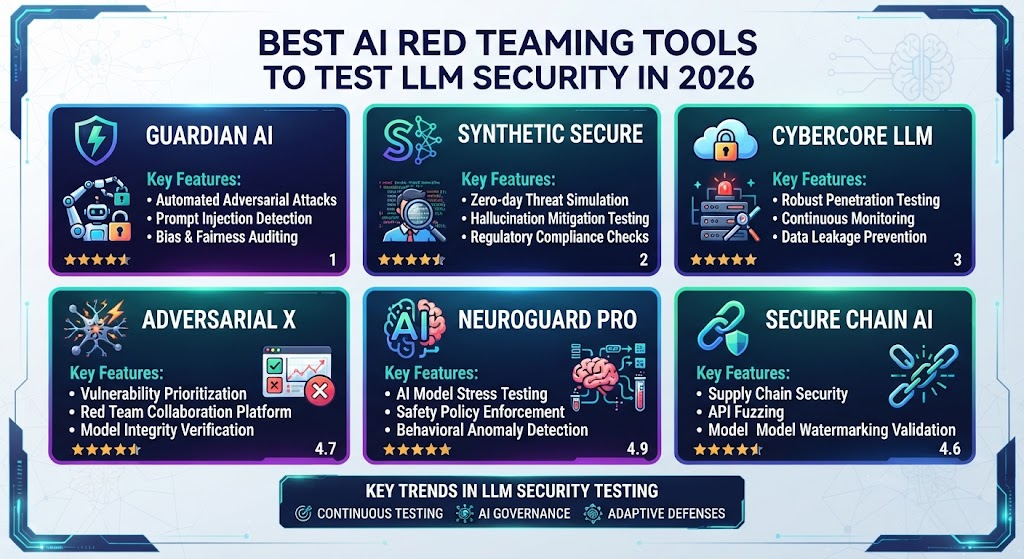
Before choosing a tool, check its supported targets, setup requirements, reporting features, and data handling. Some tools use a separate model to generate attacks or judge responses, which can send test information to an external provider. Review each tool’s documentation and test it with non-sensitive data first. Automated results are useful evidence, but they do not prove that a system is secure.
1. Garak for LLM Vulnerability Scanning
Garak is an open-source scanner designed to probe language models and detect unwanted behavior. It offers a range of probes and detectors for areas such as prompt injection, data leakage, and jailbreaks. It can help teams build an initial picture of model weaknesses and repeat tests after configuration changes.
Garak is useful when a team wants command-line testing and repeatable scans. However, a model-focused scan may not cover every application-level issue. Teams should also examine authentication, retrieval permissions, API behavior, and tool access. Use its results as one part of a broader AI vulnerability scanning program.
2. PyRIT for AI Red Team Testing
Microsoft PyRIT is an open-source framework for identifying risks in generative AI systems. It supports automated and human-led testing, including multi-turn attack strategies and configurable scoring. Teams can use it to organize scenarios, run tests against supported targets, and review results across different assessment objectives.
PyRIT can help security professionals build repeatable testing workflows for complex AI applications. Its flexible design also allows teams to adapt scenarios to their own risks. Review its setup instructions before use, and protect stored conversations and results. Testers should only run assessments against systems they own or have clear permission to test.
3. Promptfoo for Automated LLM Security Evaluations
Promptfoo supports red teaming and evaluation of generative AI applications. Its workflows can generate adversarial test cases, run them against a configured target, and produce reports for review. It also supports integration into development workflows, which helps teams repeat checks when prompts or applications change.
Promptfoo can be useful for teams that want to include automated AI security testing in their development process. Start with relevant risk categories, then inspect individual failures rather than relying only on summary scores. Review the configuration carefully because attack generation, target execution, and response grading may use different providers and settings.
4. DeepTeam for AI Vulnerability Testing
DeepTeam is an open-source red teaming framework designed to help teams test vulnerabilities in large language model applications. It can support structured adversarial scenarios and checks across different risk categories. Its value depends on how well the selected tests match the application and whether the team can review the resulting evidence.
Before using DeepTeam, check its current documentation, supported integrations, and configuration requirements. Define which risks matter most to your application, and use a controlled test environment. A scanner may identify suspicious behavior, but a security professional should verify whether each finding represents a real weakness and how it could affect the business.
5. Giskard for AI Model and Application Testing
Giskard provides testing capabilities for AI agents and language-model applications. Its scan workflows can generate scenarios, run them against an application, and report potential failures. It can also help teams evaluate answers against their own documents, which is useful for applications that rely on internal knowledge sources.
Giskard may help teams examine both security behavior and answer quality. However, an automated scan can miss issues or produce incorrect judgments. Read the findings, validate important cases, and understand where test data is sent before running scans on sensitive systems. A clean report should never be treated as a guarantee that an AI application is secure.
| Tool | Main use | Useful for |
|---|---|---|
| Garak | Model probing and vulnerability scanning | Initial checks and repeatable model tests |
| PyRIT | Automated and human-led red teaming | Custom attack scenarios and structured assessments |
| Promptfoo | Application red teaming and evaluations | Repeatable tests and development workflows |
| DeepTeam | Structured adversarial testing | Scenario-based AI vulnerability checks |
| Giskard | Agent scanning and quality checks | Application-specific security and retrieval testing |
How to Test AI Agents, Chatbots, and RAG Applications
Different AI applications need different test plans. A simple chatbot may mainly answer questions, while an agent can access tools or change records. A RAG application retrieves information from a separate knowledge source. AI agent security testing should therefore focus on the actions an agent can take, while chatbot tests should focus on privacy, responses, and application controls.
Start by identifying what the system can read, change, send, or execute. Then create tests for those capabilities and verify that the application enforces permissions independently of the model. The goal is not just to make the AI refuse a suspicious request. The goal is to ensure that sensitive data and important actions remain protected even if the model behaves unexpectedly.
Testing Chatbots for Security Weaknesses
Test chatbots with direct questions, repeated requests, unusual wording, and multi-turn conversations. Check whether they reveal system instructions, expose private data, or provide information that should be restricted. System prompt extraction tests can help reveal whether internal instructions are exposed, but a prompt should never be the sole protection for a secret or privileged operation.
Also check whether chatbot responses contain links, generated code, or content that another application handles unsafely. Verify the permissions applied to every connected data source. A chatbot should only retrieve records that the current user is allowed to see. Use controlled accounts and synthetic records to test access boundaries without exposing real customer information.
Testing AI Agents for Unsafe Actions
AI agents require tests that cover both language behavior and tool execution. A tester might check whether a malicious document can persuade the agent to send a message or change a record. The important question is whether the action is actually blocked when it lacks authorization. A refusal in the conversation is not enough if the underlying tool still accepts the request.
Review every tool’s permissions, input validation, and approval requirements. Confirm that the agent cannot access unrelated services or reuse credentials beyond its task. High-impact actions should have independent authorization checks and clear audit trails. These tests help reduce the damage that could result from AI system vulnerabilities in a connected agent.
Testing RAG Applications for Data and Retrieval Risks
RAG applications should be tested from document upload through final response. Check who can add or modify documents, how the system labels each source, and whether retrieval respects user permissions. Try to identify whether one account can retrieve another account’s records or whether untrusted instructions in a document influence the agent’s behavior.
The test should also check answer quality and source handling. A RAG application may retrieve the wrong document, omit important context, or produce an answer unsupported by its sources. Security teams should separate retrieval authorization from answer generation and preserve useful source references. This makes it easier to investigate failures and fix the correct part of the system.
AI Red Teaming Best Practices for Businesses and Security Teams
A reliable red teaming program needs clear ownership, realistic scenarios, and repeatable results. It should include security engineers, developers, AI specialists, and business owners who understand the consequences of failure. A written AI security testing framework helps teams decide which systems to test, how to rank findings, and when a system needs another assessment.
Organizations should also combine automated scans with manual review. Automated tools can cover many known patterns, but human testers can spot context-specific risks that a fixed test suite misses. The assessment should cover the model, application code, data, infrastructure, and runtime behavior. OWASP’s AI/LLM security testing guidance is a useful reference for planning this work.
Use a Risk-Based Testing Plan
Prioritize tests according to the data and actions each AI system can access. A public information chatbot may need strong abuse controls, while a finance agent needs careful authorization and approval for transactions. Record the likely impact of each failure and give the highest-risk scenarios more attention. This makes the testing effort more useful than running every available test without a clear purpose.
Include Different Languages and Attack Patterns
Do not test only simple English prompts. Users may mix languages, change spelling, use encoded text, or hide instructions inside documents. Systems used by international teams should be tested against the languages and content formats they actually support. This helps uncover gaps that may not appear in a standard English-only test suite.
Keep Testing After Deployment
AI systems change when developers update prompts, models, retrieval data, permissions, or connected services. A fix that worked last month may fail after a new release. Continuous AI security monitoring helps teams track unusual behavior, repeated blocked attempts, unexpected tool calls, and changes in system performance. Monitoring should support privacy and comply with the organization’s data-handling rules.
Protect Test Data and Findings
Red team reports can contain sensitive prompts, private records, internal instructions, and details about vulnerabilities. Store them securely and restrict access to people who need them. Remove unnecessary personal data from test cases, and avoid sending confidential material to external services without approval. Good documentation should help developers reproduce a problem without creating another security risk.
Common AI Red Teaming Mistakes That Leave Systems Vulnerable
One common mistake is testing only the underlying model. The model may behave safely in isolation but become vulnerable when connected to an over-privileged API or poorly protected knowledge base. Another mistake is relying entirely on a system prompt to enforce security. Prompts guide behavior, but application code must enforce access controls and restrictions on sensitive actions.
Teams can also misread automated results. A scanner may report a harmless response as a failure or overlook a genuine exploit. Testers should validate serious findings and record enough evidence to reproduce them. Testing only once before launch is another weakness. Models, prompts, tools, and data change, so assessments need to continue throughout the system’s life.
Treating a System Prompt as a Security Boundary
System instructions can help shape the model’s behavior, but they are not a replacement for authorization. If a user can access private records through an API, telling the model not to reveal them does not solve the underlying problem. Sensitive operations need independent permission checks that remain effective even when the model generates an unexpected request.
Testing Only Direct User Prompts
Attackers may place instructions inside documents, webpages, emails, or tool responses that an AI system later reads. Testing only the visible chat box can miss these indirect attack paths. Include external content and multi-step workflows in the test plan, especially when the AI can browse, retrieve documents, or execute tools.
Ignoring the Business Impact
Not every failure has the same consequences. A chatbot that gives a slightly incorrect answer creates a different risk from an agent that exposes confidential files. Rank findings by likelihood, impact, and the controls involved. This helps teams fix the weaknesses that matter most instead of focusing only on the number of failed tests.
How to Measure AI Red Teaming Results and Security Improvements
A useful assessment produces measurable findings, not just a list of prompts that seemed suspicious. Teams should track which scenarios were tested, how many revealed weaknesses, how serious those weaknesses were, and how quickly they were fixed. AI model evaluation can measure behavior across repeatable tests, while security-specific checks focus on unauthorized access, data exposure, and unsafe actions.
Use the same test cases after each fix or major release. Compare results by risk category, model version, and application version. This helps teams determine whether the system is improving or whether a change has introduced a new weakness. AI model robustness should be judged across realistic conditions, not from one successful demonstration or a single overall score.
| Metric | What it measures | Why it matters |
|---|---|---|
| Attack success rate | Share of tested attacks that trigger the targeted failure | Shows which risk areas need more work |
| Test coverage | Share of important features and risk categories tested | Highlights areas that have not been assessed |
| Time to fix | Time between confirming and resolving a weakness | Helps track remediation performance |
| Regression rate | Previously fixed failures that return | Shows whether fixes remain effective |
| Unauthorized action rate | Attempts that result in actions without valid permission | Measures risk from agent tools and integrations |
| Repeat-test results | Whether the same scenario passes after a fix | Confirms whether a repair worked |
A high pass rate does not automatically mean a system is secure. The test set may be too small, too predictable, or unrelated to real usage. Results need context, and important findings should receive human review. The best measurement program combines repeatable metrics with clear evidence, documented limitations, and an ongoing plan to improve coverage.
AI Red Teaming Checklist for 2026
An AI security audit should confirm that the system’s major risks have been considered and that the results are documented. Before deployment, teams should review the model, application, APIs, retrieval sources, agent permissions, and logging process. They should also confirm that the assessment was authorized and performed in a controlled environment. A checklist makes the process easier to repeat across releases and teams.
Use the following table to track the basic checks. Mark each item as complete only when there is evidence to support it. If a check fails, record the issue, assign an owner, and plan a retest. This turns the checklist into a practical record of security work rather than a form that is completed once and forgotten.
| Security check | What to confirm | Status |
|---|---|---|
| Scope and authorization | The systems and accounts in scope are documented | Not started |
| Data protection | Users cannot access records outside their permissions | Not started |
| Prompt injection | Direct and indirect instructions are tested | Not started |
| Model and output handling | Unsafe outputs cannot trigger unapproved operations | Not started |
| API access | Authentication, authorization, and rate limits are checked | Not started |
| Agent permissions | Tools use least-privilege access and approval gates where needed | Not started |
| RAG security | Retrieval respects document and user permissions | Not started |
| Cost controls | Timeouts, quotas, and spending limits are configured | Not started |
| Monitoring | Important events are logged and reviewed appropriately | Not started |
| Retesting | Confirmed issues have regression tests | Not started |
The checklist should change as the application evolves. A new tool integration may create risks that were not present during the previous assessment. Teams should update the scope whenever the system gains access to new data, new APIs, or new actions. This keeps the assessment aligned with the application’s current capabilities.
Frequently Asked Questions About AI Red Teaming
AI red teaming can seem complicated when teams first encounter model-specific security risks. The basic idea is simple: test how an AI system behaves when someone tries to misuse it, then fix the weaknesses that the tests uncover. The following answers explain common questions about large language model security, testing methods, tools, and assessment frequency.
The right approach depends on the system’s purpose and the harm a failure could cause. A small chatbot may need a focused assessment, while an AI agent connected to business systems may require deeper testing. Use these answers as a starting point, then adapt the testing plan to the system’s actual data, permissions, and integrations.
What is AI red teaming in simple terms?
AI red teaming means testing an AI system by deliberately trying to make it fail in unsafe or unintended ways. Testers look for problems such as private-data leaks, prompt injection, unauthorized tool use, and unsafe outputs. They document the findings so developers can fix the underlying weaknesses and test the system again.
How does AI red teaming work?
The process starts by defining the system and its risks. Testers then create realistic attack scenarios, run them against the application, and review the results. Confirmed weaknesses are ranked by impact, fixed by the responsible team, and added to repeatable tests. The process continues when the model or application changes.
What are the best AI red teaming tools?
Useful options include Garak, PyRIT, Promptfoo, DeepTeam, and Giskard. Each supports different workflows and testing needs. The right choice depends on your application, technical skills, integration requirements, and data-handling rules. Tools can speed up testing, but they cannot replace careful review of important findings.
Is AI red teaming different from penetration testing?
Yes. Traditional penetration testing usually focuses on software, networks, APIs, and infrastructure. AI red teaming also examines model behavior, prompt injection, data leakage, retrieval systems, and AI tool use. The methods overlap, so many organizations benefit from combining both approaches in one coordinated security program.
How often should companies test AI systems?
Companies should test AI systems before major releases and repeat relevant checks after changes to models, prompts, tools, data sources, or permissions. Systems that handle sensitive information or perform important actions may need more frequent assessments. Continuous automated tests can help catch regressions, while periodic human-led reviews can uncover less obvious weaknesses.
Can AI red teaming prevent prompt injection attacks?
Red teaming can identify prompt injection weaknesses and help teams reduce their impact, but it cannot guarantee that every attack will be prevented. Strong defenses combine safe application design, access controls, careful handling of untrusted content, restricted tool permissions, and ongoing testing. The goal is to make attacks harder and limit the damage if one succeeds.
Who should perform AI red teaming?
Qualified security professionals, AI engineers, application developers, and risk specialists can all contribute. Smaller teams may begin with documented internal testing and suitable open-source tools. High-risk systems may need experienced external testers or an independent review. Everyone involved must have clear authorization and understand how to protect test data and production systems.
Final Thoughts: Build Safer AI Systems Through Continuous Security Testing
AI systems create new opportunities, but they also introduce security problems that ordinary software tests may miss. AI red teaming helps organizations uncover these weaknesses before they cause serious harm. It examines how models, applications, data sources, APIs, and connected tools behave under realistic pressure. The findings then guide practical improvements to permissions, validation, monitoring, and system design.
The strongest approach combines automated tests, human review, clear ownership, and repeatable checks after every important change. Start with the risks that could cause the greatest harm, fix confirmed problems, and verify each repair. For more practical guidance, visit DailyTecho and explore its AI agent security guide, AI agent vulnerabilities article, and AI agent hacking guide. Continuous testing will not remove every risk, but it can help your team build AI systems that are safer, more reliable, and easier to trust.