

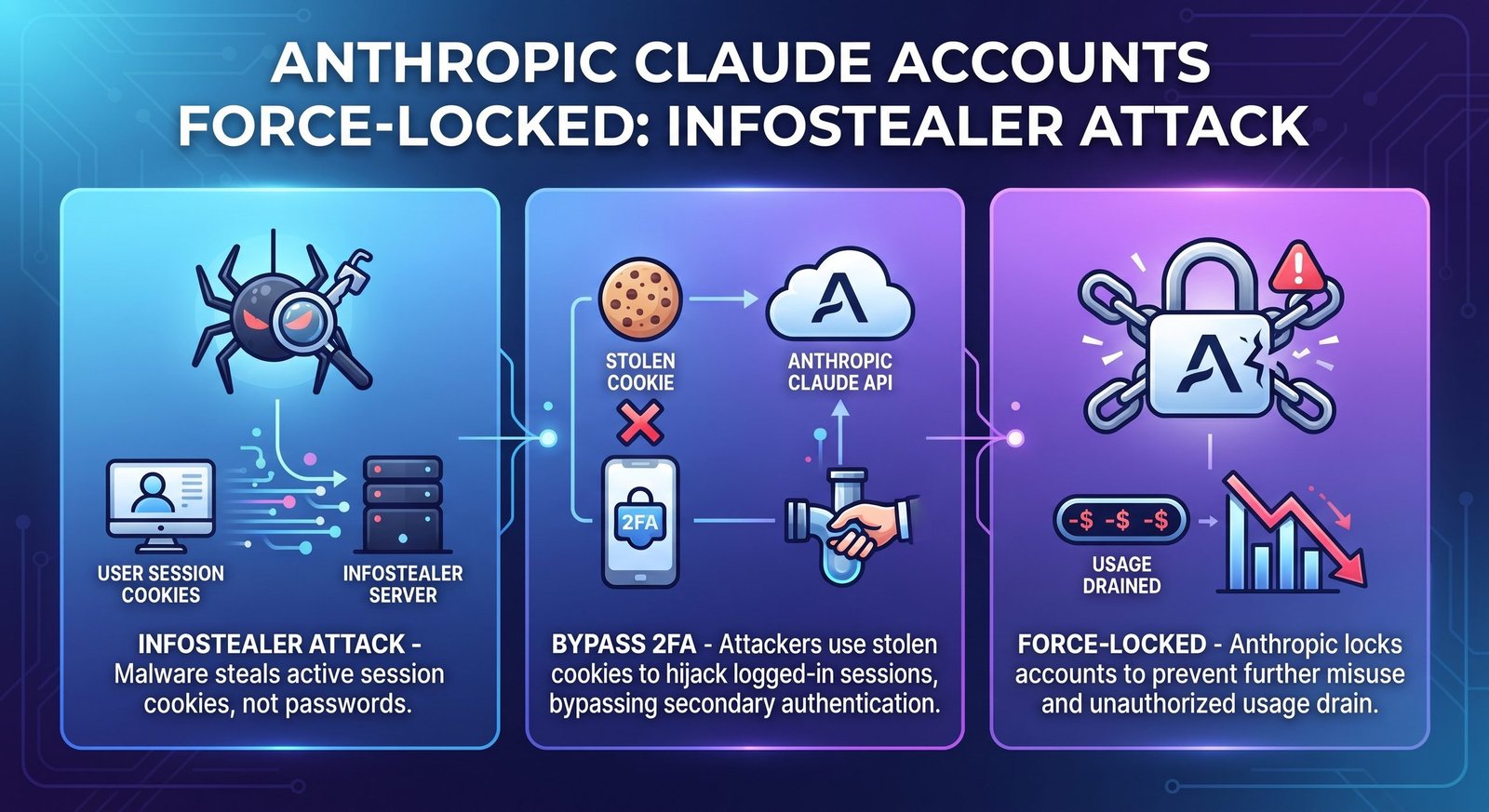
A new Claude infostealer attack has raised serious questions about the security of AI accounts.
Anthropic has warned affected Claude users about infostealer malware that can steal authenticated browser sessions. In reported cases, attackers used stolen sessions to access Claude accounts and consume users’ available usage.
The situation is especially concerning because a stolen authenticated session can work differently from a normal password-based login. An attacker may be able to use an already-established session without going through the usual login process again.
That means even users who take account security seriously shouldn’t assume that a strong password or two-factor authentication alone protects every session.
Anthropic responded by taking action against affected accounts and sessions. The company also warned users that removing access from Claude isn’t enough if the underlying computer remains infected.
So, what actually happened?
Was Anthropic hacked?
How did criminals obtain Claude sessions?
Can infostealer malware really get around 2FA?
And what should Claude users do if they think their device is infected?
Here’s everything you need to know.
Related Information
| Related DailyTecho Article | Recommended Anchor Text | Best Placement |
|---|---|---|
| AI-Driven Cyber Threats | AI-driven cyber threats | Introduction / AI security section |
| OpenAI AI Agent Warning | AI agent security risks | AI security / emerging threats section |
| Data Loss Prevention (DLP) | data loss prevention (DLP) | Data protection section |
| Data Classification Methods | data classification methods | Sensitive data / information protection section |
| Cloud Security Explained | cloud security | AI platform / business security section |
| Endpoint Security Explained | endpoint security | Infected device / malware protection section |
| What Is Ransomware? | ransomware attacks | Malware comparison section |
| Intrusion Detection and Prevention System | intrusion detection and prevention | Network defense / threat detection section |
What Happened to Anthropic Claude Accounts?
The issue involves Claude accounts whose authenticated browser sessions were reportedly stolen by information-stealing malware.
Instead of stealing only usernames and passwords, this type of malware can target information already stored or available inside a victim’s browser.
That can include credentials, cookies, session information, and other sensitive data.
Once an attacker obtains a valid authentication session, they may be able to interact with an online service as though the user is already logged in.
This is why session hijacking can be so dangerous.
The attacker doesn’t necessarily need to know the victim’s password.
They may simply abuse the stolen session.
Anthropic responded by signing affected users out and revoking compromised sessions. The company also took additional steps related to saved payment methods and unauthorized charges.
For users, however, there is another problem.
If the computer is still infected, logging back into Claude can potentially create another compromised session.
That’s why the device itself matters.
Why Is Anthropic Force-Locking Affected Claude Accounts?
The reported response is designed to stop attackers from continuing to use compromised sessions.
When an attacker has access to an active session, simply changing the password may not always solve the immediate problem. The existing session may need to be revoked separately.
That’s where session revocation becomes important.
Anthropic’s response included signing affected users out and invalidating compromised access. Reports also say the company removed saved payment methods from affected accounts and addressed unauthorized charges.
This doesn’t necessarily mean that every Claude account was compromised.
The response applies to accounts and sessions that Anthropic identified as affected.
So the headline shouldn’t be interpreted as every Claude user being locked out because Anthropic itself suffered a universal breach.
The situation is more specific.
Infected devices → stolen session information → unauthorized Claude access → Anthropic response.
That chain is the key to understanding the incident.
How Did the Claude Infostealer Attack Work?
The easiest way to understand the attack is to imagine your browser as a wallet.
Your password is one form of identification.
But after you successfully log in, the website may give your browser a temporary proof that says:
“This user has already authenticated.”
That proof can remain active for a period of time.
Infostealer malware attempts to steal valuable information from the infected device.
When it targets browser data, attackers may obtain information that can help them access online accounts.
The basic attack chain can look like this:
Malicious software → infected computer → browser data stolen → authenticated session obtained → attacker accesses account → unauthorized usage
The attacker doesn’t necessarily need to sit in front of the victim’s computer.
The stolen information can be sent to criminal infrastructure and used remotely.
That’s what makes credential theft and session theft particularly dangerous.
What Is Infostealer Malware and Why Is It Dangerous?
An infostealer is malware designed to collect valuable information from an infected device.
It may target information stored by browsers and other applications.
Depending on the malware family and the infected system, stolen information can include:
Login credentials
Browser cookies
Authentication information
Saved passwords
Session data
Cryptocurrency wallet information
Other sensitive information
Not every infostealer steals exactly the same data.
Different malware families have different capabilities.
But the basic goal is similar:
Steal useful information and send it to the attacker.
This makes infostealers different from malware that simply tries to damage files or disrupt a computer.
Their business model is often theft.
And today, online accounts are valuable targets.
That includes email accounts, social media accounts, financial services, developer platforms, cloud services, and increasingly AI accounts.
How Did Hackers Steal Claude Login Sessions?
A common misconception is that attackers must always steal the user’s password.
That’s not necessarily true.
Modern web applications use authentication mechanisms that can keep users signed in between visits.
The browser stores information that helps maintain the authenticated state.
If malware steals that information, an attacker may be able to abuse the session.
This is why stolen browser sessions are such a serious cybersecurity issue.
Think of it like this.
You have a hotel key card.
You used your ID at reception to prove who you are.
The hotel gave you the key.
Now imagine someone steals the working key card.
That person may not know your ID details or your PIN.
They may simply use the key.
A stolen web session can create a similar problem.
The exact technical behavior depends on the service and authentication system, but the security lesson is straightforward:
Protecting your password isn’t enough if the device itself is compromised.
Can a Stolen Claude Session Bypass Passwords and 2FA?
This is one of the biggest questions surrounding the incident.
The short answer is:
A stolen authenticated session can potentially allow access without repeating the normal password and 2FA process.
That’s because the attacker may be abusing an already-authenticated session rather than starting a completely new login.
This doesn’t mean 2FA is useless.
Far from it.
Two-factor authentication remains one of the most important protections for online accounts.
The problem is that security controls work at different stages.
2FA can help prove that you’re the legitimate person when establishing authentication.
But if malware steals an already-authenticated session from a compromised device, the attacker may be trying to reuse that existing authentication state.
That’s why device security matters just as much as account security.
Which Infostealer Malware Was Used in the Claude Attack?
Reports about the incident identify several infostealer malware families associated with affected systems.
The reported names include:
- Vidar
- LummaC2
- StealC
- RedLine
- Acreed
- Atomic Stealer (AMOS)
Anthropic’s warning reportedly referenced several Windows malware families and Atomic Stealer in some macOS cases.
These aren’t necessarily pieces of malware created specifically for Claude.
That’s an important distinction.
They are general-purpose information stealers that can target valuable data on infected computers.
Claude became one of the services that could be abused after a user’s session information was stolen.
Were Claude Servers Hacked or Were Users’ Computers Infected?
This distinction matters.
Based on the reporting available around the incident, this should not simply be described as Anthropic’s servers being hacked.
The reported attack path involved malware infection on users’ devices and stolen authenticated sessions.
Anthropic also reportedly said there was no evidence that the malware was related to Claude or installed through Claude itself.
So there are two very different scenarios:
Scenario 1: An attacker breaks into the company’s infrastructure.
Scenario 2: An attacker infects a user’s computer and steals the user’s authenticated session.
The reported Claude incident fits the second scenario much more closely.
That doesn’t make it less serious for affected users.
For the victim, unauthorized account access can still result in financial loss, privacy problems, stolen data, or consumed service resources.
Why Is My Claude Usage Suddenly Disappearing?
This is one of the warning signs users should pay attention to.
If you aren’t using Claude heavily but your available usage is suddenly disappearing, don’t automatically assume you’ve simply reached your normal limit.
Unexpected usage can have several explanations.
Maybe you used more than you remembered.
Maybe another authorized device is active.
Or, in a more serious case, someone else could be using your account.
Reports surrounding the incident described attackers consuming affected users’ Claude usage.
A particularly suspicious pattern would be usage that returns and then disappears unusually quickly without corresponding activity from you.
If that happens, investigate your account and your device.
What Did Anthropic Do to Protect Affected Claude Users?
Anthropic took several steps to limit the impact.
The reported response included revoking compromised sessions and signing affected users out.
The company also reportedly removed saved payment methods from affected accounts and addressed unauthorized charges.
These actions are important because they can reduce the attacker’s ability to continue using an already-compromised session.
However, there is a bigger lesson here.
Account recovery and device cleanup are two different things.
Anthropic can revoke a stolen session.
It cannot magically remove malware from your computer.
That part requires action on the affected device.
Does Signing Out of Claude Remove the Infostealer Malware?
No.
Signing out can invalidate access to the account.
It doesn’t automatically clean your computer.
This is one of the most important points in the entire story.
Imagine someone steals your house key.
You change the lock.
That’s good.
But if the thief is still inside your house, changing the lock doesn’t solve everything.
With malware, the problem is similar.
If the computer remains infected, attackers may continue stealing new information.
That can include another authentication session after you log in again.
So users who suspect an infostealer infection should treat the device as part of the security problem.
How Can You Tell If Your Claude Account Has Been Compromised?
No single symptom proves that your account was stolen.
However, several unusual signs should make you investigate.
Unexpected Claude Usage
If your usage is disappearing unusually quickly without matching your activity, check your account.
Unexpected Charges
Review payment activity for transactions you don’t recognize.
Forced Sign-Out
An unexpected sign-out can have harmless explanations, but it can also be part of a security response.
Suspicious Computer Activity
Unexpected browser behavior, strange applications, security alerts, or other unusual activity can indicate a wider device problem.
Multiple Account Problems
This is especially important.
If several unrelated online accounts suddenly show suspicious activity, don’t assume each service was independently hacked.
Your computer may be the common factor.
What Should Claude Users Do After an Infostealer Attack?
If you think your Claude account or computer may be compromised, don’t panic.
Start with containment.
First, stop using the potentially infected device for sensitive account activity until you’ve investigated it.
Next, use a trusted and clean device where possible to secure important accounts.
Review active sessions and account security settings.
Change credentials where appropriate.
Then focus on the infected computer.
Run reputable security scans and follow the security vendor’s cleanup guidance.
For serious infections, a complete operating-system reinstall may be the safest option, especially when you cannot confidently establish that the malware has been removed.
The exact response depends on the malware, operating system, and information that may have been exposed.
Should You Change Your Claude Password After This Attack?
If you suspect your account or device was compromised, changing your password is a sensible security step.
But don’t make the mistake of thinking that a password change automatically fixes an infected computer.
If malware remains active, it may steal the new password too.
That’s why account security and device security should happen together.
A sensible recovery approach is:
Secure the device → revoke compromised sessions → change important passwords → enable strong authentication → monitor the accounts
For highly sensitive accounts, prioritize email first.
Why?
Because your email account may be used to reset passwords for many other services.
Why Reinstalling or Cleaning the Infected Computer Matters
An infostealer isn’t just an account problem.
It’s an endpoint problem.
If the malware remains on the system, it may continue collecting information.
This could expose additional accounts beyond Claude.
That’s why simply changing one password may not be enough.
For users who strongly suspect a serious infection, professional incident-response guidance or a clean operating-system installation can provide greater confidence.
You should also avoid immediately restoring suspicious applications, browser extensions, or pirated software that may have caused the original infection.
Otherwise, you could recreate the same problem.
How to Protect Your Claude Account From Future Session Hijacking
Good account security starts with the device.
Keep your operating system updated.
Use reputable security software.
Be careful with browser extensions.
Don’t install unknown applications simply because a website tells you to.
Most importantly, be extremely cautious with pirated software, cracked applications, fake updates, and unofficial downloads.
Infostealers are commonly distributed through deceptive software and malicious downloads.
A “free” application can become very expensive when it gives criminals access to your digital life.
Protect Your Browser Too
Your browser can contain valuable information.
Keep it updated.
Remove extensions you don’t recognize.
Review installed extensions periodically.
Avoid installing extensions from questionable sources.
And never enter sensitive credentials into suspicious websites.
Why Pirated Software and Unofficial Downloads Are Dangerous
Cybercriminals understand human behavior.
People like free things.
That’s why malware operators often disguise malicious software as something attractive.
It might look like:
A cracked application
A free premium tool
A fake software update
A game cheat
A productivity application
A browser utility
A security tool
The victim thinks they’re getting software.
The attacker gets an opportunity.
Once the program runs, the malware can begin searching the device for valuable information.
This is why cybersecurity isn’t only about advanced technology.
Sometimes the strongest defense is simply refusing to install suspicious software.
Why Infostealers Are Becoming a Bigger Threat in 2026
Infostealers have become particularly dangerous because our browsers hold so much valuable information.
Your browser may connect you to dozens of online services.
Email.
Social media.
Shopping.
Banking.
Cloud storage.
Developer platforms.
AI services.
Business applications.
A single compromised device can therefore expose multiple digital identities.
The Claude incident highlights this broader problem.
AI accounts are becoming valuable.
People use them for work, programming, research, business planning, writing, data analysis, and other sensitive tasks.
As AI platforms become more deeply integrated into daily workflows, criminals have more reasons to target them.
What This Claude Attack Teaches Us About Passwordless Security
There’s a larger cybersecurity lesson here.
Authentication isn’t only about passwords.
Modern applications rely on sessions, tokens, cookies, devices, identity providers, and other mechanisms.
That creates more sophisticated attack surfaces.
A user can have a strong password and still face risk if their device is compromised.
That’s why modern account security needs several layers.
Strong authentication
Secure devices
Updated software
Safe browsing habits
Session management
Monitoring
Recovery planning
No single security control should be expected to stop every attack
Can Two-Factor Authentication Stop Infostealer Attacks?
2FA can stop many account attacks.
It can make stolen passwords much less useful.
But it isn’t designed to solve every endpoint compromise.
If malware steals an already-authenticated session, the attacker may attempt to reuse that session rather than perform a fresh login.
That’s why you should think about security in layers.
2FA protects authentication.
Endpoint security protects the device.
Session controls help limit existing access.
Monitoring helps identify suspicious activity.
Together, these controls create a much stronger defense.
Are AI Accounts Becoming a New Target for Cybercriminals?
The answer is increasingly clear: AI accounts are valuable digital assets.
An AI account can contain conversations, business information, coding work, research, documents, prompts, and other sensitive material.
Some accounts may also have paid subscriptions or usage limits.
That creates multiple incentives for attackers.
The Claude incident shows why users shouldn’t think of AI accounts as “just another website login.”
If you use an AI platform for important work, treat it like any other valuable business or personal account.
Secure the account.
Secure the device.
Monitor unusual activity.
And don’t ignore suspicious behavior.
What This Means for Claude, ChatGPT and Other AI Users
The Claude incident is a useful warning for anyone using online AI platforms.
The lesson isn’t that one particular AI service is uniquely unsafe.
The lesson is that authenticated sessions are valuable.
Any service that maintains logged-in browser sessions can potentially become relevant in a session-theft scenario.
That means AI users should apply the same cybersecurity discipline they would use for email, cloud storage, financial services, and other important accounts.
Your AI account may contain more sensitive information than you realize.
Anthropic Claude Infostealer Attack: Key Facts at a Glance
| Fact | Details |
|---|---|
| Affected Service | Claude |
| Attack Type | Infostealer malware and stolen authenticated sessions |
| Main Risk | Session hijacking and unauthorized account access |
| Target | Affected Claude users |
| Malware Families Reported | Vidar, LummaC2, StealC, RedLine, Acreed, and Atomic Stealer |
| Key Security Issue | Stolen authenticated browser sessions |
| 2FA Concern | A stolen active session can potentially avoid a fresh login challenge |
| Anthropic Response | Affected users signed out and compromised sessions revoked |
| Payment Protection | Saved payment methods reportedly removed from affected accounts |
| User Action | Secure the account and investigate the potentially infected device |
| Bigger Lesson | Account security and endpoint security must work together |
The malware-family names and response details above are based on current reporting about Anthropic’s warning.
Frequently Asked Questions About the Claude Infostealer Attack
What happened to Claude accounts?
Affected Claude accounts were reportedly accessed through stolen authenticated sessions obtained from devices infected with infostealer malware.
Why did Anthropic sign users out of Claude?
Signing affected users out and revoking compromised sessions helps prevent attackers from continuing to use stolen authentication sessions.
What is the Claude infostealer attack?
It refers to the reported abuse of Claude sessions stolen from devices infected with information-stealing malware.
Can infostealer malware bypass 2FA?
A stolen authenticated session can potentially allow an attacker to use an existing authenticated state without repeating the normal password and 2FA login process.
Was Anthropic itself hacked?
The available reporting does not support simply describing this as an Anthropic server breach. The reported attack involved infected user devices and stolen Claude sessions.
How do I know if my Claude account was compromised?
Watch for unexplained usage, unexpected charges, suspicious account activity, unexpected sign-outs, or signs that your computer may be infected.
Why is my Claude usage disappearing?
Unauthorized users may consume account resources if an authenticated session has been compromised. However, unusual usage can have other causes, so investigate your account and device before assuming an attack.
Does changing my Claude password remove malware?
No. A password change protects the account credential, but it doesn’t remove malware from an infected computer.
Should I reinstall Windows after an infostealer infection?
For a serious suspected infection, a clean operating-system installation can provide stronger assurance that persistent malware has been removed. The appropriate response depends on the infection and the sensitivity of the affected system.
Final Thoughts: What Claude Users Should Learn From the Attack
The biggest lesson from the Anthropic Claude infostealer attack isn’t simply “change your password.”
It’s much bigger.
Your account security depends partly on the security of the device you use to access that account.
A strong password matters.
2FA matters.
Security updates matter.
But if malware gets onto your computer and steals an authenticated browser session, attackers may find another path into your online accounts.
That’s why you should treat unexpected AI usage, suspicious charges, strange browser behavior, and unexplained account activity seriously.
If your device may be infected, secure the device before returning to normal account activity.
And don’t assume that signing out of Claude alone solves the entire problem.
The modern internet is built around connected accounts and persistent sessions. As AI platforms become more important for work and personal tasks, protecting those sessions will become an increasingly important part of cybersecurity.
For Claude users, this incident is a warning.
For everyone else, it’s a reminder.
Your password protects your account. Your device protects the session. You need to protect both.
🔒 Stay Ahead of AI Security Threats
Cybersecurity threats are changing quickly, especially as attackers target the accounts and tools people use every day.
Follow DailyTecho for more updates, practical cybersecurity explainers, AI security news, malware warnings, and important technology developments.
Meta Description:
Anthropic Claude accounts force-locked were hit by an infostealer attack. Learn how stolen sessions bypass 2FA, drain usage, and what Claude users should do now.
Trusted Sources
| Trusted Source | What It Supports |
|---|---|
| Anthropic — Official Website | Supports official Anthropic information, Claude-related updates, and the company’s security and safety context. |
| BleepingComputer — Anthropic Warns Infostealer Malware Is Hijacking Claude Sessions | Supports the Claude infostealer attack, stolen active sessions, unexpected Claude usage, malware families, and Anthropic’s response. |
| SecurityWeek — Anthropic Warns Claude Users of Infostealer Malware Infections | Supports details about infostealer malware, affected Claude users, stolen sessions, payment protection, and Anthropic’s security response. |
| MITRE ATT&CK — Credentials from Web Browsers | Supports the technical explanation of browser credential theft and how malware can target information stored by web browsers. |
| MITRE ATT&CK — Steal Web Session Cookie | Supports stolen browser sessions, session cookies, and the security risks associated with web-session theft. |
| CISA — Cybersecurity | Supports practical cybersecurity guidance, malware awareness, account protection, and defensive security practices. |
| OWASP — Authentication Cheat Sheet | Supports authentication security, MFA, session management, password protection, and account security concepts. |
| Microsoft Security — Security Intelligence | Supports broader information about malware, credential theft, infostealers, and modern cyber threats. |
| Google Safety Center — Security | Supports general account-security practices, safe browsing, suspicious activity awareness, and online account protection. |