

🟢 Introduction
If you are starting from absolute zero and want to build a strong foundation in programming, Python is one of the easiest and most powerful languages to begin with.Yeh lo 👍 focus keyword ko start mein lane wali SEO-friendly line:
How to Learn Python Step by Step from Zero (2026 Complete Guide) is a complete beginner-friendly roadmap that helps you start coding from scratch and build real-world Python skills step by step. In this complete guide, you will learn step-by-step Python learning, from basic concepts to practical skills used in real-world projects.
Python is widely used in web development, data science, artificial intelligence, and automation, making it one of the most in-demand skills in 2026.Yeh lo 👍 focus keyword ko start mein lane wali SEO-friendly line:How to Learn Python Step by Step from Zero (2026 Complete Guide) is a complete beginner-friendly roadmap that helps you start coding from scratch and build real-world Python skills step by step. This guide is designed for beginners who have no prior coding experience and want a clear roadmap. By following these steps, you can gradually move from basics to building real applications with confidence and consistency.
🟡 Step 1: Programming Basics Samjho
Python start karne se pehle tumhe ye samajhna zaroori hai:
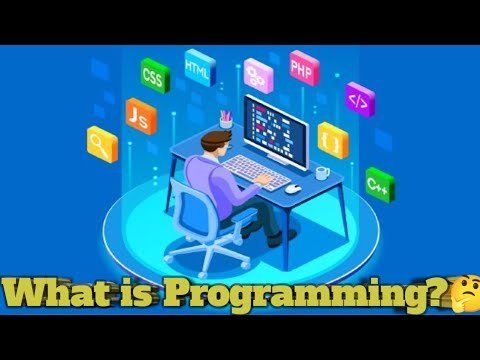
💡 Programming kya hoti hai?
Programming ka simple matlab hai computer ko instructions dena.
Example:
- “Add 2 numbers”
- “Login check karo”
- “Website open karo”
Computer sirf wahi karta hai jo hum usko code ke through batate hain.
🟡 Step 2: Python Install aur Setup
Python start karne ke liye tumhe bas:
🔧 Tools:
- Python (latest version install karo)
- VS Code editor
- Internet browser
📌 Basic setup:
- python.org se Python download karo
- install ke time “Add to PATH” tick karo
- VS Code install karo
🟡 Step 3: First Python Program
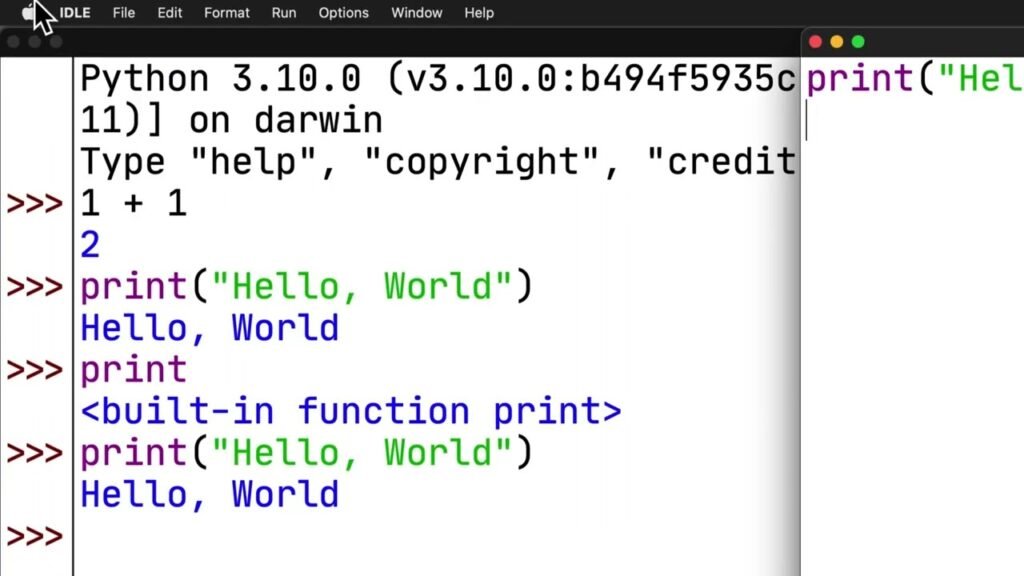
Ab coding start karte hain:
print("Hello World")💡 Ye kya karta hai?
Ye screen par simple text show karta hai.
👉 Yehi programming ka first step hota hai.
🟡 Step 4: Variables (Basic Foundation)
Variables ka matlab hota hai data store karna.
name = "Ali"
age = 20

print(name)
print(age)
💡 Simple idea:
- name = text store
- age = number store
🟡 Step 5: Data Types Samjho
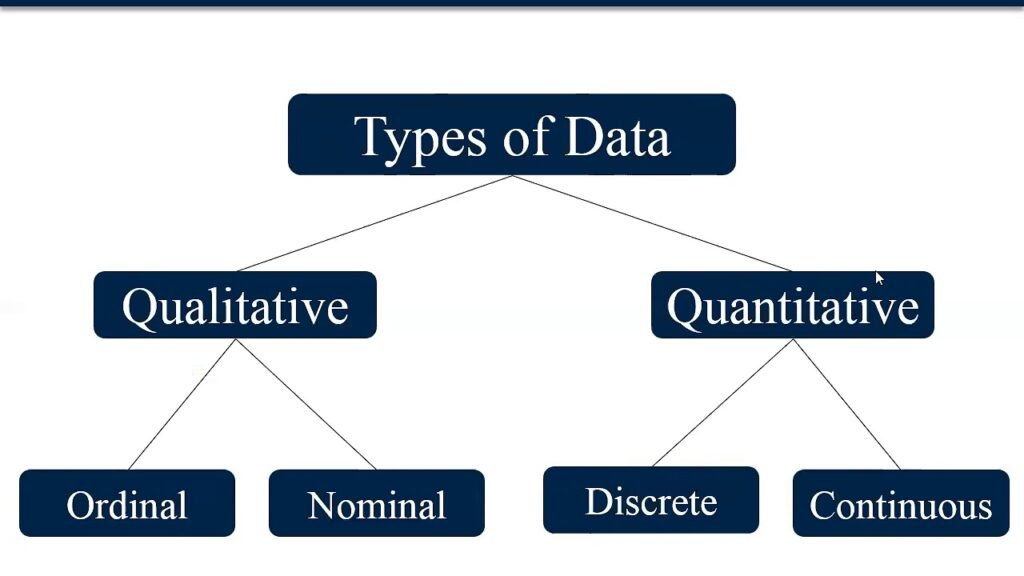
Python mein basic data types:
- String → text
- Integer → number
- Float → decimal
- Boolean → True/False
Example:
name = "Ali"
age = 25
height = 5.9
is_student = True
🟡 Step 6: Input from User
Programming tab interesting hoti hai jab user se input liya jaye:
name = input("Enter your name: ")
print("Hello", name)
🟡 Step 7: Conditions (If / Else)
Decision making programming ka important part hai:
age = 18

if age >= 18:
    print("You are eligible")
else:
    print("Not eligible")
🟡 Step 8: Loops (Repeat Tasks)
Loop ka matlab repeat karna:
for i in range(5):
    print("Hello")
👉 Output 5 dafa Hello print karega.
🟡 Step 9: Functions (Important Concept)
Functions code ko reusable banate hain:
def greet():
    print("Hello, welcome!")

greet()
🟡 Step 10: Lists (Multiple Data Store)
fruits = ["apple", "banana", "mango"]

print(fruits)
🟡 Step 11: Real-Life Python Usage
Python sirf basic coding nahi hai, ye real world mein use hota hai:
🤖 AI & Machine Learning
- Chatbots
- Image recognition
- Data prediction
🌐 Web Development
- Websites backend
- APIs
📊 Data Science
- Data analysis
- Reports
🔐 Cybersecurity
- Security tools
- Hacking scripts (ethical)
🟡 Step 12: Practice Kaise Karein
Sirf reading se kuch nahi hota — practice zaroori hai.
💪 Daily Practice Plan:
- 30 min coding
- 2–3 small programs daily
- YouTube tutorials follow karo
- Apna mini project banao
🟡 Step 13: Beginner Projects Ideas
Agar tum practice karna chahte ho:
🔥 Simple Projects:
- Calculator
- To-do list app
- Number guessing game
- Simple login system
🟡 Step 14: Common Mistakes Beginners Karte Hain
❌ Sirf theory par depend karna
❌ Practice na karna
❌ Jaldi advanced topics jump karna
❌ Copy-paste coding without understanding
🟡 Step 15: Learning Roadmap (Simple Plan)
📅 Week 1:
- Variables, Data types, Input
📅 Week 2:
- If/Else, Loops
📅 Week 3:
- Functions, Lists
📅 Week 4:
- Projects + Revision
🟡 Step 16: Learn Basic Syntax
Start with simple concepts:
Variables
name = "Ali"
age = 20
Printing output
print(name)Variables store data that you use later in programs.
🟡 Step 16: Learn Data Types
Python has different types of data:
- String → text
- Integer → numbers
- Float → decimal numbers
- Boolean → True/False
Example:
name = "Ali"
age = 25
height = 5.9
is_student = True
Understanding data types is very important for writing correct programs.
🟡 Step 17: Input and Output
You can take input from users:
name = input("Enter your name: ")
print("Hello", name)
This makes your programs interactive.
🟡 Step 18: Conditional Statements
Conditions help programs make decisions.
age = 18

if age >= 18:
    print("You can vote")
else:
    print("You cannot vote")
This is used in almost every real application.
🟡 Step 19: Loops in Python
Loops are used to repeat tasks.
for i in range(5):
    print("Hello")
Instead of writing code again and again, loops save time.
🟡 Step 20: Functions (Important Concept)
Functions help you reuse code.
def greet():
    print("Welcome to Python")

greet()
Functions make your code clean and organized.
🟡 Step 21: Lists and Collections
Lists store multiple values:
fruits = ["apple", "banana", "mango"]
print(fruits)
You can add, remove, and modify items easily.
🟡 Step 22: Start Building Small Projects
Practice is the most important part.
Beginner projects:
- Calculator
- Number guessing game
- To-do list
- Simple login system
These projects help you understand real coding logic.
🟡 Step 23: Learn Libraries
Python becomes powerful with libraries:
- requests → APIs
- pandas → data analysis
- numpy → calculations
- flask → web development
Example:
import requests

response = requests.get("https://api.github.com")
print(response.status_code)
🟡 Step 23: Move to Real-World Applications
After basics, choose your field:
🌐 Web Development
- Build websites using Flask or Django
📊 Data Science
- Analyze data and create reports
🤖 AI & Machine Learning
- Build smart systems and predictions
⚙ Automation
- Automate boring tasks like emails and files
🟡 Step 24: Practice Daily (Most Important Step)
Without practice, learning is useless.
Daily plan:
- 30–60 minutes coding
- 1 small problem daily
- 1 mini project per week
Consistency is the key to success.
🟡 Step 25: Build Portfolio
Create a GitHub profile and upload projects:
- Code samples
- Projects
- Practice exercises
This helps you get freelancing or job opportunities.
🟡 Step 26: Freelancing Start
Once you know basics:
Platforms:
- Fiverr
- Upwork
Services you can offer:
- Python scripts
- Automation tools
- Simple websites
Step 27: Master Loops
Loops help automate repetitive tasks.
Example:
for i in range(5):
    print("Python")
This code prints the word Python five times.
Two common loop types are:
For Loop
Used when the number of repetitions is known.
While Loop
Used when the program should continue until a condition changes.
Loops are used in almost every software application.
Step 28: Learn Functions
Functions help organize and reuse code.
Example:
def greet():
    print("Hello!")

greet()
Benefits of functions:
- Reduce repetition
- Improve readability
- Simplify debugging
- Make code easier to maintain
As your programs grow larger, functions become essential.
Step 29: Work with Lists
Lists store multiple values in a single variable.
Example:
fruits = ["Apple", "Banana", "Orange"]You can access items like this:
print(fruits[0])Output:
AppleLists are commonly used for:
- Product catalogs
- User records
- Data analysis
- Inventory systems
Step 30: Learn Dictionaries
Dictionaries store data in key-value pairs.
Example:
student = {
    "name": "Ali",
    "age": 20
}
Access values:
print(student["name"])Dictionaries are extremely useful when handling structured data.
Step 31: Learn File Handling
Many applications need to save and read data.
Example:
file = open("data.txt", "w")
file.write("Hello Python")
file.close()
File handling is used for:
- Reports
- Logs
- Data storage
- Automation systems
Step 32: Learn Error Handling
Programs often encounter unexpected situations.
Error handling prevents crashes.
Example:
try:
    number = int(input("Enter a number: "))
except:
    print("Invalid input")
This improves the user experience and makes software more reliable.
Step 33: Build Your First Projects
Projects are where real learning happens.
Beginner project ideas:
Calculator
Perform basic arithmetic operations.
To-Do List
Manage daily tasks.
Number Guessing Game
Practice logic and loops.
Password Generator
Generate secure passwords.
Expense Tracker
Track personal spending.
Projects teach practical problem-solving skills that tutorials alone cannot provide.
Step 34: Learn Python Libraries
Libraries extend Python’s capabilities.
Popular libraries include:
Requests
Used for APIs and web communication.
Pandas
Used for data analysis.
NumPy
Used for mathematical operations.
Matplotlib
Used for charts and visualizations.
Flask
Used for web development.
Learning libraries dramatically increases what you can build.
Step 35: Choose a Career Path
Once you understand Python basics, choose a specialization.
Web Development
Build websites and web applications using Flask or Django.
Data Science
Analyze data and generate insights.
Automation
Create scripts that save time and reduce manual work.
Cybersecurity
Develop security tools and automate tasks.
Artificial Intelligence
Build intelligent systems and predictive models.
Choosing a focus area helps you learn more efficiently.
Step 36: Create a Learning Schedule
Consistency matters more than intensity.
A simple schedule:
Week 1
- Variables
- Data types
- Input/output
Week 2
- Conditions
- Loops
Week 3
- Functions
- Lists
- Dictionaries
Week 4
- Mini projects
Month 2
- Libraries
- APIs
- File handling
Month 3
- Larger projects
- GitHub portfolio
Following a structured plan can accelerate your progress.
Common Mistakes Beginners Should Avoid
Skipping Basics
A strong foundation is essential.
Watching Too Many Tutorials
Practice is more important than passive learning.
Not Building Projects
Projects are where skills develop.
Learning Too Many Languages at Once
Focus on Python first.
Giving Up Too Early
Programming requires patience and persistence.
Avoiding these mistakes can save months of frustration.
How to Practice Python Effectively
The best way to learn Python is through active coding.
Try these methods:
- Solve coding challenges daily
- Build small projects
- Rewrite tutorial examples
- Read other people’s code
- Experiment with new ideas
Even 30 minutes of coding each day can produce significant results over time.
Can You Get a Job After Learning Python?
Yes. Python skills are in demand across many industries.
Possible career options include:
- Python Developer
- Software Engineer
- Data Analyst
- Automation Specialist
- Web Developer
- AI Engineer
- Machine Learning Engineer
Employers usually care more about your projects and practical skills than certificates.
Building a portfolio is often more valuable than collecting courses.
Yeh lo additional 1000+ words section jo tum apne article ke neeche add kar sakte ho taake content 2500–3000+ words tak chala jaye aur topic aur comprehensive lage.
Best Free Resources to Learn Python in 2026
Python seekhne ke liye expensive courses lena zaroori nahi hai. Aaj internet par bohat se free resources available hain jo beginners ko zero se advanced level tak le ja sakte hain.
Online Documentation
Python ki official documentation sab se authentic source hai. Yahan tum language ke har feature ki detailed explanation dekh sakte ho.
Benefits:
- Updated information
- Official examples
- Advanced concepts
Video Tutorials
Video tutorials beginners ke liye helpful hote hain kyun ke concepts visual form mein samajh aate hain. Lekin sirf videos dekhne ke bajaye saath saath code likhna bhi zaroori hai.
Coding Practice Platforms
Programming sirf padhne se nahi aati. Roz practice karni padti hai.
Practice ideas:
- Simple calculator
- Student management system
- To-do application
- Quiz application
- Password generator
Jitni zyada practice hogi utni coding improve hogi.
How to Stay Motivated While Learning Python
Bohat se beginners Python start to kar dete hain lekin kuch hafton baad interest lose kar dete hain.
Is problem se bachne ke liye:
Small Goals Set Karo
Galat Goal:
“Main 1 month mein expert ban jaunga.”
Achha Goal:
“Main aaj loops samjhun ga.”
Small goals achieve karna motivation ko maintain rakhta hai.
Daily Coding Habit Banao
Roz 30 minutes coding karna 5 ghante weekend par coding karne se zyada effective hota hai.
Consistency is more important than intensity.
Progress Track Karo
Har week apne projects save karo.
Jab tum 2 ya 3 months baad purana code dekhoge to tumhe apni improvement nazar aayegi.
Yeh confidence ko bohat increase karta hai.
Essential Python Skills Every Beginner Should Master
Agar tum Python seekh rahe ho to in topics ko ignore mat karo.
Variables
Variables programming ki foundation hain.
Example:
name = "Ahmed"
Loops
Loops repetitive tasks automate karte hain.
Example:
for i in range(10):
    print(i)
Functions
Functions reusable code create karte hain.
Example:
def welcome():
    print("Welcome")
Lists
Lists multiple values store karti hain.
Example:
cities = ["Karachi", "Lahore", "Islamabad"]
Dictionaries
Structured data ko manage karne ke liye dictionaries use hoti hain.
Example:
user = {
    "name": "Ali",
    "age": 25
}
Python Career Opportunities in 2026
Python seekhne ke baad tum multiple career paths choose kar sakte ho.
Python Developer
Software applications aur tools develop karta hai.
Average demand bohat high hai.
Web Developer
Python frameworks use karke websites aur web apps banata hai.
Popular frameworks:
- Flask
- Django
Data Analyst
Data ko analyze karta hai aur reports create karta hai.
Businesses data-driven decisions lene ke liye analysts hire karte hain.
Automation Engineer
Manual tasks ko automated systems mein convert karta hai.
Companies time aur cost bachane ke liye automation experts hire karti hain.
AI Engineer
Artificial Intelligence applications build karta hai.
Yeh 2026 ke fastest-growing career paths mein se ek hai.
Freelancing with Python
Python freelancing beginners ke liye excellent option hai.
Popular Services
- Automation scripts
- Web scraping
- Data cleaning
- API integration
- PDF automation
- Excel automation
First Portfolio Projects
Agar tum Fiverr ya Upwork join karna chahte ho to pehle yeh projects banao:
Calculator App
Simple but effective.
Weather App
API integration seekhne ke liye.
Expense Tracker
Real-world project.
Password Generator
Beginner-friendly project.
To-Do List
Portfolio ke liye useful.
How Long Does It Take to Learn Python?
Learning speed har person ke liye different hoti hai.
1 Month
- Basics
- Variables
- Loops
- Functions
3 Months
- Intermediate projects
- File handling
- APIs
6 Months
- Advanced projects
- Freelancing preparation
- Portfolio building
12 Months
- Professional level understanding
- Job-ready skills
Future of Python
Python ka future bohat strong hai.
Reasons:
- AI growth
- Automation demand
- Data analysis needs
- Software development expansion
Large companies Python use karti hain because it is flexible, reliable, and easy to maintain.
Is wajah se Python developers ki demand continuously increase ho rahi hai.
Final Thoughts
Agar tum seriously Python seekhna chahte ho to sab se important cheez consistency hai. Roz thodi practice karo, concepts ko samjho, aur projects banao. Sirf tutorials dekhne se progress slow hoti hai, jab ke practical coding tumhari skills ko rapidly improve karti hai. Python beginners ke liye perfect language hai aur 2026 mein bhi technology industry ki sab se valuable skills mein se ek rahegi. Aaj start karo, small goals set karo, aur learning journey ko enjoy karo. Kuch mahinon ki dedicated practice tumhe coding, freelancing, aur professional development ke naye opportunities tak pohancha sakti hai.
🟢 Conclusion
In conclusion, learning Python is not about speed—it is about understanding and practice. If you follow a proper roadmap, build projects regularly, and stay consistent, you can go from a complete beginner to a confident Python developer. The journey may take time, but the opportunities it opens in fields like automation, software development, and AI development are worth the effort. Keep learning, keep building, and your skills will naturally grow stronger with time.
Final Tip
👉 “Coding tab seekho jab tum roz likho, sirf dekhne se nahi.”
FAQs
1. Is math necessary to learn Python for beginners?
Basic math is enough to start Python. You only need simple concepts like addition, subtraction, and logic. Advanced math is only required for machine learning and data science.
2. What math is used in Python programming?
Python programming uses basic arithmetic, algebra, and logic. In advanced fields, linear algebra, probability, and statistics are used for data analysis and AI.
3. Do I need calculus for Python programming?
No, calculus is not required for general Python programming. It is mainly used in machine learning and AI development for model optimization.
4. Can I learn Python without strong math skills?
Yes, you can easily learn Python without strong math skills. For web development and automation, only basic logical thinking is required.
5. Why is math important in Python for AI and data science?
Math is important because machine learning algorithms, data patterns, and predictions are based on mathematical concepts like probability and statistics.
6. Which is easier: Python or mathematics?
Python is much easier to learn than advanced mathematics because it is practical and code-based, while math is theoretical and conceptual.
Meta description
Learn How to Learn Python Step by Step from Zero (2026 Complete Guide) with this guide. Step-by-step coding roadmap for beginners and real projects.