

Artificial intelligence is transforming the way we browse the internet, making everyday tasks faster and more efficient. This AI Browser Comparison 2026 guide explores the latest AI-powered browsers, helping you choose the best option for work, study, or personal use. From smart search and content summaries to built-in writing assistants, today’s browsers offer much more than traditional web browsing. In this guide, we compare features, performance, privacy, and usability to help you make an informed decision. Whether you are a student, professional, or content creator, this article covers everything you need to know about AI browsers, smart browsing, AI search tools, browser productivity, and online privacy in 2026.

AI Browser Comparison
Choosing the right AI browser can improve your productivity, save time, and make online tasks much easier. Every browser offers different AI features, privacy tools, and performance levels. Before selecting one, it is important to compare their strengths and understand which browser best matches your daily needs.
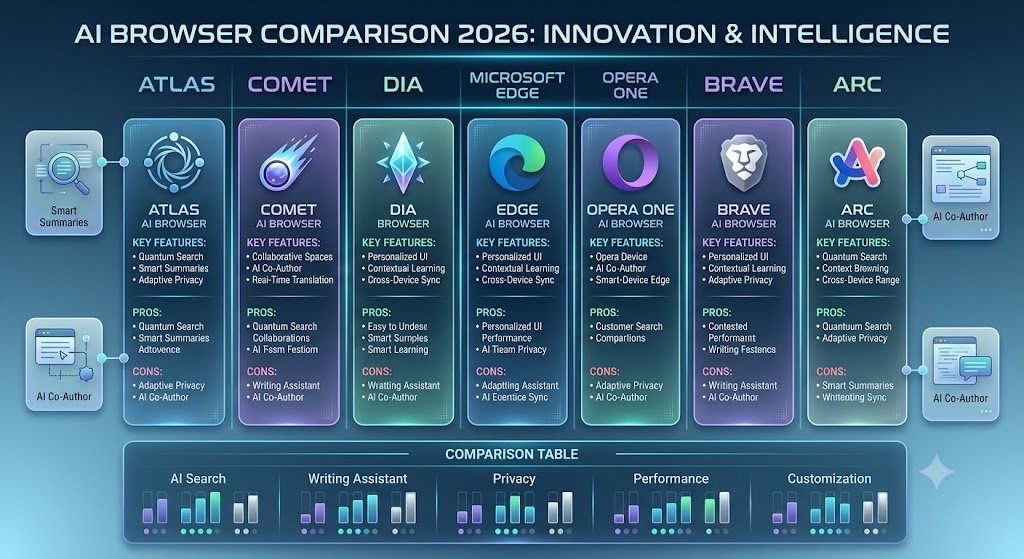
Compare the Best AI Browsers in 2026
The table below compares the most popular AI browsers based on AI features, speed, privacy, productivity tools, and ease of use. This comparison will help you quickly identify the browser that offers the best value for students, professionals, content creators, developers, and everyday users.
What Is an AI Browser?
An AI browser is a web browser that uses artificial intelligence to make browsing smarter and easier. Instead of simply displaying websites, it can understand your requests and help you complete tasks directly. For example, an AI browser can:
● Answer questions without opening multiple websites.
● Summarize long articles in seconds.
● Write emails and documents.
● Compare products from different websites.
● Translate web pages instantly.
● Organize research automatically.
● Help with coding and debugging.
● Save time during everyday browsing.
These features allow users to work more efficiently while reducing the number of tabs they need to open.
Why AI Browsers Are Becoming Popular in 2026
People spend many hours online every day. Searching, reading, comparing information, and completing simple tasks often take longer than expected. AI browsers reduce this effort by understanding what users want and providing direct assistance. Some of the biggest reasons behind their popularity include:
● Faster online research
● Better productivity
● Built-in writing assistance
● Smart search results
● Automatic page summaries
● Improved multitasking
● Time-saving AI tools
● Better organization of information
As AI technology continues to improve, more users are replacing traditional browsers with AI-powered alternatives.
Features to Look for in an AI Browser
Not every AI browser offers the same experience. Before choosing one, you should compare the most important features.
AI Search
A good AI browser should provide intelligent search results instead of only displaying a list of links. It should understand your question and deliver useful answers quickly.
Smart Summaries
Reading long articles takes time. AI summaries help users understand the main points within a few seconds.
Writing Assistant
Many AI browsers include built-in writing tools that help create emails, blog posts, reports, and social media content with better grammar and clarity.
Privacy Protection
A secure browser should protect your browsing activity, block trackers, and give users more control over their personal data.
Speed and Performance
Fast page loading and low memory usage are important, especially for users who keep many tabs open.
Cross-Device Sync
Your bookmarks, passwords, browsing history, and settings should stay synchronized across your computer, phone, and tablet.
How We Ranked These AI Browsers
Every browser in this guide is evaluated using practical factors that matter to everyday users. The comparison is based on:
● AI capabilities
● Search quality
● Productivity features
● User experience
● Privacy and security
● Browser speed
● Ease of use
● Compatibility with different operating systems
● Overall value. Instead of focusing on only one feature, this comparison looks at the complete browsing experience.
1. Atlas AI Browser
Atlas AI Browser is designed for users who want fast research and intelligent browsing. It combines AI-powered search, page summaries, and productivity tools into one clean interface. Instead of switching between different AI websites and browser tabs, users can complete many tasks directly inside the browser.
Key Features
● AI-powered search
● Instant page summaries
● Smart writing assistance
● Research support
● Clean and modern interface
● Fast browsing performance
Pros
● Easy for beginners
● Excellent research capabilities
●Saves time during browsing
● Simple and clean design
Cons
● Some advanced AI features may require a paid plan.
● The browser ecosystem is still growing compared to older browsers.
Best For
Atlas is a strong choice for students, researchers, writers, marketers, and professionals who regularly work with large amounts of online information.
2. Comet AI Browser
Comet AI Browser is built for people who want an AI assistant available while they browse. It helps users search the web, summarize pages, answer questions, and complete daily tasks without opening multiple tools. Its clean design and smart AI features make browsing faster and more productive.
Key Features
● AI-powered search
● Instant web page summaries
● Smart writing assistance
● Fast browsing experience
● Built-in productivity tools
● Simple user interface
Pros
● Easy to use
● Quick search results
● Helpful AI assistant
● Saves time during research
Cons
● Some features may still be under development.
● Advanced AI tools may require a subscription.
Best For
Comet is a great choice for students, bloggers, marketers, researchers, and office workers who spend many hours online.
3. Dia Browser
Dia Browser focuses on making everyday browsing smarter. It uses AI to understand user requests, organize information, and help users complete tasks more efficiently. Instead of only showing search results, Dia tries to provide useful answers and recommendations.
Key Features
● AI-powered browsing
● Smart page summaries
● Writing assistance
● Research support
● Clean and modern design
● Easy navigation
Pros
● Beginner-friendly
● Fast performance
● Helpful AI features
● Simple interface
Cons
● Smaller ecosystem than traditional browsers.
● Some AI features continue to improve over time.
Best For
Dia Browser is suitable for students, writers, professionals, and anyone who wants a simple AI browsing experience.
4. Microsoft Edge with AI
Microsoft Edge has become one of the strongest AI-powered browsers. It combines fast browsing with built-in AI features that help users write, search, summarize, and organize information. The browser also works well with Microsoft’s services, making it useful for business and office work.
Key Features
● AI assistant integration
● Smart search
● Reading tools
● PDF support
● Password manager
● Shopping assistance
Pros
● Stable performance
● Excellent productivity tools
● Strong security
● Regular updates
Cons
● Some AI features work best within the Microsoft ecosystem.
● Extra features may not be needed by every user.
Best For
Business users, students, office workers, and professionals.
5. Opera One AI Browser
Opera One combines traditional browsing with modern AI features. It offers a built-in AI assistant and useful tools to improve everyday browsing. Users can ask questions, generate text, summarize articles, and perform many tasks without leaving the browser.
Key Features
● Built-in AI assistant
● Sidebar tools
● Smart writing
● Ad blocker
● Free VPN
● Fast browsing
Pros
● Rich feature set
● Privacy tools included
● Smooth user experience
● Good multitasking support
Cons
● The interface may feel busy for new users.
● Some users prefer a simpler design.
Best For
Users who want an all-in-one browser with privacy and productivity features.
6. Brave AI Browser
Brave is well known for privacy. In 2026, it continues to improve its AI features while keeping user security a top priority. It blocks ads and trackers by default, helping pages load faster and protecting user data.
Key Features
● AI-powered search
● Built-in privacy protection
● Ad blocker
● Tracker blocking
● Secure browsing
● Fast performance
Pros
● Excellent privacy
● Faster page loading
● Strong security
● Low resource usage
Cons
● Some websites may require adjustments because of aggressive blocking.
● AI features are not as extensive as some competitors.
Best For
Privacy-focused users, businesses, and anyone who values online security.
7. Arc Browser
Arc Browser offers a different browsing experience. It helps users organize tabs, projects, and workspaces more efficiently. Its AI features improve productivity by helping users search, summarize, and manage information quickly.
Key Features
● Smart workspace management
● AI assistance
● Organized tabs
● Modern interface
● Productivity tools
● Fast browsing
Pros
● Unique design
● Excellent organization
● Great for multitasking
● Modern browsing experience
Cons
● It takes time to learn.
● A different layout may not suit every user.
Best For
Designers, developers, writers, researchers, and users managing multiple projects.
AI Browser Comparison Table
| Browser | Best For | AI Features | Privacy | Speed |
| Atlas | Research | Excellent | Good | Fast |
| Comet | Productivity | Excellent | Good | Fast |
| Dia | Everyday Use | Very Good | Good | Fast |
| Microsoft Edge | Office Work | Excellent | Very Good | Fast |
| Opera One | Daily Browsing | Very Good | Very Good | Fast |
| Brave | Privacy | Good | Excellent | Very Fast |
| Arc | Multitasking | Very Good | Good | Fast |
Which AI Browser Should You Choose?
The best AI browser depends on your needs.
● Choose Atlas if you do a lot of online research.
● Choose Comet if you want an AI assistant for everyday work.
● Choose Dia if you prefer a simple and beginner-friendly experience.
● Choose Microsoft Edge for office work and productivity.
● Choose Opera One if you want built-in tools like AI, VPN, and an ad blocker.
● Choose Brave if privacy and security are your highest priorities.
● Choose Arc if you work on multiple projects and need better organization.
There is no single browser that is perfect for everyone. The right choice depends on how you browse the web and which features matter most to you.
The Future of AI Browsers
AI browsers are improving quickly. In the coming years, they will do much more than search the web. They will become personal assistants that help users complete everyday tasks with less effort. Future AI browsers may help you:
● Book flights and hotels.
● Compare prices across different websites.
● Manage your calendar.
● Reply to emails automatically.
● Create presentations.
● Write reports.
● Organize research projects.
● Complete online forms.
● Shop more intelligently. As AI technology continues to grow, browsers will become more helpful, faster, and more personalized.
How to Choose the Right AI Browser
Choosing the best AI browser depends on your daily needs. Every browser offers different strengths, so it is important to understand what matters most to you.
For Students
Students need a browser that can summarize articles, explain difficult topics, and organize research. A browser with strong AI search and note-taking features can save many hours during study.
For Content Writers
Writers should look for AI writing tools, grammar assistance, page summaries, and research support. These features help create high-quality content more efficiently.
For Business Professionals
Business users often need document support, email assistance, productivity tools, and secure browsing. A browser that integrates well with workplace apps can improve daily workflow.
For Developers
Developers usually prefer browsers that are fast, organized, and compatible with development tools. AI coding assistance can also improve productivity.
For Privacy-Focused Users
If privacy is your top priority, choose a browser that blocks trackers, protects your data, and offers strong security features.
Tips to Get the Best Experience from an AI
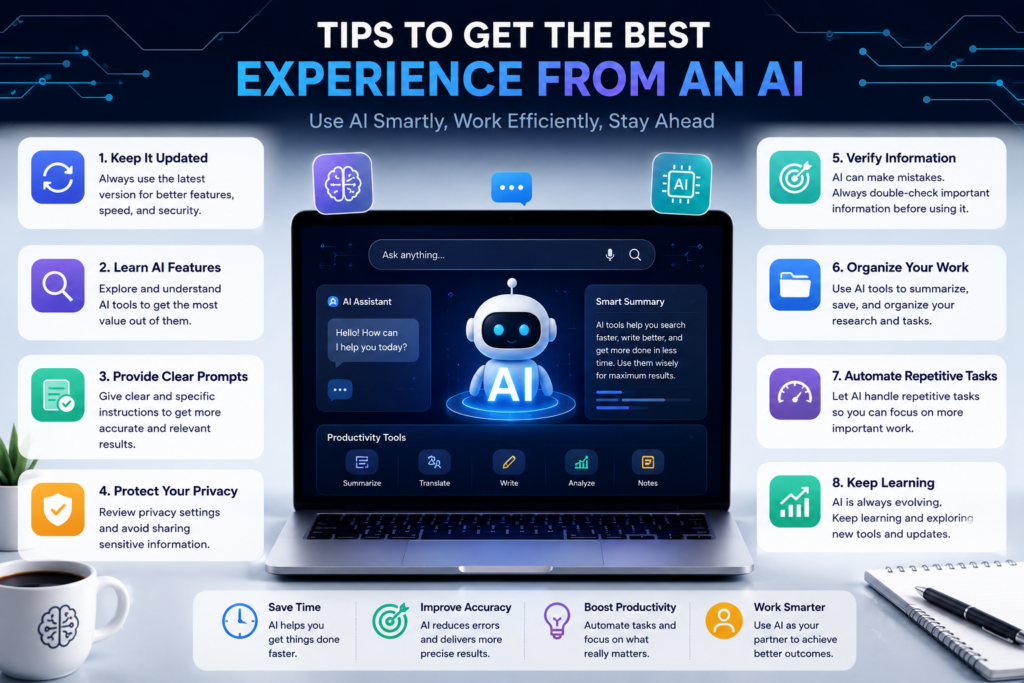
Browser
Installing an AI browser is only the first step. Using its features effectively will help you save more time and improve your productivity. Here are some useful tips:
● Keep your browser updated.
● Learn the built-in AI commands.
● Use AI summaries for long articles.
● Organize your tabs regularly.
● Enable security and privacy settings.
● Sync your browser across all your devices.
● Review AI-generated information before using it in important work.
● Use AI as a helper, not as a replacement for your own thinking.
Common Mistakes to Avoid
Many users do not get the full benefit of AI browsers because they make simple mistakes. Avoid these common problems:
● Depending completely on AI answers without checking facts.
● Ignoring browser security settings.
● Keeping too many tabs open.
● Using outdated browser versions.
● Sharing sensitive personal information with AI tools.
● Not exploring built-in productivity features.
Using your AI browser wisely will help you enjoy a better browsing experience.
FAQs
What is the best AI browser in 2026?
The best AI browser depends on your needs. Atlas, Comet, Dia, Microsoft Edge, Brave, Opera One, and Arc all offer useful AI features for different types of users.
Are AI browsers free?
Many AI browsers offer free versions with basic features. Some advanced AI tools require a paid subscription.
Can AI browsers replace traditional browsers?
Yes. Many AI browsers can replace traditional browsers because they include all the standard browsing features along with powerful AI tools.
Are AI browsers safe?
Most popular AI browsers include strong security features. However, users should always keep their browser updated and avoid sharing sensitive information unnecessarily.
Which AI browser is best for students?
Students usually benefit from AI browsers that provide research assistance, article summaries, and writing support.
Which AI browser is best for content creators?
Content creators should choose a browser with strong AI writing, research, grammar checking, and productivity features.
Do AI browsers protect privacy?
Many AI browsers include privacy tools such as tracker blocking, secure browsing, and data protection. Privacy features vary between browsers.
Final Thoughts
AI browsers are changing the way people use the internet. They help users search faster, understand information more easily, and complete everyday tasks with greater efficiency. Whether you are a student, professional, business owner, or content creator, the right AI browser can improve your productivity and save valuable time. Before making your choice, compare the available features, privacy options, browsing speed, and AI capabilities. Select the browser that matches your daily workflow instead of simply choosing the most popular one. As AI continues to evolve, browsers will become even smarter, making online work faster, easier, and more enjoyable.
Meta Description
Compare the best AI browsers Comparison in 2026, including Atlas, Comet, Dia, Brave, Opera One, Arc, and Microsoft Edge. Discover features, pros, cons, and choose the right AI browser for your needs.
1 Comment